
LInux安装MySQL5.7.24详情
安装包下载
MySQL 的官网下载地址:http://www.mysql.com/downloads/
我安装的是5.7版本
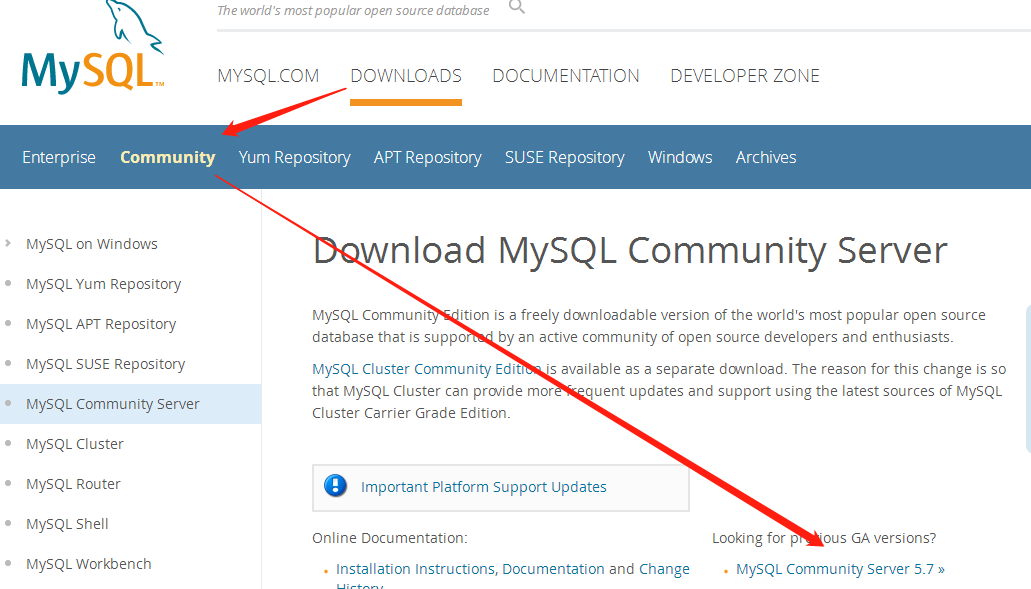
第二步:

选择:TAR
(mysql-5.7.24-el7-x86_64.tar) 点击下载
然后点击 No thanks, just start my download. 进行下载。
检查是否安装过mysql
[root@master mysql]# rpm -qa|grep mysql
mysql-community-common-5.7.10-1.el7.x86_64
mysql-community-libs-5.7.10-1.el7.x86_64
mysql-community-server-5.7.10-1.el7.x86_64
qt-mysql-4.8.5-13.el7.x86_64
mysql-community-client-5.7.10-1.el7.x86_64
下载已经安装
[root@master mysql]# rpm -e --nodeps mysql-community-common-5.7.10-1.el7.x86_64
[root@master mysql]# rpm -e --nodeps mysql-community-common-5.7.10-1.el7.x86_64
[root@master mysql]# rpm -e --nodeps mysql-community-libs-5.7.10-1.el7.x86_64
[root@master mysql]# rpm -e --nodeps mysql-community-server-5.7.10-1.el7.x86_64
[root@master mysql]# rpm -e --nodeps qt-mysql-4.8.5-13.el7.x86_64
[root@master mysql]# rpm -e --nodeps mysql-community-client-5.7.10-1.el7.x86_64
再次查看
[root@master mysql]# rpm -qa|grep mysql
[root@master mysql]#
查看是否按照自带的mariadb数据库
[root@master mysql]# rpm -qa|grep -i mariadb
5.MySQL的server端需要Perl支持,安装一下
[root@master mysql]# yum install perl -y
检查mysql组和用户
是否存在,如无创建:
[root@master mysql]# cat /etc/group | grep mysql
[root@master mysql]# cat /etc/passwd |grep mysql
[root@master mysql]# groupadd mysql
[root@master mysql]# useradd -r -g mysql mysql
放置安装包
从官网下载mysql安装包,解压后移动到/usr/local/mysql下
[root@master mysql]# ls
bin COPYING COPYING-test data docs include lib man mysql-test README README-test share support-files
创建数据目录data
mkdir -p /usr/local/mysql/data
cd /usr/local
chown -R mysql:mysql mysql/
chmod -R 755 mysql/
安装初始化MySQL
[root@master bin]# /usr/local/mysql/mysql/bin/mysqld --initialize --user=mysql --datadir=/usr/local/mysql/data --basedir=/usr/local/mysql

2019-01-03T04:39:31.511114Z 0 [Warning] TIMESTAMP with implicit DEFAULT value is deprecated. Please use --explicit_defaults_for_timestamp server option (see documentation for more details).

2019-01-03T04:39:31.522846Z 0 [ERROR] Can't find error-message file '/usr/local/mysql/share/errmsg.sys'. Check error-message file location and 'lc-messages-dir' configuration directive.

2019-01-03T04:39:31.836656Z 0 [Warning] InnoDB: New log files created, LSN=45790

2019-01-03T04:39:31.878589Z 0 [Warning] InnoDB: Creating foreign key constraint system tables.

2019-01-03T04:39:31.936673Z 0 [Warning] No existing UUID has been found, so we assume that this is the first time that this server has been started. Generating a new UUID: 902eefb4-0f11-11e9-8e04-000c29cb0c40.

2019-01-03T04:39:31.937605Z 0 [Warning] Gtid table is not ready to be used. Table 'mysql.gtid_executed' cannot be opened.

2019-01-03T04:39:31.939061Z 1 [Note] A temporary password is generated for root@localhost: i89mHkP#VI5r
启动MySQL服务
[root@master ~]# /usr/local/mysql/support-files/mysql.server start
Starting MySQL. SUCCESS!
[root@master ~]#
做个软连接重启服务
ln -s /usr/local/mysql/support-files/mysql.server /etc/init.d/mysql
[root@master ~]# service mysql restart
Shutting down MySQL.. SUCCESS!
Starting MySQL. SUCCESS!
[root@master ~]#
做个软链接,将安装目录下的mysql 放在/usr/bin 目录下
[root@master ~]# ln -s /usr/local/mysql/bin/mysql /usr/bin
修改密码,开放远程
[root@master ~]# mysql -u root -p

Enter password:

Server version: 5.7.24

Type 'help;' or '\h' for help. Type '\c' to clear the current input statement.

mysql> alter user 'root'@'localhost' identified by 'mysql';

Query OK, 0 rows affected (0.00 sec)

mysql> use mysql;

Reading table information for completion of table and column names

You can turn off this feature to get a quicker startup with -A

Database changed

mysql> update user set user.Host='%' where user.User='root';

Query OK, 1 row affected (0.00 sec)

Rows matched: 1  Changed: 1  Warnings: 0

mysql> flush privileges;

Query OK, 0 rows affected (0.00 sec)

mysql>
测试远程连接
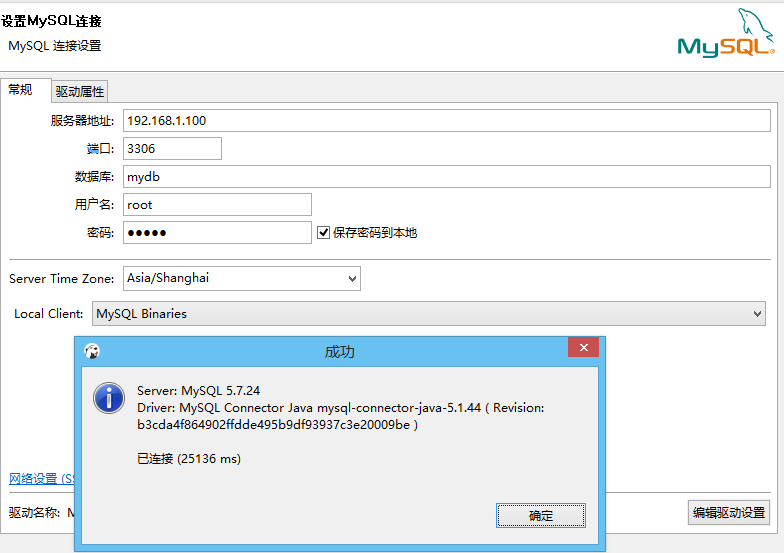
OK 完成。前台可以查询到结果。
LInux安装MySQL5.7.24详情的更多相关文章
- linux安装mysql5.7.24
一.卸载 mysql安装有三种方式,包括二进制包安装(Using Generic Binaries).RPM包安装.源码安装.一般是前两种比较多 卸载方法参考Linux->卸载Mysql方法总结 ...
- [转]阿里云CentOS 7.1使用yum安装MySql5.6.24
阿里云CentOS 7.1使用yum安装MySql5.6.24 作者:vfhky | 时间:2015-06-25 09:43 | 分类:web 在前面两篇文章<2015博客升级记(四):Cent ...
- Windows Server 2012安装mysql5.7.24记录
系统环境: 一.下载mysql5.7.24安装包 地址:https://dev.mysql.com/downloads/mysql/5.7.html#downloads 下载解压到相应的目录,我的路径 ...
- linux安装MySQL5.7记录
目录 linux安装MySQL5.7记录 1. 在根目录下创建文件夹/software和数据库数据文件/data/mysql 2. 从官网下载相应的MySQL版本 3. 解压并移动到/software ...
- linux 安装 mysql-5.6.26
linux安装mysql-5.6.26 查看工具:winscp 下载地址 http://mirrors.sohu.com/mysql/MySQL-5.6/ 文件: mysql-5.6.26-linux ...
- Kali 2019(debian linux)安装MySql5.7.x
Kali 2019(debian linux)安装MySql5.7.x MySQL安装 确认是否安装MySQL 终端输入:mysql 如出现Welcome to the MariaDB monitor ...
- Linux安装MySql5.7及配置(yum安装)
Linux安装MySql5.7及配置(yum安装) [root@xld ~]# rpm -q centos-release centos-release-7-7.1908.0.el7.centos.x ...
- Linux安装mysql5.7版本
1.linux安装mysql5.7顺序 ①mysqladmin –version 查看版本号 ②mysql5.7安装在linux中需要先初始化 Mysqld –initialize –user=mys ...
- Linux下安装mysql-5.7.24
Mysql数据库的安装对于开发者来说,是我们必然会面对的问题,它的安装过程其实并不复杂,并且网络上的安装教程也非常多,但是对于新手来说,各种不同形式的安装教程,又给新手们带来了要选择哪种方式进行安装的 ...
随机推荐
- 编译openwrt时报错build_dir/hostpkg/libubox-2018-07-25-c83a84af/blobmsg_json.c:21:19: fatal error: json.h: No such file or directory
答: 一. 详细日志: build_dir/hostpkg/libubox-2018-07-25-c83a84af/blobmsg_json.c:21:19: fatal error: json.h: ...
- Thread 源码阅读
Thread 属性说明 /** * 程序中的执行线程 * @since 1.0 */ public class Thread implements Runnable { /* Make sure re ...
- java初级之数组详解
一,数组的概念: 数组是为了存储同一种数据多个元素的集合,也可以看成是一个容器,数组既可以存储基本数据类型,也可以存储引用数据类型,数组是为了存储同种数据类型的多个值. 1.1.1,一维数组重点: 数 ...
- C#中的datatable类型作为参数传入SQL的存储空间
SQL中首先建立一个结构一样的自定义类型的表格,在存储空间中申明一个此类型的变量,此处注意此时后面必须有readonly,如: @paravalue_insert MaterialStruct rea ...
- libvirt报错总结
libvirt 的一些报错总结 出现Permission denied error: internal error process exited while connecting to monitor ...
- Kibana 创建索引 POST 403 (forbidden) on create index
一.问题描述: Kibana创建索引:kibana > management > index patterns > create index pattern 索引名称: mercha ...
- HTML <canvas> 学习笔记
Professional JavaScript for Web Developers P552 Basic Usage The <canvas> element requires a ...
- Web测试方法_02
1.页面链接检查 检查每一个链接是否都有对应的页面,页面与页面之间的来回切换是否正常响应,包括一些返回页面的链接是否正常,还要检查点击图片所链接的页面是否准确展示. 2.相关性检查 功能相关性检查:例 ...
- RN 图片处理 resizeMode
Image组件必须在样式中声明图片的宽和高.如果没有声明,则图片将不会被呈现在界面上. 我们一般将Image定义的宽和高乘以当前运行环境的像素密度称为Image的实际宽高. 当Image的实际宽 ...
- 【AMAD】django-model-utils -- Django model使用的mixin和utils
动机 简介 个人评分 动机 为django model系统提供一些可重用的mixin和utils. 简介 django-model-utils1为Django Model提供了下嘛几种分类的utils ...