
(九)shiro之web集成
- Url 匹配方式
? 匹配一个字符 /admin? 可以匹配/admin1 或者/admin2 但是不能匹配/admin12 或者/admin
* 匹配零个或者一个或者多个字符 /admin* 可以匹配 /admin 或者/admin1 或者 /admin12 但是不能匹配/admin/abc
** 匹配零个或者多个路径 /admin/** 可以匹配/admin /admin/a 或者/admin/a/b
pom.xml依赖
<project xmlns="http://maven.apache.org/POM/4.0.0" xmlns:xsi="http://www.w3.org/2001/XMLSchema-instance"

    xsi:schemaLocation="http://maven.apache.org/POM/4.0.0 http://maven.apache.org/maven-v4_0_0.xsd">

    <modelVersion>4.0.0</modelVersion>

    <groupId>com.shyroke</groupId>

    <artifactId>shiro_web</artifactId>

    <packaging>war</packaging>

    <version>0.0.1-SNAPSHOT</version>

    <name>shiro_web Maven Webapp</name>

    <url>http://maven.apache.org</url>

    <dependencies>

        <dependency>

            <groupId>javax.servlet.jsp.jstl</groupId>

            <artifactId>jstl</artifactId>

            <version>1.2</version>

        </dependency>

        <dependency>

            <groupId>javax.servlet.jsp</groupId>

            <artifactId>javax.servlet.jsp-api</artifactId>

            <version>2.3.1</version>

            <scope>provided</scope>

        </dependency>

        <dependency>

            <groupId>org.apache.tomcat</groupId>

            <artifactId>servlet-api</artifactId>

            <version>6.0.53</version>

        </dependency>

        <dependency>

            <groupId>org.apache.shiro</groupId>

            <artifactId>shiro-core</artifactId>

            <version>1.4.0</version>

        </dependency>

        <dependency>

            <groupId>org.apache.shiro</groupId>

            <artifactId>shiro-web</artifactId>

            <version>1.4.0</version>

        </dependency>

        <dependency>

            <groupId>org.slf4j</groupId>

            <artifactId>slf4j-log4j12</artifactId>

            <version>1.7.25</version>

            <scope>test</scope>

        </dependency>

        <dependency>

            <groupId>commons-logging</groupId>

            <artifactId>commons-logging</artifactId>

            <version>1.2</version>

        </dependency>

        <dependency>

            <groupId>log4j</groupId>

            <artifactId>log4j</artifactId>

            <version>1.2.17</version>

        </dependency>

    </dependencies>

    <build>

        <finalName>shiro_web</finalName>

        <plugins>

            <plugin>

                <groupId>org.mortbay.jetty</groupId>

                <artifactId>jetty-maven-plugin</artifactId>

                <version>8.1.15.v20140411</version>

                <configuration>

                    <webAppSourceDirectory>src/main/webapp</webAppSourceDirectory>

                    <scanIntervalSeconds>5</scanIntervalSeconds>

                     <reload>manual</reload>

                    <connectors>

                        <connector implementation="org.eclipse.jetty.server.nio.SelectChannelConnector">

                            <port>3032</port>

                        </connector>

                    </connectors>

                </configuration>

            </plugin>

        </plugins>

    </build>

</project>
- shiro.ini
[main]

authc.loginUrl= /login
roles.unauthorizedUrl= /unauthorized.jsp

perms.unauthorizedUrl= /unauthorized.jsp

[users]

admin=123,role1

user1=456

[roles]

role1=admin:*

#如果加入了shiro-web支持,则需要配置urls,否则报错:Caused by: org.apache.shiro.env.RequiredTypeException: Object named 'filterChainResolver' is not of required type [org.apache.shiro.web.filter.mgt.FilterChainResolver].

[urls]

/index.jsp = authc

/ = authc

/admin.jsp = authc,roles[role1]

/login = anon

/logout = logout
#如果加入了shiro-web支持,则需要配置urls,否则报错:Caused by: org.apache.shiro.env.RequiredTypeException:
Object named 'filterChainResolver' is not of required type [org.apache.shiro.web.filter.mgt.FilterChainResolver].
- web.xml
<?xml version="1.0" encoding="UTF-8"?>

<web-app xmlns:xsi="http://www.w3.org/2001/XMLSchema-instance"

    xmlns="http://java.sun.com/xml/ns/javaee"

    xsi:schemaLocation="http://java.sun.com/xml/ns/javaee http://java.sun.com/xml/ns/javaee/web-app_2_5.xsd"

    id="WebApp_ID" version="2.5">

    <display-name>t</display-name>

    <welcome-file-list>

        <welcome-file>index.html</welcome-file>

        <welcome-file>index.htm</welcome-file>

        <welcome-file>index.jsp</welcome-file>

        <welcome-file>default.html</welcome-file>

        <welcome-file>default.htm</welcome-file>

        <welcome-file>default.jsp</welcome-file>

    </welcome-file-list>

    <listener>

        <listener-class>org.apache.shiro.web.env.EnvironmentLoaderListener</listener-class>

    </listener>

    <context-param>

        <param-name>shiroConfigLocations</param-name>

        <param-value>classpath:shiro.ini</param-value>

    </context-param>

    <filter>

        <filter-name>ShiroFilter</filter-name>

        <filter-class>org.apache.shiro.web.servlet.ShiroFilter</filter-class>

    </filter>

    <filter-mapping>

        <filter-name>ShiroFilter</filter-name>

        <url-pattern>/*</url-pattern>

        <dispatcher>REQUEST</dispatcher>

        <dispatcher>FORWARD</dispatcher>

        <dispatcher>INCLUDE</dispatcher>

        <dispatcher>ERROR</dispatcher>

    </filter-mapping>

    <servlet>

        <servlet-name>loginServlet</servlet-name>

        <servlet-class>com.shyroke.servlet.LoginServlet</servlet-class>

    </servlet>

    <servlet-mapping>

        <servlet-name>loginServlet</servlet-name>

        <url-pattern>/login</url-pattern>

    </servlet-mapping>

</web-app>
- login.jsp
<body>

    <form action="<%=path%>/login" method="post">

        userName:<input type="text" name="username" /><br /> passWord:<input

            type="password" name="password" /><br /> <input type="submit"

            value="登录">

    </form>

</body>
- LoginServlet.java:【url-pattern:/login】
package com.shyroke.servlet;

import java.io.IOException;

import javax.servlet.ServletException;

import javax.servlet.http.HttpServlet;

import javax.servlet.http.HttpServletRequest;

import javax.servlet.http.HttpServletResponse;

import org.apache.shiro.SecurityUtils;

import org.apache.shiro.authc.IncorrectCredentialsException;

import org.apache.shiro.authc.UnknownAccountException;

import org.apache.shiro.authc.UsernamePasswordToken;

import org.apache.shiro.subject.Subject;

public class LoginServlet extends HttpServlet {

    /**

     *

     */

    private static final long serialVersionUID = 1L;

    @Override

    protected void doGet(HttpServletRequest request, HttpServletResponse response)

            throws ServletException, IOException {

        /**

         * 如果用户没有登录就即没有在index.jsp页面登录就会跳转到这个方法

         */

        request.getRequestDispatcher("/login.jsp").forward(request, response);

    }

    @Override

    protected void doPost(HttpServletRequest request, HttpServletResponse response)

            throws ServletException, IOException {

        request.setCharacterEncoding("UTF-8");

        String userName = request.getParameter("username");

        String passWord = request.getParameter("password");

        Subject subject = SecurityUtils.getSubject();

        UsernamePasswordToken token = new UsernamePasswordToken(userName, passWord);

        try {

            subject.login(token);

            System.out.println("登录成功");

            request.getRequestDispatcher("/index.jsp").forward(request, response);

        } catch (UnknownAccountException e) {

            System.out.println("用户名错误");

            response.sendRedirect("/login.jsp");

        } catch (IncorrectCredentialsException e) {

            System.out.println("密码错误");

            response.sendRedirect("/login.jsp");

        }

    }

}
- index.jsp
<body>

        欢迎登陆

</body>
- admin.jsp
<body>

    admin.jsp

</body>
- unauthorized.jsp
<body>

    该用户没有权限访问

</body>
- 目录结构
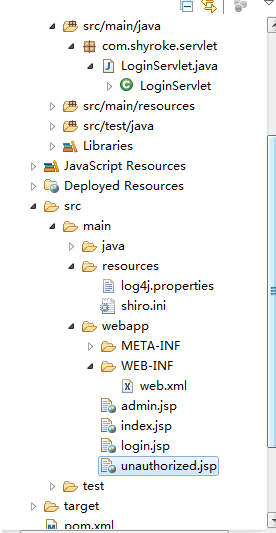
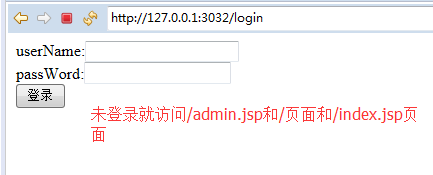
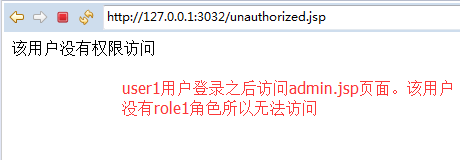
结果:

- 上例是身份和角色认证、权限认证参考第一章的demo
(九)shiro之web集成的更多相关文章
- shiro web 集成
集成方法 shiro与web集成,主要是通过配置一个ShiroFilter拦截所有URL,其中ShiroFilter类似于SpringMVC的前端控制器,是所有请求入口点,负责根据配置(如ini配置文 ...
- Shiro Web集成及拦截器机制(四)
Shiro与 Web 集成 Shiro 提供了与 Web 集成的支持,其通过一个 ShiroFilter 入口来拦截需要安全控制的 URL,然后进行相应的控制,ShiroFilter 类似于如 Str ...
- Shiro学习笔记(5)——web集成
Web集成 shiro配置文件shiroini 界面 webxml最关键 Servlet 測试 基于 Basic 的拦截器身份验证 Web集成 大多数情况.web项目都会集成spring.shiro在 ...
- 【Shiro】Apache Shiro架构之集成web
Shiro系列文章: [Shiro]Apache Shiro架构之身份认证(Authentication) [Shiro]Apache Shiro架构之权限认证(Authorization) [Shi ...
- Apache Shiro:【1】Shiro基础及Web集成
Apache Shiro:[1]Shiro基础及Web集成 Apache Shiro是什么 Apache Shiro是一个强大且易于使用的Java安全框架,提供了认证.授权.加密.会话管理,与spri ...
- 2017.2.12 开涛shiro教程-第七章-与Web集成
2017.2.9 开涛shiro教程-第七章-与Web集成(一) 原博客地址:http://jinnianshilongnian.iteye.com/blog/2018398 根据下载的pdf学习. ...
- 第七章 与Web集成——《跟我学Shiro》
转发地址:https://www.iteye.com/blog/jinnianshilongnian-2024723 目录贴:跟我学Shiro目录贴 Shiro提供了与Web集成的支持,其通过一个Sh ...
- Shiro在Web环境下集成Spring的大致工作流程
1,Shiro提供了对Web环境的支持,其通过一个 ShiroFilter 入口来拦截需要安全控制的URL,然后进行相应的控制. ①配置的 ShiroFilter 实现类为:org.spri ...
- springboot shiro和freemarker集成之权限控制完全参考手册(跳过认证,登录由三方验证,全网首发)
本文主要考虑单点登录场景,登录由其他系统负责,业务子系统只使用shiro进行菜单和功能权限校验,登录信息通过token从redis取得,这样登录验证和授权就相互解耦了. 用户.角色.权限进行集中式管理 ...
随机推荐
- sklearn中的弹性网函数 ElasticNet
语法: ElasticNet(self, alpha=1.0, l1_ratio=0.5, fit_intercept=True, normalize=False, precompute=False ...
- daoliu平台:测试线路图
1.进行需求收集及分析 搜索关键字:导流平台 同类产品体验及熟悉 搞清楚,业务流.数据流.用户焦点 2.初步熟悉原型 初步熟悉.遍历原型, 初步进行测试需求分析 3.聆听及和权威的人进行沟通 测试人员 ...
- angular父组件通过@ViewChild 主动获取子组 件的数据和方法
1.调用子组件给子组件定义一个名称 <app-footer #footerChild></app-footer> 2. 引入 ViewChild import { Compon ...
- flutter showDatePicker显示中文日期_Flutter时间控件显示中文
flutter showDatePicker showTimePicker显示中文日期 1.配置flutter_localizations依赖 找到pubspec.yaml配置flutter_loca ...
- 【419】C语言语句
判断语句 C 语言提供了以下类型的判断语句.点击链接查看每个语句的细节. 语句 描述 if 语句 一个 if 语句 由一个布尔表达式后跟一个或多个语句组成. if...else 语句 一个 if 语句 ...
- 【Leetcode_easy】747. Largest Number At Least Twice of Others
problem 747. Largest Number At Least Twice of Others 题意: solution1: class Solution { public: int dom ...
- java的mock工具:mockito
https://site.mockito.org https://github.com/mockito/mockito https://github.com/hehonghui/mockito-doc ...
- 使用ASP.NET Core支持GraphQL( restful 配套)
https://github.com/graphql-dotnet https://github.com/graphql GraphQL简介 官网:https://graphql.cn/code/ 下 ...
- 【c# 学习笔记】构造函数
构造函数 主要用于创建类的实例对象.当调用构造函数创建一个对象时,构造函数会为对象分配内存空间,并初始化类的成员.构造函数分为实例构造函数和静态构造函数两种. 1.实例构造函数 实例构造函数用于创建和 ...
- SSRAM、SDRAM和Flash简要介绍
问题1:什么是DRAM.SRAM.SDRAM?答:名词解释如下DRAM--------动态随即存取器,需要不断的刷新,才能保存数据,而且是行列地址复用的,许多都有页模式SRAM--------静态的随 ...