
Photon Server 实现注册与登录(二) --- 服务端代码整理
一、有的代码前端和后端都会用到。比如一些请求的Code。使用需要新建项目存放公共代码。
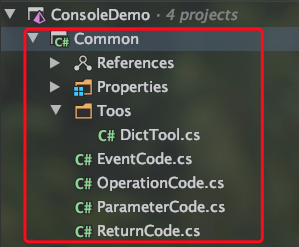
新建项目Common存放公共代码:
EventCode :存放服务端自动发送信息给客户端的code

OperationCode : 区分请求和响应

ReturnCode : 服务端响应码

ParameterCode : 解析参数
Toos/DicTool.cs : 数据基本上都是用Dictionary读取,这里工具话一下。
二、代码
Toos/DicTool.cs
using System.Collections.Generic;

namespace Common.Toos

{

    public class DictTool

    {

        //定义一个静态函数,传入key,就能取出Dict中相应的值

        public static T2 GetValue<T1, T2>(Dictionary<T1, T2> dict, T1 key)

        {

            T2 value;

            bool ok = dict.TryGetValue(key, out value);

            if (ok)

            {

                return value;

            }

            else

            {

                return default(T2);

            }

        }

    }

}
EventCode.cs
namespace Common

{

    //服务端自动向客户端发送事件类型

    public enum EventCode : byte

    {

    }

}
OperationCode.cs
namespace Common

{

    //区分请求和响应的请求

    public enum OperationCode : byte

    {

        Login,

        Register,

        Default

    }

}
ReturnCode.cs
namespace Common

{

    public enum ReturnCode

    {

        Success,

        Failed

    }

}
ParameterCode.cs
namespace Common

 {

     //区分传输数据时的参数类型

     public enum ParameterCode:byte

     {

         UserName,

         Password

     }

 }
三、实现注册和登录,两个请求。服务端接收前端请求主要是在ClientPeer.cs文件的 OnOperationRequest() 函数中。如果今后请求变多,那这一块代码就会越来越多。所以现在整理一下代码,使用模块化区分开每个请求。
使用Handler区分每个请求,让各自的请求处理自己的逻辑。基础Handler定义 OnOperationRequest() 函数,其他Handler都继承这个BaseHandler.
导入公共类Common:
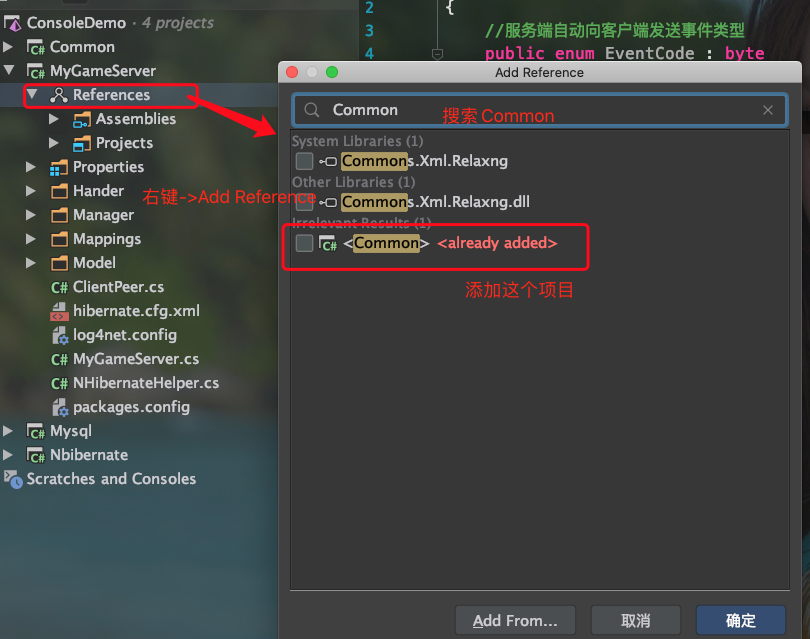
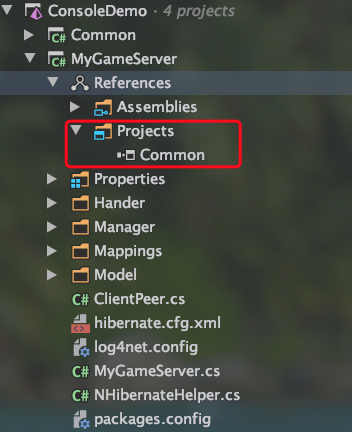
新建目录和文件。BaseHandler 父类,LoginHandler和RegisterHandler分别处理登录和注册,DefaultHandler处理默认请求。
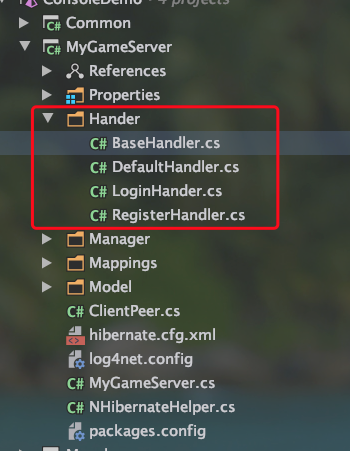
(1)、BaseHandler.cs,其他所有handler类都继承该类。
using Common;

using Photon.SocketServer;

namespace MyGameServer.Hander

{

    public abstract class BaseHandler

    {
     //区分请求接口

        public OperationCode OpCode;

        public abstract void OnOperationRequest(OperationRequest operationRequest, SendParameters sendParameters, ClientPeer peer);

    }

}
(2)、DefaultHandler.cs
using Common;

using Photon.SocketServer;

namespace MyGameServer.Hander

{

    public class DefaultHandler:BaseHandler

    {

        public DefaultHandler()

        {

            OpCode = OperationCode.Default;

        }

        public override void OnOperationRequest(OperationRequest operationRequest, SendParameters sendParameters, ClientPeer peer)

        {

        }

    }

}
(3)、LoginHandler.cs
using System;

using Common;

using Common.Toos;

using MyGameServer.Manager;

using Photon.SocketServer;

namespace MyGameServer.Hander

{

    public class LoginHander:BaseHandler

    {

        public LoginHander()

        {

            OpCode = OperationCode.Login;

        }

        public override void OnOperationRequest(OperationRequest operationRequest, SendParameters sendParameters, ClientPeer peer)

        {

        }

    }

}
(4)、RegisterHandler.cs
using Common;

using Common.Toos;

using MyGameServer.Manager;

using MyGameServer.Model;

using Photon.SocketServer;

namespace MyGameServer.Hander

{

    public class RegisterHandler:BaseHandler

    {

        public RegisterHandler()

        {

            OpCode = OperationCode.Register;

        }

        public override void OnOperationRequest(OperationRequest operationRequest, SendParameters sendParameters, ClientPeer peer)

        {

        }

    }

}
四、注册Handler。添加Handler后,我们需要使用方便,得在主函数中进行注册。
修改MyGameSerer.cs文件:
(1)、添加一个变量,用于存放Handler
public Dictionary<OperationCode,BaseHandler> HandlerDict = new Dictionary<OperationCode, BaseHandler>();
(2)、添加MyGameServer管理单例类。
public new static MyGameServer Instance { get; private set; }
(3)、注册Handler,在Setup()函数中添加
 Instance = this;

 InitHandler();
(4)、添加Handler,新建函数 InitHandler()
       private void InitHandler()

        {

            LoginHander loginHander = new LoginHander();

            HandlerDict.Add(loginHander.OpCode,loginHander);

            DefaultHandler defaultHandler = new DefaultHandler();

            HandlerDict.Add(defaultHandler.OpCode,defaultHandler);

            RegisterHandler registerHandler = new RegisterHandler();

            HandlerDict.Add(registerHandler.OpCode,registerHandler);

        }
(5)、完整代码
using System.Collections.Generic;

using System.IO;

using Common;

using ExitGames.Logging;

using ExitGames.Logging.Log4Net;

using log4net;

using log4net.Config;

using MyGameServer.Hander;

using MyGameServer.Manager;

using MyGameServer.Model;

using Photon.SocketServer;

using LogManager = ExitGames.Logging.LogManager;

namespace MyGameServer

{

    //继承 ApplicationBase

    public class MyGameServer : ApplicationBase

    {

        //日志打印

        public static readonly ILogger log = LogManager.GetCurrentClassLogger();

        public new static MyGameServer Instance { get; private set; }

        public Dictionary<OperationCode,BaseHandler> HandlerDict = new Dictionary<OperationCode, BaseHandler>();

        //客户端创建链接

        //使用一个peerbase表示一个客户端连接

        protected override PeerBase CreatePeer(InitRequest initRequest)

        {

            log.Info("Client  Connect----------");

            //创建一个客户端返回给引擎,引擎自动管理

            return new ClientPeer(initRequest);

        }

        //服务器启动时调用

        protected override void Setup()

        {

            LogManager.SetLoggerFactory(Log4NetLoggerFactory.Instance);

            GlobalContext.Properties["Photon:ApplicationLogPath"] = Path.Combine(ApplicationRootPath, "log");

            GlobalContext.Properties["LogFileName"] = "MySer_" + ApplicationName;

            XmlConfigurator.ConfigureAndWatch(new FileInfo(Path.Combine(BinaryPath, "log4net.config")));

            log.Info("MyGameServer start----------");

            Instance = this;

            InitHandler();

        }

        private void InitHandler()

        {

            LoginHander loginHander = new LoginHander();

            HandlerDict.Add(loginHander.OpCode,loginHander);

            DefaultHandler defaultHandler = new DefaultHandler();

            HandlerDict.Add(defaultHandler.OpCode,defaultHandler);

            RegisterHandler registerHandler = new RegisterHandler();

            HandlerDict.Add(registerHandler.OpCode,registerHandler);

        }

        //服务器停止调用

        protected override void TearDown()

        {

            log.Info("MyGameServer down----------");

        }

    }

}
五、修改文件ClientPeer.cs,分发请求到每个Handler中取。根据客户端传来的code判断是哪个请求,找到相应的Handler,然后将上传的参数分发给该Handler进行逻辑处理。
using System.Collections.Generic;

using Common;

using Common.Toos;

using MyGameServer.Hander;

using Photon.SocketServer;

using PhotonHostRuntimeInterfaces;

namespace MyGameServer

{

    public class ClientPeer : Photon.SocketServer.ClientPeer

    {

        //创建客户端

        public ClientPeer(InitRequest initRequest) : base(initRequest)

        {

        }

        protected override void OnOperationRequest(OperationRequest operationRequest, SendParameters sendParameters)

        {

            MyGameServer.log.Info("Client---请求了---" + operationRequest.OperationCode);

            //首先获取客户端传来的code (operationRequest.OperationCode)

            //然后根据code 去 MyGameServer中获取注册的Handler。

            //Handler我们注册到了主函数HandlerDict中。

            //DictTool工具类是我们自己定义的,方便传入key,就能从Dict中取值,这里取出的是code相对应的handler


            BaseHandler handler = DictTool.GetValue<OperationCode, BaseHandler>(MyGameServer.Instance.HandlerDict,

                (OperationCode) operationRequest.OperationCode);

            if (handler != null)

            {

                //找到相应的Handler,直接调用 OnOperationRequest 进行相应逻辑处理

                handler.OnOperationRequest(operationRequest,sendParameters,this);

            }

            else

            {

                //如果没有找到,返回我们自定义的 DefaultHandler.

                BaseHandler defHander = DictTool.GetValue<OperationCode, BaseHandler>(MyGameServer.Instance.HandlerDict,

                    OperationCode.Default);

                defHander.OnOperationRequest(operationRequest,sendParameters,this);

            }

        }

        //处理客户端断开连接

        protected override void OnDisconnect(DisconnectReason reasonCode, string reasonDetail)

        {

            MyGameServer.log.Info("Client------断开了");

        }

    }

}
到此,服务端代码整理完成。下面进行前端处理。
Photon Server 实现注册与登录(二) --- 服务端代码整理的更多相关文章
- Photon Server 实现注册与登录(四) --- 服务端响应登陆和注册
前面已经整理过了服务端代码,MyGameServer.cs 和 ClientPeer.cs 对请求和响应进行了拆分.接下来处理对前端的响应 一.响应登陆请求 之前整理中,响应前端请求主要在类Clien ...
- Photon Server 实现注册与登录(五) --- 服务端、客户端完整代码
客户端代码:https://github.com/fotocj007/PhotonDemo_Client 服务端代码:https://github.com/fotocj007/PhotonDemo_s ...
- Photon Server 实现注册与登录(一) --- Hibernate整合到项目中
本系列实现目的:基于Photon Server实现注册于登录 一.拷贝Nbibernate项目的文件到MyGamerServer项目中. 二.数据库新建表,结构如下 三.修改文件名和配置 (1).将拷 ...
- Photon Server 实现注册与登录(三) --- 前端UI设计和发起请求
一.打开之前的测试项目.先将服务端代码编译一下,在 bin/Debug/目录下会发现有一个Common.dill.我们相应导入到前端使用.直接拖拽到相应地方 UI相应布局属于前端操作,这里就不做介绍了 ...
- [Java聊天室server]实战之五 读写循环(服务端)
前言 学习不论什么一个稍有难度的技术,要对其有充分理性的分析,之后果断做出决定---->也就是人们常说的"多谋善断":本系列尽管涉及的是socket相关的知识,但学习之前,更 ...
- openssl实现双向认证教程(服务端代码+客户端代码+证书生成)
一.背景说明 1.1 面临问题 最近一份产品检测报告建议使用基于pki的认证方式,由于产品已实现https,商量之下认为其意思是使用双向认证以处理中间人形式攻击. <信息安全工程>中接触过 ...
- 使用 git post-receive 钩子部署服务端代码
在 git 中提交服务器源码的时候,如果能够直接更新到测试服务器,并且重启服务使其生效,会节省懒惰的程序员们大量的时间. git 的 Server-side hook (服务端钩子/挂钩)可以用来做件 ...
- 根据wsdl,apache cxf的wsdl2java工具生成客户端、服务端代码
根据wsdl,apache cxf的wsdl2java工具生成客户端.服务端代码 apache cxf的wsdl2java工具的简单使用: 使用步骤如下: 一.下载apache cxf的包,如apac ...
- Socket通信客户端和服务端代码
这两天研究了下Socket通信,简单实现的客户端和服务端代码 先上winfrom图片,客户端和服务端一样 服务端代码: using System; using System.Collections.G ...
随机推荐
- 数据分析之numpy使用
使用numpy生成数字 生成的类型是ndarray类型 t1 = np.array([1,2,3,4,5]) print(t1,type(t1)) # 类型为ndarray t2 = np.array ...
- Nginx 之负载均衡与反向代理
负载均衡服务器策略: 1.轮循 每个请求逐个分发到后端服务器 2.加权轮循 按照分配的权重将请求分发到后端服务器 3.ip hash 轮询的基础上,保持一个客户端多次请求分发到一台后端服务器上 一 ...
- PHP 之快递100接口封装
<?php /** * Created by PhpStorm. * User: Yang * Date: 2019/8/23 * Time: 10:38 */ class Kuaidi_Que ...
- Redis 的几种常见使用方式
常见使用方式 Redis 的几种常见使用方式包括: Redis 单副本 Redis 多副本(主从) Redis Sentinel(哨兵) Redis Cluster Redis 自研 各种使用方式的优 ...
- jenkins创建工程
1.新建一个工程 2.添加工程名,点击创建一个自由分格的软件项目 3.配置源码管理 4.增加工程构建步骤,选中调用顶层maven目标
- sqli-labs通关记录
环境搭建:https://www.cnblogs.com/kagari/p/11910749.html 总体感受:sqli-labs还是只适合入门 在此基础上添加了一个flag数据库,库名flag,表 ...
- Mysql触发器详解以及union的使用
---恢复内容开始--- Mysql触发器定义: 当一个表中有insert update delete事件发生,触发一个事件,执行一段代码.作用: 同步数据创建: create trigger 名称 ...
- 阶段5 3.微服务项目【学成在线】_day04 页面静态化_01-页面静态化需求分析
上半部分就是静态化 业务流程如下: 1.获取模型数据 2.制作模板 3.对页面进行静态化 4.将静态化生成的html页面存放文件系统中 5.将存放在文件系统的html文件发布到服务器
- mfc通过信号量保证线程同步
1.声明一个全局handle,记住在cpp里也声明 extern HANDLE uiHandle; 2.创建信号量 uiHandle = CreateSemaphore(NULL,1,1,NULL); ...
- Dart 语言简述
Dart是一种“结构化的web编程”语言,Dart编程语言在所有现代浏览器和环境中提供高性能.Dart是谷歌开发的计算机编程语言,后来被ECMA认定为标准. Dart重要的概念: 1.所有的东西都是对 ...