
【Python】【基础知识】【内置函数】【input的使用方法】
原英文帮助文档:
input([prompt])
If the prompt argument is present, it is written to standard output without a trailing newline. The function then reads a line from input, converts it to a string (stripping a trailing newline), and returns that. When EOF is read, EOFError is raised. Example:
>>> s = input('--> ')

--> Monty Python's Flying Circus

>>> s

"Monty Python's Flying Circus"
If the readline module was loaded, then input() will use it to provide elaborate line editing and history features.
————————(我是分割线)————————
中文解释:
input([prompt])
如果prompt参数存在,它将被写入标准输出,而不带尾随换行符。然后,该函数从输入中读取一行,将其转换为字符串(去掉尾随的换行符),并返回该行。
当读取到EOF时,将引发EOFError。例子:
>>> s = input('--> ')

--> Monty Python's Flying Circus

>>> s

"Monty Python's Flying Circus"
关于EOFError:
exception EOFError

Raised when the input() function hits an end-of-file condition (EOF) without reading any data. (N.B.: the io.IOBase.read() and io.IOBase.readline() methods return an empty string when they hit EOF.)
当input()函数在不读取任何数据的情况下达到文件结束条件(EOF)时引发。(注意:io.iobase.read()和io.iobase.readline()方法在到达EOF时返回空字符串。)
如果读取到readline模块, input() 将使用它来提供精细的行编辑和历史特征。
示例:
>>> input()

s

's'

>>> a = input("please input str")

please input str99

>>> a

''

>>> a = input("please input str\n")

please input str

100

>>> a

''

>>>
———————(我是分割线)————————

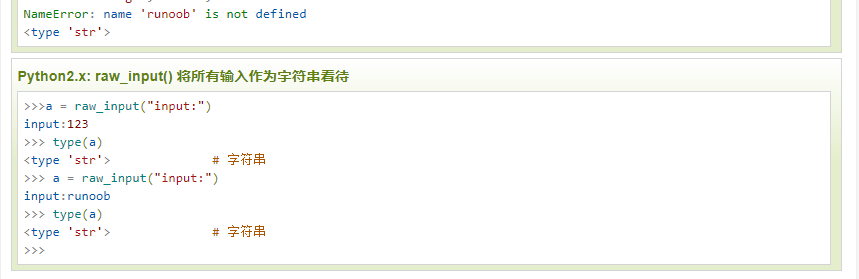
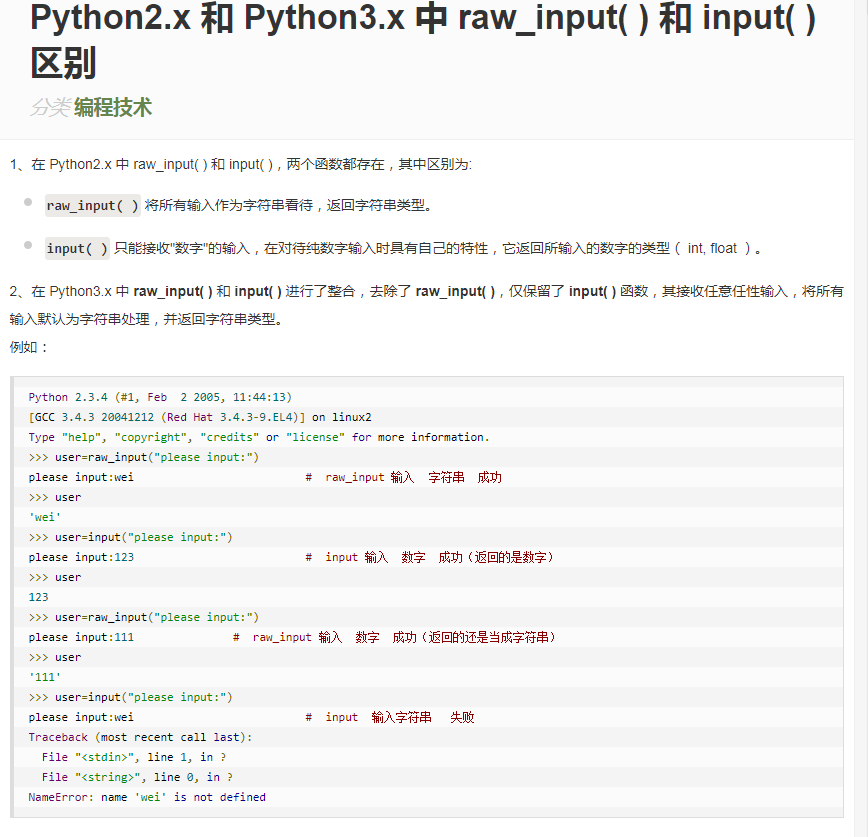
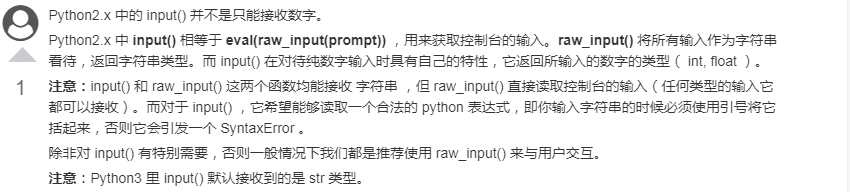
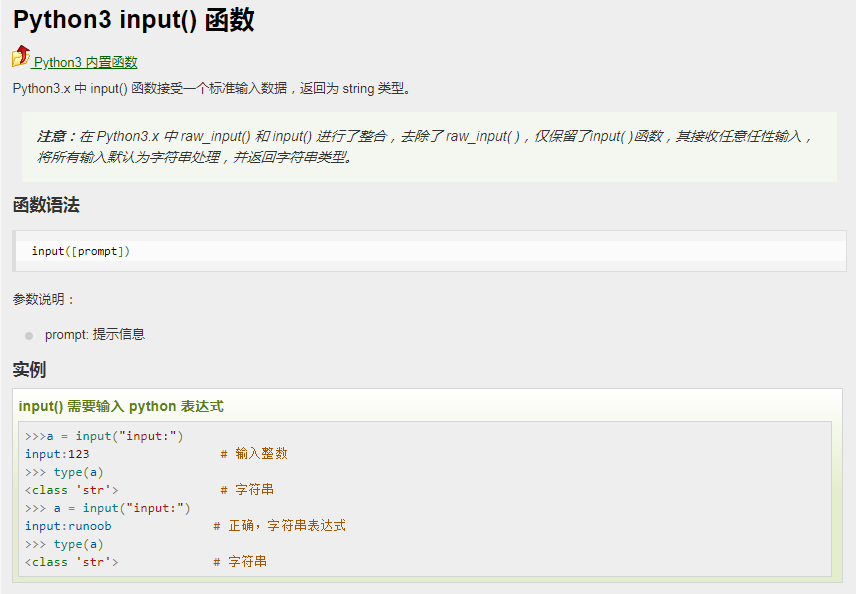
注意:在Python 2.x 和Python 3.x版本中input函数的区别:

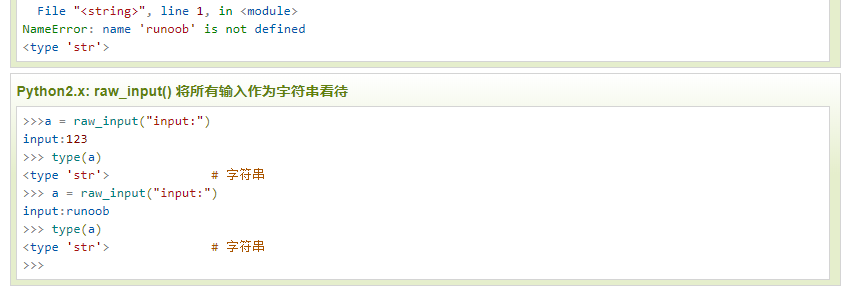
所以在Python 2.x 中常见到的是raw_input() ;

原文地址:https://blog.csdn.net/suibianshen2012/article/details/51378948
————————(我是分割线)————————
参考:
1. Python 3.7.2 documentation
2. RUNOOB.COM:
https://www.runoob.com/python/python-func-input.html
https://www.runoob.com/python3/python3-func-input.html
https://www.runoob.com/w3cnote/python2-python3-raw_input-and-input.html
https://www.runoob.com/python3/python3-func-input.html
3. https://blog.csdn.net/suibianshen2012/article/details/51378948
备注:
初次编辑时间:2019年9月21日22:41:17
第一次修改时间:2019年9月22日17:03 / 添加Python3 的Input函数说明
环境:Windows 7 / Python 3.7.2
【Python】【基础知识】【内置函数】【input的使用方法】的更多相关文章
- 十六. Python基础(16)--内置函数-2
十六. Python基础(16)--内置函数-2 1 ● 内置函数format() Convert a value to a "formatted" representation. ...
- 十五. Python基础(15)--内置函数-1
十五. Python基础(15)--内置函数-1 1 ● eval(), exec(), compile() 执行字符串数据类型的python代码 检测#import os 'import' in c ...
- python基础(15):内置函数(一)
1. 内置函数 什么是内置函数? 就是python给你提供的,拿来直接⽤的函数,比如print,input等等,截⽌到python版本3.6.2 python⼀共提供了68个内置函数.他们就是pyth ...
- python基础(内置函数+文件操作+lambda)
一.内置函数 注:查看详细猛击这里 常用内置函数代码说明: # abs绝对值 # i = abs(-123) # print(i) #返回123,绝对值 # #all,循环参数,如果每个元素为真,那么 ...
- Python基础:内置函数
本文基于Python 3.6.5的标准库文档编写,罗列了英文文档中介绍的所有内建函数,并对其用法进行了简要介绍. 下图来自Python官网:展示了所有的内置函数,共计68个(14*4+12),大家可以 ...
- 第六篇:python基础_6 内置函数与常用模块(一)
本篇内容 内置函数 匿名函数 re模块 time模块 random模块 os模块 sys模块 json与pickle模块 shelve模块 一. 内置函数 1.定义 内置函数又被称为工厂函数. 2.常 ...
- Python基础编程 内置函数
内置函数 内置函数(一定记住并且精通) print()屏幕输出 int():pass str():pass bool():pass set(): pass list() 将一个可迭代对象转换成列表 t ...
- Python基础_内置函数
Built-in Functions abs() delattr() hash() memoryview() set() all() dict() help() min() setat ...
- 学习PYTHON之路, DAY 4 - PYTHON 基础 4 (内置函数)
注:查看详细请看https://docs.python.org/3/library/functions.html#next 一 all(), any() False: 0, Noe, '', [], ...
- python基础(16):内置函数(二)
1. lamda匿名函数 为了解决⼀些简单的需求⽽设计的⼀句话函数 # 计算n的n次⽅ def func(n): return n**n print(func(10)) f = lambda n: n ...
随机推荐
- Python数学常量
常量 描述 pi 数学常量 pi(圆周率,一般以π来表示) e 数学常量 e,e即自然常数(自然常数).
- 51 Nod 1092 回文字符串
1092 回文字符串 基准时间限制:1 秒 空间限制:131072 KB 分值: 10 难度:2级算法题 收藏 关注 回文串是指aba.abba.cccbccc.aaaa这种左右对称的字符串.每 ...
- codeforces402B
Trees in a Row CodeForces - 402B The Queen of England has n trees growing in a row in her garden. At ...
- python3中的heapq模块使用
heapq-堆排序算法 heapq实现了一个适合与Python的列表一起使用的最小堆排序算法. 二叉树 树中每个节点至多有两个子节点 满二叉树 树中除了叶子节点,每个节点都有两个子节点 什么是完全二叉 ...
- Linux 常用命令之df du
1.du 命令:显示每个文件或目录的磁盘使用空间 1) du -h --max-depth [root@ip101 app]# pwd /opt/app [root@ip101 app]# du -h ...
- 快速查找 js 插件
我们是否为一个插件找半天找不到而烦恼 BootCDN 现在不用了,我们可以在 https://www.bootcdn.cn/ 中查找我们想要的任何插件,然后点进去,一直到点进去文件,我们便可以得到 这 ...
- 依赖注入框架之butterknife
主页: https://github.com/JakeWharton/butterknife 用途: 主要用来简化各种初始化控件的操作 配置: 1. 在app/build.gradle文件中depen ...
- VSCODE开发VUE.JS前端插件
VUE前端插件.转载自:https://www.cnblogs.com/karthuslorin/p/8577224.html vscode是微软开发的的一款代码编辑器,就如官网上说的一样,vscod ...
- 在xcode找不到发布证书
解决方法 1.访问XCode的Preferences>Accounts,在Apple IDs里面找到你的帐号,选中后,在右侧,在Name下面会有一行描述.双击.在弹出窗口里面,有个刷新按钮,点击 ...
- promise 实现红绿灯
<!DOCTYPE html> <html lang="en"> <head> <meta charset="UTF-8&quo ...