
实现DIV居中的几种方法
<!DOCTYPE html>

<html>

    <head>

        <meta charset="UTF-8">

        <title>demo</title>

    </head>

    <body>

        <style type="text/css">

            .div1{  width: 100px; height: 100px; border: 1px solid #000000;}

            .div2{ width:40px ; height: 40px; background-color: green;}

        </style>

        <div class="div1">

            <div class="div2">

            </div>

        </div>

    </body>

</html>
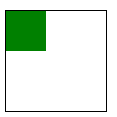
如上的两个div,实现div2在div1里面是居中显示
一、方法一
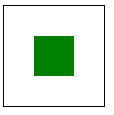
利用margin,div1的宽减去div2的宽就是div2margin-left的数值:(100-40)/2=30
div1的高减去div2的高就是div2margin-top的数值:(100-40)/2=30
<!DOCTYPE html>

<html>

    <head>

        <meta charset="UTF-8">

        <title>demo</title>

    </head>

    <body>

        <style type="text/css">

            .div1{  width: 100px; height: 100px; border: 1px solid #000000;}

            .div2{ width:40px ; height: 40px; background-color: green;}

            .div22{

                margin-left: 30px;margin-top: 30px;

            }

        </style>

        <div class="div1">

            <div class="div2 div22">

            </div>

        </div>

    </body>

</html>
二、方法二
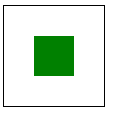
利用css的 position属性,把div2相对于div1的top、left都设置为50%,然后再用margin-top设置为div2的高度的负一半拉回来,用marg-left设置为宽度的负一半拉回来,css如下设置
<!DOCTYPE html>

<html>

    <head>

        <meta charset="UTF-8">

        <title>demo</title>

    </head>

    <body>

        <style type="text/css">

            .div1{  width: 100px; height: 100px; border: 1px solid #000000;}

            .div2{ width:40px ; height: 40px; background-color: green;}

            .div11{

                position: relative;

            }

            .div22{

                position: absolute;top:50%;left: 50%;margin-top: -20px;margin-left: -20px;

            }

        </style>

        <div class="div1 div11">

            <div class="div2 div22">

            </div>

        </div>

    </body>

</html>
三、方法三
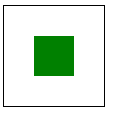
还是用css的position属性,如下的html
<!DOCTYPE html>

<html>

    <head>

        <meta charset="UTF-8">

        <title>demo</title>

    </head>

    <body>

        <style type="text/css">

            .div1{  width: 100px; height: 100px; border: 1px solid #000000;}

            .div2{ width:40px ; height: 40px; background-color: green;}

            .div11{

                position: relative;

            }

            .div22{

                position: absolute;margin:auto; top: 0;left: 0;right: 0;bottom: 0;

            }

        </style>

        <div class="div1 div11">

            <div class="div2 div22">

            </div>

        </div>

    </body>

</html>
四、方法四
利用css3的新增属性table-cell
<!DOCTYPE html>

<html>

    <head>

        <meta charset="UTF-8">

        <title>demo</title>

    </head>

    <body>

        <style type="text/css">

            .div1{  width: 100px; height: 100px; border: 1px solid #000000;}

            .div2{ width:40px ; height: 40px; background-color: green;}

            .div11{

                display: table-cell;vertical-align: middle;

            }

            .div22{

                margin: auto;

            }

        </style>

        <div class="div1 div11">

            <div class="div2 div22">

            </div>

        </div>

    </body>

</html>
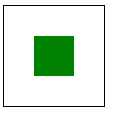
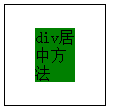
这个方法还有一个好处就是,div2的高度可以不固定,如下
<!DOCTYPE html>

<html>

    <head>

        <meta charset="UTF-8">

        <title>demo</title>

    </head>

    <body>

        <style type="text/css">

            .div1{  width: 100px; height: 100px; border: 1px solid #000000;}

            .div2{ width:40px ; background-color: green;}

            .div11{

                display: table-cell;vertical-align: middle;

            }

            .div22{

                margin: auto;

            }

        </style>

        <div class="div1 div11">

            <div class="div2 div22">

               div居中方法

            </div>

        </div>

    </body>

</html>
实现DIV居中的几种方法的更多相关文章
- div居中的三种方法
方法1: #div1{ width:200px; height:200px; background:green; position:absolute; left:0; top:0; right:0; ...
- DIV居中的几种方法
1. body{ text-align:center; } 缺点:body内所有内容一并居中 2. .center{ position: fixed; left: 50%; } 缺点:需要设置posi ...
- div居中的几种方式
摘自:https://www.cnblogs.com/ones/p/4362531.html DIV居中的几种方法 1. 1 body{ 2 text-align:center; 3 } 缺点:b ...
- CSS教程:div垂直居中的N种方法以及多行文本垂直居中的方法
在说到这个问题的时候,也许有人会问CSS中不是有vertical-align属性来设置垂直居中的吗?即使是某些浏览器不支持我只需做少许的CSS Hack技术就可以啊!所以在这里我还要啰嗦两句,CSS中 ...
- div垂直居中的几种方法
CSS教程:div垂直居中的N种方法[转](原文地址:http://www.cnblogs.com/chuncn/archive/2008/10/09/1307321.html) 在说到这个问题的时候 ...
- CSS教程:div垂直居中的N种方法[转]
在说到这个问题的时候,也许有人会问CSS中不是有vertical-align属性来设置垂直居中的吗?即使是某些浏览器不支持我只需做少许的CSS Hack技术就可以啊!所以在这里我还要啰嗦两句,CSS中 ...
- Qt中的布局浅析与弹簧的使用,以及Qt居中的两种方法
1. 布局 为什么要布局: 布局之后窗口的排列是有序的 布局之后窗口的大小发生变化, 控件的大小也会对应变化 如果不对控件布局, 窗口显示出来之后有些控件的看不到的 布局是可以嵌套使用 常用的布局方式 ...
- 让一个图片在div中居中(四种方法)
第一种方法: <div class="title"> <div class="flag"></div> <div cl ...
- 《Web开发中让盒子居中的几种方法》
一.记录下几种盒子居中的方法: 1.0.margin固定宽高居中: 2.0.负margin居中: 3.0.绝对定位居中: 4.0.table-cell居中: 5.0.flex居中: 6.0.trans ...
随机推荐
- Spark 开发环境搭建
原文见 http://xiguada.org/spark-develop/ 本文基于Spark 0.9.0,由于它基于Scala 2.10,因此必须安装Scala 2.10,否则将无法运行Spar ...
- 【实践】关于p 标签内嵌 p标签的bug
项目中遇到了一点小问题: 是这样的,在输入框包裹元素 p标签中想内嵌一个p 标签用作显示提示字符,谁知发生了一下一幕: 页面结构: <p class="modify-info-wrap ...
- 配置项目启动的时候就加载 servlet
load-on-startup值为0 就是在项目启动的时候自动加载该servlet
- DevExpress 项目目录列表参考(收集的 350个cs project)
DevExpress.ExpressApp.Tools\DBUpdater\DBUpdater.csproj DevExpress.BonusSkins\DevExpress.BonusSkins.c ...
- Android系统常用的权限
开机自动允许 android.permission.RECEIVE_BOOT_COMPLETED,允许程序开机自动运行. 电量统计 android.permission.BATTERY_STATS ...
- Discuz常见小问题2-如何在新建的页面上只显示一部分板块
切换到论坛-版块管理,记住要只显示的板块的gid(比如我的是36) 为某个主导航设置一个单独的php页面(名字自己取) 如果这个页面内容跟首页forum.php完全一样,只是第三行增加了一句话 ...
- Win7文件正在使用无法删除怎么办
Windows 7下删除文件提示被占用?系统内置工具搞定 Windows7之家(www.win7china.com):Windows7下删除文件提示被占用?系统内置工具搞定 在Windows中,删除文 ...
- Java I/O操作汇总
作者:卿笃军 原文地址:http://blog.csdn.net/qingdujun/article/details/41154807 本文简绍解说了FileWriter.FileReader.Buf ...
- .NET 之 有效预防.NET应用程序OOM
大部分的内存溢出(及内存泄漏)都和不好的开发习惯有直接关系,以下几个方式可以有效预防OOM. 一.批量和分页 每个合格的coder对数据的处理,必须要有分页或批量多次的意识.大数据量的读取或查询结果集 ...
- .NET Framwork 之 源代码编译成托管代码托管代码合并成程序集
我们都知道,C#程序需要在 .NET Framework 的环境中运行. 一.程序运行所需的三个关键 1.IL(中间语言):编译器编译源代码时生成的代码. 2. Framework类库(Framewo ...