
jquery计算器(改良版)
代码:
 <!Doctype html>

 <html>

 <meta charset="UTF-8">

 <title>计算器</title>

 <script src="jquery.min.js"></script>

 <style>

 button{

     width:80px;

     height:50px;

     background-color:#969696;

     color:white;

     font-size:17px;

 }

 </style>

 <body>

 <table>

 <tr>

     <td colspan="4" style="text-align:center;">

         <input type="text" value="0" style="font-size:17px;text-align:right;width:330px;height:50px;">

     </td>

 </tr>

 <tr>

     <td>

     <button class="num">7</button>

     </td>

     <td>

     <button class="num">8</button>

     </td>

     <td>

     <button class="num">9</button>

     </td>

     <td>

     <button class="operator">+</button>

     </td>

 </tr>

 <tr>

     <td>

     <button class="num">4</button>

     </td>

     <td>

     <button class="num">5</button>

     </td>

     <td>

     <button class="num">6</button>

     </td>

     <td>

     <button class="operator">-</button>

     </td>

 </tr>

 <tr>

     <td>

     <button class="num">1</button>

     </td>

     <td>

     <button class="num">2</button>

     </td>

     <td>

     <button class="num">3</button>

     </td>

     <td>

     <button class="operator">*</button>

     </td>

 </tr>

 <tr>

     <td>

     <button class="num">0</button>

     </td>

     <td>

     <button id="point">.</button>

     </td>

     <td>

     <button id="eq">=</button>

     </td>

     <td>

     <button class="operator">/</button>

     </td>

 </tr>

 <tr>

 <td>

 <button id="clean">C</button>

 </td>

 </tr>

 </table>

 </body>

 </html>

 <script>

 var status = 0;

 var operat;

 var firstnum;

 var secondnum;

 $("#clean").click(function(){

     status = 0;

     $("input").val(0);

     firstnum = 0;

     secondnum = 0;

 })

 $(".num").click(function(){

     if(status == 0){

         if($("input").val()==='0'){

             $("input").val($(this).html());

         }else if($("input").val() == '0.'){

             $("input").val('0.' + $(this).html());

         }else{

             $("input").val($("input").val() + $(this).html());

         }

         firstnum = $("input").val();

     }else{

         if($("input").val() == '0.'){

             $("input").val('0.' + $(this).html());

             secondnum = $("input").val();

         }else{

             $("input").val($(this).html());

             secondnum = $("input").val();

         }

     }

 })

 $(".operator").click(function(){

     status = 1;

     operat = $(this).html();

 })

 $("#point").click(function(){

     $("input").val($("input").val() + $(this).html());

 })

 $("#eq").click(function(){

     if(operat == '+'){

         $("input").val((parseFloat(firstnum)*10+parseFloat(secondnum)*10)/10);

     }else if(operat == '-'){

         $("input").val((parseFloat(firstnum)*10-parseFloat(secondnum)*10)/10);

     }else if(operat == '*'){

         $("input").val((parseFloat(firstnum)*10*parseFloat(secondnum)*10)/100);

     }else{

         $("input").val((parseFloat(firstnum)*10/parseFloat(secondnum)*10)/100);

     }

     firstnum = $("input").val();

     status = 0;

 })

 </script>
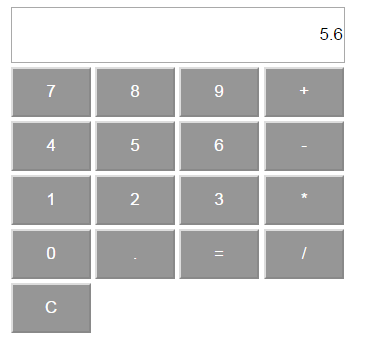
效果图:
jquery计算器(改良版)的更多相关文章
- 一句代码美化你的下框之jquery.selectMM修复版(jquery.selectMM v0.9 beta 20141217)
一句代码美化你的下框之jquery.selectMM修复版(jquery.selectMM v0.9 beta 20141217) 浏览效果: http://www.beyond630.com/jqu ...
- jQuery Mobile (整合版)
jQuery Mobile (整合版) 前言 为了方便大家看的方便,我这里将这几天的东西整合一下发出. 里面的例子请使用手机浏览器查看. 什么是jQuery Mobile? jquery mobile ...
- office全系列激活脚本-改良版
@ECHO OFFTITLE office 全版本系统激活@echo offfor /l %%a in (8,1,16) do (for /f "tokens=*" %%i in ...
- windows全系列激活脚本-改良版.cmd
@ECHO OFFTITLE Windows 全版本系统激活cscript //nologo %Systemroot%\system32\slmgr.vbs -skms 10.1.1.12ECHO 检 ...
- office全系列激活脚本-改良版.cmd
@ECHO OFFTITLE office 全版本系统激活@echo offfor /l %%a in (8,1,16) do (for /f "tokens=*" %%i in ...
- 锋利的jQuery(第二版)学习总结
通过对<锋利的jQuery>(第二版)一书的学习,发现此书讲解通俗易懂,是学习jQuery的一本很好的指导书,特作如下总结. 此书主要讲解了jQuery的常用操作,包括认识jQuery,j ...
- 优化改良版:数组,List,等集合需要加逗号或其它符合转成字符串
大家经常需要数组加逗号拼接成字符串的情况传统作法就是写for,foreach拼接, 现给出优化改良版数组,List,等集合需要加逗号或其它符合转成字符串方法: List<string> l ...
- Python实例---利用正则实现计算器[FTL版]
import re # 格式化 def format_str(str): str = str.replace('--', '+') str = str.replace('-+', '-') str = ...
- 闲来无事写一个jquery计算器,没有进行封装......
<!doctype html> <html> <head> <meta charset="utf-8" /> <title&g ...
随机推荐
- 论文翻译第二弹--用python(或Markdown)对论文复制文本进行处理
图中这种论文你想进行文本复制放入翻译软件进行翻译时,会发现是这种形式: 句子之间是断开的,这时普遍的方法,也是我之前一直用的方法就是打开一个文档编辑器,复制上去后一行行地继续调整.昨天不想这样了,就打 ...
- (数据科学学习手札39)RNN与LSTM基础内容详解
一.简介 循环神经网络(recurrent neural network,RNN),是一类专门用于处理序列数据(时间序列.文本语句.语音等)的神经网络,尤其是可以处理可变长度的序列:在与传统的时间序列 ...
- Noip 2011 Day 1 & Day 2
Day 1 >>> T1 >> 水题一道 . 我们只需要 for 一遍 , 由于地毯是从下往上铺的 , 我们只需要记录该位置最上面的地毯的编号 , 每一次在当前地 ...
- MVC PartialView 方式实现点击加载更多
<table id="MovieListing"> </table><div> <button id="btnShowMore& ...
- 深圳Uber优步司机奖励政策(12月28日到1月3日)
滴快车单单2.5倍,注册地址:http://www.udache.com/ 如何注册Uber司机(全国版最新最详细注册流程)/月入2万/不用抢单:http://www.cnblogs.com/mfry ...
- Spring框架之Filter应用
在web.xml中进行配置,对所有的URL请求进行过滤,就像"击鼓传花"一样,链式处理. 配置分为两种A和B. 在web.xml中增加如下内容: <filter> &l ...
- 关于Python的多重排序
Python预置的list.sort().sorted()方法可实现各种数组的排序,但支持的只限于一个key,如果要多重排序,目前所知的方法只有自定义了. Help on built-in funct ...
- 如何用istio实现应用的灰度发布
Istio为用户提供基于微服务的流量治理能力.Istio允许用户按照标准制定一套流量分发规则,并且无侵入的下发到实例中,平滑稳定的实现灰度发布功能. 基于华为云的Istio服务网格技术,使得灰度发布全 ...
- phpanalysis提取关键字
最近在开发一个文章模块功能,设计那边提出要给文章生成对应标签,用于文章关联推送,这里和大家分享一下实现过程: 这里需要用到PHPAnalysis,下载链接如下 链接:https://pan.baidu ...
- python终极篇 ---django 模板系统
模板系统 . MV ...