
SSM整合步骤
第一步:mybatis和spring整合
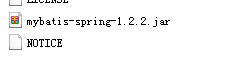
mybatis-spring-1.2.2:是mybatis官方出的包:
mybatis的包:

mybatis和spring的整合包:
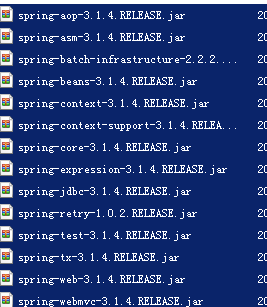
spring及springmvc的包:
Dao
Spring配置文件:
applicationContext.xml
<?xml version="1.0" encoding="UTF-8"?>

<beans xmlns="http://www.springframework.org/schema/beans"

    xmlns:xsi="http://www.w3.org/2001/XMLSchema-instance" xmlns:mvc="http://www.springframework.org/schema/mvc"

    xmlns:context="http://www.springframework.org/schema/context"

    xmlns:aop="http://www.springframework.org/schema/aop" xmlns:tx="http://www.springframework.org/schema/tx"

    xsi:schemaLocation="http://www.springframework.org/schema/beans

        http://www.springframework.org/schema/beans/spring-beans-3.1.xsd

        http://www.springframework.org/schema/mvc

        http://www.springframework.org/schema/mvc/spring-mvc-3.1.xsd

        http://www.springframework.org/schema/context

        http://www.springframework.org/schema/context/spring-context-3.1.xsd

        http://www.springframework.org/schema/aop

        http://www.springframework.org/schema/aop/spring-aop-3.1.xsd

        http://www.springframework.org/schema/tx

        http://www.springframework.org/schema/tx/spring-tx-3.1.xsd ">

    <!-- 引用配置文件 此处使用的是dbcp连接池-->

    <context:property-placeholder location="classpath:db.properties" />

    <bean id="dataSource" class="org.apache.commons.dbcp.BasicDataSource"

        destroy-method="close">

        <property name="driverClassName" value="${mysql.driver}" />

        <property name="url" value="${mysql.url}" />

        <property name="username" value="${mysql.username}" />

        <property name="password" value="${mysql.password}" />

        <property name="maxActive" value="30" />

        <property name="maxIdle" value="5" />

    </bean>

</beans>
applicationContext-dao.xml
<?xml version="1.0" encoding="UTF-8"?>

<beans xmlns="http://www.springframework.org/schema/beans"

    xmlns:xsi="http://www.w3.org/2001/XMLSchema-instance" xmlns:mvc="http://www.springframework.org/schema/mvc"

    xmlns:context="http://www.springframework.org/schema/context"

    xmlns:aop="http://www.springframework.org/schema/aop" xmlns:tx="http://www.springframework.org/schema/tx"

    xsi:schemaLocation="http://www.springframework.org/schema/beans

        http://www.springframework.org/schema/beans/spring-beans-3.1.xsd

        http://www.springframework.org/schema/mvc

        http://www.springframework.org/schema/mvc/spring-mvc-3.1.xsd

        http://www.springframework.org/schema/context

        http://www.springframework.org/schema/context/spring-context-3.1.xsd

        http://www.springframework.org/schema/aop

        http://www.springframework.org/schema/aop/spring-aop-3.1.xsd

        http://www.springframework.org/schema/tx

        http://www.springframework.org/schema/tx/spring-tx-3.1.xsd ">

   <!-- 会话工厂 -->

    <bean id="sqlSessionFactory" class="org.mybatis.spring.SqlSessionFactoryBean">

        <property name="dataSource" ref="dataSource"></property>

        <!-- 加载mybatis的配置文件 -->

        <property name="configLocation" value="classpath:mybatis/sqlMapConfig.xml"></property>

    </bean>

    <!-- mapper扫描器,这里由于没有在sqlMapConfig配置mapper,所以必须保证mapper和dao接口在同一个目录且同名 -->

    <bean class="org.mybatis.spring.mapper.MapperScannerConfigurer">

        <property name="basePackage" value="yycg.**.dao.mapper"></property>

        <property name="sqlSessionFactoryBeanName" value="sqlSessionFactory"/>

    </bean>

   <!-- 如果采用自动扫描器则不用手动设置工厂bean

    <bean id="useryyMapper2" class="org.mybatis.spring.mapper.MapperFactoryBean">

       <property name="mapperInterface"

           value="yycg.dao.mapper.UserMapper" />

       <property name="sqlSessionFactory" ref="sqlSessionFactory" />

  </bean> -->

</beans>
sqlmapConfig.xml
<?xml version="1.0" encoding="UTF-8" ?>

<!DOCTYPE configuration

PUBLIC "-//mybatis.org//DTD Config 3.0//EN"

"http://mybatis.org/dtd/mybatis-3-config.dtd">

<configuration>

<!—使用自动扫描器时,mapper.xml文件如果和mapper.java接口在一个目录则此处不用定义mappers -->

<mappers>

  <package name="cn.itcast.mybatis.mapper" />

</mappers>

</configuration>
Mapper编写的三种方法
接口实现类继承SqlSessionDaoSupport
使用此种方法需要编写mapper接口,mapper接口实现类、mapper.xml文件
1、 在sqlMapConfig.xml中配置mapper.xml的位置
<?xml version="1.0" encoding="UTF-8" ?>

<!DOCTYPE configuration

PUBLIC "-//mybatis.org//DTD Config 3.0//EN"

"http://mybatis.org/dtd/mybatis-3-config.dtd">

<configuration>

<mappers>

     <!-- 通过resource扫描user.xml -->

    <mapper resource="cn/itcast/ssm/dao/old/User.xml"/>

      <!-- 扫描 cn.itcast.ssm.dao.mapper包下的mapper接口 -->

    <package name="cn.itcast.ssm.dao.mapper" />

</mappers>

</configuration>
2、 定义mapper接口
3、 实现类继承了SqlSessionDaoSupport
mapper方法中可以this.getSqlSession()进行数据增删改查。
4、 spring 配置
<!-- mybatis运行环境 -->

<!-- 配置会话工厂,由spring管理 -->

<bean id="sqlSessionFactory" class="org.mybatis.spring.SqlSessionFactoryBean">

    <property name="dataSource" ref="dataSource"/>

    <!-- mybatis全局配置文件 -->

    <property name="configLocation" value="classpath:mybatis/SqlMapConfig.xml"></property>

</bean>

<!-- 原始编写dao的方法 -->

<bean id="userDao" class="cn.itcast.ssm.dao.old.UserDaoImpl">

   <property name="sqlSessionFactory" ref="sqlSessionFactory"/>

</bean>
使用org.mybatis.spring.mapper.MapperFactoryBean
1、 在sqlMapConfig.xml中配置mapper.xml的位置
如果mapper.xml和mappre接口的名称相同且在同一个目录,这里可以不用配置
2、 定义mapper接口
注意
1)、mapper.xml中的namespace为mapper接口的地址
2)、mapper接口中的方法名和mapper.xml中的定义的statement的id保持一致
3、 Spring中定义
<!-- 通过代理对象方法生成mapper实现对象

此种方法需要每个mapper进行配置,麻烦,不使用此方法

 -->

<bean id="userMapper" class="org.mybatis.spring.mapper.MapperFactoryBean">

   <!-- 指定mapper地址 -->

   <property name="mapperInterface"   value="cn.itcast.ssm.dao.mapper.UserMapper" />

   <property name="sqlSessionFactory" ref="sqlSessionFactory" />

</bean>
使用mapper扫描器
1、 mapper.xml文件编写,
注意:
mapper.xml中的namespace为mapper接口的地址
mapper接口中的方法名和mapper.xml中的定义的statement的id保持一致
如果将mapper.xml和mapper接口的名称保持一致则不用在sqlMapConfig.xml中进行配置
2、 定义mapper接口
注意mapper.xml的文件名和mapper的接口名称保持一致,且放在同一个目录
3、 配置mapper扫描器
<!-- 使用mapper自动扫描器

自动将mapper包中的mapper扫描出来,注册到spring容器中,bean的id是mapper的类名(第一个字母小写)

-->

<bean class="org.mybatis.spring.mapper.MapperScannerConfigurer">

   <!-- 指定mapper扫描的包 -->

   <property name="basePackage" value="cn.itcast.ssm.dao.mapper"></property>

    <property name="sqlSessionFactoryBeanName" value="sqlSessionFactory"/>

</bean>
4、 使用扫描器后从spring容器中获取mapper的实现对象
扫描器将接口通过代理方法生成实现对象,要spring容器中自动注册,名称为mapper 接口的名称
Service
UserManager接口
编写UserManagerService接口,如下:
public interface UserManagerService {

    /**

     * 根据id查询用户

     */

    public User findUserById(String id) throws Exception;

}
public class UserManagerServiceImpl implements UserManagerService {

    @Autowired

    UserMapper userMapper;

    @Override

    public User findUserById(int id) throws Exception {

        return userMapper.selectUserById(id);

    }

}
Spring配置文件:
将userManager在spring配置文件进行配置
applicationContext--service.xml
<?xml version="1.0" encoding="UTF-8"?>

<beans xmlns="http://www.springframework.org/schema/beans"

    xmlns:xsi="http://www.w3.org/2001/XMLSchema-instance" xmlns:mvc="http://www.springframework.org/schema/mvc"

    xmlns:context="http://www.springframework.org/schema/context"

    xmlns:aop="http://www.springframework.org/schema/aop" xmlns:tx="http://www.springframework.org/schema/tx"

    xsi:schemaLocation="http://www.springframework.org/schema/beans

        http://www.springframework.org/schema/beans/spring-beans-3.1.xsd

        http://www.springframework.org/schema/mvc

        http://www.springframework.org/schema/mvc/spring-mvc-3.1.xsd

        http://www.springframework.org/schema/context

        http://www.springframework.org/schema/context/spring-context-3.1.xsd

        http://www.springframework.org/schema/aop

        http://www.springframework.org/schema/aop/spring-aop-3.1.xsd

        http://www.springframework.org/schema/tx

        http://www.springframework.org/schema/tx/spring-tx-3.1.xsd ">

    <!-- 用户管理-->

    <bean id="userManagerService" class="cn.itcast.mybatis.service.impl.UserManagerServiceImpl" />

</beans>
Serivce测试:
ApplicationContext applicationContext;

    protected void setUp() throws Exception {

        applicationContext = new ClassPathXmlApplicationContext(

                new String[]{

                        "spring/applicationContext.xml",

                        "spring/applicationContext-dao.xml",

                        "spring/applicationContext-service.xml"

                }

                );

    }

    public void testFindUserById() throws Exception {

        UserManagerService userManagerService = (UserManagerService)applicationContext.getBean("userManagerService");

        System.out.println(userManagerService.findUserById(1));

    }
事务控制:
配置
在applicaitonContext.xml中配置事务管理器
<!-- 事务控制 -->

    <bean id="txManager-base"

    class="org.springframework.jdbc.datasource.DataSourceTransactionManager">

        <property name="dataSource" ref="dataSource"></property>

    </bean>

    <tx:advice id="txAdvice-base" transaction-manager="txManager-base">

        <tx:attributes>

            <tx:method name="save*" propagation="REQUIRED" />

            <tx:method name="insert*" propagation="REQUIRED" />

            <tx:method name="update*" propagation="REQUIRED" />

            <tx:method name="delete*" propagation="REQUIRED" />

            <tx:method name="get*" read-only="true" />

            <tx:method name="select*" read-only="true" />

            <tx:method name="find*" read-only="true" />

        </tx:attributes>

    </tx:advice>

    <aop:config proxy-target-class="true">

        <aop:advisor

            pointcut="execution(* cn.itcast.**.service.impl.*.*(..))"

            advice-ref="txAdvice-base" />

    </aop:config>
事务测试
在一个service方法中先执行更新,再执行插入,插入一个违反唯一约束的记录,如果数据不回滚则说明事务没有控制。
Action
spingmvc.xml配置文件
<?xml version="1.0" encoding="UTF-8"?>

<beans xmlns="http://www.springframework.org/schema/beans"

    xmlns:xsi="http://www.w3.org/2001/XMLSchema-instance" xmlns:mvc="http://www.springframework.org/schema/mvc"

    xmlns:context="http://www.springframework.org/schema/context"

    xmlns:aop="http://www.springframework.org/schema/aop" xmlns:tx="http://www.springframework.org/schema/tx"

    xsi:schemaLocation="http://www.springframework.org/schema/beans

        http://www.springframework.org/schema/beans/spring-beans-3.1.xsd

        http://www.springframework.org/schema/mvc

        http://www.springframework.org/schema/mvc/spring-mvc-3.1.xsd

        http://www.springframework.org/schema/context

        http://www.springframework.org/schema/context/spring-context-3.1.xsd

        http://www.springframework.org/schema/aop

        http://www.springframework.org/schema/aop/spring-aop-3.1.xsd

        http://www.springframework.org/schema/tx

        http://www.springframework.org/schema/tx/spring-tx-3.1.xsd ">

    <!-- 注解驱动 -->

    <mvc:annotation-driven/>

    <!-- 组件扫描,用于控制层 -->

    <context:component-scan base-package="cn.itcast.mybatis.action" />

    <!-- 视图解析器 -->

    <bean

        class="org.springframework.web.servlet.view.InternalResourceViewResolver">

        <property name="prefix" value="/WEB-INF/jsp"></property>

        <property name="suffix" value=".jsp"></property>

    </bean>

    <!-- 拦截器 -->

    <!-- <mvc:interceptors>

        多个拦截器,顺序执行

        <mvc:interceptor>

            <mvc:mapping path="/**" />

            <bean class="cn.itcast.project.yycg.base.filter.LoginInterceptor"></bean>

        </mvc:interceptor>

        <mvc:interceptor>

            <mvc:mapping path="/**" />

            <bean class="cn.itcast.project.yycg.base.filter.PermissionInterceptor"></bean>

        </mvc:interceptor>

    </mvc:interceptors> -->

</beans>
编写UserAction.java
/**

 * 用户管理

 * @author Thinkpad

 *

 */

@Controller

@RequestMapping("/user")

public class UserAction {

    @Autowired

    UserManagerService userManagerService;

    /**

     * 用户修改

     * @param model

     * @param id

     * @return

     * @throws Exception

     */

    @RequestMapping("/useredit")

    public String useredit(Model model,int id)throws Exception{

        User user = userManagerService.findUserById(id);

        model.addAttribute("user", user);

        return "useredit";

    }

    /**

     * 用户修改提交

     * @param user

     * @return

     * @throws Exception

     */

    @RequestMapping("/usereditsubmit")

    public String usereditsubmit(User user)throws Exception{

        userManagerService.saveUser(user);

        return "success";

    }

//其它方法略

//……

}
注意:学会如果在action中调用service,处理结果返回用户。
web.xml
<?xml version="1.0" encoding="UTF-8"?>

<web-app xmlns:xsi="http://www.w3.org/2001/XMLSchema-instance" xmlns="http://java.sun.com/xml/ns/javaee" xsi:schemaLocation="http://java.sun.com/xml/ns/javaee http://java.sun.com/xml/ns/javaee/web-app_3_0.xsd" id="WebApp_ID" version="3.0">

  <display-name>mybatis_03</display-name>

  <context-param>

    <param-name>contextConfigLocation</param-name>

<param-value>/WEB-INF/classes/spring/applicationContext.xml,/WEB-INF/classes/spring/applicationContext-*.xml</param-value>

  </context-param>

  <listener>

    <listener-class>org.springframework.web.context.ContextLoaderListener</listener-class>

  </listener>

  <filter>

    <filter-name>SpringCharacterEncodingFilter</filter-name>

    <filter-class>org.springframework.web.filter.CharacterEncodingFilter</filter-class>

    <init-param>

      <param-name>encoding</param-name>

      <param-value>UTF-8</param-value>

    </init-param>

  </filter>

  <filter-mapping>

    <filter-name>SpringCharacterEncodingFilter</filter-name>

    <url-pattern>/*</url-pattern>

  </filter-mapping>

  <servlet>

    <servlet-name>springmvc</servlet-name>

    <servlet-class>org.springframework.web.servlet.DispatcherServlet</servlet-class>

    <init-param>

      <param-name>contextConfigLocation</param-name>

      <param-value>classpath:spring/springmvc-servlet.xml</param-value>

    </init-param>

  </servlet>

  <servlet-mapping>

    <servlet-name>springmvc</servlet-name>

    <url-pattern>*.action</url-pattern>

  </servlet-mapping>

  <welcome-file-list>

    <welcome-file>index.jsp</welcome-file>

  </welcome-file-list>

</web-app>
测试
将工程部署在tomcat运行,输入:http://localhost:8080/mybatis_03/user/useredit.aciton?id=1,进入首页
SSM整合步骤的更多相关文章
- SSM整合大体步骤
SSM整合步骤: 1. 导入jar spring: springMVC: mybatis: 第三方支持:log4j,pageHelper,AspectJ,jackson,jstl 2. 搭建sprin ...
- 开发步骤Dubbo、spring mvc、springboot、SSM整合开发步骤
一.Dubbo开发步骤: 链接:https://pan.baidu.com/s/1pMPO1kf 密码:9zaa 第一: 1.创建consumer工程2.在pom.xml文件下添加配置3.添加appl ...
- myBatis,Spring,SpringMVC三大框架ssm整合模板
整合步骤 创建web工程 导入整合所需的所有jar包 编写各层需要的配置文件 1) mybatis的全局配置文件 <configuration> <!-- 批量别名的设置 -- ...
- Maven + 最新SSM整合
. 1. 开发环境搭建 参考博文:Eclipse4.6(Neon) + Tomcat8 + MAVEN3.3.9 + SVN项目完整环境搭建 2. Maven Web项目创建 2.1. 2.2. 2. ...
- SSM整合配置
SSM三大框架整合详细教程(Spring+SpringMVC+MyBatis) 使用SSM(Spring.SpringMVC和Mybatis)已经有三个多月了,项目在技术上已经没有什么难点了,基于现有 ...
- ssm整合说明与模板-Spring Spring MVC Mybatis整合开发
ssm整合说明 spring+spring mvc+mybatis 说明 源码下载 由于之前存在ssh框架,spring+struts+hibernate,其中spring负责aop与ioc,所以一般 ...
- spring MVC框架入门(外加SSM整合)
spring MVC框架 一.什么是sping MVC Spring MVC属于SpringFrameWork的后续产品,已经融合在Spring Web Flow里面.Spring 框架提供了构建 W ...
- SSM整合pom.xml和导包
SSM 整合-自己写的 SSM Spring +SpringMVC+Mybatis 配置 及pom.xml SSM框架(spring+springMVC+Mybatis) pom.xml文件 mave ...
- SSM整合文档
SSM整合文档 v2 一. 文件说明 文件名 描述 spring-servlet.xml 配置SpringMvc框架相关 applicationContext.xml 配置Spring容器 sprin ...
随机推荐
- gg_pie
gg_pie gg_pie PeRl 今天尝试了一下用ggplot2画饼图,转换一下极坐标就可以实现,但是和以前画heatmap的时候不一样的是,我们在卷坐标的时候需要让数据集中在一个坐标轴上. 另一 ...
- 如何配置 SpaceVim
本文将系统地介绍如何配置 SpaceVim,配置 SpaceVim 主要包括以下几个内容: 设置 SpaceVim 选项 启动/禁用模块 添加自定义插件 添加自定义按键映射以及插件配置 设置Space ...
- SQl 语句 表的连接
当涉及到多个表查询时就需要使用将表连接的方法进行查询. SQL语句连接的方式根本上分为5种: •EQUI JOIN •SEMI JOIN 3 •ANTI JOIN 4 •CROSS JOIN •DIV ...
- 每天看一片代码系列(一):stream.js
简介 stream.js是一个小型的js库,用于处理stream相关的操作.这里的stream是指一种数据结构,它像数组一样,可以放置多个类型的数据,但是并不限制长度,甚至可以达到无限长.可以对该数据 ...
- P1208 [USACO1.3]混合牛奶 Mixing Milk
P1208 [USACO1.3]混合牛奶 Mixing Milk 题目描述 由于乳制品产业利润很低,所以降低原材料(牛奶)价格就变得十分重要.帮助Marry乳业找到最优的牛奶采购方案. Marry乳业 ...
- 能用程序解决的问题绝不BB之租房篇章...
项目缘起于高德API+Python解决租房问题, 修修补补之后上线了58公寓高德搜房(全国版)http://woyaozufang.live:8080. 经过了多次代码优化.内容改版.新增房源等... ...
- spring-boot日志操作
SpringBoot Logback日志配置 Logback的配置介绍: 1.Logger.appender及layout Logger作为日志的记录器,把它关联到应用的对应的context上后,主要 ...
- CakePHP2.x 发送邮件
cake提供了多种发送邮件的方法,并且简单实用.以2.x为例 第一步 创建并添加邮件配置信息 拷贝app\Config\email.php.default 为email.php 打开在EmailCon ...
- eclipse+tomcat配置远程debug调整
由于开发环境与真实服务器环境存在差异,有时开发时明明正常的逻辑,部署之后就会出现各种各样的问题,通过日志邮不能明确定位到问题的时候,可以采用远程debug调试来定位问题.下面就介绍一下具体的配置步骤: ...
- 01-JVM内存模型:程序计数器
一.JVM模型概述 java虚拟机(JVM)在java程序运行的过程中,会将它所管理的内存划分为若干个不同的数据区域,这些区域有的随着JVM的启动而创建,有的随着用户线程的启动和结束而建立和销毁.一个 ...