
用Java+xml配置方式实现Spring数据事务(编程式事务)
一、用Java配置的方式
1、实体类:
Role
public class Role {

    private int id;

    private String roleName;

    private String note;

    @Override

    public String toString() {

        return "Role{" +

                "id=" + id +

                ", roleName='" + roleName + '\'' +

                ", note='" + note + '\'' +

                '}';

    }

    public Role() {

    }

    public Role(int id, String roleName, String note) {

        this.id = id;

        this.roleName = roleName;

        this.note = note;

    }

    public int getId() {

        return id;

    }

    public void setId(int id) {

        this.id = id;

    }

    public String getRoleName() {

        return roleName;

    }

    public void setRoleName(String roleName) {

        this.roleName = roleName;

    }

    public String getNote() {

        return note;

    }

    public void setNote(String note) {

        this.note = note;

    }

}
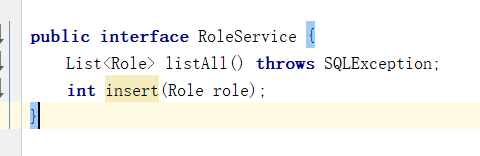
2、接口
RoleService
3、实现类
RoleServiceImpl
package com.wbg.springtransaction.service;

import com.wbg.springtransaction.config.JavaConfig;

import com.wbg.springtransaction.entity.Role;

import org.apache.ibatis.session.SqlSessionException;

import org.springframework.beans.factory.annotation.Autowired;

import org.springframework.jdbc.datasource.DataSourceTransactionManager;

import org.springframework.stereotype.Service;

import org.springframework.transaction.PlatformTransactionManager;

import org.springframework.transaction.TransactionStatus;

import org.springframework.transaction.support.DefaultTransactionDefinition;

import javax.sql.DataSource;

import javax.transaction.*;

import java.sql.Connection;

import java.sql.PreparedStatement;

import java.sql.ResultSet;

import java.sql.SQLException;

import java.util.ArrayList;

import java.util.List;

@Service

public class RoleServiceImpl implements RoleService {

    @Autowired

    DataSource dataSource;

    @Autowired

    private PlatformTransactionManager transactionManager = null;

    @Override

    public List<Role> listAll() {

        List<Role> list = new ArrayList<Role>();

        Connection connection = null;

        try {

            connection = dataSource.getConnection();

        } catch (SQLException e) {

            e.printStackTrace();

        }

        String sql = "select * from role";

        PreparedStatement preparedStatement = null;

        try {

            preparedStatement = connection.prepareStatement(sql);

            ResultSet resultSet = preparedStatement.executeQuery();

            Role role = null;

            while (resultSet.next()) {

                role = new Role(

                        resultSet.getInt(1),

                        resultSet.getString(2),

                        resultSet.getString(3)

                );

                list.add(role);

            }

        } catch (SQLException e) {

            e.printStackTrace();

        } finally {

            if (connection != null) {

                try {

                    connection.close();

                } catch (SQLException e) {

                    e.printStackTrace();

                }

            }

        }

        return list;

    }

    public int insert(Role role) {

        Connection connection = null;

        DefaultTransactionDefinition dtd = new DefaultTransactionDefinition();

        dtd.setPropagationBehavior(DefaultTransactionDefinition.PROPAGATION_REQUIRED);

        TransactionStatus ts = transactionManager.getTransaction(dtd);

        String sql = "insert into role(role_name,note) values(?,?)";

        PreparedStatement preparedStatement = null;

        try {

            connection = dataSource.getConnection();

            preparedStatement = connection.prepareStatement(sql);

            preparedStatement.setString(1, role.getRoleName());

            preparedStatement.setString(2, role.getNote());

             preparedStatement.executeUpdate();

            transactionManager.commit(ts);

        } catch (SQLException e) {

            transactionManager.rollback(ts);

            System.out.println("原因:" + e.getMessage());

        }

        return 0;

    }

}
4、配置:
JavaConfig
@Configuration

@ComponentScan("com.wbg.springtransaction.*")

@EnableTransactionManagement

public class JavaConfig implements TransactionManagementConfigurer {

    @Bean(name = "dataSource")

    public DataSource getDataSource()  {

        ComboPooledDataSource dataSource=new ComboPooledDataSource();

        try {

            dataSource.setDriverClass("org.mariadb.jdbc.Driver");

        } catch (PropertyVetoException e) {

            e.printStackTrace();

        }

        dataSource.setJdbcUrl("jdbc:mariadb://localhost:3306/wbg_logistics");

        dataSource.setUser("root");

        dataSource.setPassword("123456");

        dataSource.setMaxPoolSize(30);

        return dataSource;

    }

    @Override

    @Bean("transactionManager")

    public  PlatformTransactionManager annotationDrivenTransactionManager() {

        DataSourceTransactionManager transactionManager = new DataSourceTransactionManager();

        transactionManager.setDataSource(getDataSource());

        return transactionManager;

    }

}
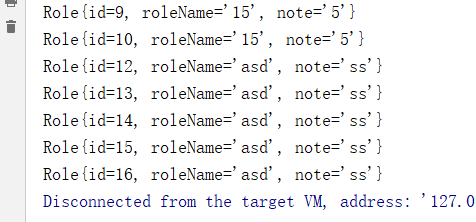
5、测试:
 public static void main(String[] args) throws SQLException {

        ApplicationContext applicationContext = new AnnotationConfigApplicationContext(JavaConfig.class);

        RoleService roleService = applicationContext.getBean(RoleService.class);

        roleService.insert(new Role(1,"asd","ss"));

        for (Role role : roleService.listAll()) {

            System.out.println(role);

        }

    }
二、用xml进行配置:
1、创建xml
<?xml version="1.0" encoding="UTF-8"?>

<beans xmlns="http://www.springframework.org/schema/beans"

       xmlns:xsi="http://www.w3.org/2001/XMLSchema-instance" xmlns:tx="http://www.springframework.org/schema/tx"

       xsi:schemaLocation="http://www.springframework.org/schema/beans http://www.springframework.org/schema/beans/spring-beans.xsd http://www.springframework.org/schema/cache http://www.springframework.org/schema/cache/spring-cache.xsd">

    <!--配置数据源-->

    <bean id="dataSource" class="com.mchange.v2.c3p0.ComboPooledDataSource">

        <property name="driverClass" value="org.mariadb.jdbc.Driver" />

        <property name="jdbcUrl" value="jdbc:mariadb://localhost:3306/wbg_logistics" />

        <property name="user" value="root" />

        <property name="password" value="123456" />

        <property name="maxPoolSize" value="30" />

        <property name="minPoolSize" value="10" />

        <property name="autoCommitOnClose" value="false" />

        <property name="checkoutTimeout" value="10000" />

        <property name="acquireRetryAttempts" value="2" />

    </bean>

    <bean id="transactionManager" class="org.springframework.jdbc.datasource.DataSourceTransactionManager">

        <property name="dataSource" ref="dataSource"/>

    </bean>

</beans>
2、配置:
@Configuration

@ComponentScan("com.wbg.springtransaction.*")

@EnableTransactionManagement

@ImportResource({"classpath:spring-cfg.xml"})

public class JavaConfig implements TransactionManagementConfigurer {

}
3、实现类RoleServiceImpl不变
4、测试:
 public static void main(String[] args) throws SQLException {

        ApplicationContext applicationContext = new AnnotationConfigApplicationContext(JavaConfig.class);

        RoleService roleService = applicationContext.getBean(RoleService.class);

        roleService.insert(new Role(1,"asd","ss"));

        for (Role role : roleService.listAll()) {

            System.out.println(role);

        }

    }
用Java+xml配置方式实现Spring数据事务(编程式事务)的更多相关文章
- 全面分析 Spring 的编程式事务管理及声明式事务管理
开始之前 关于本教程 本教程将深入讲解 Spring 简单而强大的事务管理功能,包括编程式事务和声明式事务.通过对本教程的学习,您将能够理解 Spring 事务管理的本质,并灵活运用之. 先决条件 本 ...
- 全面分析 Spring 的编程式事务管理及声明式事务管理--转
开始之前 关于本教程 本教程将深入讲解 Spring 简单而强大的事务管理功能,包括编程式事务和声明式事务.通过对本教程的学习,您将能够理解 Spring 事务管理的本质,并灵活运用之. 先决条件 本 ...
- spring事务管理——编程式事务、声明式事务
本教程将深入讲解 Spring 简单而强大的事务管理功能,包括编程式事务和声明式事务.通过对本教程的学习,您将能够理解 Spring 事务管理的本质,并灵活运用之. 先决条件 本教程假定您已经掌握了 ...
- Spring笔记(4) - Spring的编程式事务和声明式事务详解
一.背景 事务管理对于企业应用而言至关重要.它保证了用户的每一次操作都是可靠的,即便出现了异常的访问情况,也不至于破坏后台数据的完整性.就像银行的自助取款机,通常都能正常为客户服务,但是也难免遇到操作 ...
- Spring编程式事务管理及声明式事务管理
本文将深入讲解 Spring 简单而强大的事务管理功能,包括编程式事务和声明式事务.通过对本教程的学习,您将能够理解 Spring 事务管理的本质,并灵活运用之. Spring 事务属性分析 事务管理 ...
- Spring 声明式事务与编程式事务详解
本文转载自IBM开发者论坛:https://developer.ibm.com/zh/articles/os-cn-spring-trans 根据自己的学习理解有所调整,用于学习备查. 事务管理对于企 ...
- Spring MVC 的 Java Config ( 非 XML ) 配置方式
索引: 开源Spring解决方案--lm.solution 参看代码 GitHub: solution/pom.xml web/pom.xml web.xml WebInitializer.java ...
- Spring之AOP原理、代码、使用详解(XML配置方式)
Spring 的两大核心,一是IOC,另一个是AOP,本博客从原理.AOP代码以及AOP使用三个方向来讲AOP.先给出一张AOP相关的结构图,可以放大查看. 一.Spring AOP 接口设计 1.P ...
- Struts2第十篇【数据校验、代码方式、XML配置方式、错误信息返回样式】
回顾以前的数据校验 使用一个FormBean对象来封装着web端来过来的数据 维护一个Map集合保存着错误信息-对各个字段进行逻辑判断 //表单提交过来的数据全都是String类型的,birthday ...
随机推荐
- openlayers 4快速渲染管网模型数据
1.背景 项目需要将管网模型运行的结果数据在矢量地图上以不同颜色加以区分.结果数据中和图层数据中唯一能对应的只有一个标识. 2.实现思路 利用定时器+图层统一渲染.在style上找到突破口,而不是用常 ...
- IDEA 2017的插件mybatis plugin(绿色免安装)
https://blog.csdn.net/u014365133/article/details/78885189 插件下载 https://files.cnblogs.com/files/techl ...
- JavaScript This -笔记
参考文章:blog.crimx.com/2016/05/12/understanding-this/ 在es6箭头函数之前this是执行时候确定的,而非定义时候确定.函数都是被调用的,调用时找前面调用 ...
- 把连接中传的参数截取出来变成一个json对象
获取url function test() { var url=window.location.search; if(url.indexOf("?")!=-1) { var str ...
- 08_Spring自定义标签
[ 项目工程 ] [ Person.java 模型类 ] package com.spring.selfxml.model; /** * Created by HigginCui on 2018/9/ ...
- content provider其中操作文件的函数
此类函数还是有杀伤力的 1.openAssetFile(Uri uri, String mode)This is like openFile(Uri, String), but can be impl ...
- salt 之 master and minion
系统:centos7.2 master:192.168.1.41minion:192.168.1.46 注释: setenforce 0 --关闭selinux systemctl stop fire ...
- git go使用socket5代理
git # set git through socks5 proxy: git config --global http.proxy socks5://127.0.0.1:1080 # Recover ...
- cookie的初识和运用(js和jq)
cookie是什么 cookie是浏览器提供的一种机制,它将document 对象的cookie属性提供给JavaScript.可以由JavaScript对其进行控制,而并不是JavaScript本身 ...
- shell单引号双引号详解
linux shell中的单引号与双引号的区别(看完就不会有引号的疑问了) " "(双引号)与 ' '(单引号)的区别 你在shell prompt(shell 提示)后面敲 ...