
用Java+xml配置方式实现Spring数据事务(编程式事务)
一、用Java配置的方式
1、实体类:
Role
public class Role {

    private int id;

    private String roleName;

    private String note;

    @Override

    public String toString() {

        return "Role{" +

                "id=" + id +

                ", roleName='" + roleName + '\'' +

                ", note='" + note + '\'' +

                '}';

    }

    public Role() {

    }

    public Role(int id, String roleName, String note) {

        this.id = id;

        this.roleName = roleName;

        this.note = note;

    }

    public int getId() {

        return id;

    }

    public void setId(int id) {

        this.id = id;

    }

    public String getRoleName() {

        return roleName;

    }

    public void setRoleName(String roleName) {

        this.roleName = roleName;

    }

    public String getNote() {

        return note;

    }

    public void setNote(String note) {

        this.note = note;

    }

}
2、接口
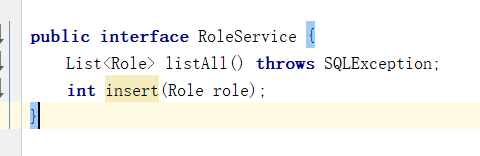
RoleService
3、实现类
RoleServiceImpl
package com.wbg.springtransaction.service;

import com.wbg.springtransaction.config.JavaConfig;

import com.wbg.springtransaction.entity.Role;

import org.apache.ibatis.session.SqlSessionException;

import org.springframework.beans.factory.annotation.Autowired;

import org.springframework.jdbc.datasource.DataSourceTransactionManager;

import org.springframework.stereotype.Service;

import org.springframework.transaction.PlatformTransactionManager;

import org.springframework.transaction.TransactionStatus;

import org.springframework.transaction.support.DefaultTransactionDefinition;

import javax.sql.DataSource;

import javax.transaction.*;

import java.sql.Connection;

import java.sql.PreparedStatement;

import java.sql.ResultSet;

import java.sql.SQLException;

import java.util.ArrayList;

import java.util.List;

@Service

public class RoleServiceImpl implements RoleService {

    @Autowired

    DataSource dataSource;

    @Autowired

    private PlatformTransactionManager transactionManager = null;

    @Override

    public List<Role> listAll() {

        List<Role> list = new ArrayList<Role>();

        Connection connection = null;

        try {

            connection = dataSource.getConnection();

        } catch (SQLException e) {

            e.printStackTrace();

        }

        String sql = "select * from role";

        PreparedStatement preparedStatement = null;

        try {

            preparedStatement = connection.prepareStatement(sql);

            ResultSet resultSet = preparedStatement.executeQuery();

            Role role = null;

            while (resultSet.next()) {

                role = new Role(

                        resultSet.getInt(1),

                        resultSet.getString(2),

                        resultSet.getString(3)

                );

                list.add(role);

            }

        } catch (SQLException e) {

            e.printStackTrace();

        } finally {

            if (connection != null) {

                try {

                    connection.close();

                } catch (SQLException e) {

                    e.printStackTrace();

                }

            }

        }

        return list;

    }

    public int insert(Role role) {

        Connection connection = null;

        DefaultTransactionDefinition dtd = new DefaultTransactionDefinition();

        dtd.setPropagationBehavior(DefaultTransactionDefinition.PROPAGATION_REQUIRED);

        TransactionStatus ts = transactionManager.getTransaction(dtd);

        String sql = "insert into role(role_name,note) values(?,?)";

        PreparedStatement preparedStatement = null;

        try {

            connection = dataSource.getConnection();

            preparedStatement = connection.prepareStatement(sql);

            preparedStatement.setString(1, role.getRoleName());

            preparedStatement.setString(2, role.getNote());

             preparedStatement.executeUpdate();

            transactionManager.commit(ts);

        } catch (SQLException e) {

            transactionManager.rollback(ts);

            System.out.println("原因:" + e.getMessage());

        }

        return 0;

    }

}
4、配置:
JavaConfig
@Configuration

@ComponentScan("com.wbg.springtransaction.*")

@EnableTransactionManagement

public class JavaConfig implements TransactionManagementConfigurer {

    @Bean(name = "dataSource")

    public DataSource getDataSource()  {

        ComboPooledDataSource dataSource=new ComboPooledDataSource();

        try {

            dataSource.setDriverClass("org.mariadb.jdbc.Driver");

        } catch (PropertyVetoException e) {

            e.printStackTrace();

        }

        dataSource.setJdbcUrl("jdbc:mariadb://localhost:3306/wbg_logistics");

        dataSource.setUser("root");

        dataSource.setPassword("123456");

        dataSource.setMaxPoolSize(30);

        return dataSource;

    }

    @Override

    @Bean("transactionManager")

    public  PlatformTransactionManager annotationDrivenTransactionManager() {

        DataSourceTransactionManager transactionManager = new DataSourceTransactionManager();

        transactionManager.setDataSource(getDataSource());

        return transactionManager;

    }

}
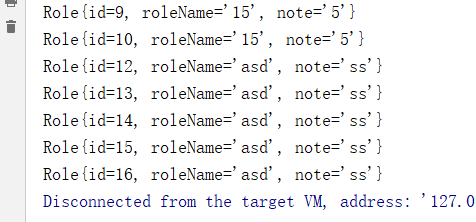
5、测试:
 public static void main(String[] args) throws SQLException {

        ApplicationContext applicationContext = new AnnotationConfigApplicationContext(JavaConfig.class);

        RoleService roleService = applicationContext.getBean(RoleService.class);

        roleService.insert(new Role(1,"asd","ss"));

        for (Role role : roleService.listAll()) {

            System.out.println(role);

        }

    }
二、用xml进行配置:
1、创建xml
<?xml version="1.0" encoding="UTF-8"?>

<beans xmlns="http://www.springframework.org/schema/beans"

       xmlns:xsi="http://www.w3.org/2001/XMLSchema-instance" xmlns:tx="http://www.springframework.org/schema/tx"

       xsi:schemaLocation="http://www.springframework.org/schema/beans http://www.springframework.org/schema/beans/spring-beans.xsd http://www.springframework.org/schema/cache http://www.springframework.org/schema/cache/spring-cache.xsd">

    <!--配置数据源-->

    <bean id="dataSource" class="com.mchange.v2.c3p0.ComboPooledDataSource">

        <property name="driverClass" value="org.mariadb.jdbc.Driver" />

        <property name="jdbcUrl" value="jdbc:mariadb://localhost:3306/wbg_logistics" />

        <property name="user" value="root" />

        <property name="password" value="123456" />

        <property name="maxPoolSize" value="30" />

        <property name="minPoolSize" value="10" />

        <property name="autoCommitOnClose" value="false" />

        <property name="checkoutTimeout" value="10000" />

        <property name="acquireRetryAttempts" value="2" />

    </bean>

    <bean id="transactionManager" class="org.springframework.jdbc.datasource.DataSourceTransactionManager">

        <property name="dataSource" ref="dataSource"/>

    </bean>

</beans>
2、配置:
@Configuration

@ComponentScan("com.wbg.springtransaction.*")

@EnableTransactionManagement

@ImportResource({"classpath:spring-cfg.xml"})

public class JavaConfig implements TransactionManagementConfigurer {

}
3、实现类RoleServiceImpl不变
4、测试:
 public static void main(String[] args) throws SQLException {

        ApplicationContext applicationContext = new AnnotationConfigApplicationContext(JavaConfig.class);

        RoleService roleService = applicationContext.getBean(RoleService.class);

        roleService.insert(new Role(1,"asd","ss"));

        for (Role role : roleService.listAll()) {

            System.out.println(role);

        }

    }
用Java+xml配置方式实现Spring数据事务(编程式事务)的更多相关文章
- 全面分析 Spring 的编程式事务管理及声明式事务管理
开始之前 关于本教程 本教程将深入讲解 Spring 简单而强大的事务管理功能,包括编程式事务和声明式事务.通过对本教程的学习,您将能够理解 Spring 事务管理的本质,并灵活运用之. 先决条件 本 ...
- 全面分析 Spring 的编程式事务管理及声明式事务管理--转
开始之前 关于本教程 本教程将深入讲解 Spring 简单而强大的事务管理功能,包括编程式事务和声明式事务.通过对本教程的学习,您将能够理解 Spring 事务管理的本质,并灵活运用之. 先决条件 本 ...
- spring事务管理——编程式事务、声明式事务
本教程将深入讲解 Spring 简单而强大的事务管理功能,包括编程式事务和声明式事务.通过对本教程的学习,您将能够理解 Spring 事务管理的本质,并灵活运用之. 先决条件 本教程假定您已经掌握了 ...
- Spring笔记(4) - Spring的编程式事务和声明式事务详解
一.背景 事务管理对于企业应用而言至关重要.它保证了用户的每一次操作都是可靠的,即便出现了异常的访问情况,也不至于破坏后台数据的完整性.就像银行的自助取款机,通常都能正常为客户服务,但是也难免遇到操作 ...
- Spring编程式事务管理及声明式事务管理
本文将深入讲解 Spring 简单而强大的事务管理功能,包括编程式事务和声明式事务.通过对本教程的学习,您将能够理解 Spring 事务管理的本质,并灵活运用之. Spring 事务属性分析 事务管理 ...
- Spring 声明式事务与编程式事务详解
本文转载自IBM开发者论坛:https://developer.ibm.com/zh/articles/os-cn-spring-trans 根据自己的学习理解有所调整,用于学习备查. 事务管理对于企 ...
- Spring MVC 的 Java Config ( 非 XML ) 配置方式
索引: 开源Spring解决方案--lm.solution 参看代码 GitHub: solution/pom.xml web/pom.xml web.xml WebInitializer.java ...
- Spring之AOP原理、代码、使用详解(XML配置方式)
Spring 的两大核心,一是IOC,另一个是AOP,本博客从原理.AOP代码以及AOP使用三个方向来讲AOP.先给出一张AOP相关的结构图,可以放大查看. 一.Spring AOP 接口设计 1.P ...
- Struts2第十篇【数据校验、代码方式、XML配置方式、错误信息返回样式】
回顾以前的数据校验 使用一个FormBean对象来封装着web端来过来的数据 维护一个Map集合保存着错误信息-对各个字段进行逻辑判断 //表单提交过来的数据全都是String类型的,birthday ...
随机推荐
- WPF MVVM 之理解(数据绑定)
(申明:最近在做一个练习,写点东西,谨供参考.) 1.界面展示:其中的布局和样式就不说了,重点在MVVM架构和数据绑定(Model层使用EF(Entity Framework)实体框架,不做介绍). ...
- Java基础(四)方法和数组
一.方法 1.方法的定义 方法也叫函数,就是一个能独立完成某个功能的一段代码.方法可以看作一个整体. 语法: 修饰符 返回类型 方法名字(数据类型 变量名,数据类型 变量名,……[形式参数(0个到n个 ...
- nodejs项目目录结构规范
参考: https://github.com/jifeng/node-app dispatch.js 主进程文件 worker.js 工作进程 app.js 应用 routes.js url路由表 p ...
- jQuery中的pushStack
在学习jquery源码的时候,学到了其中的pushStack方法,在这里记录一下 源码为 // Take an array of elements and push it onto the stack ...
- 微信小程序request请求之GET跟POST的区别
1.GET 例子: wx.request({ url: 'test.php', //仅为示例,并非真实的接口地址 data: { x: '' , y: '' }, header: { 'content ...
- 第四次作业-第一次scrum冲刺
团队成员 周斌 舒 溢 许嘉荣 唐 浩 黄欣欣 1.第一次冲刺任务安排 对Github上的HUSTOJ开源项目进行Fork,搭建基本环境 2.用户需求 ①基本功能显示在首页 ②能够提交题目并判题,并对 ...
- 面对IBM与亚马逊的犄角攻势,微软云如何招架?
亚马逊AWS和微软Azure是全球公有云的焦点.不就前公布的财报不久前公布的财报,这两家公司云计算的收入越来越接近,从数据显示来看,亚马逊的利润比微软稍高,有人称微软云的高增长来自于捆绑销售,背后真正 ...
- js 巧妙去除数组中的重复项
1.代码如下: var toObject = function(a) { var o = {}; for (var i=0, j=a.length; i<j; i=i+1) { // 这里我调整 ...
- .Net ->> iTextSharp工具读取PDF文本内容
分享一个开源的C#DLL,可以读取PDF文本内容. 地址:http://sourceforge.net/projects/itextsharp/ 这里还有相关的链接:http://www.codepr ...
- redis基本操作命令
前面我们看了redis的简介安装和数据类型,接下来介绍一下redis基本数据类型的操作命令: 一:redis键值对的管理和操作 DEL key 该命令用于在 key 存在时删除 key. DUMP k ...