
rsa实现js前台加密java后台解密
前段时间写了一个rsa前台加密到后台用java解密,下面共享下实现思路:
准备工作:第三方包是必须的
bcprov-jdk15on-148.jar
commons-codec-1.7.jar
commons-lang-2.4.jar
log4j-1.2.15.jar
slf4j-api-1.6.1.jar
项目目录:
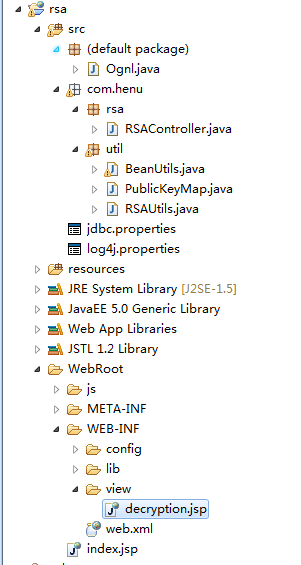
RSAUtils.java
package com.henu.util;

import java.io.File;

import java.io.FileInputStream;

import java.io.FileOutputStream;

import java.io.ObjectInputStream;

import java.io.ObjectOutputStream;

import java.math.BigInteger;

import java.security.KeyPair;

import java.security.KeyFactory;

import java.security.KeyPairGenerator;

import java.security.Provider;

import java.security.PublicKey;

import java.security.PrivateKey;

import java.security.SecureRandom;

import java.security.NoSuchAlgorithmException;

import java.security.InvalidParameterException;

import java.security.interfaces.RSAPublicKey;

import java.security.interfaces.RSAPrivateKey;

import java.security.spec.RSAPublicKeySpec;

import java.security.spec.RSAPrivateKeySpec;

import java.security.spec.InvalidKeySpecException;

import java.util.Date;

import javax.crypto.Cipher;

import org.apache.commons.io.IOUtils;

import org.apache.commons.io.FileUtils;

import org.apache.commons.codec.DecoderException;

import org.apache.commons.codec.binary.Hex;

import org.bouncycastle.jce.provider.BouncyCastleProvider;

import org.slf4j.Logger;

import org.slf4j.LoggerFactory;

import org.apache.commons.lang.StringUtils;

import org.apache.commons.lang.time.DateFormatUtils;

/**

 * RSA算法加密/解密工具类。

 *

 * @author fuchun

 * @version 1.0.0, 2010-05-05

 */

public abstract class RSAUtils {

    private static final Logger LOGGER = LoggerFactory.getLogger(RSAUtils.class);

    /** 算法名称 */

    private static final String ALGORITHOM = "RSA";

    /**保存生成的密钥对的文件名称。 */

    private static final String RSA_PAIR_FILENAME = "/__RSA_PAIR.txt";

    /** 密钥大小 */

    private static final int KEY_SIZE = 1024;

    /** 默认的安全服务提供者 */

    private static final Provider DEFAULT_PROVIDER = new BouncyCastleProvider();

    private static KeyPairGenerator keyPairGen = null;

    private static KeyFactory keyFactory = null;

    /** 缓存的密钥对。 */

    private static KeyPair oneKeyPair = null;

    private static File rsaPairFile = null;

    static {

        try {

            keyPairGen = KeyPairGenerator.getInstance(ALGORITHOM, DEFAULT_PROVIDER);

            keyFactory = KeyFactory.getInstance(ALGORITHOM, DEFAULT_PROVIDER);

        } catch (NoSuchAlgorithmException ex) {

            LOGGER.error(ex.getMessage());

        }

        rsaPairFile = new File(getRSAPairFilePath());

    }

    private RSAUtils() {

    }

    /**

     * 生成并返回RSA密钥对。

     */

    private static synchronized KeyPair generateKeyPair() {

        try {

            keyPairGen.initialize(KEY_SIZE, new SecureRandom(DateFormatUtils.format(new Date(),"yyyyMMdd").getBytes()));

            oneKeyPair = keyPairGen.generateKeyPair();

            saveKeyPair(oneKeyPair);

            return oneKeyPair;

        } catch (InvalidParameterException ex) {

            LOGGER.error("KeyPairGenerator does not support a key length of " + KEY_SIZE + ".", ex);

        } catch (NullPointerException ex) {

            LOGGER.error("RSAUtils#KEY_PAIR_GEN is null, can not generate KeyPairGenerator instance.",

                    ex);

        }

        return null;

    }

    /**

     * 返回生成/读取的密钥对文件的路径。

     */

    private static String getRSAPairFilePath() {

        String urlPath = RSAUtils.class.getResource("/").getPath();

        return (new File(urlPath).getParent() + RSA_PAIR_FILENAME);

    }

    /**

     * 若需要创建新的密钥对文件,则返回 {@code true},否则 {@code false}。

     */

    private static boolean isCreateKeyPairFile() {

        // 是否创建新的密钥对文件

        boolean createNewKeyPair = false;

        if (!rsaPairFile.exists() || rsaPairFile.isDirectory()) {

            createNewKeyPair = true;

        }

        return createNewKeyPair;

    }

    /**

     * 将指定的RSA密钥对以文件形式保存。

     *

     * @param keyPair 要保存的密钥对。

     */

    private static void saveKeyPair(KeyPair keyPair) {

        FileOutputStream fos = null;

        ObjectOutputStream oos = null;

        try {

            fos = FileUtils.openOutputStream(rsaPairFile);

            oos = new ObjectOutputStream(fos);

            oos.writeObject(keyPair);

        } catch (Exception ex) {

            ex.printStackTrace();

        } finally {

            IOUtils.closeQuietly(oos);

            IOUtils.closeQuietly(fos);

        }

    }

    /**

     * 返回RSA密钥对。

     */

    public static KeyPair getKeyPair() {

        // 首先判断是否需要重新生成新的密钥对文件

        if (isCreateKeyPairFile()) {

            // 直接强制生成密钥对文件,并存入缓存。

            return generateKeyPair();

        }

        if (oneKeyPair != null) {

            return oneKeyPair;

        }

        return readKeyPair();

    }

    // 同步读出保存的密钥对

    private static KeyPair readKeyPair() {

        FileInputStream fis = null;

        ObjectInputStream ois = null;

        try {

            fis = FileUtils.openInputStream(rsaPairFile);

            ois = new ObjectInputStream(fis);

            oneKeyPair = (KeyPair) ois.readObject();

            return oneKeyPair;

        } catch (Exception ex) {

            ex.printStackTrace();

        } finally {

            IOUtils.closeQuietly(ois);

            IOUtils.closeQuietly(fis);

        }

        return null;

    }

    /**

     * 根据给定的系数和专用指数构造一个RSA专用的公钥对象。

     *

     * @param modulus 系数。

     * @param publicExponent 专用指数。

     * @return RSA专用公钥对象。

     */

    public static RSAPublicKey generateRSAPublicKey(byte[] modulus, byte[] publicExponent) {

        RSAPublicKeySpec publicKeySpec = new RSAPublicKeySpec(new BigInteger(modulus),

                new BigInteger(publicExponent));

        try {

            return (RSAPublicKey) keyFactory.generatePublic(publicKeySpec);

        } catch (InvalidKeySpecException ex) {

            LOGGER.error("RSAPublicKeySpec is unavailable.", ex);

        } catch (NullPointerException ex) {

            LOGGER.error("RSAUtils#KEY_FACTORY is null, can not generate KeyFactory instance.", ex);

        }

        return null;

    }

    /**

     * 根据给定的系数和专用指数构造一个RSA专用的私钥对象。

     *

     * @param modulus 系数。

     * @param privateExponent 专用指数。

     * @return RSA专用私钥对象。

     */

    public static RSAPrivateKey generateRSAPrivateKey(byte[] modulus, byte[] privateExponent) {

        RSAPrivateKeySpec privateKeySpec = new RSAPrivateKeySpec(new BigInteger(modulus),

                new BigInteger(privateExponent));

        try {

            return (RSAPrivateKey) keyFactory.generatePrivate(privateKeySpec);

        } catch (InvalidKeySpecException ex) {

            LOGGER.error("RSAPrivateKeySpec is unavailable.", ex);

        } catch (NullPointerException ex) {

            LOGGER.error("RSAUtils#KEY_FACTORY is null, can not generate KeyFactory instance.", ex);

        }

        return null;

    }

    /**

     * 根据给定的16进制系数和专用指数字符串构造一个RSA专用的私钥对象。

     *

     * @param modulus 系数。

     * @param privateExponent 专用指数。

     * @return RSA专用私钥对象。

     */

    public static RSAPrivateKey getRSAPrivateKey(String hexModulus, String hexPrivateExponent) {

        if(StringUtils.isBlank(hexModulus) || StringUtils.isBlank(hexPrivateExponent)) {

            if(LOGGER.isDebugEnabled()) {

                LOGGER.debug("hexModulus and hexPrivateExponent cannot be empty. RSAPrivateKey value is null to return.");

            }

            return null;

        }

        byte[] modulus = null;

        byte[] privateExponent = null;

        try {

            modulus = Hex.decodeHex(hexModulus.toCharArray());

            privateExponent = Hex.decodeHex(hexPrivateExponent.toCharArray());

        } catch(DecoderException ex) {

            LOGGER.error("hexModulus or hexPrivateExponent value is invalid. return null(RSAPrivateKey).");

        }

        if(modulus != null && privateExponent != null) {

            return generateRSAPrivateKey(modulus, privateExponent);

        }

        return null;

    }

    /**

     * 根据给定的16进制系数和专用指数字符串构造一个RSA专用的公钥对象。

     *

     * @param modulus 系数。

     * @param publicExponent 专用指数。

     * @return RSA专用公钥对象。

     */

    public static RSAPublicKey getRSAPublidKey(String hexModulus, String hexPublicExponent) {

        if(StringUtils.isBlank(hexModulus) || StringUtils.isBlank(hexPublicExponent)) {

            if(LOGGER.isDebugEnabled()) {

                LOGGER.debug("hexModulus and hexPublicExponent cannot be empty. return null(RSAPublicKey).");

            }

            return null;

        }

        byte[] modulus = null;

        byte[] publicExponent = null;

        try {

            modulus = Hex.decodeHex(hexModulus.toCharArray());

            publicExponent = Hex.decodeHex(hexPublicExponent.toCharArray());

        } catch(DecoderException ex) {

            LOGGER.error("hexModulus or hexPublicExponent value is invalid. return null(RSAPublicKey).");

        }

        if(modulus != null && publicExponent != null) {

            return generateRSAPublicKey(modulus, publicExponent);

        }

        return null;

    }

    /**

     * 使用指定的公钥加密数据。

     *

     * @param publicKey 给定的公钥。

     * @param data 要加密的数据。

     * @return 加密后的数据。

     */

    public static byte[] encrypt(PublicKey publicKey, byte[] data) throws Exception {

        Cipher ci = Cipher.getInstance(ALGORITHOM, DEFAULT_PROVIDER);

        ci.init(Cipher.ENCRYPT_MODE, publicKey);

        return ci.doFinal(data);

    }

    /**

     * 使用指定的私钥解密数据。

     *

     * @param privateKey 给定的私钥。

     * @param data 要解密的数据。

     * @return 原数据。

     */

    public static byte[] decrypt(PrivateKey privateKey, byte[] data) throws Exception {

        Cipher ci = Cipher.getInstance(ALGORITHOM, DEFAULT_PROVIDER);

        ci.init(Cipher.DECRYPT_MODE, privateKey);

        return ci.doFinal(data);

    }

    /**

     * 使用给定的公钥加密给定的字符串。

     * <p />

     * 若 {@code publicKey} 为 {@code null},或者 {@code plaintext} 为 {@code null} 则返回 {@code

     * null}。

     *

     * @param publicKey 给定的公钥。

     * @param plaintext 字符串。

     * @return 给定字符串的密文。

     */

    public static String encryptString(PublicKey publicKey, String plaintext) {

        if (publicKey == null || plaintext == null) {

            return null;

        }

        byte[] data = plaintext.getBytes();

        try {

            byte[] en_data = encrypt(publicKey, data);

            return new String(Hex.encodeHex(en_data));

        } catch (Exception ex) {

            LOGGER.error(ex.getCause().getMessage());

        }

        return null;

    }

    /**

     * 使用默认的公钥加密给定的字符串。

     * <p />

     * 若{@code plaintext} 为 {@code null} 则返回 {@code null}。

     *

     * @param plaintext 字符串。

     * @return 给定字符串的密文。

     */

    public static String encryptString(String plaintext) {

        if(plaintext == null) {

            return null;

        }

        byte[] data = plaintext.getBytes();

        KeyPair keyPair = getKeyPair();

        try {

            byte[] en_data = encrypt((RSAPublicKey)keyPair.getPublic(), data);

            return new String(Hex.encodeHex(en_data));

        } catch(NullPointerException ex) {

            LOGGER.error("keyPair cannot be null.");

        } catch(Exception ex) {

            LOGGER.error(ex.getCause().getMessage());

        }

        return null;

    }

    /**

     * 使用给定的私钥解密给定的字符串。

     * <p />

     * 若私钥为 {@code null},或者 {@code encrypttext} 为 {@code null}或空字符串则返回 {@code null}。

     * 私钥不匹配时,返回 {@code null}。

     *

     * @param privateKey 给定的私钥。

     * @param encrypttext 密文。

     * @return 原文字符串。

     */

    public static String decryptString(PrivateKey privateKey, String encrypttext) {

        if (privateKey == null || StringUtils.isBlank(encrypttext)) {

            return null;

        }

        try {

            byte[] en_data = Hex.decodeHex(encrypttext.toCharArray());

            byte[] data = decrypt(privateKey, en_data);

            return new String(data);

        } catch (Exception ex) {

            LOGGER.error(String.format("\"%s\" Decryption failed. Cause: %s", encrypttext, ex.getCause().getMessage()));

        }

        return null;

    }

    /**

     * 使用默认的私钥解密给定的字符串。

     * <p />

     * 若{@code encrypttext} 为 {@code null}或空字符串则返回 {@code null}。

     * 私钥不匹配时,返回 {@code null}。

     *

     * @param encrypttext 密文。

     * @return 原文字符串。

     */

    public static String decryptString(String encrypttext) {

        if(StringUtils.isBlank(encrypttext)) {

            return null;

        }

        KeyPair keyPair = getKeyPair();

        try {

            byte[] en_data = Hex.decodeHex(encrypttext.toCharArray());

            byte[] data = decrypt((RSAPrivateKey)keyPair.getPrivate(), en_data);

            return new String(data);

        } catch(NullPointerException ex) {

            LOGGER.error("keyPair cannot be null.");

        } catch (Exception ex) {

            LOGGER.error(String.format("\"%s\" Decryption failed. Cause: %s", encrypttext, ex.getMessage()));

        }

        return null;

    }

    /**

     * 使用默认的私钥解密由JS加密(使用此类提供的公钥加密)的字符串。

     *

     * @param encrypttext 密文。

     * @return {@code encrypttext} 的原文字符串。

     */

    public static String decryptStringByJs(String encrypttext) {

        String text = decryptString(encrypttext);

        if(text == null) {

            return null;

        }

        return StringUtils.reverse(text);

    }

    /** 返回已初始化的默认的公钥。*/

    public static RSAPublicKey getDefaultPublicKey() {

        KeyPair keyPair = getKeyPair();

        if(keyPair != null) {

            return (RSAPublicKey)keyPair.getPublic();

        }

        return null;

    }

    /** 返回已初始化的默认的私钥。*/

    public static RSAPrivateKey getDefaultPrivateKey() {

        KeyPair keyPair = getKeyPair();

        if(keyPair != null) {

            return (RSAPrivateKey)keyPair.getPrivate();

        }

        return null;

    }

    public static PublicKeyMap getPublicKeyMap() {

        PublicKeyMap publicKeyMap = new PublicKeyMap();

        RSAPublicKey rsaPublicKey = getDefaultPublicKey();

        publicKeyMap.setModulus(new String(Hex.encodeHex(rsaPublicKey.getModulus().toByteArray())));

        publicKeyMap.setExponent(new String(Hex.encodeHex(rsaPublicKey.getPublicExponent().toByteArray())));

        return publicKeyMap;

    }

}
PublicKeyMap.java
package com.henu.util;

public class PublicKeyMap {

    private String modulus;

    private String exponent;

    public String getModulus() {

        return modulus;

    }

    public void setModulus(String modulus) {

        this.modulus = modulus;

    }

    public String getExponent() {

        return exponent;

    }

    public void setExponent(String exponent) {

        this.exponent = exponent;

    }

    @Override

    public String toString() {

        return "PublicKeyMap [modulus=" + modulus + ", exponent=" + exponent

                + "]";

    }

}
RSAController.java
package com.henu.rsa;

import javax.servlet.http.HttpServletRequest;

import org.springframework.stereotype.Controller;

import org.springframework.web.bind.annotation.RequestMapping;

import org.springframework.web.bind.annotation.ResponseBody;

import com.henu.util.PublicKeyMap;

import com.henu.util.RSAUtils;

@Controller

@RequestMapping("/rsa/")

public class RSAController {

   /**

    * 获取系数和指数

    * @return

    * @throws Exception

    */

    @RequestMapping("keyPair")

    @ResponseBody

    public PublicKeyMap keyPair() throws Exception{

        PublicKeyMap publicKeyMap = RSAUtils.getPublicKeyMap();

        return publicKeyMap;

    }

    @RequestMapping("decryption")

    public String decryption(String userName, String pwd, HttpServletRequest request){

        System.out.println(userName);

        System.out.println(pwd);

        userName  = RSAUtils.decryptStringByJs(userName);

        pwd  = RSAUtils.decryptStringByJs(pwd);

        System.out.println(userName);

        System.out.println(pwd);

        request.setAttribute("userName", userName);

        request.setAttribute("pwd", pwd);

        return "decryption";

    }

}
login.jsp
<%@ page language="java" import="java.util.*" pageEncoding="UTF-8"%>

<%

String path = request.getContextPath();

String basePath = request.getScheme()+"://"+request.getServerName()+":"+request.getServerPort()+path+"/";

%>

<!DOCTYPE HTML PUBLIC "-//W3C//DTD HTML 4.01 Transitional//EN">

<html>

  <head>

    <base href="<%=basePath%>">

    <title>My JSP 'index.jsp' starting page</title>

    <meta http-equiv="pragma" content="no-cache">

    <meta http-equiv="cache-control" content="no-cache">

    <meta http-equiv="expires" content="0">

    <meta http-equiv="keywords" content="keyword1,keyword2,keyword3">

    <meta http-equiv="description" content="This is my page">

    <!--

    <link rel="stylesheet" type="text/css" href="styles.css">

    -->

    <script type="text/javascript" src="<%=request.getContextPath() %>/js/jquery-1.9.1.min.js"></script>

    <script type="text/javascript" src="<%=request.getContextPath() %>/js/rsa/RSA.js"></script>

    <script type="text/javascript" src="<%=request.getContextPath() %>/js/rsa/BigInt.js"></script>

    <script type="text/javascript" src="<%=request.getContextPath() %>/js/rsa/Barrett.js"></script>

    <script type="text/javascript">

        $(function(){

            $("#btn").click(function(){

                $.ajax({

                    type:"post",

                    url:"<%=request.getContextPath() %>/rsa/keyPair.ht",

                    dataType:"json",

                    success:function(data){

                        var exponent = data.exponent;

                        var modulus = data.modulus;

                        var userNameMark = $("#userNameMark").val();

                        var pwdMark = $("#pwdMark").val();

                        if (userNameMark.length != 256) {

                            setMaxDigits(130);

                            var publicKey = new RSAKeyPair(exponent, '', modulus);

                            var userName = encryptedString(publicKey, encodeURIComponent(userNameMark));

                            $("#userName").val(userName);

                            $("#userNameMark").attr("disabled","disabled");

                        }

                        if (pwdMark.length != 256) {

                            setMaxDigits(130);

                            var publicKey = new RSAKeyPair(exponent, '', modulus);

                            var pwd = encryptedString(publicKey, encodeURIComponent(pwdMark));

                            $("#pwd").val(pwd);

                            $("#pwdMark").attr("disabled","disabled");

                        }

                        $("#login").submit();

                    }

                })

            });

        });

    </script>

  </head>

  <body>

        <form id="login" name="login" action="<%=request.getContextPath() %>/rsa/decryption.ht" method="post">

            账号:<input type="text" id="userNameMark" name="userNameMark"/>

                 <input type="hidden" id="userName" name="userName"/>

            密码:<input type="password" id="pwdMark" name="pwdMark"/>

                 <input type="hidden" id="pwd" name="pwd"/>

            <input id="btn" type="button" value="提 交" />

    </form>

  </body>

</html>
decryption.jsp
<%@ page language="java" import="java.util.*" pageEncoding="UTF-8"%>

<%

String path = request.getContextPath();

String basePath = request.getScheme()+"://"+request.getServerName()+":"+request.getServerPort()+path+"/";

%>

<!DOCTYPE HTML PUBLIC "-//W3C//DTD HTML 4.01 Transitional//EN">

<html>

  <head>

    <base href="<%=basePath%>">

    <title>My JSP 'decryption.jsp' starting page</title>

    <meta http-equiv="pragma" content="no-cache">

    <meta http-equiv="cache-control" content="no-cache">

    <meta http-equiv="expires" content="0">

    <meta http-equiv="keywords" content="keyword1,keyword2,keyword3">

    <meta http-equiv="description" content="This is my page">

    <!--

    <link rel="stylesheet" type="text/css" href="styles.css">

    -->

  </head>

  <body>

        账号:${userName }<br/>

        密码:${pwd }

  </body>

</html>
rsa实现js前台加密java后台解密的更多相关文章
- 【转】JS前台加密,java后台解密实现
因项目需求,需要一些敏感信息进行加密,不能以明文暴露到浏览器. 然后后台进行解密操作 先看一下效果图 未对其加密传输 1.前台JS <script type="text/javascr ...
- 明文暴露___JS前台加密,java后台解密实现
1.前台JS <script type="text/javascript"> $(function() { $("#btn").click(func ...
- js base64加密,后台解密
这是为了解决页面发送post请求,传输密码,在页面的控制台可以看到密码的明文,所以先用base64把要传输的密码转换为非明文,然后在后台解密处理. base64encode.js // base64加 ...
- RSA 前段加密 java 后台解密 已调试通过
本人整理网上的.好多网上的调不通.在这里把调试好的贴出来. 1. 异步获取公钥(后台获取):你也可以将公钥串写在页面上: var publicKey = null; $.ajax({ url: c ...
- JS前端加密JAVA后端解密详解
最近有一个加解密的需求,其实没有什么难度,但是实践过程中踩了很多坑,把踩坑过程分享出来. 1.前端JS加密 /** * 加密(需要先加载aes.min.js文件) * @param word * @r ...
- js前台加密,java后台解密实现
参考资料: JS前台加密,java后台解密实现
- JS base64 加密和 后台 base64解密(防止中文乱码)
直接上代码 1,js(2个文件,网上找的) 不要觉的长,直接复制下来就OK //UnicodeAnsi.js文件 //把Unicode转成Ansi和把Ansi转换成Unicode function ...
- 使用CEfSharp之旅(2) js前台事件执行后台方法
原文:使用CEfSharp之旅(2) js前台事件执行后台方法 版权声明:本文为博主原创文章,未经博主允许不得转载.可点击关注博主 ,不明白的进群191065815 我的群里问 https://blo ...
- js前台加密,java后端解密
1.前台JS <script type="text/javascript"> $(function() { $(" ...
随机推荐
- Jquery当div超出页面时就固定到顶部否则跟随页面滚动
$.fn.smartFloat = function () { var position = function (element) { var top = element.position().top ...
- SEO优化:WordPress发布文章主动推送到百度,加快收录保护原创
工作实在太忙,也没时间打理网站.最近公司额外交待了一些网站 SEO 方面的优化任务让我关注(这就是啥都要会.啥都要做的苦逼运维的真实写照了...). 于是抽空看了下百度站长平台,至少看到了2个新消息: ...
- Linux rsync数据定时增量备份
一.安装rsync服务端 1.查看是否安装rsync ps -ef | grep rsync 系统一般默认已安装,安装方法: yum -y install rsync 2.添加配置文件 rsync没有 ...
- OpenStack 认证服务 KeyStone连接和用户管理(五)
一) 创建环境变量链接keyston vim adminrc export OS_USERNAME=admin export OS_PASSWORD=redhat export OS_PROJECT_ ...
- 多线程IO模型
服务端编程,首要问题是选取IO模型.即如何处理大量连接,服务更多的客户端? 我们最早有2种解法,各有不足: 1.阻塞IO,每个连接都需要一个线程. 随着连接数增多,线程数剧增,系统开销太大. 2.非阻 ...
- (5) go 控制台输入输出、进制转换、原反补码、位运算
一.控制台接受输入 二.原反补码 三.位运算 四.移位运算
- 字符串Hash相关
其实也并不是什么特别难的算法,但是我个人实在是不太喜欢字符串之类的东西(字符串神马的真的是麻烦),于是一直拖着不想看,然后模板题之类的也懒得做. Hash的思想其实也没什么复杂的,就是给定一系列字符串 ...
- Failure INSTALL FAILED DUPLICATE PERMISSION
韩梦飞沙 韩亚飞 313134555@qq.com yue31313 han_meng_fei_sha Failure [INSTALL_FAILED_DUPLICATE_PERMISSION ...
- Largest Smallest Cyclic Shift
Largest Smallest Cyclic Shift 题目来源: Atcoder Code Festival 2017 Qual B Problem F 题目大意: 有\(X\)个字符'a',\ ...
- JDK源码学习笔记——Integer
一.类定义 public final class Integer extends Number implements Comparable<Integer> 二.属性 private fi ...