
【待完善】make: command not found,以及libtool.m4 and ltmain.sh have a version mismatch问题的解决方案
之前为了使用一个库,都是去下载源码,然后根据开发者提供的README手动用GCC编译,一直不能使用Makefile感觉很蛋痛,比如最近使用的ZThread
还是怪自己以前过于依赖IDE
最近发现用Cygwin就可以使用诸如./configure, make这样的命令,感觉灰常欣喜,尝试去编译ZThread库(因为我发现虽然之前我用GCC手动编译了ZThread但是在使用的过程中,ZThread总是往控制台上打印诸多的DEBUG信息,想必是编译选项的问题,我又不知道到哪个头文件中去找#define DEBUG,所以就想使用make,看使用ZThread作者写的configuration文件以及Makefile来编译能不能解决问题)
刚刚下载下来Cygwin就等着上去configure+make呢,问题就来了,输入./configure之后,等了一段时间报错(见红色文字):
$ ./configure

checking build system type... i686-pc-cygwin

checking host system type... i686-pc-cygwin

checking target system type... i686-pc-cygwin

checking for a BSD-compatible install... /usr/bin/install -c

checking whether build environment is sane... yes

checking for gawk... gawk

checking whether make sets $(MAKE)... yes

Loading m4 macros from share

checking for g++... g++

checking for C++ compiler default output file name... a.exe

checking whether the C++ compiler works... yes

checking whether we are cross compiling... no

checking for suffix of executables... .exe

checking for suffix of object files... o

checking whether we are using the GNU C++ compiler... yes

checking whether g++ accepts -g... yes

checking for style of include used by make... GNU

checking dependency style of g++... gcc3

checking for gcc... gcc

checking whether we are using the GNU C compiler... yes

checking whether gcc accepts -g... yes

checking for gcc option to accept ANSI C... none needed

checking dependency style of gcc... gcc3

checking how to run the C preprocessor... gcc -E

checking for egrep... grep -E

checking for ANSI C header files... yes

checking for sys/types.h... yes

checking for sys/stat.h... yes

checking for stdlib.h... yes

checking for string.h... yes

checking for memory.h... yes

checking for strings.h... yes

checking for inttypes.h... yes

checking for stdint.h... yes

checking for unistd.h... yes

checking pthread.h usability... no

checking pthread.h presence... no

checking for pthread.h... no

checking for sched_get_priority_max in -lrt... no

checking for sched_yield... no

checking for pthread_yield... no

checking for pthread_key_create... no

checking for pthread_keycreate... no

checking for doxygen... no

detecting for ftime() function

checking sys/time.h usability... yes

checking sys/time.h presence... yes

checking for sys/time.h... yes

checking for _ftime()... yes

checking how to run the C++ preprocessor... g++ -E

checking for ANSI C header files... (cached) yes

checking errno.h usability... yes

checking errno.h presence... yes

checking for errno.h... yes

checking for target implementation... compile-time guess

checking for sigsetjmp()... no

checking for _beginthreadex()... no

checking for a sed that does not truncate output... /usr/bin/sed

checking for ld used by gcc... d:/mingw/mingw32/bin/ld.exe

checking if the linker (d:/mingw/mingw32/bin/ld.exe) is GNU ld... yes

checking for d:/mingw/mingw32/bin/ld.exe option to reload object files... -r

checking for BSD-compatible nm... /cygdrive/d/MinGW/bin/nm -B

checking whether ln -s works... yes

checking how to recognise dependent libraries... file_magic ^x86 archive import|^x86 DLL

checking dlfcn.h usability... no

checking dlfcn.h presence... no

checking for dlfcn.h... no

checking how to run the C++ preprocessor... g++ -E

checking for g77... no

checking for f77... no

checking for xlf... no

checking for frt... no

checking for pgf77... no

checking for fort77... no

checking for fl32... no

checking for af77... no

checking for f90... no

checking for xlf90... no

checking for pgf90... no

checking for epcf90... no

checking for f95... no

checking for fort... no

checking for xlf95... no

checking for ifc... no

checking for efc... no

checking for pgf95... no

checking for lf95... no

checking for gfortran... no

checking whether we are using the GNU Fortran 77 compiler... no

checking whether  accepts -g... no

checking the maximum length of command line arguments... 8192

checking command to parse /cygdrive/d/MinGW/bin/nm -B output from gcc object... ok

checking for objdir... .libs

checking for ar... ar

checking for ranlib... ranlib

checking for strip... strip

checking for correct ltmain.sh version... grep: character class syntax is [[:space:]], not [:space:]

no

*** Gentoo sanity check failed! ***

*** libtool.m4 and ltmain.sh have a version mismatch! ***

*** (libtool.m4 = 1.5.10, ltmain.sh = ) ***

Please run:

  libtoolize --copy --force

if appropriate, please contact the maintainer of this

package (or your distribution) for help.
输入:libtoolize --copy --force提示libtoolize: command not found
咋办?搜了一下相关的问题,原来是因为安装Cygwin的时候没有安装libtool
重新运行Cygwin-setup(注意,无需卸载,重新运行setup,选择你没有安装的package即可),搜索libtool,勾选并安装,问题解决
然后再次运行libtoolize --copy --force,又报错:
$ libtoolize --copy --force

libtoolize: putting auxiliary files in `.'.

libtoolize: copying file `./ltmain.sh'

libtoolize: You should add the contents of the following files to `aclocal.m4':

libtoolize:   `/usr/share/aclocal/libtool.m4'

libtoolize:   `/usr/share/aclocal/ltoptions.m4'

libtoolize:   `/usr/share/aclocal/ltversion.m4'

libtoolize:   `/usr/share/aclocal/ltsugar.m4'

libtoolize:   `/usr/share/aclocal/lt~obsolete.m4'

libtoolize: Consider adding `AC_CONFIG_MACRO_DIR([m4])' to configure.ac and

libtoolize: rerunning libtoolize, to keep the correct libtool macros in-tree.

libtoolize: Consider adding `-I m4' to ACLOCAL_AMFLAGS in Makefile.am.
又搜了一下,在这篇BLOG说是因为没安装autoconf的原因,再回去安装autoconf,如图
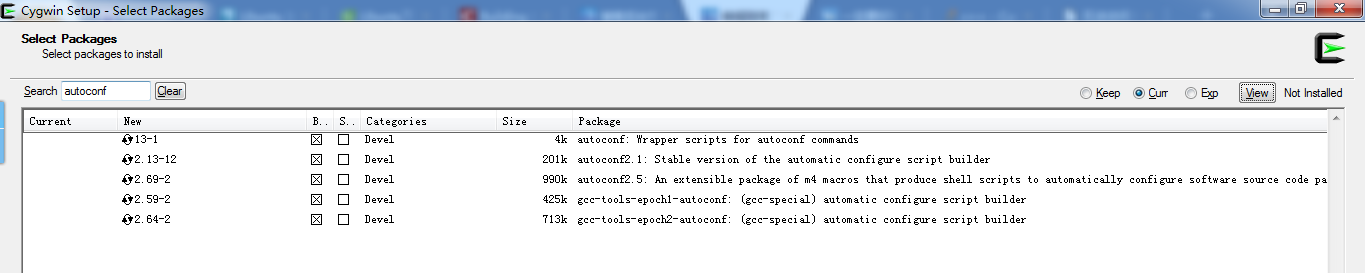
再试一次libtoolize --copy --force
结果还是报同样的错误,回头去看(上面有图,就是libtool那张)原来是libtool-debuginfo和cygwin64-libtool没有安装
于是安装libtool-debuginfo和cygwin64-libtool
再试一次libtoolize --copy --force,成功运行
好了,继续:./configure --prefix D:/ZThread/bin #--prefix指定编译时输出二进制文件的目录
然后还是报错,又运行libtoolize --copy --force,还是报错,无语了
然后,上网搜了半天,在这里找到提示说使用:autoreconf --force --install --symlink
然后又报错Can't exec "aclocal"
继续搜,在这里找到提示说要安装automake(然后我就去Cygwin-setup安装了automake-1.8,注意不要重复安装多个版本,否则会出问题)
然后输入make install又提示make: command not found
还是同样的套路,把make package给勾选安装就行了
【待完善】make: command not found,以及libtool.m4 and ltmain.sh have a version mismatch问题的解决方案的更多相关文章
- libtool: Version mismatch error 解决
在编译一个软件的时候,在 ./configure 和 make 之后可能会出现如下错误: libtool: Version mismatch error. This is libtool 2.4. ...
- libtool: Version mismatch error. 解决方法
在编译一个软件的时候,在 ./configure 和 make 之后可能会出现如下错误: libtool: Version mismatch error. This is libtool 2.4. ...
- ansible执行shell模块和command模块报错| FAILED | rc=127 >> /bin/sh: lsof: command not found和| rc=2 >> [Errno 2] No such file or directory
命令: ansible -i hosts_20 st -m shell -a 'service zabbix_agentd star' -K --become ansible -i hosts_2 ...
- Command 'ifconfig' not found, but can be installed with: sudo apt install net-tools VM Ubuntu 解决方案
VMware下安装的Ubuntu 一开始由于Firefox连不上网,然后通过看了https://www.bbsmax.com/A/VGzlEGYJbq/这个文章之后,自己也测了一下,确实好用 但是if ...
- mooon模板的automake、autoconf、m4和libtool版本信息
autoconf --version autoconf (GNU Autoconf) 2.59 automake --version automake (GNU automake) 1.9.6 m4 ...
- GET command找不到
谷歌的: On running a cronjob with get command, I was getting the following error. /bin/sh: GET: command ...
- Reprint: ADB is Not Recognized as an internal or external command Fix
ADB: Android Debug Bridge http://zacktutorials.blogspot.hk/2013/04/adb-is-not-recognized-as-internal ...
- arcmap Command
The information in this document is useful if you are trying to programmatically find a built-in com ...
- 如何将 Cortana 与 Windows Phone 8.1 应用集成 ( Voice command - Natural language recognition )
随着 Windows Phone 8.1 GDR1 + Cortana 中文版的发布,相信有很多用户或开发者都在调戏 Windows Phone 的语音私人助理 Cortana 吧,在世界杯的时候我亲 ...
随机推荐
- Atom 有什么优秀插件?
蓝色 ,主业三流青春校园小说作家兼反差萌段子手… 韦易笑等 130 人赞同 若是C / C++的话,我推荐ATOM的这几个插件主要用于代码补全,实时语法检测,以及代码格式调整,其实就是Clang的那一 ...
- TensorFlow------读取二进制文件实例
TensorFlow------读取二进制文件实例: class CifarRead(object): ''' 完成读取二进制文件,写进tfrecords,读取tfrecords :param obj ...
- Vue侦听器watch
虽然计算属性在大多数情况下更合适,但有时也需要一个自定义的侦听器.这就是为什么 Vue 通过 watch 选项提供了一个更通用的方法,来响应数据的变化.当需要在数据变化时执行异步或开销较大的操作时,这 ...
- C# this.Hide()
C# this.Hide() 第一次用的时候是在_Load函数里: BookSystem bs = new BookSystem(); bs.ShowDialog(); ...
- 集合系列之fail-fast 与fail-safe 区别
一:快速失败(fail—fast) 在用迭代器遍历一个集合对象时,如果遍历过程中对集合对象的内容进行了修改(增加.删除.修改),则会抛出Concurrent Modification Exceptio ...
- .Net Framework 之 托管模块与程序集的关系
一.基本概念: --托管模块:一个标准的32的可移植执行体(PE32)文件或一个标准的64位可移植执行体(PE32+)文件.由用支持CLR的任何一种语言创建的源代码文件,再经过相应的编译器检查语法和分 ...
- LeetCode-NQueensII
经典的N皇后问题, 这里学到了一个非常牛的新方法(http://www.matrix67.com/blog/archives/266),用位运算来求解N皇后问题: 思路其实也很容易懂,一点都不复杂, ...
- 我的Android进阶之旅------>Android字符串资源中的单引號问题error: Apostrophe not preceded by 的解决的方法
刚刚在string字符串资源文件里,写了一个单引號.报错了,错误代码例如以下 error: Apostrophe not preceded by \ (in OuyangPeng's blog ) 资 ...
- 算法笔记_094:蓝桥杯练习 矩阵相乘(Java)
目录 1 问题描述 2 解决方案 1 问题描述 问题描述 小明最近在为线性代数而头疼,线性代数确实很抽象(也很无聊),可惜他的老师正在讲这矩阵乘法这一段内容. 当然,小明上课打瞌睡也没问题,但线性 ...
- Java学习笔记3、变量、数据类型
标识符 常见的命名规则(见名知意) 包名全部小写 类或者接口,一个单词:首字母大写,多个单词:每个单词首字母大写. 方法或者变量:一个单词:首字母小写,多个单词:从第二个单词开始,每个单词首字母大写. ...