
WebClient与WebRequest差异
WebRequst的使用
WebClient和HttpWebRequst是用来获取数据的2种方式,在我的这篇数据访问(2)中主要是讲的WebClient的使用,一般而言,WebClient更倾向于“按需下载”,事实上掌握它也是相对容易的,而HttpWebRequst则允许你设置请求头或者对内容需要更多的控制,后者有点类似于form中的submit。虽然两者都是异步请求事件,但是WebClient是基于事件的异步,而HttpWebRequst是基于代理的异步编程,下面就用简单的需求两者比较用法上的不同:
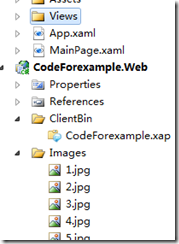
需求很简单,获取Web端的图片然后显示出来,结构如右边所示
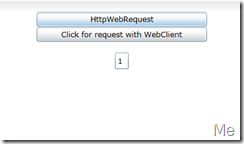
UI很简单:
<StackPanel Background="White">
<Button Width="250"
Content="HttpWebRequest"
Click="Button_Click" />
<Button Width="250"
Content="Click for request with WebClient"
Click="Button_Click_1" />
<TextBox Text="1"
x:Name="numTextBox"
Width="20" />
<Image Height="150"
Name="image1"
Stretch="Fill"
Width="200" />
</StackPanel>
页面上提供一个TextBox用来输入文件名的,先看一看WebClient获取图片并显示在Image的过程
//使用WebClient
private void Button_Click_1(object sender, RoutedEventArgs e)
{
string baseUri = String.Format("http://localhost:49280/Images/{0}.jpg", this.numTextBox.Text.Trim());
Uri uri = new Uri(baseUri, UriKind.Absolute);
WebClient client = new WebClient();
client.OpenReadCompleted += new OpenReadCompletedEventHandler(client_OpenReadCompleted);
}
void client_OpenReadCompleted(object sender, OpenReadCompletedEventArgs e)
{
Stream stream = e.Result;
BitmapImage bitmap = new BitmapImage();
bitmap.SetSource(stream);
this.image1.Source = bitmap;
}
因为之前已经对WebClient总结过了,所以就不再重复了,主要是看一看WebRequst如果要实现相同的代码的过程
//使用WebRequest
private void Button_Click(object sender, RoutedEventArgs e)
{
string baseUri =String.Format("http://localhost:49280/Images/{0}.jpg",this.numTextBox.Text.Trim());
HttpWebRequest request =(HttpWebRequest) WebRequest.Create(baseUri);
request.Method = "GET";
request.BeginGetResponse(new AsyncCallback(ReadCallback), request);
}
public void ReadCallback(IAsyncResult asyc)
{
HttpWebRequest request = (HttpWebRequest)asyc.AsyncState;
HttpWebResponse response = (HttpWebResponse)request.EndGetResponse(asyc);
this.Dispatcher.BeginInvoke(() =>
{
Stream stream = response.GetResponseStream();
BitmapImage bitmap = new BitmapImage();
bitmap.SetSource(stream);
this.image1.Source = bitmap;
}
);
}
几点需要注意的地方: 1,HttpWebRequest是个抽象类,所以无法new的,需要调用HttpWebRequest.Create();
2,其Method指定了请求类型,这里用的GET,还有POST;也可以指定ConentType;
3,其请求的Uri必须是绝对地址;
4,其请求是异步回调方式的,从BeginGetResponse开始,并通过AsyncCallback指定回调方法;
5,因为其回调不是UI线程,所以不能直接对UI进行操作,这里使用Dispatcher.BeginInvoke()
主要是第4点,如果把上面的代码中回调方法改成这样下面的样子的话,VS会提示跨域线程访问无效
HttpWebRequest request = (HttpWebRequest)asyc.AsyncState;
HttpWebResponse response = (HttpWebResponse)request.EndGetResponse(asyc);
Stream stream=response.GetResponseStream();
BitmapImage bitmap = new BitmapImage();
bitmap.SetSource(stream);
this.image1.Source = bitmap;
WebClient与WebRequest差异的更多相关文章
- 第三节:总结.Net下后端的几种请求方式(WebClient、WebRequest、HttpClient)
一. 前言 前端调用有Form表单提交,ajax提交,ajax一般是用Jquery的简化写法,在这里不再过多介绍: 后端调用大约有这些:WebCient.WebRequest.Httpclient.W ...
- Csharp:WebClient and WebRequest use http download file
//Csharp:WebClient and WebRequest use http download file //20140318 塗聚文收錄 string filePath = "20 ...
- c#利用WebClient和WebRequest获取网页源代码的比较
前几天举例分析了用asp+xmlhttp获取网页源代码的方法,但c#中一般是可以利用WebClient类和WebRequest类获取网页源代码.下面分别说明这两种方法的实现. WebClient类获取 ...
- C#、.NET网络请求总结(WebClient和WebRequest)
1.关于WebClient第三方的封装,支持多文件上传等 using System; using System.Collections.Generic; using System.Text; usin ...
- c#利用WebClient和WebRequest获取网页源代码
C#中一般是可以利用WebClient类和WebRequest类获取网页源代码.下面分别说明这两种方法的实现. WebClient类获取网页源代码 WebClient类 WebClient ...
- 淘宝开放平台使用WebClient,WebRequest访问时的错误提示导致麻烦
淘宝开放平台(TOP)提供OAuth2.0支持 通过C#的WebClient/WebRequest直接访问时会提示grant type is empty,这是一个非常恼人的错误,你会发现即使传了这个参 ...
- WebClient和WebRequest获取html代码
HTML: <%@ Page Language="C#" AutoEventWireup="true" CodeFile="Default.as ...
- C# WebClient,HttpClient,WebRequest
static void WebClientDemo() { string url = "https://www.cnblogs.com/Fred1987/p/11843418.html&qu ...
- 反射:修改请求头HttpWebRequest/Webclient Header属性的date值-"此标头必须使用适当的属性进行修改"
场景:调用外部接口,接口要求Header信息里面包涵Date信息,且Date信息必须是格式化好的,(他们用的是Java),但是C#默认的是Date属性不能被修改, 所以就会出现下面的错误: 未处理的异 ...
随机推荐
- "我爱记单词"测试报告兼功能展示
"我爱记单词"测试报告兼功能展示 前言: 我们大部分的测试都是一边开发一边完成的,这里给出软件开发基本完成后在使用时的一些测试例子. 一.背景介绍 我们的数据库中一共有10个表: ...
- 2016HUAS暑假集训训练题 B - Catch That Cow
B - Catch That Cow Description Farmer John has been informed of the location of a fugitive cow and w ...
- jquery无法修改网页标题,无法修改网页标题
今天遇到一个问题,搜索时动态修改网页标题,用jquery的这段代码无效,无论FF还是IE $("title").html("new title"); 后来只好用 ...
- Matlab里面的SVM
支持向量机是建立在统计学习理论基础之上的新一代机器学习算法,支持向量机的优势主要体现在解决线性不可分问题,它通过引入核函数,巧妙地解决了在高维空间中的内积运算,从而很好地解决了非线性分类问题. 构造出 ...
- Unity学习疑问记录之正交与透视
Unity中相机的投影是2种方式,正交和透视 这是透视方式 正交方式: //计算屏幕宽度 float height = 2.0f * Camera.main.orthographicSize;//正交 ...
- 【iCore3双核心板】iCore3双核心板使用说明(图文)
1.iCore3供电.程序下载线路连接示意图(使用iTool2) 2.iCore3供电.程序下载线路连接示意图(使用J-link和Blaster) 3.iCore3供电.读U盘线路连接示意图
- centos桌面使用
firefox添加flash插件 [root@bogon home]# cp libflashplayer.so /usr/lib64/mozilla/pl pl plugins/ plugins-w ...
- asp.net identity 2.2.0 中角色启用和基本使用(五)
建立控制器UsersAdminController 第一步:在controllers文件夹上点右键>添加>控制器, 我这里选的是“MVC5 控制器-空”,名称设置为:UsersAdminC ...
- ios-滚动视图滚动取消键盘
_scroll.keyboardDismissMode = UIScrollViewKeyboardDismissModeOnDrag;_SearchTable.keyboardDismissMode ...
- Flink - RocksDBStateBackend
如果要考虑易用性和效率,使用rocksDB来替代普通内存的kv是有必要的 有了rocksdb,可以range查询,可以支持columnfamily,可以各种压缩 但是rocksdb本身是一个库,是跑在 ...