
Spring利器之包扫描器
在学习Spring这门技术中为了大大减少applicationContext.xml配置的代码量于是有了包扫描器。
闲话不多说我们马上来实现一下吧
示例架构如下:
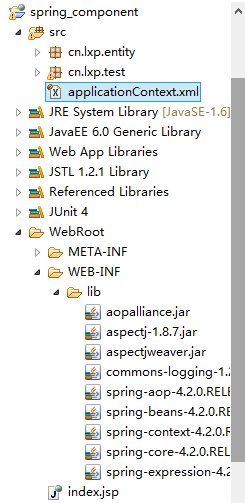
第一步我们先来修改我们的配置applicationContext.xml文件在其定义我们的包扫描器
<?xml version="1.0" encoding="UTF-8"?>

<beans xmlns="http://www.springframework.org/schema/beans"

    xmlns:xsi="http://www.w3.org/2001/XMLSchema-instance"

    xmlns:context="http://www.springframework.org/schema/context" xsi:schemaLocation="

        http://www.springframework.org/schema/beans http://www.springframework.org/schema/beans/spring-beans.xsd

        http://www.springframework.org/schema/context http://www.springframework.org/schema/context/spring-context.xsd">

 //包扫描器管理包以下的类

    <context:component-scan base-package="cn.lxp.entity"></context:component-scan>

    </beans>
第二步我们先创建实体类StudentInfo
package cn.lxp.entity;

import org.springframework.beans.factory.annotation.Value;

import org.springframework.stereotype.Component;

@Component("info")

public class StudentInfo {
//赋值

    @Value("Mr.DaPeng")

private String Name;
//赋值

    @Value("18")

private String age;

@Override

    public String toString() {

        return "StudentInfo [Name=" + Name + ", age=" + age + "]";

    }

public String getName() {

    return Name;

}

public void setName(String name) {

    Name = name;

}

public String getAge() {

    return age;

}

public void setAge(String age) {

    this.age = age;

}

}
第三步创建一个测试类SpringTest来测试我们的代码
package cn.lxp.test;

import org.junit.Test;

import org.springframework.context.ApplicationContext;

import org.springframework.context.support.ClassPathXmlApplicationContext;

import cn.lxp.entity.StudentInfo;

public class SpringTest {

    @Test

    public  void testOne(){

        ApplicationContext context=new ClassPathXmlApplicationContext("applicationContext.xml");

        StudentInfo stu=(StudentInfo)context.getBean("info");

        System.out.println(stu);

    }

}
这样我们就不用再配置文件中写很多配置的东西了直接用包扫描器为我们定义的属性赋值了

Spring利器之包扫描器的更多相关文章
- Java 包扫描器
包扫描器 获取一个包下的所有类,然后使用默认的类加载器加载到内存中 public static List<Class<?>> scanByPackage(String pack ...
- 各个版本spring的jar包以及源码下载地址
各个版本spring的jar包以及源码下载地址,目前最高版本到spring4.1.2,留存备用: http://maven.springframework.org/release/org/spring ...
- Spring众多jar包的特点,及Spring jar包官网下载方法
下面给大家说说spring众多jar包的特点吧,无论对于初学spring的新手,还是spring高手,这篇文章都会给大家带来知识上的收获,如果你已经十分熟悉本文内容就当做一次温故知新吧.spring. ...
- 笔面试复习(spring常用.jar包/事务/控制反转/bean对象管理和创建/springMVC工作原理/sql查询)
###spring常用jar包1.spring.jar是包含有完整发布模块的单个jar包.2.org.springframework.aop包含在应用中使用Spring的AOP特性时所需要的类.3.o ...
- spring相关jar包的作用讲解(转)
Spring各个jar包作用 原文链接:https://www.cnblogs.com/1995hxt/p/5255210.html Spring AOP:Spring的面向切面编程,提供AOP ...
- spring的jar包以及相关的API文档的下载方式
转自:http://blog.csdn.net/yuexianchang/article/details/53583327 侵删 感谢原创 首先是进入官网:https://spring.io/ 如图所 ...
- Spring各个jar包详解
Spring各jar包详解 spring.jar 是包含有完整发布模块的单个jar 包.但是不包括mock.jar,aspects.jar, spring-portlet.jar, and sprin ...
- Spring框架针对dao层的jdbcTemplate操作crud之delete删除数据库操作 Spring相关Jar包下载
首先,找齐Spring框架中IoC功能.aop功能.JdbcTemplate功能所需的jar包,当前13个Jar包 1.Spring压缩包中的四个核心JAR包,实现IoC控制反转的根据xml配置文件或 ...
- spring的jar包的下载、说明
spring的jar包官方下载地址:完整链接:https://repo.spring.io/webapp/#/artifacts/browse/tree/General/libs-release-lo ...
随机推荐
- Tsung安装与使用
Tsung安装与使用 Tsung安装与使用的详细说明,包括测试场景的脚本配置说明 Ray 2013/11/11 目录 安装tsung Tsung运行环境安装... Tsung安装... 使用Tsu ...
- jquery简单动画
自定义滑入滑出动画 <%@ Page Language="C#" AutoEventWireup="true" CodeFile="Defaul ...
- python 学习笔记十三 JQuery(进阶篇)
jQuery 是一个 JavaScript 库. jQuery 极大地简化了 JavaScript 编程. 安装jQuery 有两个版本的 jQuery 可供下载: Production versio ...
- html、css 【珍藏】
行内元素:会在水平方向排列,不能包含块级元素,设置width无效,height无效(可以设置line-height),margin上下无效,padding上下无效. 块级元素: 各占据一 ...
- REST 架构风格
目前基于网络应用的架构风格主要有三种: RPC架构风格 将服务器看作是由一些过程组成,客户端调用这些过程来执行特定的任务.SOAP就是RPC风格的一种架构.过程是动词性的(做某件事),因此RPC建 ...
- 笔记本_Lenovo_G480
ZC: 这是 严g 的笔记本 1.进入 BIOS --> F2键 2.安装 WinServer2003时,蓝屏 2.1.Win2003的PE(不太明白 这里的PE指什么...)不支持 AHCI ...
- IP和端口的相关检测
1.查看自己电脑的ip,使用ipconfig命令 2.检测某个ip是否可以连通,直接使用ping命令 3.windows下查看本机都有哪些端口开放,使用netstat -anp tcp 命令 4.查看 ...
- MFC编程入门之十二(对话框:非模态对话框的创建及显示)
上一节讲了模态对话框及其弹出过程,本节接着讲另一种对话框--非模态对话框的创建及显示. 非模态对话框显示后,程序其他窗口仍然能正常运行,可以响应用户输入,还可以相互切换.上一讲中创建的Tip模态对话框 ...
- Oracle存储过程-自定义数据类型,集合,遍历取值
摘要 Oracle存储过程,自定义数据类型,集合,遍历取值 目录[-] 0.前言 1.Packages 2.Packages bodies 3.输出结果 0.前言 在Oracle的存储过程中,可能会遇 ...
- find一些常用参数的一些常用实例和一些具体用法和注意事项。
find一些常用参数的一些常用实例和一些具体用法和注意事项. 1.使用name选项: 文件名选项是find命令最常用的选项,要么单独使用该选项,要么和其他选项一起使用. 可以使用某种文件名模式来匹配 ...