
【Android】设置 LinearLayout 的样式
前言
LinearLayout是最常用的控件之一,主要是用来进行排版布局,本人介绍如何给LinearLayout 增加边框样式,在增加样式之前的效果如下:
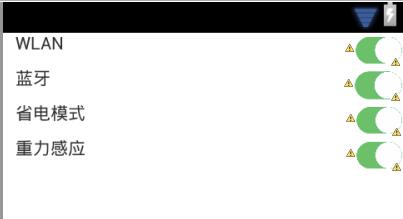
可以看得出来,每个LinearLayout几乎都连接在一起,视觉效果较差,下面我们为此编写一个样式,如同CSS样式表:
解决方法
1.在res文件夹中新建一个 android 的 xml 文件,命名为“linearlayout_boder”,代码如下:
<?xml version="1.0" encoding="utf-8"?>

<shape xmlns:android="http://schemas.android.com/apk/res/android" >

    <solid android:color="#FFFFFF" />

    <stroke

        android:width="0.1dp"

        android:color="#DDDDDD" />

    <padding

        android:bottom="1dp"

        android:left="0.5dp"

        android:right="0.5dp"

        android:top="0dp" />

</shape>
2.在需要用到此样式的地方增加如下代码:
android:background="@drawable/linearlayout_boder"
3.完整代码如下:
<?xml version="1.0" encoding="utf-8"?>

<LinearLayout xmlns:android="http://schemas.android.com/apk/res/android"

    android:layout_width="match_parent"

    android:layout_height="match_parent"

    android:orientation="vertical"

   >

    <LinearLayout

        android:layout_width="match_parent"

        android:layout_height="28dp"

         android:background="@drawable/linearlayout_boder"

         >

        <TextView

            android:id="@+id/TextView04"

            android:layout_width="wrap_content"

            android:layout_height="wrap_content"

            android:layout_weight="9"

            android:text="   WLAN" />

        <ImageView

            android:id="@+id/ImageView04"

            android:layout_width="28dp"

            android:layout_height="match_parent"

            android:layout_weight="0.38"

            android:src="@drawable/onblack" />

    </LinearLayout>

    <LinearLayout

        android:layout_width="match_parent"

        android:layout_height="28dp"

         android:background="@drawable/linearlayout_boder">

        <TextView

            android:id="@+id/TextView03"

            android:layout_width="wrap_content"

            android:layout_height="wrap_content"

            android:layout_weight="9"

            android:text="   蓝牙" />

        <ImageView

            android:id="@+id/ImageView03"

            android:layout_width="28dp"

            android:layout_height="match_parent"

            android:layout_weight="0.38"

            android:src="@drawable/onblack" />

    </LinearLayout>

    <LinearLayout

        android:layout_width="match_parent"

        android:layout_height="28dp"

         android:background="@drawable/linearlayout_boder">

        <TextView

            android:id="@+id/TextView02"

            android:layout_width="wrap_content"

            android:layout_height="wrap_content"

            android:layout_weight="9"

            android:text="   省电模式" />

        <ImageView

            android:id="@+id/ImageView02"

            android:layout_width="28dp"

            android:layout_height="match_parent"

            android:layout_weight="0.38"

            android:src="@drawable/onblack" />

    </LinearLayout>

    <LinearLayout

        android:layout_width="match_parent"

        android:layout_height="28dp"

         android:background="@drawable/linearlayout_boder">

        <TextView

            android:id="@+id/textView1"

            android:layout_width="wrap_content"

            android:layout_height="wrap_content"

            android:layout_weight="9"

            android:text="   重力感应" />

        <ImageView

            android:id="@+id/imageView1"

            android:layout_width="28dp"

            android:layout_height="match_parent"

            android:layout_weight="0.38"

            android:src="@drawable/onblack" />

    </LinearLayout>

</LinearLayout>
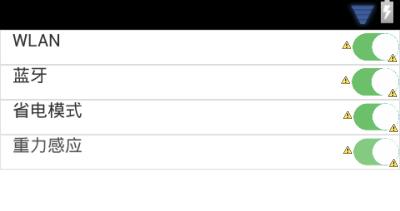
最终效果
【Android】设置 LinearLayout 的样式的更多相关文章
- android自定义控件,动态设置Button的样式
原文 http://www.cnblogs.com/landptf/p/4562203.html 今天来看一个通过重写Button来动态实现一些效果,如圆角矩形.圆形.按下改变字体,改变背景色,改变 ...
- Android按钮的各个样式设置
安卓开发学习之014 Button应用详解(样式.背景.按钮单击.长按.双击.多击事件) 一.Button简介 按钮也是继承自TextView 二.XML定义方法 <Button android ...
- Android下用程序的方法为ListView设置分割线Divider样式
使用XML的时候可以使用android:divider属性为ListView设置分割线的样式(颜色或者资源文件),而在Java代码中默认提供的方法 listView.setDivider() 却只支持 ...
- 巧用android:divider属性设置LinearLayout中元素之间的间隔
如上图,要想实现3个button线性排列并且使它们的大小相同.间隔相等.而且整体填充满整个linearlayout,我们一般的做法是在每两个button之间放一个固定宽度的view,然后设置butto ...
- Android 自定义RadioButton的样式
Android 自定义RadioButton的样式 我们知道Android控件里的button,listview可以用xml的样式自定义成自己希望的漂亮样式. 最近用到RadioButton,利用xm ...
- Android中实现全屏、无标题栏的两种办法(另附Android系统自带样式的解释)
在进行UI设计时,我们经常需要将屏幕设置成无标题栏或者全屏.要实现起来也非常简单,主要有两种方法:配置xml文件和编写代码设置. 1.在xml文件中进行配置 在项目的清单文件AndroidManife ...
- android.widget.FrameLayout$LayoutParams cannot be cast to android.widget.LinearLayout$LayoutParams
http://blog.csdn.net/lilu_leo/article/details/11952717 有时候需要在在代码中设置LayoutParams,自己为一个FrameLayout设置 ...
- 通过Spannable对象设置textview的样式
通过Spannable对象我们可以设置textview的各种样式,其功能十分强大.通过SpannableString和它的setSpan(Object what, int start, int end ...
- Android中无标题样式和全屏样式学习
在进行UI设计时,我们经常需要将屏幕设置成无标题栏或者全屏.要实现起来也非常简单,主要有两种方法:配置xml文件和编写代码设置. 1.在xml文件中进行配置 在项目的清单文件AndroidManife ...
随机推荐
- Thinking in Java——笔记(7)
Reusing Classes The first is composition,You're simply reusing the functionality of the code, not it ...
- JS中的_proto_(2)
function God(){} function Foo(){ this.name="Foo~~"; } Foo.prototype = new God(); function ...
- Spark1.6.2 java实现读取txt文件插入MySql数据库代码
package com.gosun.spark1; import java.util.ArrayList;import java.util.List;import java.util.Properti ...
- Rectangle Area || LeetCode
把交叉点的坐标求出来即可. #define max(a,b) ( (a)>(b)?(a):(b) ) #define min(a,b) ( (a)<(b)?(a):(b) ) int co ...
- center的用法
(1)先 frame ,决定大小,也就是宽.高 (2)再center,决定位置, 需要注意的是,不能直接写center,需要通过CGPointMake(x,y)赋值
- [转]线性插值&双线性插值&三线性插值
转自:http://www.cnblogs.com/yingying0907/archive/2012/11/21/2780092.html 內插是数学领域数值分析中的通过已知的离散数据求未知数据的过 ...
- Python基础一. 简介、变量、对象及引用
一.Python简介 Python是一门计算机编程语言,它是由荷兰人Guido van Rossum在1989年圣诞节期间为了打发无聊的圣诞节而编写的,作为ABC语言的继承 特性: 面向对象.解释型. ...
- 【转】MySQL数据库MyISAM和InnoDB存储引擎的比较
MySQL有多种存储引擎,MyISAM和InnoDB是其中常用的两种.这里介绍关于这两种引擎的一些基本概念(非深入介绍). MyISAM是MySQL的默认存储引擎,基于传统的ISAM类型,支持全文搜索 ...
- 用jQuery实现限制输入字数的文本框
1.导入外部.js文件: <script src="js/jquery-1.8.3.js" type="text/javascript"></ ...
- jq 页面延时刷新
最常用的方法 <script language='javascript' type='text/javascript'> $(function () { setTimeout(functi ...