
Java字节流:ByteArrayInputStream ByteArrayOutputStream
-----------------------------------------------------------------------------------
ByteArrayInputStream
类声明:public class ByteArrayInputStream extends InputStream
位于java.io包下
官方对其说明:
A ByteArrayInputStream contains an internal buffer that contains bytes that may be read from the stream. An internal counter keeps track of the next byte to be supplied by the read method.
(简单翻译:ByteArrayInputStream包含一个内部缓冲区,该缓冲区包含从流中读取的字节数据。内部计数器跟踪read方法要提供的下一个字节)
Closing a ByteArrayInputStream has no effect. The methods in this class can be called after the stream has been closed without generating an IOException.
(简单翻译:关闭ByteArrayInputStream无效,此类中的方法在关闭此流后仍可被调用,而不会产生IOException)
主要字段:
protected byte[] buf: 存储输入流中的字节数组
protected int count: 输入流中字节的个数
protected int mark: 流中当前的标记位置
protected int pos: 要从输入流缓冲区中读取的下一个字节的索引
构造方法:
ByteArrayInputStream(byte[] buf);
创建一个ByteArrayInputStream实例,使用字节数组buf作为其缓冲区数组。
ByteArrayInputStream(byte[] buf,int offset,int length);
创建一个ByteArrayInputStream实例,使用字节数组buf从offset开始的len个字节作为其缓冲区数组。
主要方法:
- int available(): 输入流中可读取的字节个数
- void close(): 关闭此输入流并释放与该流有关的系统资源.
- void mark(int readlimit): 在此输入流中标记当前的位置.
- boolean markSupported(): 检测此输入流是否支持mark和reset.
- int read(): 从输入流中读取下一个字节数据.
- int read(byte[] b,int off,int len): 从输入流中读取len个字节,并将其存储在字节数组b中off位置开始的地方
- void reset(): 将此流重新定位到最后一次对此输入流调用mark方法时的位置.
- long skip(long n): 跳过和丢弃此输入流中n个字节的数据.
通过实例演示查看源代码:
通过构造方法ByteArrayInputStream(byte[] buf)来创建一个ByteArrayInputStream类的实例
byte[] bytes = new byte[]{'a','b','c','d','e','f','g','h','j','k'};
ByteArrayInputStream byteArrayInputStream = new ByteArrayInputStream(bytes);
查看ByteArrayInputStream(byte[] buf)构造方法的源代码:
 public ByteArrayInputStream(byte buf[]) {

         this.buf = buf;

         this.pos = 0;

         this.count = buf.length;

     }
此时ByteArrayInputStream实例在内存中的情况如下图,可以看出构造函数的参数 byte buf[]就是输入流中的数据。
实例byteArrayInputStream中的属性 count = 10、mark = 0、pos = 0;

下面来看看具体的方法
(1)int available()方法
功能: 返回输入流中还能够被读取的字节个数
源代码如下:
/**
* Returns the number of remaining bytes that can be read (or skipped over)
* from this input stream.
* <p>
* The value returned is <code>count - pos</code>,
* which is the number of bytes remaining to be read from the input buffer.
*
* @return the number of remaining bytes that can be read (or skipped
* over) from this input stream without blocking.
*/
public synchronized int available() {
return count - pos;
}
执行:byteArrayInputStream.available()方法 返回值是10。(available()方法的返回值会随着pos的增大而变小)
(2)void close()方法
功能: 关闭输入流(但ByteArrayInputStream此方法无效)
源代码如下:
     /**

      * Closing a <tt>ByteArrayInputStream</tt> has no effect. The methods in

      * this class can be called after the stream has been closed without

      * generating an <tt>IOException</tt>.

      * <p>

      */

     public void close() throws IOException {

     }
执行:byteArrayInputStream.close()方法 没有任何的效果,因为源代码中方法体没有任何的代码.
(3)int read()方法
功能: 从输入流中读取下一个字节数据
源代码如下:
     /**

      * Reads the next byte of data from this input stream. The value

      * byte is returned as an <code>int</code> in the range

      * <code>0</code> to <code>255</code>. If no byte is available

      * because the end of the stream has been reached, the value

      * <code>-1</code> is returned.

      * <p>

      * This <code>read</code> method

      * cannot block.

      *

      * @return  the next byte of data, or <code>-1</code> if the end of the

      *          stream has been reached.

      */

     public synchronized int read() {

         return (pos < count) ? (buf[pos++] & 0xff) : -1;

     }
执行:byteArrayInputStream.read()方法,返回值为: 97.
此时ByteArrayInputStream实例在内存中的情况如下图,此时属性pos的为1.

(4)boolean markSupported()
功能: 检测此输入流是否支持mark()和reset()
源代码如下:
     /**

      * Tests if this <code>InputStream</code> supports mark/reset. The

      * <code>markSupported</code> method of <code>ByteArrayInputStream</code>

      * always returns <code>true</code>.

      *

      * @since   JDK1.1

      */

     public boolean markSupported() {

         return true;

     }
执行:byteArrayInputStream.markSupported()方法,返回值为: true
(5)下面三个方法主要是用来修改ByteArrayInputStream类实例中的 pos和mark属性的。
void mark(int readlimit): 在此输入流中标记当前的位置.
void reset(): 将此流重新定位到最后一次对此输入流调用mark方法时的位置.
long skip(long n): 跳过和丢弃此输入流中n个字节的数据.
void mark(int readlimit)
功能:在此输入流中标记当前的位置
源码如下:
     /**

      * Set the current marked position in the stream.

      * ByteArrayInputStream objects are marked at position zero by

      * default when constructed.  They may be marked at another

      * position within the buffer by this method.

      * <p>

      * If no mark has been set, then the value of the mark is the

      * offset passed to the constructor (or 0 if the offset was not

      * supplied).

      *

      * <p> Note: The <code>readAheadLimit</code> for this class

      *  has no meaning.

      *

      * @since   JDK1.1

      */

     public void mark(int readAheadLimit) {

         mark = pos;

     }
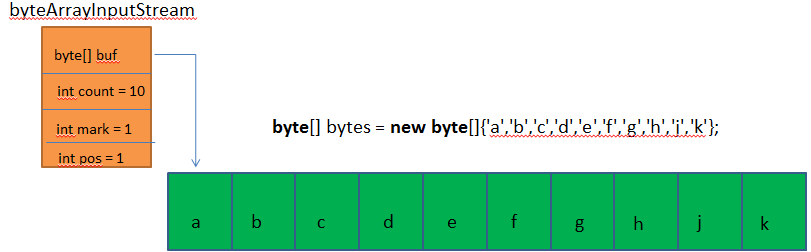
执行:byteArrayInputStream.mark(8)方法,可以看出参数readAheadLimit没有用。
此时ByteArrayInputStream实例在内存中的情况如下图,此时属性mark的值为1
void skip(long n)
功能:将此流重新定位到最后一次对此输入流调用mark方法时的位置.
源代码如下:
     /**

      * Skips <code>n</code> bytes of input from this input stream. Fewer

      * bytes might be skipped if the end of the input stream is reached.

      * The actual number <code>k</code>

      * of bytes to be skipped is equal to the smaller

      * of <code>n</code> and  <code>count-pos</code>.

      * The value <code>k</code> is added into <code>pos</code>

      * and <code>k</code> is returned.

      *

      * @param   n   the number of bytes to be skipped.

      * @return  the actual number of bytes skipped.

      */

     public synchronized long skip(long n) {

         long k = count - pos;

         if (n < k) {

             k = n < 0 ? 0 : n;

         }

         pos += k;

         return k;

     }
执行:byteArrayInputStream.skip(5)方法后,属性pos的值为6。(从输入流中跳过了5个字节)
此时ByteArrayInputStream实例在内存中的情况如下图,此时属性pos的值为6,也就是说下一次调用read()方法时,返回输入流中索引为6位置的值.

void reset()方法
功能:将此流重新定位到最后一次对此输入流调用mark方法时的位置
源代码如下:
     /**

      * Resets the buffer to the marked position.  The marked position

      * is 0 unless another position was marked or an offset was specified

      * in the constructor.

      */

     public synchronized void reset() {

         pos = mark;

     }
执行:byteArrayInputStream.reset()方法后,pos属性值为1。
此时ByteArrayInputStream实例在内存中的情况如下图,此时pos属性的值为1,下一次调用read()方法时,返回输入流中索引为1位置的值

(6)int read(byte[] b,int off,int len)方法
功能:从输入流中读取len个字节,并将其存储在字节数组b中off位置开始的地方
源代码如下:
     /**

      * Reads up to <code>len</code> bytes of data into an array of bytes

      * from this input stream.

      * If <code>pos</code> equals <code>count</code>,

      * then <code>-1</code> is returned to indicate

      * end of file. Otherwise, the  number <code>k</code>

      * of bytes read is equal to the smaller of

      * <code>len</code> and <code>count-pos</code>.

      * If <code>k</code> is positive, then bytes

      * <code>buf[pos]</code> through <code>buf[pos+k-1]</code>

      * are copied into <code>b[off]</code>  through

      * <code>b[off+k-1]</code> in the manner performed

      * by <code>System.arraycopy</code>. The

      * value <code>k</code> is added into <code>pos</code>

      * and <code>k</code> is returned.

      * <p>

      * This <code>read</code> method cannot block.

      *

      * @param   b     the buffer into which the data is read.

      * @param   off   the start offset in the destination array <code>b</code>

      * @param   len   the maximum number of bytes read.

      * @return  the total number of bytes read into the buffer, or

      *          <code>-1</code> if there is no more data because the end of

      *          the stream has been reached.

      * @exception  NullPointerException If <code>b</code> is <code>null</code>.

      * @exception  IndexOutOfBoundsException If <code>off</code> is negative,

      * <code>len</code> is negative, or <code>len</code> is greater than

      * <code>b.length - off</code>

      */

     public synchronized int read(byte b[], int off, int len) {

         if (b == null) {

             throw new NullPointerException();

         } else if (off < 0 || len < 0 || len > b.length - off) {

             throw new IndexOutOfBoundsException();

         }

         if (pos >= count) {

             return -1;

         }

         int avail = count - pos;

         if (len > avail) {

             len = avail;

         }

         if (len <= 0) {

             return 0;

         }

         System.arraycopy(buf, pos, b, off, len);

         pos += len;

         return len;

     }
执行:byteArrayInputStream.read(b,0,5)方法后,b数组中的值为['b','c','d','e','f'].
此时ByteArrayInputStream实例在内存中的情况如下图,属性pos的值为6.

------------------------------------------------------------------------
ByteArrayOutputStream
类声明:public class ByteArrayOutputStream extends OutputStream
位于java.io包下
官方对其说明:
This class implements an output stream in which the data is written into a byte array. The buffer automatically grows as data is written to it. The data can be retrieved using toByteArray() and toString().
(简单翻译:ByteArrayInputStream实现了一个输出流,其中的数据被写入一个byte数组。缓冲区会随着数据的不断写入而自动增长。可以使用toByteArray()和toString()方法来获取数据)
Closing a ByteArrayOutputStream has no effect. The methods in this class can be called after the stream has been closed without generating an IOException.
(简单翻译:关闭ByteArrayOutputStream无效,此类中的方法在关闭此流后仍可被调用,而不会产生IOException)
主要字段:
protected byte[] buf: 存储数据的缓冲区
protected int count: 缓冲区中的有效字节数
构造方法:
ByteArrayOutputStream(): 创建一个新的byte数组输出流。
ByteArrayOutputStream(int size): 创建一个新的byte数组输出流,它具有指定大小的缓冲区容量(以字节为单位)。
主要方法:
- void close():
- void reset():
- int size(): 返回缓冲区的当前大小
- byte[] toByteArray(): 创建一个新分配的byte数组
- String toString():
- String toString(String charsetName):
- void write(byte[] b,int off,int len):
- void write(int b):
- void writeTo(OutputStream out):
通过实例演示查看源代码:
通过构造方法ByteArrayOutputStream()来创建一个ByteArrayOutputStream类的实例
ByteArrayOutputStream byteArrayOutputStream = new ByteArrayOutputStream();
查看ByteArrayOutputStream()构造方法的源代码:
  /**

      * Creates a new byte array output stream. The buffer capacity is

      * initially 32 bytes, though its size increases if necessary.

      */

     public ByteArrayOutputStream() {

         this(32);

     }

     /**

      * Creates a new byte array output stream, with a buffer capacity of

      * the specified size, in bytes.

      *

      * @param   size   the initial size.

      * @exception  IllegalArgumentException if size is negative.

      */

     public ByteArrayOutputStream(int size) {

         if (size < 0) {

             throw new IllegalArgumentException("Negative initial size: "

                                                + size);

         }

         buf = new byte[size];

     }
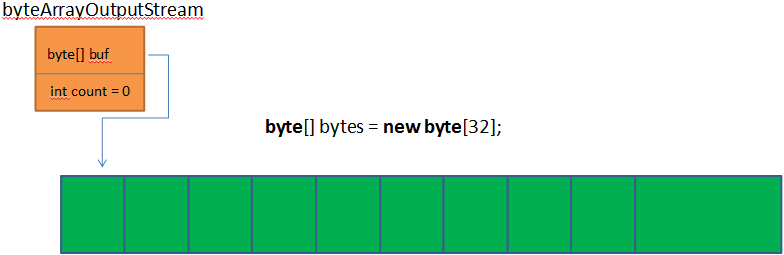
此时ByteArrayOutputStream实例在内存中的情况如下图:
下面来看看具体的方法:
(1)int close()方法
功能: 无效,源代码中什么代码都没有。
源代码如下:
      /**

      * Closing a <tt>ByteArrayOutputStream</tt> has no effect. The methods in

      * this class can be called after the stream has been closed without

      * generating an <tt>IOException</tt>.

      * <p>

      *

      */

     public void close() throws IOException {

     }
执行:byteArrayOutputStream.close()方法,不会有任何效果。
(2)void write(int b)
功能: 将指定的数据 写入到此输出流中
源代码如下:
     /**

      * Writes the specified byte to this byte array output stream.

      *

      * @param   b   the byte to be written.

      */

     public synchronized void write(int b) {

         ensureCapacity(count + 1);

         buf[count] = (byte) b;

         count += 1;

     }
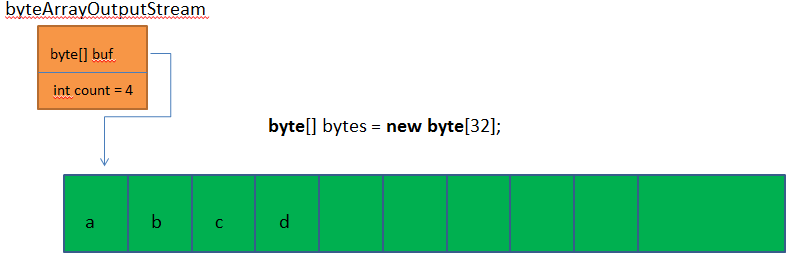
执行:byteArrayOutputStream.write(97)方法
执行:byteArrayOutputStream.write(98)方法
执行:byteArrayOutputStream.write(99)方法
执行:byteArrayOutputStream.write(100)方法
此时ByteArrayOutputStream实例在内存中的情况如下图:
(3)void write(byte b[], int off, int len)
功能: 将指定的字节数组b 从off位置开始的len个字节 写入到此输出流中。
源代码如下:
     /**

      * Writes <code>len</code> bytes from the specified byte array

      * starting at offset <code>off</code> to this byte array output stream.

      *

      * @param   b     the data.

      * @param   off   the start offset in the data.

      * @param   len   the number of bytes to write.

      */

     public synchronized void write(byte b[], int off, int len) {

         if ((off < 0) || (off > b.length) || (len < 0) ||

             ((off + len) - b.length > 0)) {

             throw new IndexOutOfBoundsException();

         }

         ensureCapacity(count + len);

         System.arraycopy(b, off, buf, count, len);

         count += len;

     }
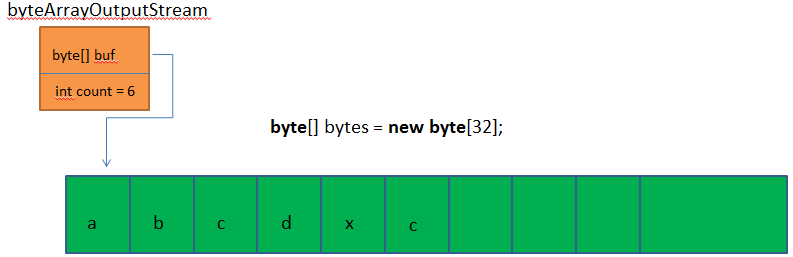
执行:
byte[] b = new byte[]{'z','x','c','f'}
byteArrayOutputStream.write(b,1,2)方法
此时ByteArrayOutputStream实例在内存中的情况如下图:
(4)void size()
功能:返回输出流中字节个数
源代码如下:
     /**

      * Returns the current size of the buffer.

      *

      * @return  the value of the <code>count</code> field, which is the number

      *          of valid bytes in this output stream.

      * @see     java.io.ByteArrayOutputStream#count

      */

     public synchronized int size() {

         return count;

     }
执行:byteArrayOutputStream.size()方法,返回的结果是:6
(5)byte[] toByteArray()
功能:将输出流中的字节数据以字节数组的形式返回
源代码如下:
     /**

      * Creates a newly allocated byte array. Its size is the current

      * size of this output stream and the valid contents of the buffer

      * have been copied into it.

      *

      * @return  the current contents of this output stream, as a byte array.

      * @see     java.io.ByteArrayOutputStream#size()

      */

     public synchronized byte toByteArray()[] {

         return Arrays.copyOf(buf, count);

     }
执行:byteArrayOutputStream.toByteArray()方法,返回的结果是:97 98 99 100 120 99
(6)String toString()、String toString(String charsetName)
功能:将输出流中的字节数据转换成字符串
源代码如下:
     /**

      * Converts the buffer's contents into a string decoding bytes using the

      * platform's default character set. The length of the new <tt>String</tt>

      * is a function of the character set, and hence may not be equal to the

      * size of the buffer.

      *

      * <p> This method always replaces malformed-input and unmappable-character

      * sequences with the default replacement string for the platform's

      * default character set. The {@linkplain java.nio.charset.CharsetDecoder}

      * class should be used when more control over the decoding process is

      * required.

      *

      * @return String decoded from the buffer's contents.

      * @since  JDK1.1

      */

     public synchronized String toString() {

         return new String(buf, 0, count);

     }

     /**

      * Converts the buffer's contents into a string by decoding the bytes using

      * the specified {@link java.nio.charset.Charset charsetName}. The length of

      * the new <tt>String</tt> is a function of the charset, and hence may not be

      * equal to the length of the byte array.

      *

      * <p> This method always replaces malformed-input and unmappable-character

      * sequences with this charset's default replacement string. The {@link

      * java.nio.charset.CharsetDecoder} class should be used when more control

      * over the decoding process is required.

      *

      * @param  charsetName  the name of a supported

      *              {@linkplain java.nio.charset.Charset </code>charset<code>}

      * @return String decoded from the buffer's contents.

      * @exception  UnsupportedEncodingException

      *             If the named charset is not supported

      * @since   JDK1.1

      */

     public synchronized String toString(String charsetName)

         throws UnsupportedEncodingException

     {

         return new String(buf, 0, count, charsetName);

     }
(7)void reset()
功能:将此 byte 数组输出流的 count 字段重置为零,从而丢弃输出流中目前已累积的所有输出。
源代码如下:
     /**

      * Resets the <code>count</code> field of this byte array output

      * stream to zero, so that all currently accumulated output in the

      * output stream is discarded. The output stream can be used again,

      * reusing the already allocated buffer space.

      *

      * @see     java.io.ByteArrayInputStream#count

      */

     public synchronized void reset() {

         count = 0;

     }
Java字节流:ByteArrayInputStream ByteArrayOutputStream的更多相关文章
- 【java】内存流:java.io.ByteArrayInputStream、java.io.ByteArrayOutputStream、java.io.CharArrayReader、java.io.CharArrayWriter
package 内存流; import java.io.ByteArrayInputStream; import java.io.ByteArrayOutputStream; import java. ...
- Java IO 流-- 字节数组流ByteArrayInPutStream ByteArrayOutPutStream
字节数组流输于缓冲流,放在jvm内存中,java可以直接操作.我们使用时可以不用关闭,交给GC垃圾回收机制处理. 当然我们为了保持良好习惯和代码一致性也可以加上关闭语句. 当其实我么打开ByteArr ...
- Java 字节流操作
在java中我们使用输入流来向一个字节序列对象中写入,使用输出流来向输出其内容.C语言中只使用一个File包处理一切文件操作,而在java中却有着60多种流类型,构成了整个流家族.看似庞大的体系结构, ...
- Java之ByteArrayInputStream和ByteArrayOutputStream-操作字节数组的类
ByteArrayInputStream和ByteArrayOutputStream 源:内存中的字节数组 目的:内存中的字节数组 这两个流对象不涉及底层资源的调用,操作的都是内存中的数组,所以不需要 ...
- 使用Java字节流拷贝文件
本文给出使用Java字节流实现文件拷贝的例子 package LearnJava; import java.io.*; public class FileTest { public static vo ...
- java 字节流和字符流的区别 转载
转载自:http://blog.csdn.net/cynhafa/article/details/6882061 java 字节流和字符流的区别 字节流与和字符流的使用非常相似,两者除了操作代码上的不 ...
- java 字节流和字符流的区别
转载自:http://blog.csdn.net/cynhafa/article/details/6882061 java 字节流和字符流的区别 字节流与和字符流的使用非常相似,两者除了操作代码上的不 ...
- Java 字节流实现文件读写操作(InputStream-OutputStream)
Java 字节流实现文件读写操作(InputStream-OutputStream) 备注:字节流比字符流底层,但是效率底下. 字符流地址:http://pengyan5945.iteye.com/b ...
- 关于java字节流的read()方法返回值为int的思考
我们都知道java中io操作分为字节流和字符流,对于字节流,顾名思义是按字节的方式读取数据,所以我们常用字节流来读取二进制流(如图片,音乐 等文件).问题是为什么字节流中定义的read()方法返回值为 ...
随机推荐
- 配置服务器有错/usr/libexec/gconf-sanity-check-2的退出状态为256
问题描述: CentOS启动的时候报如下错误:“配置服务器有错/usr/libexec/gconf-sanity-check-2的退出状态为256” 问题原因: 在装hadoop的时候误删了/tmp文 ...
- Android成长日记-使用ToggleButton实现灯的开关
案例演示 此案例实现思路:通过ToggleButton控件,ImageView控件实现 ---xml代码: <!-- textOn:true textOff:falase[s1] --> ...
- ecshop /search.php SQL Injection Vul
catalog . 漏洞描述 . 漏洞触发条件 . 漏洞影响范围 . 漏洞代码分析 . 防御方法 . 攻防思考 1. 漏洞描述 ECSHOP商城系统Search.php页面过滤不严导致SQL注入漏洞 ...
- C#的图像处理方法--(作者:http://conner-wang.spaces.live.com转载)
使用C#进行图像处理的几种方法 本文讨论了C#图像处理中Bitmap类.BitmapData类和unsafe代码的使用以及字节对齐问题. Bitmap类 命名空间:System.Drawing 封装 ...
- [IOS 静态库]
http://www.2cto.com/kf/201402/276718.html 一.什么是库? 库是共享程序代码的方式,一般分为静态库和动态库. 二.静态库与动态库的区别? 静态库:链接时完整地拷 ...
- mongoDB在centos7上的安装
1,下载安装包 下载MongoDB的安装文件 地址:https://www.mongodb.org/downloads#production 选择Linux 64-bit legacy 版本,下载到目 ...
- hdu 2005 - 第几天?
题意:判断是否为闰年 解法:这题需要注意一下用scanf能直接读入year,month,day 附上代码: 1: #include<stdlib.h> 2: #include<str ...
- Enlisting multiple 1-phase aware participants in the same transaction
In some cases it may be necessary to enlist participants that aren't two-phase commit aware into a t ...
- w3m浏览器 for Linux
w3m是个开放源代码的文字式网页浏览器. w3m支持表格.框架.SSL连线.颜色. 如果是在适当的terminal(内核支持framebuffer)上,甚至还能显示图片. 这个软件通常尽量呈现出网页本 ...
- 深入理解css中position属性及z-index属性
深入理解css中position属性及z-index属性 在网页设计中,position属性的使用是非常重要的.有时如果不能认识清楚这个属性,将会给我们带来很多意想不到的困难. position属性共 ...