
Android android:gravity属性介绍及效果图
转自: http://blog.csdn.net/aminfo/article/details/7784229
Android:gravity的属性官方说明如下:
public static final int AXIS_CLIP
public static final int AXIS_PULL_AFTER
public static final int AXIS_PULL_BEFORE
public static final int AXIS_SPECIFIED
public static final int AXIS_X_SHIFT
public static final int AXIS_Y_SHIFT
public static final int BOTTOM
public static final int CENTER
public static final int CENTER_HORIZONTAL
public static final int CENTER_VERTICAL
public static final int CLIP_HORIZONTAL
public static final int CLIP_VERTICAL
public static final int DISPLAY_CLIP_HORIZONTAL
apply(int, int, int, Rect, int, int, Rect); you must do so yourself by calling applyDisplay(int, Rect, Rect).public static final int DISPLAY_CLIP_VERTICAL
apply(int, int, int, Rect, int, int, Rect); you must do so yourself by calling applyDisplay(int, Rect, Rect).public static final int END
public static final int FILL
public static final int FILL_HORIZONTAL
public static final int FILL_VERTICAL
public static final int HORIZONTAL_GRAVITY_MASK
public static final int LEFT
public static final int NO_GRAVITY
public static final int RELATIVE_HORIZONTAL_GRAVITY_MASK
public static final int RELATIVE_LAYOUT_DIRECTION
public static final int RIGHT
public static final int START
public static final int TOP
public static final int VERTICAL_GRAVITY_MASK
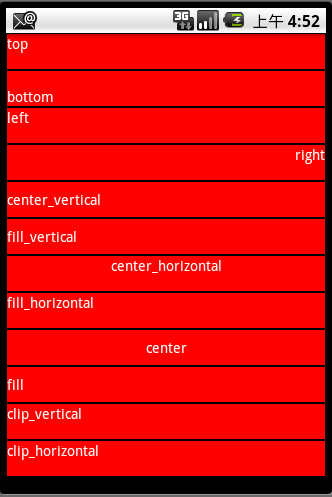
- <?xml version="1.0" encoding="utf-8"?>
- <LinearLayout xmlns:android="http://schemas.android.com/apk/res/android"
- android:layout_width="fill_parent"
- android:layout_height="fill_parent"
- android:orientation="vertical">
- <TextView android:id="@+id/TextView01"
- android:layout_width="fill_parent"
- android:layout_height="35dp"
- android:text="top"
- android:gravity="top"
- android:textColor="#ffffff"
- android:background="#ff0000"
- android:layout_margin="1px"/>
- <TextView android:id="@+id/TextView02"
- android:layout_width="fill_parent"
- android:layout_height="35dp"
- android:text="bottom"
- android:gravity="bottom"
- android:textColor="#ffffff"
- android:background="#ff0000"
- android:layout_margin="1px"/>
- <TextView android:id="@+id/TextView03"
- android:layout_width="fill_parent"
- android:layout_height="35dp"
- android:text="left"
- android:gravity="left"
- android:textColor="#ffffff"
- android:background="#ff0000"
- android:layout_margin="1px"/>
- <TextView android:id="@+id/TextView04"
- android:layout_width="fill_parent"
- android:layout_height="35dp"
- android:text="right"
- android:gravity="right"
- android:textColor="#ffffff"
- android:background="#ff0000"
- android:layout_margin="1px"/>
- <TextView android:id="@+id/TextView05"
- android:layout_width="fill_parent"
- android:layout_height="35dp"
- android:text="center_vertical"
- android:gravity="center_vertical"
- android:textColor="#ffffff"
- android:background="#ff0000"
- android:layout_margin="1px"/>
- <TextView android:id="@+id/TextView06"
- android:layout_width="fill_parent"
- android:layout_height="35dp"
- android:text="fill_vertical"
- android:gravity="fill_vertical"
- android:textColor="#ffffff"
- android:background="#ff0000"
- android:layout_margin="1px"/>
- <TextView android:id="@+id/TextView07"
- android:layout_width="fill_parent"
- android:layout_height="35dp"
- android:text="center_horizontal"
- android:gravity="center_horizontal"
- android:textColor="#ffffff"
- android:background="#ff0000"
- android:layout_margin="1px"/>
- <TextView android:id="@+id/TextView08"
- android:layout_width="fill_parent"
- android:layout_height="35dp"
- android:text="fill_horizontal"
- android:gravity="fill_horizontal"
- android:textColor="#ffffff"
- android:background="#ff0000"
- android:layout_margin="1px"/>
- <TextView android:id="@+id/TextView09"
- android:layout_width="fill_parent"
- android:layout_height="35dp"
- android:text="center"
- android:gravity="center"
- android:textColor="#ffffff"
- android:background="#ff0000"
- android:layout_margin="1px"/>
- <TextView android:id="@+id/TextView10"
- android:layout_width="fill_parent"
- android:layout_height="35dp"
- android:text="fill"
- android:gravity="fill"
- android:textColor="#ffffff"
- android:background="#ff0000"
- android:layout_margin="1px"/>
- <TextView android:id="@+id/TextView11"
- android:layout_width="fill_parent"
- android:layout_height="35dp"
- android:text="clip_vertical"
- android:gravity="clip_vertical"
- android:textColor="#ffffff"
- android:background="#ff0000"
- android:layout_margin="1px"/>
- <TextView android:id="@+id/TextView12"
- android:layout_width="fill_parent"
- android:layout_height="35dp"
- android:text="clip_horizontal"
- android:gravity="clip_horizontal"
- android:textColor="#ffffff"
- android:background="#ff0000"
- android:layout_margin="1px"/>
- </LinearLayout>

- <?xml version="1.0" encoding="utf-8"?>
- <LinearLayout xmlns:android="http://schemas.android.com/apk/res/android"
- android:layout_width="fill_parent"
- android:layout_height="fill_parent"
- android:orientation="vertical">
- <TextView android:id="@+id/TextView01"
- android:layout_width="fill_parent"
- android:layout_height="50dp"
- android:text="top"
- android:gravity="top"
- android:textColor="#ffffff"
- android:background="#00ff00"
- android:layout_margin="2px"/>
- <TextView android:id="@+id/TextView02"
- android:layout_width="fill_parent"
- android:layout_height="50dp"
- android:text="bottom"
- android:gravity="bottom"
- android:textColor="#ffffff"
- android:background="#00ff00"
- android:layout_margin="2px"/>
- <TextView android:id="@+id/TextView03"
- android:layout_width="fill_parent"
- android:layout_height="50dp"
- android:text="left"
- android:gravity="left"
- android:textColor="#ffffff"
- android:background="#00ff00"
- android:layout_margin="2px"/>
- <TextView android:id="@+id/TextView04"
- android:layout_width="fill_parent"
- android:layout_height="50dp"
- android:text="right"
- android:gravity="right"
- android:textColor="#ffffff"
- android:background="#00ff00"
- android:layout_margin="2px"/>
- <TextView android:id="@+id/TextView05"
- android:layout_width="fill_parent"
- android:layout_height="50dp"
- android:text="center_vertical"
- android:gravity="center_vertical"
- android:textColor="#ffffff"
- android:background="#00ff00"
- android:layout_margin="2px"/>
- <TextView android:id="@+id/TextView06"
- android:layout_width="fill_parent"
- android:layout_height="50dp"
- android:text="fill_vertical"
- android:gravity="fill_vertical"
- android:textColor="#ffffff"
- android:background="#00ff00"
- android:layout_margin="2px"/>
- <TextView android:id="@+id/TextView07"
- android:layout_width="fill_parent"
- android:layout_height="50dp"
- android:text="center_horizontal"
- android:gravity="center_horizontal"
- android:textColor="#ffffff"
- android:background="#00ff00"
- android:layout_margin="2px"/>
- <TextView android:id="@+id/TextView08"
- android:layout_width="fill_parent"
- android:layout_height="50dp"
- android:text="fill_horizontal"
- android:gravity="fill_horizontal"
- android:textColor="#ffffff"
- android:background="#00ff00"
- android:layout_margin="2px"/>
- <TextView android:id="@+id/TextView09"
- android:layout_width="fill_parent"
- android:layout_height="50dp"
- android:text="center"
- android:gravity="center"
- android:textColor="#ffffff"
- android:background="#00ff00"
- android:layout_margin="2px"/>
- <TextView android:id="@+id/TextView10"
- android:layout_width="fill_parent"
- android:layout_height="50dp"
- android:text="fill"
- android:gravity="fill"
- android:textColor="#ffffff"
- android:background="#00ff00"
- android:layout_margin="2px"/>
- <TextView android:id="@+id/TextView11"
- android:layout_width="fill_parent"
- android:layout_height="50dp"
- android:text="clip_vertical"
- android:gravity="clip_vertical"
- android:textColor="#ffffff"
- android:background="#00ff00"
- android:layout_margin="2px"/>
- <TextView android:id="@+id/TextView12"
- android:layout_width="fill_parent"
- android:layout_height="50dp"
- android:text="clip_horizontal"
- android:gravity="clip_horizontal"
- android:textColor="#ffffff"
- android:background="#00ff00"
- android:layout_margin="2px"/>
- </LinearLayout>
Android android:gravity属性介绍及效果图的更多相关文章
- Android] Android XML解析学习——方式比较
[Android] Android XML解析学习——方式比较 (ZT) 分类: 嵌入式 (From:http://blog.csdn.net/ichliebephone/article/deta ...
- [Android] Android 支持下拉刷新、上拉加载更多 的 XRecyclerview
XRecyclerView一个实现了下拉刷新,滚动到底部加载更多以及添加header功能的的RecyclerView.使用方式和RecyclerView完全一致,不需要额外的layout,不需要写特殊 ...
- [Android] Android 使用 FragmentTabHost + Fragment 实现 微信 底部菜单
Android 使用 FragmentTabHost + Fragment 实现 微信 底部菜单 利用FragmentTabHost实现底部菜单,在该底部菜单中,包括了4个TabSpec,每个TabS ...
- [Android] Android ViewPager 中加载 Fragment的两种方式 方式(二)
接上文: https://www.cnblogs.com/wukong1688/p/10693338.html Android ViewPager 中加载 Fragmenet的两种方式 方式(一) 二 ...
- [Android] Android ViewPager 中加载 Fragment的两种方式 方式(一)
Android ViewPager 中加载 Fragmenet的两种方式 一.当fragment里面的内容较少时,直接 使用fragment xml布局文件填充 文件总数 布局文件:view_one. ...
- [Android] Android 卡片式控件CardView的优雅使用
[Android] Android 卡片式控件CardView的优雅使用 CardView是在安卓5.0提出的卡片式控件 其具体用法如下: 1.在app/build.gradle 文件中添加 comp ...
- [Android] Android 让UI控件固定于底部的几种方法
Android 让UI控件固定于底部的几种方法1.采用linearlayout布局:android:layout_height="0dp" <!-- 这里不能设置fill_p ...
- [Android] Android 异步定时任务实现的三种方法(以SeekBar的进度自动实现为例)
[Android] Android 定时异步任务实现的三种方法(以SeekBar的进度自动实现为例) 一.采用Handler与线程的sleep(long)方法 二.采用Handler与timer及Ti ...
- Android <Android应用开发实战> 资源类型<一>
1.字符串资源>>1.普通字符串>>2.字符串数组 <resources> <string-array name="planets_array&qu ...
随机推荐
- ORA-14402: 更新分区关键字列将导致分区的更改
默认情况下,oracle的分区表对于分区字段是不允许进行update操作的,如果有对分区字段行进update,就会报错——ORA-14402: 更新分区关键字列将导致分区的更改.這種情況可以通過開啟表 ...
- __get().__set.__isset,__unset魔术方法
一般来说,总是把类的属性定义为 private .这更符合现实的逻辑. 但是对属性的读取和赋值操作非常频繁的,因此在PHP中,预定义了两魔术方法 "__get()"用来获取私有成员属性值的,只有一个参 ...
- HDU 1710 二叉树三种遍历
Binary Tree Traversals Problem Description A binary tree is a finite set of vertices that is either ...
- BZOJ 1922: [Sdoi2010]大陆争霸
Description 一个无向图,到一个点之前需要先到其他点,求从第一个点到第 \(n\) 点最短时间. Sol 拓扑+Dijkstra. 跑Dijkstra的时候加上拓扑序... 用两个数组表示 ...
- PictureCutting图片批量裁切(裁剪)工具
PictureCutting图片批量裁切(裁剪)工具 写这个工具的原因是因为在获取一个软件的皮肤包中的图片的时候需要进行批量的裁切工作,而有没有找到在linux下简单好用的工具,干脆就用QT写了一个. ...
- 【GoLang】GoLang 遍历 map、slice、array方法
代码示例: map1 := make(map[string]string) map1["a"] = "AAA" map1["b"] = &q ...
- MVC Return View() 和 Return PartialView()的区别
分部视图在action中返回一定要用PartialView(),而不要偷懒使用View(),因为,如果你使用View()渲染视图,系统会认为你是一个标准视图,会为你加个默认的母板页(Layout),除 ...
- Delete a node from BST
Given a root node reference of a BST and a key, delete the node with the given key in the BST. Retur ...
- [转] Android利用tcpdump抓包
原文链接:http://mysuperbaby.iteye.com/blog/902201 Android利用tcpdump抓包 博客分类: Android AndroidAccessGoHTML ...
- 使用ssh正向连接、反向连接、做socks代理的方法
ssh -L 219.143.16.157:58080:172.21.163.32:8080 用户名@localhost -p 10142 在 219.143.16.157机器执行 将ssh隧 ...