
VS2013: upgrading a Windows Phone 7/8 and Windows 8 apps(转)
VS2013: upgrading a Windows Phone 7/8 and Windows 8 apps
In this post I will showcase issues I had while upgrading a Visual Studio 2012 solution containing a Windows Phone app (with both 7.8 and 8.0 versions) and Windows Store app to Visual Studio 2013.
As you probably already know, the Release Candidate version of VS2013 was released a few days ago and I decided it was the appropriate time to upgrade my 2Day todo-list application. Because 2Day for Windows will target the 8.1 release (coming October 18th, now available for MSDN subscribers) I needed to perform this upgrade before the release.
Windows Phone 7.x support
The first issue is simple and yet sad: Visual Studio 2013 is dropping support for Windows Phone 7.x app. I guess it makes sense when given the fact the WP8 devices represent more than 65% of the total of Windows Phone device (see this AdDuplex blog post for more details).I can also confirm this trend that by looking at 2Day’s data for last week:
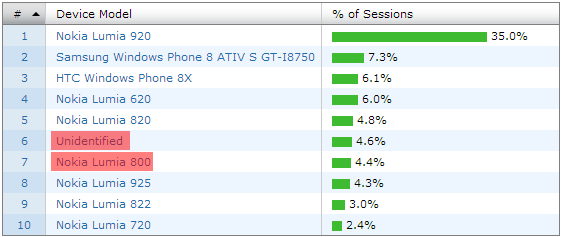
Since I released the first version of 2Day I submitted 14 updates. Starting from 2Day 1.4 I released all updates for both WP7 and WP8 devices. It looks like the 2.1 update coming later this month will be the last one targeting WP7 devices.
Windows Phone support Conclusion: upgrade to VS2013 imply no more WP7 support. You can try to maintain 2 solutions but we will see in the next paragraph that there are other issues with Portable Class Libraries.
Portable Class Libraries (PCL)
2Day’s Visual Studio 2012 solution contains Portable Class Libraries to enable code reuse between Windows Phone and Windows 8 (it was also helping code sharing between WP7 and WP8 versions). In Visual Studio 2013, like we saw before, support for WP7 is now longer available, including for PCLs:
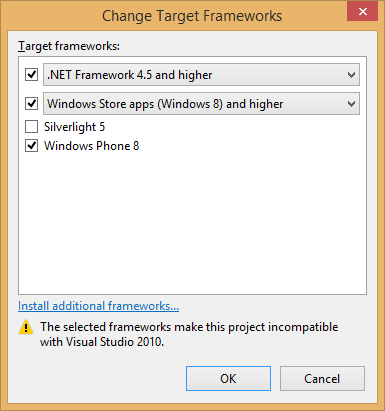
So opening a solution that contains PCLs targeting WP7 will upgrade those PCLs and drop targeting of WP7.
Also, in order to target WP7 and have async/await support I had to use the Async BCL NuGet package:
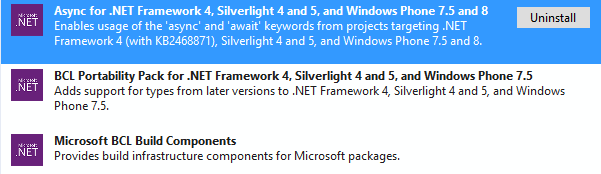
Because the async support is now supported in the frameworks I target (Windows 8.1 and Windows Phone 8), I must remove those packages in order to prevent conflicts like the following:
Error 28 The type 'System.Threading.Tasks.Task<TResult>' exists in both 'c:\Program Files (x86)\Reference Assemblies\Microsoft\Framework\.NETPortable\v4.0\Profile\Profile158\mscorlib.dll' and '...\packages\Microsoft.Bcl.1.0.19\lib\portable-net40+sl4+win8+wp71\System.Threading.Tasks.dll'
While doing those upgrades I also ended up target .Net 4.5, and it turns out the reflection API has some changes in the latest version of .Net. If you’re like me you’re a fan of SOLID principles, you probably have some kind of Inversion of Control container using reflection… In my case the following code was not working anymore:
var constructor = typeof(T).GetConstructors().FirstOrDefault();
And I had to use the new reflection API:
var constructor = typeof(T).GetTypeInfo().DeclaredConstructors.FirstOrDefault();
You can read this complete post on the blog of the .Net team for more details about the evolution of the reflection API.
PCL Conclusion: be careful when you upgrade PCL projects to VS2013. Because WP7 support is gone, you don’t need the Async BCL NuGet package anymore. If you choose to target .Net 4.5 beware of possible breaking changes in the reflection API.
General conclusion: if like me your original plan was to target WP7, WP8 and Windows 8.1 withing a single Visual Studio solution, you’re in trouble. My decision is to drop support for WP7 devices for the next update of my app. I guess I could go with branching in TFS to keep compatibility but I don’t have time for that. Be also careful with PCLs and the new reflection API.
VS2013: upgrading a Windows Phone 7/8 and Windows 8 apps(转)的更多相关文章
- Setting up a EDK II build environment on Windows and Linux:搭建Windows和Linux开发环境[2.2]
Setting up a EDK II build environment on Windows and Linux:搭建Windows和Linux开发环境[2.2] 2015-07 北京海淀区 ...
- U盘启动盘的制作--用U盘硬装Windows系统、或是重装Windows系统
借助IT天空的优启通U盘启动盘的制作--用U盘装Windows系统.或是重装Windows系统之U盘启动盘的制作 1.==================================== 2.== ...
- Windows Azure Active Directory (2) Windows Azure AD基础
<Windows Azure Platform 系列文章目录> Windows Azure AD (WAAD)是Windows Azure提供的一个REST风格的服务,为您的云服务提供了身 ...
- C#制作Windows service服务系列二:演示一个定期执行的windows服务及调试(windows service)
系列一: 制作一个可安装.可启动.可停止.可卸载的Windows service(downmoon原创) 系列二:演示一个定期执行的windows服务及调试(windows service)(down ...
- Windows 安装程序无法将 Windows 配置为在此计算机的硬件上运行
遇到这个问题是用辅助工具(WinNTSetup3.exe)进行的安装,重启后就就遇到“Windows 安装程序无法将 Windows 配置为在此计算机的硬件上运行” 解决:在WIN PE 下挂载安装光 ...
- Windows Kernel Way 1:Windows内核调试技术
掌握Windows内核调试技术是学习与研究Windows内核的基础,调试Windows内核的方式大致分为两种: (1)通过Windbg工具在Windows系统运行之初连接到Windows内核,连接成功 ...
- 如何在Windows中打开多个Windows Media Player
博客搬到了fresky.github.io - Dawei XU,请各位看官挪步.最新的一篇是:如何在Windows中打开多个Windows Media Player.
- 您在基于 Windows 7 的或基于 Windows Server 2008 R2 的计算机上读取器中插入智能卡时出现错误消息:"设备驱动程序软件未能成功安装"
http://support.microsoft.com/kb/976832/zh-cn http://support.microsoft.com/kb/976832/zh-tw 症状 当智能卡插入智 ...
- [Windows Phone]解锁、注册Windows Phone实体手机为开发机(Windows 8)
原文:[Windows Phone]解锁.注册Windows Phone实体手机为开发机(Windows 8) 前言 ? ? 最近要开发Windows Phone(以下简称WP)的手机游戏,由於使用模 ...
随机推荐
- IP地址的分类与寻址
IP地址:有一种标识符,被TCP/IP协议簇的IP层用来标识 连接到因特网的设备.IP协议的第4版IPv4地址是32位地址,是连接地址,定义了每一个连接到因特网上的设备(可以认为是主机的别名),而不是 ...
- 怎么在Centos7下添加win8.1的启动项
首先找到启动文件. 在/boot/grub2目录下, 找到grub.cfg文件. 然后, sudo修改, 用gedit工具方便. 怎么修改? 打开文件, 找到有两个menuentry开头的部分, 然 ...
- win7 备份错误解决
解决win7 备份出错, 开启服务: windows backup volume shadow copy
- 使用beanUtils操纵javabean
Sun公司的内省API过于繁琐,所以Apache组织结合很多实际开发中的应用场景开发了一套简单.易用的API操作Bean的属性——BeanUtils,在Beanutil中可以直接进行类型的自动转换. ...
- git-配置公司账号
1.初始化配置 git config --global user.name " abc" git config --global user.email "abc@123. ...
- P1514 引水入城
概述 首先,这是一道好题,这道题既考查了图论的dfs知识,又考察了区间贪心问题中很典型的区间覆盖问题,着实是一道好题. 大概思路说明 我们观察到,只有第一行可以放水库,而第一行在哪里放水库的结果就是直 ...
- 关于JavaScript的判断语句(1)
if语句: if( 判断条件 ){ 判断结果为true执行语句: } if...else语句: if(判断条件){ 判断结果为true时执行的语句: }else{ 判断结果为false时执行语句: } ...
- 计算机视觉(Computer Version,CV)、模式识别、人工智能
一.计算机视觉 Divid Marr将计算机视觉系统的开发问题归纳为3个要素: (1)数学理论 考虑数学计算层面的目标及可以引入的合理约束条件. (2)描述和算法 重点解决计算机视觉中的输入输出的数据 ...
- iOS沙盒目录
出于安全考虑,iOS系统的沙盒机制规定每个应用都只能访问当前沙盒目录下面的文件(也有例外,比如系统通讯录能在用户授权的情况下被第三方应用访问),这个规则把iOS系统的封闭性展现的淋漓尽致. 一.沙盒中 ...
- ng-bind-html 的原素没有高度
angularjs里绑定html元素,在页面的div里使用ng-bind-html <!-- html--> <div class="info" ng-bind- ...