
003商城项目:数据库的创建以及ssm框架的整合
我们创建一个数据库。如下:

然后开始整合框架:
1、配置数据源
2、需要让spring容器管理SqlsessionFactory,单例存在。
3、把mapper的代理对象放到spring容器中。使用扫描包的方式加载mapper的代理对象。
<?xml version="1.0" encoding="UTF-8" ?>

<!DOCTYPE configuration

        PUBLIC "-//mybatis.org//DTD Config 3.0//EN"

        "http://mybatis.org/dtd/mybatis-3-config.dtd">

<configuration>

</configuration>
<?xml version="1.0" encoding="UTF-8"?>

<beans xmlns="http://www.springframework.org/schema/beans"

    xmlns:context="http://www.springframework.org/schema/context" xmlns:p="http://www.springframework.org/schema/p"

    xmlns:aop="http://www.springframework.org/schema/aop" xmlns:tx="http://www.springframework.org/schema/tx"

    xmlns:xsi="http://www.w3.org/2001/XMLSchema-instance"

    xsi:schemaLocation="http://www.springframework.org/schema/beans http://www.springframework.org/schema/beans/spring-beans-4.0.xsd

    http://www.springframework.org/schema/context http://www.springframework.org/schema/context/spring-context-4.0.xsd

    http://www.springframework.org/schema/aop http://www.springframework.org/schema/aop/spring-aop-4.0.xsd http://www.springframework.org/schema/tx http://www.springframework.org/schema/tx/spring-tx-4.0.xsd

    http://www.springframework.org/schema/util http://www.springframework.org/schema/util/spring-util-4.0.xsd">

    <!-- 数据库连接池 -->

    <!-- 加载配置文件 -->

    <context:property-placeholder location="classpath:resource/db.properties" />

    <!-- 数据库连接池 -->

    <bean id="dataSource" class="com.alibaba.druid.pool.DruidDataSource"

        destroy-method="close">

        <property name="url" value="${jdbc.url}" />

        <property name="username" value="${jdbc.username}" />

        <property name="password" value="${jdbc.password}" />

        <property name="driverClassName" value="${jdbc.driver}" />

        <property name="maxActive" value="10" />

        <property name="minIdle" value="5" />

    </bean>

    <!-- 配置sqlsessionFactory -->

    <bean id="sqlSessionFactory" class="org.mybatis.spring.SqlSessionFactoryBean">

        <property name="configLocation" value="classpath:mybatis/SqlMapConfig.xml"></property>

        <property name="dataSource" ref="dataSource"></property>

    </bean>

    <!-- 配置扫描包,加载mapper代理对象

     -->

    <bean class="org.mybatis.spring.mapper.MapperScannerConfigurer">

        <property name="basePackage" value="com.taotao.mapper"></property>

    </bean>

</beans>
这里的db.properties:
jdbc.driver=com.mysql.jdbc.Driver

jdbc.url=jdbc:mysql://127.0.0.1:3306/taotao?characterEncoding=utf-8

jdbc.username=root

jdbc.password=1234

basePackage使我们要扫描的包路径。
sqlSessionFactory是里面的一个属性,spring容器生成MapperScannerConfigurer对象时要从IOC容器里面去拿这个sqlSessionFactory对象,所以我们之前要配置
<bean id="sqlSessionFactory"。但是要配置sqlSessionFactory时有需要两个属性:

1、事务管理
2、需要把service实现类对象放到spring容器中管理。
我们先配置把service实现类对象放到spring容器中管理。
applicationContext-service.xml
<?xml version="1.0" encoding="UTF-8"?>

<beans xmlns="http://www.springframework.org/schema/beans"

    xmlns:context="http://www.springframework.org/schema/context" xmlns:p="http://www.springframework.org/schema/p"

    xmlns:aop="http://www.springframework.org/schema/aop" xmlns:tx="http://www.springframework.org/schema/tx"

    xmlns:xsi="http://www.w3.org/2001/XMLSchema-instance"

    xsi:schemaLocation="http://www.springframework.org/schema/beans http://www.springframework.org/schema/beans/spring-beans-4.0.xsd

    http://www.springframework.org/schema/context http://www.springframework.org/schema/context/spring-context-4.0.xsd

    http://www.springframework.org/schema/aop http://www.springframework.org/schema/aop/spring-aop-4.0.xsd
    http://www.springframework.org/schema/tx http://www.springframework.org/schema/tx/spring-tx-4.0.xsd

    http://www.springframework.org/schema/util http://www.springframework.org/schema/util/spring-util-4.0.xsd">

    <!-- 扫描包加载Service实现类 -->

    <context:component-scan base-package="com.taotao.service"></context:component-scan>

</beans>
我们再配置事务管理:要么不执行要么一起执行。
<?xml version="1.0" encoding="UTF-8"?>

<beans xmlns="http://www.springframework.org/schema/beans"

    xmlns:context="http://www.springframework.org/schema/context" xmlns:p="http://www.springframework.org/schema/p"

    xmlns:aop="http://www.springframework.org/schema/aop" xmlns:tx="http://www.springframework.org/schema/tx"

    xmlns:xsi="http://www.w3.org/2001/XMLSchema-instance"

    xsi:schemaLocation="http://www.springframework.org/schema/beans http://www.springframework.org/schema/beans/spring-beans-4.0.xsd

    http://www.springframework.org/schema/context http://www.springframework.org/schema/context/spring-context-4.0.xsd

    http://www.springframework.org/schema/aop http://www.springframework.org/schema/aop/spring-aop-4.0.xsd http://www.springframework.org/schema/tx http://www.springframework.org/schema/tx/spring-tx-4.0.xsd

    http://www.springframework.org/schema/util http://www.springframework.org/schema/util/spring-util-4.0.xsd">

    <!-- 事务管理器 -->

    <bean id="transactionManager"

        class="org.springframework.jdbc.datasource.DataSourceTransactionManager">

        <!-- 数据源 -->

        <property name="dataSource" ref="dataSource" />

    </bean>

    <!-- 通知 -->

    <tx:advice id="txAdvice" transaction-manager="transactionManager">

        <tx:attributes>

            <!-- 传播行为 -->

            <tx:method name="save*" propagation="REQUIRED" />

            <tx:method name="insert*" propagation="REQUIRED" />

            <tx:method name="add*" propagation="REQUIRED" />

            <tx:method name="create*" propagation="REQUIRED" />

            <tx:method name="delete*" propagation="REQUIRED" />

            <tx:method name="update*" propagation="REQUIRED" />

            <tx:method name="find*" propagation="SUPPORTS" read-only="true" />

            <tx:method name="select*" propagation="SUPPORTS" read-only="true" />

            <tx:method name="get*" propagation="SUPPORTS" read-only="true" />

        </tx:attributes>

    </tx:advice>

    <!-- 切面 -->

    <aop:config>

        <aop:advisor advice-ref="txAdvice"

            pointcut="execution(* com.taotao.service.*.*(..))" />

    </aop:config>

</beans>
这里是spring的传统AOP编程参考这篇文章10Spring_AOP编程(传统编程)。
第三步:
接下来我们来配置表现层:
springmvc.xml:
<?xml version="1.0" encoding="UTF-8"?>

<beans xmlns="http://www.springframework.org/schema/beans"

    xmlns:xsi="http://www.w3.org/2001/XMLSchema-instance" xmlns:p="http://www.springframework.org/schema/p"

    xmlns:context="http://www.springframework.org/schema/context"

    xmlns:mvc="http://www.springframework.org/schema/mvc"

    xsi:schemaLocation="http://www.springframework.org/schema/beans http://www.springframework.org/schema/beans/spring-beans.xsd

        http://www.springframework.org/schema/mvc http://www.springframework.org/schema/mvc/spring-mvc-4.0.xsd

        http://www.springframework.org/schema/context http://www.springframework.org/schema/context/spring-context.xsd">

    <context:component-scan base-package="com.taotao.controller" />

    <mvc:annotation-driven />

    <bean

        class="org.springframework.web.servlet.view.InternalResourceViewResolver">

        <property name="prefix" value="/WEB-INF/jsp/" />

        <property name="suffix" value=".jsp" />

    </bean>

</beans>
第四步:最后配置web.xml来启动spring容器和拦截链接,配置springmvc,解决post乱码.
web.xml:
<?xml version="1.0" encoding="UTF-8"?>

<web-app xmlns:xsi="http://www.w3.org/2001/XMLSchema-instance"

    xmlns="http://java.sun.com/xml/ns/javaee" xmlns:web="http://java.sun.com/xml/ns/javaee/web-app_2_5.xsd"

    xsi:schemaLocation="http://java.sun.com/xml/ns/javaee http://java.sun.com/xml/ns/javaee/web-app_2_5.xsd"

    id="taotao" version="2.5">

    <display-name>taotao-manager</display-name>

    <welcome-file-list>

        <welcome-file>index.html</welcome-file>

        <welcome-file>index.htm</welcome-file>

        <welcome-file>index.jsp</welcome-file>

        <welcome-file>default.html</welcome-file>

        <welcome-file>default.htm</welcome-file>

        <welcome-file>default.jsp</welcome-file>

    </welcome-file-list>

    <!-- 加载spring容器 -->

    <context-param>

        <param-name>contextConfigLocation</param-name>

        <param-value>classpath:spring/applicationContext-*.xml</param-value>

    </context-param>

    <listener>

        <listener-class>org.springframework.web.context.ContextLoaderListener</listener-class>

    </listener>

    <!-- 解决post乱码 -->

    <filter>

        <filter-name>CharacterEncodingFilter</filter-name>

        <filter-class>org.springframework.web.filter.CharacterEncodingFilter</filter-class>

        <init-param>

            <param-name>encoding</param-name>

            <param-value>utf-8</param-value>

        </init-param>

    </filter>

    <filter-mapping>

        <filter-name>CharacterEncodingFilter</filter-name>

        <url-pattern>/*</url-pattern>

    </filter-mapping>

    <!-- springmvc的前端控制器 -->

    <servlet>

        <servlet-name>taotao-manager</servlet-name>

        <servlet-class>org.springframework.web.servlet.DispatcherServlet</servlet-class>

        <!-- contextConfigLocation不是必须的, 如果不配置contextConfigLocation, springmvc的配置文件默认在:WEB-INF/servlet的name+"-servlet.xml" -->

        <init-param>

            <param-name>contextConfigLocation</param-name>

            <param-value>classpath:spring/springmvc.xml</param-value>

        </init-param>

        <load-on-startup>1</load-on-startup>

    </servlet>

    <servlet-mapping>

        <servlet-name>taotao-manager</servlet-name>

        <url-pattern>/</url-pattern>

    </servlet-mapping>

</web-app>
注意我们上面这么配置的话,所有的请求都会被拦截的。包括我们请求的静态资源,而且我们创建静态资源如下:
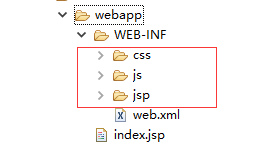

上面的红色框框就做了资源的映射,凡是请求形式是/css/**的都会被转成/WEB-INF/CSS/这种形式,这样静态资源就不会被拦截了可以正常发访问了。
整合测试:碰到的问题比较多,就放在下一篇博客里面讲了。
003商城项目:数据库的创建以及ssm框架的整合的更多相关文章
- SSM 框架快速整合实例--学生查询
一.快速准备 SSM 框架即 Spring 框架.SpringMVC 框架.MyBatis 框架,关于这几个框架的基础和入门程序,我前面已经写过几篇文章作为基础和入门介绍了.对于这 3 个框架还不熟悉 ...
- SSM框架快速整合实例——学生查询
一.快速准备 SSM 框架即 Spring 框架.SpringMVC 框架.MyBatis 框架,关于这几个框架的基础和入门程序,我前面已经写过几篇文章作为基础和入门介绍了.这里再简单的介绍一下: 1 ...
- SSM框架——详细整合教程
SSM框架——详细整合教程(Spring+SpringMVC+MyBatis) 1.基本概念 1.1.Spring Spring是一个开源框架,Spring是于2003 年兴起的一个轻量级的Jav ...
- SSM框架的整合与使用——实现简单的转账系统
一.整合思路 SSM框架即SpringMVC + Spring + MyBati框架集,是一种轻量级的Web开源框架.它们各自在JAVA三层架构中负责的模块如下图所示: 其中,SpringMVC与Sp ...
- SSM框架的整合思路&功能实现
这是我第一篇博客,关于SSM框架的整合思路以及简单功能实现. 首先,最近刚刚学习Spring+SpringMVC+Mybatis,在开发时遇到形形色色的问题,周遭人也为我提供了一些思路,我会一点点整理 ...
- SSM框架——详细整合教程(Spring+SpringMVC+MyBatis)【申明:来源于网络】
SSM框架--详细整合教程(Spring+SpringMVC+MyBatis)[申明:来源于网络] 地址:http://blog.csdn.net/u014662268/article/details ...
- 026 SSM综合练习02--数据后台管理系统--数据库表创建及SSM环境搭建
1.数据库准备 本项目我们Oracle数据库,Oracle 为每个项目创建单独user,oracle数据表存放在表空间下,每个用户有独立表空间. (1)采用数据库管理员账号:SYSTEM,再配合数据库 ...
- 002杰信-陌生的maven-web项目整改成我们熟悉的Web架构;classpath的含义;ssm框架的整合;junit测试
这篇博客的资源来源于创智播客,先在此申明.这篇博客的出发点是jk项目,传智的做法是Maven的web模板生成的,但是这样子的结构目录与我们熟知的Web项目的结构目录相差很大,所以要按照我们熟知的项目结 ...
- SSM框架——详细整合教程(Spring+SpringMVC+MyBatis)
1.前言 使用框架都是较新的版本: Spring 4.0.2 RELEASE Spring MVC 4.0.2 RELEASE MyBatis 3.2.6 2.Maven引入需要的JAR包 2.1设置 ...
随机推荐
- 我的Android六章:Android中SQLite数据库操作
今天学习的内容是Android中的SQLite数据库操作,在讲解这个内容之前小编在前面有一篇博客也是讲解了SQLite数据库的操作,而那篇博客的讲解是讲述了 如何在Window中通过DOM来操作数据库 ...
- 新萝卜家园GHOST WIN7系统32,64位极速装机特别版
系统来自:系统妈:http://www.xitongma.com 新萝卜家园GHOST win7系统32位极速装机特别版 V2016年3月 系统概述 新萝卜家园ghost win7系统32位极速装机特 ...
- symfony2 路由工作原理及配置
1.路由是程序的方法和URL的一一映射.
- 【开源项目SugarSite】ASP.NET MVC+ Layui+ SqlSugar+RestSharp项目讲解
SugarSite一个前端支持移动端的企业网站,目前只支持了简单功能,后续还会加上论坛等. 源码GIT地址: https://github.com/sunkaixuan/SugarSite 技术介绍 ...
- css hover对其包含的元素进行样式设置
<ul class="icon-down-single-arr-li"> <li> <a href="javascript:void(0)& ...
- android中基于HTML模板的方式嵌入SWF
继上一篇 利用webview实现在andorid中嵌入swf 这篇继续说说通过html模板的方式来嵌入SWF,这样做的好处最直观的就是可以把html,swf和android代码串起来,交互操作很方便( ...
- Android海康监控视频调用demo
一. 开发环境 1. 操作系统:windows7(X64) 2. 开发工具:eclipse adt Build: v22.2.1-833290 JDK7 android SDK 3. 客户端设备版本: ...
- js 获取json串中的值
用js中著名的eval函数var strJSON = "{name:'json name'}";//得到的JSONvar obj = eval( "(" + s ...
- hadoop2.6分布式部署时 livenodes等于1的原因
1.问题描述 在进行hadoop2.x版本的hdfs分布式部署时,遇到了一个奇怪的问题: 使用start-dfs.sh命令启动dfs之后,所有的datanode节点上均能看到datanode进程,然而 ...
- Android程序函数 将assets文件夹下的文件复制到手机的sd卡中(包括子文件夹)
最近在做个功能是将asset文件夹下的所有文件(包括子文件)全部拷贝出来到指定目录下.所用的方法无非是用AssetManager.但是这里 有个问题是也要讲子文件夹和子文件都要拷贝出来.到网上Goog ...