
uniapp中使用AntV F6 + table表格插件使用
首先看页面效果:
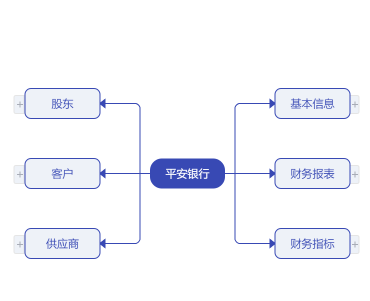
AntV官网下载F6文件到项目中与uViewUI插件
<template>
<view class="page">
<!-- 导航栏 -->
<b-nav-bar class="title">
<template slot="left">
<view @click="nativeBack" class="iconfont icon-zuofanhui nBack ml15"></view>
</template>
<view>{{navTitle}}</view>
</b-nav-bar>
<!-- 树状图 -->
<view class="page over_hidden">
<!-- #ifdef APP-PLUS || H5 -->
<view :id="option.id" :option="option" :treeDom="treeDom" :change:treeDom="treeGraph.changeTreeGraphSize"
:change:option="treeGraph.changeTreeGraphData"
style="width: 100%;height: 100%;display: flex;justify-content: center;align-items: center;"></view>
<!-- #endif -->
<!-- #ifndef APP-PLUS || H5 -->
<view>非 APP、H5 环境不支持</view>
<!-- #endif -->
</view>
<!-- 表格弹窗 -->
<u-popup :show="showLinkTable" mode="bottom" :round="10" class="tablePopup">
<view class="tableHeader">
<scroll-view class="tableTitle" scroll-x="true">
<view style="display: inline-block;">{{tableTitle}}</view>
</scroll-view>
<view class="tableIcon" @click="closePopup">
<text class="iconfont icon-shanchu1"></text>
</view>
</view>
<view class="tableContent">
<view class="time">
最新时间:{{newTime}}
</view>
<lyy-table :headerFixed="true" :columnFixed="1" :emptyString="''" :contents="contentsData"
:headers="columnsData" class="lyyTable" @row-click="rowclick"></lyy-table>
</view>
</u-popup>
<!-- 点击问号注释说明弹窗 -->
<u-popup :show="showExplain" mode="bottom" :round="10" class="explainPopup">
<view class="explainHeader">
<scroll-view class="explainTitle" scroll-x="true">
<view style="display: inline-block;">{{explainTitle}}</view>
</scroll-view>
<view class="explainIcon" @click="canclePopup">
<text class="iconfont icon-shanchu1"></text>
</view>
</view>
<scroll-view class="explainContent" scroll-y="true">
<view>{{ nodeInterpret }}</view>
</scroll-view>
</u-popup>
</view>
</template>
<script>
import {
mapState
} from 'vuex';
export default {
data() {
return {
navTitle: '', // 标题
option: { // 导图数据
id: "canvasId",
data: '',
},
treeDom: {
width: null,
height: null
}
}
},
computed: {
...mapState(['stabarHeight']) //刘海屏高度存储在vuex里面
},
mounted() {
uni
.createSelectorQuery()
.select("#canvasId")
.boundingClientRect((data) => {
this.treeDom = data;
})
.exec();
},
methods: {
nativeBack() {
uni.navigateBack({
delta:1,//返回层数,2则上上页
})
},
}
}
</script>
</script>
<script module="treeGraph" lang="renderjs">
import F6 from '@/static/common/js/F6/f6.min.js'
import TreeGraph from '@/static/common/js/F6/extends/graph/treeGraph.js'
import {
queryFirstnodeList,
fetchGraphChildren,
queryCompanyTable
} from '@/api/company.js'
import {
computeWidthHeight,
// addCollapseNode,
handleChildrenData,
getArcPosition,
levelNode,
flowLine
} from './graphConfig';
import {
getSession
} from '@/util/storage';
// 自定义节点
F6.registerNode('icon-node', levelNode, 'rect')
// 绘制连线
F6.registerEdge('flow-line', flowLine);
F6.registerGraph('TreeGraph', TreeGraph)
// 默认边和箭头样式
export const defaultEdgeStyle = {
stroke: '#3849b4',
endArrow: {
path: 'M 0,0 L 5,4 L 5,-4 Z',
lineWidth: 1,
fill: '#3849b4',
},
}
export default {
data() {
return {
graph: null,
treeData: {},
graphReady: false,
companyName: '', // 公司名称
companyCode: '', // 公司代码
topTreeData: [], // 二级节点
showLinkTable: false, // 是否显示表格弹窗
tableId: '', // 表格id
tableName: '', // 表名
contentsData: [], //表格数据
columnsData: [], //表头数据
tableTitle: '', // 表格标题
newTime: '', //最新时间
showExplain: false, // 是否显示点击问号注释说明弹窗
explainTitle: '', // 注释说明弹窗标题
nodeInterpret: '', // 注释说明弹窗内容
tableTitles: [], // 表格标题
}
},
created() {
this.initData()
},
mounted() {
this.init() // 初始化F6
},
onLoad(option) {
this.navTitle = `${option.title}(${option.code})` // 页面标题
this.companyName = option.title // 公司名
this.companyCode = option.code // 公司代码
},
watch: {
showLinkTable: {
handler(val) {
if (val) {
document.getElementsByTagName("body")[0].addEventListener('touchmove', (e) => {
e.preventDefault();
}, {
passive: false
}); //阻止默认事件
} else {
document.getElementsByTagName("body")[0].addEventListener('touchmove', (e) => {
e.returnValue = true;
}, {
passive: false
}); //打开默认事件
}
},
},
showExplain: {
handler(val) {
if (val) {
document.getElementsByTagName("body")[0].addEventListener('touchmove', (e) => {
e.preventDefault();
}, {
passive: false
}); //阻止默认事件
} else {
document.getElementsByTagName("body")[0].addEventListener('touchmove', (e) => {
e.returnValue = true;
}, {
passive: false
}); //打开默认事件
}
},
},
},
methods: {
// 初始化一、二级节点
async initData() {
await this.requestTopTreeNode()
this.setDefaultNode()
},
// 获取二级分类节点
async requestTopTreeNode() {
try {
let res = await queryFirstnodeList({
token: sessionStorage.getItem('token')
})
res = res.data || []
res.forEach((item) => {
item.level = 2
item.hasChildren = true // 隐藏展示/折叠图表
item.collapsed = true // 当前折叠状态
item.isGetChildren = false // 是否已加载了children
item.width = 75
item.height = 25
})
this.topTreeData = res
} catch (err) {
err.msg && this.$alert(err.msg, '提示')
}
},
// 设置初始树数据
setDefaultNode(data) {
if (!data) {
const children = JSON.parse(JSON.stringify(this.topTreeData))
data = {
id: 'root',
name: this.companyName,
children,
level: 1,
width: 75,
height: 25
}
this.treeData = data
}
if (this.graphReady) {
this.showLinkTable = false
this.graph.data(this.treeData)
this.graph.render()
this.graph.fitCenter()
} else {
const unwatch = this.$watch('graphReady', (val) => {
if (val) {
this.setDefaultNode(data)
unwatch()
}
})
}
},
// 初始化
init() {
this.treeDom.width = uni.getSystemInfoSync().screenWidth // 获取屏幕宽度
let sysInfo = getSession('systemInfo')
if (sysInfo.platform.indexOf('ios') > -1) {
this.treeDom.height = uni.getSystemInfoSync().screenHeight - 44 - this.stabarHeight // 获取ios屏幕高度
} else {
this.treeDom.height = uni.getSystemInfoSync().screenHeight - 44 // 获取安卓屏幕高度
}
// 实例化F6
this.graph = new F6.TreeGraph({
container: this.option.id,
width: this.treeDom.width,
height: this.treeDom.height,
animate: true,
// fitView: true, // 画布自适应
// fitCenter: true, //图将会被平移,图的中心将对齐到画布中心,但不缩放。优先级低于 fitView。
minZoom: 0.2,
maxZoom: 1.5,
linkCenter: true, //指定边是否连入节点的中心
modes: {
default: ['drag-canvas', 'zoom-canvas'],
},
defaultNode: {
type: 'icon-node',
anchorPoints: [
[0, 0.5],
[1, 0.5],
],
labelCfg: {
style: {
fill: '#3849B4',
fontSize: 11,
textAlign: 'center',
textBaseline: 'middle',
},
},
},
defaultEdge: {
type: 'flow-line',
style: defaultEdgeStyle,
},
layout: {
type: 'compactBox',
direction: 'H',
getId(d) {
return d.id
},
getHeight(d) {
return d.height
},
getWidth(d) {
return d.width
},
getVGap(d) {
return d.level >= 3 ? 10 : 20
},
getHGap() {
return 25
}
},
})
// 监听点击事件
this.graph.on('node:tap', this.graphNodeClick);
this.graphReady = true
this.graph.data(this.treeData);
this.graph.render();
},
// 元素点击事件
async graphNodeClick(evt) {
const {
item,
target
} = evt;
// const targetType = target.get('type');
const name = target.get('name')
const model = item.getModel()
// 增加元素
if (name === 'link-text') {
this.handleLink(model)
//显示加载框
uni.showLoading({
title: '加载中',
mask: true
});
} else if (name === 'more-node') {
this.handleMore(model)
} else if (name === 'interpret-icon') {
this.showExplain = true
this.nodeInterpret = model.nodeInterpret
this.explainTitle = model.name
} else {
this.haneldCollapse(item,model)
}
},
// 处理展开折叠
async haneldCollapse(item, model) {
let hasChildren = model.hasChildren
if (!hasChildren) {
return
}
let collapsed = model.collapsed
const {
graph
} = this
if (model.collapsed) {
if (model.loading) {
return
} else if (!model.isGetChildren) {
model.loading = true
graph.updateChild(model, model.id)
graph.updateItem(item, {
loading: true
})
this.getChildNodes(item, model)
return
}
}
collapsed = !collapsed;
model.collapsed = collapsed;
graph.updateChild(model, model.id)
const updateParams = {
collapsed
}
graph.updateItem(item, updateParams)
},
// 查看更多节点
handleMore(model) {
const {
graph
} = this
const {
backupChildren,
parentId
} = model
const parent = graph.findById(parentId)
const parentModel = parent.getModel()
parentModel.children = backupChildren
graph.updateChild(parentModel, parentId)
},
// 未请求子关系数据时
async getChildNodes(item, model) {
const id = model.id.split('_')[0];
let hasChildren = model.hasChildren
let collapsed = model.collapsed
try {
const res = await fetchGraphChildren(id, this.companyCode)
if (!res.data || res.data.length == 0) {
model.hasChildren = false;
} else {
const nextLevel = model.level + 1
let children = handleChildrenData(res.data, nextLevel)
if (children.length) {
if (children.length > 10) {
const backupChildren = children
const num = children.length - 10
children = children.slice(0, 10)
children.push({
id: `more-${Date.now()}`,
parentId: model.id,
level: 0,
width: 220,
height: 34,
num,
backupChildren
})
}
model.children = children
} else {
model.hasChildren = false
}
}
} catch (err) {
model.hasChildren = false
} finally {
model.loading = false
model.isGetChildren = true
}
collapsed = !collapsed;
model.collapsed = collapsed;
const {
graph
} = this
graph.updateChild(model, model.id)
const updateParams = {
collapsed
}
if (hasChildren !== model.hasChildren) {
updateParams.hasChildren = model.hasChildren
}
graph.updateItem(item, updateParams)
},
// 获取可点击实体表格信息
async handleLink(model) {
this.columnsData = []
this.tableId = model.id.split('_')[0];
this.tableName = model.content.join('')
let params = {
id: this.tableId,
name: this.tableName
}
const res = await queryCompanyTable(params)
if (res.code == 0) {
this.tableTitle = res.data.name
this.newTime = res.data.latestTime
this.contentsData = res.data.resultList
res.data.titles.forEach(item => {
let obj = {
label: item.fieldTitle,
key: item.field,
fieldSign: item.fieldSign,
width: (40 + item.fieldTitle.length * 16) + 'px',
sort: true
}
// obj.label == ''
this.columnsData.push(obj)
})
this.tableTitles = res.data.titles
this.showLinkTable = true
//隐藏加载框
uni.hideLoading();
} else {
//隐藏加载框
uni.hideLoading();
uni.$u.toast(res.msg)
}
},
// 表格代码列点击事件
rowclick(row, data, index) {
this.tableTitles.forEach(item => {
Object.keys(item).forEach(res => {
const title = row[this.tableTitles[index + 1].field]
uni.redirectTo({
url: `/pages/records-center/look-company/companyDetail/companyDetail?title=${title}&code=${data}`
})
})
})
},
// 关闭表格弹窗
closePopup() {
this.showLinkTable = false
},
// 关闭点击问号注释弹窗
canclePopup() {
this.showExplain = false
},
// 清除画布
handleClear() {
this.graph && this.graph.destroy()
this.graph = null
this.graphReady = false
},
},
beforeDestroy() {
this.handleClear()
},
}
</script>
<style lang="scss" scoped>
.page {
background: #ffffff;
overflow: hidden;
.title {
font-size: 32rpx;
text-align: center;
border-bottom: 1rpx solid #DCDEE3;
.nBack {
height: 100%;
display: flex;
align-items: center;
justify-content: center;
}
}
.tablePopup {
width: 100%;
background-color: #ffffff;
.tableHeader {
width: 100%;
height: 100rpx;
display: flex;
justify-content: space-between;
align-items: center;
border-bottom: 1rpx solid #DCDEE3;
.tableTitle {
font-size: 30rpx;
font-family: PingFang SC;
font-weight: bold;
color: #333333;
margin-left: 30rpx;
width: 80%;
height: 100rpx;
line-height: 100rpx;
white-space: nowrap;
}
.tableIcon {
width: 44rpx;
height: 44rpx;
background-color: #F4F4F4;
margin-right: 30rpx;
border-radius: 50%;
display: flex;
justify-content: center;
align-items: center;
.icon-shanchu1 {
font-size: 32rpx;
color: #C0C0C0;
}
}
}
.tableContent {
width: 100%;
height: 800rpx;
margin: 0rpx 0rpx 30rpx;
.time {
font-size: 22rpx;
height: 68rpx;
color: #999999;
margin-left: 30rpx;
line-height: 68rpx;
}
.lyyTable {
width: 100%;
height: calc(100% - 68rpx) !important;
overflow: hidden;
font-size: 24rpx;
}
}
}
.explainPopup {
width: 100%;
background-color: #fff;
.explainHeader {
width: 100%;
height: 100rpx;
display: flex;
justify-content: space-between;
align-items: center;
border-bottom: 1px solid #DCDEE3;
.explainTitle {
font-size: 30rpx;
font-family: PingFang SC;
font-weight: bold;
color: #333333;
margin-left: 30rpx;
width: 80%;
height: 100rpx;
line-height: 100rpx;
white-space: nowrap;
}
.explainIcon {
width: 44rpx;
height: 44rpx;
background-color: #F4F4F4;
margin-right: 30rpx;
border-radius: 50%;
display: flex;
justify-content: center;
align-items: center;
.icon-shanchu1 {
font-size: 32rpx;
color: #C0C0C0;
}
}
}
.explainContent {
padding: 38rpx 57rpx 38rpx 30rpx;
font-size: 24rpx;
line-height: 50rpx;
overflow-y: scroll;
max-height: 200rpx;
color: #666666;
}
}
}
/deep/ .uni-table-th {
color: #3849B4;
background-color: #F7F8FB !important;
font-size: 24rpx;
}
/deep/ .uni-table-td {
font-size: 24rpx;
}
</style>
/** 获取Path贝塞尔曲线控制点坐标
* @param {Number} startX 弧线起始x坐标
* @param {Number} startY 弧线起始Y坐标
* @param {Number} endX 弧线结束X坐标
* @param {Number} endY 弧线结束Y坐标
* @param {Number} angle 弧线角度
*/
export function getArcPosition (startX, startY, endX, endY, angle) {
const PI = Math.PI
// 两点间的x轴夹角弧度
const yOffset = endY - startY
const xOffset = endX - startX
let xAngle = Math.atan2(yOffset, xOffset)
// 转为角度
xAngle = 360 * xAngle / (2 * PI)
// 两点间的长度
const L = Math.sqrt(yOffset * yOffset + xOffset * xOffset)
// 计算等腰三角形斜边长度
const L2 = L / 2 / Math.cos(angle * 2 * PI / 360)
// 求第一个顶点坐标,位于下边
const top = {}
// 求第二个顶点坐标,位于上边
const bottom = {}
top.x = startX + Math.round(L2 * Math.cos((xAngle + angle) * 2 * PI / 360))
top.y = startY + Math.round(L2 * Math.sin((xAngle + angle) * 2 * PI / 360))
bottom.x = startX + Math.round(L2 * Math.cos((xAngle - angle) * 2 * PI / 360))
bottom.y = startY + Math.round(L2 * Math.sin((xAngle - angle) * 2 * PI / 360))
return { top, bottom }
}
// 图标请自行在iconfont图标库下载,记得加上u(icon-loading icon-zhankai icon-shouqi icon-xiala)
const LOADING_ICON = '\ueb80'
const COLLAPSE_ICON = '\ue617'
const EXPAND_ICON = '\ue611'
// 添加展开/折叠节点(canvas)
export function addCollapseNode (group, w, h, cfg) {
const isLeft = cfg.x < 0
const x = isLeft ? - 11 : w - 0
const radius = isLeft ? [2, 0, 0, 2] : [0, 2, 2, 0]
group.addShape('rect', {
attrs: {
x,
y: h / 2 - 10,
width: 10,
height: 20,
stroke: '#e5e5e5',
fill: '#eef2f8',
radius,
},
name: 'marker-box',
})
group.addShape('text', {
attrs: {
x: x + (isLeft ? 6 : 5),
y: h / 2 + 5,
fontFamily: 'iconfont', // 对应css里面的font-family: "iconfont"
textAlign: 'center',
fontSize: 11,
lineHeight: 11,
fill: '#a9adb7',
text: cfg.loading ? LOADING_ICON : cfg.collapsed ? EXPAND_ICON : COLLAPSE_ICON,
},
name: 'collapse-icon',
})
}
// 默认边和箭头样式
export const defaultEdgeStyle = {
stroke: '#3849B4',
endArrow: {
path: 'M 0,0 L 5,4 L 5,-4 Z',
lineWidth: 1,
fill: '#3849B4',
},
}
// 自定义层级节点(canvas)
export const levelNode = {
draw (cfg, group) {
const { labelCfg = {}, level, name } = cfg
let keyShape = null
// 根节点,高度固定,宽度根据公司名调整
const w = cfg.width
const h = cfg.height
if (level === 0) {
const { num } = cfg
keyShape = group.addShape('rect', {
attrs: {
width: w,
height: h,
x: 0,
y: 0,
fill: '#ffffff',
fillOpacity: 0,
}
})
group.addShape('text', {
attrs: {
...labelCfg.style,
text: `展开更多(${num})`,
fill: '#999999',
x: 100,
y: 18,
},
name: 'more-text'
})
// 字体图标字体大小与文字不一样
group.addShape('text', {
attrs: {
...labelCfg.style,
fontFamily: 'iconfont', // 对应css里面的font-family: "iconfont"
text: '\ue81c',
fill: '#999999',
fontSize: 14,
x: 150,
y: 18,
},
name: 'more-icon'
})
// 添加这个是方便做鼠标移入文字和字体图标变色,层级高
group.addShape('rect', {
attrs: {
width: w,
height: h,
x: 0,
y: 0,
lineWidth: 1,
stroke: '#e5e5e5',
cursor: 'pointer',
fill: '#ffffff',
radius: 6,
fillOpacity: 0,
},
name: 'more-node'
})
} else if (level === 1) {
keyShape = group.addShape('rect', {
attrs: {
width: w,
height: h,
x: 0,
y: 0,
fill: '#3849b4',
radius: 12,
},
})
group.addShape('text', {
attrs: {
...labelCfg.style,
text: name,
x: w / 2,
y: h / 2,
fontSize: 11,
fill: '#ffffff',
},
})
} else {
// 不管二/三级几点是否有展开/折叠图标宽度都不计算上,在layout中会考虑
cfg.hasChildren && addCollapseNode(group, w, h, cfg)
// 配置了有展开/折叠图标则渲染
// 二级分类节点,宽高固定
if (level === 2) {
keyShape = group.addShape('rect', {
attrs: {
fill: '#eef2f8',
stroke: '#3849B4',
radius: 6,
width: w,
height: h,
x: 0,
y: 0,
},
})
group.addShape('text', {
attrs: {
...labelCfg.style,
text: name,
x: w / 2,
y: h / 2,
fontSize: 11,
},
})
} else {
// 三级以上节点配置
keyShape = group.addShape('rect', {
attrs: {
width: w,
height: h,
x: 0,
y: 0,
fill: '#e5e5e5',
radius: 6,
},
})
// 上部关系节点名称
group.addShape('rect', {
attrs: {
x: 1,
y: 1,
width: w - 2,
height: 32,
fill: '#eef2f8',
radius: [6, 6, 0, 0]
},
})
group.addShape('text', {
attrs: {
...labelCfg.style,
text: name,
x: w / 2,
y: 18,
},
})
// 判断是否有说明文字(即?)
if (cfg.nodeInterpret) {
group.addShape('text', {
attrs: {
...labelCfg.style,
x: w - 14,
y: 17,
fontFamily: 'iconfont', // 对应css里面的font-family: "iconfont"
textAlign: 'right',
fill: '#999999',
text: '\ue715',
cursor: 'pointer',
lineHeight: 12
},
name: 'interpret-icon',
})
}
// 下方实体节点内容
group.addShape('rect', {
attrs: {
x: 1,
y: 34,
width: w - 2,
height: h - 35,
fill: '#ffffff',
radius: [0, 0, 6, 6]
},
})
const content = cfg.content
// 可能有多行文字
for (let i = 0, l = content.length; i < l; i++) {
const attrs = {
...labelCfg.style,
text: content[i],
x: w / 2,
textAlign: 'center',
fill: '#999999',
lineHeight: 14
}
// 如果只有一行文字,设置y居中
if (l === 1) {
attrs.y = (h + 34) / 2
} else {
attrs.y = 34 + (i + 1) * 14 + 1
}
const config = {
attrs
}
// 可点击节点样式
if (cfg.showType === '3') {
config.attrs.fill = '#3849b4'
config.attrs.cursor = 'pointer'
config.name = 'link-text'
}
group.addShape('text', config)
}
}
}
return keyShape
},
update (cfg, item) {
const group = item.getContainer()
// 如果不展示展开/折叠,调整样式造成视觉隐藏
if (!cfg.hasChildren) {
const icon = group.find((e) => e.get('name') === 'collapse-icon')
icon.attr('fill', '#ffffff')
const iconBox = group.find((e) => e.get('name') === 'marker-box')
iconBox.attr('width', 0)
iconBox.attr('stroke', '#ffffff')
} else {
const icon = group.find((e) => e.get('name') === 'collapse-icon')
icon.attr('text', cfg.loading ? LOADING_ICON : cfg.collapsed ? EXPAND_ICON : COLLAPSE_ICON)
}
}
}
export function getContentAndHeight ({ content, vPadding = 8, hPadding = 16, width = 220, defaultHeight = 50, maxHeight = 200, otherHeight = 34 }) {
let rowNum = content.length
const defaultLength = (width - vPadding) / 12
const res = []
for (let i = 0, l = content.length; i < l; i++) {
const item = content[i]
const isDissatisfy = computeStrOccupyLength(item) > defaultLength
if (isDissatisfy) {
const matchItems = splitStr(item, defaultLength)
rowNum += (matchItems.length - 1)
res.push(...matchItems)
} else {
res.push(item)
}
}
let height = Math.max(defaultHeight, rowNum * 14 + hPadding)
height = Math.min(height, maxHeight) + otherHeight
return {
height,
content: res
}
}
// 自定义节点连线
export const flowLine = {
draw (cfg, group) {
const { startPoint, endPoint, targetNode, sourceNode, style: { stroke, endArrow } } = cfg
let path = null
// 是否向左
const isLeft = startPoint.x > endPoint.x
// 因为设置的连接点为容器的中心
const sourceNodeWidth = sourceNode._cfg.model.width
startPoint.x = startPoint.x + (isLeft ? - sourceNodeWidth / 2 : sourceNodeWidth / 2)
const targetNodeWidth = targetNode._cfg.model.width
endPoint.x = endPoint.x + (isLeft ? targetNodeWidth / 2 : -targetNodeWidth / 2)
startPoint.x = startPoint.x + (sourceNode._cfg.model.hasChildren ? (isLeft ? -16 : 16) : 0)
// 如果两个节点中心点纵向距离小于10直接绘一条线
if (Math.abs(startPoint.y - endPoint.y) < 8) {
path = [
['M', startPoint.x, startPoint.y],
['L', startPoint.x + (isLeft ? -12 : 12), startPoint.y],
['L', startPoint.x + (isLeft ? -12 : 12), endPoint.y],
['L', endPoint.x, endPoint.y]
]
} else {
// 判断弧线部分向上/下
const isTop = startPoint.y < endPoint.y
// 计算弧线开始/结束坐标
const arcStartX = startPoint.x + (isLeft ? -12 : 12)
const arcStartY = endPoint.y + (isTop ? -4 : 4)
const arcEndX = arcStartX + (isLeft ? -4 : 4)
const arcEndY = endPoint.y
// 取到弧线的控制点坐标(上下2个控制点)
const arcControlList = getArcPosition(arcStartX, arcStartY, arcEndX, arcEndY, 16)
const arcControlItem = isLeft ? (isTop ? arcControlList.bottom : arcControlList.top) : (isTop ? arcControlList.top : arcControlList.bottom)
// 绘制路径
path = [
['M', startPoint.x, startPoint.y],
['L', arcStartX, startPoint.y],
['L', arcStartX, arcStartY],
['Q', arcControlItem.x, arcControlItem.y, arcEndX, arcEndY],
['L', endPoint.x, arcEndY]
]
}
const shape = group.addShape('path', {
attrs: {
stroke,
path,
endArrow
}
})
return shape
},
}
// 计算字符串占用长度
function computeStrOccupyLength (str) {
let num = 0
str.split('').forEach((s) => {
if (/[0123456789.?()-:]/.test(s)) {
num += 0.5
} else {
num += 1
}
})
return Math.ceil(num)
}
// 根据数量截取字符串
function splitStr (str, maxNum) {
let num = maxNum
const res = []
let tmp = []
str.split('').forEach((s, i) => {
tmp.push(s)
if (/[0123456789.?()-:]/.test(s)) {
num -= 0.5
} else {
num -= 1
}
if (num < 1 || i === str.length - 1) {
res.push(tmp.join(''))
tmp = []
num = maxNum
}
})
return res
}
// 处理添加子节点
export function handleChildrenData (data, level) {
const res = []
data.forEach((item) => {
const { children, name, parentId, nodeInterpret } = item
children.forEach((subItem, index) => {
let content = subItem.name
if (content) {
const { showType, isChildren } = subItem
const id = `${subItem.id}_${index}`
content = content.split('\n').filter((item) => item)
// 对内容进行处理,计算容器高度/宽度
const { height, content: computeContent } = getContentAndHeight({ content })
res.push({
id,
parentId,
content: computeContent,
name,
nodeInterpret,
showType,
level,
collapsed: true,
hasChildren: Boolean(isChildren),
width: 220,
height
})
}
})
})
return res
}
表格插件文件:
去插件市场下载表格插件:
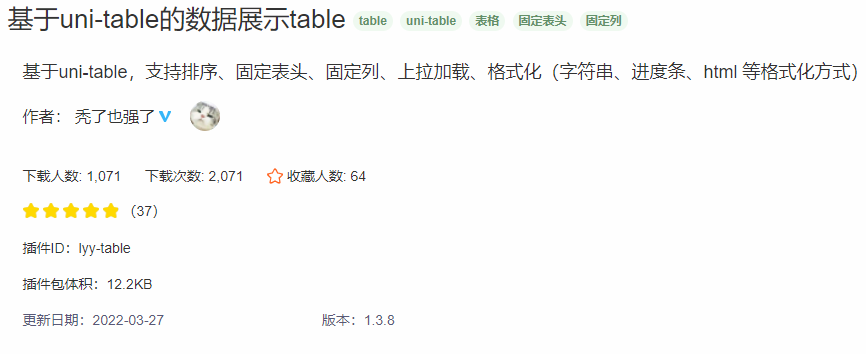

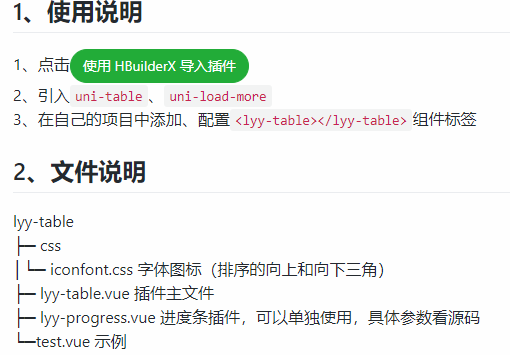
我这里改了排序,数据为空默认展示,列点击事件源代码,直接复制就好:
<template>
<view :style="{height}" :prop="ready" :change:prop="tableRender.documentReady">
<scroll-view scroll-x scroll-y class="container" @scrolltolower="scrolltolower">
<uni-table stripe border :loading="loading" style="min-height: 100%;">
<uni-tr id="lyy-thead" :class="headerFixed?'fixed-head':''" style="display: flex;">
<uni-th v-for="(item,index) in headers" :key="index" :width="item.width" align="center" :style="{
display:item.hidden?'none':'flex',width:item.width,justifyContent: 'center',
left:columnFixed>0?fixedLeft(index):'unset',
right:columnFixed<0?fixedRight(index):'unset',
position:isFixed(index)?'sticky':'unset',
borderLeft:columnFixed<0&&isFixed(index)?'1px solid #f0f0f0':'unset',
zIndex:index<=columnFixed-1?999:99,
backgroundColor:'inherit'
}">
<view @click="doSort(item)" style="display: flex;flex-direction: row;justify-content: center;">
<text :style="{lineHeight:'20px'}">{{item.label}}</text>
<view class="header-icon"
style="line-height:6px;display:flex;flex-direction:column;margin-left:5px;justify-content: center;"
v-if="item.sort">
<text class="iconfont icon-arrow-up"
:style="{color:lastSortItem===item.key&&sortWay=='asc'?'#3849B4':'#bcbcbc'}" />
<text class="iconfont icon-arrow-down"
:style="{color:lastSortItem===item.key&&sortWay=='desc'?'#3849B4':'#bcbcbc'}" />
</view>
</view>
</uni-th>
</uni-tr>
<!--<uni-tr v-if="headerFixed" :style="{height: theadHeight}">
</uni-tr>
<!-- <uni-td class="no_data" align="center">暂无数据</uni-td> -->
<view v-if="contents.length<1" class="no_data">暂无数据</view>
<uni-tr v-else v-for="(content,sindex) in sortContents" :key="sindex"
style="display:flex;table-layout: fixed;min-width: 100%;">
<!-- @click.native="rowClick(content)">-->
<uni-td v-for="(header,hindex) in headers" class="tableCell" :data-wrap="overflow" :key="hindex"
align="center" :style="{display:header.hidden?'none':'flex',textAlign:'center',width:header.width,
left:columnFixed>0?fixedLeft(hindex):'unset',
right:columnFixed<0?fixedRight(hindex):'unset',
justifyContent:'center',
alignItems:'center',
position:isFixed(hindex)?'sticky':'unset',
borderLeft:columnFixed<0&&isFixed(hindex)?'1px solid #f0f0f0':'unset',
zIndex:hindex<=columnFixed-1?9:'unset',
backgroundColor:'inherit',
overflow:'hidden'}" >
<template v-if="header.format!==undefined">
<lyy-progress
v-if="header.format.type==='progress'&&!isNaN(parseFloat(content[header.key]))"
:percent="content[header.key].toFixed(2)" show-info round></lyy-progress>
<view v-else-if="header.format.type==='html'" v-html="content[header.key]"></view>
<text v-else>{{content[header.key]}}</text>
</template>
<text v-else @click.native="header.fieldSign == '2' ? getRow(content,content[header.key],hindex) : ''">{{content[header.key]}}</text>
</uni-td>
</uni-tr>
<uni-tr v-if="contents.length>0&&totalRow.length>0" style="min-width: 100%;display: flex;">
<uni-td v-for="(header,index) in headers" :key="Math.random()" align="center" :style="{textAlign: 'center',display:header.hidden?'none':'table-cell',width:header.width,
left:columnFixed>0?fixedLeft(index):'unset',
right:columnFixed<0?fixedRight(index):'unset',
position:isFixed(index)?'sticky':'unset',
borderLeft:columnFixed<0&&isFixed(index)?'1px solid #f0f0f0':'unset',
zIndex:index<=columnFixed-1?9:'unset',
backgroundColor:'inherit'}">
<text v-if="index==0">合计</text>
<view v-else>
<!--<progress v-if="typeof header.format!=='undefined'&& header.format.type==='progress'" :percent="renderTotalRow(header)" :show-info="true" stroke-width="10" :active="true"></progress>-->
<lyy-progress
v-if="typeof header.format!=='undefined'&& header.format.type==='progress'&&!isNaN(parseFloat(renderTotalRow(header)))"
:percent="renderTotalRow(header)" :show-info="true" round></lyy-progress>
<text v-else>{{ renderTotalRow(header)}}</text>
</view>
</uni-td>
</uni-tr>
</uni-table>
<!-- <uni-load-more v-show="showLoadMore" :status="loadMore"></uni-load-more> -->
</scroll-view>
</view>
</template>
<script>
import lyyProgress from './lyy-progress'
/**
* lyyTable ver1.3.8
* @description lyyTable表格组件 ver1.3.8
*/
export default {
name: "lyyTable",
components: {
lyyProgress
},
data() {
return {
ready: 1,
lastSortItem: '', //上一次排序列
sortWay: 'none', //默认无排序
sortIndex: 0,
sortContents: [], //排序时的表格内容
footContent: {},
scrollHeight: '',
theadHeight: ''
}
},
props: {
//表格高度 1.3.8
// #ifdef H5
height: {
type: String,
default: 'calc(100vh - 44px - env(safe-area-inset-top))'
},
// #endif
// #ifndef H5
height: {
type: String,
default: '100vh'
},
// #endif
overflow: {
type: String,
default: 'nowrap',
validator: val => ['wrap', 'nowrap'].indexOf(val) > -1
},
//显示加载
loading: {
type: Boolean,
default: false
},
//上拉加载文字,参考uni-load-more
loadMore: {
type: String,
default: 'more'
},
//是否显示上拉加载组件
showLoadMore: {
type: Boolean,
default: false
},
//固定表头
headerFixed: {
type: Boolean,
default: false
},
//固定首列 ver1.3.3弃用
/*firstColumnFixed: {
type: Boolean,
default: false
},*/
//固定列数 ver1.3.3新增
columnFixed: {
type: Number,
default: 0
},
//排序方式
sortWays: {
type: Array,
default: () => ['none', 'asc', 'desc']
},
//数据为空时的占位符
emptyString: {
type: String,
default: '-'
},
//表头
headers: {
type: Array,
default: () => [],
},
//表格数据
contents: {
type: Array,
default: () => []
},
//合计列
totalRow: {
type: Array,
default: () => []
}
},
mounted() {
//uni.setStorageSync('contents',this.contents)
this.sortContents = JSON.parse(JSON.stringify(this.contents))
this.renderContents()
this.createTotalRow()
if (this.overflow == 'nowrap') {
this.ready = this.headers.length * this.contents.length
}
//ver 1.2.0 修复 uni-table width 问题
/*this.$nextTick(() => {
console.log('abc',this.$refs)
const query = uni.createSelectorQuery().in(this)
query.select('.uni-table').boundingClientRect(dom=>{
console.log(123456,dom)
}).exec()
this.$refs['uni-table'].removeAttribute('style')
})*/
//ver 1.2.0 新增 固定表头
/*if (this.headerFixed) {
/*var wHeight = document.body.clientHeight
var tablePoseY = document.getElementById('lyy-tbody').getBoundingClientRect().y
document.getElementById('lyy-tbody').style.height = wHeight - tablePoseY + 'px'
const query = uni.createSelectorQuery().in(this)
query.select('#lyy-thead').boundingClientRect(dom => {
console.log(dom)
this.theadHeight = dom.height + 'px'
}).exec()
}*/
},
watch: {
contents: {
//console.log(value)
handler(value) {
this.sortContents = JSON.parse(JSON.stringify(value))
console.log('len--------', value.length)
this.renderContents()
this.createTotalRow()
this.lastSortItem = ''
this.sortWay = 'none'
for (var header of this.headers) {
this.renderTotalRow(header)
}
//this.$forceUpdate()
this.$nextTick(function() {
if (this.overflow == 'nowrap') {
this.ready = this.headers.length * this.contents.length
}
})
},
deep: true
},
//监听排序变化
sortChange(value) {
var that = this
var contents = JSON.parse(JSON.stringify(that.contents))
// 修改排序规则:空值默认排在最后,其他非空值按升序降序排
let effectiveArr = contents.filter((item) => item[that.lastSortItem] !== '')
const invalidArr = contents.filter((item) => item[that.lastSortItem] === '')
switch (value.sortWay) {
case 'none':
that.sortContents = contents
this.renderContents()
break
case 'asc': //正序
effectiveArr = effectiveArr.sort(function(a, b) {
//需要排序的列为数字时直接计算
if (!isNaN(Number(a[that.lastSortItem])) && !isNaN(Number(b[that
.lastSortItem]))) {
return a[that.lastSortItem] - b[that.lastSortItem]
}
//非数字转为ASCII排序(1.3.7弃用)
//1.3.7更改排序方式,使中文排序更符合中国习惯
else {
//(1.3.7弃用) return a[that.lastSortItem].charCodeAt() - b[that.lastSortItem].charCodeAt()
return a[that.lastSortItem].localeCompare(b[that.lastSortItem], 'zh-cn')
}
})
that.sortContents = effectiveArr.concat(invalidArr)
break
case 'desc': //倒序
effectiveArr = effectiveArr.sort(function(a, b) {
//需要排序的列为数字时直接计算
if (!isNaN(Number(a[that.lastSortItem])) && !isNaN(Number(b[that
.lastSortItem]))) {
return b[that.lastSortItem] - a[that.lastSortItem]
}
//非数字转为ASCII排序(1.3.7弃用)
//1.3.7更改排序方式,使中文排序更符合中国习惯
else {
//(1.3.7弃用) return a[that.lastSortItem].charCodeAt() - b[that.lastSortItem].charCodeAt()
return b[that.lastSortItem].localeCompare(a[that.lastSortItem], 'zh-cn')
}
})
that.sortContents = effectiveArr.concat(invalidArr)
break
}
that.$forceUpdate()
}
},
computed: {
//将排序方式、上次排序列作为一个整体进行监听,不然会出现切换排序列不排序的现象
sortChange() {
var {
sortWay,
lastSortItem
} = this
return {
sortWay,
lastSortItem
}
}
},
methods: {
//点击排序表头时存储上次排序列名,并循环切换排序方式
doSort(item) {
if (item.sort) {
if (this.lastSortItem !== item.key) {
this.lastSortItem = item.key
this.sortIndex = 0
this.sortIndex++
this.sortWay = this.sortWays[this.sortIndex]
} else {
if (this.sortIndex < 2) {
this.sortIndex++
this.sortWay = this.sortWays[this.sortIndex]
} else {
this.sortIndex = 0
this.sortWay = this.sortWays[0]
}
}
}
},
//表格内容渲染
renderContents() {
const headers = this.headers
//防止修改穿透
var contents = JSON.parse(JSON.stringify(this.contents))
//var contents=uni.getStorageSync('contents')
let sortContents = JSON.parse(JSON.stringify(this.sortContents))
var newArr = []
var result = ''
sortContents.forEach(function(content, index) {
var item = content
headers.forEach(function(header) {
//字符类型格式化
if (typeof header.format !== 'undefined' && (header.format.type === 'string' ||
header.format.type === 'html')) {
var template = header.format.template
var keys = header.format.keys
//console.log(typeof template)
if (typeof template === 'function') {
var arg = []
keys.forEach((el, i) => {
arg.push(contents[index][el])
})
result = template(arg)
//console.log(result)
} else {
keys.forEach((el, i) => {
var value = contents[index][el]
var reg = new RegExp('\\{' + i + '}', 'g')
template = template.replace(reg, value)
})
result = template
}
item[header.key] = result
}
//计算类型格式化
else if (typeof header.format !== 'undefined' && (header.format.type ===
'compute' || header.format.type === 'progress')) {
//console.log(header.format.template)
var temp = header.format.template
var keys = header.format.keys
//1.3.7 使计算列支持function
if (typeof temp === 'function') {
var arg = []
keys.forEach((el, i) => {
arg.push(contents[index][el])
})
item[header.key] = temp(arg)
//console.log(result)
} else {
keys.forEach((el, i) => {
var reg = new RegExp('\\{' + i + '}', 'g')
temp = temp.replace(reg, contents[index][el])
})
//console.log(temp)
item[header.key] = eval(temp)
//this.sortContents[index][header.key]=result
}
}
})
newArr.push(item)
})
this.sortContents = newArr
},
createTotalRow() {
if (this.totalRow.length > 0 && this.sortContents[0] !== undefined) {
/*var obj = {...this.contents[0]}
console.log(obj)
for (var i in obj) {
this.footContent[i] = obj[i]
}*/
this.footContent = JSON.parse(JSON.stringify(this.sortContents[0]))
for (var i in this.footContent) {
var result = 0
if (this.sortContents.length > 0) {
for (var j in this.sortContents) {
result += parseFloat(this.sortContents[j][i]) || 0
}
}
this.footContent[i] = result
}
}
},
//合计列渲染
renderTotalRow(header) {
var content = JSON.parse(JSON.stringify(this.footContent))
var result = this.emptyString
if (this.totalRow.indexOf(header.key) > -1) {
if (typeof header.format !== 'undefined' && header.format.type === 'progress') {
var temp = header.format.template
var keys = header.format.keys
for (var index in keys) {
var reg = new RegExp('\\{' + index + '}', 'g')
temp = temp.replace(reg, content[keys[index]])
}
result = eval(temp)
result = isNaN(result) ? 0 : result.toFixed(2)
} else {
if (content[header.key] != null && !isNaN(content[header.key])) {
result = content[header.key]
}
}
}
return result
},
//上拉加载事件
scrolltolower(e) {
if (e.detail.direction == 'bottom') {
this.$emit('onPullup')
}
},
//固定列left计算
fixedLeft(index) {
var headers = this.headers.filter(item => !item.hidden)
var left = 'calc(1px'
for (var i = 1; i < index + 1; i++) {
left += ' + ' + headers[i - 1].width
}
left += ')'
return left
},
//v1.3.5
//固定列right计算
fixedRight(index) {
var headers = this.headers.filter(item => !item.hidden)
var columnFixed = Math.abs(this.columnFixed)
if (index >= headers.length + this.columnFixed) {
var right = 'calc(1px'
for (var i = index; i < headers.length - 1; i++) {
if (index + 1 == headers.length) {
break
} else {
right += ' + ' + headers[i + 1].width
}
}
right += ')'
return right
} else {
return 'unset'
}
},
//v1.3.5
isFixed(index) {
if (this.columnFixed > 0) {
return index <= this.columnFixed - 1
} else if (this.columnFixed < 0) {
var headers = this.headers.filter(item => !item.hidden)
return index >= headers.length + this.columnFixed
} else {
return false
}
},
// 获取行数据,点击列数据与下标
getRow(row,key,index){
this.$emit('row-click',row,key,index)
},
}
}
</script>
<script module="tableRender" lang="renderjs">
function test(a, b) {
alert(a, b)
}
export default {
methods: {
documentReady(newValue, oldValue, ownerInstance, instance) {
//alert(`${newValue},${oldValue}`)
console.log(newValue, oldValue)
if (newValue > oldValue) {
var cells = document.querySelectorAll('.tableCell')
function changeWrap(e) {
console.log(1)
var wrap = e.currentTarget.dataset.wrap
e.currentTarget.dataset.wrap = wrap == 'nowrap' ? 'unset' : 'nowrap'
}
function fun(e) {
changeWrap(e)
}
// for (var i = oldValue - 1; i < cells.length; i++) {
// cells[i].addEventListener('click', fun)
// }
}
}
}
}
</script>
<style>
/deep/.uni-table-loading {
display: none !important;
}
</style>
<style scoped>
@import './css/iconfont.css';
.container {
width: 100vw;
height: 100%;
border-bottom: 1px solid #f0f0f0;
}
.uni-table-scroll {
overflow: unset !important;
border-top: none;
}
.no_data {
position: fixed;
width: 750upx;
background-color: #FFF;
height: 50px;
text-align: center;
line-height: 50px;
}
#lyy-thead {
/*min-width: 750upx;*/
display: table;
background-color: #FFF;
}
[data-wrap='unset'] {
white-space: unset !important;
display: flex !important;
}
[data-wrap='nowrap'] {
white-space: nowrap !important;
}
[data-wrap='nowrap'] uni-text {
width: 100%;
text-overflow: ellipsis;
overflow: hidden;
}
.fixed-head {
position: sticky;
top: 0;
z-index: 99;
border-top: 1px solid #f0f0f0;
}
/*修复滑动时偏移1px问题*/
/*.table--border {
border-top: none;
border-left: none;
}*/
.uni-table-tr {
background-color: #FFF;
}
</style>
uniapp中使用AntV F6 + table表格插件使用的更多相关文章
- [转]手把手教你--Bootstrap Table表格插件及数据导出(可导出Excel2003及Exce2007)
原文地址:https://blog.csdn.net/javayoucome/article/details/80081771 1.介绍 Bootstrap Table介绍见官网:http://boo ...
- 关于Vue.cli 脚手架环境中引入Bootstrap时,table表格样式缺失的解决办法
Vue+bootstrap不能正常使用table的样式 环境:下载官网的本地bootstrap包,然后在vue 的index.html引入bootstrap的css和js环境 问题描述:1. vue里 ...
- 在Bootstrap开发框架中使用bootstrapTable表格插件和jstree树形列表插件时候,对树列表条件和查询条件的处理
在我Boostrap框架中,很多地方需要使用bootstrapTable表格插件和jstree树形列表插件来共同构建一个比较常见的查询界面,bootstrapTable表格插件主要用来实现数据的分页和 ...
- 用echartsjs 实现散点图与table表格双向交互,以及实现echarts取自于table数据,和自定义echarts提示内容
本人研究echarts已经有一段时间了,今天就分享几个关于echarts的小技巧.虽然看起来简单,但做起来却很繁琐,不过实用性倒是很好. 在一个大的页面中,左边为table表格,右边为echarts的 ...
- 2.13 table表格定位
2.13 table表格定位 前言 在web页面中经常会遇到table表格,特别是后台操作页面比较常见.本篇详细讲解table表格如何定位.一.认识table 1.首先看下table长什么 ...
- [译]MVC网站教程(四):MVC4网站中集成jqGrid表格插件(系列完结)
目录 1. 介绍 2. 软件环境 3. 在运行示例代码之前(源代码 + 示例登陆帐号) 4. jqGrid和AJAX 5. GridSettings 6. ...
- 好用的自适应表格插件-bootstrap table (支持固定表头)
最近工作中找到了一款十分好用的表格插件,不但支持分页,样式,搜索,事件等等表格插件常有的功能外,最主要的就是他自带的冻结表头功能,让开发制作表格十分容易,不过网上大多都是英文文档,第一次使用会比较麻烦 ...
- Table Dragger - 简单的 JS 拖放排序表格插件
Table Dragger 是一个极简的实现拖放排序的表格插件,纯 JavaScript 库,不依赖 jQuery.用于构建操作方便的拖放排序功能,超级容易设置,有平滑的动画,支持触摸事件. 在线演示 ...
- html table表格导出excel的方法 html5 table导出Excel HTML用JS导出Excel的五种方法 html中table导出Excel 前端开发 将table内容导出到excel HTML table导出到Excel中的解决办法 js实现table导出Excel,保留table样式
先上代码 <script type="text/javascript" language="javascript"> var idTmr; ...
- 关于html中table表格tr,td的高度和宽度
关于html中table表格tr,td的高度和宽度 关于html中table表格tr,td的高度和宽度 做网页的时候经常会遇到各种各样的问题,经常遇到的一个就是会碰到表格宽度对不齐的问题.首先,来分析 ...
随机推荐
- Error:java: 无效的目标发行版: 9
今天碰到一个编译问题,起先以为是jdk版本问题,但是查看了下,发现版本没错. 顿时有一种怀疑人生的感觉. 然后网上找了许久,终于让我找到答案: 下面直接上解决方案: 将版本9改为8,保存,测试运行,可 ...
- Adobe Acrobat PDF Reader DC软件下载
安装包下载 https://get.adobe.com/en/reader/enterprise/ ftp下载,按日期排序 ftp://ftp.adobe.com/pub/adobe/reader/w ...
- easyExcel-modle
package com.alibaba.easyexcel.test.model;import com.alibaba.excel.annotation.ExcelProperty;import co ...
- vue2 element-ui组件二封-表单组件-按钮封装
这里是一段我们公司过往项目的代码(增删改查项目中的查询/重置按钮) <el-button @click="query()" type="primary" ...
- twenty two
打包处理less文件 1,运行npm i less-loader@10.0.1 less@4.1.1 -D 2, 在webpack.config.js的module->rules数组中 rule ...
- Prettier 与 ESLint 对函数名后空格的处理
问题 Prettier 格式化 JavaScript 代码之后,默认不会在函数与 () 添加空格,而 ESLint 默认情况下则要求函数与 () 之间必须有一个空格. 保留空格的方案配置 方案 1 在 ...
- Access to the path 'C:\Windows\TEMP\XXX.tmp' is denied.
System.UnauthorizedAccessException: Access to the path 'C:\Windows\TEMP\ASPNETCORE_935a19f1-814f-4b3 ...
- Jmeter性能测试入门到项目实战03
Jmeter性能测试入门到项目实战03 P35 项目业务介绍 1,之前已经对Jmeter所有的知识点做了一个介绍,主要的业务模式是币币交易,就像b2c 2, 3, 4,主要是把登陆和交易这一块做一个并 ...
- 安装fearch
sudo add-apt-repository ppa:christian-boxdoerfer/fsearch-daily sudo apt-get update sudo apt-get inst ...
- JDBC之Statement
Statement 目录 Statement Statement Statement概述 要执行的SQL分为两类 查询 增删改 Statement继承体系 SQL注入问题 SQL注入问题解决 获取得到 ...