
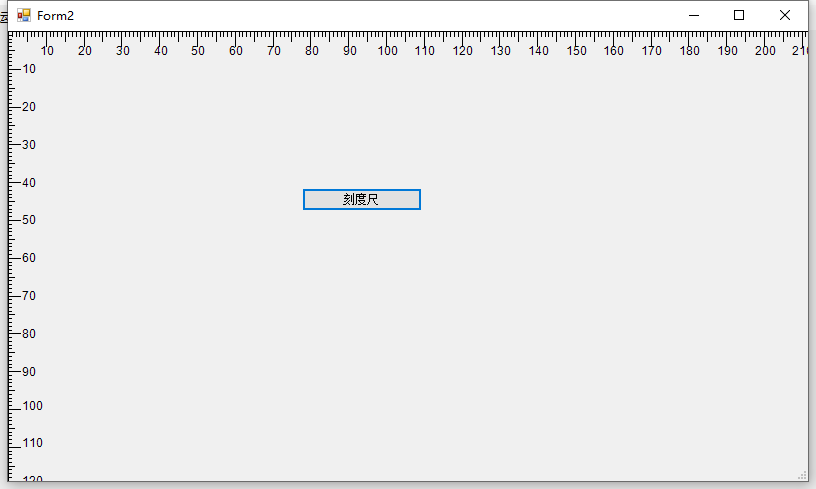
【转】WinForm窗体刻度尺
`using System;
using System.Drawing;
using System.Windows.Forms;
using System.Drawing.Drawing2D;
namespace IntegrationAPP
{
public partial class Form2 : Form
{
public static float MonitorDPI = 96f ;
private int originLocation = 0; //坐标原地起始位置
private int maxScaleX = 1000; //X轴最大刻度
private int maxScaleY = 1000; //Y轴最大刻度
private float scaling = 1.0F; //缩放比例
private int offSetX = 0; //X轴偏移位置
private int offSetY = 0; //Y轴偏移位置
private Font font = new Font("Arial", 9); //刻度值显示字体
private TextureBrush textureBrush;
private Bitmap bit;
int x = 0;
int y = 0;
    public Form2()

    {

        InitializeComponent();

    }

    private void button1_Click(object sender, EventArgs e)

    {

       // bit = new Bitmap((int)(MonitorDPI / 25.4 * 1 * scaling) - offSetX, (int)(MonitorDPI / 25.4 * 1 * scaling) - offSetX);

        Graphics g1 = CreateGraphics();

        PaintEventArgs pe = new PaintEventArgs(g1, this.ClientRectangle);

        RulerControl_Paint(g1,pe );

       // g1.SmoothingMode = System.Drawing.Drawing2D.SmoothingMode.AntiAlias;

       // g1.Dispose();

       // textureBrush = new TextureBrush(bit);//使用TextureBrush可以有效减少窗体拉伸时的闪烁

    }

    private void RulerControl_Paint(object sender, PaintEventArgs e)

      {

          Graphics g = e.Graphics;

          int widthInmm = maxScaleX;

          int heightInmm = maxScaleY;

          //绘制X轴

          for (int i = 0; i <= widthInmm; i++)

          {

              SizeF size = g.MeasureString(Convert.ToString(i), font);

              float x = originLocation + (float)(MonitorDPI / 25.4 * i * scaling) - offSetX;

              if (x >= originLocation)

              {

                  PointF start = new PointF(x, originLocation);

                  PointF end = new PointF(x, 3);

                  if (i % 5 == 0)

                  {

                      end = new PointF(x, 6);

                  }

                  if (i % 10 == 0 && i != 0)

                  {

                      end = new PointF(x, 12);

                      g.DrawString(Convert.ToString(i), font, Brushes.Black, new PointF(x - (float)(MonitorDPI / 25.4 * Convert.ToString(i).Length * scaling), 12));

                  }

                  g.DrawLine(Pens.Black, start, end);

              }

          }

          g.DrawLine(Pens.Black, new PointF(originLocation, originLocation), new PointF(this.Width, originLocation));

          //绘制Y轴

          for (int i = 0; i <= heightInmm; i++)

          {

              SizeF size = g.MeasureString(Convert.ToString(i), font);

              float y = originLocation + (float)(MonitorDPI / 25.4 * i * scaling) - offSetY;

              if (y >= originLocation)

              {

                  PointF start = new PointF(originLocation, y);

                  PointF end = new PointF(3, y);

                  if (i % 5 == 0)

                  {

                      end = new PointF(6, y);

                  }

                  if (i % 10 == 0 && i != 0)

                  {

                      end = new PointF(12, y);

                      g.DrawString(Convert.ToString(i), font, Brushes.Black, new PointF(12, y - (float)(MonitorDPI / 25.4 * Convert.ToString(i).Length * scaling)));

                  }

                  g.DrawLine(Pens.Black, start, end);

              }

          }

          g.DrawLine(Pens.Black, new PointF(originLocation, originLocation), new PointF(originLocation, this.Height));

          Pen p = new Pen(Color.Gray, 1);

          p.DashStyle = DashStyle.Solid;

          p.DashPattern = new float[] { 1, (float)(MonitorDPI / 25.4 * 5 * scaling) - 1 };

          for (int i = 0; i <= heightInmm; i += 5)

          {

              g.DrawLine(p, 0, (float)(MonitorDPI / 25.4 * i * scaling), 1000, (float)(MonitorDPI / 25.4 * i * scaling));

          }

      }

}
}
`
【转】WinForm窗体刻度尺的更多相关文章
- winform 窗体圆角设计
网上看到的很多winform窗体圆角设计代码都比较累赘,这里分享一个少量代码就可以实现的圆角.主要运用了System.Drawing.Drawing2D. 效果图 代码如下. private void ...
- WinForm 窗体属性 窗体美化
WinForm是·Net开发平台中对Windows Form的一种称谓. Windows窗体的一些重要特点如下: 功能强大:Windows窗体可用于设计窗体和可视控件,以创建丰富的基于Windows的 ...
- winform窗体置顶
winform窗体置顶 金刚 winform 置顶 今天做了一个winform小工具.需要设置置顶功能. 网上找了下,发现百度真的很垃圾... 还是必应靠谱些. 找到一个可以链接. https://s ...
- winform窗体控件(全)
回顾跟补充下除了昨天那常用6个其他的winform窗体控件作用 1:Button:按钮 (1)AutoSize:如果是True的情况下,内容将会撑开:False的话会另起一行 (2)Enabled: ...
- C#将exe运行程序嵌入到自己的winform窗体中
以下例子是将Word打开,然后将它嵌入到winform窗体中,效果如下图:C将exe运行程序嵌入到自己的winform窗体中 - kingmax_res - iSport注意:该方法只适用于com的e ...
- Winform 窗体单例
有窗体Form1和窗体Form2,单击Form1上按钮,只弹出一个Form2. Form2里自定义一个方法,里面判断是否弹出Form2,没有时弹出Form2. public static Form2 ...
- WinForm窗体嵌入
一.在winform窗体上添加两个控件 1.容器>Panel 2.添加 SideBar.dll (下载链接:http://pan.baidu.com/s/1o6qhf9w) (1)将SideBa ...
- C#实现WinForm窗体逐渐显示效果
C#实现WinForm窗体逐渐显示效果,这个博客园里面已经有其它人已经实现了,原理很简单,就是通过定时改变窗体的透明度(从0到1,即透明度从完全透明到不透明),我这里也是按照这个思路来实现的,但是我做 ...
- .NET vs2010中使用IrisSkin2.dll轻松实现winForm窗体换肤功能
IrisSkin2.dll是一款很不错的免费皮肤控件,利用它可以轻松的实现winForm窗体换肤! 网上很多朋友说在VS2010中不能使用IrisSkin2.dll,我这里提供一个取巧的办法. Iri ...
随机推荐
- Java有没有goto?
goto 是Java中的保留字,在目前版本的Java中没有使用.(根据James Gosling(Java之父)编写的<The Java Programming Language>一书的附 ...
- sleep 方法和 wait 方法有什么区别?
这个问题常问,sleep 方法和 wait 方法都可以用来放弃 CPU 一定的时间,不同点 在于如果线程持有某个对象的监视器,sleep 方法不会放弃这个对象的监视器, wait 方法会放弃这个对象的 ...
- Redis报错:DENIED Redis is running in protected mode
转:Redis使用认证密码登录 Redis默认配置是不需要密码认证的,也就是说只要连接的Redis服务器的host和port正确,就可以连接使用.这在安全性上会有一定的问题,所以需要启用Redis ...
- 体验javascript之美第五课 五分钟彻底明白 匿名函数自执行和闭包
通过文你将学到: 1.闭包是怎么回事儿? 2.闭包的原理和在jquery中的应用 3.从一到面试题彻底理解闭包和垃圾回收机制 4.闭包在jquery中的应用 概述 经常听到闭包这个词儿,或者匿名函数自 ...
- canvas 实现 github404动态效果
使用canvas来完成github404的动态效果 前几天使用css样式和js致敬了一下github404的类似界面,同时最近又接触了canvas,本着瞎折腾的想法,便借着之前的js的算法,使用can ...
- mapreduce统计单词
源代码: WordCountMapper.java: package cn.idcast.mapreduce; import org.apache.hadoop.io.LongWritable; im ...
- maven安装和配置阿里云镜像(各种详细配置)
maven安装和详细配置 提示:下面是maven3.6.3版本百度云链接,记住maven3.3以上版本必须安装jdk1.7及以上版本,否则会出错. 链接:https://pan.baidu.com/s ...
- 基于Spring接口,集成Caffeine+Redis两级缓存
原创:微信公众号 码农参上,欢迎分享,转载请保留出处. 在上一篇文章Redis+Caffeine两级缓存,让访问速度纵享丝滑中,我们介绍了3种整合Caffeine和Redis作为两级缓存使用的方法,虽 ...
- servlet和action的区别
1.Servlet:默认在第一次访问时被创建,创建一次,单实例对象 2.Action:访问时被创建,每次访问action的时候,都会创建action对象,创建多次,多实例对象
- 解决k8s故障,eureka处于unknow的问题
//pod Unknown状态,开始强制删除eureka-server-node-0,eureka-server-node-1等,强制删除不了 [root@fp158 sts]# kubectl de ...