
Dev Express 框架自定义登录添加短信验证功能
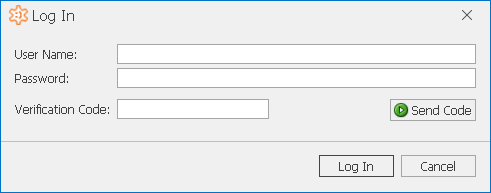
需求:登录界面改成这样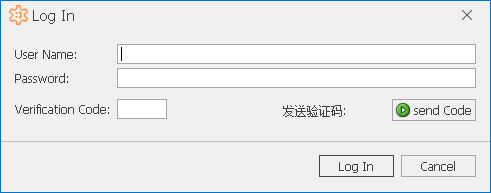
记录一下过程,以便下次操作类似的步骤有遗忘,也与大伙儿分享下,如有不当之处请指出,感谢。
参考官网文档:https://docs.devexpress.com/eXpressAppFramework/112982/task-based-help/security/how-to-use-custom-logon-parameters-and-authentication?v=18.1
具体实现步骤:
一:界面
1.自定义用户类Employee(也可以使用默认默认的PermissionPolicyUser类,如果属性满足的话)
using DevExpress.Persistent.Base;

using DevExpress.Persistent.BaseImpl.PermissionPolicy;

using DevExpress.Xpo;

using System;

using System.Collections.Generic;

using System.ComponentModel;

using System.Linq;

using System.Text;

using System.Threading.Tasks;

namespace Login2.Module.BusinessObjects

{

    [DefaultClassOptions, DefaultProperty("UserName")]

    public class Employee : PermissionPolicyUser //继承默认的用户类

    {

        public Employee(Session session) : base(session) { }

        //验证码

        private string verificationCode;

        public string VerificationCode

        {

            get { return verificationCode; }

            set { SetPropertyValue("VerificationCode", ref verificationCode, value); }

        }

        //手机号

        private string phone;

        public string Phone

        {

            get { return phone; }

            set { SetPropertyValue("Phone", ref phone, value); }

        }

    }

}
2.自定义参数类:ConstomLogonParameters
using DevExpress.ExpressApp.DC;

using DevExpress.Persistent.Base;

using System;

using System.Collections.Generic;

using System.ComponentModel;

using System.Linq;

using System.Runtime.Serialization;

using System.Text;

using System.Threading.Tasks;

namespace Login.Module

{

    [DomainComponent, Serializable]

    [System.ComponentModel.DisplayName("Log In")]

    public class CustomLogonParameters : INotifyPropertyChanged, ISerializable

    {

        private string username;

        private string password;

        private string verificationCode;


        [Browsable(true)]

        public String UserName

        {

            get { return username; }

            set

            {

                if (username == value) return;

                username = value;

            }

        }

        [PasswordPropertyText(true)]

        public string Password

        {

            get { return password; }

            set

            {

                if (password == value) return;

                password = value;

            }

        }

        //验证码

        [Browsable(true)]

        public String VerificationCode

        {

            get { return verificationCode; }

            set

            {

                if (verificationCode == value) return;

                verificationCode = value;

            }

        }

        public CustomLogonParameters() { }

        // ISerializable

        public CustomLogonParameters(SerializationInfo info, StreamingContext context)

        {

            if (info.MemberCount > 0)

            {

                UserName = info.GetString("UserName");

                Password = info.GetString("Password");

                VerificationCode = info.GetString("VerificationCode");

            }

        }

        private void OnPropertyChanged(string propertyName)

        {

            if (PropertyChanged != null)

            {

                PropertyChanged(this, new PropertyChangedEventArgs(propertyName));

            }

        }

        public event PropertyChangedEventHandler PropertyChanged;

        [System.Security.SecurityCritical]

        public void GetObjectData(SerializationInfo info, StreamingContext context)

        {

            info.AddValue("UserName", UserName);

            info.AddValue("Password", Password);

            info.AddValue("VerificationCode", VerificationCode);

        }

    }

}
3.自定义参数验证类:CustomAuthentication 类
using DevExpress.Data.Filtering;

using DevExpress.ExpressApp;

using DevExpress.ExpressApp.Security;

using DevExpress.Persistent.BaseImpl.PermissionPolicy;

using Login.Module.BusinessObjects;

using Login2.Module;

using Login2.Module.BusinessObjects;

using System;

using System.Collections.Generic;

using System.Linq;

using System.Text;

using System.Threading.Tasks;

namespace Login.Module

{

    public class CustomAuthentication : AuthenticationBase, IAuthenticationStandard

    {

        private CustomLogonParameters customLogonParameters;

        public CustomAuthentication()

        {

            customLogonParameters = new CustomLogonParameters();

        }

        public override void Logoff()

        {

            base.Logoff();

            customLogonParameters = new CustomLogonParameters();

        }

        public override void ClearSecuredLogonParameters()

        {

            customLogonParameters.Password = "";

            base.ClearSecuredLogonParameters();

        }

        // 自定义的用户类

        public override object Authenticate(IObjectSpace objectSpace)

        {

            //根据用户名查找该用户

            Employee employee = objectSpace.FindObject<Employee>

                (new BinaryOperator("UserName", customLogonParameters.UserName));

            //用户不存在

            if (employee == null)

                throw new ArgumentNullException("Employee");

            //比较密码

            if (!employee.ComparePassword(customLogonParameters.Password))

                throw new AuthenticationException(

                    employee.UserName, "Password mismatch.");

            //比较验证码

            string verificationCode = employee.VerificationCode;

            if (verificationCode != customLogonParameters.VerificationCode)

                throw new AuthenticationException("VerificationCode mismatch");

            return employee;

        }

        public override void SetLogonParameters(object logonParameters)

        {

            this.customLogonParameters = (CustomLogonParameters)logonParameters;

        }

        public override IList<Type> GetBusinessClasses()

        {

            return new Type[] { typeof(CustomLogonParameters) };

        }

        public override bool AskLogonParametersViaUI

        {

            get { return true; }

        }

        public override object LogonParameters

        {

            get { return customLogonParameters; }

        }

        public override bool IsLogoffEnabled

        {

            get { return true; }

        }

    }

}
4.WinApplications.cs 中替换组件
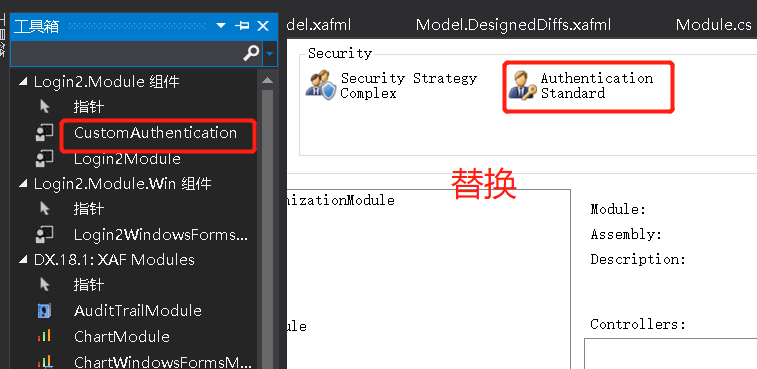
替换这个登录界面上的参数才会是我们自定义的参数,如下:
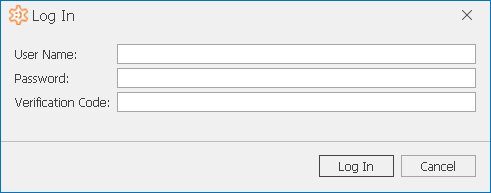
5.添加“发送验证码”按钮:
1)在Controller包下 Add Dev Express Item 选择view Controller
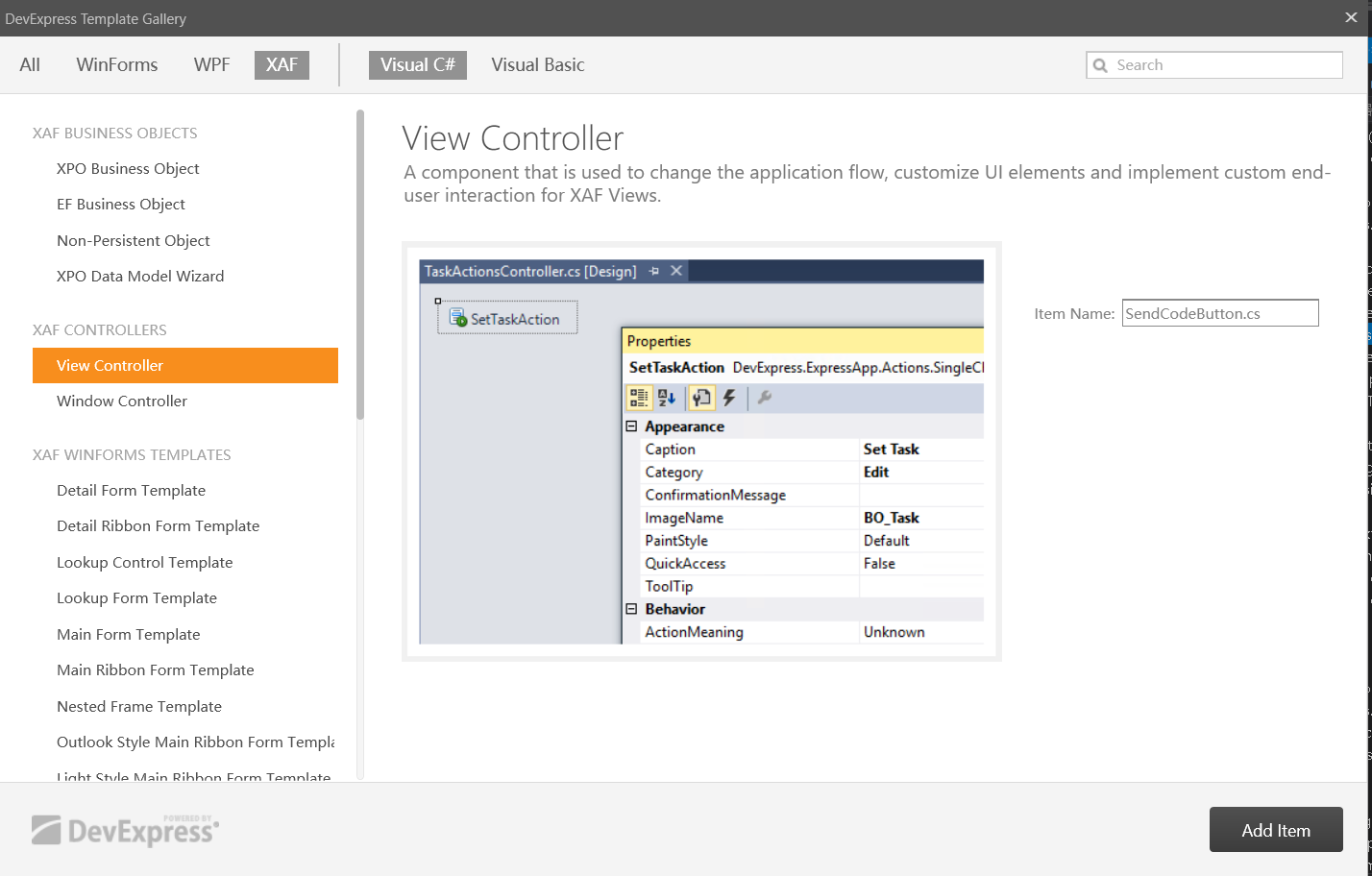
2)给视图层添加按钮组件:

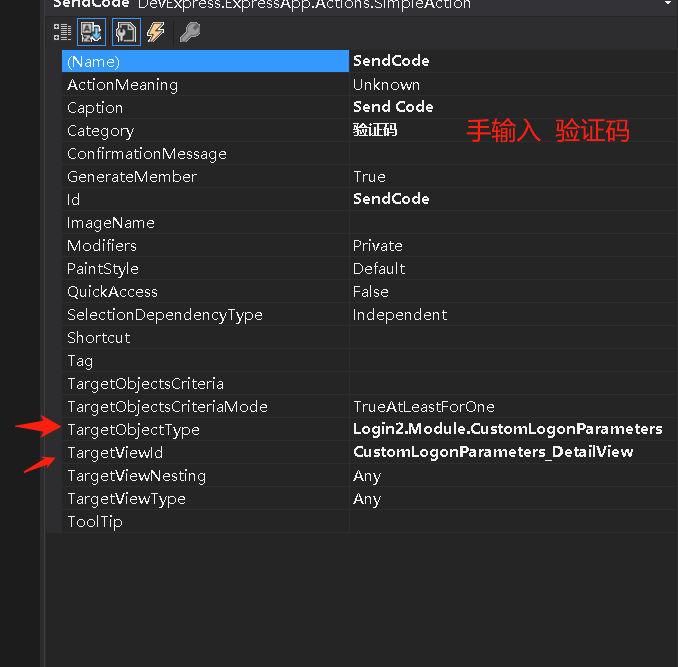
3)设置组件属性
设置属性时,项目不能处于启动状态,不然设置不上去
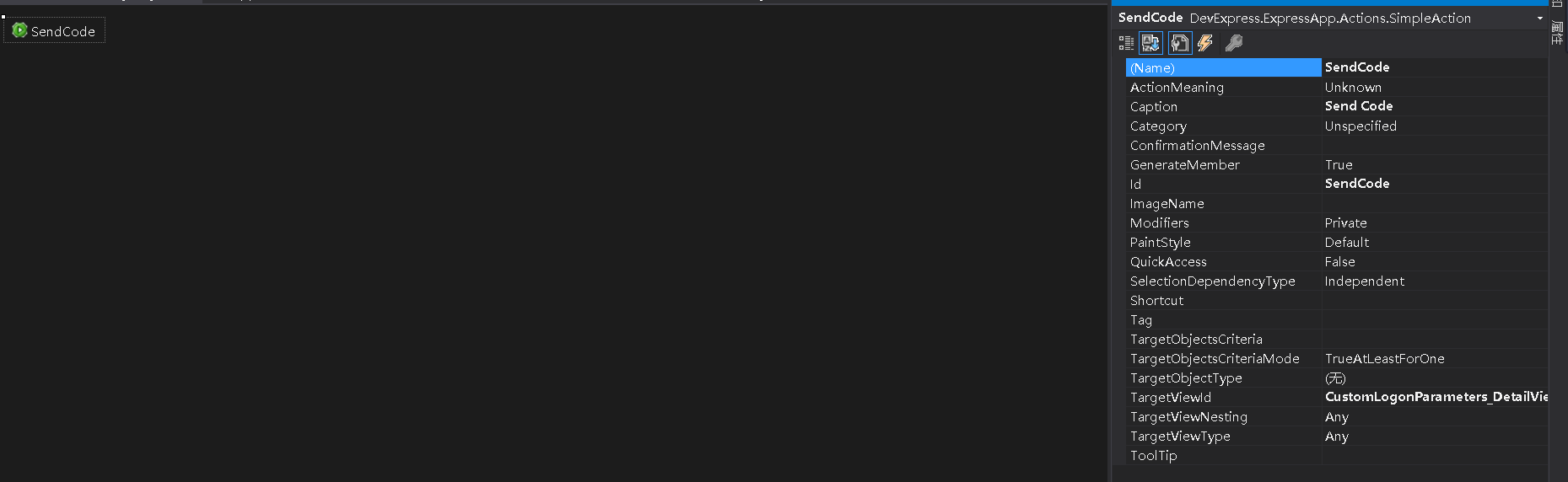
属性中的TargetViewId,填下面的这个自定义参数类的detail_View 的 Id
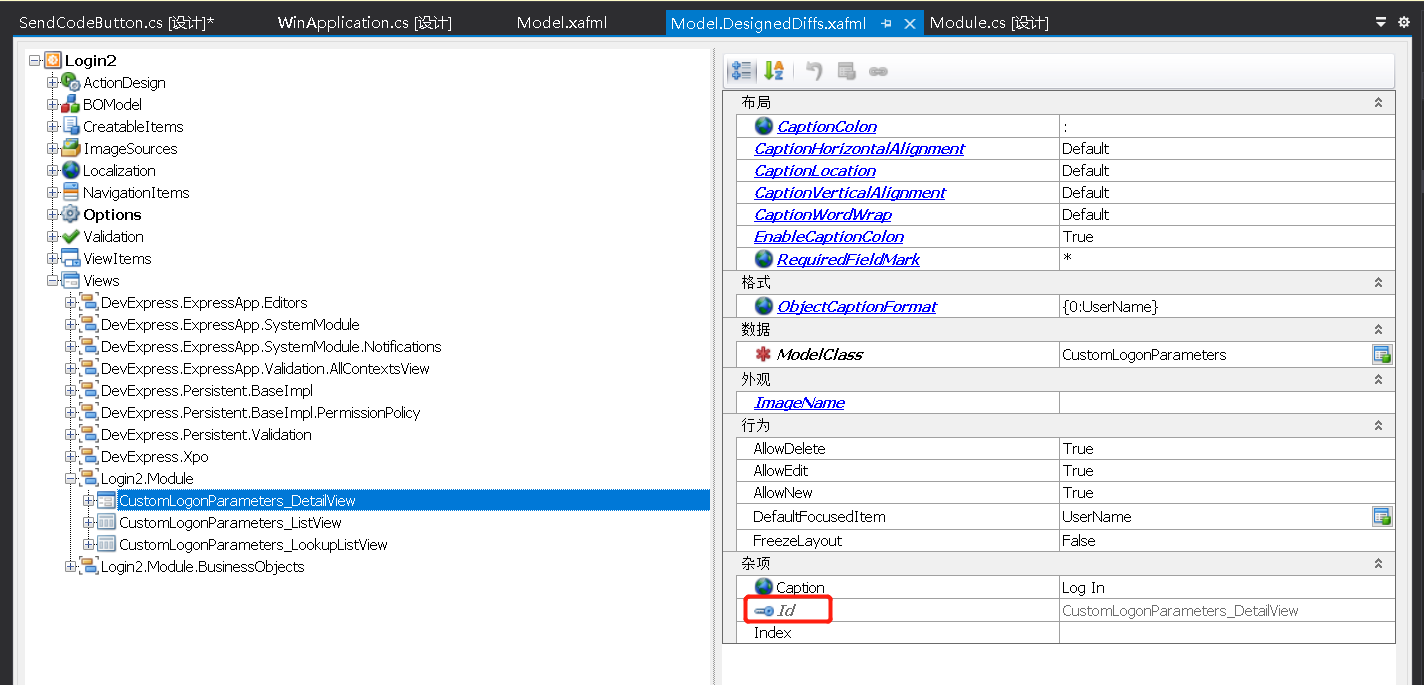
接下来,我调了半天.....梳理一下
新建如下,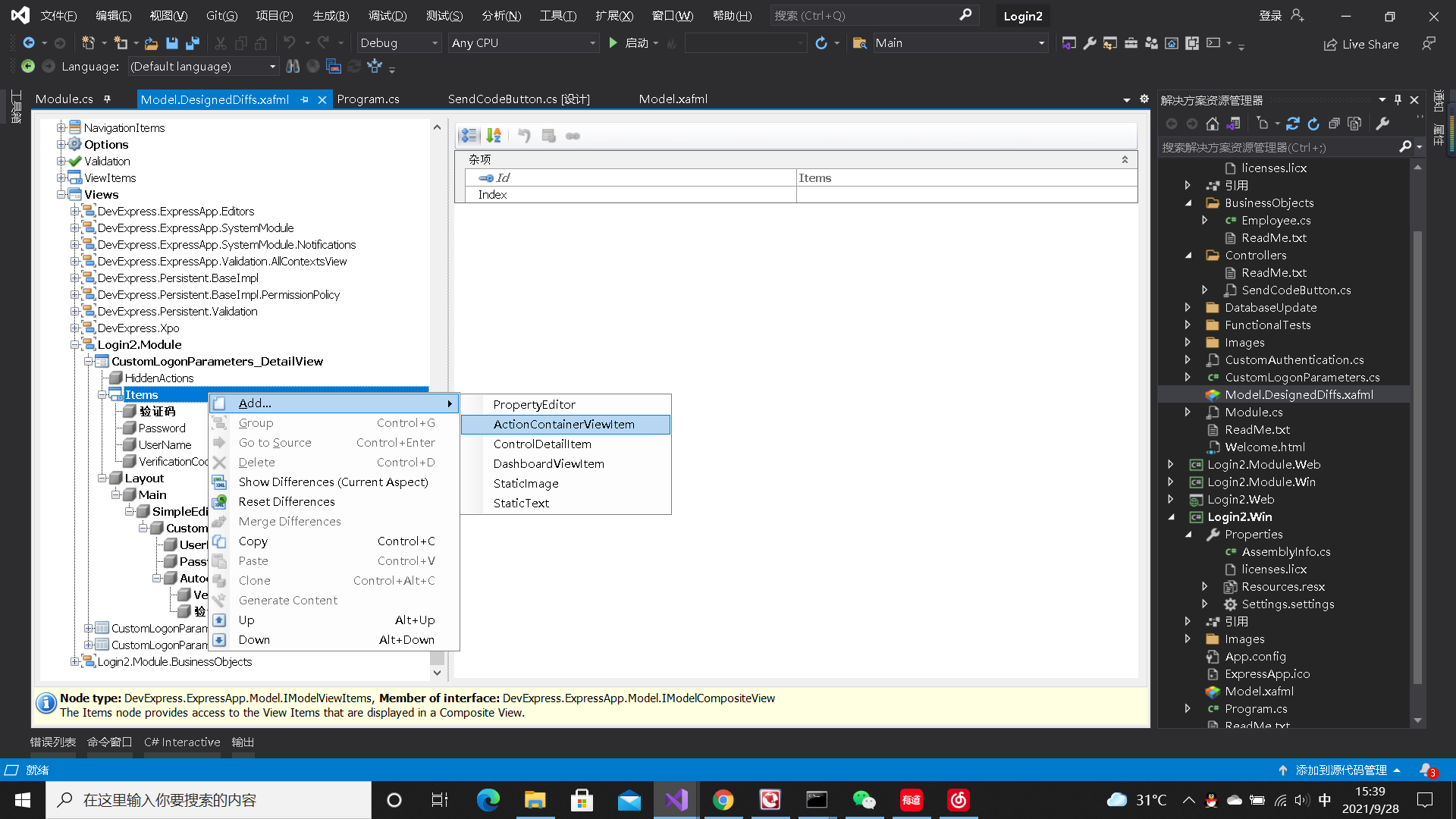
在layout下 再把上面建的组件添加上去,具体细节....
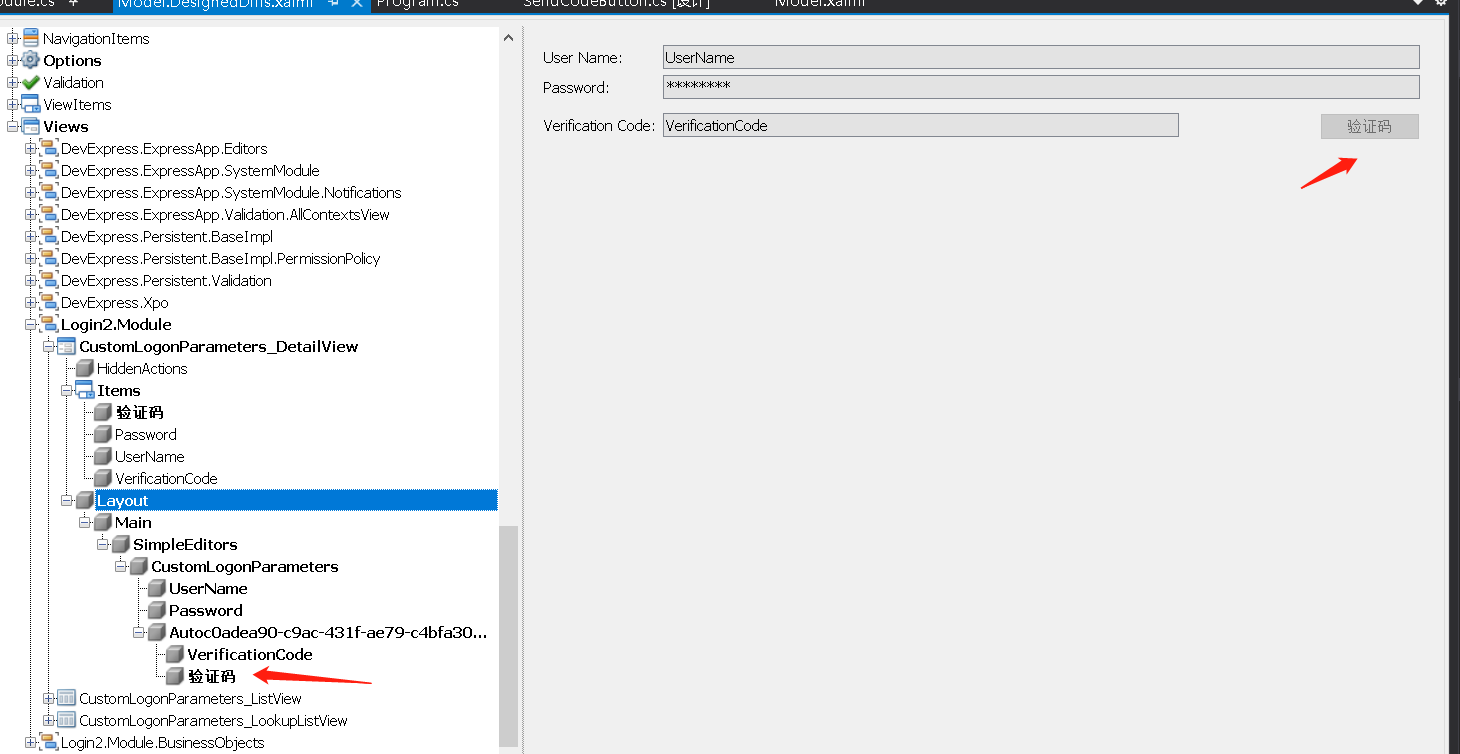
右键 add layoutViewItem
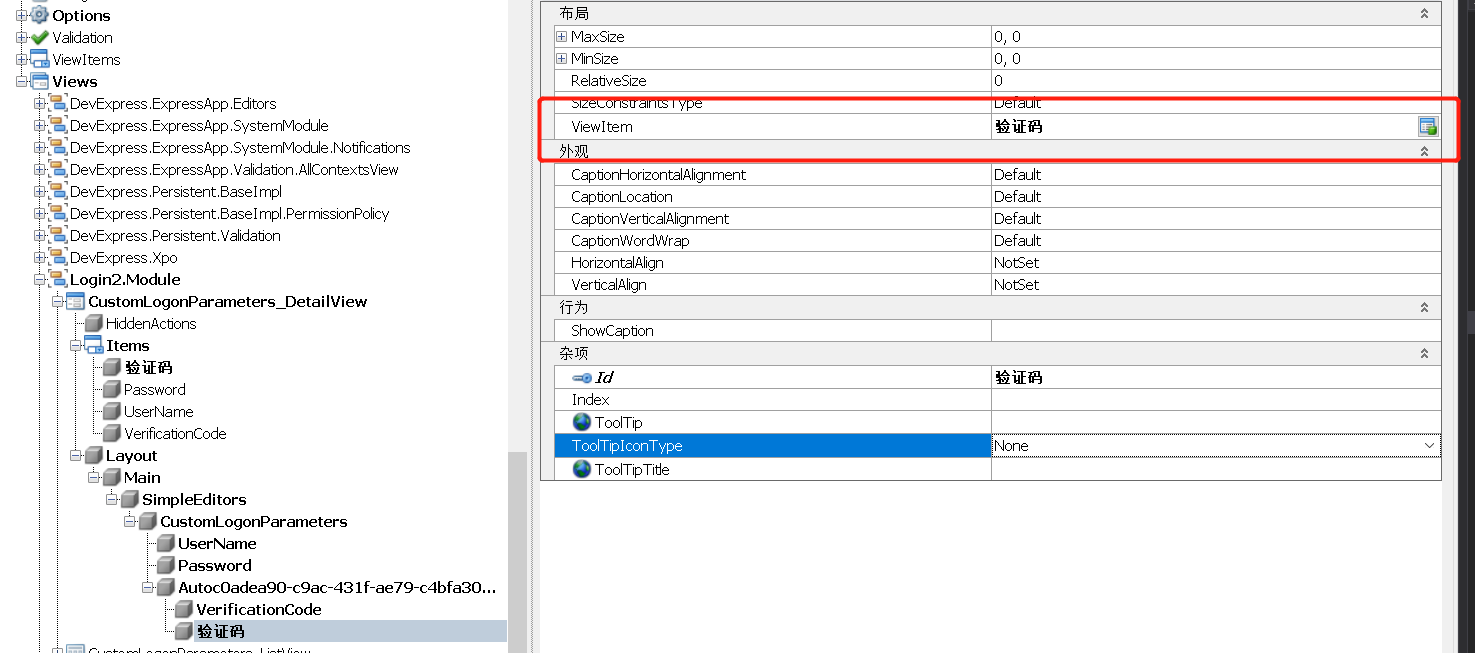
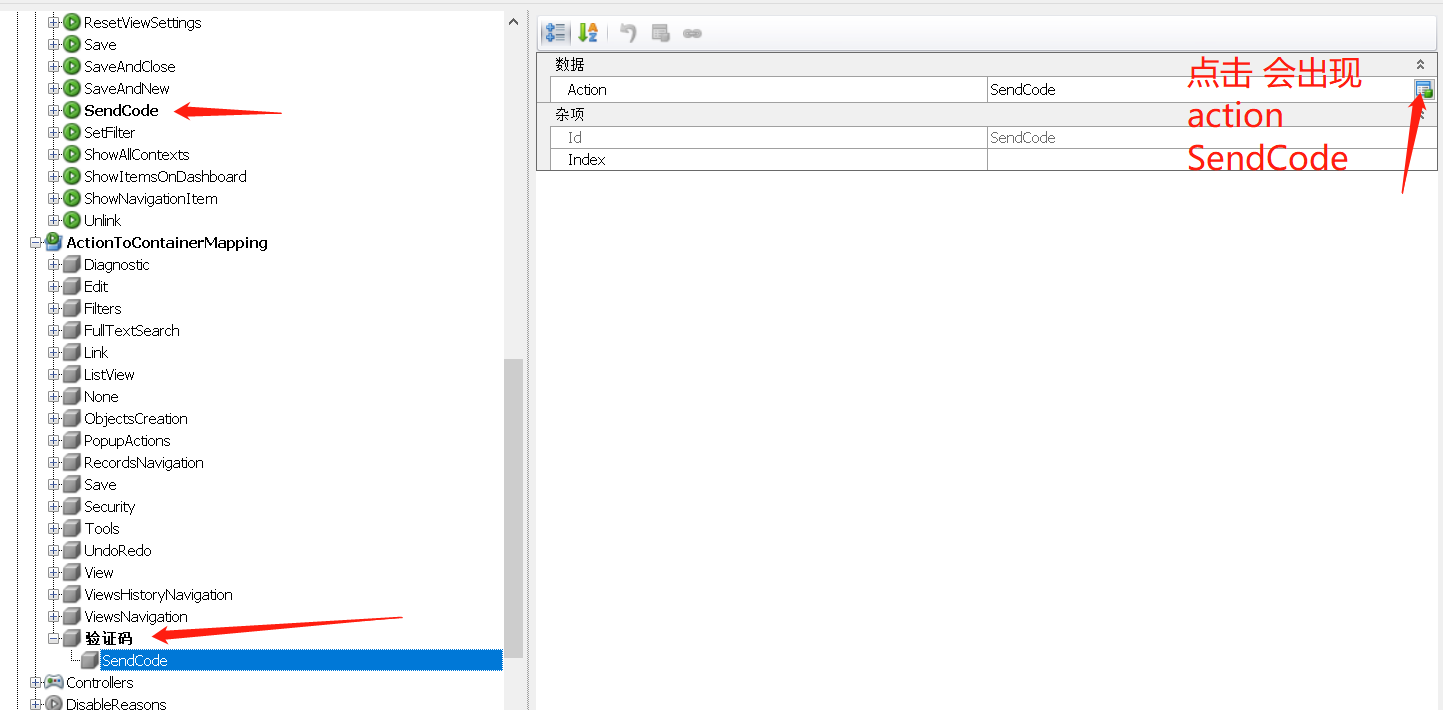
接下来就是 Controller包中添加的那个SimpleAction的属性了。
之后,再把新增的这个组件给注册了。在Module.cs 文件中添加代码。
参考:https://docs.devexpress.com/eXpressAppFramework/113475/ui-construction/controllers-and-actions/logon-form-controllers-and-actions
这个注册是组长在论坛上搜索到的。
之后界面就调好了。
二:验证
验证就稍微简单一点了。
根据它官网给的实例代码,找到校验的方法。
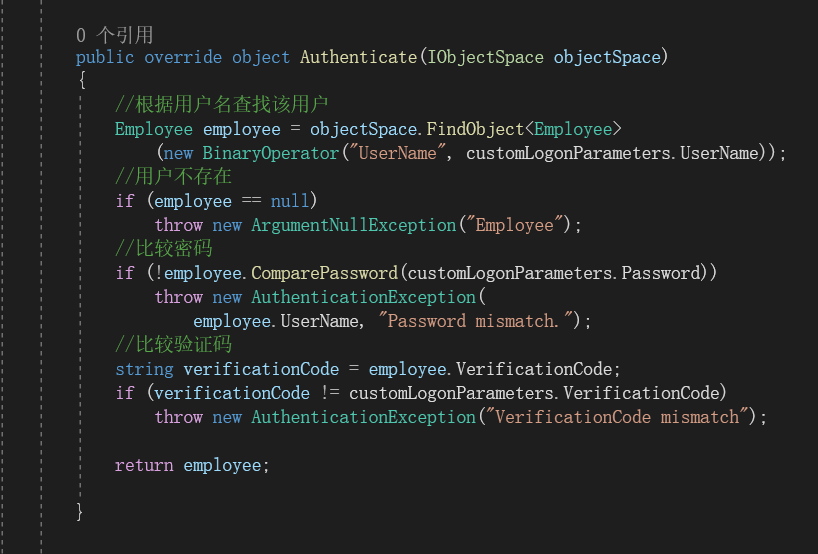
再根据需求自定义就好了。
还有就是发送短信验证码的按钮执行方法,在按钮的属性中可以找到。或者直接点击这个ViewController。再方法中自定义方法,例如:
 private void simpleAction_yzm_Execute(object sender, SimpleActionExecuteEventArgs e)

        {

            customLogonParameters = e.CurrentObject as CustomLogonParameters;

            string username = customLogonParameters.UserName;

            if(username == null || username == "")

            {

                throw new AuthenticationException("请输入用户名");

            }

            IObjectSpace objectSpace = Application.CreateObjectSpace(typeof(PermissionPolicyUser));

            Employee user = objectSpace.FindObject<Employee>

                (new BinaryOperator("UserName", customLogonParameters.UserName));

            string phone = user.Phone;

            //2.向该手机发送验证码

            string verificationCode = "1234";

            //验证码赋值给 用户的验证码属性    比较的时候  用  用户的验证码属性和输入的校验

            //employee.VerificationCode = verificationCode;

            user.VerificationCode = verificationCode;

            objectSpace.CommitChanges();

        }
注意这里按钮取登录页面上输入的参数用的对象和方法与点击Log In 有略微不同。
附CustomLogonParameter代码如下:
public class CustomLogonParameters : INotifyPropertyChanged, ISerializable

    {

        private string username;

        private string password;

        private string verificationCode;

        [Browsable(true)]

        public String UserName

        {

            get { return username; }

            set

            {

                if (username == value) return;

                username = value;

            }

        }

        [PasswordPropertyText(true)]

        public string Password

        {

            get { return password; }

            set

            {

                if (password == value) return;

                password = value;

            }

        }

        //验证码

        [Browsable(true)]

        public String VerificationCode

        {

            get { return verificationCode; }

            set

            {

                if (verificationCode == value) return;

                verificationCode = value;

            }

        }

        public CustomLogonParameters() { }

        // ISerializable

        public CustomLogonParameters(SerializationInfo info, StreamingContext context)

        {

            if (info.MemberCount > 0)

            {

                UserName = info.GetString("UserName");

                Password = info.GetString("Password");

                VerificationCode = info.GetString("VerificationCode");

            }

        }

        private void OnPropertyChanged(string propertyName)

        {

            if (PropertyChanged != null)

            {

                PropertyChanged(this, new PropertyChangedEventArgs(propertyName));

            }

        }

        public event PropertyChangedEventHandler PropertyChanged;

        [System.Security.SecurityCritical]

        public void GetObjectData(SerializationInfo info, StreamingContext context)

        {

            info.AddValue("UserName", UserName);

            info.AddValue("Password", Password);

            info.AddValue("VerificationCode", VerificationCode);

        }
CustomAuthentication类代码如下:
 public class CustomAuthentication : AuthenticationBase, IAuthenticationStandard

    {

        private CustomLogonParameters customLogonParameters;

        public CustomAuthentication()

        {

            customLogonParameters = new CustomLogonParameters();

        }

        public override void Logoff()

        {

            base.Logoff();

            customLogonParameters = new CustomLogonParameters();

        }

        public override void ClearSecuredLogonParameters()

        {

            customLogonParameters.Password = "";

            base.ClearSecuredLogonParameters();

        }

        //public override object Authenticate(IObjectSpace objectSpace)

        //{

        //    Employee employee = objectSpace.FindObject<Employee>(

        //        new BinaryOperator("UserName", customLogonParameters.UserName));

        //    if (employee == null)

        //        throw new ArgumentNullException("Employee");

        //    if (!employee.ComparePassword(customLogonParameters.Password))

        //        throw new AuthenticationException(

        //            employee.UserName, "Password mismatch.");

        //    return employee;

        //}

        // 默认的用户类

        //public override object Authenticate(IObjectSpace objectSpace)

        //{

        //    //根据用户名查找该用户

        //    PermissionPolicyUser sampleUser = objectSpace.FindObject<PermissionPolicyUser>

        //        (new BinaryOperator("UserName", customLogonParameters.UserName));

        //    //用户不存在

        //    if (sampleUser == null)

        //        throw new ArgumentNullException("PermissionPolicyUser");

        //    //比较密码

        //    if (!sampleUser.ComparePassword(customLogonParameters.Password))

        //        throw new AuthenticationException(

        //            sampleUser.UserName, "Password mismatch.");

        //    //比较验证码

        //    //if(sampleUser.VerificationCode!=customLogonParameters.VerificationCode)

        //    if ("1234" != customLogonParameters.VerificationCode)

        //        throw new AuthenticationException("VerificationCode mismatch");

        //    return sampleUser;

        //}

        // 自定义的用户类

        public override object Authenticate(IObjectSpace objectSpace)

        {

            //根据用户名查找该用户

            Employee employee = objectSpace.FindObject<Employee>

                (new BinaryOperator("UserName", customLogonParameters.UserName));

            //用户不存在

            if (employee == null)

                throw new ArgumentNullException("Employee");

            //比较密码

            if (!employee.ComparePassword(customLogonParameters.Password))

                throw new AuthenticationException(

                    employee.UserName, "Password mismatch.");

            //比较验证码

            string verificationCode = employee.VerificationCode;

            if (verificationCode != customLogonParameters.VerificationCode)

                throw new AuthenticationException("VerificationCode mismatch");

            return employee;

        }

        public override void SetLogonParameters(object logonParameters)

        {

            this.customLogonParameters = (CustomLogonParameters)logonParameters;

        }

        public override IList<Type> GetBusinessClasses()

        {

            return new Type[] { typeof(CustomLogonParameters) };

        }

        public override bool AskLogonParametersViaUI

        {

            get { return true; }

        }

        public override object LogonParameters

        {

            get { return customLogonParameters; }

        }

        public override bool IsLogoffEnabled

        {

            get { return true; }

        }
写的比较匆忙,如有不当欢迎指出!
Dev Express 框架自定义登录添加短信验证功能的更多相关文章
- Springboot下实现阿里云短信验证功能(含代码)
Springboot下实现阿里云短信验证功能 一 开通阿里云短信服务 阿里云官网注册登录 找到短信服务并开通 打开短信服务的管理台 在国内消息那栏中添加签名管理和模板管理(按照格式要求去写) 在右上角 ...
- 如何实现php手机短信验证功能
http://www.qdexun.cn/jsp/news/shownews.do?method=GetqtnewsdetailAction&id=1677 下载php源代码 现在网站在建设网 ...
- AndroidStudio短信验证功能收不到验证码
http://mob.com/第三方接口获取地址: 登陆过后点我的后台即可上传,管理应用.需注意的是,即使验证不通过,只要整合了短信验证的Jar包,每天都有20条免费验证短信.现在的mob.com只支 ...
- 基于ThinkPHP与阿里大于的PHP短信验证功能
https://blog.csdn.net/s371795639/article/details/53381274 PHP阿里大鱼短信验证 第一步 登陆阿里大于注册账号,在用户管理中心创建应用,确定A ...
- sendsms短信验证功能实现代码
<!DOCTYPE HTML> <html> <head> <meta charset="utf-8"> <meta name ...
- Android Studio精彩案例(五)《JSMS短信验证码功能实现》
转载本专栏文章,请注明出处,尊重原创 .文章博客地址:道龙的博客 很多应用刚打开的时候,让我们输入手机号,通过短信验证码来登录该应用.那么,这个场景是怎么实现的呢?其实是很多开放平台提供了短信验证功能 ...
- ASP.NET MVC+Bootstrap 实现短信验证
短信验证大家都已经非常熟悉了,基本上每天都在接触手机短信的验证码,比方某宝,某东购物.站点注冊,网上银行等等,都要验证我们的手机号码真实性.这样做有什么优点呢. 曾经咱们在做站点的时候.为了提高用户注 ...
- 完整的Android手机短信验证源码
短信验证功能我分两个模块来说,短信验证码的后台和代码实现短信验证码的功能. 一.短信验证码的后台 1.注册Mob账号:http://www.mob.com/#/login 2.注册成功之后, ...
- Android实战简易教程-第三十九枪(第三方短信验证平台Mob和验证码自己主动填入功能结合实例)
用户注冊或者找回password时通常会用到短信验证功能.这里我们使用第三方的短信平台进行验证实例. 我们用到第三方短信验证平台是Mob,地址为:http://mob.com/ 一.注冊用户.获取SD ...
- JAVA短信验证登录
短信验证登陆 1.点击触发,以电话号码为参数调用发送验证登录短信方法 2.默认模板为验证模板 生成6位验证码 3.将生成的验证码和手机号码放入缓存,(已经设置好缓存存放时间) 4.调用发送模板短信方法 ...
随机推荐
- 笑死,面试官又问我SpringBoot自动配置原理
面试官:好久没见,甚是想念.今天来聊聊SpringBoot的自动配置吧? 候选者:嗯,SpringBoot的自动配置我觉得是SpringBoot很重要的"特性"了.众所周知,Spr ...
- 《STL源码剖析》STL的双层配置器
SGI STL第一级配置器: template<int inst> class __malloc_alloc_template{...}; 其中: 1.allocate()直接使用mall ...
- SPOJ GCDMAT - GCD OF MATRIX
简要题意 给出三个整数 \(T,n,m\),\(T\) 组询问,每组询问给出四个整数 \(i_1,j_1,i_2,j_2\)(数据保证 \(i_1,j_1\leq n\ \ i_2,j_2\leq m ...
- ZXing CaptureActivity黑屏问题
关于zxing captureActivity黑屏的问题,我在网上搜索一下,结果发现几乎没有这方面的资料.后来自己用了半天时间,独步跟踪调试,查看相机类的代码,最后发现了一点问题,就是关闭相机的时候没 ...
- Blazor Pdf Reader PDF阅读器 组件 更新
Blazor Pdf Reader PDF阅读器 组件 https://www.nuget.org/packages/BootstrapBlazor.PdfReader#readme-body-tab ...
- py教学之集合
集合的概念 集合(set)是一个无序的不重复元素序列. 可以使用大括号 { } 或者 set() 函数创建集合,注意:创建一个空集合必须用 set() 而不是 { },因为 { } 是用来创建一个空字 ...
- Ionic 设置全局变量,三种方法设置图片一种是直接增加,一种是replace,第三种是管道和第二种类似
- chrome实现下载文件JS代码弹出'另存为'窗口
1.TXT类型文件 <!DOCTYPE html> <html lang="en"> <head> <meta charset=" ...
- Java后台如何接收与处理JSON类型数据
项目开发中偶尔会使用到某个为JSON类型的字段,一个字段中又包含多个其他的字段. 这种设计方式是根据实际需要来进行处理的,比如规则可能包含多条,每一条规则又包含 多个字段:再比如一些特殊的应用场景如标 ...
- Markdown快速入门——我不学 甚至没这篇文章
Markdown快速入门---我不学甚至没这篇文章 写在前 俗话说:"工欲善其事,必先利其器".那么码字前,自然是要找到合适的工具.我这里就选用了VSCode+Markdown.( ...