
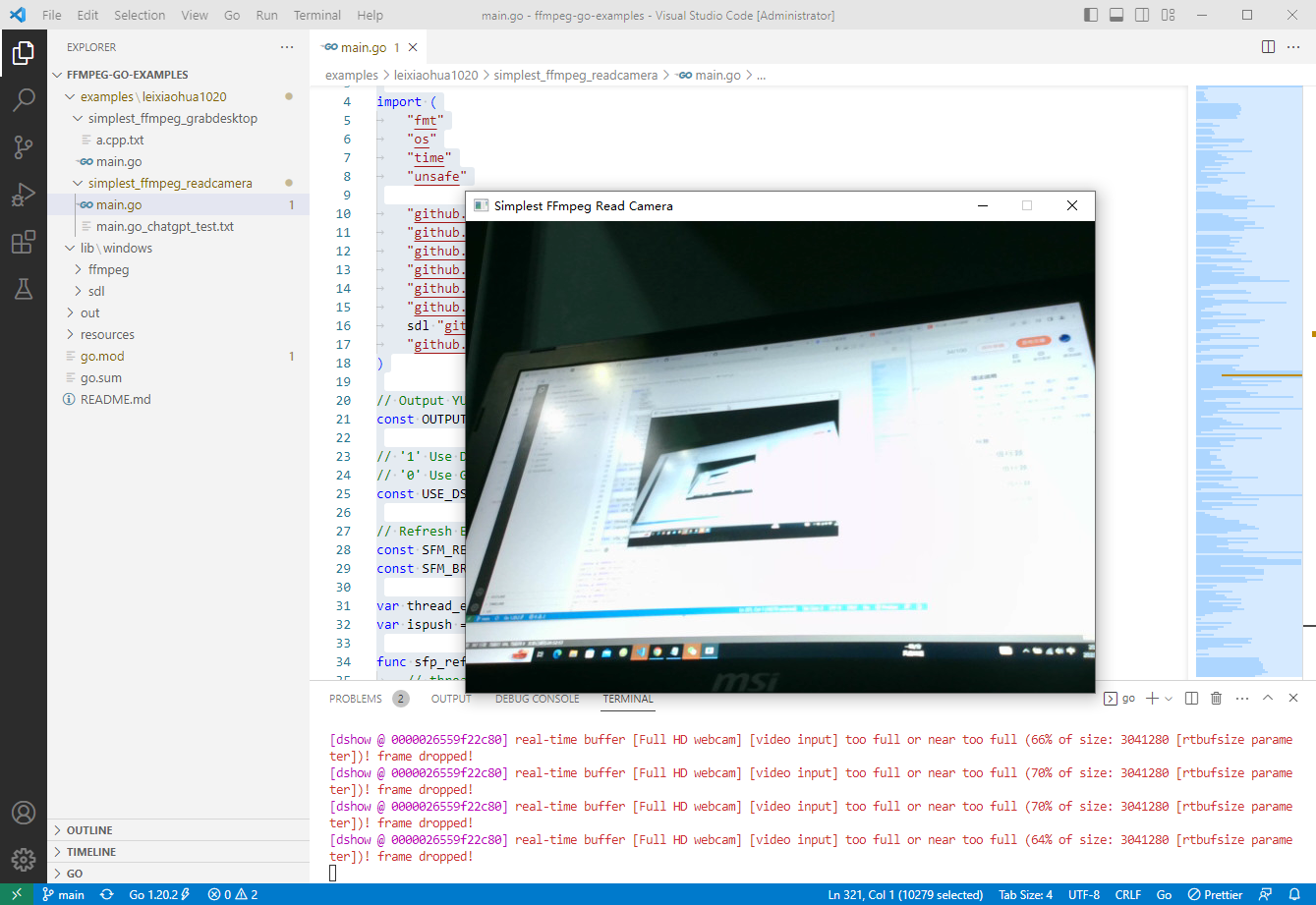
2023-03-14:读取摄像头,并且显示视频。代码用go语言编写。
2023-03-14:读取摄像头,并且显示视频。代码用go语言编写。
答案2023-03-14:
大体流程如下:
导入所需的库和包。
初始化 ffmpeg 和 SDL2 库。
打开摄像头并创建 AVFormatContext 结构体。
查找视频流,并且打开视频解码器。
创建 SDL 窗口,用于显示视频。
创建 AVFrame 结构体,用于存储解码后的视频帧数据。
创建 AVPacket 结构体,用于存储编码后的视频数据。
创建 SwsContext 结构体,用于转换视频帧格式。
不断从视频流读取 AVPacket,直到读完所有帧。
解码 AVPacket 中的视频数据,将其存储在 AVFrame 中。
将 AVFrame 中的数据转换为适合 SDL 窗口显示的格式。
显示转换后的图像帧。
释放所有资源,包括关闭 SDL 窗口、释放 AVFrame 和 AVPacket、删除 SwsContext 结构体、关闭解码器、关闭视频流、关闭摄像头。
需要注意的是,在实际使用中可能会遇到各种问题,例如视频格式不支持、分辨率不匹配等。因此,我们需要根据具体情况来进行相应的调整和处理,以确保程序能够正常运行。
这段代码调用了以下结构体:
AVFormatContext:表示 FFmpeg 格式上下文,包含视频文件的信息和元数据。
AVCodecContext:表示视频编解码器上下文,用于配置和控制编解码器。
AVPacket:表示一个压缩的音频或视频数据包,包含了一帧或多帧音频或视频数据。
AVFrame:表示一个解码后的视频帧,存储原始像素数据以及相关的元数据。
SwsContext:表示视频帧转换器上下文,用于将解码后的视频帧从一种格式转换为另一种格式。
SDL_Window:表示 SDL 窗口,用于显示视频图像。
SDL_Renderer:表示 SDL 渲染器,用于将视频帧渲染到 SDL 窗口中。
这些结构体是实现视频播放所必需的重要组件。它们之间的交互、设置和使用都可以影响视频播放的效果和性能,因此需要仔细地处理和配置。同时,在释放资源时,需要确保所有相关的结构体被正确销毁,以避免内存泄漏和其他问题。
代码见github.com/moonfdd/ffmpeg-go-examples。
执行命令:
go run ./examples/leixiaohua1020/simplest_ffmpeg_readcamera/main.go
代码参考了雷霄骅的本地摄像头数据的获取解码和显示,代码用golang编写。代码如下:
// https://github.com/leixiaohua1020/simplest_ffmpeg_device/blob/master/simplest_ffmpeg_readcamera/simplest_ffmpeg_readcamera.cpp

package main

import (

	"fmt"

	"os"

	"time"

	"unsafe"

	"github.com/moonfdd/ffmpeg-go/ffcommon"

	"github.com/moonfdd/ffmpeg-go/libavcodec"

	"github.com/moonfdd/ffmpeg-go/libavdevice"

	"github.com/moonfdd/ffmpeg-go/libavformat"

	"github.com/moonfdd/ffmpeg-go/libavutil"

	"github.com/moonfdd/ffmpeg-go/libswscale"

	sdl "github.com/moonfdd/sdl2-go/sdl2"

	"github.com/moonfdd/sdl2-go/sdlcommon"

)

// Output YUV420P

const OUTPUT_YUV420P = 0

// '1' Use Dshow

// '0' Use GDIgrab

const USE_DSHOW = 0

// Refresh Event

const SFM_REFRESH_EVENT = (sdl.SDL_USEREVENT + 1)

const SFM_BREAK_EVENT = (sdl.SDL_USEREVENT + 2)

var thread_exit ffcommon.FInt = 0

var ispush = true

func sfp_refresh_thread(opaque ffcommon.FVoidP) uintptr {

	// thread_exit = 0

	for thread_exit == 0 {

		var event sdl.SDL_Event

		event.Type = SFM_REFRESH_EVENT

		if ispush {

			event.SDL_PushEvent()

			ispush = false

		}

		sdl.SDL_Delay(40)

	}

	fmt.Println("sfp_refresh_thread 发送退出事件")

	// thread_exit = 0

	//Break

	var event sdl.SDL_Event

	event.Type = SFM_BREAK_EVENT

	event.SDL_PushEvent()

	return 0

}

// Show Dshow Device

func show_dshow_device() {

	pFormatCtx := libavformat.AvformatAllocContext()

	var options *libavutil.AVDictionary

	libavutil.AvDictSet(&options, "list_devices", "true", 0)

	iformat := libavformat.AvFindInputFormat("dshow")

	fmt.Printf("========Device Info=============\n")

	libavformat.AvformatOpenInput(&pFormatCtx, "video=dummy", iformat, &options)

	fmt.Printf("================================\n")

}

// Show AVFoundation Device

func show_avfoundation_device() {

	pFormatCtx := libavformat.AvformatAllocContext()

	var options *libavutil.AVDictionary

	libavutil.AvDictSet(&options, "list_devices", "true", 0)

	iformat := libavformat.AvFindInputFormat("avfoundation")

	fmt.Printf("==AVFoundation Device Info===\n")

	libavformat.AvformatOpenInput(&pFormatCtx, "", iformat, &options)

	fmt.Printf("=============================\n")

}

func main0() (ret ffcommon.FInt) {

	var pFormatCtx *libavformat.AVFormatContext

	var i, videoindex ffcommon.FInt

	var pCodecCtx *libavcodec.AVCodecContext

	var pCodec *libavcodec.AVCodec

	var ifmt *libavformat.AVInputFormat

	libavformat.AvRegisterAll()

	libavformat.AvformatNetworkInit()

	pFormatCtx = libavformat.AvformatAllocContext()

	//Open File

	//char filepath[]="src01_480x272_22.h265";

	//avformat_open_input(&pFormatCtx,filepath,NULL,NULL)

	//Register Device

	libavdevice.AvdeviceRegisterAll()

	/解码器部分//

	//打开摄像头

	ifmt = libavformat.AvFindInputFormat("dshow")

	var options *libavutil.AVDictionary

	// libavutil.AvDictSet(&options, "probesize", "100000000", 0)

	// libavutil.AvDictSet(&options, "rtbufsize", "100000000", 0)

	if libavformat.AvformatOpenInput(&pFormatCtx, "video=Full HD webcam", ifmt, &options) < 0 {

		fmt.Printf("Cannot open camera.\n")

		return

	}

	if pFormatCtx.AvformatFindStreamInfo(nil) < 0 {

		fmt.Println("Couldn't find stream information.")

		return -1

	}

	videoindex = -1

	for i = 0; i < int32(pFormatCtx.NbStreams); i++ {

		if pFormatCtx.GetStream(uint32(i)).Codec.CodecType == libavutil.AVMEDIA_TYPE_VIDEO {

			videoindex = i

			break

		}

	}

	if videoindex == -1 {

		fmt.Printf("Didn't find a video stream.\n")

		return -1

	}

	pCodecCtxPara := pFormatCtx.GetStream(uint32(videoindex)).Codecpar

	pCodec = libavcodec.AvcodecFindDecoder(pCodecCtxPara.CodecId)

	if pCodec == nil {

		fmt.Printf("Codec not found.\n")

		return -1

	}

	pCodecCtx = pCodec.AvcodecAllocContext3()

	if pCodecCtx == nil {

		fmt.Printf("Cannot alloc valid decode codec context.\n")

		return

	}

	if pCodecCtx.AvcodecParametersToContext(pCodecCtxPara) < 0 {

		fmt.Printf("Cannot initialize parameters.\n")

		return

	}

	if pCodecCtx.AvcodecOpen2(pCodec, nil) < 0 {

		fmt.Printf("Could not open codec.\n")

		return -1

	}

	var pFrame, pFrameYUV *libavutil.AVFrame

	pFrame = libavutil.AvFrameAlloc()

	pFrameYUV = libavutil.AvFrameAlloc()

	//unsigned char *out_buffer=(unsigned char *)av_malloc(avpicture_get_size(AV_PIX_FMT_YUV420P, pCodecCtx->width, pCodecCtx->height));

	//avpicture_fill((AVPicture *)pFrameYUV, out_buffer, AV_PIX_FMT_YUV420P, pCodecCtx->width, pCodecCtx->height);

	out_buffer := (*byte)(unsafe.Pointer(libavutil.AvMalloc(uint64(libavcodec.AvpictureGetSize(int32(libavutil.AV_PIX_FMT_YUV420P), pCodecCtx.Width, pCodecCtx.Height)))))

	((*libavcodec.AVPicture)(unsafe.Pointer(pFrameYUV))).AvpictureFill(out_buffer, libavutil.AV_PIX_FMT_YUV420P, pCodecCtx.Width, pCodecCtx.Height)

	//SDL----------------------------

	// if sdl.SDL_Init(sdl.SDL_INIT_VIDEO|sdl.SDL_INIT_AUDIO|sdl.SDL_INIT_TIMER) != 0 {

	if sdl.SDL_Init(sdl.SDL_INIT_VIDEO) != 0 {

		fmt.Printf("Could not initialize SDL - %s\n", sdl.SDL_GetError())

		return -1

	}

	var screen_w, screen_h ffcommon.FInt = 640, 360

	// var mode *sdl.SDL_DisplayMode = new(sdl.SDL_DisplayMode)

	// if sdl.SDL_GetCurrentDisplayMode(0, mode) != 0 {

	// 	fmt.Printf("SDL: could not get current display mode - exiting:%s\n", sdl.SDL_GetError())

	// 	return -1

	// }

	//Half of the Desktop's width and height.

	screen_w = pCodecCtx.Width

	screen_h = pCodecCtx.Height

	window := sdl.SDL_CreateWindow("Simplest FFmpeg Read Camera", sdl.SDL_WINDOWPOS_UNDEFINED, sdl.SDL_WINDOWPOS_UNDEFINED, screen_w, screen_h, 0)

	if window == nil {

		fmt.Printf("SDL: could not create window - exiting:%s\n", sdl.SDL_GetError())

		return -1

	}

	window.SDL_ShowWindow()

	time.Sleep(2 * time.Second)

	defer window.SDL_DestroyWindow()

	renderer := window.SDL_CreateRenderer(-1, 0)

	if renderer == nil {

		fmt.Printf("SDL: could not create renderer - exiting:%s\n", sdl.SDL_GetError())

		return -1

	}

	defer renderer.SDL_DestroyRenderer()

	texture := renderer.SDL_CreateTexture(sdl.SDL_PIXELFORMAT_YV12,

		sdl.SDL_TEXTUREACCESS_STREAMING,

		pCodecCtx.Width,

		pCodecCtx.Height)

	defer texture.SDL_DestroyTexture()

	var rect sdl.SDL_Rect

	rect.X = 0

	rect.Y = 0

	rect.W = screen_w

	rect.H = screen_h

	var rect2 sdl.SDL_Rect

	rect2.X = 0

	rect2.Y = 0

	rect2.W = pCodecCtx.Width

	rect2.H = pCodecCtx.Height

	//SDL End------------------------

	// var got_picture ffcommon.FInt

	//AVPacket *packet=(AVPacket *)av_malloc(sizeof(AVPacket));

	packet := &libavcodec.AVPacket{}

	var fp_yuv *os.File

	if OUTPUT_YUV420P != 0 {

		fp_yuv, _ = os.Create("output.yuv")

	}

	var img_convert_ctx *libswscale.SwsContext

	img_convert_ctx = libswscale.SwsGetContext(pCodecCtx.Width, pCodecCtx.Height, pCodecCtx.PixFmt, pCodecCtx.Width, pCodecCtx.Height, libavutil.AV_PIX_FMT_YUV420P, libswscale.SWS_BICUBIC, nil, nil, nil)

	//------------------------------

	//video_tid := sdl.SDL_CreateThread(sfp_refresh_thread, nil)

	//

	go sfp_refresh_thread(uintptr(0))

	//sdl.SDL_CreateThread(sfp_refresh_thread, "", uintptr(0))

	//Event Loop

	var event sdl.SDL_Event

	for {

		//Wait

		ispush = true

		event.SDL_WaitEvent()

		if event.Type == SFM_REFRESH_EVENT {

			//------------------------------

			if pFormatCtx.AvReadFrame(packet) >= 0 {

				if int32(packet.StreamIndex) == videoindex {

					if pCodecCtx.AvcodecSendPacket(packet) < 0 {

						packet.AvPacketUnref()

						continue

					}

					ret = pCodecCtx.AvcodecReceiveFrame(pFrame)

					if ret < 0 {

						fmt.Printf("Decode Error.\n")

						return -1

					}

					if ret >= 0 {

						// if got_picture != 0 {

						img_convert_ctx.SwsScale((**byte)(unsafe.Pointer(&pFrame.Data)), (*int32)(unsafe.Pointer(&pFrame.Linesize)), 0, uint32(pCodecCtx.Height), (**byte)(unsafe.Pointer(&pFrameYUV.Data)), (*int32)(unsafe.Pointer(&pFrameYUV.Linesize)))

						if OUTPUT_YUV420P != 0 {

							y_size := pCodecCtx.Width * pCodecCtx.Height

							fp_yuv.Write(ffcommon.ByteSliceFromByteP(pFrameYUV.Data[0], int(y_size)))   //Y

							fp_yuv.Write(ffcommon.ByteSliceFromByteP(pFrameYUV.Data[1], int(y_size)/4)) //U

							fp_yuv.Write(ffcommon.ByteSliceFromByteP(pFrameYUV.Data[2], int(y_size)/4)) //V

						}

						texture.SDL_UpdateYUVTexture(&rect2,

							pFrameYUV.Data[0], pFrameYUV.Linesize[0],

							pFrameYUV.Data[1], pFrameYUV.Linesize[1],

							pFrameYUV.Data[2], pFrameYUV.Linesize[2])

						renderer.SDL_RenderClear()

						renderer.SDL_RenderCopy(texture, nil, &rect)

						renderer.SDL_RenderPresent()

					}

				}

				packet.AvFreePacket()

			} else {

				//Exit Thread

				thread_exit = 1

				fmt.Println("main 准备退出 1")

			}

		} else if event.Type == sdl.SDL_QUIT {

			thread_exit = 1

			fmt.Println("main 准备退出 2")

		} else if event.Type == SFM_BREAK_EVENT {

			fmt.Println("退出循环 3")

			break

		}

	}

	img_convert_ctx.SwsFreeContext()

	if OUTPUT_YUV420P != 0 {

		fp_yuv.Close()

	}

	sdl.SDL_Quit()

	libavutil.AvFree(uintptr(unsafe.Pointer(out_buffer)))

	libavutil.AvFree(uintptr(unsafe.Pointer(pFrame)))

	libavutil.AvFree(uintptr(unsafe.Pointer(pFrameYUV)))

	pCodecCtx.AvcodecClose()

	libavformat.AvformatCloseInput(&pFormatCtx)

	return 0

}

func main() {

	os.Setenv("Path", os.Getenv("Path")+";./lib/windows/ffmpeg")

	ffcommon.SetAvutilPath("./lib/windows/ffmpeg/avutil-56.dll")

	ffcommon.SetAvcodecPath("./lib/windows/ffmpeg/avcodec-58.dll")

	ffcommon.SetAvdevicePath("./lib/windows/ffmpeg/avdevice-58.dll")

	ffcommon.SetAvfilterPath("./lib/windows/ffmpeg/avfilter-56.dll")

	ffcommon.SetAvformatPath("./lib/windows/ffmpeg/avformat-58.dll")

	ffcommon.SetAvpostprocPath("./lib/windows/ffmpeg/postproc-55.dll")

	ffcommon.SetAvswresamplePath("./lib/windows/ffmpeg/swresample-3.dll")

	ffcommon.SetAvswscalePath("./lib/windows/ffmpeg/swscale-5.dll")

	sdlcommon.SetSDL2Path("./lib/windows/sdl/SDL2.0.16.dll")

	genDir := "./out"

	_, err := os.Stat(genDir)

	if err != nil {

		if os.IsNotExist(err) {

			os.Mkdir(genDir, 0777) //  Everyone can read write and execute

		}

	}

	// go func() {

	// 	time.Sleep(1000)

	// 	exec.Command("./lib/ffplay.exe", "rtmp://localhost/publishlive/livestream").Output()

	// 	if err != nil {

	// 		fmt.Println("play err = ", err)

	// 	}

	// }()

	main0()

}
2023-03-14:读取摄像头,并且显示视频。代码用go语言编写。的更多相关文章
- iNeuOS工业互联平台,WEB组态(iNeuView)集成rtmp和websocket视频元件,支持海康、大华等摄像头实时显示视频
目 录 1. 概述... 1 2. 平台演示... 2 3. 硬件摄像头... 2 4. 视频流协议转换管理... 2 5. 组态视频元件 ...
- Opencv 播放mp4文件和读取摄像头图以及可能会发生的一些异常问题解决方法
学习内容 学习Opencv 读取并播放本地视频和打开摄像头图像以及可能会发生的一些异常问题解决方法 代码演示 电脑环境信息: OpenCV版本:4.5.2 ,vs2017 1.视频文件读取与播放 加载 ...
- opencv学习之路(2)、读取视频,读取摄像头
一.介绍 视频读取本质上就是读取图像,因为视频是由一帧一帧图像组成的.1秒24帧基本就能流畅的读取视频了. ①读取视频有两种方法: A. VideoCapture cap; cap.open(“1.a ...
- javacv——读取摄像头的图像、截取视频的画面
javacv开发包是用于支持java多媒体开发的一套开发包,可以适用于本地多媒体(音视频)调用以及音视频,图片等文件后期操作(图片修改,音视频解码剪辑等等功能). 这些需要引入的包.音视频处理使用ff ...
- OpenCV-Python 读取显示视频 | 六
目标 学习读取视频,显示视频和保存视频. 学习从相机捕捉并显示它. 你将学习以下功能:cv.VideoCapture(),cv.VideoWriter() 从相机中读取视频 通常情况下,我们必须用摄像 ...
- 使用opencv显示视频的方法
下面对使用opencv显示视频做一个简单的记录.当然,网上这方面的资料已经数不胜数了,我只是将其简单记录,总结一下. 在opencv中显示视频主要有: (1)从本地读取视频和调用摄像头读取视频 (2) ...
- ffmpeg显示视频
项目最近需要实现播放视频功能,这个在上家公司就做过.虽然跟之前的场景不一样,有以前的功底还是很快可以解决,事实也确实如此.在使用DShow处理完视频分割与合并后,继续使用DShow显示视频,很快即完成 ...
- 最简单的基于FFmpeg的AVDevice例子(读取摄像头)
=====================================================最简单的基于FFmpeg的AVDevice例子文章列表: 最简单的基于FFmpeg的AVDev ...
- 基于FPGA摄像头图像采集显示系统
本系统主要由FPGA主控模块.图像采集模块.图像存储模块以及图像显示模块等模块组成.其中图像采集模块选择OV7670摄像头模块,完成对视频图像的采集和解码功能,并以RGB565标准输出RGB 5:6: ...
- [转载] 最简单的基于FFmpeg的AVDevice例子(读取摄像头)
=====================================================最简单的基于FFmpeg的AVDevice例子文章列表: 最简单的基于FFmpeg的AVDev ...
随机推荐
- vue下拉选择select option el-cascader删除重选值的问题
select当下拉值多的时候 以及input cascader级联选择一个值后 后面我不想要了 vue 提供了一个关键字 可以帮你全部清空 这个关键字就是:clearable
- 学习笔记-C++
题目:声明一个基类BaseClass,从它派生出类DerivedClass,BaseClass有成员函数fn1()和fn2(),fn1()是虚函数,DerivedClass也有成员函数fn1()和fn ...
- springboot整合flowable-初步入门
最近工作中有用到工作流的开发,引入了flowable工作流框架,在此记录一下springboot整合flowable工作流框架的过程,以便后续再次使用到时可以做一些参考使用,如果项目中有涉及到流程审批 ...
- JDK1.8中的时间处理API
相比于JDK1.8之前的SimpleDateFormat以及Calendar等API带来的易误用.线程不安全等问题,JDK1.8提供了LocalDate,LocalTime,LocalDateTime ...
- Cesium渲染模块之Shader
1. 引言 Cesium是一款三维地球和地图可视化开源JavaScript库,使用WebGL来进行硬件加速图形,使用时不需要任何插件支持,基于Apache2.0许可的开源程序,可以免费用于商业和非商业 ...
- 【故障公告】cc攻击又来了,雪上加霜的三月
非常非常抱歉!今天 21:20-22:10 左右,肆无忌惮的 cc 攻击又来了,蓄意攻击者很厉害,躲过阿里云云盾的黑洞机制,轻松击垮园子的博客站点,又给大家带来了很大的麻烦,请大家谅解! 今年3月是园 ...
- 网络安全(中职组)-B模块:Windows操作系统渗透测试
任务环境说明: 服务器场景:teltest 服务器场景操作系统:Windows7 (封闭靶机) 1.通过本地PC中渗透测试平台Kali对服务器场景Windows进行系统服务及版本扫描渗透测试,并将该 ...
- 云原生API网关全生命周期管理Apache APISIX探究实操
@ 目录 概述 定义 NGINX 与 Kong 的痛点 APISIX 的技术优势 特性 架构 应用场景 主要概念 部署 快速入门 quickstart安装 Admin API创建路由 RPM安装 安装 ...
- 单元测试Mockito框架
单元测试Mockito框架 Mock 测试就是在测试过程中,对于某些 不容易构造(如 HttpServletRequest 必须在 Servlet 容器中才能构造出来)或者不容易获取 比较复杂 的对象 ...
- python3常用模块和方法
1.使用索引反转字符串 str="hello" print(str[::-1]) 2.zip函数获取可迭代对象,将它们聚合到一个元组中,然后返回结果.语法是zip(*iterabl ...