
SVN在拉取(更新)代码的时候出现Error:svn: E155037: Previous operation has not finished; run 'cleanup' if it was interrupted问题 ---window版
简易方法1
今天朋友看到朋友报错这个错误,偷偷学习了下他的方法并做记录以防忘记
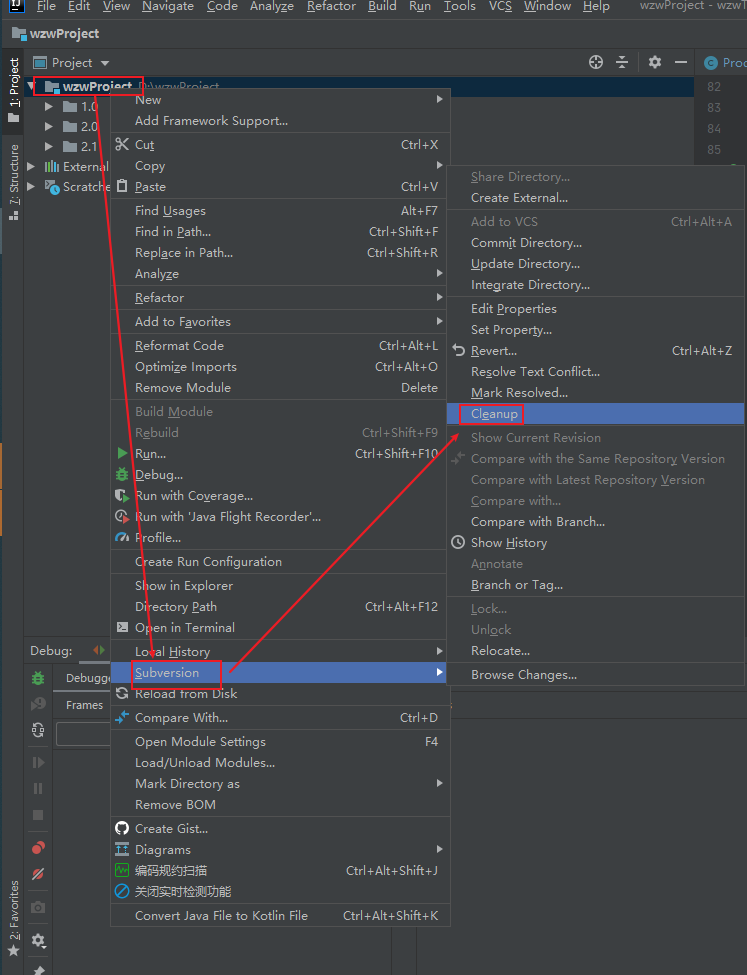
简易方法2
今天使用svn时报了一个这个错,网上搜索时都说是要使用sqllite来删除svn队列。
其实可以直接使用idea自带的terminal运行svn cleanup 成功就可以解决这个问题。但可能遇到以下问题
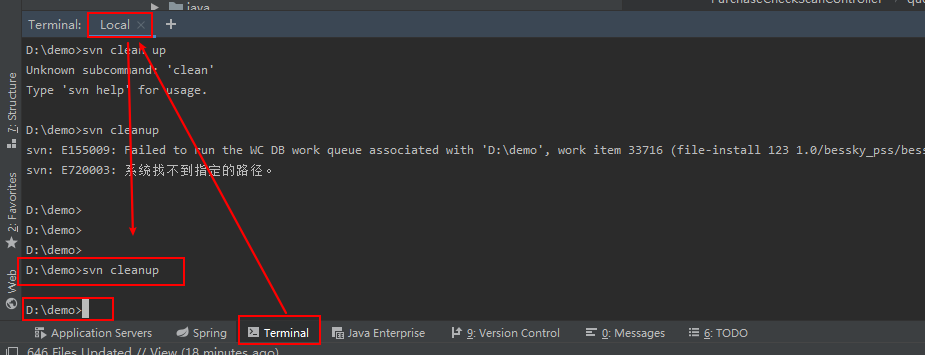
简易方法3
问题1

1. 当遇到这个问题的时候,你将要下载sqlite3.exe文件
SQLite 安装
在 Windows 上安装 SQLite
请访问 SQLite 下载页面,从 Windows 区下载预编译的二进制文件。
您需要下载 sqlite-tools-win32-*.zip 和 sqlite-dll-win32-*.zip 压缩文件。
创建文件夹 C:\sqlite,并在此文件夹下解压上面两个压缩文件,将得到 sqlite3.def、sqlite3.dll 和 sqlite3.exe 文件。
添加 C:\sqlite 到 PATH 环境变量,最后在命令提示符下,使用 sqlite3 命令,将显示如下结果,看到一下结果说明你安装和环境变量配置成功了。
C:\>sqlite3

SQLite version 3.7.15.2 2013-01-09 11:53:05

Enter ".help" for instructions

Enter SQL statements terminated with a ";"

sqlite>
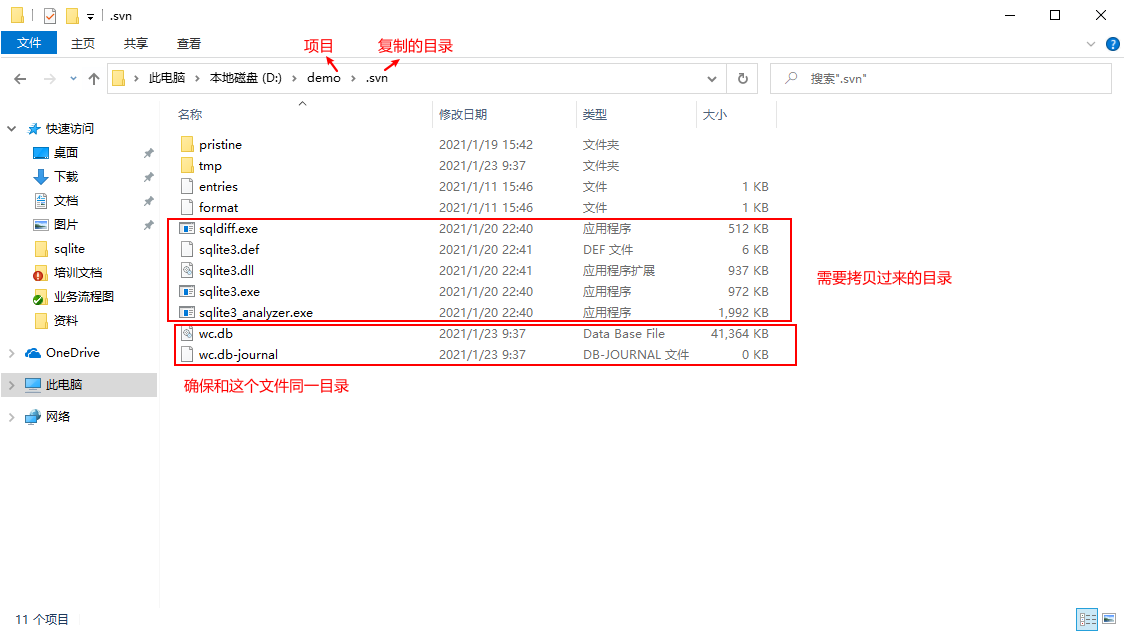
2. 接下来你需要是将所有的sqlite3的文件都放到拉下来的项目中的.svn目录中
3.修改对应的配置环境
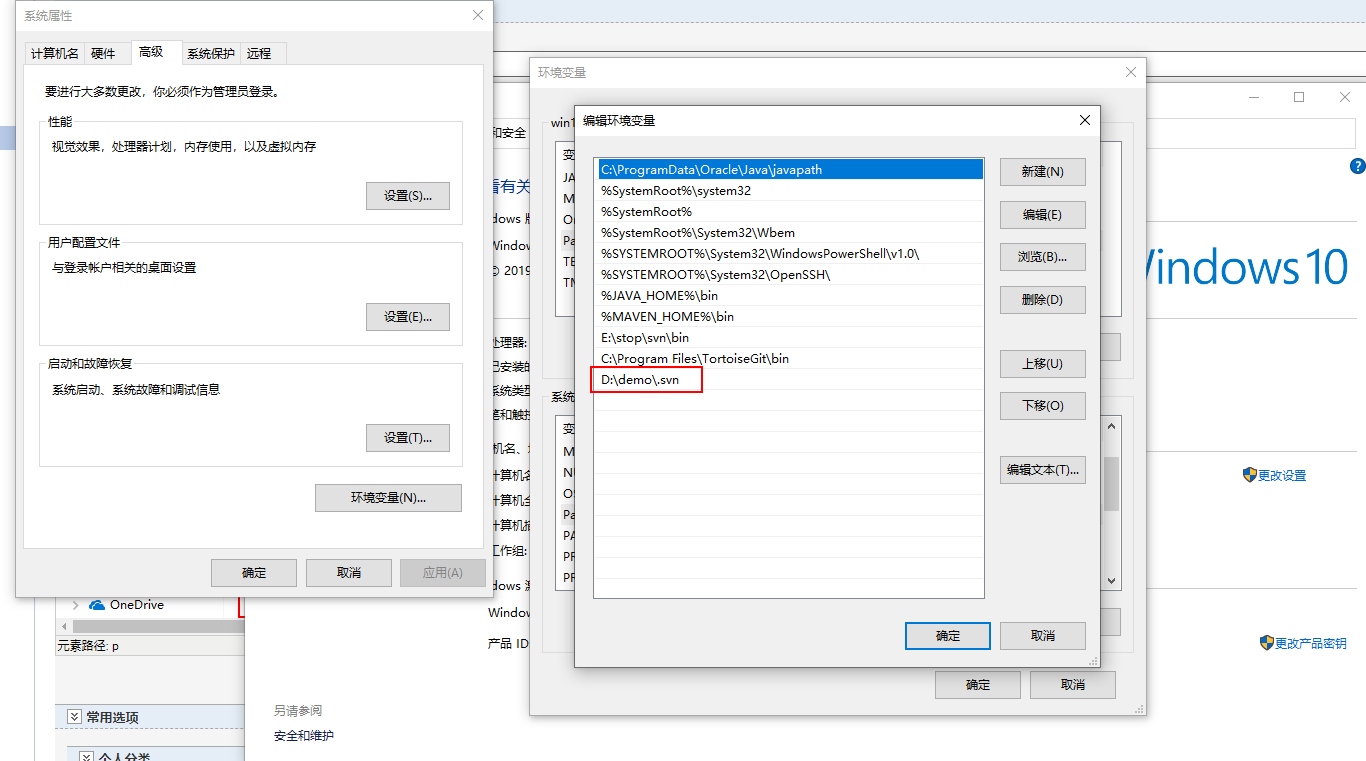
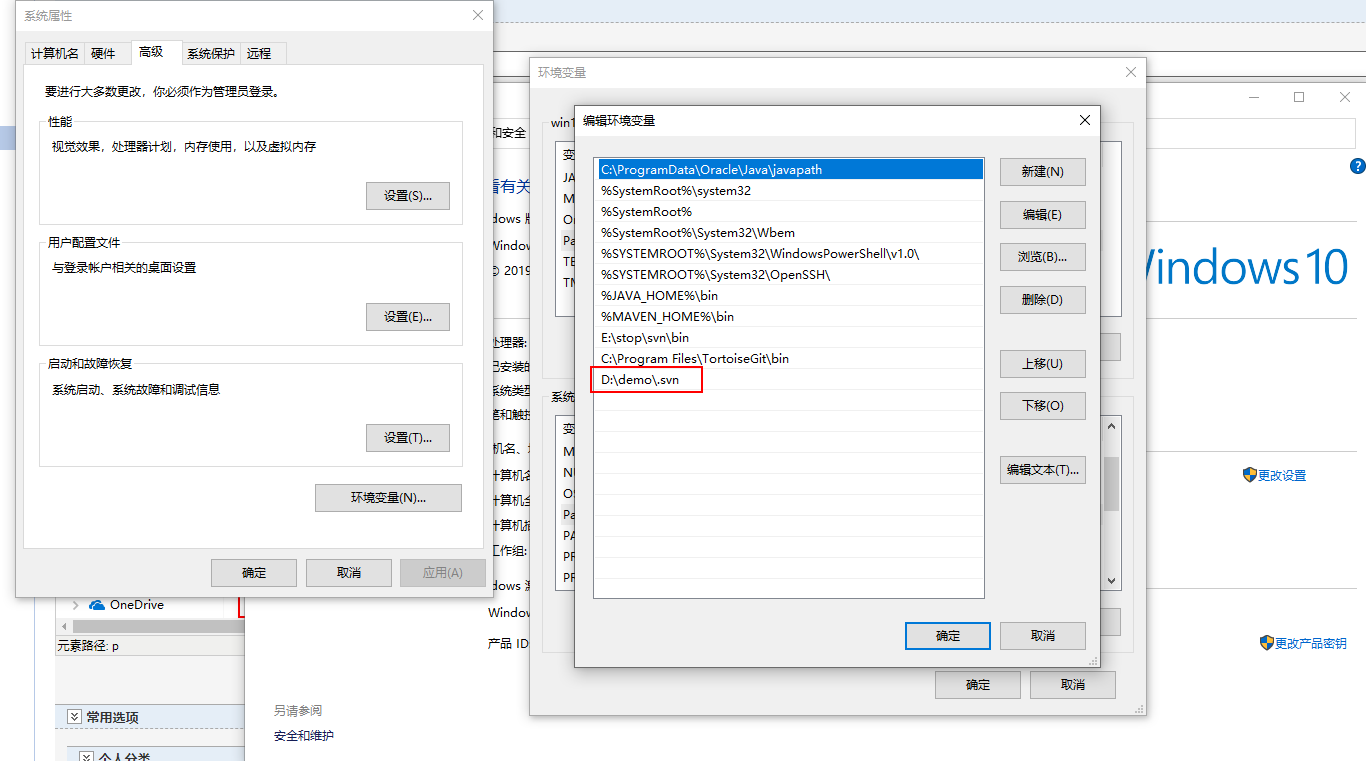
运行CMD查看是否完成,显示以下表示完成
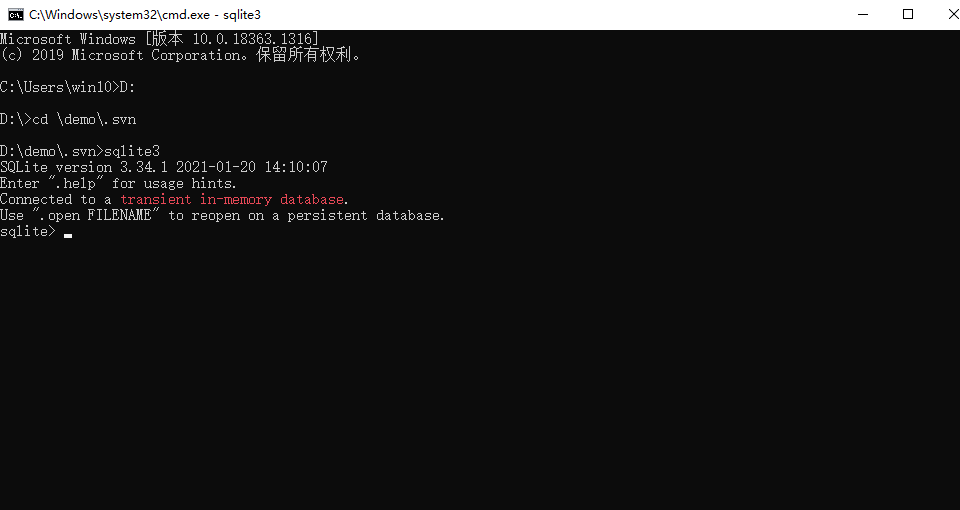
4.接下来你就可以清空svn的队列
启动cmd执行sqlite3 .svn/wc.db "select * from work_queue"
 看到很多记录,下一步执行delete from work_queue
但可能遇到以下问题

问题2
sqlite3.OperationalError: unable to open database file 解决办法
原因
1:数据库路改成绝对路径,并且目录要存在
2:数据库会自动建立,之前自己多此一举的建了个数据库,所以有权限问题。
3: 一般在settings.py中配置name路径的时候,如果不具体指到某个盘符,对应的文件夹要在该项目中存在。
4: 请将装xx.db的文件夹改成可读写(去掉只读)
5: 用sqlite3 配置文件中的user,password和host都可以默认为空
可以参考文档:https://blog.csdn.net/yu102655/article/details/83714524
SVN在拉取(更新)代码的时候出现Error:svn: E155037: Previous operation has not finished; run 'cleanup' if it was interrupted问题 ---window版的更多相关文章
- 解决svn更新项目目录时“Error:svn: E155037: Previous operation has not finished; run 'cleanup' if it was interrupted”的报错问题
今天在IDEA更新项目目录时,发现报错“Error:svn: E155037: Previous operation has not finished; run 'cleanup' if it was ...
- SVN Commit报错 svn: E155037: Previous operation has not finished; run 'cleanup' if it was interrupted
svn commit 文件出错 svn: E155037: Commit failed (details follow): svn: E155037: Previous operation has n ...
- MyEclipse中 使用svn更新jar包 出现 svn cleanup failed–previous operation has not finished; run cleanup if it was interrupted 导致整个svn异常处理
svn cleanup failed–previous operation has not finished; run cleanup if it was interrupted 2014-07-02 ...
- svn提交报错Previous operation has not finished; run 'cleanup' if it was interrupted
从SVN上拉下来Document文档(word和excel),在本地修改后,准备通过TortoiseSVN提交,发现报错. Error: Previous operation has not fini ...
- SVN 操作报错 “Previous operation has not finished; run 'cleanup' if it was interrupted“
今天在 通过 SVN 合并代码的时候报了如下的错误 ”Previous operation has not finished; run 'cleanup' if it was interrupted“ ...
- svn报错:[Previous operation has not finished; run 'cleanup' if it was interrupted] 的排错过程
今天在打开某一文档的情况下,使用SVN更新文档,在更新的过程中报错,提示需要执行clean up,果断右键执行clean up,又提示一个新的错误:"Previous operation h ...
- svn报错cleanup failed–previous operation has not finished; run cleanup if it was interrupted的解决办法
今天在svn提交的时候它卡顿了一下,我以为已经提交完了,就按了一下,结果就再也恢复不了,也继续不了了... 报错 cleanup failed–previous operation has not f ...
- svn报错:“Previous operation has not finished; run 'cleanup' if it was interrupted“ 的解决方法
今天改完代码提交时,提交接近完成但窗口还未关闭电脑蓝屏了.夏天来了,电脑比人还怕热啊~~~ 心里咯噔一下,估计svn又会出一些莫名其妙的问题了. 果然,待电脑重启后开eclipse,文件还是新增状 ...
- svn执行clean up 操作时报错 "Previous operation has not finished; run 'cleanup' if it was interrupted"解决如下!
今天在项目中更新的时候,突然间爆了一个svn的这个错误,当时提示我去clean up操作,结果我执行clean up操作时候,还是报错,后来坚持出来,是因为ios项目中的一个图标出了问题,使svn进入 ...
随机推荐
- 【windows安全性 之访问控制】 访问控制 详细解说
windows的安全性的两个基本支柱是身份验证(登入)和授权(访问控制). 身份验证是标识用户的过程 ,授权在验证了所标识用户是否可以访问特定资源之后进行. 相关的命名空间和类: System.Sec ...
- Python3对接华三CAS平台Api获取虚拟机监控信息-渐入佳境
--时间:2021年2月3日 --作者:飞翔的小胖猪 说明 使用python对接华三CAS虚拟化平台,通过厂商提供的api接口获取每个集群下所有虚拟机的监控信息,并保存数据在本地的mariadb数据库 ...
- Typora使用教程 之 PicGo集成做图床
目录 一.Typora是什么 二.研究它的原因 三.需要解决的问题 四.解决图床问题 1.下载PicGo 2.安装下载的PicGo,并根据下图所示配置(必须安装nodejs,否则插件一直是" ...
- 简单实现一个快速传输电子书到kindle的小项目
前言 最近翻出来好久没有看的kindle,准备继续我的阅读之路.当然,也是因为发现了一个非常好的获取电子书资源的网站,又燃起了我的阅读兴趣. 然而,往kindle里传输电子书的方式一共有四种: 直接在 ...
- Nginx解决跨域问题No 'Access-Control-Allow-Origin'
使用nginx在server块下的location块下为请求添加请求头来解决跨域 add_header 'Access-Control-Allow-Origin' '*'; add_header 'A ...
- CF1385G口胡
只能说很神秘??? 首先观察题面,假设给出的第一个序列为 \(a\),第二个序列为 \(b\).对于 \((a_i,b_i)\) 我们连一条边. 得到的是一个 \(n\) 个点 \(n\) 条边的不一 ...
- Java的jinfo命令使用详解
jinfo命令简介 jinfo(Java Virtual Machine Configuration Information)是JDK提供的一个可以实时查看Java虚拟机各种配置参数和系统属性的命令行 ...
- ArcGIs创建企业级数据库
本文主要描述ArcGIs创建企业级数据库. 目标:创建企业级地理数据库,使用ArcMap通过SDE引擎 与Oracle交互数据,创建完成后将本地的mdb数据库中数据迁移到Oracle的地理数据库当中. ...
- Linux移植总结--Linux中asm和arch的软链接
@ 目录 问题 include <asm/aaa.h>实际用的是asm-arm/aaa.h include <asm/arch/memory.h>实际用的是include/as ...
- ZYNQ 双CPU裸机运行例程
vivado 2014.4 特殊情况:总DDR内存大于512MB,且CPU0已经占用了超过512MB,这时按以下步骤CPU1无法启动. 原因:启动入口地址限制.更改方法如下: 打开cpu1_bsp\p ...