<script>
import wepy from 'wepy'
import api from '../api/api'
export default class recharge extends wepy.page {
config = {
navigationBarTitleText: '账户充值'
}
data = {
notHere: {},
apiRes: {},
amountTab: {
currentType: '0',
amountType: [
[1000, 0],
[2000, 200],
[5000, 1000],
[10000, 3000]
],
payType: 0
}
}
async getAccountBalance() {
const backEndRequire = {
method: 'POST',
header: {
'Content-Type': 'application/x-www-form-urlencoded'
}
}
let q = backEndRequire
q.query = {
uid: this.$parent.UID.uid,
}
const r = await api.getAccountBalance(q)
this.apiRes.AccountBalance = r.data.data
this.$apply()
}
onLoad() {
this.notHere.commonCfg = wepy.$appConfig.common
this.getAccountBalance()
}
phoneCall(e) {
wx.makePhoneCall({
phoneNumber: e.currentTarget.dataset.replyPhone,
success() {}
})
}
onTap(e) {
const k = e.currentTarget.dataset.key
const v = e.currentTarget.dataset.val
this.amountTab[k] = v
}
}
</script>
<template>
<view class="root_">
<view>
<view>
<view>账户余额
<text class="question-mark">?</text>
</view>
<view>
<view class="balance"><text>¥</text><text class="balance-num"> {{apiRes.AccountBalance['1'].val}} </text> <text>币</text></view>
</view>
</view>
<view>
<view>充值金额</view>
<repeat for="{{amountTab.amountType}}" key="index" index="index" item="item">
<view class="amount-item" @tap="onTap" data-key="currentType" data-val={{index}}>
<view mode="aspectFit" class=" {{index===amountTab.currentType ? 'amount-item_select-after' :''}}">
<view>
<view wx:if="{{index !== 0}}">送{{item[1]}}币</view>
<view>
<text>{{item[0]}}</text><text>元</text>=<text>{{item[0]+item[1]}}</text><text>币</text>
</view>
</view>
</view>
</view>
</repeat>
</view>
</view>
<view>支付方式</view>
<view class="pay-type">
<view class="payType_img-separation">
<view class="{{amountTab.payType === '0' ? 'pay-type_select-after' : ''}}">
<image @tap="onTap" data-key="payType" data-val="0" class="pay-type_img-width-height" src="{{notHere.commonCfg.localImgPath}}payWeixin.jpg"></image>
</view>
</view>
<view class="payType_img-separation">
<view class="{{amountTab.payType === '1' ? 'pay-type_select-after' : ''}}">
<image @tap="onTap" data-key="payType" data-val="1" class="pay-type_img-width-height" src="{{notHere.commonCfg.localImgPath}}payAli.jpg"></image>
</view>
</view>
</view>
<view>
<view class="pay-number">应付金额
<text>{{amountTab.amountType[amountTab.currentType][0]}}</text>元
</view>
</view>
<view>
<button class="weui-btn weui-btn_mini weui-btn_primary recharge_button">立即充值</button>
</view>
<view class="contact">购买套餐,一键咨询:
<text class="phone-number" data-reply-phone="075581773181" bindtap="phoneCall">0755-81773181</text>
</view>
</view>
</template>
<style lang="less">
@import "../style/weui.wxss"; // WXSS · 小程序 https://developers.weixin.qq.com/miniprogram/dev/framework/view/wxss.html
@wx-width: 750rpx;
@wx-width_px: 750;
@wx-width_one-unit: @wx-width/750;
@color-main_red: #F00;
@color-main_blue: #2CABE2; // TODO 全局统一;2018年10月2日 16:29:42
@page-padding-horizontal: @wx-width_one-unit*12;
@wx-width_subtract-padding-width: @wx-width - @page-padding-horizontal*2;
.root_ {
padding: @page-padding-horizontal;
}
.balance {
font-size: @wx-width_one-unit*25;
.balance-num {
font-weight: normal;
}
}
.question-mark {
@c: #adadad;
border: @wx-width_one-unit solid @c;
color: @c;
border-radius: 50%;
text-align: center;
}
.amount-item {
width: 50%;
display: inline-flex;
}
@pay-type_2imgs_padding-width : @wx-width_subtract-padding-width*0.1; // 并排的2张图的区域的外围边框
@pay-type_border-width: @wx-width_one-unit; // 图片被点击后的新增边框宽度
@pay-type_img_available-width: @wx-width_subtract-padding-width - @pay-type_2imgs_padding-width*2 - @pay-type_border-width*2; // 可用区的图片宽度份额,其他留作2张图片间的水平padding
@pay-type_imgs_width-share: 0.6;
@pay-type_img-margin-width: @pay-type_img_available-width*(1- @pay-type_imgs_width-share)/4; // 2张图之间的margin宽度
@pay-type_img-render-width: @pay-type_img_available-width*@pay-type_imgs_width-share/2; // 图片最终被渲染的宽度
@pay-type_img-width-divide-height: 98/40; // 原图 宽度 高度 98 40 像素 96*96 dpi;// 原2张图宽高像素比相同;//image-height("file.png");
@pay-type_img-render-height: @pay-type_img-render-width/@pay-type_img-width-divide-height; // 保持图片宽高比,图片最终被渲染的高度
@pay-type_amount-item_select-after-font-size: @wx-width_one-unit*24;
.pay-type {
display: inline-flex;
padding: 0 @pay-type_2imgs_padding-width;
height: @pay-type_img-render-height + @pay-type_border-width;
}
.pay-type_img-width-height {
width: @pay-type_img-render-width;
height: @pay-type_img-render-height;
}
.payType_img-separation {
margin: 0 @pay-type_img-margin-width;
}
.pay-type_select-after,
.amount-item_select-after {
border: @pay-type_border-width solid @color-main_blue;
@v: @pay-type_amount-item_select-after-font-size;
&:after {
display: block;
float: right;
content: "√";
background-color: @color-main_blue;
color: #fff;
border-radius: 50%;
font-size: @v;
margin-top: -@v;
}
}
.contact {
text-align: center;
.phone-number {
color: @color-main_blue;
}
}
.recharge_button {
width: 90%;
border-radius: @wx-width_one-unit*8;
background-color: @color-main_blue;
color: #fff;
}
</style>
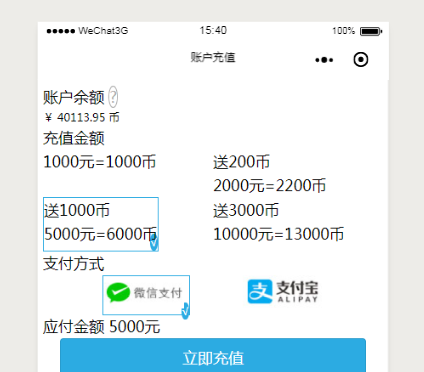
对宽度的精细化控制
【宽度赋值原则】
1、艺术的数组,科研的结果,比如:黄金分割;
2、加减乘除的计算的结果;
- 02_创建Git仓库,克隆仓库,git add,git commit,git push,git pull,同行冲突,不同行冲突的结局方案,git mergetool的使用
1 创建Git资源库,残酷目录信息 创建git资源库的命令: git init –bare 仓库名称 (其中-bare表示的意思是空的库的意思) 进入E:\software\repository\gi ...
- Git使用详细教程(3):git add, git commit详解
在使用git之前,我们首先要初始化一个git管理的仓库,这里以博客(blog)为例 git init blog 我们进入目录,执行git status查看git状态,可以看到一个新的git管理的项目目 ...
- git commit 合并
日常 git 管理代码的时候,经常因为因为一些小的代码改动而进行一次 git commit , 但是这样造成的后果就是小的 git commit 很多很杂. 今天特意的研究了一些 git commit ...
- gitignore失效 删除 git commit记录
已追踪的文件需要清理本地缓存 git rm -r --cached . git add . git commit -m 'update .gitignore' 删除 git commit记录 不小心上 ...
- github 使用“git commit -m"命令时候出现的一个小问题
git commit -m 使用问题 今天提交文件到github,步骤是: git add abc.py (abc.py是我当前随意写的一个文件名) git commit -m 'add codes ...
- 如何在命令行添加换行符到git commit -m "xxx"
需求来源: 需要将自动识别的组件信息.更新信息.任务跟踪单号.下载链接等信息自动提交并推送至gerrit, 然后作为触发条件启动另一个协作业务流程. 方法1:单引号开放方法 git commit -m ...
- Git:git commit时退出报错解决(Error45、Error325)
Git 报错 在输入git commit编辑注释日志时强制退出git程式,文件会变成只读文件,于是出现下述报错: 解决方法(ERROR45) 我们提交代码的正常操作流程一般是: 输入git commi ...
- 如何写好git commit message
1.触发事件 我有这样一个版本库,里面包含两个学习用的练习项目:BookStore(以下简称BS)和PictureFriend(以下简称PF) 我在更改PF以后,未进行提交,同时又到BS中优化了一下文 ...
- 从code review到Git commit log
最近在读一本技术类的书:朱赟——<跃迁:从技术到管理的硅谷路径>,其中聊了很多很有趣的观点,比如:技术管理.技术实践.硅谷文化.个人成长等. 读到关于硅谷人如何做code review这一 ...
随机推荐
- 设计模式:工厂方法模式(Python)
来自:http://blog.csdn.net/ericzhong83/article/details/7604728 工厂方法模式(Factory Method Pattern): 定义了一个创建对 ...
- mac os x 安装adb
http://stackoverflow.com/questions/31374085/installing-adb-on-mac-os-x Option 1 - Using Homebrew Thi ...
- python重置变量 sys.defaultencoding
<span style="font-family: Arial, Helvetica, sans-serif;">比如重置变量defaultencoding为utf-8 ...
- WP8数据存储--独立存储设置
<Grid x:Name="LayoutRoot" Background="Transparent"> <Grid.RowDefinition ...
- poj 2601 Simple calculations
Simple calculations Time Limit: 1000MS Memory Limit: 65536K Total Submissions: 6559 Accepted: 32 ...
- YII2 学习
下载地址: http://www.yiiframework.com/download/ http://www.yiichina.com/download 直接选择basic模板下载即可 下载之后解压到 ...
- 前端模块化和AMD、CMD规范
前端模块化和AMD.CMD规范 先看下基础:https://github.com/seajs/seajs/issues/547
- VUE入门实例,模版组件用法
这里每一个例子可以直接拷进body运行. 本系列为学习记录,并非大神教学案例. 仅仅整理用法,至于VUE的原理,设计模式等等暂不讨论,文中如有不对,还请大家帮忙指正,万分感激. 下一篇会写父子组件交互 ...
- CentOS 加载/挂载光驱
1.mkdir /mnt/cdrom 2.mount /dev/cdrom /mnt/cdrom 3.挂载 umount /dev/cdrom /mnt/cdrom
- gm picture
console.log("ok") /*var images = require("images");var fs = require("fs&quo ...
