
Spring-Boot ☞ ShapeFile文件读写工具类+接口调用
一、项目目录结构树

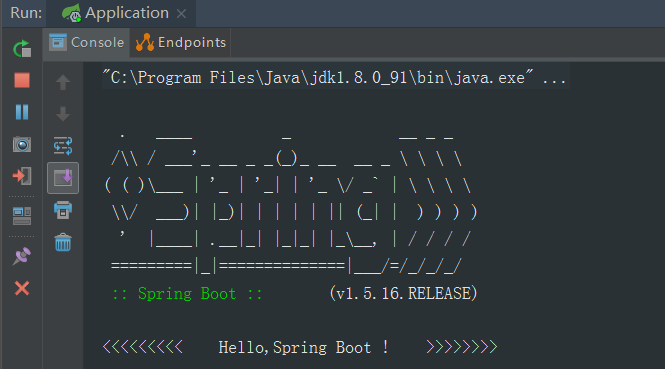
二、项目启动
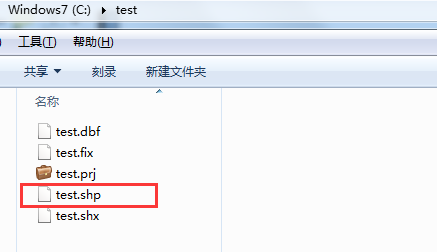
三、往指定的shp文件里写内容
(1) json数据【Post】
{

    "name":"test",

    "path":"c:/test",

    "geom":"MULTIPOLYGON(((101.870371 25.19228,101.873633 25.188183,101.880564 25.184416,101.886808 25.186028,101.892043 25.189969,101.896592 25.190163,101.903716 25.190785,101.905454 25.193464,101.899897 25.196202,101.894146 25.197911,101.891657 25.19826,101.886078 25.197658,101.884211145538 25.2007060137013,101.88172564506 25.1949712942389,101.87874 25.199619,101.874641 25.200998,101.868547 25.202415,101.863741 25.202415,101.85887 25.202842,101.854557 25.202182,101.852604 25.199736,101.852282 25.19628,101.854492 25.194183,101.855608 25.192668,101.863698 25.192105,101.870371 25.19228)))",

    "id":1001,

    "des":"湖泊水面"

}
(2)接口调用

(3)QGIS查看,验证数据有效性

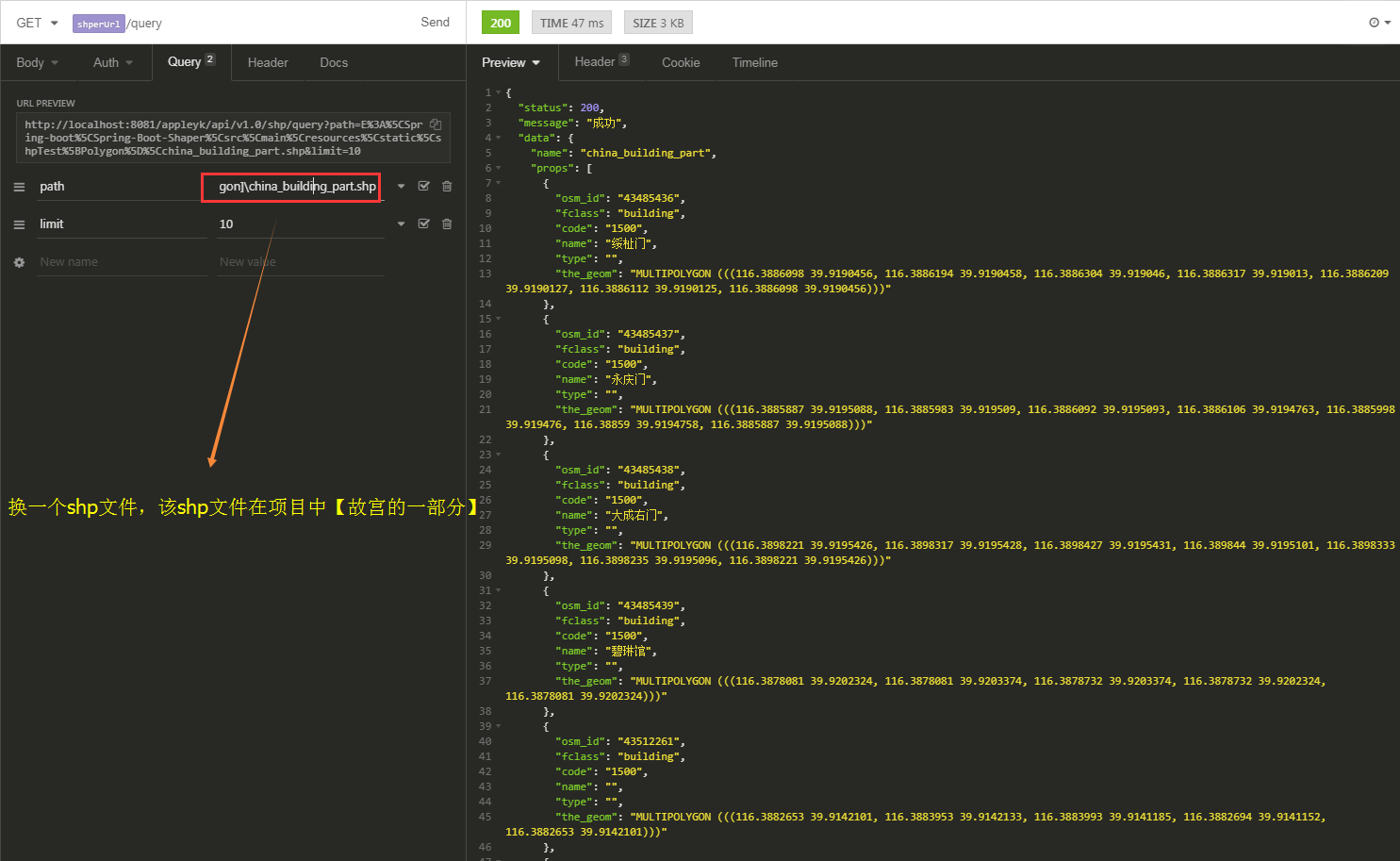
四、读取指定shp文件,并显示内容
(1)接口调用

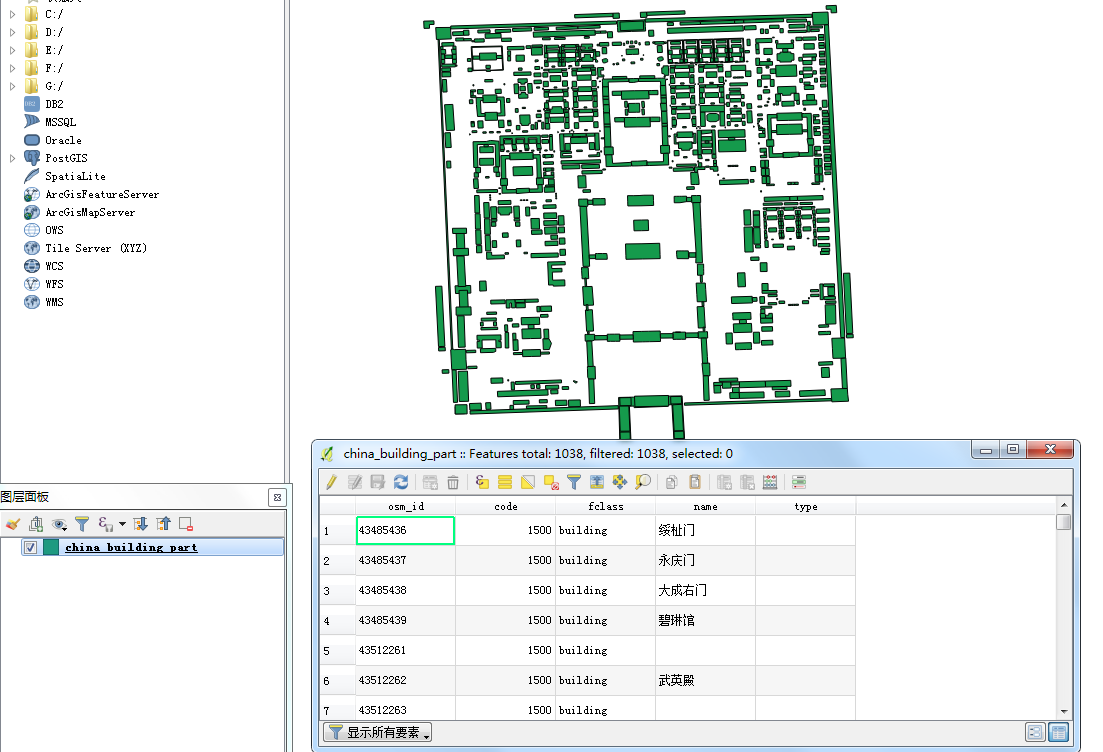
(2)QGIS显示北京故宫【shp文件在项目中的static文件夹下】
五、将指定的shp文件转成image文件或流
(1) 接口调用 === 转image【png】文件
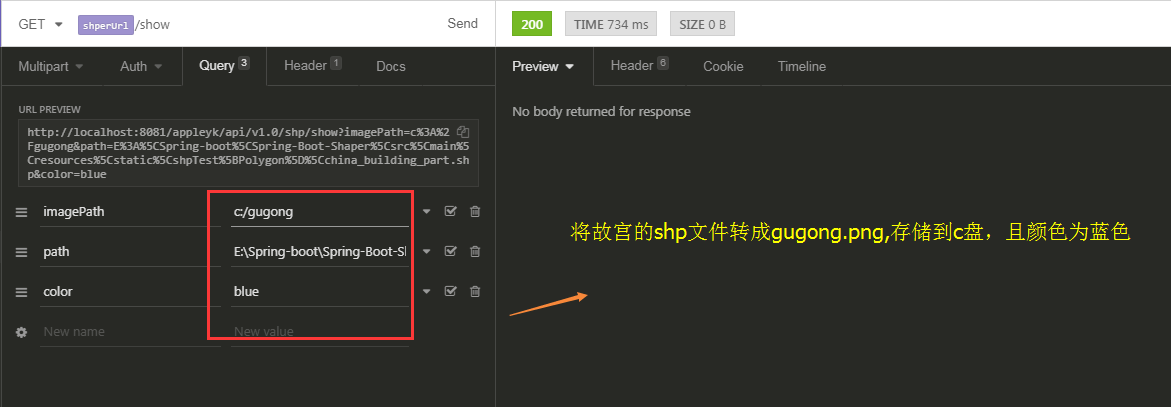
c盘下查看

(2) 接口调用 === 转image流,输出到客户端
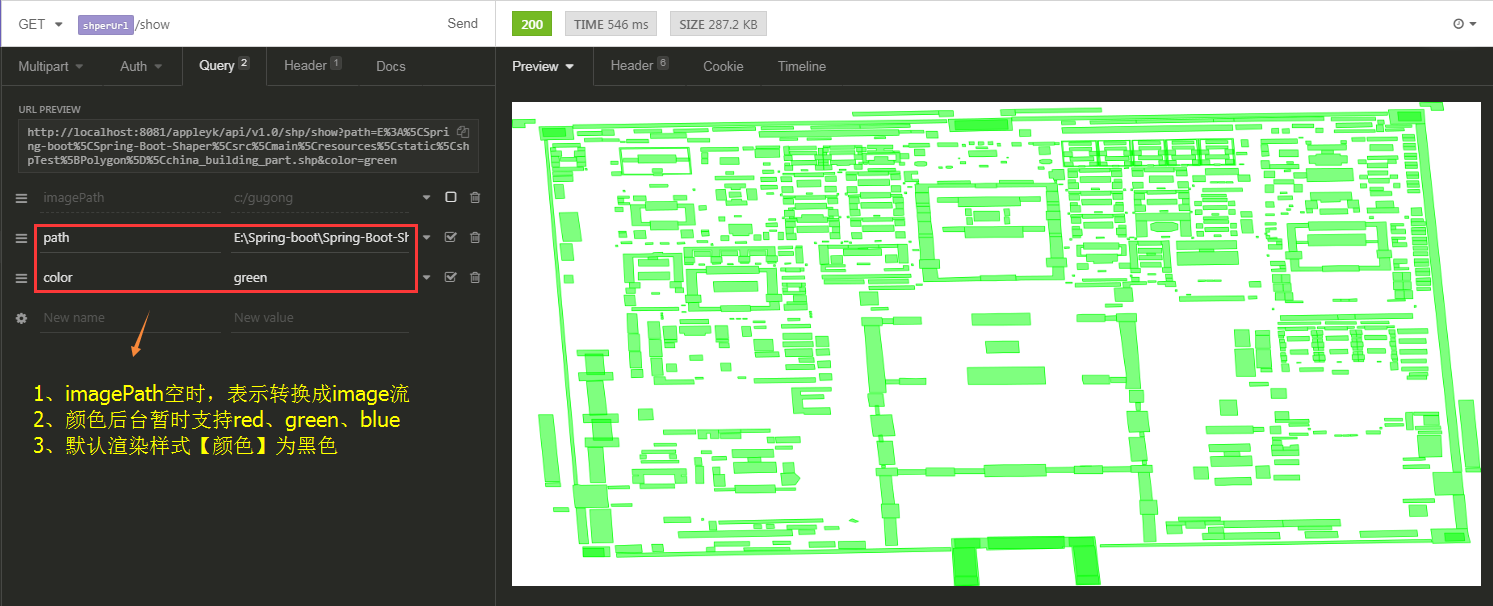
六、核心工具类【ShpTools】
package com.appleyk.geotools;

import com.appleyk.IO.StringTokenReader;

import com.appleyk.pojos.ShpDatas;

import com.appleyk.pojos.ShpInfo;

import com.appleyk.result.ResponseMessage;

import com.appleyk.result.ResponseResult;

import com.vividsolutions.jts.geom.*;

import com.vividsolutions.jts.geom.Point;

import com.vividsolutions.jts.geom.Polygon;

import org.geotools.data.*;

import org.geotools.data.shapefile.ShapefileDataStore;

import org.geotools.data.shapefile.ShapefileDataStoreFactory;

import org.geotools.data.simple.SimpleFeatureSource;

import org.geotools.feature.FeatureCollection;

import org.geotools.feature.FeatureIterator;

import org.geotools.feature.simple.SimpleFeatureTypeBuilder;

import org.geotools.geometry.jts.ReferencedEnvelope;

import org.geotools.map.FeatureLayer;

import org.geotools.map.Layer;

import org.geotools.map.MapContent;

import org.geotools.referencing.crs.DefaultGeographicCRS;

import org.geotools.renderer.lite.StreamingRenderer;

import org.geotools.styling.SLD;

import org.geotools.styling.Style;

import org.geotools.swing.JMapFrame;

import org.geotools.swing.data.JFileDataStoreChooser;

import org.opengis.feature.Property;

import org.opengis.feature.simple.SimpleFeature;

import org.opengis.feature.simple.SimpleFeatureType;

import org.springframework.util.ResourceUtils;

import javax.imageio.ImageIO;

import javax.servlet.http.HttpServletResponse;

import java.awt.*;

import java.awt.image.BufferedImage;

import java.io.File;

import java.io.IOException;

import java.io.Serializable;

import java.nio.charset.Charset;

import java.util.Collection;

import java.util.HashMap;

import java.util.Map;

/**

 * <p>shapefile读写工具类</p>

 * @author Appleyk

 * @blob https://blog.csdn.net/appleyk

 * @date Created on 上午 11:54 2018-10-12

 */

public class ShpTools {

    /**

     * 集合对象构造器【自定义的】

     */

    private  static GeometryCreator gCreator = GeometryCreator.getInstance();

    /**

     * 边界

     */

    private  static ReferencedEnvelope bounds;

    // 画布的宽度

    private static final int IMAGE_WIDTH = 2400;

    // 画布的高度

    private static final int IMAGE_HEIGHT = 1200;

    /**

     * 通过shp文件路径,读取shp内容

     * @param filePath

     * @throws Exception

     */

    public static ShpDatas readShpByPath(String filePath,Integer limit) throws Exception {

        // 一个数据存储实现,允许从Shapefiles读取和写入

        ShapefileDataStore shpDataStore =  new ShapefileDataStore(new File(filePath).toURI().toURL());

        // 设置编码【防止中文乱码】

        shpDataStore.setCharset(Charset.forName("UTF-8"));

        // getTypeNames:获取所有地理图层,这里我只取第一个【如果是数据表,取出的就是表名】

        String typeName = shpDataStore.getTypeNames()[0];

        System.out.println("shp【图层】名称:"+typeName);

        FeatureCollection<SimpleFeatureType, SimpleFeature> result = getFeatures(shpDataStore, typeName);

        // 迭代特征集合

        FeatureIterator<SimpleFeature> iterator = result.features();

        ShpDatas shpDatas = new ShpDatas();

        shpDatas.setName(typeName);

        shpDatas.setShpPath(filePath);

        buildShpDatas(limit, iterator, shpDatas);

        iterator.close();

        return  shpDatas;

    }

    /**

     * 根据数据源及图层名称拿到特征集合

     * @param shpDataStore

     * @param typeName

     * @return

     * @throws IOException

     */

    private static FeatureCollection<SimpleFeatureType, SimpleFeature> getFeatures(ShapefileDataStore shpDataStore, String typeName) throws IOException {

        // 通过此接口可以引用单个shapefile、数据库表等。与数据存储进行比较和约束

        FeatureSource<SimpleFeatureType, SimpleFeature> featureSource = shpDataStore.getFeatureSource(typeName);

        // 一个用于处理FeatureCollection的实用工具类。提供一个获取FeatureCollection实例的机制

        FeatureCollection<SimpleFeatureType, SimpleFeature> result = featureSource.getFeatures();

        System.out.println("地理要素【记录】:"+result.size()+"个");

        System.out.println("==================================");

        return result;

    }

    /**

     * 构建shpDatas对象

     * @param limit

     * @param iterator

     * @param shpDatas

     */

    private static void buildShpDatas(Integer limit, FeatureIterator<SimpleFeature> iterator, ShpDatas shpDatas) {

        // 这里我们只迭代前limit个

        int stop = 0;

        while (iterator.hasNext()) {

            if (stop > limit) {

                break;

            }

            // 拿到一个特征

            SimpleFeature feature = iterator.next();

            // 取出特征里面的属性集合

            Collection<Property> p = feature.getProperties();

            // 遍历属性集合

            Map<String,Object> prop = new HashMap<>();

            for (Property pro : p) {

                String key = pro.getName().toString();

                String val = pro.getValue().toString();

                prop.put(key, val);

                System.out.println("key【字段】:"+key+"\t||  value【值】:"+val);

            }

            System.out.println("\n============================ 序号:"+stop+"\n");

            shpDatas.addProp(prop);

            stop++;

        } // end 最外层 while

    }

    /**

     * 将一个几何对象写进shapefile

     * @param filePath

     * @param geometry

     */

    public  static  void writeShpByGeom(String filePath, Geometry geometry) throws Exception{

        ShapefileDataStore ds = getshpDS(filePath, geometry);

        FeatureWriter<SimpleFeatureType, SimpleFeature> writer = ds.getFeatureWriter(ds.getTypeNames()[0],

                Transaction.AUTO_COMMIT);

        // Interface SimpleFeature:一个由固定列表值以已知顺序组成的SimpleFeatureType实例。

        SimpleFeature feature = writer.next();

        feature.setAttribute("name", "XXXX名称");

        feature.setAttribute("path", "c:/test");

        feature.setAttribute("the_geom", geometry);

        feature.setAttribute("id", 1010L);

        feature.setAttribute("des", "XXXX描述");

        System.out.println("========= 写入【"+geometry.getGeometryType()+"】成功 !=========");

        // 写入

        writer.write();

        // 关闭

        writer.close();

        // 释放资源

        ds.dispose();

    }

    /**

     * 将一个几何对象写进shapefile

     * @param shpInfo

     */

    public  static ResponseResult writeShpByGeom(ShpInfo shpInfo) throws Exception{

        // 特殊字符串解析器

        StringTokenReader reader = new StringTokenReader();

        // 根据几何对象的wkt字符串,反解【解析】成Geometry对象

        Geometry geometry = reader.read(shpInfo.getGeom());

        // 拿到shp对象所在的目录【文件夹】

        String path = shpInfo.getPath();

        File file = new File(path);

        if(!file.exists()){

            file.mkdir();

        }

        if(!file.isDirectory()){

            return  new ResponseResult(ResponseMessage.BAD_REQUEST,"path不是有效的文件夹" );

        }

        String filePath = shpInfo.getPath()+"/"+shpInfo.getName()+".shp";

        ShapefileDataStore ds = getshpDS(filePath, geometry);

        String typeName = ds.getTypeNames()[0];

        FeatureWriter<SimpleFeatureType, SimpleFeature> writer ;

        if(shpInfo.isAppendWrite()){

            // 追加写几何对象

            writer = ds.getFeatureWriterAppend(typeName, Transaction.AUTO_COMMIT);

        }else{

            // 覆盖写几何对象

            writer = ds.getFeatureWriter(typeName, Transaction.AUTO_COMMIT);

        }

        // Interface SimpleFeature:一个由固定列表值以已知顺序组成的SimpleFeatureType实例。

        SimpleFeature feature = writer.next();

        feature.setAttribute("name", shpInfo.getName());

        feature.setAttribute("path", shpInfo.getPath());

        feature.setAttribute("the_geom", geometry);

        feature.setAttribute("id", shpInfo.getId());

        feature.setAttribute("des", shpInfo.getDes());

        System.out.println("========= 写入【"+geometry.getGeometryType()+"】成功 !=========");

        // 写入

        writer.write();

        // 关闭

        writer.close();

        // 释放资源

        ds.dispose();

        // 返回创建成功后的shp文件路径

        return  new ResponseResult(ResponseMessage.OK,filePath);

    }

    /**

     * 拿到配置好的DataStore

     * @param filePath

     * @param geometry

     * @return

     * @throws IOException

     */

    private static ShapefileDataStore getshpDS(String filePath, Geometry geometry) throws IOException {

        // 1.创建shape文件对象

        File file = new File(filePath);

        Map<String, Serializable> params = new HashMap<>();

        // 2、用于捕获参数需求的数据类 URLP:url to the .shp file.

        params.put(ShapefileDataStoreFactory.URLP.key, file.toURI().toURL());

        // 3、创建一个新的数据存储【如果存在,则不创建】

        ShapefileDataStore ds = (ShapefileDataStore) new ShapefileDataStoreFactory().createNewDataStore(params);

        // 4、定义图形信息和属性信息 -- SimpleFeatureTypeBuilder 构造简单特性类型的构造器

        SimpleFeatureTypeBuilder tBuilder = new SimpleFeatureTypeBuilder();

        // 5、设置 -- WGS84:一个二维地理坐标参考系统,使用WGS84数据

        tBuilder.setCRS(DefaultGeographicCRS.WGS84);

        tBuilder.setName("shapefile");

        // 添加名称

        tBuilder.add("name", String.class);

        // 添加shp所在目录名称

        tBuilder.add("path", String.class);

        // 添加 一个几何对象

        tBuilder.add("the_geom", geometry.getClass());

        // 添加一个id

        tBuilder.add("id", Long.class);

        // 添加描述

        tBuilder.add("des", String.class);

        // 设置此数据存储的特征类型

        ds.createSchema(tBuilder.buildFeatureType());

        // 设置编码

        ds.setCharset(Charset.forName("UTF-8"));

        return ds;

    }

    /**

     * 打开shp文件,获取地图内容

     * @param filePath  文件路径

     * @param isOpenByChoose 是否自定义打开shp文件

     * @throws Exception

     */

    public static  MapContent getMapContentByPath(String filePath,boolean isOpenByChoose,String color) throws  Exception{

        File file;

        if(isOpenByChoose){

            // 1.1、 数据源选择 shp扩展类型的

            file = JFileDataStoreChooser.showOpenFile("shp", null);

        }else{

            // 1.2、根据路径拿到文件对象

            file = new File(filePath);

        }

        if(file==null){

            return null;

        }

        // 2、得到打开的文件的数据源

        FileDataStore store = FileDataStoreFinder.getDataStore(file);

        // 3、设置数据源的编码,防止中文乱码

        ((ShapefileDataStore)store).setCharset(Charset.forName("UTF-8"));

        /**

         * 使用FeatureSource管理要素数据

         * 使用Style(SLD)管理样式

         * 使用Layer管理显示

         * 使用MapContent管理所有地图相关信息

         */

        // 4、以java对象的方式访问地理信息 --    简单地理要素

        SimpleFeatureSource featureSource = store.getFeatureSource();

        bounds = featureSource.getBounds();

        // 5、创建映射内容,并将我们的shapfile添加进去

        MapContent mapContent = new MapContent();

        // 6、设置容器的标题

        mapContent.setTitle("Appleyk's GeoTools");

        Color color1;

        if(color == null || "".equals(color)){

            color1 = Color.BLACK;

        }else if("red".equals(color)){

            color1 = Color.RED;

        }else if("green".equals(color)){

            color1 = Color.GREEN;

        }else if("blue".equals(color)){

            color1 = Color.BLUE;

        }else{

            color1 = Color.ORANGE;

        }

        // 7、创建简单样式 【颜色填充】

        Style style = SLD.createSimpleStyle(featureSource.getSchema(),color1);

        // 8、显示【shapfile地理信息+样式】

        Layer layer = new FeatureLayer(featureSource, style);

        // 9、将显示添加进map容器

        mapContent.addLayer(layer);

        return  mapContent;

    }

    public  static  void showMap(MapContent mapContent){

        JMapFrame.showMap(mapContent);

    }

    /**

     * shp文件转Image【格式定png】

     * @param shpFilePath shp目标文件

     * @param destImagePath 转成图片的文件 == 如果没有,转成的图片写进response输出流里

     * @param response 响应流

     * @throws Exception

     */

    public static void shp2Image(String shpFilePath,String destImagePath,String color, HttpServletResponse response) throws  Exception{

        // 流渲染器

        StreamingRenderer renderer = new StreamingRenderer();

        MapContent mapContent = getMapContentByPath(shpFilePath,false,color );

        renderer.setMapContent(mapContent);

        Rectangle imageBounds = new Rectangle(0, 0, IMAGE_WIDTH, IMAGE_HEIGHT);

        BufferedImage dumpImage = new BufferedImage(IMAGE_WIDTH, IMAGE_HEIGHT, BufferedImage.TYPE_INT_RGB);

        Graphics2D g2d = dumpImage.createGraphics();

        g2d.fillRect(0, 0, IMAGE_WIDTH, IMAGE_HEIGHT);

        g2d.setRenderingHint(RenderingHints.KEY_ANTIALIASING, RenderingHints.VALUE_ANTIALIAS_ON);

        renderer.paint(g2d, imageBounds, bounds);

        g2d.dispose();

        if(destImagePath == null || "".equals(destImagePath)){

            ImageIO.write(dumpImage, "png", response.getOutputStream());

        }else{

            ImageIO.write(dumpImage, "png", new File(destImagePath+".png"));

        }

    }

    public static void main(String[] args) throws  Exception{

        File file = ResourceUtils.getFile("classpath:static/shpTest[Point]/dp_tl.shp");

        // 从shp文件里面读取属性信息

        readShpByPath(file.getAbsolutePath(),10);

        System.out.println("=================下面开始往shp文件里面写几何对象===================");

        // 先创建文件夹test

        String filePath = "C:/test/test.shp";

        String pointWkt="POINT (120.76164848270959 31.22001141278534)";

        Point point = gCreator.createPointByWKT(pointWkt);

        // Polygon【面】

        String polygonWkt="POLYGON ((103.859188 34.695908, 103.85661 34.693788, 103.862027 34.69259, 103.863709 34.695078, 103.859188 34.695908))";

        Polygon polygon = gCreator.createPolygonByWKT(polygonWkt);

        // LineString【线】

        String linestringWkt="LINESTRING(113.511315990174 41.7274734296674,113.51492087909 41.7284983348307,113.516079593384 41.727649586406,113.515907932007 41.7262243043929,113.514019656861 41.7247989907606,113.512131381714 41.7250872589898,113.51138036319 41.7256637915682,113.511315990174 41.7274734296674)";

        LineString lineString = gCreator.createLineByWKT(linestringWkt);

        // MultiPolygon【多面】

        String multiPolyWkt = "MULTIPOLYGON(((101.870371 25.19228,101.873633 25.188183,101.880564 25.184416,101.886808 25.186028,101.892043 25.189969,101.896592 25.190163,101.903716 25.190785,101.905454 25.193464,101.899897 25.196202,101.894146 25.197911,101.891657 25.19826,101.886078 25.197658,101.884211145538 25.2007060137013,101.88172564506 25.1949712942389,101.87874 25.199619,101.874641 25.200998,101.868547 25.202415,101.863741 25.202415,101.85887 25.202842,101.854557 25.202182,101.852604 25.199736,101.852282 25.19628,101.854492 25.194183,101.855608 25.192668,101.863698 25.192105,101.870371 25.19228)))";

        MultiPolygon multiPolygon = gCreator.createMulPolygonByWKT(multiPolyWkt);

        // 几何对象的范围【矩形边界】

        Envelope envelope = polygon.getEnvelopeInternal();

        System.out.println(envelope);

        // 往shp文件里面写几何对象

        writeShpByGeom(filePath,point);

    }

}
Spring-Boot ☞ ShapeFile文件读写工具类+接口调用的更多相关文章
- spring boot 结合Redis 实现工具类
自己整理了 spring boot 结合 Redis 的工具类引入依赖 <dependency> <groupId>org.springframework.boot</g ...
- properties文件读写工具类
java代码: import java.io.FileInputStream; import java.io.FileOutputStream; import java.io.IOException; ...
- android 文件读写工具类
将可以序列化的对象通过base64编码后进行保存 但是感觉多数情况下,不需要采用这个功能,直接保存原始的json字符串,取出来之后再进行解析即可 package com.wotlab.home.mon ...
- list集合、txt文件对比的工具类和文件读写工具类
工作上经常会遇到处理大数据的问题,下面两个工具类,是在处理大数据时编写的:推荐的是使用map的方式处理两个list数据,如果遇到list相当大数据这个方法就起到了作用,当时处理了两个十万级的list, ...
- java文件读写工具类
依赖jar:commons-io.jar 1.写文件 // by FileUtilsList<String> lines = FileUtils.readLines(file, " ...
- SSM(Spring)中,在工具类中调用服务层的方法
因为平时在调用service层时都是在controller中,有配置扫描注入,spring会根据配置自动注入所依赖的服务层. 但因我们写的工具类不属于controller层,所以当所写接口需要调用服务 ...
- java简单的文件读写工具类
import java.io.BufferedInputStream; import java.io.BufferedOutputStream; import java.io.BufferedRead ...
- properties文件读写工具类PropertiesUtil.java
import java.io.FileInputStream; import java.io.FileOutputStream; import java.io.IOException; import ...
- 51. spring boot属性文件之多环境配置【从零开始学Spring Boot】
原本这个章节是要介绍<log4j多环境不同日志级别的控制的>但是没有这篇文章做基础的话,学习起来还是有点难度的,所以我们先一起了解下spring boot属性文件之多环境配置,当然文章中也 ...
随机推荐
- liunx增强命令
查找命令 grep 格式:grep [option] pattern [file] 实例: ps -ef | grep sshd 查找指定 ssh 服务进程 ps -ef | grep sshd | ...
- mysql便于管理的几个shell脚本
[mysql@clark scripts]$ lsmysql_db_shutdown.sh mysql_db_startup.sh mysql_env.ini mysqlplus.sh[mysq ...
- JS支持可变参数(任意多个)
<script type="text/javascript"> function abc(){ //js中有个变量arguments,可以访问所有传入的值 for(va ...
- Cloud Foundry Session Affinity(Sticky Session)的实现
会话保持(Session Affinity),有时又称粘滞会话(Sticky Sessions), 是负载均衡领域设计需要着力解决的重要问题之一,也是一个相对比较复杂的问题. 会话保持是指在负载均衡器 ...
- Computer Hardware
Computer Hardware Para 1 Computer hardware can be divides into four categories: input hardware, stor ...
- 开源重磅,java内容管理系统CMS,点击就可以编辑,保存,轻松构建自己的站点
买的暂时空间不给力.内存不足,老给关闭,先转到京东云上了,免费的,也不知免费多久. 这是地址2 http://java4cms.jd-app.com/index.html 这是地址 http:// ...
- ACM-ICPC (10/14)
动态规划的四个姿势 动态规划要学好,姿势一定要骚,在实战的时候,你将你的转移方程按照以下四种姿势搞一发后,一定会是耳目一新,引来萌妹子的注意~~~哈哈!!! 言归正传了!!! 之所以写动态规划优化,是 ...
- E. XOR and Favorite Number
题意:很多询问,求每个询问下,有多少个区间,异或=k. 分析:异或也有前缀和.[L,R] = pre[R] ^ pre[L-1]: 莫队算法:是莫涛队长发明的,一种改良版的暴力离线算法. 首先将问题重 ...
- JAVA程序员常用软件类库下载地址整理
IT行业是个发展更新特别快的领域,每个程序员在职业生涯中都会经历各类技术和工具的更新迭代. 俗话说:工欲善其事,必先利其器.本着独乐乐不如众乐乐的精神(其实是自己健忘)本人把经常要用到的软件工具官方下 ...
- android(eclipse)广播机制知识梳理(三)
1:分类: 标准广播:没有先后顺序,无法被截断 有序广播:又先后顺序,可以截断 2:接收广播:首先进行注册,注册的方式有静态注册和动态注册.也就是在代码中注册和在AndroidManifest ...