
CALayer层的属性(转)
一.position和anchorPoint
1.简单介绍
CALayer有2个非常重要的属性:position和anchorPoint
position:
(1)用来设置CALayer在父层中的位置
(2)以父层的左上角为原点(0,0)
anchorPoint:
(1)称为”定位点”,”锚点”
(2)决定着CALayer身上的哪个点会在position属性所指的位置
(3)以自己的左上角为原点(0,0)
(4)它的x,y取值范围都是0~1,默认值为(0.5,0.5)
2.图示
anchorPoint 它的取值为0~1
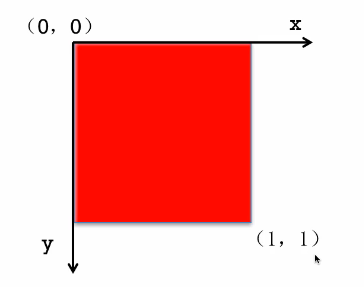
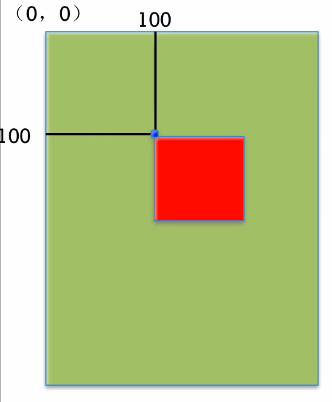
红色图层的anchorPoint为(0,0)

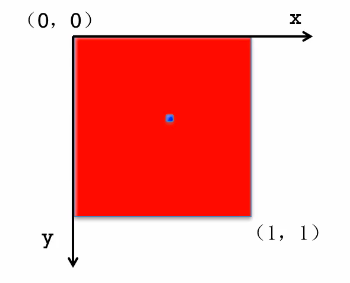
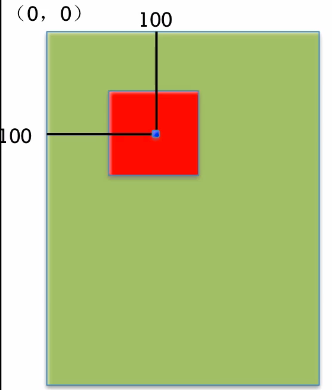
红色图层的anchorPoint为(0.5,0.5)
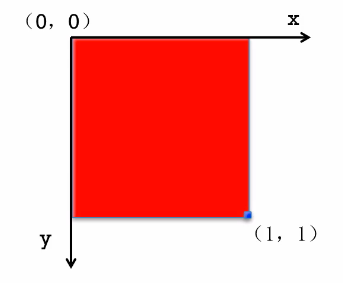
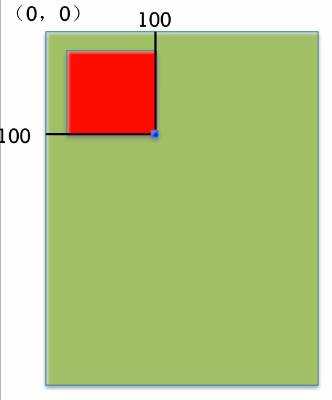
红色图层的anchorPoint为(1,1)
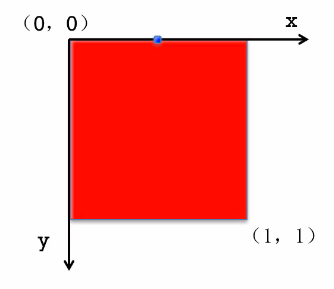
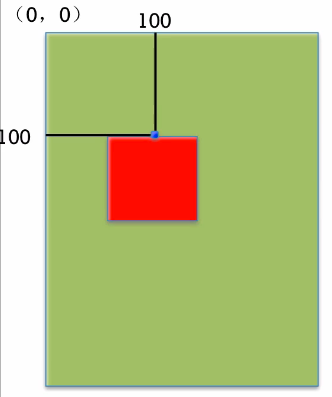
红色图层的anchorPoint为(0.5,0)
position和anchorPoint
添加一个红色图层到绿色图层上,红色图层显示到什么位置,由position属性决定
假设红色图层的position是(100,100)
到底把红色图层的哪个点移动到(100,100)的坐标位置,锚点。
红色图层的锚点是(0,0)
红色图层的锚点是(0.5,0.5)
红色图层的锚点是(1,1)
红色图层的锚点是(0.5,0)
3.代码示例
(1)没有设置锚点。默认的锚点位置为(0.5,0.5)
@implementation ViewController

- (void)viewDidLoad {

    [super viewDidLoad];

    //创建图层

    CALayer *layer = [CALayer layer];

    //设置图层的属性

    layer.backgroundColor = [UIColor redColor].CGColor;

    layer.bounds = CGRectMake(, , , );

    //添加图层

    [self.view.layer addSublayer:layer];

}

- (void)didReceiveMemoryWarning {

    [super didReceiveMemoryWarning];

    // Dispose of any resources that can be recreated.

}

@end
(2)设置锚点为(0,0)
@implementation ViewController

- (void)viewDidLoad {

    [super viewDidLoad];

    //创建图层

    CALayer *layer = [CALayer layer];

    //设置图层的属性

    layer.backgroundColor = [UIColor redColor].CGColor;

    layer.bounds = CGRectMake(, , , );

    //设置锚点为(0,0)

    layer.anchorPoint = CGPointZero;

    //添加图层

    [self.view.layer addSublayer:layer];

}

- (void)didReceiveMemoryWarning {

    [super didReceiveMemoryWarning];

    // Dispose of any resources that can be recreated.

}

@end
二.隐式动画
1.简单说明
每一个UIView内部都默认关联着一个CALayer,我们称这个Layer为Root Layer(根层)。 所有的非Root Layer,也就是手动创建的CALayer对象,都存在着隐式动画
什么是隐式动画? 当对非Root Layer的部分属性进行修改时,默认会自动产生一些动画效果。 而这些属性称为Animatable Properties(可动画属性)。
举例几个常见的可动画属性
(1)bounds:用于设置CALayer的宽度和高度。修改这个属性会产生缩放动画
(2)backgroudColor:用于设置CALayer的背景色。修改这个属性会产生背景色的渐变动画。
(3)position:用于设置CALayer的位置。修改这个属性会产生平移动画。
2.代码示例
@implementation ViewController

- (void)viewDidLoad {

    [super viewDidLoad];

    //创建图层

    CALayer *layer = [CALayer layer];

    //设置图层属性

    layer.backgroundColor = [UIColor brownColor].CGColor;

    layer.bounds = CGRectMake(, , , );

    //显示位置

    layer.position = CGPointMake(, );

    layer.anchorPoint = CGPointZero;

    layer.cornerRadius = ;

    //添加图层

    [self.view.layer addSublayer:layer];

    _myLayer = layer;

}

- (void)didReceiveMemoryWarning {

    [super didReceiveMemoryWarning];

    // Dispose of any resources that can be recreated.

}

- (void)touchesBegan:(NSSet<UITouch *> *)touches withEvent:(UIEvent *)event{

    //隐式动画

    _myLayer.bounds = CGRectMake(, , , );

    _myLayer.backgroundColor = [UIColor yellowColor].CGColor;

}

@end
关闭隐式动画
 //关闭隐式动画

    [CATransaction begin];

    [CATransaction setDisableActions:YES];

    //隐式动画

    _myLayer.bounds = CGRectMake(, , , );

    _myLayer.backgroundColor = [UIColor yellowColor].CGColor;

    [CATransaction commit];
CALayer层的属性(转)的更多相关文章
- iOS开发UI篇—CAlayer层的属性
iOS开发UI篇—CAlayer层的属性 一.position和anchorPoint 1.简单介绍 CALayer有2个非常重要的属性:position和anchorPoint @property ...
- CAlayer层的属性
iOS开发UI篇—CAlayer层的属性 一.position和anchorPoint 1.简单介绍 CALayer有2个非常重要的属性:position和anchorPoint @property ...
- iOS开发UI 篇—CAlayer层的属性
一.position和anchorPoint 1.简单介绍 CALayer有2个非常重要的属性:position和anchorPoint @property CGPoint position; 用来设 ...
- CALayer之mask属性-遮罩
CALayer有一个属性叫做mask. 这个属性本身就是个CALayer类型,有和其他图层一样的绘制和布局属性. 它类似于一个子图层,相对于父图层(即拥有该属性的图层)布局,但是它却不是一个普通的子图 ...
- Swift - CALayer的contents属性动画
Swift - CALayer的contents属性动画 效果 源码 https://github.com/YouXianMing/Swift-Animations // // LiveImageVi ...
- CALayer的additive属性解析
CALayer的additive属性解析 效果: 源码:https://github.com/RylanJIN/ShareOfCoreAnimation // // CAPartAViewContro ...
- C#在数据层过滤属性中的主键
C#使用泛型+反射做为数据层时,一个很都头疼的问题,如何让C#属性在程序里识别出哪个属性是主键,在拼接SQL时,不能把主键拼接到SQL语句里. 这个需要自定义一个属性.新建一个类文件,命名为Prosp ...
- 蓝牙BLE: ATT协议层中属性(Attribute)
ATT(Attribute Protocol)属性层是GATT和GAP的基础,它定义了BLE协议栈上层的数据结构和组织方式. 属性(Attribute)概念是ATT层的核心,ATT层定义了属性的内容, ...
- calayer 的特殊属性整理
calayer: An object that manages image-based content and allows you to perform animations on that con ...
随机推荐
- ionic2 目录
首先 ionic2 暂时找不到中文文档.本人英语又很渣.无奈之下只能依赖于百度翻译.完全是已自己理解的方式运作 ,可能里面会有一些偏差之类的 不过我都测试过代码是可以跑通的 只不过讲解的部分可能... ...
- Mysql自动更新字段时间
Mysql中更新某天数据可设置该条数据中的某个字段自动更新 ALTER TABLE `表名` MODIFY `字段名` TIMESTAMP DEFAULT CURRENT_TIMESTAMP ON U ...
- sql查询某字段的相同值
sql查询某字段的相同值: SELECT * FROM table WHERE col in (SELECT col FROM table GROUP BY col HAVING COUNT (col ...
- NIOSocket Server Client
最近在看Netty框架,顺便写了一下NIO SocketChannel服务端和客户端 Server.java import java.io.IOException; import java.net.I ...
- 图片小精灵 & 解决同时给一个元素设置背景问题 &jq登录注册切换
图片小精灵,当有整张图片时可以通过图片小精灵设置图标. 例如 <!DOCTYPE html> <html> <head> <meta charset=&quo ...
- css sticky footer布局
Sticky footers设计是最古老和最常见的效果之一,大多数人都曾经经历过.它可以概括如下:如果页面内容不够长的时候,页脚块粘贴在视窗底部:如果内容足够长时,页脚块会被内容向下推送.套路为:内容 ...
- jsonp跨域&百度下拉
<!DOCTYPE html> <html lang="en"> <head> <meta charset="UTF-8&quo ...
- Flexviewer调用特定的widget
Flexviewer调用特定的widget: 之前一直是自己添加个固定的key来调用widget 但是后来发现框架早就为你写好啦调用widget的方法 在WidgetManager中有个 public ...
- day01-struts框架
一.框架概述 1.框架的意义与作用: 所谓框架,就是把一些繁琐的重复性代码封装起来,使程序员在编码中把更多的经历放到业务需求的分析和理解上面. 特点:封装了很多细节,程序员在使用的时候会非常简单. 2 ...
- css随笔
1. 关于使用pre标签,且要自动换行 可以使用: word-wrap: break-word; white-space: pre-wrap; 2. 更改placeholder样式 .input::- ...