
将html文档转成pdf
(1)使用场景:在项目中使用到了合同,只有在合同的头部,是不相同的。在合同的主体部分都是相同的,因此就把他放到了模板(html文件)里面。
在用户线上签约完成之后,可以将pdf版的合同下载。
(2)需求:由上可以看出,首先需要把html文件转成pdf。其次需要将pdf下载。
(3)code:
1)在上午就顺利的找了一段合适的代码,成功的跑起来了,在参数里面需要传递一个html文件,因为我测试的是一个类似于hello word的简单的html,所以就侥幸成功了。可能是找的过程太顺利了!!!结果将html换成项目中的文件后死后调不出来,百度才知道,这种方式只能将标准格式的html转成pdf。这里所谓的标准,,标准到表态。。此方法,弃~【但是怎么也是费劲调出来的,就也贴出来吧】、
原文地址:https://blog.csdn.net/m15732622413/article/details/78456961?utm_source=blogxgwz1
package com.jeeplus.common.utils;

import java.io.BufferedWriter;

import java.io.File;

import java.io.FileInputStream;

import java.io.FileNotFoundException;

import java.io.FileOutputStream;

import java.io.IOException;

import java.io.InputStream;

import java.io.OutputStream;

import java.io.OutputStreamWriter;

import java.io.StringWriter;

import java.io.Writer;

import java.net.MalformedURLException;

import java.util.ArrayList;

import java.util.Date;

import java.util.HashMap;

import java.util.List;

import java.util.Map;

import javax.servlet.http.HttpServletRequest;

import javax.servlet.http.HttpServletResponse;

import org.springframework.stereotype.Controller;

import org.springframework.web.bind.annotation.RequestMapping;

import org.springframework.web.bind.annotation.ResponseBody;

import org.xhtmlrenderer.pdf.ITextFontResolver;

import org.xhtmlrenderer.pdf.ITextRenderer;

import com.jeeplus.core.web.BaseController;

import com.lowagie.text.DocumentException;

import com.lowagie.text.pdf.BaseFont;

import com.mitchellbosecke.pebble.PebbleEngine;

import com.mitchellbosecke.pebble.template.PebbleTemplate;

/**

 * 下载PDF文件

 *

 * @author xiao

 *

 */

@Controller

public class PDFUtil extends BaseController {

    private static final String FONTPATH = "C:/WINDOWS/Fonts/simsun.ttc";// 支持中文字体(放哪里都行)

    public static String exportPdf(String htmlpath, HttpServletResponse response, HttpServletRequest request)

            throws Exception {

        String html = htmlpath;

        String pdf = html2Pdf(html, "D:/测试2.pdf");

        // 如果在控制类有response对象可以直接转换后的pdf文件,在控制类方法需要return null

        downloadFile(pdf, "我的PDF文件.pdf", response, request);

        // return null;

        System.out.println("create html success! 文件存放路径:" + pdf);

        return "导出成功!";

    }

    /**

     * html转换pdf文件 注:支持中文,目前iText只支持上面FONTPATH定义的这种字体,所以html文件中也需要用样式设置字体为:SimSun

     * htmlPath 需要转换的html源文件 pdfPath 转换后pdf文件存放地址

     */

    public static String html2Pdf(String htmlPath, String pdfPath) {

        try {

            String url = new File(htmlPath).toURI().toURL().toString();

            OutputStream output = new FileOutputStream(pdfPath);

            ITextRenderer renderer = new ITextRenderer();

            renderer.setDocument(url);

            // 解决中文支持问题(html的中文必须用SimSun字体,Java只能支持这1种字体)

            ITextFontResolver fontResolver = renderer.getFontResolver();

            fontResolver.addFont(FONTPATH, BaseFont.IDENTITY_H, BaseFont.NOT_EMBEDDED);

            renderer.layout();

            renderer.createPDF(output);

            output.close();

            return pdfPath;

        } catch (MalformedURLException e) {

            e.printStackTrace();

            return null;

        } catch (FileNotFoundException e) {

            e.printStackTrace();

            return null;

        } catch (DocumentException e) {

            e.printStackTrace();

            return null;

        } catch (IOException e) {

            e.printStackTrace();

            return null;

        }

    }

    /**

     * 文件下载-支持中文名称

     *

     * @param          sourcePath下载文件全路径(F:/test.pdf)

     * @param          fileName需要生成的下载文件名(HTML转PDF测试.pdf)

     * @param response

     * @throws Exception

     */

    public static void downloadFile(String sourcePath, String fileName, HttpServletResponse response,

            HttpServletRequest request) throws Exception {

        // 读到流中

        InputStream inStream = null;

        try {

            inStream = new FileInputStream(sourcePath);// 文件的存放路径

            // 设置输出的格式

            response.reset();

            String name = new String((fileName));

            response.addHeader("Content-Disposition",

                    "attachment; filename=" + new String(name.getBytes(), "iso-8859-1"));

            // 循环取出流中的数据

            byte[] b = new byte[100];

            int len;

            while ((len = inStream.read(b)) > 0) {

                response.getOutputStream().write(b, 0, len);

            }

            response.getOutputStream().flush();

        } catch (IOException e) {

            e.printStackTrace();

        } finally {

            try {

                inStream.close();

                response.getOutputStream().close();

                // 删除源文件

                /*

                 * File sourceFile = new File(sourcePath); if(sourceFile.exists()){

                 * sourceFile.delete(); }

                 */

            } catch (IOException e) {

                e.printStackTrace();

            }

        }

    }

}
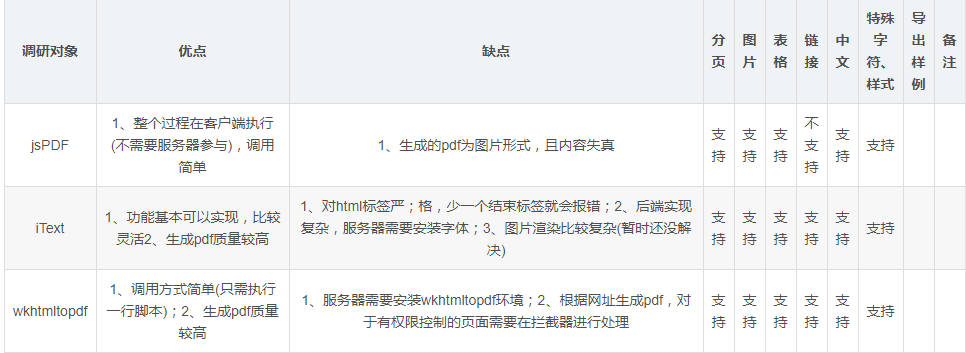
(4)在网上看到了这个比较,很清晰 原文:https://blog.csdn.net/huyuyang6688/article/details/79710704?utm_source=blogxgwz0
将html文档转成pdf的更多相关文章
- word ppt excel文档转换成pdf
1.把word文档转换成pdf (1).添加引用 using Microsoft.Office.Interop.Word; 添加引用 (2).转换方法 /// <summary> /// ...
- C#实现文档转换成PDF
网上有很多将doc.ppt.xls等类型的文档转换成pdf的方法,目前了解到的有两大类: 1.使用虚拟打印机将doc.ppt.xls等类型的文档 2.使用OFFICE COM组件 我采用了第二种方法实 ...
- 用java将简单的word文档换成pdf文档
用java将简单的word文档换成pdf文档的方式很多,因为很多都没有实际测试过,所以这里就先泛泛的说一下 整体上来看分两种: 1.纯java代码实现,有很多优秀的开源软件可以用,比如poi,itex ...
- ASP.NET将word文档转换成pdf的代码
一.添加引用 using Microsoft.Office.Interop.Word; 二.转换方法 1.方法 C# 代码 /// <summary> /// 把Word文件转换成pdf文 ...
- Java利用aspose-words将word文档转换成pdf(破解 无水印)
首先下载aspose-words-15.8.0-jdk16.jar包 http://pan.baidu.com/s/1nvbJwnv 引入jar包,编写Java代码 package doc; impo ...
- Java实现批量将word文档转换成PDF
先导入words的jar包 需要jar包的私聊我发你 代码如下:import com.aspose.words.Document;import java.io.File; public class W ...
- Python将word文档转换成PDF文件
如题. 代码: ''' #將word文档转换为pdf文件 #用到的库是pywin32 #思路上是调用了windows和office功能 ''' #导入所需库 from win32com.client ...
- asp.net将ppt文档转换成pdf
一.添加引用 using Microsoft.Office.Core;using Microsoft.Office.Interop.PowerPoint; 二.转换方法 C# 代码 复制 // ...
- C# word文档转换成PDF格式文档
最近用到一个功能word转pdf,有个方法不错,挺方便的,直接调用即可,记录下 方法:ConvertWordToPdf(string sourcePath, string targetPath) so ...
随机推荐
- VC++使用CImage PNG转BMP图片透明背景处理
PNG格式的图片是支持透明通道的,BMP格式的图片是没有透明通道的,所以当PNG格式的图片转换为BMP格式时,对于PNG图片的透明背景就需要进行特别的处理. VC++中的HBITMAP是支持透明色的, ...
- (转)什么是JSON+如何处理JSON字符串
仍然是crifan的好文: http://www.crifan.com/summary_what_is_json_and_how_to_process_json_string/ . . . .
- ActiveMQ(3) ActiveMQ创建(simpleAuthenticationPlugin)安全认证
控制端安全认证: ActiveMQ目录conf下jetty.xml: <bean id="securityLoginService" class="org.ecli ...
- SpringMVC学习 -- IDEA 创建 HelloWorld
SpringMVC 概述: Spring 为展现层提供的基于 MVC 实际理念的优秀 Web 框架 , 是目前最主流的 MVC 框架之一. 自 Spring3.0 发布及 2013 年 Struts ...
- SSL步骤
SSL步骤 被认证的服务器 1.创建keystore 2.创建信任证书 3.导出信任证书供客户端使用 客户端 1.创建keystore(如果不存在) 2.导入信任证书
- 填坑webpack
1.Concepts: webpack is a module bundler for modern JS applications. Since there are lots of complex ...
- 10款最新CSS3/jQuery菜单导航插件
这是我们在2014年收集的10款最新的CSS3 / jQuery菜单导航插件,不论从外观样式,还是功能扩展性,这些jQuery菜单一定可以满足大家的设计需求.这次我们收集的jQuery菜单,有水平 菜 ...
- Linux搭建JavaEE开发环境与Tomcat——(十)
服务器通过ip地址访问是不需要备案的,如果通过域名访问的话才需要备案. 1.安装Mysql 在CentOS7上安装MySQL时,出现了以下的提示: 原因是: CentOS7带有MariaDB而不是my ...
- Codeforces Round #391 A B C D E
A. Gotta Catch Em' All! 题意 从给定的字符串中选取字符,问可构成多少个\(Bulbasaur\) // 想到柯南里一些从报纸上剪汉字拼成的恐吓信_(:з」∠)_ Code #i ...
- cobalt strike使用笔记
启动: ./teamserver 192.168.74.1 admin #启动cs服务器.admin为密码. 监听器: windows/beacon_dns/reverse_dns_txtwindow ...