
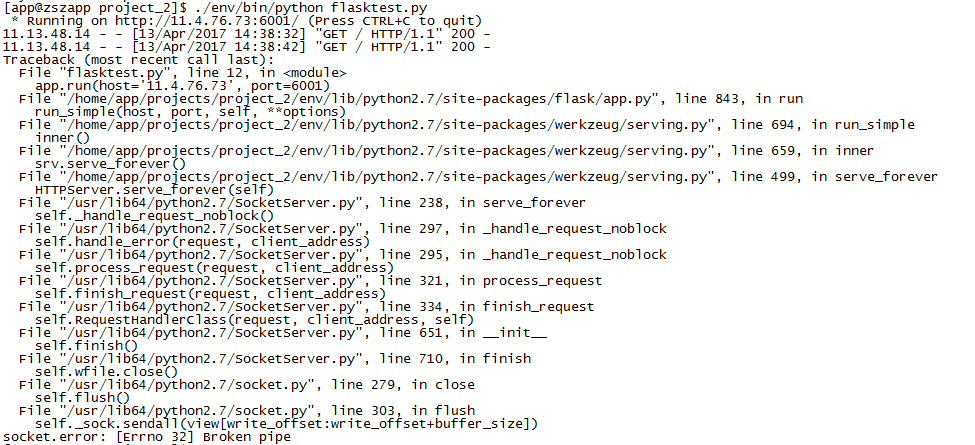
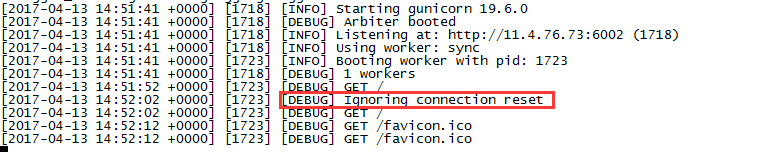
因采用 Flask 原生 WSGI 出现 "Broken pipe" 报错的故障处理
:first-child { margin-top: 0; } blockquote > :last-child { margin-bottom: 0; } img { border: 0; max-width: 100%; height: auto !important; margin: 2px 0; } table { border-collapse: collapse; border: 1px solid #bbbbbb; } td, th { padding: 4px 8px; border-collapse: collapse; border: 1px solid #bbbbbb; } @media only screen and (-webkit-max-device-width: 1024px), only screen and (-o-max-device-width: 1024px), only screen and (max-device-width: 1024px), only screen and (-webkit-min-device-pixel-ratio: 3), only screen and (-o-min-device-pixel-ratio: 3), only screen and (min-device-pixel-ratio: 3) { html, body { font-size: 17px; } body { line-height: 1.7; padding: 0.75rem 0.9375rem; color: #353c47; } h1 { font-size: 2.125rem; } h2 { font-size: 1.875rem; } h3 { font-size: 1.625rem; } h4 { font-size: 1.375rem; } h5 { font-size: 1.125rem; } h6 { color: inherit; } ul, ol { padding-left: 2.5rem; } blockquote { padding: 0 0.9375rem; } }
-->
div{font-size:15px;}.wiz-table-tools .wiz-table-menu-item.active .wiz-table-menu-sub {display: block}.wiz-table-tools .wiz-table-menu-sub:before, .wiz-table-tools .wiz-table-menu-sub:after {position: absolute;content: " ";border-style: solid;border-color: transparent;border-bottom-color: #cccccc;left: 22px;margin-left: -14px;top: -8px;border-width: 0 8px 8px 8px;z-index:10;}.wiz-table-tools .wiz-table-menu-sub:after {border-bottom-color: #ffffff;top: -7px;}.wiz-table-tools .wiz-table-menu-sub-item {padding: 4px 12px;font-size: 14px;}.wiz-table-tools .wiz-table-menu-sub-item.split {border-top: 1px solid #E0E0E0;}.wiz-table-tools .wiz-table-menu-sub-item:hover {background-color: #ececec;}.wiz-table-tools .wiz-table-menu-sub-item.disabled {color: #bbbbbb;cursor: default;}.wiz-table-tools .wiz-table-menu-sub-item.disabled:hover {background-color: transparent;}.wiz-table-tools .wiz-table-menu-item.wiz-table-cell-bg:hover .wiz-table-color-pad {display: block;}.wiz-table-tools .wiz-table-color-pad {display: none;padding: 10px;box-sizing: border-box;width: 85px;height: 88px;background-color: #fff;cursor: default;}.wiz-table-tools .wiz-table-color-pad > div{font-size:15px;}.wiz-table-tools .wiz-table-color-pad .wiz-table-color-pad-item {display: inline-block;width: 15px;height: 15px;margin-right: 9px;position: relative;}.wiz-table-tools .wiz-table-color-pad .wiz-table-color-pad-item i.pad-demo {position: absolute;top:3px;left:0;}.wiz-table-tools .wiz-table-color-pad .wiz-table-color-pad-item .icon-oblique_line{color: #cc0000;}.wiz-table-tools .wiz-table-color-pad .wiz-table-color-pad-item:last-child {margin-right: 0;}.wiz-table-tools .wiz-table-color-pad .wiz-table-color-pad-item.active i.editor-icon.icon-box {color: #448aff;}.wiz-table-tools .wiz-table-cell-align {display: none;padding: 10px;box-sizing: border-box;width: 85px;height: 65px;background-color: #fff;cursor: default;}.wiz-table-tools .wiz-table-cell-align .wiz-table-cell-align-item {display: inline-block;width: 15px;height: 15px;margin-right: 9px;position: relative;}.wiz-table-tools .wiz-table-cell-align .wiz-table-cell-align-item:last-child {margin-right:0}.wiz-table-tools .wiz-table-cell-align .wiz-table-cell-align-item i.valign{position: absolute;top:3px;left:0;color: #d2d2d2;}.wiz-table-tools .wiz-table-cell-align-item.active i.editor-icon.valign {color: #a1c4ff;}.wiz-table-tools .wiz-table-cell-align-item.active i.editor-icon.icon-box,.wiz-table-tools .wiz-table-cell-align-item.active i.editor-icon.align {color: #448aff;}.wiz-table-tools .wiz-table-color-pad .wiz-table-color-pad-item:last-child,.wiz-table-tools .wiz-table-cell-align .wiz-table-cell-align-item:last-child {margin-right: 0;}th.wiz-selected-cell-multi, td.wiz-selected-cell-multi {background: rgba(0,102,255,.05);}th:before,td:before,#wiz-table-col-line:before,#wiz-table-range-border_start_right:before,#wiz-table-range-border_range_right:before{content: " ";position: absolute;top: 0;bottom: 0;right: -5px;width: 9px;cursor: col-resize;background: transparent;z-index:100;}th:after,td:after,#wiz-table-row-line:before,#wiz-table-range-border_start_bottom:before,#wiz-table-range-border_range_bottom:before{content: " ";position: absolute;left: 0;right: 0;bottom: -5px;height: 9px;cursor: row-resize;background: transparent;z-index:100;}.wiz-table-container {}.wiz-table-body {position:relative;padding:0 0 10px;overflow-x:auto;overflow-y:hidden;-webkit-overflow-scrolling:touch;}.wiz-table-body table {margin:0;outline:none;}td,th {height:28px;word-break:break-all;box-sizing:border-box;outline:none;}body pre.prettyprint {padding:0;}body pre.prettyprint code {white-space: pre;}body pre.prettyprint.linenums {box-shadow:none; overflow: auto;-webkit-overflow-scrolling: touch;}body pre.prettyprint.linenums ol.linenums {box-shadow: 40px 0 0 #FBFBFC inset, 41px 0 0 #ECECF0 inset; padding: 10px 10px 10px 40px !important;}
-->
"Broken pipe" 报错原因:<wiz_tmp_tag id="wiz-table-range-border" contenteditable="false" style="display: none;">



因采用 Flask 原生 WSGI 出现 "Broken pipe" 报错的故障处理的更多相关文章
- broken pipe 报错分析和解决办法
参考资料: 1.博客1:https://blog.csdn.net/qq_37535749/article/details/113781338 2.博客2:https://blog.csdn.net/ ...
- flask+sqlite3+echarts2+ajax数据可视化报错:UnicodeDecodeError: 'utf8' codec can't decode byte解决方法
flask+sqlite3+echarts2+ajax数据可视化报错: UnicodeDecodeError: 'utf8' codec can't decode byte 解决方法: 将 py文件和 ...
- flask笔记(三)Flask 添加登陆验证装饰器报错,及解析
Flask 添加登陆验证装饰器报错,及解析 写这个之前,是想到一个需求,这个是关于之前写Flask笔记(二)中的一个知识点,路由相关 需求为 : 有一些页面必须是登陆之后才能访问的,比如Shoppin ...
- Flask - 访问返回字典的接口报错:The view function did not return a valid response. The return type must be a string, tuple, Response instance, or WSGI callable, but it was a dict.
背景 有一个 Flask 项目,然后有一个路由返回的是 dict 通过浏览器访问,结果报错 关键报错信息 TypeError: 'dict' object is not callable The vi ...
- from flask.ext.wtf import Form导入报错
问题来源: 在学习Flask网上教程(PS:中文版教程链接,英文版教程其中代码是对的,运行没错误,我为了看的快一些,所以就直接看的中文版>~<,英文版教程链接)时,使用如下代码: from ...
- Python直接改变实例化对象的列表属性的值 导致在flask中接口多次请求报错
错误原理实例如下: class One(): list = [1, 2, 3] @classmethod def get_copy_list(cls): # copy一份list,这样对list的改变 ...
- 解决thinkphp query()执行原生SQL语句成功结果报错的问题
1.query方法 query方法用于执行SQL查询操作,如果数据非法或者查询错误则返回false,否则返回查询结果数据集(同select方法). 2.execute方法 execute用于更新和写入 ...
- 采用WebService客户端调用WSDL/SOAP网络报错的解决办法
WebService接口是网络传输控制的重要途径,在Windows系统下运行客户端时,平时一直能正确运行,但某天可能突然会发生调用wsdl soap邮件标头无法识别等莫名其妙的错误提示,出现这种情况一 ...
- 首次接触flask遇到socket.error: [Errno 10013] 报错
解决方案: 发现是因为端口5000被占用了,设置一个其他port就行:app.run(port=5050)
随机推荐
- ng 实现插入和删除
结果: 代码: <!DOCTYPE html> <html ng-app="myApp"> <head lang="en"> ...
- 转载:将STM32的标准库编译成lib使用【图文】
from:http://www.cnblogs.com/zyqgold/p/3189719.html 百度上边也有不少关于lib文件的文章,恰巧看到该博文,感觉该博文的条理清晰,步骤明确,故复制到这个 ...
- docker -ce(社区免费版)
Docker -ce https://www.cnblogs.com/zhangxiaoyong/p/9706392.html Docker 是世界领先的软件容器平台.开发人员利用 Docker 可以 ...
- Java程序员必须掌握的知识
1.语法:Java程序员必须比较熟悉语法,在写代码的时候IDE的编辑器对某一行报错应该能够根据报错信息 知道是什么样的语法错误并且知道任何修正. 2.命令:必须熟悉JDK带的一些常用命令及其常用选项, ...
- linux离线搭建Python环境及安装numpy、pandas
1.安装python2.7.3 Cent OS 6.5默认装的有python2.6.6,需要重新安装python2.7.3下载地址:https://www.python.org/downloads/s ...
- OpenSSH 使用技巧
1. 取消 OpenSSH 初次连接 yes 确认 在脚本中有时会使用ssh进行远程连接操作,如果是第一次 ssh 连接往往会提示你是否确认连接并要求你输入yes, 才能继续.如何才能避免这个步骤呢? ...
- 在html与php中实现上传图片
form.html文件 <body> 点击浏览按钮添加要上传的文件(*请上传大小不能大于2M的静态图片)<br /> <form enctype="multip ...
- mysql5.7不支持0000-00-00 00:00:00的默认时间设置
方案一: 数据不多的话把原有的5.53的数据改一下符合要求(数据库时间字段里千万不能出现0000-00-00 00:00:00这样的值),然后导出.sql文件,导出的.sql文件里把 DEFAULT ...
- MVC匿名类传值学习
刚接触MVC+EF框架不久,但一直很困惑的就是控制器能否及如何向视图传递匿名类数据.宝宝表示很讨厌去新建实体类啦,查询稍有不同就去建一个实体类不是很麻烦吗,故趁阳光正好,周末睡到自然醒后起来尝试了之前 ...
- ubuntu为什么没有/etc/inittab文件? 深究ubuntu的启动流程分析
Linux 内核启动 init ,init进程ID是1,是所有进程的父进程,所有进程由它控制. Ubuntu 的启动由upstart控制,自9.10后不再使用/etc/event.d目录的配置文件,改 ...