
.Net Core中简单使用MongoDB
MongoDB 是由C++语言编写的,是一个基于分布式且面向文档存储的开源数据库系统。
下载地址:
https://www.mongodb.com/download-center/community
在.Net Core中使用需要引入核心包 MongoDB.Driver
添加数据:
//与Mongodb建立连接

MongoClient client = new MongoClient("mongodb://127.0.0.1");

//获得数据库,没有则自动创建

IMongoDatabase db = client.GetDatabase("db1");

//拿到集合(表)

IMongoCollection<Student> student = db.GetCollection<Student>("Student");

var data = new Student();

data.id = ;

data.name = "江北";

data.age = ;

data.remarks = "暂无";

//添加一条数据

student.InsertOne(data);
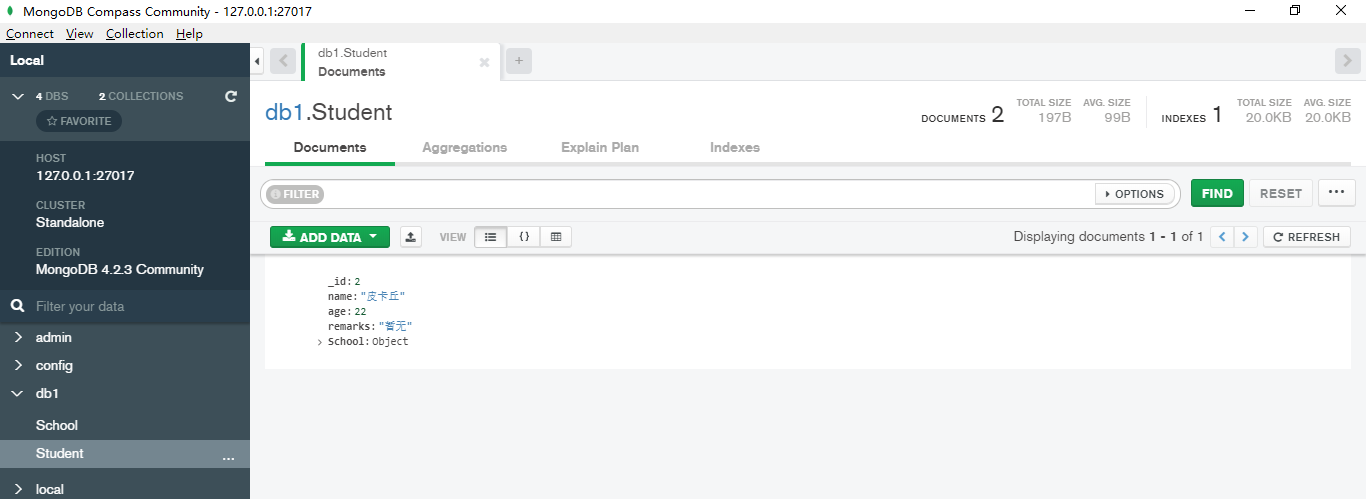
在图形化界面中查看一下
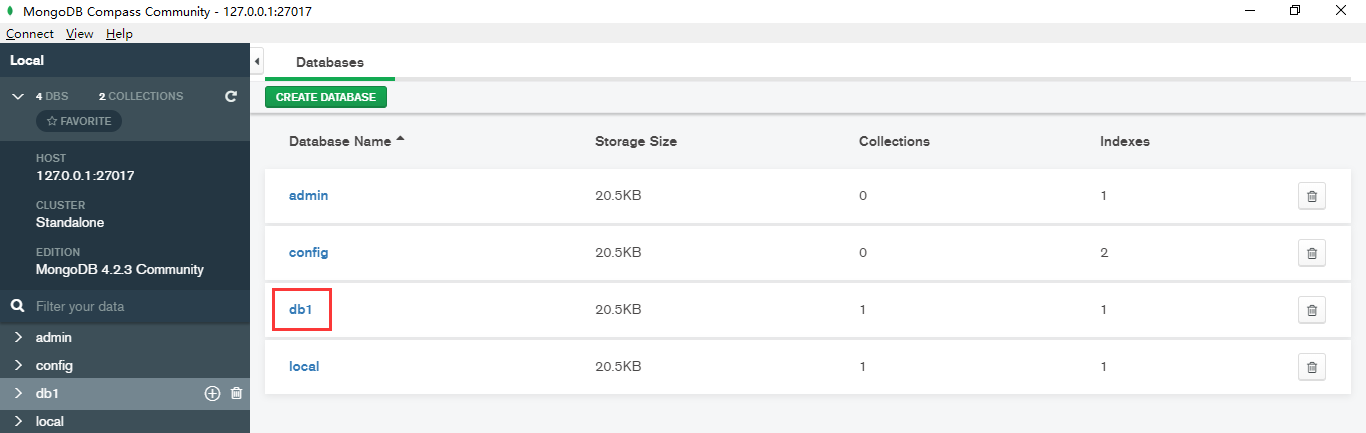
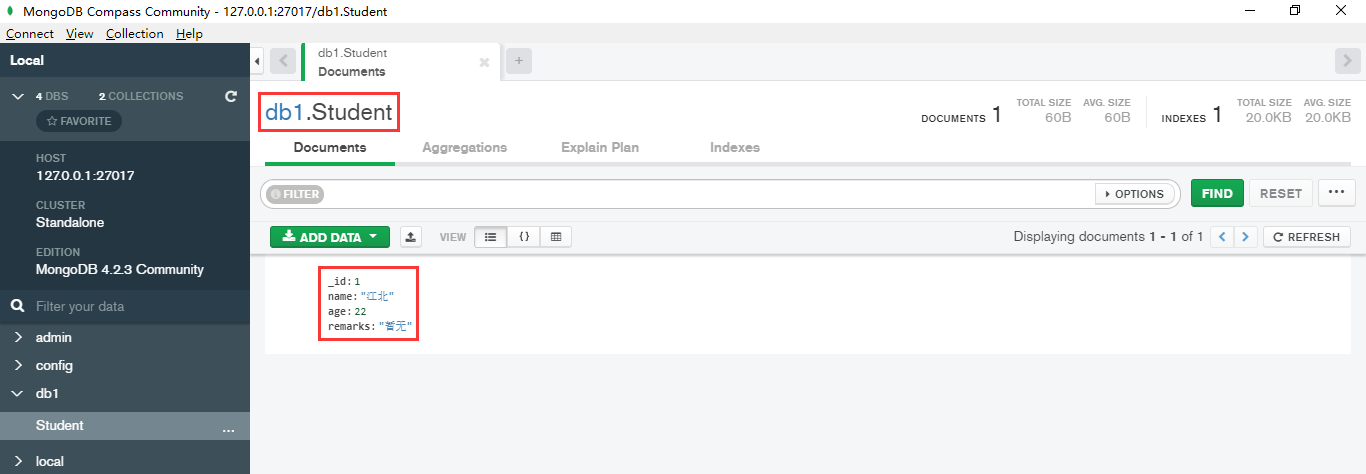
Mongodb默认用id做主键,因此不会显式的指定id是主键。Mongdb中没有内置"自增字段",可以把id声明为ObjectId类型,这样插入以后就自动给字段赋值。
例如,建一个类:
public class School

{

    public ObjectId id { get; set; }

    public string name { get; set; }

    public string address { get; set; }

}
//需引入命名空间 using MongoDB.Bson;
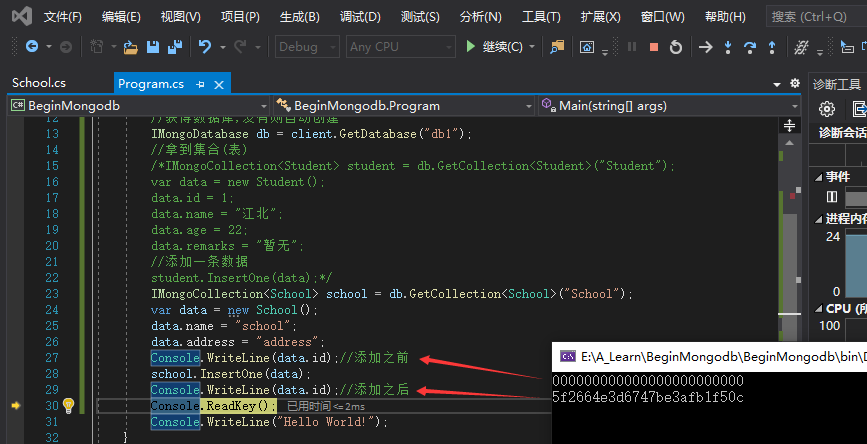
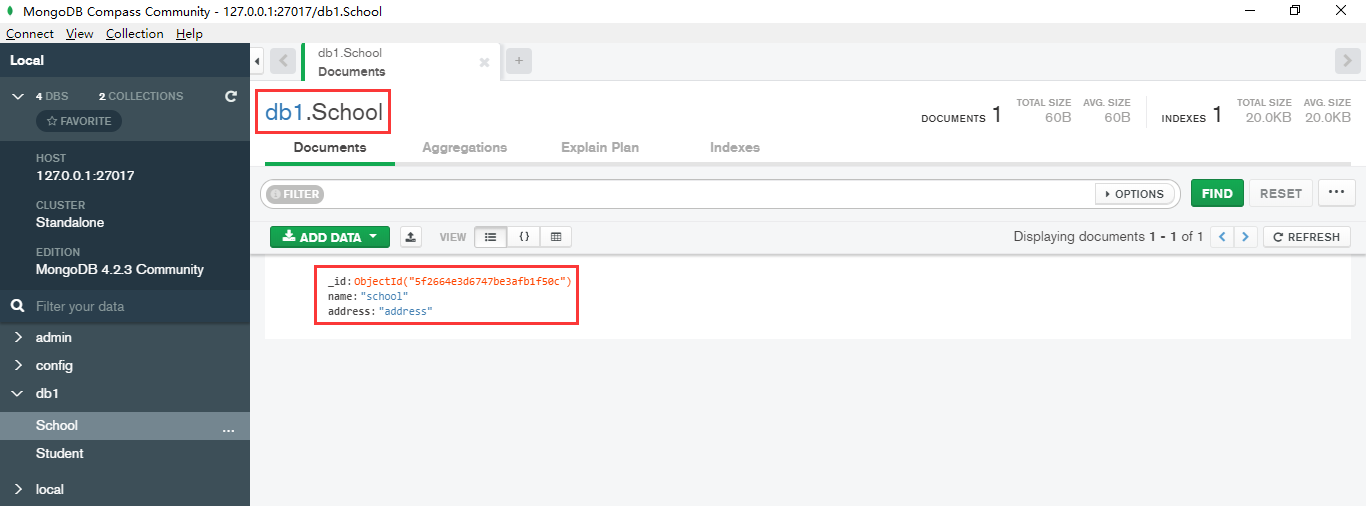
当然School对象之后多加或者去掉一个字段都行。Mongodb是用Json保存的,因此也可以直接用Json格式插入,可用BsonDocument对象作为泛型对象。
//与Mongodb建立连接

MongoClient client = new MongoClient("mongodb://127.0.0.1");

//获得数据库,没有则自动创建

IMongoDatabase db = client.GetDatabase("db1");

//拿到集合(表)

IMongoCollection<BsonDocument> document = db.GetCollection<BsonDocument>("School");

db.GetCollection<BsonDocument>("School");

var json = "{id:1,name:'xx学校',address:'xxx路xx号',remarks:'暂无!'}";

BsonDocument bsons = BsonDocument.Parse(json);
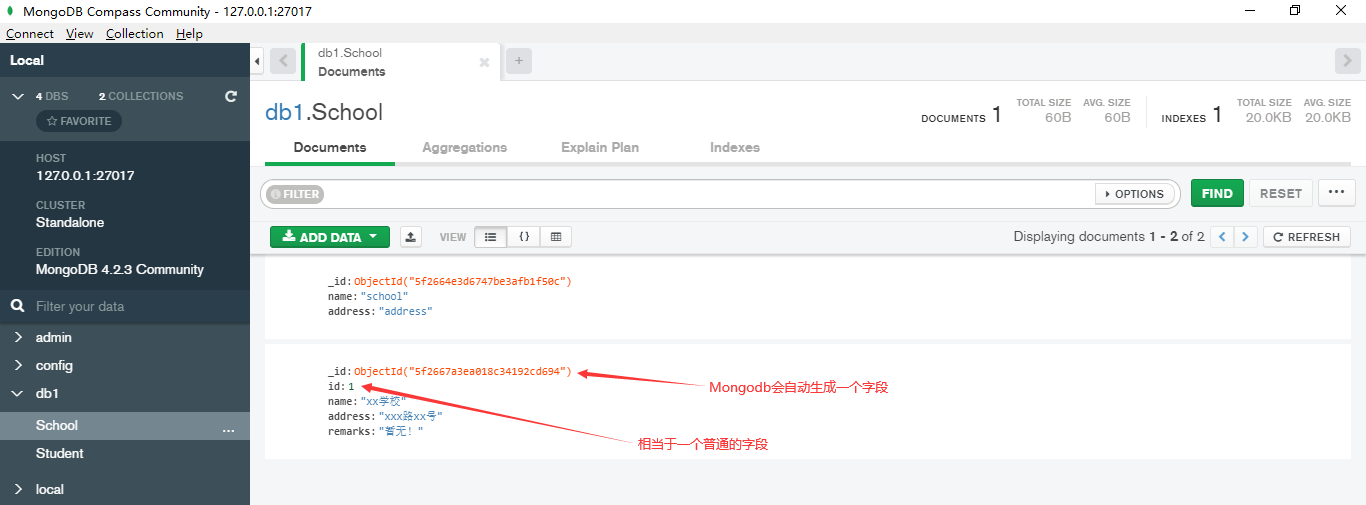
学生和学校是有对应关系的,我们可以添加有嵌套关系类型的对象
public class Student

{

    public int id { get; set; }

    public string name { get; set; }

    public int age { get; set; }

    public string remarks { get; set; }

    public School School { get; set; }

}
//与Mongodb建立连接

MongoClient client = new MongoClient("mongodb://127.0.0.1");

//获得数据库,没有则自动创建

IMongoDatabase db = client.GetDatabase("db1");

//拿到集合(表)

IMongoCollection<Student> student = db.GetCollection<Student>("Student");

Student student1 = new Student();

student1.id = ;

student1.name = "北晚舟";

student1.age = ;

student1.remarks = "暂无";

School school = new School();

school.name = "xxxSchool";

school.address = "xxxAddress";

student1.School = school;

student.InsertOne(student1);
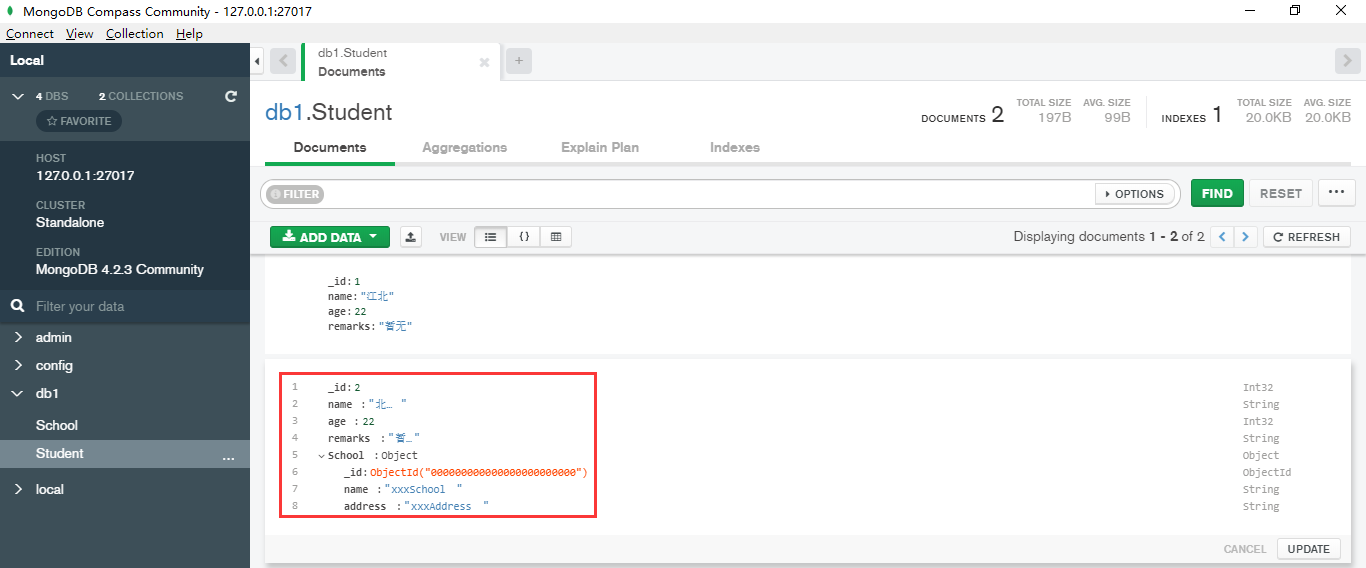
数据查询:
//与Mongodb建立连接

MongoClient client = new MongoClient("mongodb://127.0.0.1");

//获得数据库,没有则自动创建

IMongoDatabase db = client.GetDatabase("db1");

//拿到集合(表)

IMongoCollection<Student> student = db.GetCollection<Student>("Student");

var data = Builders<Student>.Filter.Gt(m => m.age, );//Gt:大于

var result = student.Find(data).ToList();
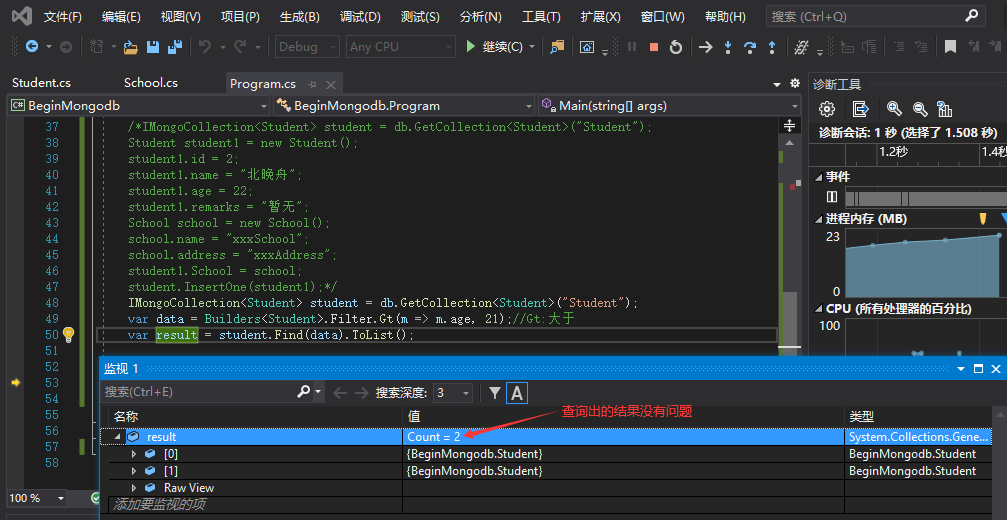
我们安装的NuGet包是支持Lamda表达式的,可用条件表达式来查找数据
//与Mongodb建立连接

MongoClient client = new MongoClient("mongodb://127.0.0.1");

//获得数据库,没有则自动创建

IMongoDatabase db = client.GetDatabase("db1");

//拿到集合(表)

IMongoCollection<Student> student = db.GetCollection<Student>("Student");

var data = Builders<Student>.Filter.Where(m => m.age > 21 && m.name.Contains("江"));

var result = student.Find(data).ToList();
分页查询:
//与Mongodb建立连接

MongoClient client = new MongoClient("mongodb://127.0.0.1");

//获得数据库,没有则自动创建

IMongoDatabase db = client.GetDatabase("db1");

//拿到集合(表)

IMongoCollection<Student> student = db.GetCollection<Student>("Student");

var filter = Builders<Student>.Filter.Where(m => m.age > );

FindOptions<Student, Student> findOpt = new FindOptions<Student, Student>();

findOpt.Limit = ;

findOpt.Skip = ;

findOpt.Sort = Builders<Student>.Sort.Ascending(m => m.age).Descending(m => m.name);

var result = (student.FindAsync(filter, findOpt).Result).ToList();
数据更新:
//与Mongodb建立连接

MongoClient client = new MongoClient("mongodb://127.0.0.1");

//获得数据库,没有则自动创建

IMongoDatabase db = client.GetDatabase("db1");

//拿到集合(表)

IMongoCollection<Student> student = db.GetCollection<Student>("Student");

var filter = Builders<Student>.Filter.Where(m => m.age > );

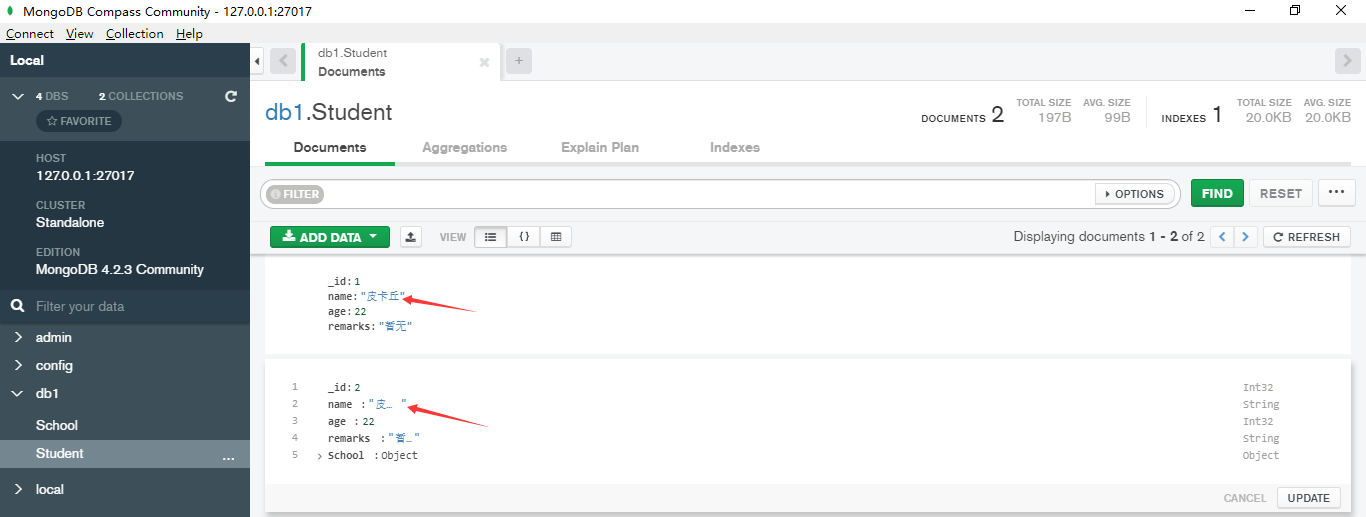
var update = Builders<Student>.Update.Set(m => m.name, "皮卡丘");

//update Student set name="皮卡丘" where age>21

student.UpdateMany(filter, update);
数据删除:
//与Mongodb建立连接

MongoClient client = new MongoClient("mongodb://127.0.0.1");

//获得数据库,没有则自动创建

IMongoDatabase db = client.GetDatabase("db1");

//拿到集合(表)

IMongoCollection<Student> student = db.GetCollection<Student>("Student");

var filter = Builders<Student>.Filter.Where(m => m.age > );

//delete from Student where age>21

//student.DeleteMany(filter);

student.DeleteOne(filter);//只删除一个
MongoDB中文网:https://www.mongodb.org.cn
.Net Core中简单使用MongoDB的更多相关文章
- C# Asp.net中简单操作MongoDB数据库(一)
需要引用MongoDB.Driver.dll.MongoDB.Driver.core.dll.MongoDB.Bson.dll三个dll. 1.数据库连接: public class MongoDb ...
- .NET平台开源项目速览(20)Newlife.Core中简单灵活的配置文件
记得5年前开始拼命翻读X组件的源码,特别是XCode,但对Newlife.Core 的东西了解很少,最多只是会用用,而且用到的只是九牛一毛.里面好用的东西太多了. 最近一年时间,零零散散又学了很多,也 ...
- C# Asp.net中简单操作MongoDB数据库(二)
C# Asp.net中简单操作MongoDB数据库(一) , mongodb数据库连接可以回顾上面的篇幅. 1.model类: public class BaseEntity { /// < ...
- .net core 中简单封装Dapper.Extensions 并使用sqlsuger自动生成实体类
引言 由公司需要使用dapper 同时支持多数据库 又需要支持实体类 又需要支持sql 还需要支持事务 所以采用了 dapper + dapperExtensions 并配套 生成实体类小工具的方 ...
- Asp.Net Core中简单使用日志组件log4net
本文将简单介绍在.NET 6中使用log4net的方法,具体见下文范例. 1.首先新建一个ASP.NET Core空项目 2.通过Nuget包管理器安装下面两个包 log4net Microsoft. ...
- 在.Net Core中使用MongoDB的入门教程(一)
首先,我们在MongoDB的官方文档中看到,MongoDb的2.4以上的For .Net的驱动是支持.Net Core 2.0的. 所以,在我们安装好了MangoDB后,就可以开始MangoDB的.N ...
- Asp.Net Core中使用MongoDB的入门教程,控制台程序使用 MongoDB
内容来源 https://blog.csdn.net/only_yu_yy/article/details/78882446 首先,创建一个.Net Core的控制台应用程序.然后使用NuGet导入 ...
- 在Asp.Net Core中添加区域的简单实现
使用区域,可以有效的对业务进行隔离,各种业务及分工可以更灵活.在Asp.Net Core中启用区域也是极简单的. 使用步骤: 1.在 Startup.cs 中添加区域的路由: app.UseMvc(r ...
- Hangfire在ASP.NET CORE中的简单实现
hangfire是执行后台任务的利器,具体请看官网介绍:https://www.hangfire.io/ 新建一个asp.net core mvc 项目 引入nuget包 Hangfire.AspNe ...
随机推荐
- 利用SignalR实施响应股票数据波动
1.新建ASP.NET Web应用程序, 选择Empty模板. 2.创建Stock.cs类 public class Stock { /// <summary> /// 价格 /// & ...
- 十年老苹果(A1286)强升Catalina及Win10踩坑记
前言 手头有一台十年老苹果,MacBook Pro,A1286,连视网膜屏都没有,电池也早就衰减以后直接拆掉了(减重). 早些年用得还挺多,后来家里也弄了台式,用得逐渐少了,再后来时不时Windows ...
- shell专题(九):函数
9.1 系统函数 1.basename基本语法 basename [string / pathname] [suffix] (功能描述:basename命令会删掉所有的前缀包括最后一个(‘/’)字 ...
- MYSQL 之 JDBC(十三):处理事务
所谓事务是指:一组逻辑操作单元,使数据从一种状态变换到另一种状态. 事务的ACID属性 原子性,Atomicity:事务是一个不可分割的工作单位,事务中的操作要么都发生,要么都不发生. 一致性,Con ...
- 数据分析03 /基于pandas的数据清洗、级联、合并
数据分析03 /基于pandas的数据清洗.级联.合并 目录 数据分析03 /基于pandas的数据清洗.级联.合并 1. 处理丢失的数据 2. pandas处理空值操作 3. 数据清洗案例 4. 处 ...
- Python面向对象03 /继承
Python面向对象03 /继承 目录 Python面向对象03 /继承 1. 初识继承 2. 单继承 3. 多继承 4. 总结 1. 初识继承 概念:专业角度:如果B类继承A类,B类就称为子类,派生 ...
- InnoDB表存储结构及keyring加密
ibdata是InnoDB最重要的系统表空间文件,它记录了InnoDB的核心信息,包括事务系统信息.元数据信息,记录InnoDB change buffer的btree,防止数据损坏的double w ...
- SpringMVC中@RequestBody接收前端传来的多个参数
在使用ajax发送请求时,如果发送的JSON数据是一个类中的不同属性,在Controller方法中使用@RequestBody会直接封装进该类中 例如: 前端部分代码 JavaScript <s ...
- SQL order by语句
关于order by: order by 语句用于根据指定的列对结果集进行排序,默认按照升序排列. 1. select 字段名 from 表名 where 条件 order by 字段名1 asc/ ...
- .net core options 依赖注入的方式
options 依赖注入的方式 public class JwtSettingsOptions { public const string JwtSettings = "JwtSetting ...