
C#编写一个较完整的记事本程序
开发环境
Visual Studio 2019
- 至少需安装 .NET桌面开发
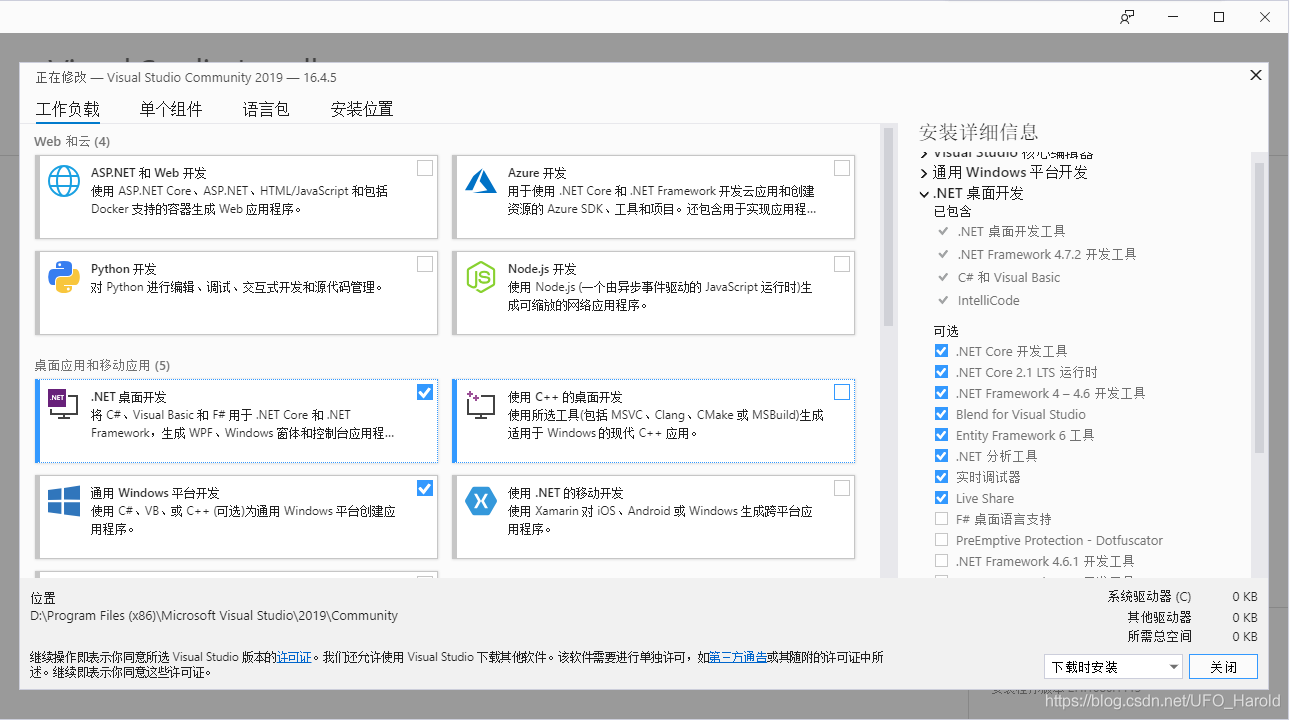
创建项目并配置
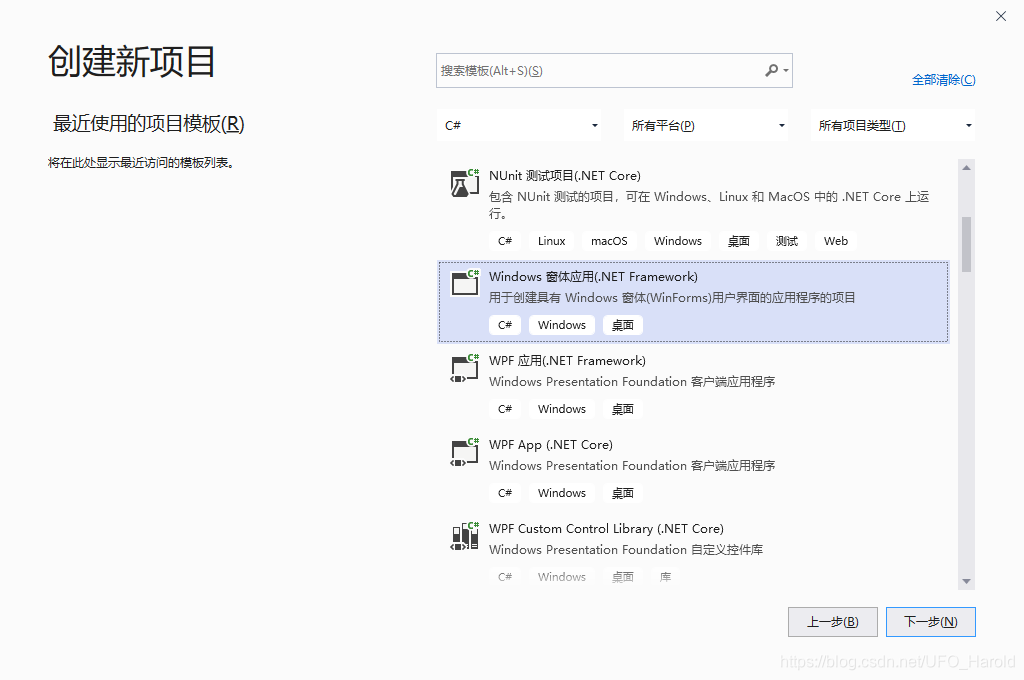
创建窗体文件
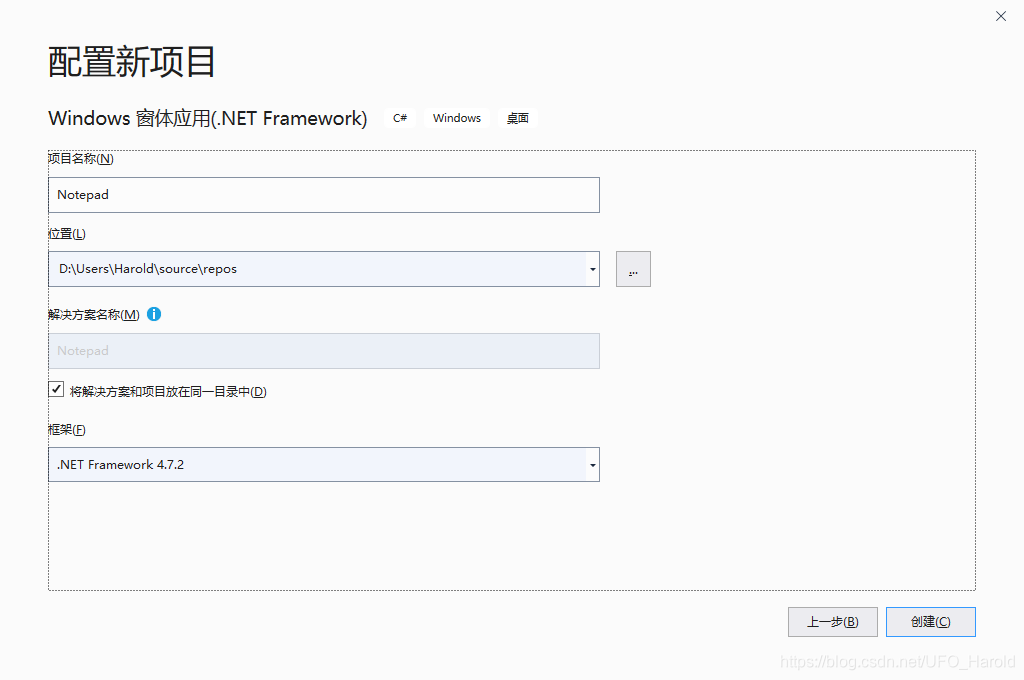
配置项目名称及框架
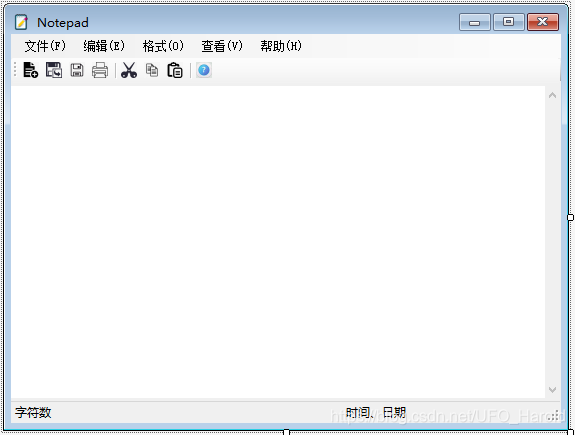
设计界面
创建窗体文件,将控件摆放位置如下,参考系统自带的记事本程序
窗体添加的控件和组件如下
- 控件及组件在工具箱查找

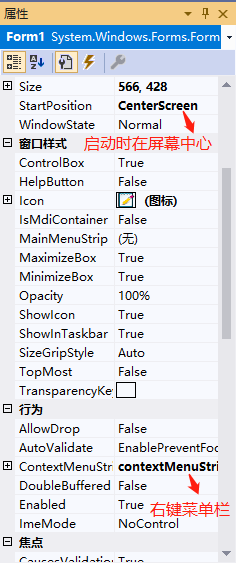
窗体属性
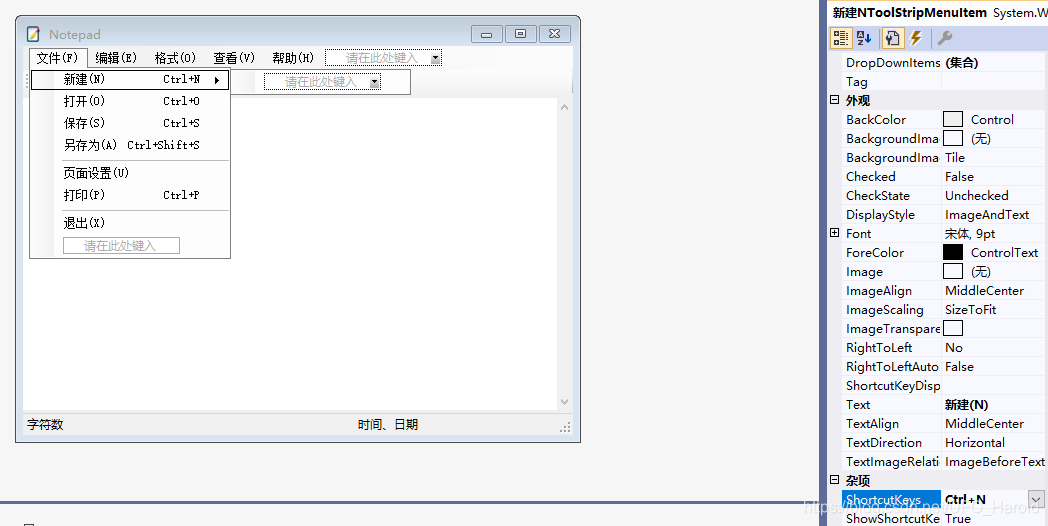
快捷键设置
- 杂项 --> ShortcutKeys
程序属性
项目属性如下图,在创建项目时就已定好了框架,如果在另一台主机上的框架版本比目前项目框架版本低的话,则运行不起来
- 文章末尾有整个程序的压缩包链接可下载,如需直接运行则需下载对应的.NET Framework 4.7.2框架
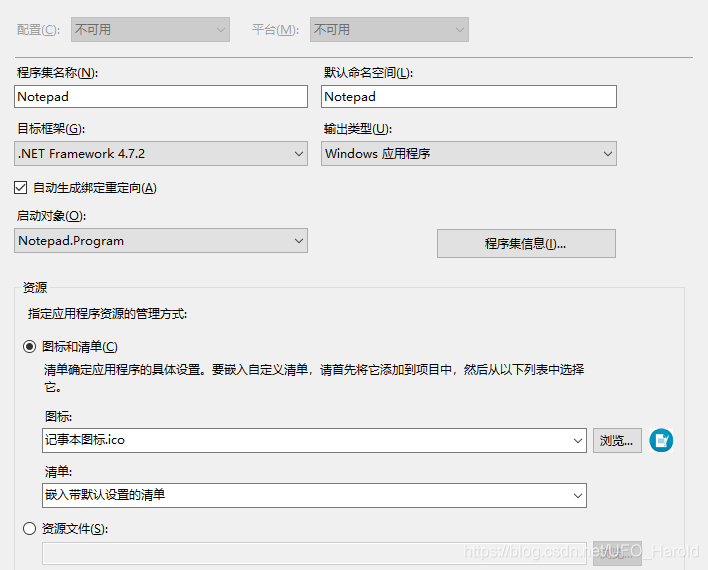
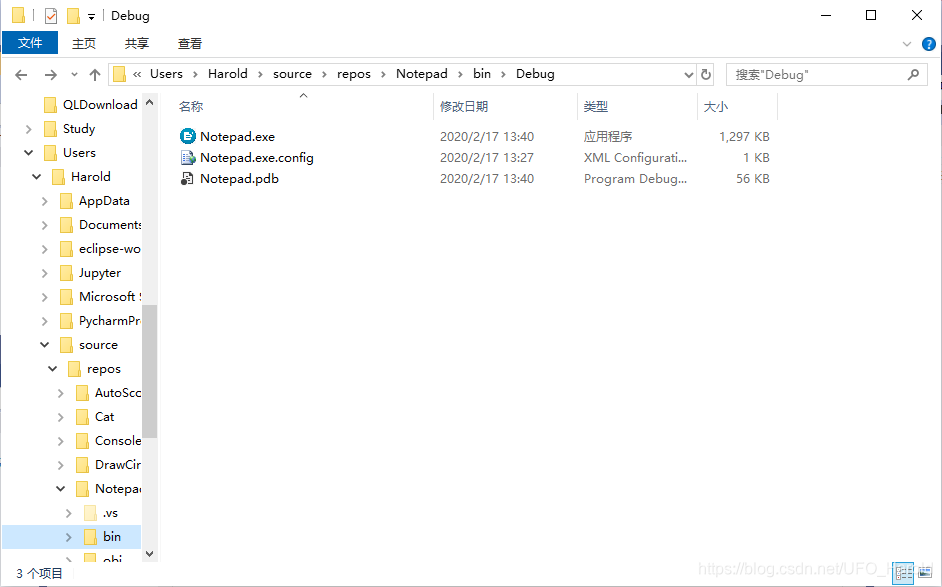
程序图标可在此设置,生成程序后的图标如下图,此文件夹下的程序文件可在第二台主机上直接运行(项目\bin\Debug目录下就是生成程序文件的存放位置,双击程序文件即可运行)
代码演示
代码开头的using部分
- 注释部分需自行添加
using System;

using System.Collections.Generic;

using System.ComponentModel;

using System.Data;

using System.Drawing;

using System.IO;//提供了关于文件、数据流的读取和写入操作

using System.Linq;

using System.Text;

using System.Threading.Tasks;

using System.Windows.Forms;

using System.Diagnostics;//提供了用于与事件日志、性能计数器和系统进程进行交互的类
主要功能
1.新建文件:


    private void 新建NToolStripMenuItem_Click(object sender, EventArgs e)

    {

        if (txtBox.Modified == true)

        {

            DialogResult dr = MessageBox.Show("文件发生变化,是否更改保存?", "注意", MessageBoxButtons.YesNoCancel);

            if (dr == DialogResult.Yes)

            {

                保存SToolStripMenuItem_Click(sender, e);

                return;

            }

            else if (dr == DialogResult.Cancel)

            {

                return;

            }

            txtBox.Clear();

            this.Text = "NewNotepad";

        }

        else

        {

            txtBox.Clear();

            this.Text = "NewNotepad";

        }

    }
新建文件
2.打开:
    private void 打开ToolStripMenuItem_Click(object sender, EventArgs e)

    {

        if (openFileDialog.ShowDialog() == DialogResult.OK)

        {

            filename = openFileDialog.FileName;

            OpenFile();

        }

    }

    protected void OpenFile()

    {

        try

        {

            txtBox.Clear();

            txtBox.Text = File.ReadAllText(filename);

        }

        catch

        { MessageBox.Show("Error!"); }

    }
打开
3.保存:
    private void 保存SToolStripMenuItem_Click(object sender, EventArgs e)

    {

        try

        {

            StreamWriter sw = File.AppendText(Application.ExecutablePath);

            sw.Write(txtBox.Text);

            sw.Dispose();

        }

        catch

        {

            SaveFileDialog sf = new SaveFileDialog();

            sf.DefaultExt = "*.txt";

            sf.Filter = "文本文档(.txt)|*.txt";

            if (sf.ShowDialog() == DialogResult.OK)

            {

                StreamWriter sw = File.AppendText(sf.FileName);

                sw.Write(txtBox.Text);

                sw.Dispose();

            }

        }

    }
保存
4.另存为:
    private void 另存为ToolStripMenuItem_Click(object sender, EventArgs e)

    {

        string name;

        //SaveFileDialog类

        SaveFileDialog save = new SaveFileDialog();

        //过滤器

        save.Filter = "*.txt|*.TXT|(*.*)|*.*";

        //显示

        if (save.ShowDialog() == DialogResult.OK)

        {

            name = save.FileName;

            FileInfo info = new FileInfo(name);

            //info.Delete();

            StreamWriter writer = info.CreateText();

            writer.Write(txtBox.Text);

            writer.Close();

        }

    }
另存为
5.打印:
    private void 打印PToolStripMenuItem_Click(object sender, EventArgs e)

    {

        //显示允许用户选择打印机的选项及其它打印选项的对话框

        this.printDialog.Document = this.printDocument;

        this.printDialog.PrinterSettings = this.pageSetupDialog.PrinterSettings;

        //向打印机发送打印指令

        if (this.printDialog.ShowDialog() == DialogResult.OK)

        {

            try

            {

                this.printDocument.Print();

            }

            catch (Exception ex)

            {

                MessageBox.Show(ex.Message, "错误信息!", MessageBoxButtons.OK, MessageBoxIcon.Error);

            }

        }

    }
打印
6.编辑:
- 根据输入是否输入内容控制是否启用功能
    private void 编辑ToolStripMenuItem_Click(object sender, EventArgs e)

    {

        剪切ToolStripMenuItem.Enabled = txtBox.Modified;

        if (txtBox.SelectedText == "")

        {

            剪切ToolStripMenuItem.Enabled = false;

            复制ToolStripMenuItem.Enabled = false;

            删除ToolStripMenuItem.Enabled = false;

        }

        else

        {

            剪切ToolStripMenuItem.Enabled = true;

            复制ToolStripMenuItem.Enabled = true;

            删除ToolStripMenuItem.Enabled = true;

        }

        if (txtBox.Text == "")

        {

            查找ToolStripMenuItem.Enabled = false;

            查找下一个ToolStripMenuItem.Enabled = false;

            查找上一个ToolStripMenuItem.Enabled = false;

            替换ToolStripMenuItem.Enabled = false;

        }

        else

        {

            查找ToolStripMenuItem.Enabled = true;

            查找下一个ToolStripMenuItem.Enabled = true;

            查找上一个ToolStripMenuItem.Enabled = true;

            替换ToolStripMenuItem.Enabled = true;

        }

        if (Clipboard.GetText() == "")

            粘贴ToolStripMenuItem.Enabled = false;

        else

            粘贴ToolStripMenuItem.Enabled = true;

    }
编辑
7.查找:
- 查找功能不够完善,混用查找上一项和查找下一项效果不理想
    TextBox txtInput = new TextBox()

    {

        Font = new Font("宋体", 10)

    };

    TextBox txtInputReplace = new TextBox()

    {

        Font = new Font("宋体", 10)

    };

    Label lblSearch = new Label

    {

        Text = "查找内容:",

        Size = new Size(65, 25),

        Location = new Point(5, 22)

    };

    Label lblDirection = new Label

    {

        Text = "查找方向:",

        Size = new Size(65, 25),

        Location = new Point(5, 58)

    };

    Button FindNext = new Button

    {

        Name = "btnFindNext",

        Text = "查找下一项",

        Size = new Size(80, 25),

        Location = new Point(265, 15)

    };

    Button Cancel = new Button

    {

        Name = "btnCancel",

        Text = "取消",

        Size = new Size(80, 25),

        Location = new Point(265, 50)

    };

    RadioButton down = new RadioButton

    {

        Name = "radDown",

        Text = "向下",

        Size = new Size(55, 25),

        Location = new Point(70, 53),

        Checked = true

    };

    RadioButton upward = new RadioButton

    {

        Name = "radUpward",

        Text = "向上",

        Size = new Size(55, 25),

        Location = new Point(140, 53),

        Checked = false

    };

    new Form FindForm = new Form

    {

        Text = "查找文本",

        FormBorderStyle = FormBorderStyle.FixedSingle,

        MaximizeBox = false,

        MinimizeBox = false

    };

    private void 查找ToolStripMenuItem_Click(object sender, EventArgs e)

    {

        //显示查找对话框

        txtInput.Size = new Size(190, 33);

        txtInput.Location = new Point(70, 15);

        txtInput.Multiline = true;

        FindNext.Click += new EventHandler(Direction_Click);

        //FindNext.Click += new EventHandler(Visible_Click);

        Cancel.Click += new EventHandler(Cancel_Click);

        FindForm.Controls.Add(lblSearch);

        FindForm.Controls.Add(lblDirection);

        FindForm.Controls.Add(txtInput);

        FindForm.Controls.Add(down);

        FindForm.Controls.Add(upward);

        FindForm.Controls.Add(FindNext);

        FindForm.Controls.Add(Cancel);

        FindForm.Top = this.Top + 50;

        FindForm.Left = this.Left + 50;

        FindForm.Height = 120;

        FindForm.Width = 380;

        FindForm.StartPosition = FormStartPosition.CenterParent;

        FindForm.ShowDialog();

    }

    private void Cancel_Click(object sender, EventArgs e)

    {

        //关闭对话框

        FindForm.Close();

        ReplaceForm.Close();

    }

    private void Direction_Click(object sender, EventArgs e)

    {

        //选择字符查找方向

        if (down.Checked == true)

        {

            Find_Click(sender, e);

        }

        else if (upward.Checked == true)

        {

            FindLast_Click(sender, e);

        }

    }

            int nextPosition, firstPosition;

    string word;

    Boolean IF = false;

    private void Find_Click(object sender, EventArgs e)

    {

        txtBox.Focus();

        FindWords(txtInput.Text);

    }

    private void FindWords(string words)

    {

        //向下查找字符

        if (nextPosition >= txtBox.Text.Length)

            nextPosition = 0;

        firstPosition = txtBox.Text.IndexOf(words, nextPosition);

        if (firstPosition == -1)

            nextPosition = 0;

        else

        {

            txtBox.Select(firstPosition, words.Length);

            nextPosition = firstPosition + 1;

        }

        word = words;

        IF = true;

    }
查找
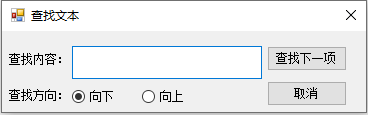
8. 查找下一项 :
    private void 查找下一个ToolStripMenuItem_Click(object sender, EventArgs e)

    {

        //查找下一项,如果未查找过,则显示查找对话框

        down.Checked = true;

        upward.Checked = false;

        try

        {

            FindWords(word);

        }

        catch

        {

            查找ToolStripMenuItem_Click(sender, e);

        }

    }
查找下一项
9.查找上一项:
    private void FindWordsLast(string words)

    {

        //向上查找字符

        if (IF == false)

            nextPosition = txtBox.Text.Length;

        if (nextPosition < 0)

            nextPosition = txtBox.Text.Length;

        firstPosition = txtBox.Text.LastIndexOf(words, nextPosition);

        if (firstPosition == -1)

            nextPosition = txtBox.Text.Length;

        else

        {

            txtBox.Select(firstPosition, words.Length);

            nextPosition = firstPosition - 1;

        }

        word = words;

        IF = true;

    }

    private void 查找上一个ToolStripMenuItem_Click(object sender, EventArgs e)

    {

        //查找上一项,如果未查找过,则显示查找对话框

        upward.Checked = true;

        down.Checked = false;

        try

        {

            FindWordsLast(word);

        }

        catch

        {

            查找ToolStripMenuItem_Click(sender, e);

        }

    }
查找上一项
10.替换:
    Label LblReplace = new Label

    {

        Name = "lblReplace",

        Text = "替换:",

        Size = new Size(55, 25),

        Location = new Point(15, 50)

    };

    Form ReplaceForm = new Form

    {

        Text = "替换文本",

        FormBorderStyle = FormBorderStyle.FixedSingle,

        MaximizeBox = false,

        MinimizeBox = false

    };

    private void 替换ToolStripMenuItem_Click(object sender, EventArgs e)

    {

        txtInput.Size = new Size(190, 30);

        txtInput.Location = new Point(70, 12);

        txtInput.Multiline = true;

        txtInputReplace.Size = new Size(190, 30);

        txtInputReplace.Location = new Point(70, 47);

        txtInputReplace.Multiline = true;

        Button Replace = new Button

        {

            Name = "btnReplace",

            Text = "替换",

            Size = new Size(80, 25),

            Location = new Point(265, 15)

        };

        Replace.Click += new EventHandler(Replace_Click);

        Cancel.Click += new EventHandler(Cancel_Click);

        ReplaceForm.Controls.Add(lblSearch);

        ReplaceForm.Controls.Add(LblReplace);

        ReplaceForm.Controls.Add(txtInput);

        ReplaceForm.Controls.Add(txtInputReplace);

        ReplaceForm.Controls.Add(Replace);

        ReplaceForm.Controls.Add(Cancel);

        ReplaceForm.Top = this.Top + 50;

        ReplaceForm.Left = this.Left + 50;

        ReplaceForm.Height = 140;

        ReplaceForm.Width = 380;

        ReplaceForm.StartPosition = FormStartPosition.CenterParent;

        ReplaceForm.ShowDialog();

    }

    private void Replace_Click(object sender, EventArgs e)

    {

        txtBox.Text = txtBox.Text.Replace(txtInput.Text, txtInputReplace.Text);

    }
替换
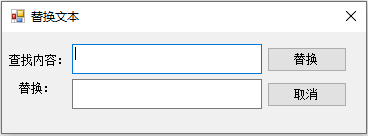
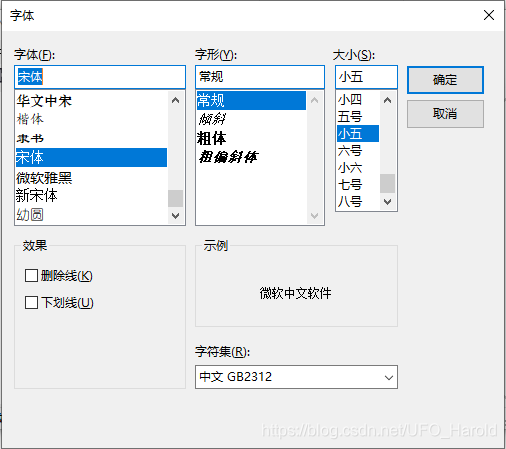
11. 字体选择:
- 直接调用控件即可
    private void 字体ToolStripMenuItem_Click(object sender, EventArgs e)

    {

        //提示用户从本地计算机安装的字体中选择字体字号

        FontDialog fontDialog = new FontDialog();

        if (fontDialog.ShowDialog() == DialogResult.OK)

        {

            txtBox.Font = fontDialog.Font;

        }

    }
字体选择
12. 关于记事本:
- 新建一个窗口,根据自己的喜好添加标签及摆放位置
    private void 关于记事本ToolStripMenuItem_Click(object sender, EventArgs e)

    {

        //关于记事本说明

        Label lblTitle = new Label()

        {

            Text = "多功能记事本",

            Size = new Size(150, 25),

            Location = new Point(100, 50)

        };

        Label lblEdition = new Label()

        {

            Text = "版本号:个性测试版",

            Size = new Size(150, 25),

            Location = new Point(85, 100)

        };

        Label lblMail = new Label()

        {

            Text = "E-Mail:",

            Size = new Size(55, 25),

            Location = new Point(30, 180)

        };

        LinkLabel llblMail = new LinkLabel()

        {

            Text = "2417525822@qq.com",

            Size = new Size(110, 25),

            Location = new Point(85, 180)

        };

        Label lblCNDS = new Label()

        {

            Text = "CNDS博客:",

            Size = new Size(65, 25),

            Location = new Point(20, 220)

        };

        LinkLabel llblCNDS = new LinkLabel()

        {

            Text = "https://blog.csdn.net/UFO_Harold",

            Size = new Size(200, 25),

            Location = new Point(85, 220)

        };

        Form about = new Form

        {

            Text = "关于记事本",

            FormBorderStyle = FormBorderStyle.FixedSingle,

            MaximizeBox = false

        };

        llblCNDS.Click += new EventHandler(LlblCNDS_Click);

        about.Controls.Add(lblTitle);

        about.Controls.Add(lblEdition);

        about.Controls.Add(lblMail);

        about.Controls.Add(llblMail);

        about.Controls.Add(lblCNDS);

        about.Controls.Add(llblCNDS);

        about.Top = this.Top + this.Height / 2 - about.Height / 2;

        about.Left = this.Left + this.Width / 2 - about.Width / 2;

        about.StartPosition = FormStartPosition.CenterParent;

        about.ShowDialog();

    }
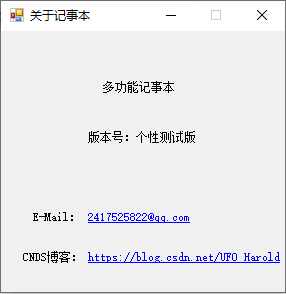
关于记事本
- 效果如图
完整代码
namespace Notepad
{
public partial class Form1 : Form
{
public Form1()
{
InitializeComponent();
}
string filename = "";
public Form1(string filename)
{
InitializeComponent();
if (filename != null)
{
this.filename = filename;
OpenFile();
}
}
private void 新建NToolStripMenuItem_Click(object sender, EventArgs e)
{
if (txtBox.Modified == true)
{
DialogResult dr = MessageBox.Show("文件发生变化,是否更改保存?", "注意", MessageBoxButtons.YesNoCancel);
if (dr == DialogResult.Yes)
{
保存SToolStripMenuItem_Click(sender, e);
return;
}
else if (dr == DialogResult.Cancel)
{
return;
}
txtBox.Clear();
this.Text = "NewNotepad";
}
else
{
txtBox.Clear();
this.Text = "NewNotepad";
}
}
private void 打开ToolStripMenuItem_Click(object sender, EventArgs e)
{
if (openFileDialog.ShowDialog() == DialogResult.OK)
{
filename = openFileDialog.FileName;
OpenFile();
}
}
protected void OpenFile()
{
try
{
txtBox.Clear();
txtBox.Text = File.ReadAllText(filename);
}
catch
{ MessageBox.Show("Error!"); }
}
private void 保存SToolStripMenuItem_Click(object sender, EventArgs e)
{
try
{
StreamWriter sw = File.AppendText(Application.ExecutablePath);
sw.Write(txtBox.Text);
sw.Dispose();
}
catch
{
SaveFileDialog sf = new SaveFileDialog();
sf.DefaultExt = "*.txt";
sf.Filter = "文本文档(.txt)|*.txt";
if (sf.ShowDialog() == DialogResult.OK)
{
StreamWriter sw = File.AppendText(sf.FileName);
sw.Write(txtBox.Text);
sw.Dispose();
}
}
}
private void 另存为ToolStripMenuItem_Click(object sender, EventArgs e)
{
string name;
//SaveFileDialog类
SaveFileDialog save = new SaveFileDialog();
//过滤器
save.Filter = "*.txt|*.TXT|(*.*)|*.*";
//显示
if (save.ShowDialog() == DialogResult.OK)
{
name = save.FileName;
FileInfo info = new FileInfo(name);
//info.Delete();
StreamWriter writer = info.CreateText();
writer.Write(txtBox.Text);
writer.Close();
}
}
private void 页面设置ToolStripMenuItem_Click(object sender, EventArgs e)
{
//弹出页面设置界面
pageSetupDialog.Document = printDocument;
pageSetupDialog.ShowDialog();
}
private void 打印PToolStripMenuItem_Click(object sender, EventArgs e)
{
//显示允许用户选择打印机的选项及其它打印选项的对话框
this.printDialog.Document = this.printDocument;
this.printDialog.PrinterSettings = this.pageSetupDialog.PrinterSettings;
//向打印机发送打印指令
if (this.printDialog.ShowDialog() == DialogResult.OK)
{
try
{
this.printDocument.Print();
}
catch (Exception ex)
{
MessageBox.Show(ex.Message, "错误信息!", MessageBoxButtons.OK, MessageBoxIcon.Error);
}
}
}
private void 退出XToolStripMenuItem_Click(object sender, EventArgs e)
{
Application.Exit();
}
private void 编辑ToolStripMenuItem_Click(object sender, EventArgs e)
{
剪切ToolStripMenuItem.Enabled = txtBox.Modified;
if (txtBox.SelectedText == "")
{
剪切ToolStripMenuItem.Enabled = false;
复制ToolStripMenuItem.Enabled = false;
删除ToolStripMenuItem.Enabled = false;
}
else
{
剪切ToolStripMenuItem.Enabled = true;
复制ToolStripMenuItem.Enabled = true;
删除ToolStripMenuItem.Enabled = true;
}
if (txtBox.Text == "")
{
查找ToolStripMenuItem.Enabled = false;
查找下一个ToolStripMenuItem.Enabled = false;
查找上一个ToolStripMenuItem.Enabled = false;
替换ToolStripMenuItem.Enabled = false;
}
else
{
查找ToolStripMenuItem.Enabled = true;
查找下一个ToolStripMenuItem.Enabled = true;
查找上一个ToolStripMenuItem.Enabled = true;
替换ToolStripMenuItem.Enabled = true;
}
if (Clipboard.GetText() == "")
粘贴ToolStripMenuItem.Enabled = false;
else
粘贴ToolStripMenuItem.Enabled = true;
}
private void 撤销ToolStripMenuItem_Click(object sender, EventArgs e)
{
if (txtBox.CanUndo)
{
txtBox.Undo();
txtBox.ClearUndo();
}
}
private void 剪切ToolStripMenuItem_Click(object sender, EventArgs e)
{
txtBox.Cut();
}
private void 复制CToolStripMenuItem_Click(object sender, EventArgs e)
{
txtBox.Copy();
}
private void 粘贴PToolStripMenuItem_Click(object sender, EventArgs e)
{
txtBox.Paste();
}
private void 删除lToolStripMenuItem_Click(object sender, EventArgs e)
{
txtBox.SelectedText = string.Empty;
}
TextBox txtInput = new TextBox()
{
Font = new Font("宋体", 10)
};
TextBox txtInputReplace = new TextBox()
{
Font = new Font("宋体", 10)
};
Label lblSearch = new Label
{
Text = "查找内容:",
Size = new Size(65, 25),
Location = new Point(5, 22)
};
Label lblDirection = new Label
{
Text = "查找方向:",
Size = new Size(65, 25),
Location = new Point(5, 58)
};
Button FindNext = new Button
{
Name = "btnFindNext",
Text = "查找下一项",
Size = new Size(80, 25),
Location = new Point(265, 15)
};
Button Cancel = new Button
{
Name = "btnCancel",
Text = "取消",
Size = new Size(80, 25),
Location = new Point(265, 50)
};
RadioButton down = new RadioButton
{
Name = "radDown",
Text = "向下",
Size = new Size(55, 25),
Location = new Point(70, 53),
Checked = true
};
RadioButton upward = new RadioButton
{
Name = "radUpward",
Text = "向上",
Size = new Size(55, 25),
Location = new Point(140, 53),
Checked = false
};
new Form FindForm = new Form
{
Text = "查找文本",
FormBorderStyle = FormBorderStyle.FixedSingle,
MaximizeBox = false,
MinimizeBox = false
};
private void 查找ToolStripMenuItem_Click(object sender, EventArgs e)
{
//显示查找对话框
txtInput.Size = new Size(190, 33);
txtInput.Location = new Point(70, 15);
txtInput.Multiline = true; FindNext.Click += new EventHandler(Direction_Click);
//FindNext.Click += new EventHandler(Visible_Click); Cancel.Click += new EventHandler(Cancel_Click); FindForm.Controls.Add(lblSearch);
FindForm.Controls.Add(lblDirection);
FindForm.Controls.Add(txtInput);
FindForm.Controls.Add(down);
FindForm.Controls.Add(upward);
FindForm.Controls.Add(FindNext);
FindForm.Controls.Add(Cancel);
FindForm.Top = this.Top + 50;
FindForm.Left = this.Left + 50;
FindForm.Height = 120;
FindForm.Width = 380;
FindForm.StartPosition = FormStartPosition.CenterParent;
FindForm.ShowDialog();
}
private void Visible_Click(object sender, EventArgs e)
{
FindForm.Visible = false;
}
private void Cancel_Click(object sender, EventArgs e)
{
//关闭对话框
FindForm.Close();
ReplaceForm.Close();
}
private void Direction_Click(object sender, EventArgs e)
{
//选择字符查找方向
if (down.Checked == true)
{
Find_Click(sender, e);
}
else if (upward.Checked == true)
{
FindLast_Click(sender, e);
}
}
int nextPosition, firstPosition;
string word;
Boolean IF = false;
private void Find_Click(object sender, EventArgs e)
{
txtBox.Focus();
FindWords(txtInput.Text);
}
private void FindWords(string words)
{
//向下查找字符
if (nextPosition >= txtBox.Text.Length)
nextPosition = 0;
firstPosition = txtBox.Text.IndexOf(words, nextPosition);
if (firstPosition == -1)
nextPosition = 0;
else
{
txtBox.Select(firstPosition, words.Length);
nextPosition = firstPosition + 1;
}
word = words;
IF = true;
}
private void 查找下一个ToolStripMenuItem_Click(object sender, EventArgs e)
{
//查找下一项,如果未查找过,则显示查找对话框
down.Checked = true;
upward.Checked = false;
try
{
FindWords(word);
}
catch
{
查找ToolStripMenuItem_Click(sender, e);
}
}
private void FindLast_Click(object sender, EventArgs e)
{
txtBox.Focus();
FindWordsLast(txtInput.Text);
}
private void FindWordsLast(string words)
{
//向上查找字符
if (IF == false)
nextPosition = txtBox.Text.Length;
if (nextPosition < 0)
nextPosition = txtBox.Text.Length; firstPosition = txtBox.Text.LastIndexOf(words, nextPosition); if (firstPosition == -1)
nextPosition = txtBox.Text.Length;
else
{
txtBox.Select(firstPosition, words.Length);
nextPosition = firstPosition - 1;
}
word = words;
IF = true;
}
private void 查找上一个ToolStripMenuItem_Click(object sender, EventArgs e)
{
//查找上一项,如果未查找过,则显示查找对话框
upward.Checked = true;
down.Checked = false;
try
{
FindWordsLast(word);
}
catch
{
查找ToolStripMenuItem_Click(sender, e);
}
}
Label LblReplace = new Label
{
Name = "lblReplace",
Text = "替换:",
Size = new Size(55, 25),
Location = new Point(15, 50)
};
Form ReplaceForm = new Form
{
Text = "替换文本",
FormBorderStyle = FormBorderStyle.FixedSingle,
MaximizeBox = false,
MinimizeBox = false
};
private void 替换ToolStripMenuItem_Click(object sender, EventArgs e)
{
txtInput.Size = new Size(190, 30);
txtInput.Location = new Point(70, 12);
txtInput.Multiline = true; txtInputReplace.Size = new Size(190, 30);
txtInputReplace.Location = new Point(70, 47);
txtInputReplace.Multiline = true; Button Replace = new Button
{
Name = "btnReplace",
Text = "替换",
Size = new Size(80, 25),
Location = new Point(265, 15)
};
Replace.Click += new EventHandler(Replace_Click);
Cancel.Click += new EventHandler(Cancel_Click); ReplaceForm.Controls.Add(lblSearch);
ReplaceForm.Controls.Add(LblReplace);
ReplaceForm.Controls.Add(txtInput);
ReplaceForm.Controls.Add(txtInputReplace);
ReplaceForm.Controls.Add(Replace);
ReplaceForm.Controls.Add(Cancel);
ReplaceForm.Top = this.Top + 50;
ReplaceForm.Left = this.Left + 50;
ReplaceForm.Height = 140;
ReplaceForm.Width = 380;
ReplaceForm.StartPosition = FormStartPosition.CenterParent;
ReplaceForm.ShowDialog();
}
private void Replace_Click(object sender, EventArgs e)
{
txtBox.Text = txtBox.Text.Replace(txtInput.Text, txtInputReplace.Text);
}
private void 全选AToolStripMenuItem_Click(object sender, EventArgs e)
{
txtBox.SelectAll();
}
private void 自动换行ToolStripMenuItem_Click(object sender, EventArgs e)
{
//默认自动换行,点击按钮打开或关闭自动换行
if (自动换行ToolStripMenuItem.Checked == true)
{
txtBox.WordWrap = false;
自动换行ToolStripMenuItem.Checked = false;
}
else
{
txtBox.WordWrap = true;
自动换行ToolStripMenuItem.Checked = true;
}
}
private void 字体ToolStripMenuItem_Click(object sender, EventArgs e)
{
//提示用户从本地计算机安装的字体中选择字体字号
FontDialog fontDialog = new FontDialog();
if (fontDialog.ShowDialog() == DialogResult.OK)
{
txtBox.Font = fontDialog.Font;
}
}
private void Form1_SizeChanged(object sender, EventArgs e)
{
//窗体的txtBox控件随窗体改变而改变的大小
if (状态栏ToolStripMenuItem.Checked == true && 工具栏TToolStripMenuItem.Checked == true)
txtBox.Height = this.Height - menuStrip.Height - toolStrip.Height - statusStrip.Height - 39;
else if (状态栏ToolStripMenuItem.Checked == false && 工具栏TToolStripMenuItem.Checked == true)
txtBox.Height = this.Height - menuStrip.Height - toolStrip.Height - 39;
else if (状态栏ToolStripMenuItem.Checked == true && 工具栏TToolStripMenuItem.Checked == false)
txtBox.Height = this.Height - menuStrip.Height - statusStrip.Height - 39;
else
txtBox.Height = this.Height - menuStrip.Height - 39;
txtBox.Width = this.Width - 16;
}
private void 工具栏TToolStripMenuItem_Click(object sender, EventArgs e)
{
//默认打开工具栏,点击按钮打开或关闭工具栏
if (工具栏TToolStripMenuItem.Checked == true)
{
toolStrip.Visible = false;
工具栏TToolStripMenuItem.Checked = false;
txtBox.Top = 25;
}
else if (工具栏TToolStripMenuItem.Checked == false)
{
toolStrip.Visible = true;
工具栏TToolStripMenuItem.Checked = true;
txtBox.Top = 50;
}
Form1_SizeChanged(sender, e);
}
private void 放大ToolStripMenuItem_Click(object sender, EventArgs e)
{
//放大字体大小
var fontsize = txtBox.Font.Size;
var fontFamily = txtBox.Font.FontFamily;
txtBox.Font = new Font(fontFamily, fontsize + 1);
}
private void 缩小ToolStripMenuItem_Click(object sender, EventArgs e)
{
//缩小字体大小
var fontsize = txtBox.Font.Size;
var fontFamily = txtBox.Font.FontFamily;
txtBox.Font = new Font(fontFamily, fontsize - 1);
}
private void 恢复默认缩放ToolStripMenuItem_Click(object sender, EventArgs e)
{
//恢复默认字体大小
txtBox.Font = new Font(txtBox.Font.FontFamily, 11);
}
private void 状态栏ToolStripMenuItem_Click(object sender, EventArgs e)
{
//默认显示状态栏,点击按钮显示或关闭状态栏
if (状态栏ToolStripMenuItem.Checked == true)
{
statusStrip.Visible = false;
状态栏ToolStripMenuItem.Checked = false;
}
else if (状态栏ToolStripMenuItem.Checked == false)
{
statusStrip.Visible = true;
状态栏ToolStripMenuItem.Checked = true;
}
Form1_SizeChanged(sender, e);
}
//private int GetStringLen(string s)
//{
// if (!string.IsNullOrEmpty(s))
// {
// int len = s.Length;
// for (int i = 0; i < s.Length; i++)
// {
// if (s[i] > 255)
// len++;
// }
// return len;
// }
// return 0;
//}
private void 查看帮助HToolStripMenuItem_Click(object sender, EventArgs e)
{
//调用系统自带的浏览器打开网页查看帮助
Process.Start("https://jingyan.baidu.com/article/a24b33cdd86a0f19fe002be9.html");
}
private void 关于记事本ToolStripMenuItem_Click(object sender, EventArgs e)
{
//关于记事本说明
Label lblTitle = new Label()
{
Text = "多功能记事本",
Size = new Size(150, 25),
Location = new Point(100, 50)
};
Label lblEdition = new Label()
{
Text = "版本号:个性测试版",
Size = new Size(150, 25),
Location = new Point(85, 100)
};
Label lblMail = new Label()
{
Text = "E-Mail:",
Size = new Size(55, 25),
Location = new Point(30, 180)
};
LinkLabel llblMail = new LinkLabel()
{
Text = "2417525822@qq.com",
Size = new Size(110, 25),
Location = new Point(85, 180)
};
Label lblCNDS = new Label()
{
Text = "CNDS博客:",
Size = new Size(65, 25),
Location = new Point(20, 220)
};
LinkLabel llblCNDS = new LinkLabel()
{
Text = "https://blog.csdn.net/UFO_Harold",
Size = new Size(200, 25),
Location = new Point(85, 220)
};
Form about = new Form
{
Text = "关于记事本",
FormBorderStyle = FormBorderStyle.FixedSingle,
MaximizeBox = false
}; llblCNDS.Click += new EventHandler(LlblCNDS_Click);
about.Controls.Add(lblTitle);
about.Controls.Add(lblEdition);
about.Controls.Add(lblMail);
about.Controls.Add(llblMail);
about.Controls.Add(lblCNDS);
about.Controls.Add(llblCNDS);
about.Top = this.Top + this.Height / 2 - about.Height / 2;
about.Left = this.Left + this.Width / 2 - about.Width / 2;
about.StartPosition = FormStartPosition.CenterParent;
about.ShowDialog();
}
private void LlblCNDS_Click(object sender, EventArgs e)
{
Process.Start("https://blog.csdn.net/UFO_Harold");
}
private void 新建toolStripButton_Click(object sender, EventArgs e)
{
新建NToolStripMenuItem_Click(this, e);
}
private void 另存为toolStripButton_Click(object sender, EventArgs e)
{
另存为ToolStripMenuItem_Click(this, e);
}
private void 保存StoolStripButton_Click(object sender, EventArgs e)
{
保存SToolStripMenuItem_Click(this, e);
}
private void 打印PtoolStripButton_Click(object sender, EventArgs e)
{
打印PToolStripMenuItem_Click(this, e);
}
private void 剪切toolStripButton_Click(object sender, EventArgs e)
{
剪切ToolStripMenuItem_Click(this, e);
}
private void 复制CtoolStripButton_Click(object sender, EventArgs e)
{
复制CToolStripMenuItem_Click(this, e);
}
private void 粘贴PtoolStripButton_Click(object sender, EventArgs e)
{
粘贴PToolStripMenuItem_Click(this, e);
}
private void 帮助HtoolStripButton_Click(object sender, EventArgs e)
{
查看帮助HToolStripMenuItem_Click(this, e);
}
private void Timer_Tick(object sender, EventArgs e)
{
//显示编辑光标所在几行几列
int row = txtBox.GetLineFromCharIndex(txtBox.SelectionStart) + 1;
int col = (txtBox.SelectionStart - txtBox.GetFirstCharIndexFromLine(txtBox.GetLineFromCharIndex(txtBox.SelectionStart))) + 1;
toolStripStatusLblLocation.Text = "第 " + row + " 行, 第 " + col + " 列";
toolStripStatusLblNow.Text = "" + DateTime.Now.ToLocalTime();
}
private void Form1_FormClosing(object sender, FormClosingEventArgs e)
{
//关闭窗体时如果已修改内容,则弹出是否保存对话框,否则直接关闭窗体
if (txtBox.Modified == true)
{
DialogResult dr = MessageBox.Show("文件发生变化,是否更改保存?", "注意", MessageBoxButtons.YesNoCancel);
if (dr == DialogResult.Yes)
{
保存SToolStripMenuItem_Click(sender, e);
return;
}
else if (dr == DialogResult.No)
{
return;
}
else if (dr == DialogResult.Cancel)
{
e.Cancel = true;
}
}
}
}
}
运行结果
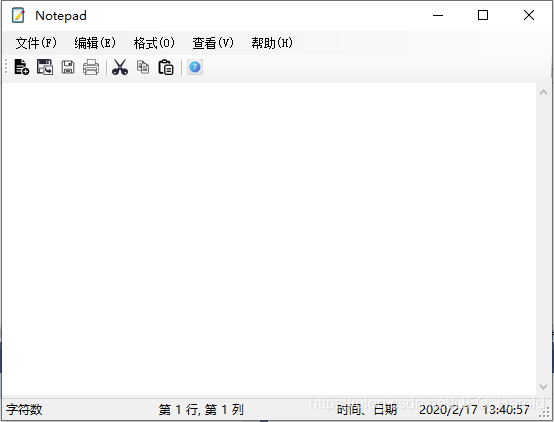
注:
- 控件请自行改名,也可使用默认控件名,此次程序的控件均已自定义名称,然后再双击控件便会自动创建控件的事件函数并跳到代码页,全数copy代码到自己新建的程序可能运行不起来,因为控件的事件需要双击控件才跳转到事件函数,事件方法前出现引用不是为 0 即生效;
- 查找上一项下一项功能混用时会有一些bug,达不到预期效果,但能运行,不会报错,一点逻辑上的问题,目前没有想到解决方法,大家可自行深入摸索,如有可以改进的地方可联系博主;
- 整个项目源码的文件:(源码仅供学习交流使用,如需使用请安装.NET Framework 4.7.2框架,且图标可能因文件路径不同而无法显示,修改文件路径即可)
- 蓝奏云:https://www.lanzous.com/i9r643e
- 百度网盘:https://pan.baidu.com/s/1BagLHS9bOG2jvaOcHgeUgA 提取码:y639
- Github:https://github.com/Harold-666/Notepad/tree/master
该文是从CSND搬家过来的文章,已修正,觉得CSND不好用,搬至博客园在此安家,总的来说,在博客园的体验感比在CSDN好很多,往后请各位博友多多指教!我的博客园地址:https://www.cnblogs.com/Harold-popo
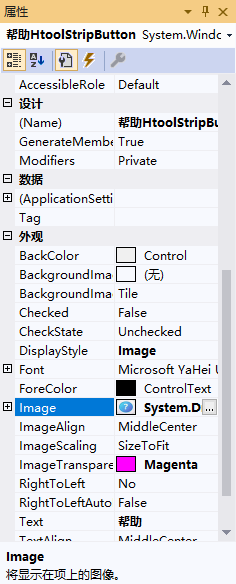
- 状态栏图标设置
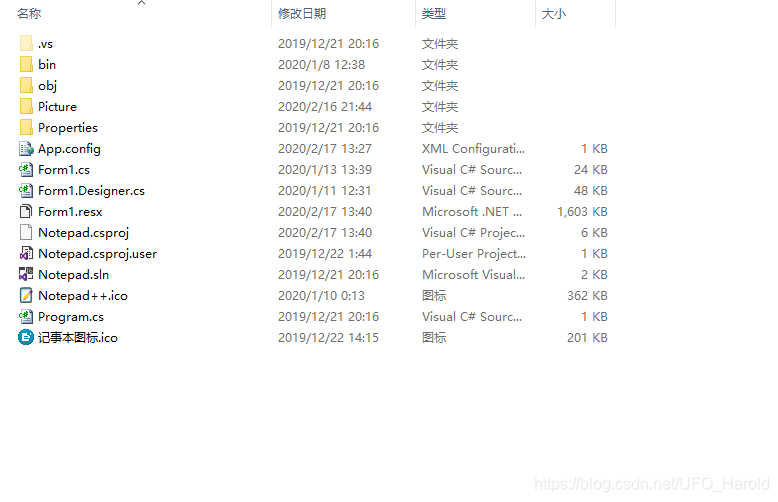
- 项目文件目录
C#编写一个较完整的记事本程序的更多相关文章
- 如何编写一个编译c#控制台应用程序的批处理程序
如何编写一个编译c#控制台应用程序的批处理程序 2011-03-22 18:14 dc毒蘑菇 | 浏览 579 次 最近在网上看了一个教程,是学C#的,但是我的机子上装不上vs,所以想写一个批处理来编 ...
- JNI编程(一) —— 编写一个最简单的JNI程序
来自:http://chnic.iteye.com/blog/198745 忙了好一段时间,总算得了几天的空闲.貌似很久没更新blog了,实在罪过.其实之前一直想把JNI的相关东西整理一下的,就从今天 ...
- JNI编程(一) —— 编写一个最简单的JNI程序(转载)
转自:http://chnic.iteye.com/blog/198745 忙了好一段时间,总算得了几天的空闲.貌似很久没更新blog了,实在罪过.其实之前一直想把JNI的相关东西整理一下的,就从今天 ...
- 如何在linux下编写一个简单的Shell脚本程序
在了解了linux终端和其搭配的基本Shell(默认为bash)的基础下,我们就可以在终端中用vi/vim编辑器编写一个shell的脚本程序了 Shell既为一种命令解释解释工具,又是一种脚本编程语言 ...
- 编写一个基于HBase的MR程序,结果遇到一个错:ERROR security.UserGroupInformation - PriviledgedActionException as ,求帮助
环境说明:Ubuntu12.04,使用CDH4.5,伪分布式环境 Hadoop配置如下: core-site.xml: <configuration><property> ...
- 编写一个简单的java服务器程序
import java.net.*;import java.io.*; public class server{ ); //监听在80端口 Socket sock = server.accept(); ...
- Go编写一个比特币交易自动出价程序
语言环境为>=go1.10 go语言环境不多说 实现目的能与BitMEX api进行交互自动交易,目前虚拟币平台很多,平台API实现也很容易.后续会加上其它平台和自动交易算法策略,具体看平台交易 ...
- 通过编写一个简单的漏洞扫描程序学习Python基本语句
今天开始读<Python绝技:运用Python成为顶级黑客>一书,第一章用一个小例子来讲解Python的基本语法和语句.主要学习的内容有:1. 安装第三方库.2. 变量.字符串.列表.词典 ...
- 用javascript编写一个简单的随机验证码程序
简单模拟网页的随机数字验证码,效果图如下: html代码: <div id="content"> <div class="left"> ...
随机推荐
- Windows五次Shift漏洞
本文首发于我的个人博客. 在小破站上看到了一个关于Windows五次shift的视频,觉得很有意思,就像拿来复现一下试试.原视频是在Window7虚拟机上进行的,由于现在基本上都已经用Win10了,我 ...
- Python开发的入门教程(六)-函数
介绍 本文主要介绍Python中函数的基本知识和使用 Python之什么是函数 我们知道圆的面积计算公式为: S = πr² 当我们知道半径r的值时,就可以根据公式计算出面积.假设我们需要计算3个不同 ...
- P4719 【模板】"动态 DP"&动态树分治
题目描述 给定一棵 n 个点的树,点带点权. 有 m 次操作,每次操作给定 x,y,表示修改点 x 的权值为 y. 你需要在每次操作之后求出这棵树的最大权独立集的权值大小. 输入格式 第一行有两个整数 ...
- SplashImage
关于Unity启动时间过长(启动黑屏时间长)的问题 https://blog.csdn.net/h5q8n2e7/article/details/50484458 Unity3D游戏开发之“重写Uni ...
- Timeline Event
https://forum.unity.com/threads/timeline-events.479400/
- 编程体系结构(01):Java编程基础
一.数据类型 1.基础类型 整型:byte .short .int .long 浮点型:float.double 字节型:char 2.包装类型 Byte,Short,Integer,Long Flo ...
- Java进阶专题(十三) 从电商系统角度研究多线程(上)
前言 本章节主要分享下,多线程并发在电商系统下的应用.主要从以下几个方面深入:线程相关的基础理论和工具.多线程程序下的性能调优和电商场景下多线程的使用. 多线程J·U·C 线程池 概念 回顾线程创 ...
- rank,dense_rank和row_number函数区别
我对技术一般抱有够用就好的态度,一般在网上或者书上找了贴合的解决方案,放到实际中发现好用就行了,不再深究,等出了问题再说. 因此,我对Oracle中中形成有效序列的方法集中在rownum,row_nu ...
- [Java数据结构]HashSet,LinkedHashSet,TreeeSet
Java中Set表示一个不包括重复元素的集合,它有HashSet,LinkedHashSet,TreeeSet三种常用实现. HashSet是Set的最常用实现,它常被用来清除重复元素. 例程: Se ...
- cookie和session讲解
1.cookie是什么? 保存在浏览器本地上的一组组键值对 2.session是什么? 保存在服务器上的一组组键值对 3.为什么要有cookie? HTTP是无协议状态,每次请求都是互相独立的,没有办 ...