
e3mall商城的归纳总结10之freemarker的使用和sso单点登录系统的简介
敬给读者的话
本节主要讲解freemarker的使用以及sso单点登录系统,两种技术都是比较先进的技术,freemarker是一个模板,主要生成一个静态静态,能更快的响应给用户,提高用户体验。
而sso单点登录系统主要是为了解决分布式架构的一个登录系统,因为分布式架构的每一个模块都是一个项目,那么就需要存在一个session共享的问题,而sso单点登录系统正是为了解决这个问题。
1、使用freemarker实现网页静态化
2、ActiveMq同步生成静态网页
一、freemarker的使用方法
a、什么是freemarker
FreeMarker是一个用Java语言编写的模板引擎,它基于模板来生成文本输出。FreeMarker与Web容器无关,即在Web运行时,它并不知道Servlet或HTTP。它不仅可以用作表现层的实现技术,而且还可以用于生成XML,JSP或Java 等。
目前企业中:主要用Freemarker做静态页面或是页面展示
b、Freemarker的使用方法
把freemarker的jar包添加到工程中。
Maven工程添加依赖
<dependency>

  <groupId>org.freemarker</groupId>

  <artifactId>freemarker</artifactId>

  <version>2.3.23</version>

</dependency>
原理图:
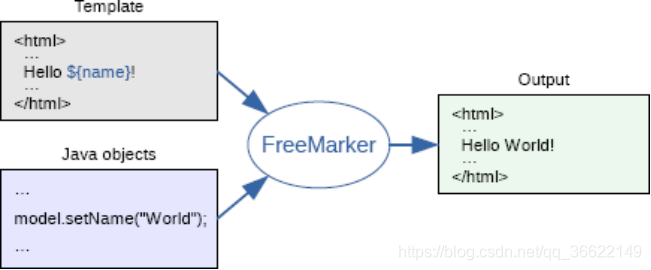
先设定好模板中的变量,然后在后台通过变量赋值然后生成一个静态文件的方式来产生一个静态html文件的。
使用步骤:
第一步:创建一个Configuration对象,直接new一个对象。构造方法的参数就是freemarker对于的版本号。
第二步:设置模板文件所在的路径。
第三步:设置模板文件使用的字符集。一般就是utf-8.
第四步:加载一个模板,创建一个模板对象。
第五步:创建一个模板使用的数据集,可以是pojo也可以是map。一般是Map。
第六步:创建一个Writer对象,一般创建一FileWriter对象,指定生成的文件名。
第七步:调用模板对象的process方法输出文件。
第八步:关闭流。
我们来测试一下:
模板中我们只写了一个模板:
${hello}
hello为map中的key。
测试代码:
	@Test

	public void genFile() throws Exception {

		// 第一步:创建一个Configuration对象,直接new一个对象。构造方法的参数就是freemarker对于的版本号。

		Configuration configuration = new Configuration(Configuration.getVersion());

		// 第二步:设置模板文件所在的路径。

		configuration.setDirectoryForTemplateLoading(new File("D:/workspaces/term197/e3-item-web/src/main/webapp/WEB-INF/ftl"));

		// 第三步:设置模板文件使用的字符集。一般就是utf-8.

		configuration.setDefaultEncoding("utf-8");

		// 第四步:加载一个模板,创建一个模板对象。

		Template template = configuration.getTemplate("hello.ftl");

		// 第五步:创建一个模板使用的数据集,可以是pojo也可以是map。一般是Map。

		Map dataModel = new HashMap<>();

		//向数据集中添加数据

		dataModel.put("hello", "this is my first freemarker test.");

		// 第六步:创建一个Writer对象,一般创建一FileWriter对象,指定生成的文件名。

		Writer out = new FileWriter(new File("D:/temp/term197/out/hello.html"));

		// 第七步:调用模板对象的process方法输出文件。

		template.process(dataModel, out);

		// 第八步:关闭流。

		out.close();

	}
——模板的语法
比如说我们写了一个map,然后页面需要访问map中的key,那么模板中写${key}即可。
——访问pojo中的属性
Student对象。学号、姓名、年龄
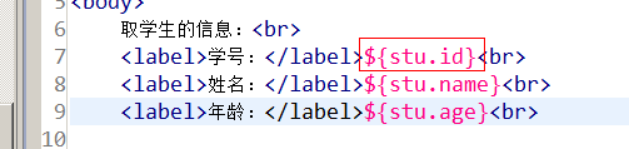
上图需要将Student对象存入map中,map的key为stu,值为student的对象。比如
Student student = new Student(1,“小明”,18);//构造方法
Map mapdate = HaspMap<>();
mapdate.put(“stu”,student);
然后把map存入model中
——取集合中的数据
<#list studentList as student>

${student.id}/${studnet.name}

</#list>
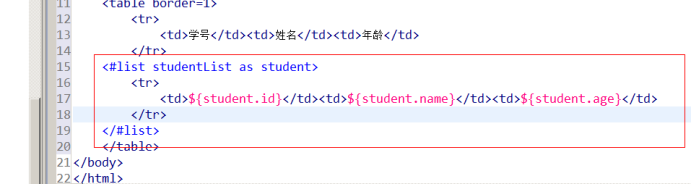
上图需要将list对象存入map中,map的key是studentList ,值是list对象。然后把map存入model中。
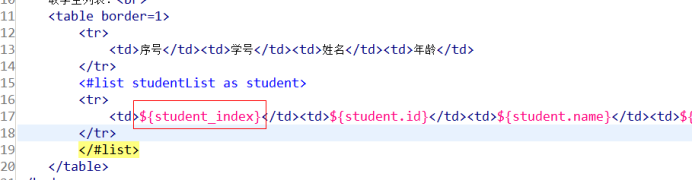
——取循环中的下标
<#list studentList as student>

	${student_index}

</#list>
——判断
<#if student_index % 2 == 0>

<#else>

</#if>
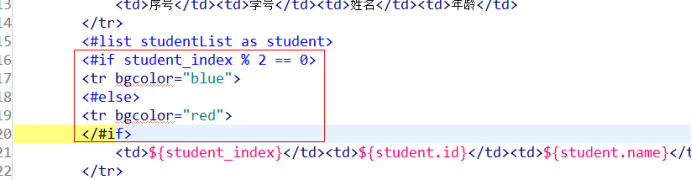
如果序号是偶数,背景是蓝色,反正是红色。
——日期类型格式化
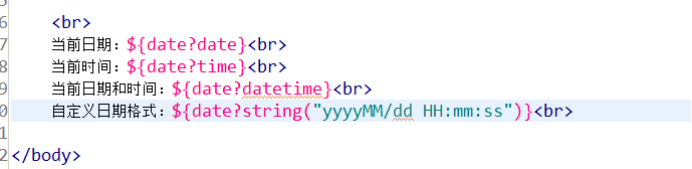
由于日期有很多格式,因此我们需要对日期进行格式修改
${date?date}表示date用日期表示,比如2019-1-22.
${date?time}表示date用时间表示 比如 23:00
${date?datetime}表示date用日期加时间表示比如 2019-1-22 23:00
${date?string(yyyy-MM-dd HH:mm:ss)}表示2019-01-22 23:00:00
——Null值的处理
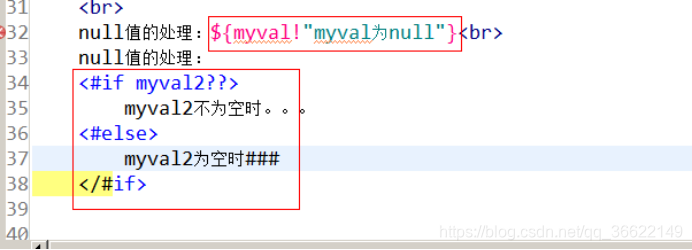
由于freemarker中不能出现空值,因此我们需要对freemarker中的空值进行判断,
比如$ {myval!}表示当myval的值为空时,赋值“”(空字符串),和 $ {myval!""}类似。
<#if myval??>
myval中有内容
<#else>
myval为空
</#/if>
Include标签
<#include “模板名称”>
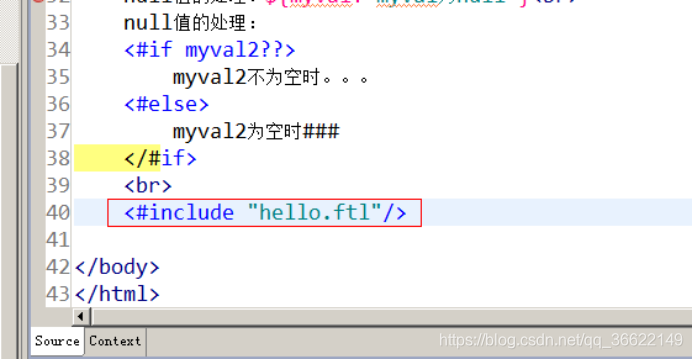
Freemarker整合spring
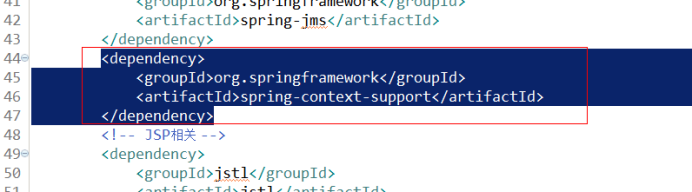
引入jar包:
Freemarker的jar包
整合spring
在spring目录下创建applicationContent-freemarker.xml文件
<?xml version="1.0" encoding="UTF-8"?>

<beans xmlns="http://www.springframework.org/schema/beans"

	xmlns:xsi="http://www.w3.org/2001/XMLSchema-instance" xmlns:p="http://www.springframework.org/schema/p"

	xmlns:context="http://www.springframework.org/schema/context"

	xmlns:dubbo="http://code.alibabatech.com/schema/dubbo" xmlns:mvc="http://www.springframework.org/schema/mvc"

	xsi:schemaLocation="http://www.springframework.org/schema/beans http://www.springframework.org/schema/beans/spring-beans.xsd

        http://www.springframework.org/schema/mvc http://www.springframework.org/schema/mvc/spring-mvc-4.2.xsd

        http://code.alibabatech.com/schema/dubbo http://code.alibabatech.com/schema/dubbo/dubbo.xsd

        http://www.springframework.org/schema/context http://www.springframework.org/schema/context/spring-context.xsd">

	<bean id="freemarkerConfig"

		class="org.springframework.web.servlet.view.freemarker.FreeMarkerConfigurer">

		<property name="templateLoaderPath" value="/WEB-INF/ftl/" />

		<property name="defaultEncoding" value="UTF-8" />

	</bean>

</beans>
Controller层:
请求的url:/genhtml
参数:无
返回值:ok (String, 需要使用@ResponseBody)
业务逻辑:
1、从spring容器中获得FreeMarkerConfigurer对象。
2、从FreeMarkerConfigurer对象中获得Configuration对象。
3、使用Configuration对象获得Template对象。
4、创建数据集
5、创建输出文件的Writer对象。
6、调用模板对象的process方法,生成文件。
7、关闭流。
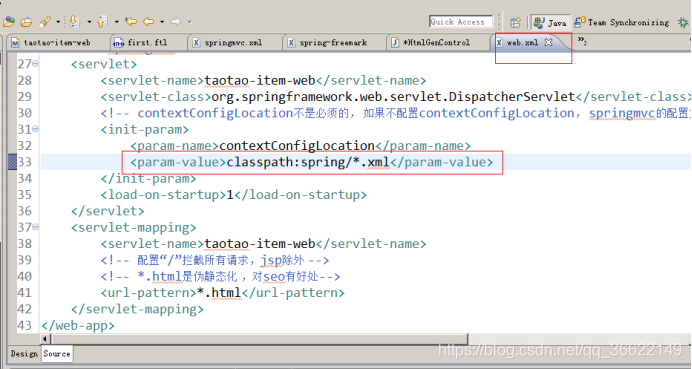
加载配置文件:
@Controller

public class HtmlGenController {

	@Autowired

	private FreeMarkerConfigurer freeMarkerConfigurer;

	@RequestMapping("/genhtml")

	@ResponseBody

	public String genHtml()throws Exception {

		// 1、从spring容器中获得FreeMarkerConfigurer对象。

		// 2、从FreeMarkerConfigurer对象中获得Configuration对象。

		Configuration configuration = freeMarkerConfigurer.getConfiguration();

		// 3、使用Configuration对象获得Template对象。

		Template template = configuration.getTemplate("hello.ftl");

		// 4、创建数据集

		Map dataModel = new HashMap<>();

		dataModel.put("hello", "1000");

		// 5、创建输出文件的Writer对象。

		Writer out = new FileWriter(new File("D:/temp/term197/out/spring-freemarker.html"));

		// 6、调用模板对象的process方法,生成文件。

		template.process(dataModel, out);

		// 7、关闭流。

		out.close();

		return "OK";

	}

}
在项目中商品详情页面静态化
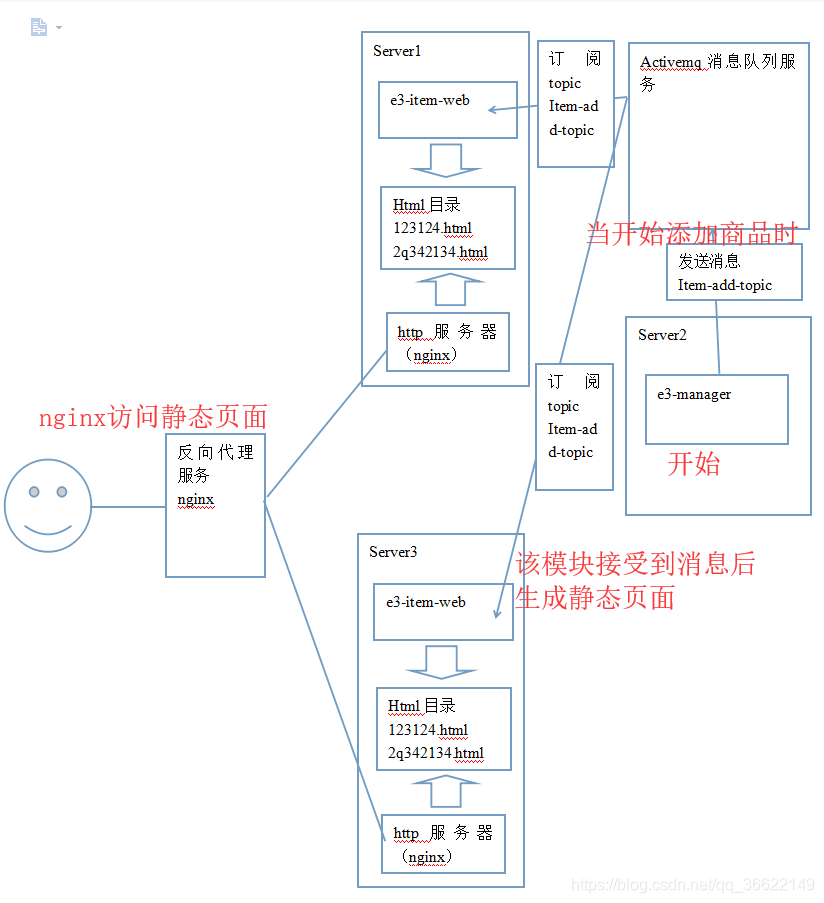
网页的静态化方案
输出文件的名称:商品id+“.html”
输出文件的路径:工程外部的任意目录。
网页访问:使用nginx访问网页。在此方案下tomcat只有一个作用就是生成静态页面。
工程部署:可以把e3-item-web部署到多个服务器上。
生成静态页面的时机:商品添加后,生成静态页面。可以使用Activemq,订阅topic(商品添加)
manager-service层添加商品:(发送Topic消息)
//添加商品

	@Override

	public E3Result InsertItem(TbItem item, String desc) {

		final long id = IDUtils.genItemId();

		//补齐数据

		item.setId(id);

		//1-正常,2-下架,3-删除

		item.setStatus((byte) 1);

		item.setCreated(new Date());

		item.setUpdated(new Date());

		TbItemMapper.insert(item);

		TbItemDesc itemDesc = new TbItemDesc();

		itemDesc.setItemId(id);

		itemDesc.setItemDesc(desc);

		itemDesc.setCreated(new Date());

		itemDesc.setUpdated(new Date());

		itemDescMapper.insert(itemDesc);

		//向activemq中发送topic消息,广播一下

		try {

			jmsTemplate.send(topicDestination,new MessageCreator() {

				@Override

				public Message createMessage(Session session) throws JMSException {

					// 发送数据

				TextMessage textMessgage = session.createTextMessage(id+"");

				return textMessgage;

				}

			});

		} catch (JmsException e) {

			e.printStackTrace();

		}

		return E3Result.ok();

	}
item-web接受topic消息
需要配置springmvcactivemq.xml(监听器、topicDestination、ConnectionFactory等等)和springmvcfreemarker.xml(freem的bean文件,构造方法等)配置文件。
package cn.tsu.item.e3mall.listener;

import java.io.File;

import java.io.FileWriter;

import java.io.Writer;

import java.util.HashMap;

import java.util.Map;

import javax.jms.JMSException;

import javax.jms.Message;

import javax.jms.MessageListener;

import javax.jms.TextMessage;

import org.springframework.beans.factory.annotation.Autowired;

import org.springframework.web.servlet.view.freemarker.FreeMarkerConfig;

import cn.tsu.e3mall.common.Commons;

import cn.tsu.e3mall.pojo.TbItem;

import cn.tsu.e3mall.pojo.TbItemDesc;

import cn.tsu.e3mall.service.ItemService;

import cn.tsu.item.e3mall.pojo.Item;

import freemarker.template.Configuration;

import freemarker.template.Template;

public class TopicListener implements MessageListener {

	@Autowired

	private ItemService itemService;

	@Autowired

	private FreeMarkerConfig freemarkerConfig;

	@Override

	public void onMessage(Message message){

		// TODO Auto-generated method stub

		try {

			Thread.sleep(1000);

			TextMessage textMessage = (TextMessage) message;

			String s = textMessage.getText();

			Long itemid = new Long(s);

			System.out.println("收到.....item-web"+itemid);

			//查询商品信息

			TbItem tbItem = itemService.getItemByid(itemid);

			//继承tbItem,商品图片获取第一张getImages方法

			Item item = new Item(tbItem);

			//查询商品详情信息

			TbItemDesc itemDesc = itemService.descEdit(itemid);

			//获取configuration对象

			Configuration configuration = freemarkerConfig.getConfiguration();

			//通过configuration获取模板

			Template template = configuration.getTemplate("item.ftl");

			//创建map对象,把数据存入

			Map dataModel = new HashMap<>();

			dataModel.put("item", item);

			dataModel.put("itemDesc", itemDesc);

			//静态文件的名称

			Writer out = new FileWriter(new File(Commons.ITEM_INFO+itemid+".html"));

			//生成静态文件

			template.process(dataModel, out);

			//关流

			out.close();

		} catch (Exception e) {

			// TODO Auto-generated catch block

			e.printStackTrace();

		}

	}

}
三、sso系统分析
本文讲解的很详细,希望可以给您带来不同之处,如果您有问题,欢迎下方评论,博主看到后会第一时间回复大家.
e3mall商城的归纳总结10之freemarker的使用和sso单点登录系统的简介的更多相关文章
- 第04项目:淘淘商城(SpringMVC+Spring+Mybatis)【第十天】(单点登录系统实现)
https://pan.baidu.com/s/1bptYGAb#list/path=%2F&parentPath=%2Fsharelink389619878-229862621083040 ...
- JAVAEE——宜立方商城10:使用freemarker实现网页静态化、ActiveMq同步生成静态网页、Sso单点登录系统分析
1. 学习计划 1.使用freemarker实现网页静态化 2.ActiveMq同步生成静态网页 2. 网页静态化 可以使用Freemarker实现网页静态化. 2.1. 什么是freemarker ...
- e3mall商城的归纳总结1之项目的架构
首先来谈谈e3mall商城,e3mall商城是黑马推出一个学习的项目,前身是淘淘商城.两个用的技术差不多.,但由于后期加了一些新技术,更名为e3mall商城.本商城为分布式商城,主要用到的技术使mav ...
- Keycloak快速上手指南,只需10分钟即可接入Spring Boot/Vue前后端分离应用实现SSO单点登录
登录及身份认证是现代web应用最基本的功能之一,对于企业内部的系统,多个系统往往希望有一套SSO服务对企业用户的登录及身份认证进行统一的管理,提升用户同时使用多个系统的体验,Keycloak正是为此种 ...
- SSO单点登录可以自己实现吗?--开源软件诞生10
ERP与SSO的恩怨情仇--第10篇 用日志记录“开源软件”的诞生 赤龙 ERP 开源地址: 点亮星标,感谢支持,与开发者交流 kzca2000 码云:https://gitee.com/redrag ...
- e3mall商城的归纳总结9之activemq整合spring、redis的缓存
敬给读者 本节主要给大家说一下activemq整合spring,该如何进行配置,上一节我们说了activemq的搭建和测试(单独测试),想看的可以点击时空隧道前去查看.讲完了之后我们还说一说在项目中使 ...
- e3mall商城的归纳总结2之认识dubbo、zookeeper
由于本项目用的是soa架构,因此必须需要两个系统之间进行通信,目前的解决办法有三种(本人认为) Webservice:效率不高基于soap协议.项目中不推荐使用. 使用restful形式的服务:htt ...
- e3mall商城的归纳总结7之solr搭建和应用
敬给读者的话 本文主要应用的技术是solr技术的搭建和应用,本文小编尽量写的更详细一些,让读者在不考虑项目的情况下也能正常完成solr的搭建,说完搭建之后,再说明运行solrj在项目中如何应用solr ...
- e3mall商城的归纳总结6之redis
一.说在前面的话 前面几节我们主要对该项目的后端进行了增删改查,但是所有的数据都是存放在数据库中,这样的话数据库的压力显而易见是很大的,因此本节学习nosql的缓存,也就是redis的使用,在使用之前 ...
随机推荐
- Linux的VMWare14中配置Centos7桥接网络环境(网络一)
1.查看当前初始环境如下:在windows端先查看本机ip ifconfig
- Xposed原理分析
目录 安卓系统启动 什么zygote? 安卓应用运行? Xposed介绍 Xposed构成 Xposed初始化大体工作流程 源码分析 初始化 app_main#main app_main#initia ...
- 001_记一次ansible api二次开发遇到的小问题
在某次关于发布系统的项目中,需要调用ansible来发布任务,其中一段代码是初始化ansible的连接,并传入一个source(目标机器)的值,代码段如下: from .ansible_api imp ...
- 用 Python 可以实现侧脸转正脸?我也要试一下!
作者 | 李秋键 责编 | Carol 封图 | CSDN 下载自视觉中国 很多人学习python,不知道从何学起.很多人学习python,掌握了基本语法过后,不知道在哪里寻找案例上手.很多已经做案例 ...
- xadmin 安装
xadmin 安装 环境(一定要一样) Python 3.6.2 Django 2.0 安装 pip install django==2.0, 指定特定的版本 pip install https:// ...
- XCTF-WEB-新手练习区(5-8)笔记
5:disabled_button X老师今天上课讲了前端知识,然后给了大家一个不能按的按钮,小宁惊奇地发现这个按钮按不下去,到底怎么才能按下去呢? 删除disable="" 字段 ...
- Integer.valueOf源码分析
1. 引言 在牛客网上看到这样一道题目,判断一下打印的结果 public static void main(String[] args){ Integer i1 = 128; Integer i2 = ...
- Django中的ORM如何通过数据库中的表格信息自动化生成Model 模型类?
Inspectdb Django项目通过绑定的数据库中的相应表格直接自动化生成Model 模型类 python manage.py inspectdb Django 中的 ORM 可以实现对象关系映射 ...
- c++知识点 2006-10-14 12:59
这是自己开发一个简易的监控系统时的所用到的知识点. 第一个问题 在网络传输数据时可以传int,float,doule,char,等包括结构体类型但是除类类型外. 在调试中要常用merry寄存器. 应用 ...
- python3中文输出乱码的问题
最近使用you-get这个工具下载视频,发现命令行窗口里显示的媒体标题是乱码(但文件管理器里显示正常).我的命令行窗口的code page是936,sys.stdout.encoding是utf-8, ...