
elk部署(实操二)
续上篇
https://www.cnblogs.com/wangql/p/13373022.html
安装logstash
下载地址:wget https://artifacts.elastic.co/downloads/logstash/logstash-6.1.0.rpm

#安装

rpm -ivh logstash-6.1.0.rpm

#启动服务

systemctl  restart logstash.service

systemctl  status logstash.service

systemctl  enable logstash.service
测试基本输入输出
 [root@elk2 ~]# /usr/share/logstash/bin/logstash -e  'input { stdin{} } output { stdout{} }'

WARNING: Could not find logstash.yml which is typically located in $LS_HOME/config or /etc/logstash. You can specify the path using --path.settings. Continuing using the defaultsCould not find log4j2 configuration at path /usr/share/logstash/config/log4j2.properties. Using default config which logs errors to the consoleThe stdin plugin is now waiting for
input:Abc                  #输入这个
2020-06-17T05:38:32.783Z elk2 abc    #输出这个
使用rubydebug详细输出
[root@elk2 ~]# /usr/share/logstash/bin/logstash -e 'input { stdin{} } output { stdout{ codec => rubydebug} }'


WARNING: Could not find logstash.yml which is typically located in $LS_HOME/config or /etc/logstash. You can specify the path using --path.settings. Continuing using the defaultsCould not find log4j2 configuration at path /usr/share/logstash/config/log4j2.properties. Using default config which logs errors to the consoleThe stdin plugin is now waiting for
input:Hello                  #输入
{          "host" => "elk2",          #输出
"@timestamp" => 2020-06-17T05:40:38.039Z,
"message" => "hello",
"@version" => "1"
}

[root@elk2 ~]# /usr/share/logstash/bin/logstash -e 'input { stdin{} } output { elasticsearch { hosts => ["192.168.0.208:9200"]} }'


WARNING: Could not find logstash.yml which is typically located in $LS_HOME/config or /etc/logstash. You can specify the path using --path.settings. Continuing using the defaultsCould not find log4j2 configuration at path /usr/share/logstash/config/log4j2.properties. Using default config which logs errors to the consoleThe stdin plugin is now waiting for
input:123456
wangshibo
huanqiu
hahaha
logstash的配置
配置地址
/etc/logstash/conf.d下,以*.conf结尾
vim /etc/logstash/conf.d/elk1.conf

input { stdin { } }

output {

    elasticsearch { hosts => ["192.168.0.208:9200"]}

    stdout { codec => rubydebug }

}
执行
[root@elk2 ~]# /usr/share/logstash/bin/logstash -f /etc/logstash/conf.d/elk1.conf


WARNING: Could not find logstash.yml which is typically located in $LS_HOME/config or /etc/logstash. You can specify the path using --path.settings. Continuing using the defaultsCould not find log4j2 configuration at path /usr/share/logstash/config/log4j2.properties. Using default config which logs errors to the consoleThe stdin plugin is now waiting for
input:Beijing        #输入
{      "@version" => "1",    #输出

"host" => "elk2",
 "message" => "beijing",
 "@timestamp" => 2020-06-17T05:48:29.275Z
}
更多用法后续列出
安装kibana
下载地址:wget https://artifacts.elastic.co/downloads/kibana/kibana-6.1.0-x86_64.rpm

#安装

rpm -ivh kibana-6.1.0-x86_64.rpm
修改配置文件
vim /etc/kibana/kibana.yml


2 server.port: 5601                #端口
7 server.host: "0.0.0.0"              #服务监听地址
21 elasticsearch.url: "http://192.168.0.213:9200"    #声明地址,从哪里查,集群里面随便选一个
30 kibana.index: ".kibana"            #kibana自己创建的索引
33 kibana.defaultAppId: "discover"        #打开kibana页面时,默认打开discover
62 elasticsearch.pingTimeout: 1500        #ping检测超时时间
66 elasticsearch.requestTimeout: 30000      #请求超时时间
80 elasticsearch.startupTimeout: 5000        #启动超时时间

114 i18n.locale: "zh-CN"        #启用中文
启动服务
systemctl  restart  kibana.service

systemctl  status kibana.service

systemctl  enable kibana.service
查看端口
netstat -utnlp | grep 5601
访问服务
http://192.168.0.208:5601

如果起不来
curl -XDELETE http://localhost:9200/.kibana*
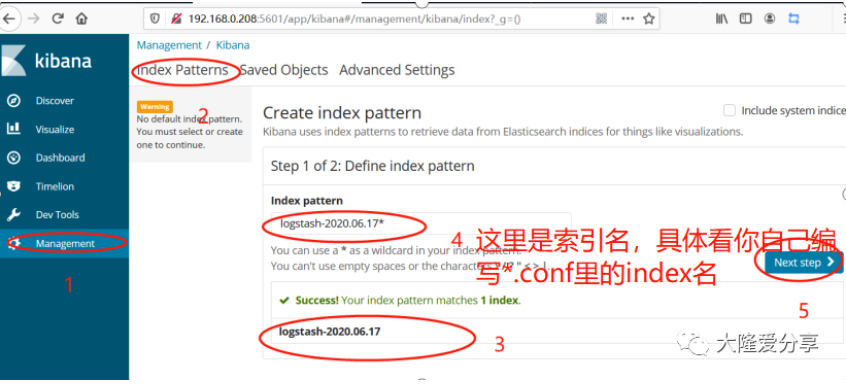
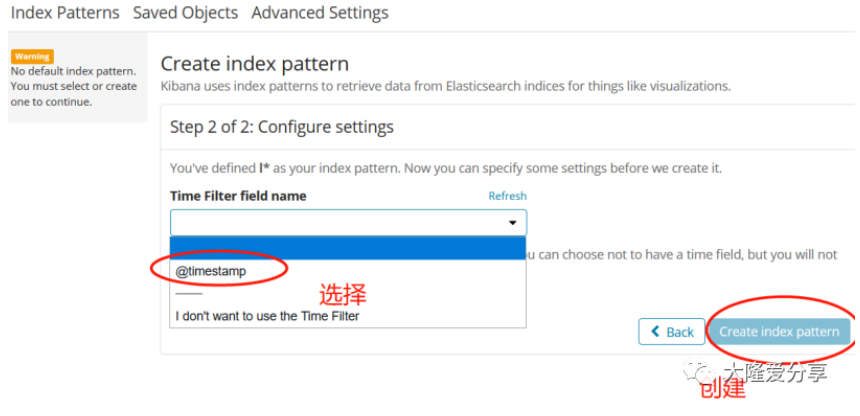
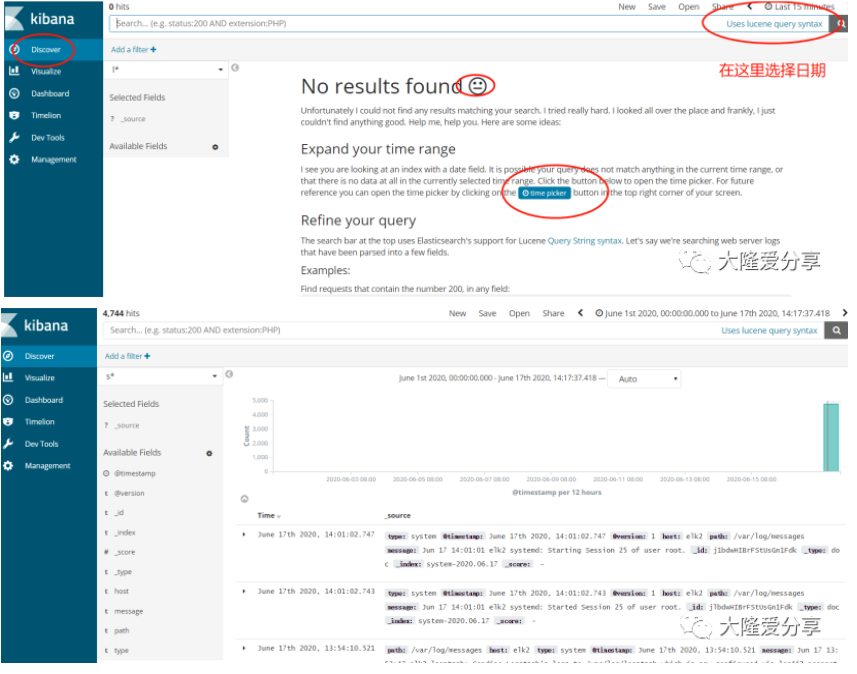
到这里我们的elk就搭建成功了,下一篇教大家安装es 的插件,方便后续更好的维护。
本文为我自己的学习笔记,难免有些遗漏,欢迎指正。遇事不慌,大隆来帮,也请大家关注我,支持我,谢谢!
没有理论,只有实战
更多干货
来关注我
elk部署(实操二)的更多相关文章
- Istio的流量管理(实操二)(istio 系列四)
Istio的流量管理(实操二)(istio 系列四) 涵盖官方文档Traffic Management章节中的inrgess部分. 目录 Istio的流量管理(实操二)(istio 系列四) Ingr ...
- Python实操二
实操一: 1.用map来处理字符串列表啊,把列表中所有人都变成sb,比方alex_sb name=['alex','wupeiqi','yuanhao'] name=['alex','wupeiqi' ...
- Linux基础实操二
实操一: 1) 新建用户natasha uid为1000,gid为555,备注信息为“master” 2) 修改natasha用户的家目录为/Natasha 3) 查看用户信息配置文件的最后一行 ca ...
- unittest测试框架详谈及实操(二)
类级别的setUp()方法与tearDown()方法 在实操(一)的例子中,通过setUp()方法为每个测试方法都创建了一个Chrome实例,并且在每个测试方法执行结束后要关闭实例.是不是觉得有个多余 ...
- GitBook安装部署实操手册
前言 GitBook是一个基于Node.js的命令行工具,可使用Git和Markdown来编写文档,赞誉太多,不再赘述. Node.js 下载安装包 cd /tmp wget https://node ...
- ASP.NET Core托管和部署Linux实操演练手册
一.课程介绍 ASP.NET Core 是一种全新的跨平台开源 .NET 框架,能够在 IIS.Nginx.Apache.Docker 上进行托管或在自己的进程中进行自托管. 作为一个.NET Web ...
- Python关于类的实操
实操一:总结 1.什么是绑定到对象的方法,如何定义,如何调用,给谁用?有什么特性? 2.什么是绑定到类的方法,如何定义,如何调用,给谁用?有什么特性? 3.什么是解除绑定的函数,如何定义,如何调用,给 ...
- Linux基础实操六
实操一: 临时配置网络(ip,网关,dns)+永久配置 #ifconfig ens33 192.168.145.134/24 #vim /etc/resolv.conf #route add defa ...
- Linux基础实操五
实操一:nginx服务 二进制安装nginx包1) 1)#yum clean all 2)#yum install epel-release -y 3)#yum install nginx -y 1) ...
随机推荐
- git如何上传文件夹
git是不支持上传空文件夹的,文件夹里面必须有文件才可以 1.本地仓库上传文件夹到远程 在本地仓库新建一个文件夹,如果里面没有文件,那么$ git push origin master 不能将文件夹p ...
- Centos-文本过滤-grep
grep 文本过滤,对文本的每一行进行关键字搜索,如果找到则输出 相关选项 -A 除了列出符合关键字的行外,还输出符合关键字行后多少行内容 -c 只显示符号条件的行号 -f 批量搜索,把关键字写入到 ...
- Go-归档文件-tar
文件归档 tar 1. 创建一个tar头部并自动填充tar头部信息 tar.FileInfoHeader() 联合 os.Stat() 方法 2. 手动填写 tar头部信息 tar.Header{} ...
- Hbuilder MUI 下拉选择与时间选择器
一. Hbuilder 下拉选择 <link rel="stylesheet" href="../../../assets/mui/css/mui.picker.m ...
- Mbedtls和Opesnssl 解码x509Certificate
最近项目需要添加解码x509Certificate功能,可以使用openssl或者mbedtls库.对这两个库的使用总结一下. 一 Openssl解码x509 Certificate 1. 初始化 ...
- 01Linux系统简介
Linux 简介 一.介绍 1.1 内容 Linux 的历史,Linux 与 Windows 的区别等知识. 1.2 知识点 linux为何物 linux历史简介 linux重要人物 linux与wi ...
- 01 百度 AI Studio 基础操作记录(一) Notebook
转载参考: AI Studio基本操作(一) Notebook篇 一.基础 1.新建文件: 可以使用命令, !cat <<newfile > newfile.py 在项目空间内直接创 ...
- Matlab绘制子图subplot使用攻略
参考:https://jingyan.baidu.com/article/915fc414ad794b51394b20e1.html Matlab绘制子图subplot使用攻略 听语音 原创 | 浏览 ...
- CF741D Arpa’s letter-marked tree and Mehrdad’s Dokhtar-kosh paths 树上启发式合并(DSU ON TREE)
题目描述 一棵根为\(1\) 的树,每条边上有一个字符(\(a-v\)共\(22\)种). 一条简单路径被称为\(Dokhtar-kosh\)当且仅当路径上的字符经过重新排序后可以变成一个回文串. 求 ...
- 返回头添加cookie信息
返回类型 HttpResponseMessage //构建返回对象 var res= Request.CreateResponse(HttpStstusCode.Ok,返回体) //创建cookie对 ...