
Nacos配置中心源码分析
1.使用
compile 'com.alibaba.cloud:spring-cloud-starter-alibaba-nacos-config:2.2.3.RELEASE'
spring:

  application:

    name: product

  cloud:

    nacos:

      config:

        server-addr: 127.0.0.1:9000

        namespace: 038b8be8-54da-44a5-9664-def33bc8cd19

        group: DEFAULT_GROUP

        prefix: ${spring.application.name}
     file-extension: yaml
Nacos配置文件命名规则
${prefix}-${spring.profile.active}.${file-extension}
prefix:服务名称,对应spring:application:name
spring.profile.active:配置环境
file-extension:配置文件类型,默认是properties
2.配置类加载
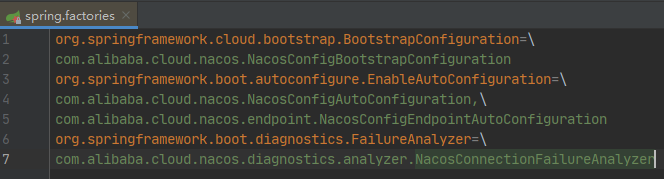
NacosConfigBootstrapConfiguration配置文件的加载
@Configuration(proxyBeanMethods = false)

@ConditionalOnProperty(name = "spring.cloud.nacos.config.enabled", matchIfMissing = true)

public class NacosConfigBootstrapConfiguration {

    @Bean

    @ConditionalOnMissingBean

    public NacosConfigProperties nacosConfigProperties() {

        return new NacosConfigProperties();

    }

    @Bean

    @ConditionalOnMissingBean

    public NacosConfigManager nacosConfigManager(

            NacosConfigProperties nacosConfigProperties) {

        return new NacosConfigManager(nacosConfigProperties);

    }

    @Bean

    public NacosPropertySourceLocator nacosPropertySourceLocator(

            NacosConfigManager nacosConfigManager) {

        return new NacosPropertySourceLocator(nacosConfigManager);

    }

}
NacosConfigManager
public NacosConfigManager(NacosConfigProperties nacosConfigProperties) {

    this.nacosConfigProperties = nacosConfigProperties;

    createConfigService(nacosConfigProperties);

}

// 创建ConfigService 配置服务

static ConfigService createConfigService(

        NacosConfigProperties nacosConfigProperties) {

    if (Objects.isNull(service)) {

     // 加锁防止多线程多次创建

        synchronized (NacosConfigManager.class) {

            try {

                if (Objects.isNull(service)) {

                    service = NacosFactory.createConfigService(

                 // 完成一些配置的初始化

                            nacosConfigProperties.assembleConfigServiceProperties());

                }

            }

            ...

        }

    }

    return service;

}

public static ConfigService createConfigService(Properties properties) throws NacosException {

    return ConfigFactory.createConfigService(properties);

}

// 通过反射创建实例 :NacosConfigService

public static ConfigService createConfigService(Properties properties) throws NacosException {

    try {

        Class<?> driverImplClass = Class.forName("com.alibaba.nacos.client.config.NacosConfigService");

        Constructor constructor = driverImplClass.getConstructor(Properties.class);

        ConfigService vendorImpl = (ConfigService) constructor.newInstance(properties);

        return vendorImpl;

    } catch (Throwable e) {

        throw new NacosException(NacosException.CLIENT_INVALID_PARAM, e);

    }

}
NacosConfigService
NacosConfigService有参构造方法

public NacosConfigService(Properties properties) throws NacosException {

    // 检查上下文路径

    ValidatorUtils.checkInitParam(properties);

    String encodeTmp = properties.getProperty(PropertyKeyConst.ENCODE);

    if (StringUtils.isBlank(encodeTmp)) {

        this.encode = Constants.ENCODE;

    } else {

        this.encode = encodeTmp.trim();

    }

    // 设置命名空间配置

    initNamespace(properties);

    // 安全验证

    this.agent = new MetricsHttpAgent(new ServerHttpAgent(properties));

    this.agent.start();

    this.worker = new ClientWorker(this.agent, this.configFilterChainManager, properties);

}

// SecurityProxy用来安全验证的,默认没有用户名就没启用,登录验证直接返回true

public ServerHttpAgent(Properties properties) throws NacosException {

    this.serverListMgr = new ServerListManager(properties);

    this.securityProxy = new SecurityProxy(properties, NACOS_RESTTEMPLATE);

    this.namespaceId = properties.getProperty(PropertyKeyConst.NAMESPACE);

    init(properties);

    this.securityProxy.login(this.serverListMgr.getServerUrls());

    // 初始化执行服务

    this.executorService = new ScheduledThreadPoolExecutor(1, new ThreadFactory() {

        @Override

        public Thread newThread(Runnable r) {

            Thread t = new Thread(r);

            t.setName("com.alibaba.nacos.client.config.security.updater");

            t.setDaemon(true);

            return t;

        }

    });

    // 固定每5秒执行登录验证任务

    this.executorService.scheduleWithFixedDelay(new Runnable() {

        @Override

        public void run() {

            securityProxy.login(serverListMgr.getServerUrls());

        }

    }, 0, this.securityInfoRefreshIntervalMills, TimeUnit.MILLISECONDS);

}
ClientWorker
public ClientWorker(final HttpAgent agent, final ConfigFilterChainManager configFilterChainManager,

        final Properties properties) {

    this.agent = agent;

    this.configFilterChainManager = configFilterChainManager;

    // 初始化超时时间和重试时间

    init(properties);

    // 传进来的安全验证

    this.executor = Executors.newScheduledThreadPool(1, new ThreadFactory() {

        @Override

        public Thread newThread(Runnable r) {

            Thread t = new Thread(r);

            t.setName("com.alibaba.nacos.client.Worker." + agent.getName());

            t.setDaemon(true);

            return t;

        }

    });

    // 长轮询

    this.executorService = Executors

            .newScheduledThreadPool(Runtime.getRuntime().availableProcessors(), new ThreadFactory() {

                @Override

                public Thread newThread(Runnable r) {

                    Thread t = new Thread(r);

                    t.setName("com.alibaba.nacos.client.Worker.longPolling." + agent.getName());

                    t.setDaemon(true);

                    return t;

                }

            });

    // 检查配置任务,每10毫秒一次

    this.executor.scheduleWithFixedDelay(new Runnable() {

        @Override

        public void run() {

            try {

                checkConfigInfo();

            } catch (Throwable e) {

                LOGGER.error("[" + agent.getName() + "] [sub-check] rotate check error", e);

            }

        }

    }, 1L, 10L, TimeUnit.MILLISECONDS);

}

// 检查配置信息

public void checkConfigInfo() {

    // 分派任务

    int listenerSize = cacheMap.get().size();

    // 把长任务数汇总起来。

    int longingTaskCount = (int) Math.ceil(listenerSize / ParamUtil.getPerTaskConfigSize());

    if (longingTaskCount > currentLongingTaskCount) {

        for (int i = (int) currentLongingTaskCount; i < longingTaskCount; i++) {

            // The task list is no order.So it maybe has issues when changing.

            executorService.execute(new LongPollingRunnable(i));

        }

        currentLongingTaskCount = longingTaskCount;

    }

}
LongPollingRunnable
@Override

public void run() {

    List<CacheData> cacheDatas = new ArrayList<CacheData>();

    List<String> inInitializingCacheList = new ArrayList<String>();

    try {

        // 检查故障转移配置

        for (CacheData cacheData : cacheMap.get().values()) {

            if (cacheData.getTaskId() == taskId) {

                cacheDatas.add(cacheData);

                try {

                    // 检查本地配置

                    checkLocalConfig(cacheData);

                    if (cacheData.isUseLocalConfigInfo()) {

                        cacheData.checkListenerMd5();

                    }

                } catch (Exception e) {

                    LOGGER.error("get local config info error", e);

                }

            }

        }

        // 检查服务配置,检查是否没有使用本地配置信息,如果没有使用本地配置信息则请求获取服务端配置信息

        List<String> changedGroupKeys = checkUpdateDataIds(cacheDatas, inInitializingCacheList);

        if (!CollectionUtils.isEmpty(changedGroupKeys)) {

            LOGGER.info("get changedGroupKeys:" + changedGroupKeys);

        }

        for (String groupKey : changedGroupKeys) {

            String[] key = GroupKey.parseKey(groupKey);

            String dataId = key[0];

            String group = key[1];

            String tenant = null;

            if (key.length == 3) {

                tenant = key[2];

            }

            try {

                // 获取服务端配置信息

                String[] ct = getServerConfig(dataId, group, tenant, 3000L);

                CacheData cache = cacheMap.get().get(GroupKey.getKeyTenant(dataId, group, tenant));
          // 更新缓存配置信息,此时缓存的MD5已经改变

                cache.setContent(ct[0]);

                if (null != ct[1]) {

                    cache.setType(ct[1]);

                }

                LOGGER.info("[{}] [data-received] dataId={}, group={}, tenant={}, md5={}, content={}, type={}",

                        agent.getName(), dataId, group, tenant, cache.getMd5(),

                        ContentUtils.truncateContent(ct[0]), ct[1]);

            } catch (NacosException ioe) {

                String message = String

                        .format("[%s] [get-update] get changed config exception. dataId=%s, group=%s, tenant=%s",

                                agent.getName(), dataId, group, tenant);

                LOGGER.error(message, ioe);

            }

        }

        for (CacheData cacheData : cacheDatas) {

            if (!cacheData.isInitializing() || inInitializingCacheList

                    .contains(GroupKey.getKeyTenant(cacheData.dataId, cacheData.group, cacheData.tenant))) {

                cacheData.checkListenerMd5();

                cacheData.setInitializing(false);

            }

        }

        inInitializingCacheList.clear();

        executorService.execute(this);

    } catch (Throwable e) {

        // 如果轮训任务异常,将对该任务下一次执行时间进行处罚

        LOGGER.error("longPolling error : ", e);

        executorService.schedule(this, taskPenaltyTime, TimeUnit.MILLISECONDS);

    }

}
CacheData
void checkListenerMd5() {

    for (ManagerListenerWrap wrap : listeners) {

        // 如果监听器中的缓存CacheMap的Md5与当前CacheMap的Md5不一致,则通知监听器配置信息已经变更

        if (!md5.equals(wrap.lastCallMd5)) {

            safeNotifyListener(dataId, group, content, type, md5, wrap);

        }

    }

}

private void safeNotifyListener(final String dataId, final String group, final String content, final String type,

        final String md5, final ManagerListenerWrap listenerWrap) {

    final Listener listener = listenerWrap.listener;

    Runnable job = new Runnable() {

        @Override

        public void run() {

            ClassLoader myClassLoader = Thread.currentThread().getContextClassLoader();

            ClassLoader appClassLoader = listener.getClass().getClassLoader();

            try {

                if (listener instanceof AbstractSharedListener) {

                    AbstractSharedListener adapter = (AbstractSharedListener) listener;

                    adapter.fillContext(dataId, group);

                    LOGGER.info("[{}] [notify-context] dataId={}, group={}, md5={}", name, dataId, group, md5);

                }

                // 执行回调之前先将线程classloader设置为具体webapp的classloader,以免回调方法中调用spi接口是出现异常或错用(多应用部署才会有该问题)。

                Thread.currentThread().setContextClassLoader(appClassLoader);

                ConfigResponse cr = new ConfigResponse();

                cr.setDataId(dataId);

                cr.setGroup(group);

                cr.setContent(content);

                configFilterChainManager.doFilter(null, cr);

                String contentTmp = cr.getContent();
          // 接收配置信息

                listener.receiveConfigInfo(contentTmp);

                // 比较缓存中的内容,并更新Md5值

                if (listener instanceof AbstractConfigChangeListener) {

                    Map data = ConfigChangeHandler.getInstance()

                            .parseChangeData(listenerWrap.lastContent, content, type);

                    ConfigChangeEvent event = new ConfigChangeEvent(data);

                    ((AbstractConfigChangeListener) listener).receiveConfigChange(event);

                    listenerWrap.lastContent = content;

                }

                listenerWrap.lastCallMd5 = md5;

                LOGGER.info("[{}] [notify-ok] dataId={}, group={}, md5={}, listener={} ", name, dataId, group, md5,

                        listener);

            } catch (NacosException ex) {

                ...

            } finally {

                Thread.currentThread().setContextClassLoader(myClassLoader);

            }

        }

    };

    final long startNotify = System.currentTimeMillis();

    try {

        if (null != listener.getExecutor()) {

            listener.getExecutor().execute(job);

        } else {

            job.run();

        }

    } catch (Throwable t) {

        LOGGER.error("[{}] [notify-error] dataId={}, group={}, md5={}, listener={} throwable={}", name, dataId,

                group, md5, listener, t.getCause());

    }

    final long finishNotify = System.currentTimeMillis();

    LOGGER.info("[{}] [notify-listener] time cost={}ms in ClientWorker, dataId={}, group={}, md5={}, listener={} ",

            name, (finishNotify - startNotify), dataId, group, md5, listener);

}
总结:
客户端通过一个定时任务来检查自己监听的配置项的数据的,一旦服务端的数据发生变化时,客户端将会获取到最新的数据,并将最新的数据保存在一个 CacheData 对象中,然后会重新计算 CacheData 的 md5 属性的值,此时就会对该 CacheData 所绑定的 Listener 触发 receiveConfigInfo 回调。
考虑到服务端故障的问题,客户端将最新数据获取后会保存在本地的 snapshot 文件中,以后会优先从文件中获取配置信息的值。
Nacos配置中心源码分析的更多相关文章
- Apollo配置中心源码分析
Apollo配置中心源码分析 1. apollo的核心代码分享 SpringApplication启动的关键步骤 在SpringApplication中,会加载所有实现了Init方法的类 protec ...
- 微服务之Nacos配置中心源码解析(二)
Nacos配置中心源码解析 源码入口 ConfigFactory.createConfigService ConfigService configService = NacosFactory.crea ...
- spring cloud config配置中心源码分析之注解@EnableConfigServer
spring cloud config的主函数是ConfigServerApplication,其定义如下: @Configuration @EnableAutoConfiguration @Enab ...
- nacos注册中心源码流程分析
作为一个注册中心,和eureka类似,核心的功能点: 1.服务注册:nacos客户端携带自身信息向nacos服务端进行注册. 2.服务心跳:客户端定时向服务端发送心跳,告知服务端自己处于可用状态 3. ...
- nacos统一配置中心源码解析
配置文件想必大家都很熟悉,无论什么架构 都离不开配置,虽然spring boot已经大大简化了配置,但如果服务很多 环境也好几个,管理配置起来还是很麻烦,并且每次改完配置都需要重启服务,nacos c ...
- SpringCloud Alibaba Nacos注册中心源码浅析
一.前置了解 1.1 简介 Nacos是一款阿里巴巴推出的一款微服务发现.配置管理框架.我们本次对将对它的服务注册发现功能进行简单源码分析. 1.2 流程 Nacos的分析分为两部分,一部分是我们的客 ...
- SpringCloudAlibaba 微服务组件 Nacos 之配置中心源码深度解析
大家好,这篇文章跟大家聊下 SpringCloudAlibaba 中的微服务组件 Nacos.Nacos 既能做注册中心,又能做配置中心,这篇文章主要来聊下做配置中心时 client 端的一些设计,主 ...
- 并发编程之 SynchronousQueue 核心源码分析
前言 SynchronousQueue 是一个普通用户不怎么常用的队列,通常在创建无界线程池(Executors.newCachedThreadPool())的时候使用,也就是那个非常危险的线程池 ^ ...
- iOS 开源库系列 Aspects核心源码分析---面向切面编程之疯狂的 Aspects
Aspects的源码学习,我学到的有几下几点 Objective-C Runtime 理解OC的消息分发机制 KVO中的指针交换技术 Block 在内存中的数据结构 const 的修饰区别 block ...
随机推荐
- swoole协程通道channel
swoole 协程通道 为了协程直接互相通讯传递数据 和go的通道很相似 Co\run(function(){ $chan = new Swoole\Coroutine\Channel(1); Swo ...
- JavaSE学习笔记02运算符、帮助文档生成与Scanner输入
1. 运算符 1. 算术运算符:+,-,*,/,%,++,-- //二元运算符 int a = 10; int b = 20; int c = 25; int d = 25; System.out.p ...
- 2020主流国产BI产品对比
国产BI软件由于具备较强的本土特性,可以很好地适应国内用户的使用习惯,越来越多被国内用户使用.目前国内BI产品很多,可谓百家争鸣,如何从众多的BI产品中选择适合自己的呢?这里我们对比一下目前国内主流的 ...
- TCMalloc 内存分配原理简析
一.TCMalloc TCMalloc简介 为啥要介绍 TCMalloc? 因为golang的内存分配算法绝大部分都是来自 TCMalloc,golang只改动了其中的一小部分.所以要理解golang ...
- OpenCV(c++)-1 安装和配置OpenCV4.4(Windows+visual studio 2019)
@ 目录 安装OpenCV4 在Windows系统安装OpenCV4 配置visual studio 2019 配置包含路径 验证配置结果 安装OpenCV4 OpenCV是一个基于BSD许可(开源) ...
- Hadoop1.0 和 Hadoop2.0
date: 2018-11-16 18:54:37 updated: 2018-11-16 18:54:37 1.从Hadoop整体框架来说 1.1 Hadoop1.0即第一代Hadoop,由分布式存 ...
- Hbase实用技巧:全量+增量数据的迁移方法
摘要:本文介绍了一种Hbase迁移的方法,可以在一些特定场景下运用. 背景 在Hbase使用过程中,使用的Hbase集群经常会因为某些原因需要数据迁移.大多数情况下,可以跟用户协商用离线的方式进行迁移 ...
- Redis可以做哪些事?
Redis是一种基于键值对的NoSQL数据库,它的值主要由string(字符串),hash(哈希),list(列表),set(集合),zset(有序集合)五种基本数据结构构成,除此之外还支持一些其他的 ...
- 云计算之路-出海记:蹭一张 aws 船票
出海记开篇之后,在 aws 上搭建博客园海外站的出海计划今天开始迈出第一步 -- 注册一个 aws 海外区域账号. aws 现在针对新注册用户提供12个月免费套餐(正在园子里推广并提供了专属注册通道) ...
- 【Java GC系列】垃圾收集简介(1)
说明: 在本文中, Garbage Collection 翻译为 "垃圾收集", garbage collector 翻译为 "垃圾收集器"; 一般认为, 垃圾 ...