
Solon rpc 1.2.18 发布,突出Rpc特性
Solon 是一个微型的Java RPC开发框架。项目从2018年启动以来,参考过大量前人作品;历时两年,3500多次的commit;内核保持0.1m的身材,超高的跑分,良好的使用体验。支持:Rpc、Rest api、Mvc 多种开发模式。
Solon 强调:克制 + 简洁 + 开放的原则;力求:更小、更快、更自由的体验。
所谓更小:
内核0.1m,最小开发单位0.2m(相比Dubbo、Springboot项目包,小到可以乎略不计)
所谓更快:
本机helloworld测试,Qps可达12万之多。可参考:《helloworld_wrk_test》
所谓更自由:(代码操控自由)
// 除了注入模式之外,还可以按需手动

//

//手动获取配置

Map<String,String> db = Solon.cfg().getMap("db");

//手动获取容器里的Bean

UserService userService = Aop.get(UserService.class);

//手动监听http post请求

Solon.global().post("/user/update", x-> userService.updateById(x.paramMap()));
本次版本重大变更:
一、突出Rpc 的特性
Solonn rpc 框架分为两部分:Nami 承载客户端的工作;Solon.boot 承载服务端的工作;Solon 做为容器贯穿前后
架构示意图
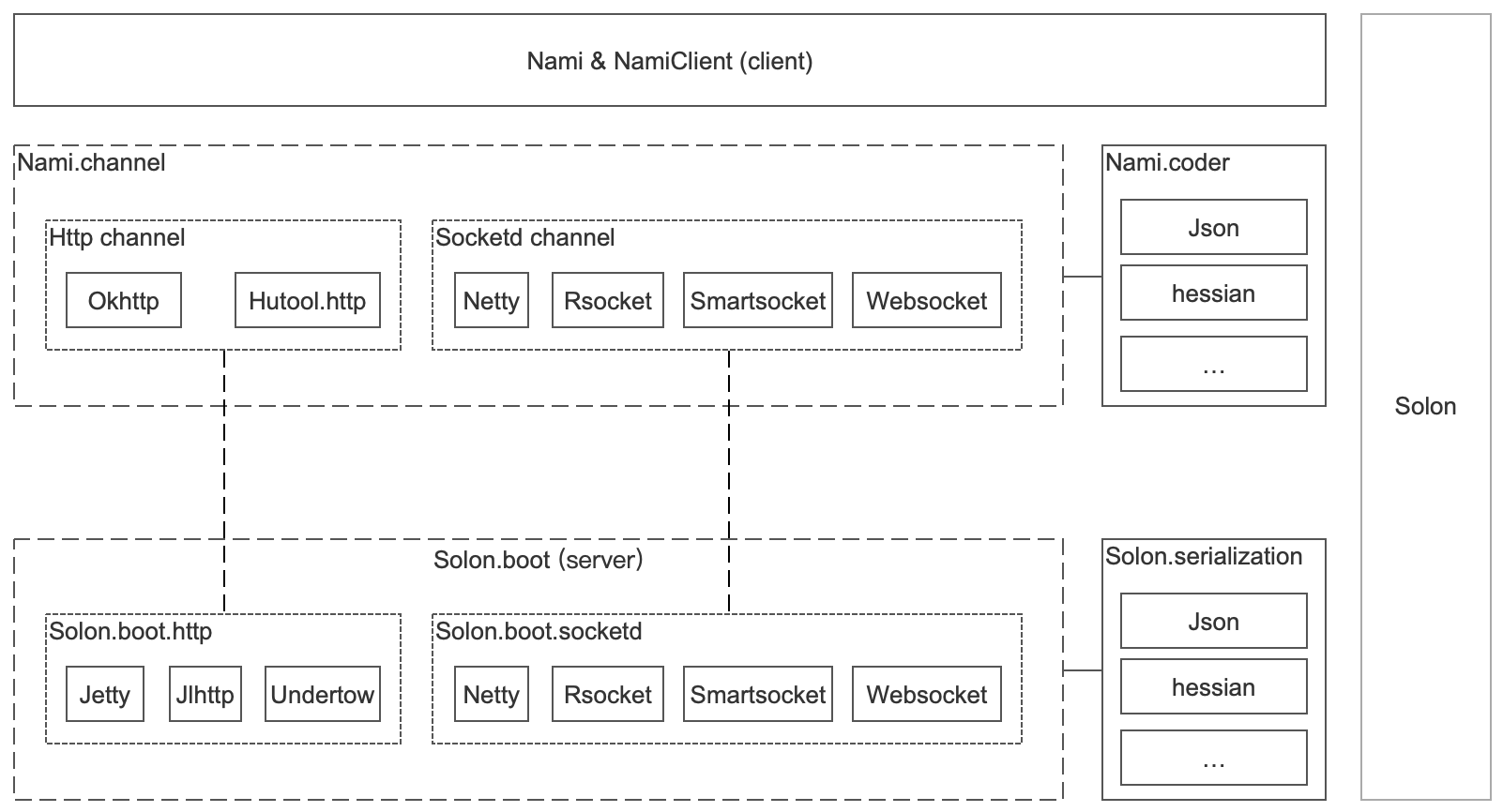
二、将Nami 分解为:内核、通道、编解码三块
使用时须引入有通道和编码包;也可根据需求定制自己的通道与编码方案
- 内核:org.noear:nami
- 通道:org.noear:nami.channel.* (支持http、 socket、websocket)
- 编码:org.noear:nami.coder.*
(一)已适配通道包
- org.noear:nami.channel.http.hutool
- org.noear:nami.channel.http.okhttp
- org.noear:nami.channel.socketd.jdksocket
- org.noear:nami.channel.socketd.netty
- org.noear:nami.channel.socketd.rsocket
- org.noear:nami.channel.socketd.smartsocket
- org.noear:nami.channel.socketd.websocket
(二)已适配解码包
- org.noear:nami.coder.fastjson
- org.noear:nami.coder.hessian
- org.noear:nami.coder.snack3
(三)支持Springboot集成
- org.noear:nami-springboot-starter (客户端集成)
- org.noear:springboot-solon-plugin(服务端集成)
Springboot 客户端集成示例 demo10.client_springboot
三、将集成包的打包方式由pom改为jar
- org.noear:solon-rpc 改为 jar
- org.noear:solon-web 改为 jar
附1:包引用使用示例
(一)http + json
- 客户端
<parent>

    <groupId>org.noear</groupId>

    <artifactId>solon-parent</artifactId>

    <version>1.2.18</version>

</parent>

<dependencies>

    <dependency>

        <groupId>org.noear</groupId>

        <artifactId>nami.coder.snack3</artifactId>

    </dependency>

    <dependency>

        <groupId>org.noear</groupId>

        <artifactId>nami.channel.http.okhttp</artifactId>

    </dependency>

</dependencies>
public class ClientApp {

    public static void main(String[] args) {

        Solon.start(ClientApp.class, args);

        //

        // 默认使用json解码

        //

        HelloService helloService = Nami.builder()

                .upstream(() -> "http://localhost:8080").create(HelloService.class);

        String result = helloService.hello("noear");

        System.out.println("Rpc result: " + result);

    }

}
- 服务端
<parent>

    <groupId>org.noear</groupId>

    <artifactId>solon-parent</artifactId>

    <version>1.2.18</version>

</parent>

<dependencies>

    <dependency>

        <groupId>org.noear</groupId>

        <artifactId>solon.serialization.snack3</artifactId>

    </dependency>

    <dependency>

        <groupId>org.noear</groupId>

        <artifactId>solon.boot.jlhttp</artifactId>

    </dependency>

</dependencies>
public class ServerApp {

    public static void main(String[] args) {

        Solon.start(ServerApp.class, args);

    }

}

@Mapping("/")

@Component(remoting = true)

public class HelloServiceImpl implements HelloService {

    @Override

    public String hello(String name) {

        return "hello: " + name;

    }

}
(二)sockted + json
- 客户端
<parent>

    <groupId>org.noear</groupId>

    <artifactId>solon-parent</artifactId>

    <version>1.2.18</version>

</parent>

<dependencies>

    <dependency>

        <groupId>org.noear</groupId>

        <artifactId>nami.coder.hessian</artifactId>

    </dependency>

    <dependency>

        <groupId>org.noear</groupId>

        <artifactId>nami.channel.socketd.smartsocket</artifactId>

    </dependency>

</dependencies>
public class ClientApp {

    public static void main(String[] args) {

        Solon.start(ClientApp.class, args);

        //

        // 默认使用json解码

        //

        HelloService helloService = Nami.builder()

                .upstream(() -> "http://localhost:8080").decoder(HessianDecoder.instance).create(HelloService.class);

        String result = helloService.hello("noear");

        System.out.println("Rpc result: " + result);

    }

}
- 服务端
<parent>

    <groupId>org.noear</groupId>

    <artifactId>solon-parent</artifactId>

    <version>1.2.18</version>

</parent>

<dependencies>

    <dependency>

        <groupId>org.noear</groupId>

        <artifactId>solon.serialization.hession</artifactId>

    </dependency>

    <dependency>

        <groupId>org.noear</groupId>

        <artifactId>solon.boot.socketd.smartsocket</artifactId>

    </dependency>

</dependencies>
public class ServerApp {

    public static void main(String[] args) {

        Solon.start(ServerApp.class, args);

    }

}

@Mapping(value = "/",method = MethodType.SOCKET)

@Component(remoting = true)

public class HelloServiceImpl implements HelloService {

    @Override

    public String hello(String name) {

        return "hello: " + name;

    }

}
附2:更多示例
Solon rpc 1.2.18 发布,突出Rpc特性的更多相关文章
- cocoapods导入第三方库提示RPC failed curl 18 transfer
错误提示: error: RPC failed; curl 18 transfer closed with outstanding read data remaining fatal: The rem ...
- git clone时RPC failed; curl 18 transfer closed with outstanding read data remaining
git clone时报RPC failed; curl 18 transfer closed with outstanding read data remaining 错误 原因1:缓存区溢出 解决方 ...
- Git 报错:git - error: RPC failed; curl 18 transfer closed with outstanding read data remaining 解决方案
error: RPC failed; curl 18 transfer closed with outstanding read data remaining because have error w ...
- git报错--RPC failed; curl 18 transfer closed with outstanding read data remaining
遇到的问题一: error: RPC failed; curl 18 transfer closed with outstanding read data remaining fata ...
- (转)git clone: error: RPC failed; result=18, HTTP code = 200 解决办法
git clone: error: RPC failed; result=18, HTTP code = 200 解决办法 分类: git2013-09-01 17:03 10753人阅读 评论(2) ...
- pod update更新error: RPC failed; curl 18 transfer closed with outstanding read data remaining
1. pod update 的时候出现下边的错误 error: RPC failed; curl 18 transfer closed with outstanding read data remai ...
- error: RPC failed; curl 18 transfer closed with outstanding read data remaining
报错: error: RPC failed; curl 18 transfer closed with outstanding read data remaining fatal: The remot ...
- git clone报错error: RPC failed; curl 18 transfer closed with outstanding read data remaining
具体错误信息如下图: error: RPC failed; curl 18 transfer closed with outstanding read data remaining fatal: ...
- 解决git报错:error: RPC failed; curl 18 transfer closed with outstanding read data remaining 的方法
报错信息: error: RPC failed; curl 18 transfer closed with outstanding read data remainingfatal: the remo ...
随机推荐
- day010|python之装饰器
装饰器02 目录 装饰器02 1 装饰器的语法糖 1.1 定义 1.2 基本使用 2 有参装饰器 2.1 基本用法 2.2 示例 3叠加多个装饰器 3.1 基本用法 3.2 示例 4 wraps装饰器 ...
- filebeat输出结果到elasticsearch的多个索引
基本环境: filebeat版本:6.5.4 (Linux,x86-64) elasticsearch版本:6.54 (一)需求说明 在一台服务器上有多个日志需要使用filebeat日志收集到el ...
- AtCoder Grand Contest 017 (VP)
contest link Official Editorial 比赛体验--之前做题的时候感觉 AtCoder 挺快的,现在打了VP之后发现还是会挂的--而且不是加载缓慢或者载不出来,直接给你一个无法 ...
- 题解-Little C Loves 3 III
Little C Loves 3 III 给定 \(n\) 和序列 \(a_0,a_1,\dots,a_{2^n-1}\) 和 \(b_0,b_1,\dots,b_{2^n-1}\),求序列 \(c_ ...
- 题解-Cats Transport
题解-Cats Transport Cats Transport 有 \(n\) 个山丘,\(m\) 只猫子,\(p\) 只铲屎官.第 \(i-1\) 个山丘到第 \(i\) 个山丘的距离是 \(d_ ...
- ACM里的期望和概率问题 从入门到精通
起因:在2020年一场HDU多校赛上.有这么一题没做出来. 题目链接:http://acm.hdu.edu.cn/showproblem.php?pid=6829 题目大意:有三个人,他们分别有X,Y ...
- 二、Linux文件系统结构
为了方便管理文件和目录,Linux 系统将它们组织成一个以根目录 / 开始的倒置的树状结构.Linux 中的目录,和 Windows 系统中的文件夹类似,不同之处在于,Linux 系统中的目录也被当做 ...
- WIN7环境下配置vscode c++环境
目录 安装vscode 添加中文环境支持 添加c++支持 配置c++环境 安装MinGW 配置MinGW环境变量 配置vscode launch文件配置 task文件配置 可能出现的问题 安装vsco ...
- JQuery ajax request及Java服务端乱码问题及设置
今天花了半天功夫才搞定2个乱码问题 1. 原先一直用form提交,现在改作JQuery ajax 提交,发现乱码. 2. window.location url中含有中文提交后,乱码. 第一个问题: ...
- Impala的特点
Impala的特点 0. 原理 基于内存的分析框架. 1.为什么会有Impala? hive进行计算太慢了,于是就有了Impala,Impala可以理解为是hive的内存版本. 2.Impala的优点 ...