
pytest文档51-内置fixture之cache使用
前言
pytest 运行完用例之后会生成一个 .pytest_cache 的缓存文件夹,用于记录用例的ids和上一次失败的用例。
方便我们在运行用例的时候加上--lf 和 --ff 参数,快速运行上一次失败的用例。
--lf, --last-failed 只重新运行上次运行失败的用例(或如果没有失败的话会全部跑)
--ff, --failed-first 运行所有测试,但首先运行上次运行失败的测试(这可能会重新测试,从而导致重复的fixture setup/teardown)
--lf 和 --ff 相关介绍查看之前的这篇https://www.cnblogs.com/yoyoketang/p/9769559.html
cache
pytest -h 查看命令行参数,关于 cache 参数的使用方式
>pytest -h

--lf, --last-failed   rerun only the tests that failed at the last run (or

                        all if none failed)

--ff, --failed-first  run all tests but run the last failures first. This

                        may re-order tests and thus lead to repeated fixture

--nf, --new-first     run tests from new files first, then the rest of the

                        tests sorted by file mtime

--cache-show=[CACHESHOW]

                        show cache contents, don't perform collection or

                        tests. Optional argument: glob (default: '*').

--cache-clear         remove all cache contents at start of test run.
参数说明:
- --lf 也可以使用
--last-failed仅运行上一次失败的用例 - --ff 也可以使用
--failed-first运行全部的用例,但是上一次失败的用例先运行 - --nf 也可以使用
--new-first根据文件插件的时间,新的测试用例会先运行 - --cache-show=[CACHESHOW] 显示.pytest_cache文件内容,不会收集用例也不会测试用例,选项参数: glob (默认: '*')
- --cache-clear 测试之前先清空.pytest_cache文件
--cache-show
测试案例代码test_x.py
# test_x.py

# 作者-上海悠悠 QQ交流群:717225969

# blog地址 https://www.cnblogs.com/yoyoketang/

def test_01():

    a = "hello"

    b = "hello"

    assert a == b

def test_02():

    a = "hello"

    b = "hello world"

    assert a == b

def test_03():

    a = "hello"

    b = "hello world"

    assert a in b

def test_04():

    a = "hello"

    b = "hello world"

    assert a not in b
命令行输入 运行完成后,会有2个用例失败,2个用例成功
>pytest test_x.py --tb=no

============================= test session starts =============================

collected 4 items

test_x.py .F.F                                                           [100%]

===================== 2 failed, 2 passed in 0.11 seconds ======================
运行完成后,会在当前的目录生成一个 .pytest_cache 的缓存文件夹,层级结构如下
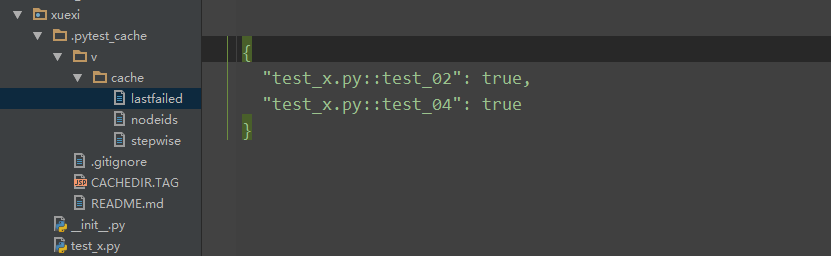
lastfailed 文件记录上一次运行失败的用例
{

  "test_x.py::test_02": true,

  "test_x.py::test_04": true

}
nodeids 文件记录所有用例的节点
[

  "test_x.py::test_01",

  "test_x.py::test_02",

  "test_x.py::test_03",

  "test_x.py::test_04"

]
于是可以通过 pytest --cache-show 命令查看cache目录
D:\soft\kecheng202004\xuexi>pytest --cache-show

============================= test session starts =============================

cachedir: \.pytest_cache

---------------------------- cache values for '*' -----------------------------

cache\lastfailed contains:

  {'test_x.py::test_02': True, 'test_x.py::test_04': True}

cache\nodeids contains:

  ['test_x.py::test_01',

   'test_x.py::test_02',

   'test_x.py::test_03',

   'test_x.py::test_04']

cache\stepwise contains:

  []

======================== no tests ran in 0.02 seconds =========================
--cache-clear
--cache-clear 用于在测试用例开始之前清空cache的内容
pytest --cache-clear
查看pytest关于cache的更多文档 https://docs.pytest.org/en/latest/cache.html
pytest文档51-内置fixture之cache使用的更多相关文章
- pytest文档42-fixture参数化params
前言 参数化是自动化测试里面必须掌握的一个知识点,用过 unittest 框架的小伙伴都知道使用 ddt 来实现测试用例的参数化. pytest 测试用例里面对应的参数可以用 parametrize ...
- pytest文档7-pytest-html生成html报告
前言 pytest-HTML是一个插件,pytest用于生成测试结果的HTML报告.兼容Python 2.7,3.6 pytest-html 1.github上源码地址[https://github. ...
- pytest文档3-pycharm运行pytest
前言 上一篇pytest文档2-用例运行规则已经介绍了如何在cmd执行pytest用例,平常我们写代码在pycharm比较多 写完用例之后,需要调试看看,是不是能正常运行,如果每次跑去cmd执行,太麻 ...
- pytest文档52-命令行参数--setup-show查看fixture的执行过程
前言 使用命令行运行 pytest 用例的时候,看不到 fixture 的执行过程. 如果我们想知道fixture的执行过程和先后顺序,可以加上 --setup-show 命令行参数,帮助查看 fix ...
- pytest文档30-功能用例与自动化用例完美对接(allure)
前言 做自动化做久了,经常会思考一个问题,到底别人是怎么做的自动化,跟自己的有啥不一样,看过不少书和资料,都是停留在demo的层面. 真正把自动化做的好的大牛又不屑于分享自己的劳动成果,所以大部分情况 ...
- pytest文档56-插件打包上传到 pypi 库
前言 pytest 的插件完成之后,可以上传到 github,方便其他小伙伴通过 pip 源码安装.如果我们想通过 pip install packages 这种方式安装的话,需上传到 pypi 仓库 ...
- pytest文档43-元数据使用(pytest-metadata)
前言 什么是元数据?元数据是关于数据的描述,存储着关于数据的信息,为人们更方便地检索信息提供了帮助. pytest 框架里面的元数据可以使用 pytest-metadata 插件实现.文档地址http ...
- pytest文档19-doctest测试框架
前言 doctest从字面意思上看,那就是文档测试.doctest是python里面自带的一个模块,它实际上是单元测试的一种. 官方解释:doctest 模块会搜索那些看起来像交互式会话的 Pytho ...
- pytest文档9-参数化parametrize
前言 pytest.mark.parametrize装饰器可以实现测试用例参数化. parametrizing 1.这里是一个实现检查一定的输入和期望输出测试功能的典型例子 # content of ...
随机推荐
- Linux:系统用户和用户组
一.用户介绍 用户分为三类,超级用户.虚拟用户.普通用户:系统通过用户的uid识别用户:超级用户uid=0,虚拟用户uid=1-599,普通用户的uid=500-65535 用户和组相关配置文件/et ...
- Git 不能提交空目录?我也是醉了!
Git 不能提交空目录?我也是醉了! 背景 最近在提交文件时,因为是空的 Maven 项目结构,发现 Git 空目录死活不能提交,还以为是我自己在 .gitignore 文件中忽略了,在网上查了下,原 ...
- oracle之SQL的基本函数
SQL的基本函数 2.1 单行函数与多行函数 单行函数:指一行数据输入,返回一个值的函数.所以查询一个表时,对选择的每一行数据都返回一个结果. SQL>select empno,lower(en ...
- 详解usbmon抓取的log各字段的含义
详解 usbmon 抓取的 log 各字段的含义 在上篇文章中,我们已经介绍了如何在 linux 下使用 usbmon 抓取 usb 总线上数据的方法.(https://www.cnblogs.com ...
- [LeetCode]364. 加权嵌套序列和 II (DFS)
题目 给一个嵌套整数序列,请你返回每个数字在序列中的加权和,它们的权重由它们的深度决定. 序列中的每一个元素要么是一个整数,要么是一个序列(这个序列中的每个元素也同样是整数或序列). 与 前一个问题 ...
- 关于java中循环的学习
switch 值是固定的 效率高语法:switch (表达式) { case 常量 1: 语句; break; case 常量 2: 语句; break; … default: 语句; break;} ...
- Centos 7 redis、tomcat、Spring Boot添加开机自启服务
一.redis添加开机自启 1.添加服务配置文件 [root@test system]# vim /etc/systemd/system/redis-server.service 2.服务配置文件内容 ...
- 第3章 02 python字符串类型及操作
字符串切片 取字符串从结尾到开头,相当于字符串逆序 转义符 转义符表达特定字符的本意 转义符 \“ ----> ” 字符串操作符 例子: 获取星期字符串 定义星期 获取用户 ...
- spring mvc(4) HandlerMapping
在前面一节里提到,DispatcherServlet在接收到请求后,通过HandlerMapping找到处理请求对应的Controller(其实处理请求器并不一定是Controller,还可以是Htt ...
- 解Bug之路-记一次对端机器宕机后的tcp行为
解Bug之路-记一次对端机器宕机后的tcp行为 前言 机器一般过质保之后,就会因为各种各样的问题而宕机.而这一次的宕机,让笔者观察到了平常观察不到的tcp在对端宕机情况下的行为.经过详细跟踪分析原因之 ...