
IIdea使用CXF开发WebService
写这篇文章主要是用于增强记忆,而我参考的是这位朋友的随笔,链接如下
http://www.xiaomager.com/415.html
服务端开发过程
1.首先创建一个maven项目,如下图

2.添加项目的依赖包以及设置相关配置
提示:首先介绍一下基础环境 ,开发编译器 intellij idea ,我们的jdk是1.7,tomcat是7,spring使用的是spring4,cxf准备使用3.1.4,这里特别需要说明的是,cxf 3.0以后的版本只能在jdk1.7上使用,如果在1.6使用的话,会直接报错的。
<project xmlns="http://maven.apache.org/POM/4.0.0" xmlns:xsi="http://www.w3.org/2001/XMLSchema-instance"

  xsi:schemaLocation="http://maven.apache.org/POM/4.0.0 http://maven.apache.org/maven-v4_0_0.xsd">

  <modelVersion>4.0.0</modelVersion>

  <groupId>com.rainsoft</groupId>

  <artifactId>cxfWebservice</artifactId>

  <packaging>war</packaging>

  <version>1.0-SNAPSHOT</version>

  <name>cxfWebservice</name>

  <url>http://maven.apache.org</url>

  <properties>

      <project.build.sourceEncoding>UTF-8</project.build.sourceEncoding>

      <java.version>1.7</java.version>

      <!-- spring版本号 -->

      <spring.version>4.3.2.RELEASE</spring.version>

      <!-- CXF版本号 -->

      <cxf.version>3.1.4</cxf.version>

  </properties>

  <dependencies>

    <!-- spring核心包 -->

    <!-- springframe start -->

      <dependency>

          <groupId>org.springframework</groupId>

          <artifactId>spring-beans</artifactId>

          <version>${spring.version}</version>

      </dependency>

      <dependency>

          <groupId>org.springframework</groupId>

          <artifactId>spring-web</artifactId>

          <version>${spring.version}</version>

      </dependency>

      <dependency>

          <groupId>org.springframework</groupId>

          <artifactId>spring-core</artifactId>

          <version>${spring.version}</version>

      </dependency>

      <!-- CXF webservice -->

      <dependency>

          <groupId>org.apache.cxf</groupId>

          <artifactId>cxf-rt-frontend-jaxws</artifactId>

          <version>${cxf.version}</version>

      </dependency>

      <dependency>

          <groupId>org.apache.cxf</groupId>

          <artifactId>cxf-rt-transports-http</artifactId>

          <version>${cxf.version}</version>

      </dependency>

      <dependency>

          <groupId>org.apache.cxf</groupId>

          <artifactId>cxf-rt-frontend-jaxrs</artifactId>

          <version>${cxf.version}</version>

      </dependency>

  </dependencies>

  <build>

      <finalName>cxfWebservice</finalName>

      <defaultGoal>compile</defaultGoal>

      <resources>

          <resource>

              <directory>src/main/resources</directory>

              <!-- 资源根目录排除各环境的配置,使用单独的资源目录来指定 -->

              <excludes>

                  <!--测试环境-->

                  <exclude>conf/test/*</exclude>

                  <!--生产环境-->

                  <exclude>conf/production/*</exclude>

                  <!--开发环境-->

                  <exclude>conf/development/*</exclude>

              </excludes>

          </resource>

          <resource>

              <directory>src/main/resources/conf/${profiles.active}</directory>

              <targetPath>conf</targetPath>

          </resource>

      </resources>

      <plugins>

          <!-- compiler插件, 设定JDK版本 -->

          <plugin>

              <groupId>org.apache.maven.plugins</groupId>

              <artifactId>maven-compiler-plugin</artifactId>

              <version>3.3</version>

              <configuration>

                  <source>${java.version}</source>

                  <target>${java.version}</target>

                  <showWarnings>true</showWarnings>

                  <encoding>${project.build.sourceEncoding}</encoding>

                  <compilerArguments>

                      <verbose />

                      <bootclasspath>${java.home}/lib/rt.jar;${java.home}/lib/jce.jar</bootclasspath>

                  </compilerArguments>

              </configuration>

          </plugin>

          <!-- 解决maven命令console出现中文乱码 -->

          <plugin>

              <groupId>org.apache.maven.plugins</groupId>

              <artifactId>maven-surefire-plugin</artifactId>

              <version>2.7.2</version>

              <configuration>

                  <forkMode>once</forkMode>

                  <argLine>-Dfile.encoding=UTF-8</argLine>

                  <skipTests>true</skipTests>

              </configuration>

          </plugin>

      </plugins>

  </build>

  <distributionManagement>

      <repository>

          <id>nexus-releases</id>

          <url>http://192.168.1.22:8081/nexus/content/repositories/releases/</url>

      </repository>

      <snapshotRepository>

          <id>nexus-snapshots</id>

          <url>http://192.168.1.22:8081/nexus/content/repositories/releases/</url>

      </snapshotRepository>

  </distributionManagement>

  <profiles>

    <!--生产环境-->

    <profile>

          <id>production</id>

          <properties>

              <profiles.active>production</profiles.active>

          </properties>

      </profile>

      <!--测试环境-->

      <profile>

          <id>test</id>

          <properties>

              <profiles.active>test</profiles.active>

          </properties>

      </profile>

      <profile>

          <id>development</id>

          <properties>

              <profiles.active>development</profiles.active>

          </properties>

          <activation><activeByDefault>true</activeByDefault></activation>

      </profile>

  </profiles>

</project>
保存后,需要执行maven 的 clean, install 来下载jar包到maven的本地库。
3.添加配置文件支持
一共有三处配置文件需要更新
第一处:需要新增一个cxf的配置文件,这里取名为cxf-servlet.xml,内容如下:
<?xml version="1.0" encoding="UTF-8"?>

<beans xmlns="http://www.springframework.org/schema/beans"

       xmlns:xsi="http://www.w3.org/2001/XMLSchema-instance"

       xmlns:jaxws="http://cxf.apache.org/jaxws"

       xmlns:context="http://www.springframework.org/schema/context"

       xsi:schemaLocation="http://www.springframework.org/schema/beans http://www.springframework.org/schema/beans/spring-beans.xsd

       http://www.springframework.org/schema/context http://www.springframework.org/schema/context/spring-context.xsd

       http://cxf.apache.org/jaxws

       http://cxf.apache.org/schemas/jaxws.xsd">

    <context:component-scan base-package="com.daisy" />

    <bean id="cxfdemo" class="com.daisy.cxf.server.impl.MyCxfServerImpl">

    </bean>

    <jaxws:endpoint id="cxfService" implementor="#cxfdemo" address="/cxfserver" />

</beans>
此处需要根据自己的包以及配置文件,添加配置
这里面主要就是定义了一个cxfService,它的 实现类是com.daisy.cxf.server.impl.CxfServerImpl,这个 实现类我们在第三步骤来加上,其次还定义了一个/cxfserver的路径,即我们的cxfserver服务端的请求路径。
第二处:需要在spring主配置applicationContext文件里把这个新建的文件添加上,配置如下:
<?xml version="1.0" encoding="UTF-8"?>

<beans xmlns="http://www.springframework.org/schema/beans"

               xmlns:context="http://www.springframework.org/schema/context"

               xmlns:xsi="http://www.w3.org/2001/XMLSchema-instance"

               xsi:schemaLocation="http://www.springframework.org/schema/beans

      http://www.springframework.org/schema/beans/spring-beans-3.0.xsd

      http://www.springframework.org/schema/context

      http://www.springframework.org/schema/context/spring-context.xsd">

    <context:annotation-config />

    <import resource="cxf-servlet.xml" />

</beans>
第三处:就是需要在web.xml里面配置cxf的servlet,具体如下:
该处定义了请求webService的前缀,及通过引入一个org.apache.cxf.transport.servlet.CXFServlet的servlet来处理 所有前缀 /webService/*的请求,所以 我们的cxf的全路径应该是 这里的servlet-mapping加上第一处的address,即 /webService/cxfserver。
<?xml version="1.0" encoding="UTF-8"?>

<web-app xmlns:xsi="http://www.w3.org/2001/XMLSchema-instance"

         xmlns="http://java.sun.com/xml/ns/javaee"

         xsi:schemaLocation="http://java.sun.com/xml/ns/javaee

         http://java.sun.com/xml/ns/javaee/web-app_3_0.xsd" version="3.0">

  <display-name>cxfWebservice</display-name>

  <context-param>

    <param-name>contextConfigLocation</param-name>

    <param-value>classpath:conf/applicationContext.xml</param-value>

  </context-param>

  <listener>

    <listener-class>org.springframework.web.util.IntrospectorCleanupListener</listener-class>

  </listener>

  <listener>

    <listener-class>org.springframework.web.context.ContextLoaderListener</listener-class>

  </listener>

  <servlet>

    <servlet-name>CXFServlet</servlet-name>

    <servlet-class>org.apache.cxf.transport.servlet.CXFServlet</servlet-class>

    <load-on-startup>1</load-on-startup>

  </servlet>

  <servlet-mapping>

    <servlet-name>CXFServlet</servlet-name>

    <url-pattern>/webService/*</url-pattern>

  </servlet-mapping>

  <welcome-file-list>

    <welcome-file>index.jsp</welcome-file>

  </welcome-file-list>

</web-app>
4. 添加cxf服务端的接口类和接口实现类,目录结构如下

java实现代码为 IMyCxfServer.java
此处必须声明一下,在接口的上面也必须加上 @WebService , 我开始抱着试试的心理将它去掉了,结果在客户端调用的时候就怎么都找不到对应的方法了
package com.daisy.cxf.server;

import javax.jws.WebService;

/**

 * @author daisy

 * @description IMyCxfServer

 * @date 2017/4/8

 */

@WebService

public interface IMyCxfServer {

    String sayHello(String name);

}
MyCxfServerImpl.java
package com.daisy.cxf.server.impl;

import com.daisy.cxf.server.IMyCxfServer;

import javax.jws.WebService;

/**

 * @author daisy

 * @description MyCxfServerImpl

 * @date 2017/4/8

 */

@WebService

public class MyCxfServerImpl implements IMyCxfServer {

    @Override

    public String sayHello(String name) {

        return "hello "+name;

    }

}
以上代码表示的意思很明白,即服务端提供一个sayHello的方法,将客户端传递的字符串参数 前面加上 hello 后返回。
5. 添加cxf服务端的接口类和接口实现类,目录结构如下
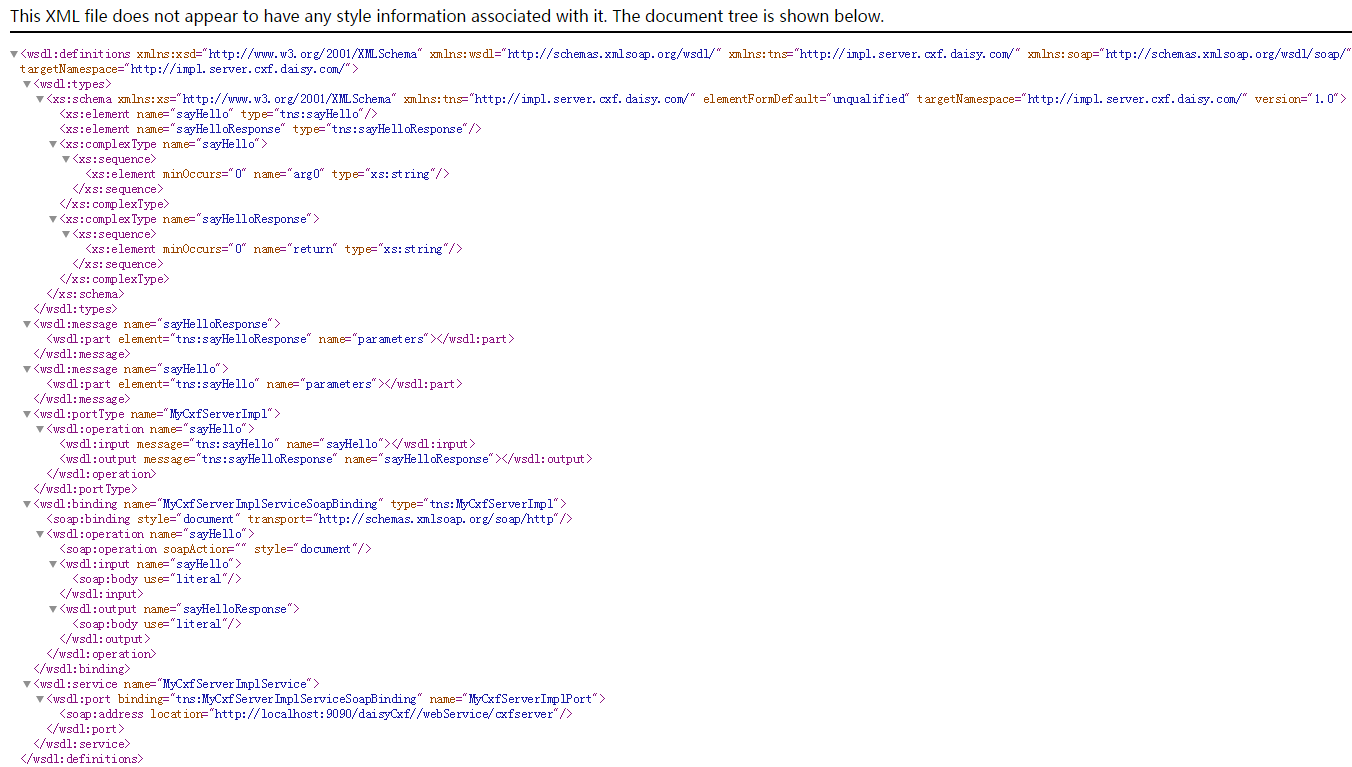
将项目添加到tomcat服务器上运行,访问链接 http://localhost:9090/daisyCxf//webService/cxfserver?wsdl 即可看到结果,如下图所示
IIdea使用CXF开发WebService的更多相关文章
- struts1+spring+myeclipse +cxf 开发webservice以及普通java应用调用webservice的实例
Cxf + Spring+ myeclipse+ cxf 进行 Webservice服务端开发 使用Cxf开发webservice的服务端项目结构 Spring配置文件applicationCont ...
- 使用cxf开发webservice应用时抛出异常
在使用cxf开发webservice应用时,报出了类似下面的错误 JAXB: [javax.xml.bind.UnmarshalException: unexpected element (uri:& ...
- 【WebService】使用CXF开发WebService(四)
CXF简介 Apache CXF = Celtix + XFire,开始叫 Apache CeltiXfire,后来更名为 Apache CXF 了,以下简称为 CXF.CXF 继承了 Celtix ...
- 使用cxf开发webservice接口
项目中经常用到开发webservice接口,及调用webService接口.这里讲解如何使用cxf开发webService接口. 一.webservice介绍及理解 webservice是一种跨平台, ...
- 3.使用CXF开发webService
CXF 简介 关于 Apache CXF Apache CXF = Celtix + XFire,Apache CXF 的前身叫 Apache CeltiXfire,现在已经正式更名为 Apache ...
- Spring boot+CXF开发WebService
最近工作中需要用到webservice,而且结合spring boot进行开发,参照了一些网上的资料,配置过程中出现的了一些问题,于是写了这篇博客,记录一下我这次spring boot+cxf开发的w ...
- Spring boot+CXF开发WebService Demo
最近工作中需要用到webservice,而且结合spring boot进行开发,参照了一些网上的资料,配置过程中出现的了一些问题,于是写了这篇博客,记录一下我这次spring boot+cxf开发的w ...
- (三)使用CXF开发WebService客户端
前面一讲开发了webservice服务器端接口,今天的话,我们来开发webservice客户端,让大家来体验下过程: 首先建一个Maven项目,项目名字,WS_Client: 然后我们要用CXF给我们 ...
- CXF开发WebService
CXF开发Web Service 参考链接 使用 spring 框架来集成 Web Services 开发 浏览器调用接口 大概这样, 没成功 加@WebMethod(action="get ...
随机推荐
- Agumaster 将爬虫取股票名称代号子系统分出来成agumaster_crawler, 两系统通过RabbitMq连接
agumaster_crawler系统负责启动爬虫取得数据,之后便往队列中推送. agumaster_crawler系统中pom.xml关于RabbitMq的依赖是: <!-- RabbitMq ...
- agumaster增加了网易数据源
- Centos7安装后进不去,死活就要填licence,该怎么办?
遇到这个问题不要麻爪,跟着我做: 1 回车 2 回车 c 回车 c 回车 然后就进入系统了. 要使它联网,点右上角的开关按钮,将PCI Ethernet选择为connect状态. 我的centos7是 ...
- Java I/O流 复制文件速度对比
Java I/O流 复制文件速度对比 首先来说明如何使用Java的IO流实现文件的复制: 第一步肯定是要获取文件 这里使用字节流,一会我们会对视频进行复制(视频为非文本文件,故使用之) FileInp ...
- 基于Socket的编程
2020/7/5 客户端步骤: 1.创建Socket. 根据指定服务端的IP地址或者端口号构造Socket类对象: Socket socket = new Socket(InetAddress. ...
- 6.Kafka消息流处理
- Linux环境下C++调试的三板斧
调试解决程序的漏洞,是程序员最基本的技能之一.用惯了图形化IDE,在目前使用gtest框架进行单元测试,需要通过xshell远程连接Linux虚拟机进行C++代码的调试时,觉得很不适应.经过几天查资料 ...
- kali一些基础工具
目录 netcat netcat https://blog.csdn.net/fageweiketang/article/details/82833193 网络工具当中的瑞士军刀 -nc指令,nc可以 ...
- PHP图片压缩类,高清无损直接用就ok啦
这个不完全是我自己写的-_-!,但是好用呀 <?php /** * Created by PhpStorm. * Note:文件介绍 * User: Lynly * Date: 2018/11/ ...
- NoActionBar主题下如何添加OptionsMenu
菜单无法显示 为了不显示标题栏,所以主题使用了 NoActionBar,这也直接导致选项菜单无处显示 解决方案 添加一个ToolBar,自定义标题栏 <androidx.appcompat.wi ...