
【Android】Android 移动应用数据到SD
【Android】Android 移动应用数据到SD
在应用的menifest文件中指定就可以了,在 <manifest> 元素中包含android:installLocation 属性,设置其值为"internalOnly"即可,如下:
<manifest xmlns:android="http://schemas.android.com/apk/res/android" android:installLocation="internalOnly" ... >
android:installLocation 还有另外两个属性值:"preferExternal"和"auto",根据字面意思大概也能明白是什么意思了,还是说明如下:
如果你定义了 "preferExternal",意味着你要求你的应用安装至扩展存储,但是系统不能保证应用肯定会安装至扩展存储。如果扩展存储没有空间了,系统将把应用安装到内置存储。用户可以在两个位置之间移动你的应用。
如果你定义了 "auto",表示你的应用可能会安装在扩展存储,但是对安装位置没有特别的偏好。系统将基于很多因素决定你的应用安装到哪里。用户同样可以将应用在两个位置之间移动
我们在使用Android手机时发现,有的程序允许被移动到SD卡,而有的不行?这是为什么呢?
因为在Android 2.2版之后, Android应用才被允许移动到SD卡中。而在此之前开发的应用,全部没有这个功能。
那么究竟如何允许你的应用移动到SD卡呢?答案其实很简单,只要给Manifest设置一个installLocation属性即可。
这个属性设置的是默认安装位置, 共有三个有效值,auto、internalOnly、preferExternal。
auto 表示自动,由系统决定安装位置
internalOnly 安装在手机内存
preferExternal 安装在外部存储中
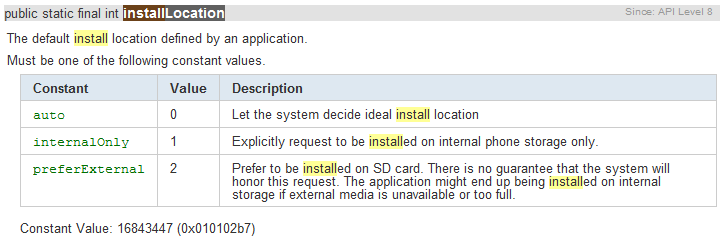
看一下修改后的AndroidManifest.xml。
<manifest xmlns:android="http://schemas.android.com/apk/res/android"

      package="com.yfz"

      android:installLocation="auto"

      android:versionCode="1"

      android:versionName="1.0">
是不是很简单?
可能有人会问,如果我的还要支持2.1怎么办呢? 其实不用管啦,你只要设置 <uses-sdk android:minSdkVersion="7" /> 然后安装到2.1的设备上时,Android会忽略这个属性,直接给你安装到手机内存。
需要额外注意的是,并不是所有程序都适合移到SD卡上。下面就看一下,在哪些条件下,不建议允许程序移动到SD卡上。
Applications That Should NOT Install on External Storage
When the user enables USB mass storage to share files with their computer (or otherwise unmounts or removes the external storage), any application installed on the external storage and currently running is killed. The system effectively becomes unaware of the application until mass storage is disabled and the external storage is remounted on the device. Besides killing the application and making it unavailable to the user, this can break some types of applications in a more serious way. In order for your application to consistently behave as expected, you should not allow your application to be installed on the external storage if it uses any of the following features, due to the cited consequences when the external storage is unmounted:
Services
Your running Service will be killed and will not be restarted when external storage is remounted. You can, however, register for the ACTION_EXTERNAL_APPLICATIONS_AVAILABLE broadcast Intent, which will notify your application when applications installed on external storage have become available to the system again. At which time, you can restart your Service.
Alarm Services
Your alarms registered with AlarmManager will be cancelled. You must manually re-register any alarms when external storage is remounted.
Input Method Engines
Your IME will be replaced by the default IME. When external storage is remounted, the user can open system settings to enable your IME again.
Live Wallpapers
Your running Live Wallpaper will be replaced by the default Live Wallpaper. When external storage is remounted, the user can select your Live Wallpaper again.
Live Folders
Your Live Folder will be removed from the home screen. When external storage is remounted, the user can add your Live Folder to the home screen again.
App Widgets
Your App Widget will be removed from the home screen. When external storage is remounted, your App Widget will not be available for the user to select until the system resets the home application (usually not until a system reboot).
Account Managers
Your accounts created with AccountManager will disappear until external storage is remounted.
Sync Adapters
Your AbstractThreadedSyncAdapter and all its sync functionality will not work until external storage is remounted.
Device Administrators
Your DeviceAdminReceiver and all its admin capabilities will be disabled, which can have unforeseeable consequences for the device functionality, which may persist after external storage is remounted.
Broadcast Receivers listening for "boot completed"
The system delivers the ACTION_BOOT_COMPLETED broadcast before the external storage is mounted to the device. If your application is installed on the external storage, it can never receive this broadcast.
Copy Protection
Your application cannot be installed to a device's SD card if it uses Android Market's Copy Protection feature. However, if you use Android Market's Application Licensing instead, your application can be installed to internal or external storage, including SD cards.
If your application uses any of the features listed above, you should not allow your application to install on external storage. By default, the system will not allow your application to install on the external storage, so you don't need to worry about your existing applications. However, if you're certain that your application should never be installed on the external storage, then you should make this clear by declaring android:installLocation with a value of "internalOnly". Though this does not change the default behavior, it explicitly states that your application should only be installed on the internal storage and serves as a reminder to you and other developers that this decision has been made
上面这段一定要看,很重要。 比如你的程序如果想开机自启动,那就一定不能允许移动到SD卡了。 因为开机启动的广播消息BOOT_COMPLETE在 SD 卡被装载之前就发出来了,程序根本没法收到。
【Android】Android 移动应用数据到SD的更多相关文章
- Android(java)学习笔记182:保存数据到SD卡 (附加:保存数据到内存)
1. 如果我们要想读写数据到SD卡中,首先必须知道SD的路径: File file = new File(Environment.getExternalStorageDirectory()," ...
- Android(java)学习笔记125:保存数据到SD卡 (附加:保存数据到内存)
1. 如果我们要想读写数据到SD卡中,首先必须知道SD的路径: File file = new File(Environment.getExternalStorageDirectory()," ...
- Android 学习笔记之数据存储SharePreferenced+File
学习内容: Android的数据存储.... 1.使用SharedPreferences来保存和读取数据... 2.使用File中的I/O来完成对数据的存储和读取... 一个应用程序,经常需要与用 ...
- Android开发-API指南-数据存储
Storage Options 英文原文:http://developer.android.com/guide/topics/data/data-storage.html 采集日期:2015-02-0 ...
- Android读取JSON格式数据
Android读取JSON格式数据 1. 何为JSON? JSON,全称为JavaScript Object Notation,意为JavaScript对象表示法. JSON 是轻量级的文本数据交换格 ...
- Android学习笔记_36_ListView数据异步加载与AsyncTask
一.界面布局文件: 1.加入sdcard写入和网络权限: <!-- 访问internet权限 --> <uses-permission android:name="andr ...
- Android学习笔记-保存数据的实现方法1
Android开发中,有时候我们需要对信息进行保存,那么今天就来介绍一下,保存文件到内存,以及SD卡的一些操作,及方法,供参考. 第一种,保存数据到内存中: //java开发中的保存数据的方式 pub ...
- 快速解决设置Android 23.0以上版本对SD卡的读写权限无效的问题
快速解决设置Android 23.0以上版本对SD卡的读写权限无效的问题 转 https://www.jb51.net/article/144939.htm 今天小编就为大家分享一篇快速解决设置And ...
- Android客户端和服务器端数据交互
网上有很多例子来演示Android客户端和服务器端数据如何实现交互不过这些例子大多比较繁杂,对于初学者来说这是不利的,现在介绍几种代码简单.逻辑清晰的交互例子,本篇博客介绍第四种: 一.服务器端: 代 ...
随机推荐
- Android中的5种数据存储方式
本文转自 http://hi.baidu.com/maguowei/blog/item/7aca46c25574a33ae5dd3ba4.htmlAndroid数据存储Android提供了5种方式存 ...
- poj1166学习中
#include <iostream> #include <string.h> #include <cstdio> #include <cmath> u ...
- u-boot 编译时间
给定的格式FORMAT 控制着输出,解释序列如下: %% 一个文字的 % %a 当前locale 的星期名缩写(例如: 日,代表星期日) %A 当前locale 的星期名全称 ( ...
- JQuery教程
1.是javaScript库(js文件) 2.使用:script标签 3.语法:$开头 $().action() 列如:$('div').css("color",'red'); 4 ...
- 从nib文件里加载collectionViewCell
如何取出在xib文件里绘制的collectionViewCell ? 1.获得nib文件 UINib *nib = [[UINib NibWithName:@"xib文件的名字"] ...
- 业务代码中(java class)中如何实现多线程,并且将子线程中的值随方法返回返回值
转载自http://bbs.csdn.net/topics/390731832 问题: public static String getAddress(final InputStream inputS ...
- sql语句对数据库表进行加锁和解锁
锁是数据库中的一个非常重要的概念,它主要用于多用户环境下保证数据库完整性和一致性. 我们知道,多个用户能够同时操纵同一个数据库中的数据,会发生数据不一致现象.即如果没有锁定且多个用户同时访问一个数据库 ...
- Webpack使用教程三(webpack-dev-server)
Webpack给本地开发提供了一个可选的服务器webpack-dev-server.webpack-dev-server是一个很小的express应用,使用前需要用npm安装,它根据webpack.c ...
- mongoDB研究笔记:journaling保证意外故障下的数据完整性
mongoDB的Journaling日志功能与常见的log日志是不一样的,mongoDB也有log日志,它只是简单记录了数据库在服务器上的启动信息.慢查询记录.数据库异常信息.客户端与数据库服务器连接 ...
- Dynamic CRM 2013学习笔记(十六)用JS控制Tab可见,可用
一个Form里经常会有好几个Tab,有时要根据一些条件设置哪些Tab可用,可见.下面就介绍下如何用JS对Tab进行控制. 1. 控制可见 function setTabVisableByName( ...