
Android 5.0新特性了解(一)----TabLayout
1、在2015年的google大会上,google发布了新的Android Support Material Design库,里面包含了几个新的控件,其中就有一个TabLayout,它就可以完成TabPageIndicator的效果。使用的 android studio进行开发的,所以引用TabLayout很简单,只要在build.gradle中加入compile 'com.android.support:design:23.+'即可。
效果图:
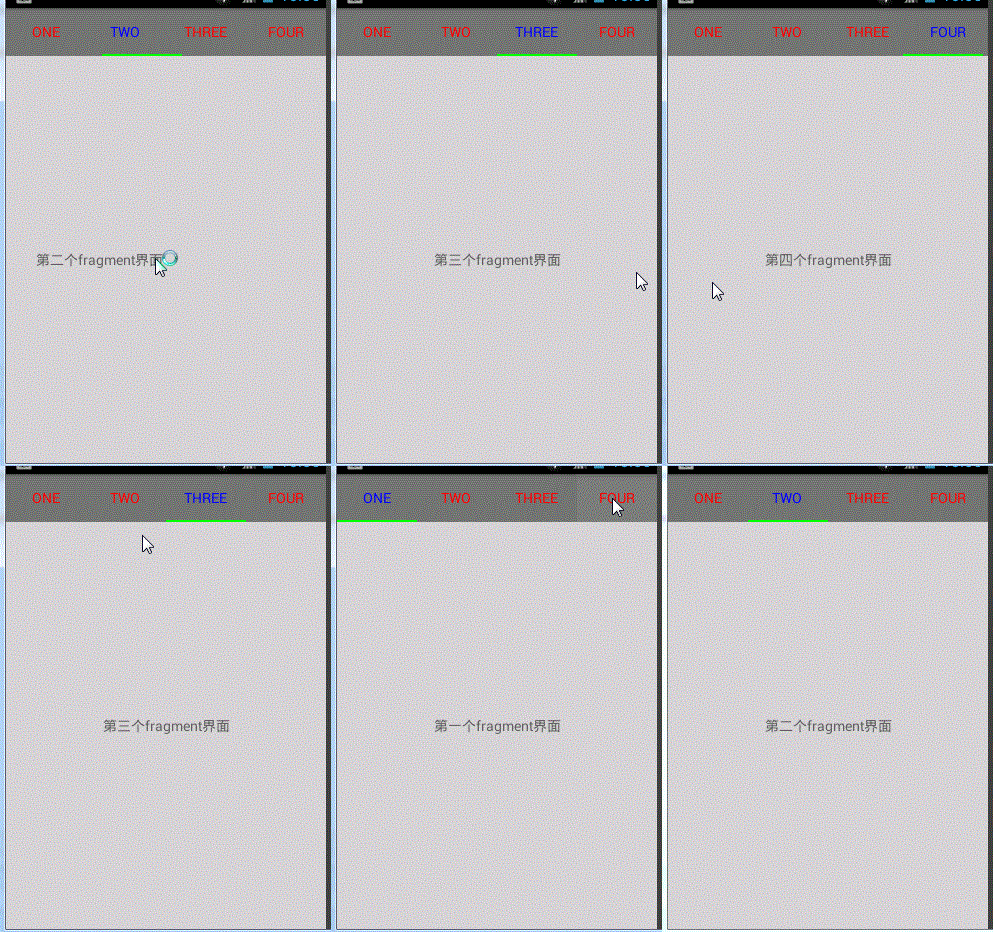
2、编写xml的时候注意一下这三个属性
app:tabIndicatorColor="#0f0"                每个tab下方的下划线的颜色

app:tabSelectedTextColor="#00f"             被选中的tab的文本颜色

app:tabTextColor="#f00"                     未被选中的tab的文本颜色
布局文件activity_main.xml
<?xml version="1.0" encoding="utf-8"?>

<LinearLayout xmlns:android="http://schemas.android.com/apk/res/android"

    xmlns:tools="http://schemas.android.com/tools"

    xmlns:app="http://schemas.android.com/apk/res-auto"

    android:layout_width="match_parent"

    android:layout_height="match_parent"

    android:orientation="vertical"

    tools:context=".MainActivity">

    <android.support.design.widget.TabLayout

        android:id="@+id/tablayout"

        android:layout_width="match_parent"

        android:layout_height="wrap_content"

        android:background="#777"

        app:tabIndicatorColor="#0f0"

        app:tabSelectedTextColor="#00f"

        app:tabTextColor="#f00"

        />

    <android.support.v4.view.ViewPager

        android:id="@+id/viewpager"

        android:layout_width="match_parent"

        android:layout_height="0dp"

        android:layout_weight="1"

        android:background="#cccc"

        />

</LinearLayout>
3、创建MyFragmentOne.java文件
package com.wangjitao.myapptest.fragment;

import android.os.Bundle;

import android.support.annotation.Nullable;

import android.support.v4.app.Fragment;

import android.view.LayoutInflater;

import android.view.View;

import android.view.ViewGroup;

import com.wangjitao.myapptest.R;

/**

 * Created by wangjitao on 2016/3/7.

 */

public class MyFragmentOne extends Fragment {

    public MyFragmentOne(){

    };

    @Nullable

    @Override

    public View onCreateView(LayoutInflater inflater, ViewGroup container, Bundle savedInstanceState) {

        return inflater.inflate(R.layout.fragment_one, container, false);

    }

}
4、创建ViewPager的适配器MyAdapter.java
package com.wangjitao.myapptest.adapter;

import android.support.v4.app.Fragment;

import android.support.v4.app.FragmentManager;

import android.support.v4.app.FragmentStatePagerAdapter;

import java.util.List;

/**

 * Created by jh on 2016/3/7.

 */

public class MyAdapter extends FragmentStatePagerAdapter {

    private List<Fragment> list_Fragments ;

    private List<String> list_Titles ;

    public MyAdapter(FragmentManager fm ,List<Fragment> list_Fragments  ,List<String> list_Titles ) {

        super(fm);

        this.list_Fragments = list_Fragments ;

        this.list_Titles = list_Titles ;

    }

    @Override

    public Fragment getItem(int position) {

        return list_Fragments.get(position);

    }

    @Override

    public int getCount() {

        int rec = 0 ;

        if (list_Fragments != null && list_Fragments.size() > 0){

            rec = list_Fragments.size();

        }

        return rec;

    }

    @Override

    public CharSequence getPageTitle(int position) {

        return list_Titles.get(position);

    }

}
5、MainActivity.java
package com.wangjitao.myapptest.activity;

import android.support.design.widget.TabLayout;

import android.support.v4.app.Fragment;

import android.support.v4.app.FragmentActivity;

import android.support.v4.view.ViewPager;

import android.os.Bundle;

import com.wangjitao.myapptest.R;

import com.wangjitao.myapptest.adapter.MyAdapter;

import com.wangjitao.myapptest.fragment.MyFragmentOne;

import java.util.ArrayList;

import java.util.List;

public class MainActivity extends FragmentActivity {

    public static final String TAG = "MainActivity";

    private TabLayout mTabLayout ;

    private ViewPager mViewPager ;

    private List<Fragment> list_Fragments ;

    private List<String> list_Titles ;

    private MyAdapter mMyAdapter ;

    @Override

    protected void onCreate(Bundle savedInstanceState) {

        super.onCreate(savedInstanceState);

        setContentView(R.layout.activity_main);

        initView();

        initData();

    }

    private void initData() {

        list_Fragments = new ArrayList<>();

        list_Titles = new ArrayList<>();

      for(int i = 0 ; i < 4 ; i++){

          list_Fragments.add(new MyFragmentOne());

      }

        list_Titles.add("one");

        list_Titles.add("two");

        list_Titles.add("three");

        list_Titles.add("four");

        mMyAdapter = new MyAdapter(getSupportFragmentManager(),list_Fragments,list_Titles);

        mViewPager.setAdapter(mMyAdapter);

        mTabLayout.setupWithViewPager(mViewPager);

    }

    private void initView() {

        mTabLayout = (TabLayout)findViewById(R.id.tablayout);

        mViewPager = (ViewPager)findViewById(R.id.viewpager);

    }

}
补充:TabLayout中的Tab似乎没有占满屏幕的宽度,怎么解决呢?
代码:
tabLayout.setTabGravity(TabLayout.GRAVITY_FILL);

tabLayout.setTabMode(TabLayout.MODE_FIXED);
布局文件设置:
<android.support.design.widget.TabLayout

        android:id="@+id/tabLayout"

        app:tabGravity="fill"

        app:tabMode="fixed"

        android:layout_width="match_parent"

        android:layout_height="wrap_content"

        />
Android 5.0新特性了解(一)----TabLayout的更多相关文章
- Android 6.0 新特性 整理 资料来自网络
Android 6.0新特性 Runtime Permissions Doze and App Standby Apache HTTP Client Removal BoringSSL Access ...
- Android 8.0 新特性
Android 8.0 (Android Oreo(奥利奥))新特性介绍 通知渠道 - Notification Channels 通知渠道是由应用自行定义的通知内容类别,借助渠道,开发者可以让用户对 ...
- android 7.0 新特性 和对开发者的影响
android 7.0新特性 - jiabailong的专栏 - 博客频道 - CSDN.NEThttp://blog.csdn.net/jiabailong/article/details/5241 ...
- 腾讯云安全:开发者必看|Android 8.0 新特性及开发指南
欢迎大家关注腾讯云技术社区-博客园官方主页,我们将持续在博客园为大家推荐技术精品文章哦~ 背景介绍 谷歌2017 I/O开发者大会今年将于5月17-19日在美国加州举办.大会将跟往年一样发布最新的 A ...
- 开发者必看|Android 8.0 新特性及开发指南
背景介绍 谷歌2017 I/O开发者大会今年将于5月17-19日在美国加州举办.大会将跟往年一样发布最新的 Android 系统,今年为 Android 8.0.谷歌在今年3 月21日发布 Andro ...
- Android 7.0新特性
还望支持个人博客站:http://www.enjoytoday.cn 由于google目前不是无法直接在国内访问,故此,对于android 开发平台的7.0新特性做个保存.也可供大家查阅.原文转自an ...
- android 5.0新特性
Android Lollipop 面向开发人员的主要功能 Material Design 设计 注重性能 通知 以大屏幕呈现 以文档为中心 连接性能再上一级 高性能图形 音频处理功能更强 摄像头和视频 ...
- Android 6.0 新特性
首先谈一谈Android 6.0的一些新特性 锁屏下语音搜索 指纹识别 更完整的应用权限管理 Doze电量管理 Now onTap App link 在开发过程中与我们关系最密切的就是"更完 ...
- Android 5.0 新特性
Material Design Material Design简介 Material Design是谷歌新的设计语言,谷歌希望寄由此来统一各种平台上的用户体验,Material Design的特点是干 ...
- android 5.0新特性CardView教程
CardView 是android5.0新加入的特性,大家先别着急,由于谷歌出了cardview的兼容包,也就是android.support.v7.widget.CardView包,所以在5.0以下 ...
随机推荐
- BLE蓝牙的广播类型
广播的类型一般分为四种,见如下表格: 1. 可连接的非定向广播(Connectable Undirected Event Type): 这是一种用途最广的广播类型,包括广播数据和扫描响应数据,它表示当 ...
- Solr4.3之检索建议suggest
原文链接:http://www.656463.com/article/Efm26v.htm 很多才学solr的人,都容易把solr spellcheck和solr suggest混淆,误以为他们是一样 ...
- python 输出乱码
在Python中有两种默认的字符串:str和unicode.在Python中一定要注意区分“Unicode字符串”和“unicode对象”的区别.后面所有的“unicode字符串”指的都是python ...
- 【转】java正则表达式
在Sun的Java JDK 1.40版本中,Java自带了支持正则表达式的包,本文就抛砖引玉地介绍了如何使用java.util.regex包. 可粗略估计一下,除了偶尔用Linux的外,其他Linu ...
- 详解 Qt 线程间共享数据(用信号槽方式)
使用共享内存.即使用一个两个线程都能够共享的变量(如全局变量),这样两个线程都能够访问和修改该变量,从而达到共享数据的目的. Qt 线程间共享数据是本文介绍的内容,多的不说,先来啃内容.Qt线程间共享 ...
- A Guide to Creating a Quality Project Schedule
Successful projects start with a good quality project schedule. Creating a schedule is one of the fi ...
- search搜索功能
1.html <div class="search"> <form name="formsearch" action=" ...
- tag标签调取
{dede:tag row='10' sort='new' getall='1'} <li> <a href='[fie ...
- eigen主页
http://eigen.tuxfamily.org/index.php?title=Main_Page
- Spring 3.x jar 包详解 与 依赖关系(转)
以下的内容我会持续更新(当然是我有新发现的时候); 以下内容是我在网上搜索.整理.修改的而成的内容.由于很多内容都是转载了,无法追溯到源头,因此无法一一对原作者进行道谢. 这几天,我查阅大量的官方的文 ...