
PowerShell实现文件下载(类wget)
对Linux熟悉的读者可能会对Linux通过wget下载文件有印象,这个工具功能很强大,在.NET环境下提到下载文件大多数人熟悉的是通过System.Net.WebClient进行下载,这个程序集能实现下载的功能,但是有缺陷,如果碰上类似于.../scripts/?dl=417这类的下载链接将无法正确识别文件名,下载的文件通常会被命名为dl=417这样古怪的名字,其实对应的文件名是在访问这个链接返回结果的HTTP头中包含的。事实上微软也提供了避免这些缺陷的程序集System.Net.HttpWebRequest 和 HttpWebResponse,本文将会使用这两个程序集来实现PowerShell版wget的功能。
代码不怎么复杂,基本上就是创建HttpWebRequest对象,设定UserAgent和CookieContainer以免在遇到设置防盗链的服务器出现无法下载的情况。然后通过HttpWebRequest对象的GetResponse()方法从http头中获取目标文件的大小以及文件名,以便能在下载到文件时提示当前下载进度,在下载完文件后,列出当前目录下对应的文件。代码不复杂,有任何疑问的读者可以留言给我,进行交流,下面上代码:
=====文件名:Get-WebFile.ps1=====
function Get-WebFile {
<# Author:fuhj(powershell#live.cn ,http://fuhaijun.com)
Downloads a file or page from the web
.Example
Get-WebFile http://mirrors.cnnic.cn/apache/couchdb/binary/win/1.4.0/setup-couchdb-1.4.0_R16B01.exe
Downloads the latest version of this file to the current directory
#> [CmdletBinding(DefaultParameterSetName="NoCredentials")]
param(
# The URL of the file/page to download
[Parameter(Mandatory=$true,Position=0)]
[System.Uri][Alias("Url")]$Uri # = (Read-Host "The URL to download")
,
# A Path to save the downloaded content.
[string]$FileName
,
# Leave the file unblocked instead of blocked
[Switch]$Unblocked
,
# Rather than saving the downloaded content to a file, output it.
# This is for text documents like web pages and rss feeds, and allows you to avoid temporarily caching the text in a file.
[switch]$Passthru
,
# Supresses the Write-Progress during download
[switch]$Quiet
,
# The name of a variable to store the session (cookies) in
[String]$SessionVariableName
,
# Text to include at the front of the UserAgent string
[string]$UserAgent = "PowerShellWget/$(1.0)"
) Write-Verbose "Downloading '$Uri'"
$EAP,$ErrorActionPreference = $ErrorActionPreference, "Stop"
$request = [System.Net.HttpWebRequest]::Create($Uri);
$ErrorActionPreference = $EAP
$request.UserAgent = $(
"{0} (PowerShell {1}; .NET CLR {2}; {3}; http://fuhaijun.com)" -f $UserAgent,
$(if($Host.Version){$Host.Version}else{"1.0"}),
[Environment]::Version,
[Environment]::OSVersion.ToString().Replace("Microsoft Windows ", "Win")
) $Cookies = New-Object System.Net.CookieContainer
if($SessionVariableName) {
$Cookies = Get-Variable $SessionVariableName -Scope 1
}
$request.CookieContainer = $Cookies
if($SessionVariableName) {
Set-Variable $SessionVariableName -Scope 1 -Value $Cookies
} try {
$res = $request.GetResponse();
} catch [System.Net.WebException] {
Write-Error $_.Exception -Category ResourceUnavailable
return
} catch {
Write-Error $_.Exception -Category NotImplemented
return
} if((Test-Path variable:res) -and $res.StatusCode -eq 200) {
if($fileName -and !(Split-Path $fileName)) {
$fileName = Join-Path (Convert-Path (Get-Location -PSProvider "FileSystem")) $fileName
}
elseif((!$Passthru -and !$fileName) -or ($fileName -and (Test-Path -PathType "Container" $fileName)))
{
[string]$fileName = ([regex]'(?i)filename=(.*)$').Match( $res.Headers["Content-Disposition"] ).Groups[1].Value
$fileName = $fileName.trim("\/""'") $ofs = ""
$fileName = [Regex]::Replace($fileName, "[$([Regex]::Escape(""$([System.IO.Path]::GetInvalidPathChars())$([IO.Path]::AltDirectorySeparatorChar)$([IO.Path]::DirectorySeparatorChar)""))]", "_")
$ofs = " " if(!$fileName) {
$fileName = $res.ResponseUri.Segments[-1]
$fileName = $fileName.trim("\/")
if(!$fileName) {
$fileName = Read-Host "Please provide a file name"
}
$fileName = $fileName.trim("\/")
if(!([IO.FileInfo]$fileName).Extension) {
$fileName = $fileName + "." + $res.ContentType.Split(";")[0].Split("/")[1]
}
}
$fileName = Join-Path (Convert-Path (Get-Location -PSProvider "FileSystem")) $fileName
}
if($Passthru) {
$encoding = [System.Text.Encoding]::GetEncoding( $res.CharacterSet )
[string]$output = ""
} [int]$goal = $res.ContentLength
$reader = $res.GetResponseStream()
if($fileName) {
try {
$writer = new-object System.IO.FileStream $fileName, "Create"
} catch {
Write-Error $_.Exception -Category WriteError
return
}
}
[byte[]]$buffer = new-object byte[] 4096
[int]$total = [int]$count = 0
do
{
$count = $reader.Read($buffer, 0, $buffer.Length);
if($fileName) {
$writer.Write($buffer, 0, $count);
}
if($Passthru){
$output += $encoding.GetString($buffer,0,$count)
} elseif(!$quiet) {
$total += $count
if($goal -gt 0) {
Write-Progress "Downloading $Uri" "Saving $total of $goal" -id 0 -percentComplete (($total/$goal)*100)
} else {
Write-Progress "Downloading $Uri" "Saving $total bytes..." -id 0
}
}
} while ($count -gt 0) $reader.Close()
if($fileName) {
$writer.Flush()
$writer.Close()
}
if($Passthru){
$output
}
}
if(Test-Path variable:res) { $res.Close(); }
if($fileName) {
ls $fileName
}
}
调用方法,如下:
Get-WebFile http://mirrors.cnnic.cn/apache/couchdb/binary/win/1.4.0/setup-couchdb-1.4.0_R16B01.exe
这里下载couchdb的最新windows安装包。
执行效果如下图所示:
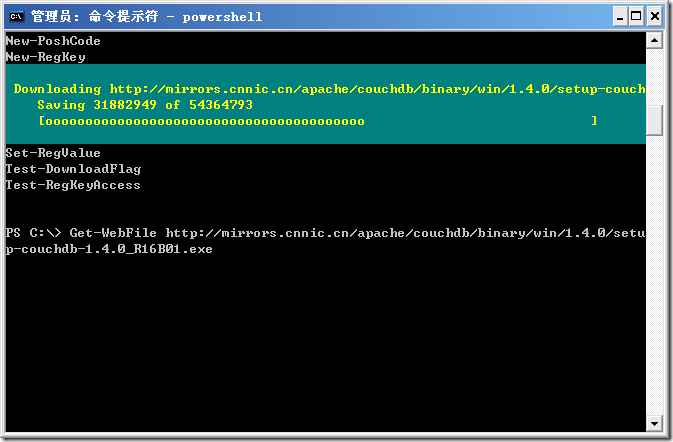
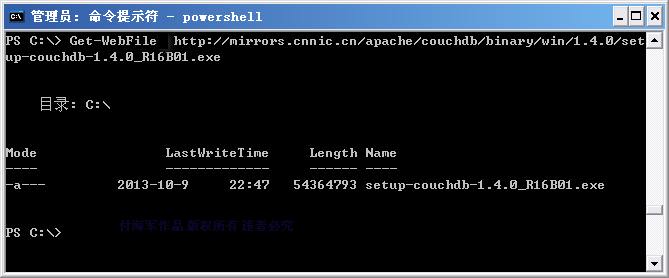
能够看到在下载文件的过程中会显示当前已下载数和总的文件大小,并且有进度条显示当前下载的进度,跟wget看起来是有些神似了。下载完毕后会显示已经下载文件的情况。
作者: 付海军
出处:http://fuhj02.cnblogs.com
版权:本文版权归作者和博客园共有
转载:欢迎转载,为了保存作者的创作热情,请按要求【转载】,谢谢
要求:未经作者同意,必须保留此段声明;必须在文章中给出原文连接且保证内容完整!否则必究法律责任!
个人网站: http://www.fuhaijun.com/
PowerShell实现文件下载(类wget)的更多相关文章
- php 支持断点续传的文件下载类
php 支持断点续传的文件下载类 分类: php class2013-06-30 17:27 17748人阅读 评论(6) 收藏 举报 php断点续传下载http测试 php 支持断点续传,主要依靠H ...
- [上传下载] C#FileDown文件下载类 (转载)
点击下载 FileDown.zip 主要功能如下 .参数为虚拟路径 .获取物理地址 .普通下载 .分块下载 .输出硬盘文件,提供下载 支持大文件.续传.速度限制.资源占用小 看下面代码吧 /// &l ...
- php实现的支持断点续传的文件下载类
通常来说,php支持断点续传,主要依靠HTTP协议中 header HTTP_RANGE实现. HTTP断点续传原理: Http头 Range.Content-Range()HTTP头中一般断点下载时 ...
- PHP基础文件下载类的简单封装
1: <?php 2: /** 3: * [FileDown 公用文件下载方法] 4: * @param [type] $filePath [文件路径(绝对路径或相对路径)] 5: */ 6: ...
- C# 文件下载类
using System; using System.Net; using System.IO; using System.Text; using System.Web; using System.W ...
- 封装qt http文件下载类
#include <QApplication> #include <QtWidgets> #include <QtNetwork> //downloads one ...
- Linux基础命令介绍七:网络传输与安全 wget curl rsync iptables
本篇接着介绍网络相关命令:wget 文件下载工具.curl 网络数据传输工具.rsync 文件传输工具等. 本篇接着介绍网络相关命令 1.wget 文件下载工具 wget [option]... [U ...
- Android 实现网络多线程APK文件下载
(转自:http://blog.csdn.net/mad1989/article/details/38421465) 实现原理 (1)首先获得下载文件的长度,然后设置本地文件的长度. (2)根据文件长 ...
- android下载简单工具类
功能是实现下载文件,图片或MP3等,为了简单起见使用单线程,此代码为MarsAndroid教程的复制品,放在此处,留着参考. 首先是一个得到字节流随后保存到内存卡上的工具类: package com. ...
随机推荐
- HTTP协议状态码详解(HTTP Status Code)
转自:http://www.cnblogs.com/shanyou/archive/2012/05/06/2486134.html 使用ASP.NET/PHP/JSP 或者javascript都会用到 ...
- [matlab] MATLAB 界面编程 傻瓜教程
>_<:在 MATLAB 的命令窗口(Command Window)中运行 guide 命令,来打开 GUIDE 界面,如下: >_<:然后,选择空模板(Blang GUI), ...
- Javascript中递归造成的堆栈溢出及解决方案
关于堆栈的溢出问题,在Javascript日常开发中很常见,Google了下,相关问题还是比较多的.本文旨在描述如何解决此类问题. 首先看一个实例(当然你可以使用更容易的方式实现,这里我们仅探讨递归) ...
- css圆环百分比
<!DOCTYPE html> <html> <head> <meta charset="UTF-8"> <title> ...
- paip.语义相关是否可在 哈米 的语义分析中应用
paip.语义相关是否可在 哈米 的语义分析中应用 作者Attilax 艾龙, EMAIL:1466519819@qq.com 来源:attilax的专栏 地址:http://blog.csdn. ...
- atitit.解决net.sf.json.JSONException There is a cycle in the hierarchy
atitit.解决net.sf.json.JSONException There is a cycle in the hierarchy 1. 环境:使用hibernate4跟个,,要不个哪的对象系列 ...
- 如何向Openstack社区提交一个新项目
前几天有个朋友问我:自己有一个idea不错的项目,也把基本的框架写好了,想贡献到Openstack社区,却不知道应该怎么做.正好之前我有过类似的经历,那么来分享一下我是如何向Openstack社区提交 ...
- Android自定义相机拍照、图片裁剪的实现
最近项目里面又要加一个拍照搜题的功能,也就是用户对着不会做的题目拍一张照片,将照片的文字使用ocr识别出来,再调用题库搜索接口搜索出来展示给用户,类似于小猿搜题.学霸君等app. 其实Android提 ...
- 查看Exchange邮件队列(queue)
#加载Exchange管理模块 Add-PSSnapin Microsoft.Exchange.Management.PowerShell.snapin get-queue #查看队列 get-mes ...
- WindowsPhone-GameBoy模拟器开发五--使用XNA初略实现Gameboy显示系统
开篇前,最近弄了个空间,大家不嫌弃的话可以上去讨论讨论J http://www.lihengzhe.cn 这一次,就来简单地实现gameboy的实现机制.先说一下本次内容涉及到的技术,其实也就一项—X ...