
JSON Web Token
What is JSON Web Token?
JSON Web Token (JWT) is an open standard (RFC 7519) that defines a compact and self-contained way for securely transmitting information between parties as a JSON object. This information can be verified and trusted because it is digitally signed. JWTs can be signed using a secret (with the HMAC algorithm) or a public/private key pair using RSA.
Let's explain some concepts of this definition further.
Compact: Because of its smaller size, JWTs can be sent through an URL, POST parameter, or inside an HTTP header. Additionally, the smaller size means transmission is fast.
Self-contained: The payload contains all the required information about the user, avoiding the need to query the database more than once.
When should you use JSON Web Tokens?
Here are some scenarios where JSON Web Tokens are useful:
Authentication: This is the most common scenario for using JWT. Once the user is logged in, each subsequent request will include the JWT, allowing the user to access routes, services, and resources that are permitted with that token. Single Sign On is a feature that widely uses JWT nowadays, because of its small overhead and its ability to be easily used across different domains.
Information Exchange: JSON Web Tokens are a good way of securely transmitting information between parties, because as they can be signed, for example using public/private key pairs, you can be sure that the senders are who they say they are. Additionally, as the signature is calculated using the header and the payload, you can also verify that the content hasn't been tampered with.
What is the JSON Web Token structure?
JSON Web Tokens consist of three parts separated by dots (.), which are:
- Header
- Payload
- Signature
Therefore, a JWT typically looks like the following.
xxxxx.yyyyy.zzzzz
Let's break down the different parts.
Header
The header typically consists of two parts: the type of the token, which is JWT, and the hashing algorithm being used, such as HMAC SHA256 or RSA.
For example:
{

  "alg": "HS256",

  "typ": "JWT"

}
Then, this JSON is Base64Url encoded to form the first part of the JWT.
Payload
The second part of the token is the payload, which contains the claims. Claims are statements about an entity (typically, the user) and additional metadata. There are three types of claims: reserved, public, and private claims.
Reserved claims: These is a set of predefined claims which are not mandatory but recommended, to provide a set of useful, interoperable claims. Some of them are: iss (issuer), exp (expiration time), sub (subject), aud (audience), and others.
Notice that the claim names are only three characters long as JWT is meant to be compact.
Public claims: These can be defined at will by those using JWTs. But to avoid collisions they should be defined in the IANA JSON Web Token Registry or be defined as a URI that contains a collision resistant namespace.
Private claims: These are the custom claims created to share information between parties that agree on using them.
An example of payload could be:
{

  "sub": "1234567890",

  "name": "John Doe",

  "admin": true

}
The payload is then Base64Url encoded to form the second part of the JSON Web Token.
Signature
To create the signature part you have to take the encoded header, the encoded payload, a secret, the algorithm specified in the header, and sign that.
For example if you want to use the HMAC SHA256 algorithm, the signature will be created in the following way:
HMACSHA256(

  base64UrlEncode(header) + "." +

  base64UrlEncode(payload),

  secret)
The signature is used to verify that the sender of the JWT is who it says it is and to ensure that the message wasn't changed along the way.
Putting all together
The output is three Base64 strings separated by dots that can be easily passed in HTML and HTTP environments, while being more compact when compared to XML-based standards such as SAML.
The following shows a JWT that has the previous header and payload encoded, and it is signed with a secret. 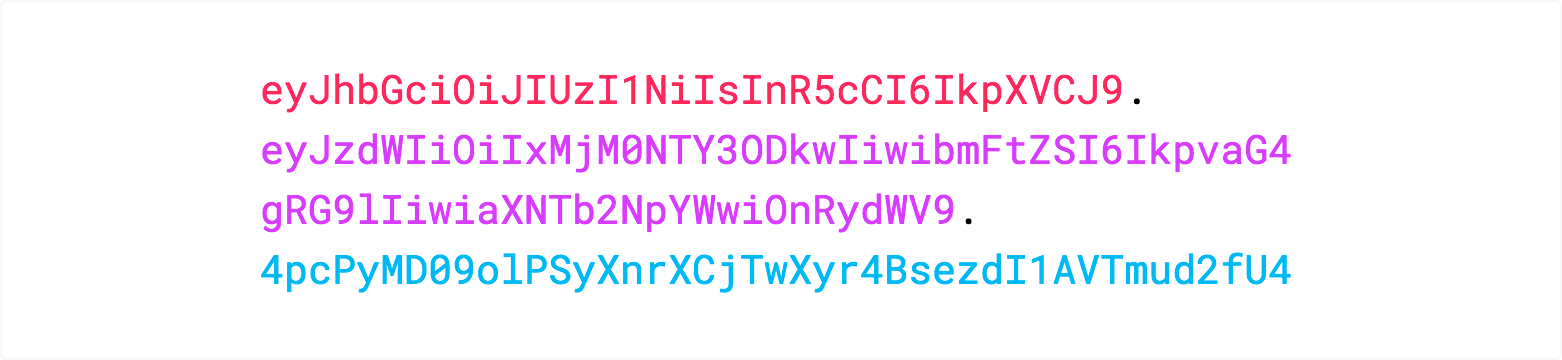
If you want to play with JWT and put these concepts into practice, you can use jwt.io Debugger to decode, verify, and generate JWTs.
https://jwt.io/introduction/
JSON Web Token的更多相关文章
- 使用Json Web Token设计Passport系统
>>Token Auth机制 基于Token的身份验证是无状态的,我们不将用户信息存在服务器或Session中. 相比原始的Cookie+Session方式,更适合分布式系统的用户认证,绕 ...
- JWT【JSON Web Token】 简述
draft: http://self-issued.info/docs/draft-ietf-oauth-json-web-token.html http://tools.ietf.org/html/ ...
- 八幅漫画理解使用JSON Web Token设计单点登录系统
用jwt这种token的验证方式,是不是必须用https协议保证token不被其他人拦截? 是的.因为其实只是Base64编码而已,所以很容易就被解码了.如果你的JWT被嗅探到,那么别人就可以相应地解 ...
- JSON Web Token - 在Web应用间安全地传递信息(zhuan)
来自 http://blog.leapoahead.com/2015/09/06/understanding-jwt/ JSON Web Token(JWT)是一个非常轻巧的规范.这个规范允许我们使用 ...
- [认证授权] 2.OAuth2(续) & JSON Web Token
0. RFC6749还有哪些可以完善的? 0.1. 撤销Token 在上篇[认证授权] 1.OAuth2授权中介绍到了OAuth2可以帮我们解决第三方Client访问受保护资源的问题,但是只提供了如何 ...
- Hacking JWT(JSON Web Token)
0x01 JWT工作流程 JSON Web Token(JWT)是一个非常轻巧的规范. 这个规范允许我们使用JWT在用户和服务器之间传递安全可靠的信息. JWT常被用于前后端分离,可以和Restful ...
- 什么是JWT(JSON WEB TOKEN)
转自于:http://www.jianshu.com/p/576dbf44b2ae 什么是JWT Json web token(JWT)是为了网络应用环境间传递声明而执行的一种基于JSON的开发标准( ...
- JSON Web Token - 在Web应用间安全地传递信息
转载自:http://blog.leapoahead.com/2015/09/06/understanding-jwt/ JSON Web Token(JWT)是一个非常轻巧的规范.这个规范允许我们使 ...
- JWT(JSON Web Token) 多网站的单点登录,放弃session
多个网站之间的登录信息共享, 一种解决方案是基于cookie - session的登录认证方式,这种方式跨域比较复杂. 另一种替代方案是采用基于算法的认证方式, JWT(json web token) ...
随机推荐
- 正则匹配中文.PHP不兼容的问题
不使用: ^[\u4e00-\u9fa5_a-zA-Z0-9_]+$ 有可能兼容有问题 if(!preg_match_all("/^[\\x7f-\\xff_a-zA-Z0-9]+$/&qu ...
- Smart ECM数据发布假数据测试工作。
1. ScriptBom.java//文件方法供接口调用 代码: public String setBomEcnHistoryDataByXML(String strView){//传入arg文件名 ...
- 20145225 实验四《Andoid开发基础》
实验内容 搭建Android环境 运行Android 修改代码,能输出学号 实验步骤 安装Android Studio 安装Android的SDK 运行Andriod Studio并在模拟手机上显示自 ...
- HTML: Css引入的四種方式
哪四種?這裏簡單進行下總結 ①寫在 style 標籤中 <style type="text/css"> 這裏是css代碼... </style> ②外部引入 ...
- win2003 老的ASP程序报错 Microsoft OLE DB Provider for Orac(0x80004005)
ASP连接ORACLE报错,记得环境刚配置完成的时候一切正常,今天莫名其妙的报错了 报错位置78行: 这是一个很老的系统,代码没人去东,只是从老的机器迁移到新的服务器中,想想应该是环境的问题 网上搜索 ...
- 在serviceImpl里使用自身的方法
@Service("tbLeaveRegisterService")@Transactionalpublic class TbLeaveRegisterServiceImpl ex ...
- hadoop、hbase、hive、zookeeper版本对应关系
本文引用自:http://www.aboutyun.com/blog-61-62.html 最新版本: hadoop和hbase版本对应关系: Hbase Hadoop 0.92.0 1.0.0 ...
- 【转】MySQL USE NAMES 'UTF8'
先说MySQL的字符集问题.Windows下可通过修改my.ini内的 # CLIENT SECTION [mysql] default-character-set=utf8 # SERVER SEC ...
- ubuntu下交叉编译windows c程序
简介 采用mingw32可以在linux下直接编译c程序输出为windows下的exe程序或dll链接库. 个人编译的纯c程序(不含winapi),主要是c99程序,通常采用gcc/cc编译调试后,再 ...
- hdu1231最大连续子序列
题目链接: http://acm.hdu.edu.cn/showproblem.php?pid=1231 #include<iostream> #include<cstdio> ...