
利用SQLiteOpenHelper来管理SQLite数据库 (转)
转载自 利用SQLiteOpenHelper来管理SQLite数据库
http://blog.csdn.net/conowen/article/details/7306545
* author:conowen@大钟
* E-mail:conowen@hotmail.com
* http://blog.csdn.net/conowen
* 注:本文为原创,仅作为学习交流使用,转载请标明作者及出处。
********************************************************************************************/
1、SQLiteOpenHelper介绍
通过上篇博文,http://blog.csdn.net/conowen/article/details/7276417,了解了SQLite数据库的相关操作方法,但是一般在实际开发中,为了更加方便地管理、维护、升级数据库,需要通过继承SQLiteOpenHelper类来管理SQLite数据库。
关于SQLiteOpenHelper的官方说明如下:
A helper class to manage database creation and version management.
You create a subclass implementing onCreate(SQLiteDatabase),onUpgrade(SQLiteDatabase, int, int) and optionallyonOpen(SQLiteDatabase), and this class takes care of opening the database if it exists, creating it if it does not, and upgrading it as necessary. Transactions are used to make sure the database is always in a sensible state.
This class makes it easy for ContentProvider implementations to defer opening and upgrading the database until first use, to avoid blocking application startup with long-running database upgrades.
For an example, see the NotePadProvider class in the NotePad sample application, in thesamples/ directory of the SDK.
简单翻译:SQLiteOpenHelper可以创建数据库,和管理数据库的版本。
在继承SQLiteOpenHelper的类(extends SQLiteOpenHelper)里面,通过复写onCreate(SQLiteDatabase),onUpgrade(SQLiteDatabase, int, int) 和onOpen(SQLiteDatabase)(可选)来操作数据库。
2、SQLiteOpenHelper()的具体用法
创建一个新的class如下所示,onCreate(SQLiteDatabase db)和onUpgrade(SQLiteDatabase db, int oldVersion, int newVersion)方法会被自动添加。
- /*
- * @author:conowen
- * @date:12.2.29
- */
- package com.conowen.sqlite;
- import android.content.Context;
- import android.database.sqlite.SQLiteDatabase;
- import android.database.sqlite.SQLiteDatabase.CursorFactory;
- import android.database.sqlite.SQLiteOpenHelper;
- public class DbHelper extends SQLiteOpenHelper{
- public DbHelper(Context context, String name, CursorFactory factory,
- int version) {
- super(context, name, factory, version);
- // TODO Auto-generated constructor stub
- }
- @Override
- public void onCreate(SQLiteDatabase db) {
- // TODO Auto-generated method stub
- }
- @Override
- public void onUpgrade(SQLiteDatabase db, int oldVersion, int newVersion) {
- // TODO Auto-generated method stub
- }
- }
方法详解
- public SQLiteOpenHelper (Context context, String name, SQLiteDatabase.CursorFactory factory, int version)
Create a helper object to create, open, and/or manage a database. This method always returns very quickly. The database is not actually created or opened until one ofgetWritableDatabase() orgetReadableDatabase() is called.
Parameters
| context | to use to open or create the database |
|---|---|
| name | of the database file, or null for an in-memory database |
| factory | to use for creating cursor objects, or null for the default |
| version | number of the database (starting at 1); if the database is older, onUpgrade(SQLiteDatabase, int, int) will be used to upgrade the database; if the database is newer,onDowngrade(SQLiteDatabase, int, int) will be used to downgrade the database |
参数简述:
name————表示数据库文件名(不包括文件路径),SQLiteOpenHelper类会根据这个文件名来创建数据库文件。
version————表示数据库的版本号。如果当前传入的数据库版本号比上一次创建的版本高,SQLiteOpenHelper就会调用onUpgrade()方法。
- public DbHelper(Context context, String name, CursorFactory factory,
- int version) {
- super(context, name, factory, version);
- // TODO Auto-generated constructor stub
- }
以上是SQLiteOpenHelper 的构造函数,当数据库不存在时,就会创建数据库,然后打开数据库(过程已经被封装起来了),再调用onCreate (SQLiteDatabase db)方法来执行创建表之类的操作。当数据库存在时,SQLiteOpenHelper 就不会调用onCreate (SQLiteDatabase db)方法了,它会检测版本号,若传入的版本号高于当前的,就会执行onUpgrade()方法来更新数据库和版本号。
3、SQLiteOpenHelper的两个主要方法
3.1、onCreate方法
- public abstract void onCreate (SQLiteDatabase db)<span class="normal"></span>
Called when the database is created for the first time. This is where the creation of tables and the initial population of the tables should happen.
Parameters
| db | The database. |
|---|
- //这样就创建一个一个table
- @Override
- public void onCreate(SQLiteDatabase db) {
- // TODO Auto-generated method stub
- String sql = "CREATE TABLE table_name(_id INTEGER PRIMARY KEY , filename VARCHAR, data TEXT)";
- db.execSQL(sql);
- }
3.2、onUpgrade方法
- public abstract void onUpgrade (SQLiteDatabase db, int oldVersion, int newVersion)
Called when the database needs to be upgraded. The implementation should use this method to drop tables, add tables, or do anything else it needs to upgrade to the new schema version.
The SQLite ALTER TABLE documentation can be found here. If you add new columns you can use ALTER TABLE to insert them into a live table. If you rename or remove columns you can use ALTER TABLE to rename the old table, then create the new table and then populate the new table with the contents of the old table.
Parameters
| db | The database. |
|---|---|
| oldVersion | The old database version. |
| newVersion | The new database version. |
更新数据库,包括删除表,添加表等各种操作。若版本是第一版,也就是刚刚建立数据库,onUpgrade()方法里面就不用写东西,因为第一版数据库何来更新之说,以后发布的版本,数据库更新的话,可以在onUpgrade()方法添加各种更新的操作。
4、注意事项
创建完SQLiteOpenHelper 类之后,在主activity里面就可以通过SQLiteOpenHelper.getWritableDatabase()或者getReadableDatabase()方法来获取在SQLiteOpenHelper 类里面创建的数据库实例。(也就是说只有调用这两种方法才真正地实例化数据库)
getWritableDatabase() 方法————以读写方式打开数据库,如果数据库所在磁盘空间满了,而使用的又是getWritableDatabase() 方法就会出错。
因为此时数据库就只能读而不能写,
getReadableDatabase()方法————则是先以读写方式打开数据库,如果数据库的磁盘空间满了,就会打开失败,但是当打开失败后会继续尝试以只读
方式打开数据库。而不会报错
=========================================================================================================
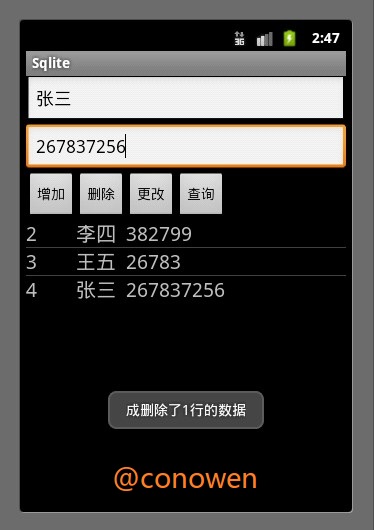
下面演示一个以SQLite的数据库为adapter的listview例子(也可以当做通讯录小工具)
效果图如下
- /*主activity
- * @author:conowen
- * @date:12.3.1
- */
- package com.conowen.sqlite;
- import android.app.Activity;
- import android.content.ContentValues;
- import android.database.Cursor;
- import android.database.sqlite.SQLiteDatabase;
- import android.os.Bundle;
- import android.view.View;
- import android.view.View.OnClickListener;
- import android.widget.Button;
- import android.widget.EditText;
- import android.widget.ListAdapter;
- import android.widget.ListView;
- import android.widget.SimpleCursorAdapter;
- import android.widget.Toast;
- public class SqliteActivity extends Activity {
- SQLiteDatabase sqldb;
- public String DB_NAME = "sql.db";
- public String DB_TABLE = "num";
- public int DB_VERSION = 1;
- final DbHelper helper = new DbHelper(this, DB_NAME, null, DB_VERSION);
- // DbHelper类在DbHelper.java文件里面创建的
- /** Called when the activity is first created. */
- @Override
- public void onCreate(Bundle savedInstanceState) {
- super.onCreate(savedInstanceState);
- setContentView(R.layout.main);
- sqldb = helper.getWritableDatabase();
- // 通过helper的getWritableDatabase()得到SQLiteOpenHelper所创建的数据库
- Button insert = (Button) findViewById(R.id.insert);
- Button delete = (Button) findViewById(R.id.delete);
- Button update = (Button) findViewById(R.id.update);
- Button query = (Button) findViewById(R.id.query);
- final ContentValues cv = new ContentValues();
- // ContentValues是“添加”和“更新”两个操作的数据载体
- updatelistview();// 更新listview
- // 添加insert
- insert.setOnClickListener(new OnClickListener() {
- @Override
- public void onClick(View v) {
- // TODO Auto-generated method stub
- EditText et_name = (EditText) findViewById(R.id.name);
- EditText et_phone = (EditText) findViewById(R.id.phone);
- cv.put("name", et_name.getText().toString());
- cv.put("phone", et_phone.getText().toString());
- // name和phone为列名
- long res = sqldb.insert("addressbook", null, cv);// 插入数据
- if (res == -1) {
- Toast.makeText(SqliteActivity.this, "添加失败",
- Toast.LENGTH_SHORT).show();
- } else {
- Toast.makeText(SqliteActivity.this, "添加成功",
- Toast.LENGTH_SHORT).show();
- }
- updatelistview();// 更新listview
- }
- });
- // 删除
- delete.setOnClickListener(new OnClickListener() {
- @Override
- public void onClick(View v) {
- // TODO Auto-generated method stub
- int res = sqldb.delete("addressbook", "name='大钟'", null);
- // 删除列名name,行名为“大钟”的,这一行的所有数据,null表示这一行的所有数据
- // 若第二个参数为null,则删除表中所有列对应的所有行的数据,也就是把table清空了。
- // name='大钟',大钟要单引号的
- // 返回值为删除的行数
- if (res == 0) {
- Toast.makeText(SqliteActivity.this, "删除失败",
- Toast.LENGTH_SHORT).show();
- } else {
- Toast.makeText(SqliteActivity.this, "成删除了" + res + "行的数据",
- Toast.LENGTH_SHORT).show();
- }
- updatelistview();// 更新listview
- }
- });
- // 更改
- update.setOnClickListener(new OnClickListener() {
- @Override
- public void onClick(View v) {
- // TODO Auto-generated method stub
- cv.put("name", "大钟");
- cv.put("phone", "1361234567");
- int res = sqldb.update("addressbook", cv, "name='张三'", null);
- // 把name=张三所在行的数据,全部更新为ContentValues所对应的数据
- // 返回时为成功更新的行数
- Toast.makeText(SqliteActivity.this, "成功更新了" + res + "行的数据",
- Toast.LENGTH_SHORT).show();
- updatelistview();// 更新listview
- }
- });
- // 查询
- query.setOnClickListener(new OnClickListener() {
- @Override
- public void onClick(View v) {
- // TODO Auto-generated method stub
- Cursor cr = sqldb.query("addressbook", null, null, null, null,
- null, null);
- // 返回名为addressbook的表的所有数据
- Toast.makeText(SqliteActivity.this,
- "一共有" + cr.getCount() + "条记录", Toast.LENGTH_SHORT)
- .show();
- updatelistview();// 更新listview
- }
- });
- }
- // 更新listview
- public void updatelistview() {
- ListView lv = (ListView) findViewById(R.id.lv);
- final Cursor cr = sqldb.query("addressbook", null, null, null, null,
- null, null);
- String[] ColumnNames = cr.getColumnNames();
- // ColumnNames为数据库的表的列名,getColumnNames()为得到指定table的所有列名
- ListAdapter adapter = new SimpleCursorAdapter(this, R.layout.layout,
- cr, ColumnNames, new int[] { R.id.tv1, R.id.tv2, R.id.tv3 });
- // layout为listView的布局文件,包括三个TextView,用来显示三个列名所对应的值
- // ColumnNames为数据库的表的列名
- // 最后一个参数是int[]类型的,为view类型的id,用来显示ColumnNames列名所对应的值。view的类型为TextView
- lv.setAdapter(adapter);
- }
- }
- /*SQLiteOpenHelper类
- * @author:conowen
- * @date:12.3.1
- */
- package com.conowen.sqlite;
- import android.content.Context;
- import android.database.sqlite.SQLiteDatabase;
- import android.database.sqlite.SQLiteDatabase.CursorFactory;
- import android.database.sqlite.SQLiteOpenHelper;
- public class DbHelper extends SQLiteOpenHelper {
- public DbHelper(Context context, String name, CursorFactory factory,
- int version) {
- super(context, name, factory, version);
- // TODO Auto-generated constructor stub
- }
- @Override
- public void onCreate(SQLiteDatabase db) {
- // TODO Auto-generated method stub
- String sql = "CREATE TABLE addressbook (_id INTEGER PRIMARY KEY , name VARCHAR, phone VARCHAR)";
- db.execSQL(sql);
- }
- @Override
- public void onUpgrade(SQLiteDatabase db, int oldVersion, int newVersion) {
- // TODO Auto-generated method stub
- }
- }
main.xml
- <?xml version="1.0" encoding="utf-8"?>
- <LinearLayout xmlns:android="http://schemas.android.com/apk/res/android"
- android:layout_width="fill_parent"
- android:layout_height="fill_parent"
- android:orientation="vertical" >
- <EditText
- android:id="@+id/name"
- android:layout_width="fill_parent"
- android:layout_height="wrap_content" />
- <EditText
- android:id="@+id/phone"
- android:layout_width="fill_parent"
- android:layout_height="wrap_content" />
- <LinearLayout
- android:id="@+id/linearLayout1"
- android:layout_width="fill_parent"
- android:layout_height="wrap_content" >
- <Button
- android:id="@+id/insert"
- android:layout_width="wrap_content"
- android:layout_height="wrap_content"
- android:text="增加" />
- <Button
- android:id="@+id/delete"
- android:layout_width="wrap_content"
- android:layout_height="wrap_content"
- android:text="删除" />
- <Button
- android:id="@+id/update"
- android:layout_width="wrap_content"
- android:layout_height="wrap_content"
- android:text="更改" />
- <Button
- android:id="@+id/query"
- android:layout_width="wrap_content"
- android:layout_height="wrap_content"
- android:text="查询" />
- </LinearLayout>
- <ListView
- android:id="@+id/lv"
- android:layout_width="fill_parent"
- android:layout_height="wrap_content" >
- </ListView>
- </LinearLayout>
ListView的布局文件layout.xml
- <?xml version="1.0" encoding="utf-8"?>
- <LinearLayout xmlns:android="http://schemas.android.com/apk/res/android"
- android:layout_width="fill_parent"
- android:layout_height="fill_parent"
- android:orientation="horizontal" >
- <TextView
- android:id="@+id/tv1"
- android:layout_width="wrap_content"
- android:layout_height="wrap_content"
- android:textSize="20sp"
- android:width="50px" />
- <TextView
- android:id="@+id/tv2"
- android:layout_width="wrap_content"
- android:layout_height="wrap_content"
- android:textSize="20sp"
- android:width="50px"
- />
- <TextView
- android:id="@+id/tv3"
- android:layout_width="wrap_content"
- android:layout_height="wrap_content"
- android:textSize="20sp"
- android:width="150px" />
- </LinearLayout>
利用SQLiteOpenHelper来管理SQLite数据库 (转)的更多相关文章
- 在VB中利用Nuget包使用SQLite数据库和Linq to SQLite
上午解决了在C#中利用Nuget包使用SQLite数据库和Linq to SQLite,但是最后生成的是C#的cs类文件,对于我这熟悉VB而对C#白痴的来说怎么能行呢? 于是下午接着研究,既然生成的是 ...
- 在Android中查看和管理sqlite数据库
在Android中可以使用Eclipse插件DDMS来查看,也可以使用Android工具包中的adb工具来查看.android项目中的sqlite数据库位于/data/data/项目包/databas ...
- 在C#中利用Nuget包使用SQLite数据库和Linq to SQLite
本来是学习在VB中使用SQLite数据库和Linq to SQLite,结果先学习到了在C#中使用SQLite数据库和Linq to SQLite的方法,写出来与大家共同学习.(不知道算不算不务正业) ...
- Android 查看和管理sqlite数据库
在Android中可以使用Eclipse插件DDMS来查看,也可以使用Android工具包中的adb工具来查看.android项目中的sqlite数据库位于/data/data/项目包/databas ...
- Android学习记录:SQLite数据库、res中raw的文件调用
SQLite数据库是一种轻量级的关系型数据库. 在android中保存数据或调用数据库可以利用SQLite. android中提供了几个类来管理SQLite数据库 SQLiteDatabass类用来对 ...
- SQLite数据库增删改查
一:SQLite数据库简介: SQLite是一种轻量级的关系型数据库,官网:http://www.sqlite.org/. SQLite数据库文件存在于移动设备的一下目录中:data->data ...
- android中与SQLite数据库相关的类
为什么要在应用程序中使用数据库?数据库最主要的用途就是作为数据的存储容器,另外,由于可以很方便的将应用程序中的数据结构(比如C语言中的结构体)转化成数据库的表,这样我们就可以通过操作数据库来替代写一堆 ...
- SQLite数据库学习小结——Frameworks层实现
3. SQLite的Frameworks层实现 3.1 Frameworks层架构 Android系统方便应用使用,在Frameworks层中封装了一套Content框架,之所以叫Content框架而 ...
- SQLite数据库下载、安装和学习
SQLite 是一个开源的嵌入式关系数据库,实现自包容.零配置.支持事务的SQL数据库引擎. 其特点是高度便携.使用方便.结构紧凑.高效.可靠.与其他数据库管理系统不同,SQLite 的安装和运行非常 ...
随机推荐
- mysql 用户方面的操作
1.只新建用户的操作 mysql -u root -p密码mysql> insert into mysql.user(Host,User,Password) values(‘localhost’ ...
- struts2基本配置
struts.xml 放在src目录下 <?xml version="1.0" encoding="UTF-8"?> <struts> ...
- 不使用配置文件动态注册HttpModule
在asp.net 4.0中,提供了一种不通过修改配置文件注册Module的方法.从.net3.5开始,新提供的PreApplicationStartMethodAttribute特性可以应用在程序集上 ...
- 深入浅出 - Android系统移植与平台开发(五)- 编译Android源码(转)
2.3编译Android源码 Android源码体积非常庞大,由Dalvik虚拟机.Linux内核.编译系统.框架代码.Android定制C库.测试套件.系统应用程序等部分组成,在编译Android源 ...
- 12个常用的js正则表达式
在这篇文章里,我已经编写了12个超有用的正则表达式,这可是WEB开发人员的最爱哦. 1.在input框中只能输入金额,其实就是只能输入最多有两位小数的数字 //第一种在input输入框限制 <i ...
- 【社招】来杭州吧,阿里国际UED招前端~~
来杭州吧,阿里国际UED招前端~~ 依稀记得,几年前在北京的日子,两点一线的生活方式,似乎冲淡模糊了身边的一切,印象最深刻的莫过于北京的地铁站了吧(因为只有等地铁,搭地铁的时候,才能够停下脚步,静静地 ...
- DiscuzX程序升级教程_不知道关闭论坛的看过来
DiscuzX程序升级教程,不知道关闭论坛的朋友看过来,适用于 1.0, 1.5 2.0 , 2.5Beta, 2.5RC,2.5, 3.0 1)关闭论坛:后台- 全局- 站点信息- 是否关闭 :是 ...
- js实现把网页table导成Excel
//导出excel function exportExcel(DivID,strTitle){ if(DivID==null) { return false; } var jXls, myWorkbo ...
- 【Android代码片段之六】Toast工具类(实现带图片的Toast消息提示)
转载请注明出处,原文网址:http://blog.csdn.net/m_changgong/article/details/6841266 作者:张燕广 实现的Toast工具类ToastUtil封装 ...
- 滑动菜单栏(一)开源项目SlidingMenu的使用
本帖最后由 user1 于 2013-7-16 21:56 编辑 一.SlidingMenu简介相信大家对SlidingMenu都不陌生了,它是一种比较新的设置界面或配置界面的效果,在主界面左滑或者右 ...