
stimulsoft Report报表使用笔记
1.使用设计器设计mrt报表模板,或者从其他文件复制修改
2.删除business object 数据源
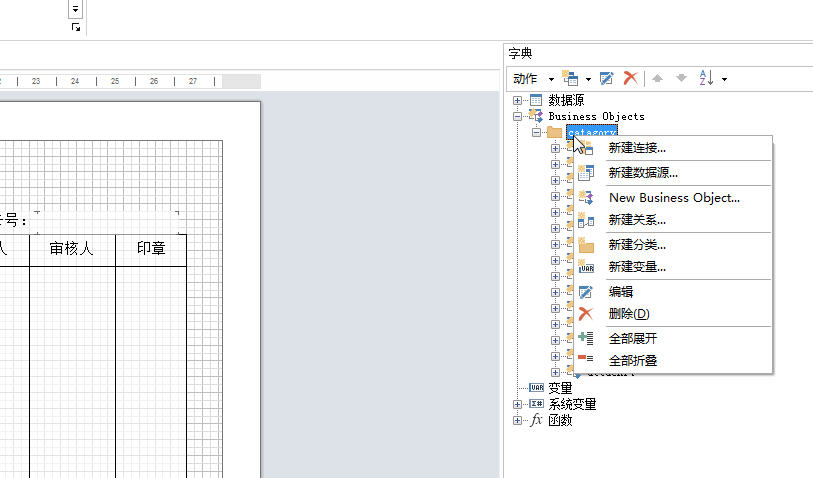
3.使用代码添加数据源
ParcelChangeItem change = new ParcelChangeItem();
string filename = @"D:\worki\xxx信息.mrt";
Stimulsoft.Report.StiReport report = new StiReport();
report.Load(filename);
report.Dictionary.Clear();
report.RegBusinessObject("parcel", parcel);
report.Dictionary.SynchronizeBusinessObjects(1);
report.Dictionary.Synchronize();
report.Save(filename);
4.再绑定报表各字段,字段上右键,选设计。
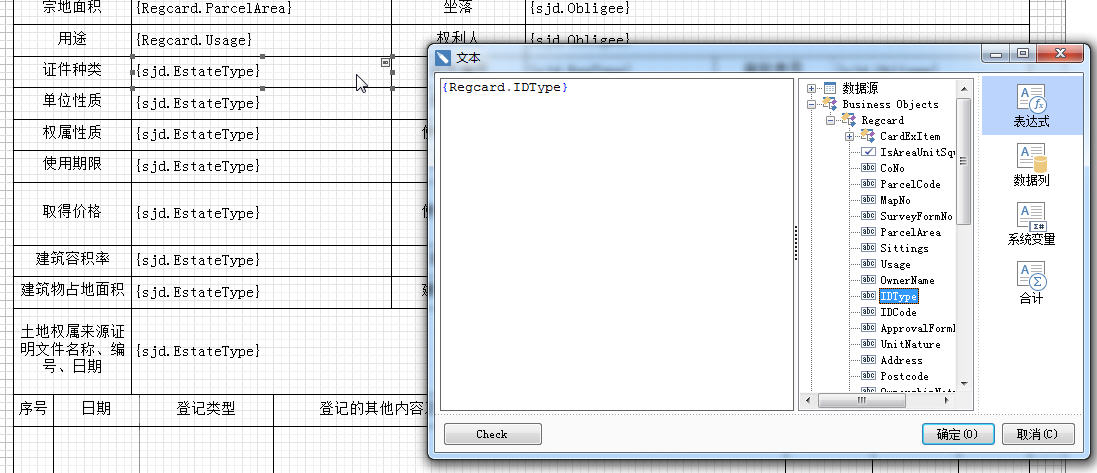
5.使用
RegcardEx aa = new RegcardEx()
{
ExIndex = "22",
RegDate = "2015-9-9",
RegType = "初始登记",
RegContent = "aaaaa"
};
RegcardParcel parcel = new RegcardParcel()
{
ParcelCode = "aaaaaa",
IsAreaUnitSquaremeter = true,
OwnerName = "xt张三",
CardExItem = aa
};
StiReport report = new StiReport();
report.Load(@"F:\stimulsoft报表\报表模板\土地登记卡.mrt");
report.RegBusinessObject("land", "Regcard", parcel);
report.Compile();
report.Render(true);
report.Show();
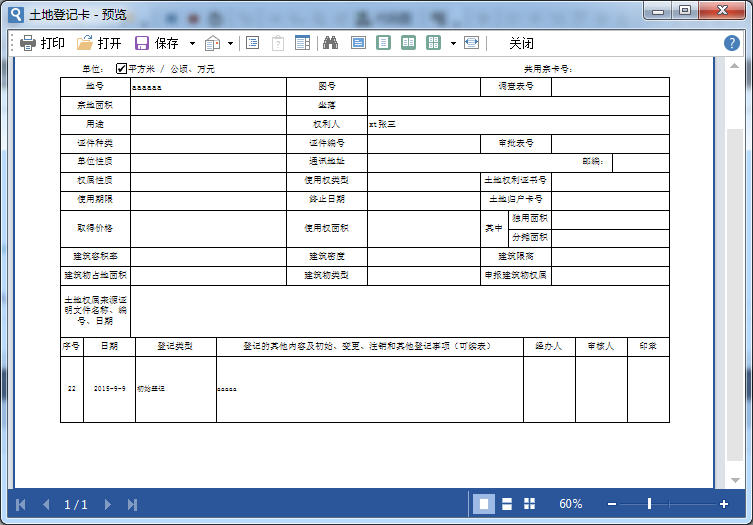
注意,定义的对象,类名,与报表里的名称关键字不可以重名,否则报对象已存在错误。
其他类型使用待补充
列表及底部边线
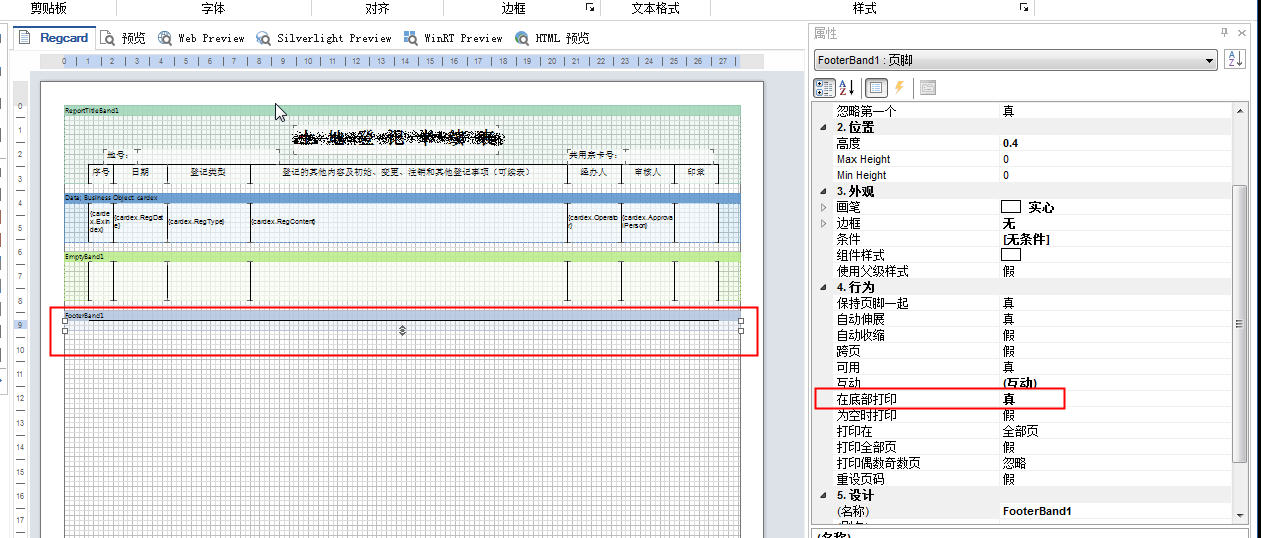
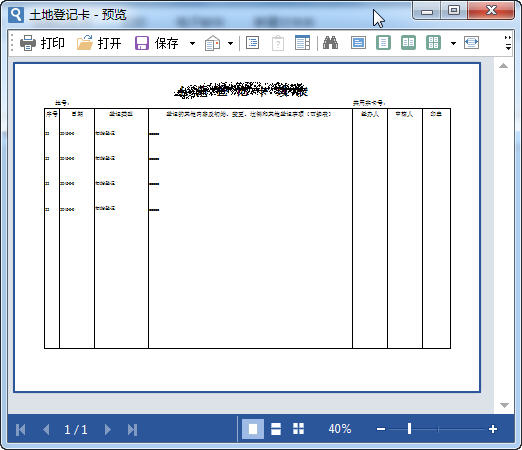
List<RegcardEx> cers = new List<RegcardEx>() {
new RegcardEx(){ExIndex = "22",RegDate = "2015-9-9",RegType = "初始登记",RegContent = "aaaaa" },
new RegcardEx(){ExIndex = "22",RegDate = "2015-9-9",RegType = "初始登记",RegContent = "aaaaa" },
new RegcardEx(){ExIndex = "22",RegDate = "2015-9-9",RegType = "初始登记",RegContent = "aaaaa" },
new RegcardEx(){ExIndex = "22",RegDate = "2015-9-9",RegType = "初始登记",RegContent = "aaaaa" },
};
StiReport report = new StiReport();
report.Load(@"F:\stimulsoft报表\报表模板\土地登记卡续表.mrt");
report.RegBusinessObject("land", "cardex", cers);
report.Compile();
report.Render(true);
report.Show();
}
stimulsoft Report报表使用笔记的更多相关文章
- jQuery + Stimulsoft.Report 选择gridview多行打印
jQuery + Stimulsoft.Report 报表空间打印多个ID split函数,多行ID 1. 获取选择多行ID(前台) //按钮-打印 function PrinterWorkQuali ...
- Stimulsoft.Report.net报表简单实用
1 using System; using System.Collections.Generic; using System.Linq; using System.Web; using System. ...
- Stimulsoft报表操作笔记(一):统计
一.引言 报表大家应该都知道是什么,简单来说就是用表格.图表等格式来动态显示数据.现在web系统中很多需要使用到报表统计.打印功能等,将所需用到的数据绑定到指定的位置,然后分类汇总,这样查看起来更清晰 ...
- stimulsoft report工具—— 简单的多表连接打印报表例子
一.用报表工具打印多个表格信息(包括学生表.教师表.班级表) 1.准备打印的数据(用sqlserver) 1)班级表
- 二十六、【开源框架】EFW框架Winform前端开发之Grid++Report报表、条形码、Excel导出、图表控件
回<[开源]EFW框架系列文章索引> EFW框架源代码下载V1.2:http://pan.baidu.com/s/1hcnuA EFW框架实例源代码下载:http://pan ...
- 机房收费系统中的Grid++Report报表设计器的应用
在进行账单查询功能的时候我应用了Grid++Report报表设计器,下面我就为大家介绍一下,还望大家多多指点. 首先,在Grid++Report报表设计器中进行报表界面的设置.在属性编辑窗口中这里对报 ...
- Grid++Report 报表开发工具
Grid++Report 报表开发工具 版本 更新日期 大小 下载 说明 Grid++Repoert6.0.0.6 2015/08/08 16.0M [下载] 锐浪报表工具最新版本,新增功能说 ...
- Stimulsoft.Report.web viewer控件添加按钮
当你购买了带源码的时候,你可以对源码进行修改以达到自己想要的效果,比较这里讲到的,向viewer控件工具栏添加按钮. 通过源码目录可以看出我们需要修改的有两部分代码 红色方块圈中的部分,[StiWeb ...
- Grid++Report报表工具C/S实战篇(五)
一.课程介绍 本次分享课程属于<C#高级编程实战技能开发宝典课程系列>中的第五部分,阿笨后续会计划将实际项目中的一些比较实用的关于C#高级编程的技巧分享出来给大家进行学习,不断的收集.整理 ...
随机推荐
- js前台加密,java后台解密实现
参考资料: JS前台加密,java后台解密实现
- REGEX.C GNU 提取过滤数据
今天被@SVCHAO 勾起兴趣来了.. 有把正则表达式兴趣捡起来了,试了下notepad++基本上语法倒是没有忘记,不过如果是用在嵌入式的方案的话,似乎还是有点费劲的. 先mark一个基础语法. 单 ...
- 总是弹出visual studio 实时调试器 三种解决办法
最近服务器老是弹出visual studio 实时调试器很是郁闷呀.关还关不掉.怎么解决呢 ,现像如下图所示: 下面我们一起来分析一下这种情况的原因: 弹出应用程序: Visual Studio 实时 ...
- python-print
%s,%d就是占位符.还有%r 只是说明这样的对应:%s-->str();%r-->repr(),什么意思呢?就是说%s调用的是str()函数把对象转化为str类型,而%r是调用了repr ...
- vs2008及以上的ActiveX测试容器在哪儿
解压缩 vssetupdir \Samples\1033\VC2010Samples.zip ,位于C++\MFC\ole\TstCon\ vs2008中的sample的话,要改TCProps项目的L ...
- CG Rendering v.s. Browser Rendering
浏览器的渲染技术 v.s. CG渲染器的渲染技术 看了两篇文章: 浏览器的渲染原理简介, How browsers work(译文), 想到了一些东西, 对比两者, 或许有些东西能想得更明白些. 以下 ...
- 原生js+本地储存登录注册
//简易操作,只能当前页面储存一个username和password. <!DOCTYPE html> <html> <head> <meta charset ...
- Spark常用函数(源码阅读六)
源码层面整理下我们常用的操作RDD数据处理与分析的函数,从而能更好的应用于工作中. 连接Hbase,读取hbase的过程,首先代码如下: def tableInitByTime(sc : SparkC ...
- HDU 1394 Minimum Inversion Number(最小逆序数 线段树)
Minimum Inversion Number [题目链接]Minimum Inversion Number [题目类型]最小逆序数 线段树 &题意: 求一个数列经过n次变换得到的数列其中的 ...
- Json转Java Bean
//json字符串为Bean Device device = JSON.parseObject(jsonString, Device.class); //json字符串转List List<Mo ...