
c# .NET Framework 版本确定
关于.NET Framework 版本信息这里做个介绍:
1. 编译时,工程的目标的 .NET Framework 版本
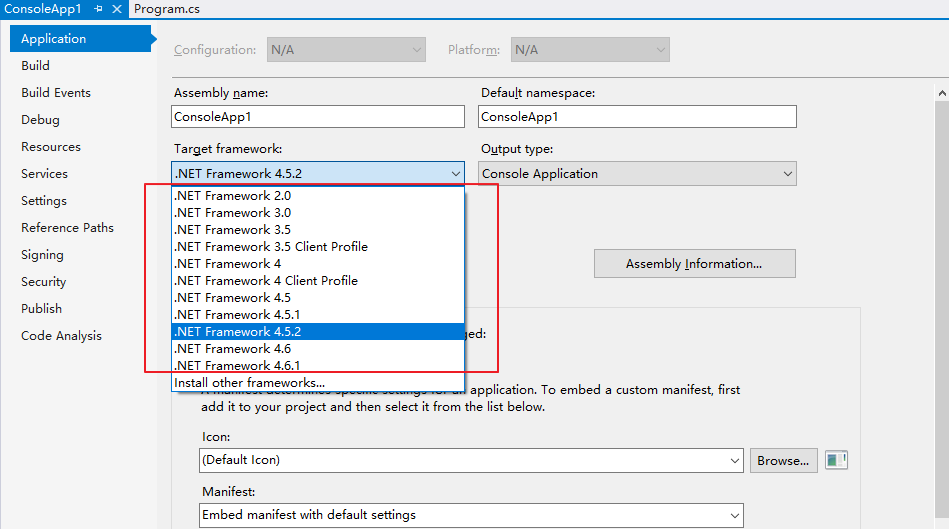
同样的代码,我先选择.net 4.0,就发现有语法错误,原因是4.0版本还没提供这个API

改选 .net 4.5,语法错误消失了,因为这个API在后续的 .net已经添加了

但是运行起来,真正使用的 .NET Framework版本就不一定是目标版本了。
2. 运行时实际的Framework版本
真实运行的Framework版本跟机器安装的 Framework 版本有关,如果目标是4.5,机器上只装了 4.8。
那么由于向下兼容的原则,运行时CLR就会使用4.8去运行程序。如果机器只安装了3.5,那么CLR就会弹出一个提示框让用户去安装 4.5。
如何确定机器安装的 Framework版本呢?一般都是查看注册表:
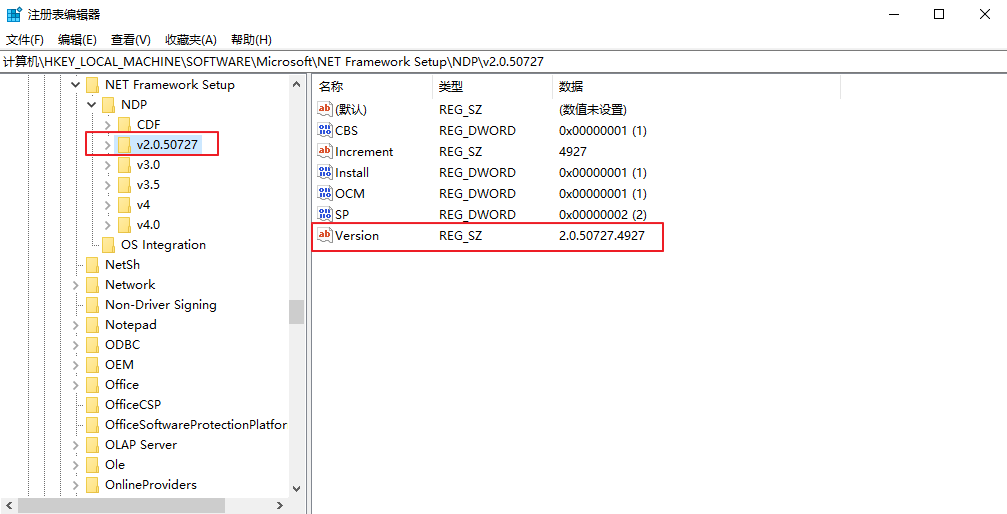
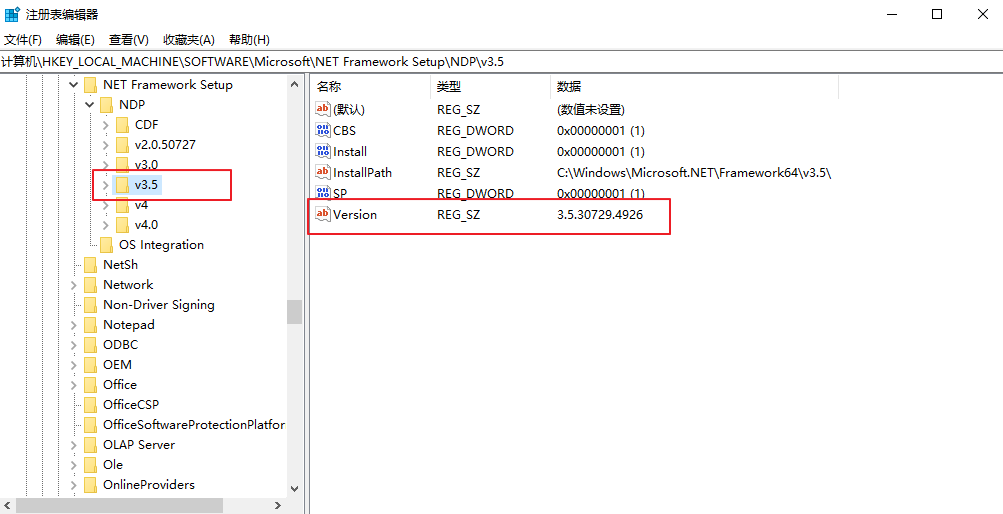
输入 regedit 打开注册表,并找到这一项:
计算机\HKEY_LOCAL_MACHINE\SOFTWARE\Microsoft\NET Framework Setup\NDP
.NET Framework 4.5之前的版本可以这样依次确认:
4.5以及之后的版本需要这样确认:
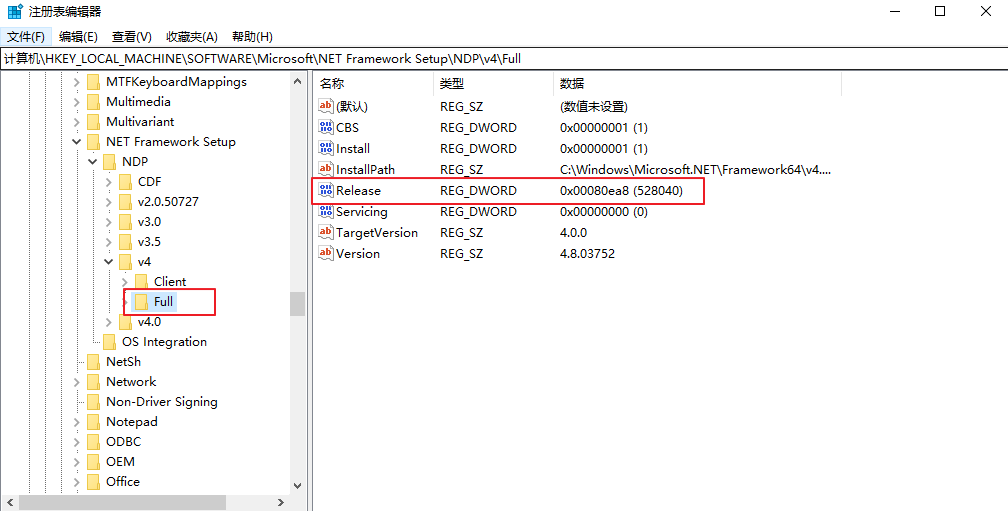
Release的值对应了 .NET Framework版本,下面是微软列举每个版本的值
| .NET Framework version | Value of the Release DWORD |
|---|---|
| .NET Framework 4.5 | All Windows operating systems: 378389 |
| .NET Framework 4.5.1 | On Windows 8.1 and Windows Server 2012 R2: 378675 On all other Windows operating systems: 378758 |
| .NET Framework 4.5.2 | All Windows operating systems: 379893 |
| .NET Framework 4.6 | On Windows 10: 393295 On all other Windows operating systems: 393297 |
| .NET Framework 4.6.1 | On Windows 10 November Update systems: 394254 On all other Windows operating systems (including Windows 10): 394271 |
| .NET Framework 4.6.2 | On Windows 10 Anniversary Update and Windows Server 2016: 394802 On all other Windows operating systems (including other Windows 10 operating systems): 394806 |
| .NET Framework 4.7 | On Windows 10 Creators Update: 460798 On all other Windows operating systems (including other Windows 10 operating systems): 460805 |
| .NET Framework 4.7.1 | On Windows 10 Fall Creators Update and Windows Server, version 1709: 461308 On all other Windows operating systems (including other Windows 10 operating systems): 461310 |
| .NET Framework 4.7.2 | On Windows 10 April 2018 Update and Windows Server, version 1803: 461808 On all Windows operating systems other than Windows 10 April 2018 Update and Windows Server, version 1803: 461814 |
| .NET Framework 4.8 | On Windows 10 May 2019 Update and Windows 10 November 2019 Update: 528040 On all other Windows operating systems (including other Windows 10 operating systems): 528049 |
3. 关于CLR版本
除了.NET Framework的assembly,还有CLR(公共语言运行时),它负责管理执行code,它的版本需要这样确认:
输入命令:clrver
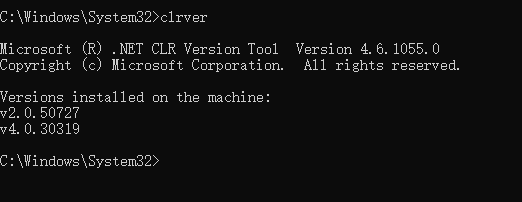
CLR 2.0可以管理 .NET Framework 2.0 3.0 3.5
CLR 4.0可以管理 .NET Framework 4.0 4.5 4.5以上版本
4. 其他
.net 3.5 需要开启windows功能才能正常使用,如下图:

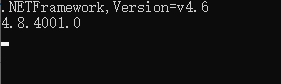
用code 辨识版本号
// 工程配置的目标Framework版本
Console.WriteLine(AppDomain.CurrentDomain.SetupInformation.TargetFrameworkName);
// 实际真实运行的Framework版本
Console.WriteLine(FileVersionInfo.GetVersionInfo(typeof(Uri).Assembly.Location).ProductVersion);
结果
.NET 4.0 和 .NET 4.0 Client Profile 版本的区别:
4 Client Profile 是.4的子集,更轻量,更小
c# .NET Framework 版本确定的更多相关文章
- .NET FRAMEWORK版本:4.0.30319; ASP.NET版本:4.6.118.0
https://gqqnbig.me/2015/11/23/net-framework%e7%89%88%e6%9c%ac4-0-30319-asp-net%e7%89%88%e6%9c%ac4-6- ...
- c# 获取系统版本,获取net framework 版本(Environment 类)
1.获取当前操作系统版本信息 使用Environment.OSVersion 属性 获取包含当前平台标识符和版本号的 OperatingSystem 对象. 命名空间: System程序集: ms ...
- vs版本与.net framework 版本对应
vs2002 .net framework 1.0 vs2003 版本号:7.x .net framework 1.1 window server 2003 vs2005 版本号:8.x . ...
- 查看.Net Framework版本的方法
乐博网最新补充(乐博网一步步教你如何最快查看本机.net framework的版本): 方法一: 第一步: 打开“我的电脑“,在地址栏输入 %systemroot%\Microsoft.NET\Fr ...
- Windows查看电脑上安装的.Net Framework版本的五种方法(转)
1.查看安装文件判断Framwork版本号 打开资源管理器,比如我的电脑,再地址栏输入%systemroot%\Microsoft.NET\Framework后单击“转到”或者按回车. 在新文件夹中查 ...
- NET Framework 版本和依赖关系
原文:https://docs.microsoft.com/zh-cn/dotnet/framework/migration-guide/versions-and-dependencies 每个版本的 ...
- 查看Windows电脑上.NET Framework版本的方法(找了好久的方法)
照网上大多数人的方法,在路径 C:\Windows\Microsoft.NET\Framework 下可以查看到.NET Framework的版本,不过无论Win7还是Win10,显示都是这样的: 那 ...
- Visual Studio 2015 没显示可用的.Net Framework版本
安装了VS 2015企业版, 然后在创建工程的时候遇到了一个问题: 当我选择Framework版本时候, 列表是空的, 如下图所示: 是生成工具出现了问题,所以尝试又安装了下 "Micros ...
- .NET Framework 版本和依赖关系[微软官方文档]
.NET Framework 版本和依赖关系 微软官方文档: https://docs.microsoft.com/zh-cn/dotnet/framework/migration-guide/ver ...
- [转帖] .NET FrameWork 版本的确定方法
检测电脑安装的net framework版本 https://msdn.microsoft.com/en-us/library/hh925568(v=vs.110).aspx To find .N ...
随机推荐
- 源码包安装转换rpm包
目录 纯净版虚拟机 1. 先安装个虚拟机,登陆nginx官网 http://nginx.org/选择一个稳定的版本 2. 右键复制地址,到新克隆的纯净虚拟机wget 下载 3.源码包 4.解压 tar ...
- bayaim_linux_configure_oracle
---------------------------bayaim_linux_install_oracle_11g--2.0------------------------------------- ...
- C/S与B/S架构
目录 软件开发架构 C/S架构 数据放在服务端和客户端的利弊: B/S架构 软件开发架构 开发软件,必须要开发一套 客户端 和 服务端 服务端与客户端的作用 服务端:24小时不间断提供服务 客户端:享 ...
- 堆与栈(heap and stack)在c/c++的应用(概念)
在学习c/c++时,我们经常会遇到 堆与栈 的问题,今天就来讲一下各类情况下的heap,stack的应用. 程序内存布局场景下,堆与栈表示两种内存管理方式: 1.内部分配时,堆和栈表示两种不同的内存管 ...
- 如何下载Youtube上的视频, 字幕, MP3等资源, 方法简单直接!
Youtube不用多说了吧,秒杀国内一众视频平台,没有之一, 既然关注Youtube说明大家对Youtube都是认同的.不用说4K,8K视频,比起国内一些伪4K, 真的良心, 就连广告也是5秒跳过, ...
- python27期jquery:
JavaScript:(简称“JS”) 是一种轻量级的编程语言(ECMAscript5或6)是一种解释性脚本语言(代码不进行预编译)主要用来向HTML页面添加交互行为JavaScript 是互联网上最 ...
- lincense更新失败
用户的证书到期,页面无法访问, 1 #/dashboard/systemindex在这里面上传证书文件,一分钟后会恢复正常 2 在后台直接配置license字段,将license文件的内容直接拷贝过去 ...
- 【2019.8.12 慈溪模拟赛 T1】钥匙(key)(暴力DP)
暴力\(DP\) 这题做法很多,有\(O(n^2)\)的,有\(O(n^2logn)\)的,还有徐教练的\(O(nlogn)\)的,甚至还有\(bzt\)的二分+线段树优化建图的费用流. 我懒了点,反 ...
- 【转】Struts2 表单验证与验证框架
版权声明:好笔头不如烂记性 https://blog.csdn.net/zsbgood/article/details/81114038 表单数据验证是很常见的功能,通常前端页面会有一次 js验证,但 ...
- 探索clickout指令实现
实现一个可复用的点击区域之外方法 随着3大框架的风靡,我们从以前的layer等UI库迁移到了更加强大的UI库,比如vue的好伙伴element,组件库的作用是封装一些常用的功能,将HTML.CSS.J ...