
配置中心入门案例以及出现Could not resolve placeholder 'XXX' in value "${XXX}"的解决方式
<?xml version="1.0" encoding="UTF-8"?>

<project xmlns="http://maven.apache.org/POM/4.0.0" xmlns:xsi="http://www.w3.org/2001/XMLSchema-instance"

         xsi:schemaLocation="http://maven.apache.org/POM/4.0.0 https://maven.apache.org/xsd/maven-4.0.0.xsd">

    <modelVersion>4.0.0</modelVersion>

    <parent>

        <groupId>org.springframework.boot</groupId>

        <artifactId>spring-boot-starter-parent</artifactId>

        <version>2.1.11.RELEASE</version>

        <relativePath/> <!-- lookup parent from repository -->

    </parent>

    <groupId>com.bjsxt</groupId>

    <artifactId>config-server</artifactId>

    <version>0.0.1-SNAPSHOT</version>

    <name>config-server</name>

    <description>config-server</description>

    <properties>

        <java.version>1.8</java.version>

        <spring-cloud.version>Greenwich.SR4</spring-cloud.version>

    </properties>

    <dependencies>

        <dependency>

            <groupId>org.springframework.boot</groupId>

            <artifactId>spring-boot-starter-web</artifactId>

        </dependency>

        <dependency>

            <groupId>org.springframework.cloud</groupId>

            <artifactId>spring-cloud-config-server</artifactId>

        </dependency>

        <dependency>

            <groupId>org.springframework.cloud</groupId>

            <artifactId>spring-cloud-starter-netflix-eureka-client</artifactId>

        </dependency>

        <dependency>

            <groupId>org.springframework.boot</groupId>

            <artifactId>spring-boot-starter-test</artifactId>

            <scope>test</scope>

        </dependency>

    </dependencies>

    <dependencyManagement>

        <dependencies>

            <dependency>

                <groupId>org.springframework.cloud</groupId>

                <artifactId>spring-cloud-dependencies</artifactId>

                <version>${spring-cloud.version}</version>

                <type>pom</type>

                <scope>import</scope>

            </dependency>

        </dependencies>

    </dependencyManagement>

    <build>

        <plugins>

            <plugin>

                <groupId>org.springframework.boot</groupId>

                <artifactId>spring-boot-maven-plugin</artifactId>

            </plugin>

        </plugins>

    </build>

</project>
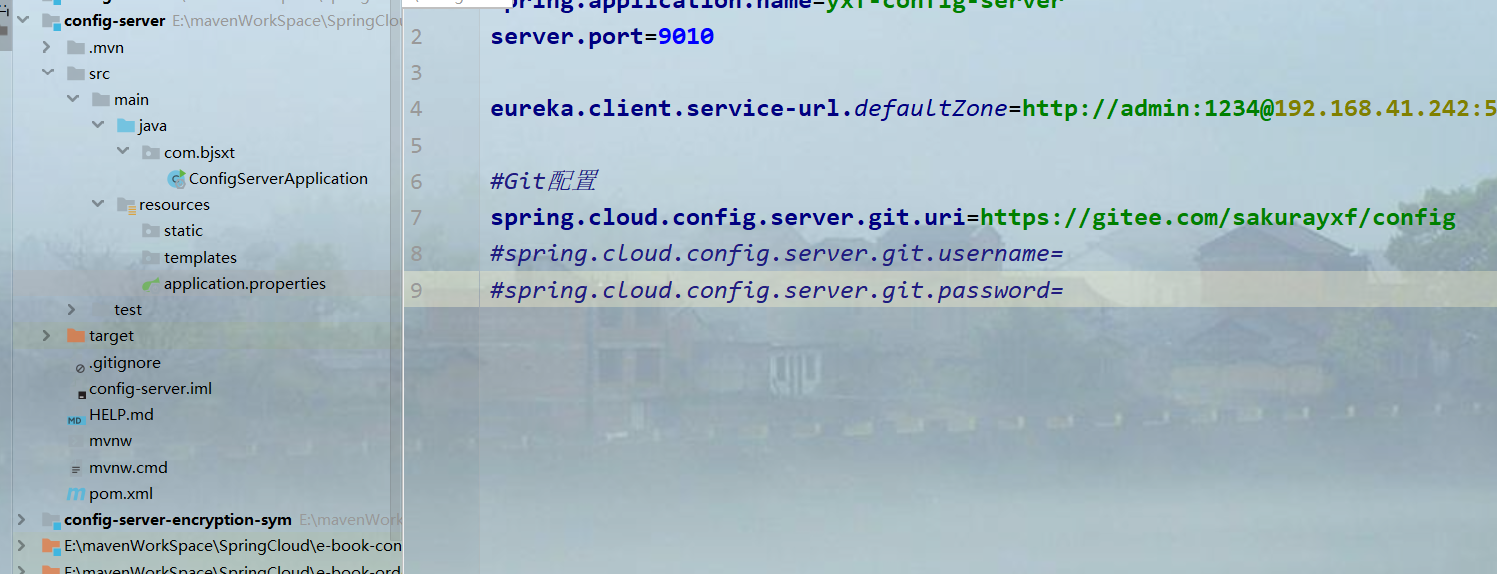
spring.application.name=yxf-config-server

server.port=

eureka.client.service-url.defaultZone=http://admin:1234@192.168.41.242:5050/eureka/,http://admin:1234@192.168.41.242:5051/eureka/

#Git配置

spring.cloud.config.server.git.uri=https://gitee.com/sakurayxf/config

#spring.cloud.config.server.git.username=

#spring.cloud.config.server.git.password=
package com.bjsxt;

import org.springframework.boot.SpringApplication;

import org.springframework.boot.autoconfigure.SpringBootApplication;

import org.springframework.cloud.config.server.EnableConfigServer;

import org.springframework.cloud.netflix.eureka.EnableEurekaClient;

@SpringBootApplication

@EnableEurekaClient

@EnableConfigServer

public class ConfigServerApplication {

    public static void main(String[] args) {

        SpringApplication.run(ConfigServerApplication.class, args);

    }

}
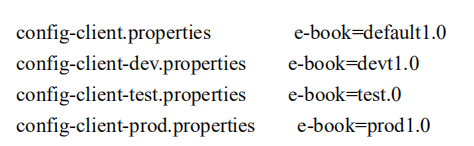

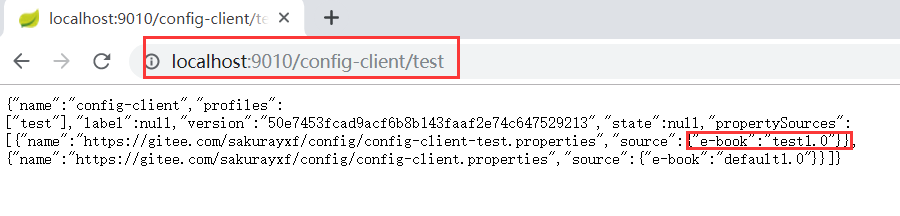
注意命令规则

<?xml version="1.0" encoding="UTF-8"?>

<project xmlns="http://maven.apache.org/POM/4.0.0" xmlns:xsi="http://www.w3.org/2001/XMLSchema-instance"

         xsi:schemaLocation="http://maven.apache.org/POM/4.0.0 https://maven.apache.org/xsd/maven-4.0.0.xsd">

    <modelVersion>4.0.0</modelVersion>

    <parent>

        <groupId>org.springframework.boot</groupId>

        <artifactId>spring-boot-starter-parent</artifactId>

        <version>2.1.11.RELEASE</version>

        <relativePath/> <!-- lookup parent from repository -->

    </parent>

    <groupId>com.bjsxt</groupId>

    <artifactId>config-client</artifactId>

    <version>0.0.1-SNAPSHOT</version>

    <name>config-client</name>

    <description>config-client</description>

    <properties>

        <java.version>1.8</java.version>

        <spring-cloud.version>Greenwich.SR4</spring-cloud.version>

    </properties>

    <dependencies>

        <dependency>

            <groupId>org.springframework.boot</groupId>

            <artifactId>spring-boot-starter-web</artifactId>

        </dependency>

        <dependency>

            <groupId>org.springframework.cloud</groupId>

            <artifactId>spring-cloud-starter-config</artifactId>

        </dependency>

        <dependency>

            <groupId>org.springframework.cloud</groupId>

            <artifactId>spring-cloud-starter-netflix-eureka-client</artifactId>

        </dependency>

        <dependency>

            <groupId>org.springframework.boot</groupId>

            <artifactId>spring-boot-starter-test</artifactId>

            <scope>test</scope>

        </dependency>

    </dependencies>

    <dependencyManagement>

        <dependencies>

            <dependency>

                <groupId>org.springframework.cloud</groupId>

                <artifactId>spring-cloud-dependencies</artifactId>

                <version>${spring-cloud.version}</version>

                <type>pom</type>

                <scope>import</scope>

            </dependency>

        </dependencies>

    </dependencyManagement>

    <build>

        <plugins>

            <plugin>

                <groupId>org.springframework.boot</groupId>

                <artifactId>spring-boot-maven-plugin</artifactId>

            </plugin>

        </plugins>

    </build>

</project>
package com.bjsxt;

import org.springframework.boot.SpringApplication;

import org.springframework.boot.autoconfigure.SpringBootApplication;

import org.springframework.cloud.netflix.eureka.EnableEurekaClient;

import org.springframework.context.annotation.Bean;

import org.springframework.context.support.PropertySourcesPlaceholderConfigurer;

@SpringBootApplication

@EnableEurekaClient

public class ConfigClientApplication {

    public static void main(String[] args) {

        SpringApplication.run(ConfigClientApplication.class, args);

    }

}
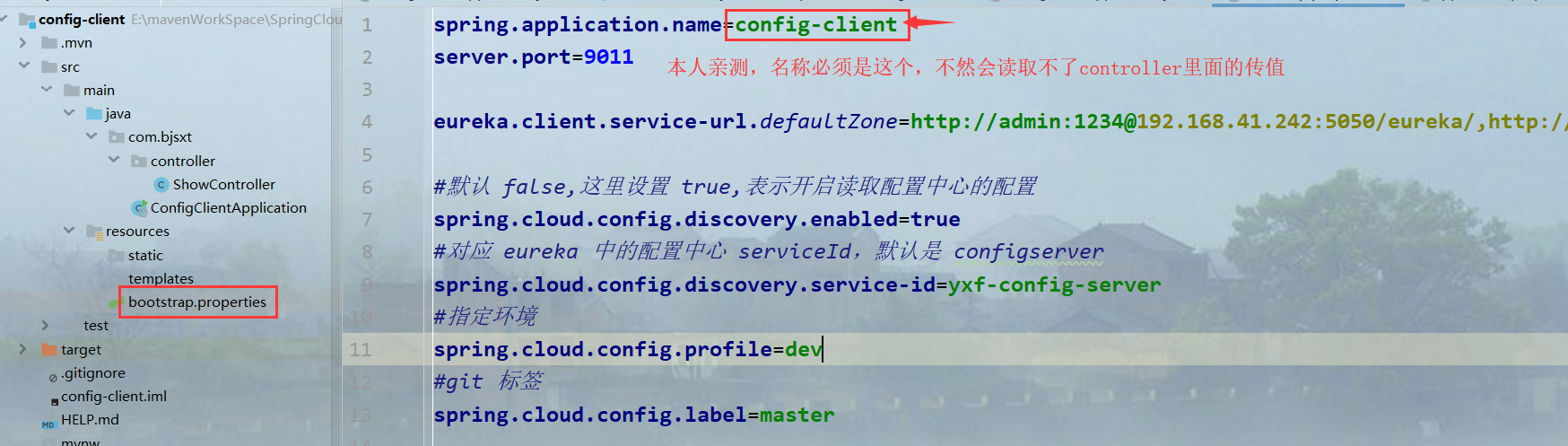
spring.application.name=config-client

server.port=

eureka.client.service-url.defaultZone=http://admin:1234@192.168.41.242:5050/eureka/,http://admin:1234@192.168.41.242:5051/eureka/

#默认 false,这里设置 true,表示开启读取配置中心的配置

spring.cloud.config.discovery.enabled=true

#对应 eureka 中的配置中心 serviceId,默认是 configserver

spring.cloud.config.discovery.service-id=yxf-config-server

#指定环境

spring.cloud.config.profile=dev

#git 标签

spring.cloud.config.label=master
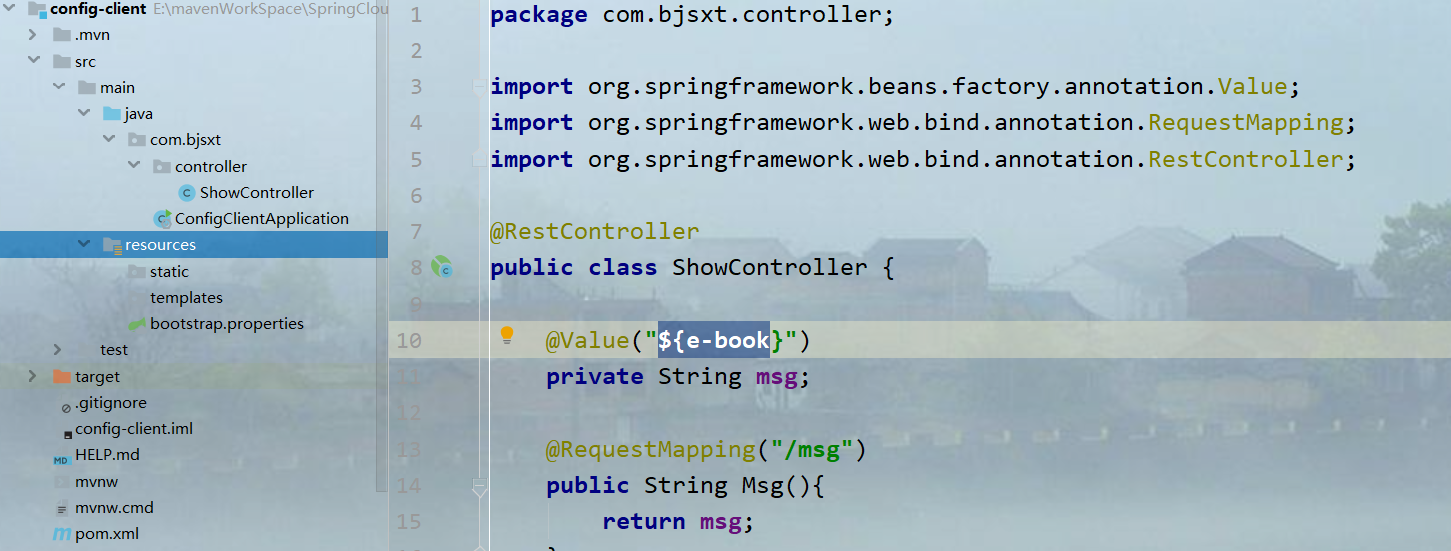
package com.bjsxt.controller;

import org.springframework.beans.factory.annotation.Value;

import org.springframework.web.bind.annotation.RequestMapping;

import org.springframework.web.bind.annotation.RestController;

@RestController

public class ShowController {

    @Value("${e-book}")

    private String msg;

    @RequestMapping("/msg")

    public String Msg(){

        return msg;

    }

}
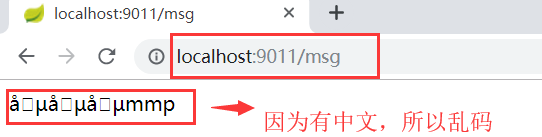
在写这个的过程中,实验了好几次都会出现这样的问题

度娘也说了几种解决方法:
1.就是配置文件必须是bootstrap.properties/yml
2.就是

去找注册中心中的服务必须名称正确。
3.就是我遇到的这种,
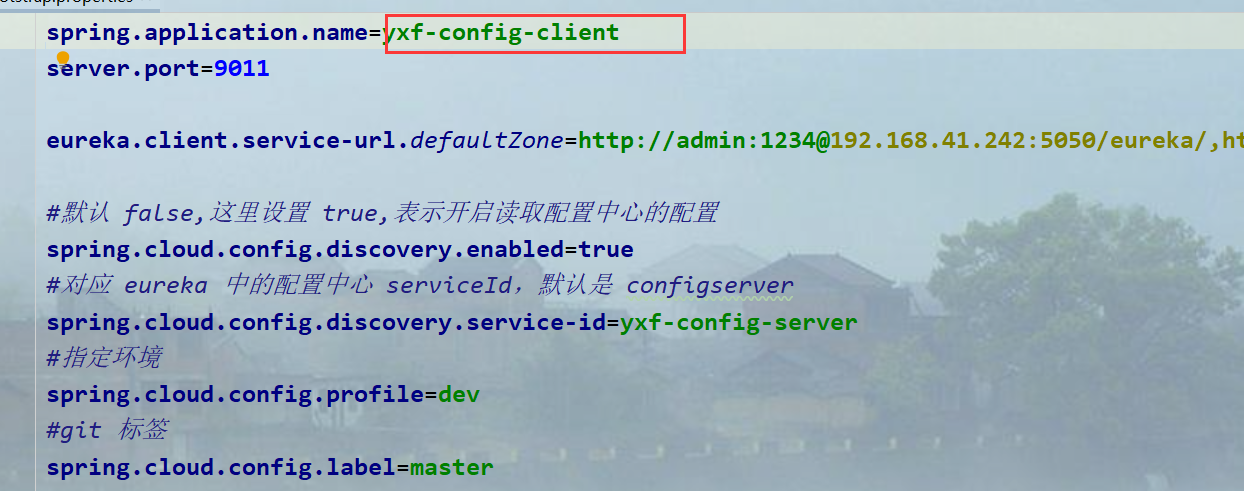
客户端的名称必须是config-client,不会就读取不到值。
总之这个问题花费了我很长时间,最后还是老师过来帮我解决的,问题也是不容易发现。
配置中心入门案例以及出现Could not resolve placeholder 'XXX' in value "${XXX}"的解决方式的更多相关文章
- Spring Cloud config之一:分布式配置中心入门介绍
Spring Cloud Config为服务端和客户端提供了分布式系统的外部化配置支持.配置服务器为各应用的所有环境提供了一个中心化的外部配置.它实现了对服务端和客户端对Spring Environm ...
- spring配置mq入门案例
第一步:添加maven配置 <!-- mq --> <dependency> <groupId>org.springframework</groupId> ...
- SpringCloud-分布式配置中心【入门介绍】
案例代码:https://github.com/q279583842q/springcloud-e-book 一. 为什么需要使用配置中心 1 服务配置的现状 2 常用的配置管理解决方案的缺点 3 为 ...
- SpringBoot快速入门(解析+入门案例源码实现)
这里写目录标题 SpringBoot入门 一.SpringBoot 概念 二.JavaConfig 入门 1. JavaConfig 概念 2. 项目准备 三.常用注解 四.SpringBoot 入门 ...
- SpringMVC入门案例及请求流程图(关于处理器或视图解析器或处理器映射器等的初步配置)
SpringMVC简介:SpringMVC也叫Spring Web mvc,属于表现层的框架.Spring MVC是Spring框架的一部分,是在Spring3.0后发布的 Spring结构图 Spr ...
- Spring Cloud 入门教程 - 搭建配置中心服务
简介 Spring Cloud 提供了一个部署微服务的平台,包括了微服务中常见的组件:配置中心服务, API网关,断路器,服务注册与发现,分布式追溯,OAuth2,消费者驱动合约等.我们不必先知道每个 ...
- springcloud 入门 8 (config配置中心)
Spring Cloud Config: 配置中心为了方便服务配置文件统一管理,实时更新,所以需要分布式配置中心组件,它就是Spring Cloud Config. 在分布式系统中,由于服务数量巨多, ...
- Spring Cloud实战之初级入门(五)— 配置中心服务化与配置实时刷新
目录 1.环境介绍 2.配置中心服务化 2.1 改造mirco-service-spring-config 2.2 改造mirco-service-provider.mirco-service-con ...
- SpringCloud实战之初级入门(三)— spring cloud config搭建git配置中心
目录 1.环境介绍 2.配置中心 2.1 创建工程 2.2 修改配置文件 2.3 在github中加入配置文件 2.3 修改启动文件 3. 访问配置中心 1.环境介绍 上一篇文章中,我们介绍了如何利用 ...
随机推荐
- 域名解析 | A记录 ,CNAME,MX,NS 你懂了吗
域名解析 | A记录 ,CNAME,MX,NS 你懂了吗 域名解析 什么是域名解析?域名解析就是国际域名或者国内域名以及中文域名等域名申请后做的到IP地址的转换过程.IP地址是网路上标识您站点的数字地 ...
- VM小技巧——虚拟机解决vm窗口太小的办法
——" 慢下来总结才能增大效率" 很多人在装虚拟机的时候,遇到了窗口过小不能自适应的问题.我也是查了好多资料,都说安装Vmware Tools即可解决,还有说修改分辨率也可以.两种 ...
- matlab中的eval函数使用
matlab中的eval函数使用 在matlab的命令行窗口中输入help eval命令回车就可以看到eval函数的官方解释,大概的意思就是执行matlab中的表达式,计算expression表示的代 ...
- My First Cloud Application's Design
Structure Diagram as following: Questions list: 1. Skydrive Integration > Based on the MSDN commu ...
- 配置SElinux环境,将SELinux设置为enforcing
SELinux是 美国国家安全局 (NSA) 对于 强制访问控制的实现 =>可以使root受限的权限 关闭SELinux=>修改配置文件,永久生效; sed -i 's/SELINUX=e ...
- nyoj 18-The Triangle(动态规划)
18-The Triangle 内存限制:64MB 时间限制:1000ms Special Judge: No accepted:5 submit:5 题目描述: 7 3 8 8 1 0 2 7 4 ...
- hdu 1509 Windows Message Queue (优先队列)
Windows Message QueueTime Limit: 2000/1000 MS (Java/Others) Memory Limit: 65536/32768 K (Java/Oth ...
- zabbix4.0开源监控部署
---恢复内容开始--- 1.安装依赖环境 yum -y install telnet net-tools python-paramiko dejavu-sans-fonts python-setup ...
- 移动端viewport模版
<!DOCTYPE html> <html> <head> <meta charset="utf-8"> <meta cont ...
- 编写自定义cmake配置文件FindXXX.cmake或者xxx-config.cmake | cmake with user defined entry
本文首发于个人博客https://kezunlin.me/post/12ab5707/,欢迎阅读! cmake with user defined entry Guide FindXXX.cmake ...