
(七十)c#Winform自定义控件-饼状图
官网
前提
入行已经7,8年了,一直想做一套漂亮点的自定义控件,于是就有了本系列文章。
GitHub:https://github.com/kwwwvagaa/NetWinformControl
码云:https://gitee.com/kwwwvagaa/net_winform_custom_control.git
如果觉得写的还行,请点个 star 支持一下吧
欢迎前来交流探讨: 企鹅群568015492 
麻烦博客下方点个【推荐】,谢谢
NuGet
Install-Package HZH_Controls
目录
https://www.cnblogs.com/bfyx/p/11364884.html
用处及效果
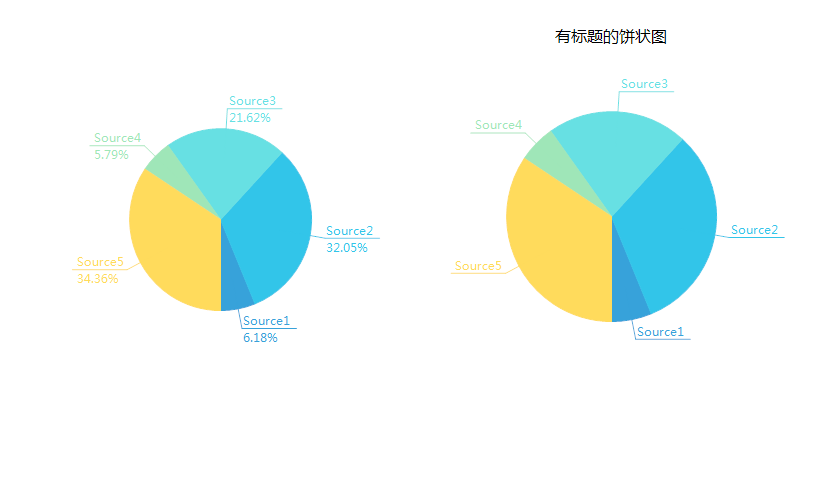
准备工作
使用GDI+画的控件,不了解可以先百度下
开始
添加一个类UCPieChart ,继承UserControl
添加一些属性
  /// <summary>

         /// The pie items

         /// </summary>

         private PieItem[] pieItems = new PieItem[];

         /// <summary>

         /// The random

         /// </summary>

         private Random random = null;

         /// <summary>

         /// The format center

         /// </summary>

         private StringFormat formatCenter = null;

         /// <summary>

         /// The margin

         /// </summary>

         private int margin = ;

         /// <summary>

         /// The m is render percent

         /// </summary>

         private bool m_IsRenderPercent = false;

         /// <summary>

         /// The percen format

         /// </summary>

         private string percenFormat = "{0:F2}%";

         /// <summary>

         /// The components

         /// </summary>

         private IContainer components = null;

         /// <summary>

         /// Gets or sets a value indicating whether this instance is render percent.

         /// </summary>

         /// <value><c>true</c> if this instance is render percent; otherwise, <c>false</c>.</value>

         [Browsable(true)]

         [Category("自定义")]

         [DefaultValue(false)]

         [Description("获取或设置是否显示百分比占用")]

         public bool IsRenderPercent

         {

             get

             {

                 return m_IsRenderPercent;

             }

             set

             {

                 m_IsRenderPercent = value;

                 Invalidate();

             }

         }

         /// <summary>

         /// Gets or sets the text margin.

         /// </summary>

         /// <value>The text margin.</value>

         [Browsable(true)]

         [Category("自定义")]

         [Description("获取或设置文本距离,单位为像素,默认50")]

         [DefaultValue()]

         public int TextMargin

         {

             get

             {

                 return margin;

             }

             set

             {

                 margin = value;

                 Invalidate();

             }

         }

         /// <summary>

         /// Gets or sets the percent format.

         /// </summary>

         /// <value>The percent format.</value>

         [Browsable(true)]

         [Category("自定义")]

         [Description("获取或设置文百分比文字的格式化信息")]

         [DefaultValue("{0:F2}%")]

         public string PercentFormat

         {

             get

             {

                 return percenFormat;

             }

             set

             {

                 percenFormat = value;

                 Invalidate();

             }

         }

         /// <summary>

         /// The center of circle color

         /// </summary>

         private Color centerOfCircleColor = Color.White;

         /// <summary>

         /// Gets or sets the color of the center of circle.

         /// </summary>

         /// <value>The color of the center of circle.</value>

         [Browsable(true)]

         [Category("自定义")]

         [Description("获取或设置圆心颜色")]

         public Color CenterOfCircleColor

         {

             get { return centerOfCircleColor; }

             set

             {

                 centerOfCircleColor = value;

                 Invalidate();

             }

         }

         /// <summary>

         /// The center of circle width

         /// </summary>

         private int centerOfCircleWidth = ;

         /// <summary>

         /// Gets or sets the width of the center of circle.

         /// </summary>

         /// <value>The width of the center of circle.</value>

         [Browsable(true)]

         [Category("自定义")]

         [Description("获取或设置圆心宽度")]

         public int CenterOfCircleWidth

         {

             get { return centerOfCircleWidth; }

             set

             {

                 if (value < )

                     return;

                 centerOfCircleWidth = value;

                 Invalidate();

             }

         }

         /// <summary>

         /// The title

         /// </summary>

         private string title;

         /// <summary>

         /// Gets or sets the ti tle.

         /// </summary>

         /// <value>The ti tle.</value>

         [Browsable(true)]

         [Category("自定义")]

         [Description("获取或设置标题")]

         public string TiTle

         {

             get { return title; }

             set

             {

                 title = value;

                 ResetTitleHeight();

                 Invalidate();

             }

         }

         /// <summary>

         /// The title font

         /// </summary>

         private Font titleFont = new Font("微软雅黑", );

         /// <summary>

         /// Gets or sets the title font.

         /// </summary>

         /// <value>The title font.</value>

         [Browsable(true)]

         [Category("自定义")]

         [Description("获取或设置标题字体")]

         public Font TitleFont

         {

             get { return titleFont; }

             set

             {

                 titleFont = value;

                 ResetTitleHeight();

                 Invalidate();

             }

         }

         /// <summary>

         /// The title froe color

         /// </summary>

         private Color titleFroeColor = Color.Black;

         /// <summary>

         /// Gets or sets the color of the title froe.

         /// </summary>

         /// <value>The color of the title froe.</value>

         [Browsable(true)]

         [Category("自定义")]

         [Description("获取或设置标题颜色")]

         public Color TitleFroeColor

         {

             get { return titleFroeColor; }

             set

             {

                 titleFroeColor = value;

                 Invalidate();

             }

         }

         /// <summary>

         /// The title size

         /// </summary>

         private SizeF titleSize = SizeF.Empty;

         /// <summary>

         /// Resets the height of the title.

         /// </summary>

         private void ResetTitleHeight()

         {

             if (string.IsNullOrEmpty(title))

                 titleSize = SizeF.Empty;

             else

             {

                 using (var g = this.CreateGraphics())

                 {

                     titleSize = g.MeasureString(title, titleFont);

                 }

             }

         }

         /// <summary>

         /// Gets or sets the data source.

         /// </summary>

         /// <value>The data source.</value>

         [Browsable(true)]

         [Category("自定义")]

         [Description("获取或设置标题颜色")]

         [Localizable(true)]

         public PieItem[] DataSource

         {

             get { return pieItems; }

             set

             {

                 pieItems = value;

                 Invalidate();

             }

         }
重绘
  protected override void OnPaint(PaintEventArgs e)

         {

             e.Graphics.SetGDIHigh();

             int width;

             Point centerPoint = GetCenterPoint(out width);

             Rectangle rectangle = new Rectangle(centerPoint.X - width, centerPoint.Y - width, width * , width * );

             if (width >  && pieItems.Length != )

             {

                 if (!string.IsNullOrEmpty(title))

                     e.Graphics.DrawString(title, titleFont, new SolidBrush(titleFroeColor), new PointF((this.Width - titleSize.Width) / , ));

                 Rectangle rect = new Rectangle(rectangle.X - centerPoint.X, rectangle.Y - centerPoint.Y, rectangle.Width, rectangle.Height);

                 e.Graphics.TranslateTransform(centerPoint.X, centerPoint.Y);

                 e.Graphics.RotateTransform(90f);

                 int num = pieItems.Sum((PieItem item) => item.Value);

                 float num2 = 0f;

                 float num3 = -90f;

                 for (int i = ; i < pieItems.Length; i++)

                 {

                     Color cItem = pieItems[i].PieColor ?? ControlHelper.Colors[i];

                     Pen pen = new Pen(cItem, 1f);

                     SolidBrush solidBrush = new SolidBrush(cItem);

                     SolidBrush solidBrush2 = new SolidBrush(cItem);

                     Brush percentBrush = new SolidBrush(cItem);

                     float num4 = e.Graphics.MeasureString(pieItems[i].Name, Font).Width + 3f;

                     float num5 = (num != ) ? Convert.ToSingle((double)pieItems[i].Value * 1.0 / (double)num * 360.0) : ((float)( / pieItems.Length));

                     e.Graphics.FillPie(solidBrush, rect, 0f, 0f - num5);

                     e.Graphics.DrawPie(new Pen(solidBrush), rect, 0f, 0f - num5);

                     e.Graphics.RotateTransform(0f - num5 / 2f);

                     if (num5 < 2f)

                     {

                         num2 += num5;

                     }

                     else

                     {

                         num2 += num5 / 2f;

                         int num6 = ;

                         if (num2 < 45f || num2 > 315f)

                         {

                             num6 = ;

                         }

                         if (num2 > 135f && num2 < 225f)

                         {

                             num6 = ;

                         }

                         e.Graphics.DrawLine(pen, width *  / , , width + num6, );

                         e.Graphics.TranslateTransform(width + num6, 0f);

                         if (num2 - num3 < 5f)

                         {

                         }

                         num3 = num2;

                         if (num2 < 180f)

                         {

                             e.Graphics.RotateTransform(num2 - 90f);

                             e.Graphics.DrawLine(pen, 0f, 0f, num4, 0f);

                             e.Graphics.DrawString(pieItems[i].Name, Font, solidBrush2, new Point(, -Font.Height));

                             if (IsRenderPercent)

                             {

                                 e.Graphics.DrawString(string.Format(percenFormat, num5 * 100f / 360f), Font, percentBrush, new Point(, ));

                             }

                             e.Graphics.RotateTransform(90f - num2);

                         }

                         else

                         {

                             e.Graphics.RotateTransform(num2 - 270f);

                             e.Graphics.DrawLine(pen, 0f, 0f, num4, 0f);

                             e.Graphics.TranslateTransform(num4 - 3f, 0f);

                             e.Graphics.RotateTransform(180f);

                             e.Graphics.DrawString(pieItems[i].Name, Font, solidBrush2, new Point(, -Font.Height));

                             if (IsRenderPercent)

                             {

                                 e.Graphics.DrawString(string.Format(percenFormat, num5 * 100f / 360f), Font, percentBrush, new Point(, ));

                             }

                             e.Graphics.RotateTransform(-180f);

                             e.Graphics.TranslateTransform(0f - num4 + 3f, 0f);

                             e.Graphics.RotateTransform(270f - num2);

                         }

                         e.Graphics.TranslateTransform(-width - num6, 0f);

                         e.Graphics.RotateTransform(0f - num5 / 2f);

                         num2 += num5 / 2f;

                     }

                     solidBrush.Dispose();

                     pen.Dispose();

                     solidBrush2.Dispose();

                     percentBrush.Dispose();

                 }

                 e.Graphics.ResetTransform();

                 if (centerOfCircleWidth > )

                 {

                     Rectangle rectCenter = new Rectangle(rect.Left + rect.Width /  - centerOfCircleWidth / , rect.Top + rect.Height /  - centerOfCircleWidth / , centerOfCircleWidth, centerOfCircleWidth);

                     e.Graphics.FillEllipse(new SolidBrush(centerOfCircleColor), rectCenter);

                 }

             }

             else

             {

                 e.Graphics.FillEllipse(Brushes.AliceBlue, rectangle);

                 e.Graphics.DrawEllipse(Pens.DodgerBlue, rectangle);

                 e.Graphics.DrawString("无数据", Font, Brushes.DimGray, rectangle, formatCenter);

             }

             base.OnPaint(e);

         }
一些辅助函数
  /// <summary>

         /// Sets the data source.

         /// </summary>

         /// <param name="source">The source.</param>

         public void SetDataSource(PieItem[] source)

         {

             if (source != null)

             {

                 DataSource = source;

             }

         }

         /// <summary>

         /// Sets the data source.

         /// </summary>

         /// <param name="names">The names.</param>

         /// <param name="values">The values.</param>

         /// <exception cref="System.ArgumentNullException">

         /// names

         /// or

         /// values

         /// </exception>

         /// <exception cref="System.Exception">两个数组的长度不一致!</exception>

         public void SetDataSource(string[] names, int[] values)

         {

             if (names == null)

             {

                 throw new ArgumentNullException("names");

             }

             if (values == null)

             {

                 throw new ArgumentNullException("values");

             }

             if (names.Length != values.Length)

             {

                 throw new Exception("两个数组的长度不一致!");

             }

             pieItems = new PieItem[names.Length];

             for (int i = ; i < names.Length; i++)

             {

                 pieItems[i] = new PieItem

                 {

                     Name = names[i],

                     Value = values[i]

                 };

             }

             Invalidate();

         }
完整代码
// ***********************************************************************
// Assembly : HZH_Controls
// Created : 2019-09-23
//
// ***********************************************************************
// <copyright file="UCPieChart.cs">
// Copyright by Huang Zhenghui(黄正辉) All, QQ group:568015492 QQ:623128629 Email:623128629@qq.com
// </copyright>
//
// Blog: https://www.cnblogs.com/bfyx
// GitHub:https://github.com/kwwwvagaa/NetWinformControl
// gitee:https://gitee.com/kwwwvagaa/net_winform_custom_control.git
//
// If you use this code, please keep this note.
// ***********************************************************************
using System;
using System.ComponentModel;
using System.ComponentModel.Design;
using System.Drawing;
using System.Drawing.Drawing2D;
using System.Drawing.Text;
using System.Linq;
using System.Windows.Forms; namespace HZH_Controls.Controls
{
/// <summary>
/// Class UCPieChart.
/// Implements the <see cref="System.Windows.Forms.UserControl" />
/// </summary>
/// <seealso cref="System.Windows.Forms.UserControl" />
public class UCPieChart : UserControl
{
/// <summary>
/// The pie items
/// </summary>
private PieItem[] pieItems = new PieItem[]; /// <summary>
/// The random
/// </summary>
private Random random = null; /// <summary>
/// The format center
/// </summary>
private StringFormat formatCenter = null; /// <summary>
/// The margin
/// </summary>
private int margin = ; /// <summary>
/// The m is render percent
/// </summary>
private bool m_IsRenderPercent = false; /// <summary>
/// The percen format
/// </summary>
private string percenFormat = "{0:F2}%"; /// <summary>
/// The components
/// </summary>
private IContainer components = null; /// <summary>
/// Gets or sets a value indicating whether this instance is render percent.
/// </summary>
/// <value><c>true</c> if this instance is render percent; otherwise, <c>false</c>.</value>
[Browsable(true)]
[Category("自定义")]
[DefaultValue(false)]
[Description("获取或设置是否显示百分比占用")]
public bool IsRenderPercent
{
get
{
return m_IsRenderPercent;
}
set
{
m_IsRenderPercent = value;
Invalidate();
}
} /// <summary>
/// Gets or sets the text margin.
/// </summary>
/// <value>The text margin.</value>
[Browsable(true)]
[Category("自定义")]
[Description("获取或设置文本距离,单位为像素,默认50")]
[DefaultValue()]
public int TextMargin
{
get
{
return margin;
}
set
{
margin = value;
Invalidate();
}
} /// <summary>
/// Gets or sets the percent format.
/// </summary>
/// <value>The percent format.</value>
[Browsable(true)]
[Category("自定义")]
[Description("获取或设置文百分比文字的格式化信息")]
[DefaultValue("{0:F2}%")]
public string PercentFormat
{
get
{
return percenFormat;
}
set
{
percenFormat = value;
Invalidate();
}
} /// <summary>
/// The center of circle color
/// </summary>
private Color centerOfCircleColor = Color.White;
/// <summary>
/// Gets or sets the color of the center of circle.
/// </summary>
/// <value>The color of the center of circle.</value>
[Browsable(true)]
[Category("自定义")]
[Description("获取或设置圆心颜色")]
public Color CenterOfCircleColor
{
get { return centerOfCircleColor; }
set
{
centerOfCircleColor = value;
Invalidate();
}
} /// <summary>
/// The center of circle width
/// </summary>
private int centerOfCircleWidth = ;
/// <summary>
/// Gets or sets the width of the center of circle.
/// </summary>
/// <value>The width of the center of circle.</value>
[Browsable(true)]
[Category("自定义")]
[Description("获取或设置圆心宽度")]
public int CenterOfCircleWidth
{
get { return centerOfCircleWidth; }
set
{
if (value < )
return;
centerOfCircleWidth = value;
Invalidate();
}
} /// <summary>
/// The title
/// </summary>
private string title;
/// <summary>
/// Gets or sets the ti tle.
/// </summary>
/// <value>The ti tle.</value>
[Browsable(true)]
[Category("自定义")]
[Description("获取或设置标题")]
public string TiTle
{
get { return title; }
set
{
title = value;
ResetTitleHeight();
Invalidate();
}
}
/// <summary>
/// The title font
/// </summary>
private Font titleFont = new Font("微软雅黑", );
/// <summary>
/// Gets or sets the title font.
/// </summary>
/// <value>The title font.</value>
[Browsable(true)]
[Category("自定义")]
[Description("获取或设置标题字体")]
public Font TitleFont
{
get { return titleFont; }
set
{
titleFont = value;
ResetTitleHeight();
Invalidate();
}
} /// <summary>
/// The title froe color
/// </summary>
private Color titleFroeColor = Color.Black;
/// <summary>
/// Gets or sets the color of the title froe.
/// </summary>
/// <value>The color of the title froe.</value>
[Browsable(true)]
[Category("自定义")]
[Description("获取或设置标题颜色")]
public Color TitleFroeColor
{
get { return titleFroeColor; }
set
{
titleFroeColor = value;
Invalidate();
}
} /// <summary>
/// The title size
/// </summary>
private SizeF titleSize = SizeF.Empty;
/// <summary>
/// Resets the height of the title.
/// </summary>
private void ResetTitleHeight()
{
if (string.IsNullOrEmpty(title))
titleSize = SizeF.Empty;
else
{
using (var g = this.CreateGraphics())
{
titleSize = g.MeasureString(title, titleFont);
}
}
} /// <summary>
/// Gets or sets the data source.
/// </summary>
/// <value>The data source.</value>
[Browsable(true)]
[Category("自定义")]
[Description("获取或设置标题颜色")]
[Localizable(true)]
public PieItem[] DataSource
{
get { return pieItems; }
set
{
pieItems = value;
Invalidate();
}
} /// <summary>
/// Initializes a new instance of the <see cref="UCPieChart"/> class.
/// </summary>
public UCPieChart()
{
InitializeComponent();
random = new Random();
formatCenter = new StringFormat();
formatCenter.Alignment = StringAlignment.Center;
formatCenter.LineAlignment = StringAlignment.Center;
SetStyle(ControlStyles.UserPaint | ControlStyles.SupportsTransparentBackColor, true);
SetStyle(ControlStyles.ResizeRedraw, true);
SetStyle(ControlStyles.OptimizedDoubleBuffer, true);
SetStyle(ControlStyles.AllPaintingInWmPaint, true);
pieItems = new PieItem[];
if (GetService(typeof(IDesignerHost)) != null || LicenseManager.UsageMode == LicenseUsageMode.Designtime)
{
pieItems = new PieItem[]; for (int i = ; i < ; i++)
{
pieItems[i] = new PieItem
{
Name = "Source" + (i + ),
Value = random.Next(, )
};
}
}
} /// <summary>
/// Gets the center point.
/// </summary>
/// <param name="width">The width.</param>
/// <returns>Point.</returns>
private Point GetCenterPoint(out int width)
{
width = Math.Min(base.Width, base.Height - (titleSize != SizeF.Empty ? ((int)titleSize.Height) : )) / - margin - ;
return new Point(base.Width / - , base.Height / + (titleSize != SizeF.Empty ? ((int)titleSize.Height) : ) - );
} /// <summary>
/// 引发 <see cref="E:System.Windows.Forms.Control.Paint" /> 事件。
/// </summary>
/// <param name="e">包含事件数据的 <see cref="T:System.Windows.Forms.PaintEventArgs" />。</param>
protected override void OnPaint(PaintEventArgs e)
{
e.Graphics.SetGDIHigh(); int width;
Point centerPoint = GetCenterPoint(out width);
Rectangle rectangle = new Rectangle(centerPoint.X - width, centerPoint.Y - width, width * , width * );
if (width > && pieItems.Length != )
{
if (!string.IsNullOrEmpty(title))
e.Graphics.DrawString(title, titleFont, new SolidBrush(titleFroeColor), new PointF((this.Width - titleSize.Width) / , ));
Rectangle rect = new Rectangle(rectangle.X - centerPoint.X, rectangle.Y - centerPoint.Y, rectangle.Width, rectangle.Height);
e.Graphics.TranslateTransform(centerPoint.X, centerPoint.Y);
e.Graphics.RotateTransform(90f);
int num = pieItems.Sum((PieItem item) => item.Value);
float num2 = 0f;
float num3 = -90f;
for (int i = ; i < pieItems.Length; i++)
{
Color cItem = pieItems[i].PieColor ?? ControlHelper.Colors[i];
Pen pen = new Pen(cItem, 1f);
SolidBrush solidBrush = new SolidBrush(cItem);
SolidBrush solidBrush2 = new SolidBrush(cItem);
Brush percentBrush = new SolidBrush(cItem);
float num4 = e.Graphics.MeasureString(pieItems[i].Name, Font).Width + 3f;
float num5 = (num != ) ? Convert.ToSingle((double)pieItems[i].Value * 1.0 / (double)num * 360.0) : ((float)( / pieItems.Length));
e.Graphics.FillPie(solidBrush, rect, 0f, 0f - num5);
e.Graphics.DrawPie(new Pen(solidBrush), rect, 0f, 0f - num5);
e.Graphics.RotateTransform(0f - num5 / 2f);
if (num5 < 2f)
{
num2 += num5;
}
else
{
num2 += num5 / 2f;
int num6 = ;
if (num2 < 45f || num2 > 315f)
{
num6 = ;
}
if (num2 > 135f && num2 < 225f)
{
num6 = ;
}
e.Graphics.DrawLine(pen, width * / , , width + num6, );
e.Graphics.TranslateTransform(width + num6, 0f);
if (num2 - num3 < 5f)
{
}
num3 = num2;
if (num2 < 180f)
{
e.Graphics.RotateTransform(num2 - 90f);
e.Graphics.DrawLine(pen, 0f, 0f, num4, 0f);
e.Graphics.DrawString(pieItems[i].Name, Font, solidBrush2, new Point(, -Font.Height));
if (IsRenderPercent)
{
e.Graphics.DrawString(string.Format(percenFormat, num5 * 100f / 360f), Font, percentBrush, new Point(, ));
}
e.Graphics.RotateTransform(90f - num2);
}
else
{
e.Graphics.RotateTransform(num2 - 270f);
e.Graphics.DrawLine(pen, 0f, 0f, num4, 0f);
e.Graphics.TranslateTransform(num4 - 3f, 0f);
e.Graphics.RotateTransform(180f);
e.Graphics.DrawString(pieItems[i].Name, Font, solidBrush2, new Point(, -Font.Height));
if (IsRenderPercent)
{
e.Graphics.DrawString(string.Format(percenFormat, num5 * 100f / 360f), Font, percentBrush, new Point(, ));
}
e.Graphics.RotateTransform(-180f);
e.Graphics.TranslateTransform(0f - num4 + 3f, 0f);
e.Graphics.RotateTransform(270f - num2);
}
e.Graphics.TranslateTransform(-width - num6, 0f);
e.Graphics.RotateTransform(0f - num5 / 2f);
num2 += num5 / 2f;
}
solidBrush.Dispose();
pen.Dispose();
solidBrush2.Dispose();
percentBrush.Dispose();
}
e.Graphics.ResetTransform(); if (centerOfCircleWidth > )
{
Rectangle rectCenter = new Rectangle(rect.Left + rect.Width / - centerOfCircleWidth / , rect.Top + rect.Height / - centerOfCircleWidth / , centerOfCircleWidth, centerOfCircleWidth);
e.Graphics.FillEllipse(new SolidBrush(centerOfCircleColor), rectCenter);
}
}
else
{
e.Graphics.FillEllipse(Brushes.AliceBlue, rectangle);
e.Graphics.DrawEllipse(Pens.DodgerBlue, rectangle);
e.Graphics.DrawString("无数据", Font, Brushes.DimGray, rectangle, formatCenter);
}
base.OnPaint(e);
}
/// <summary>
/// Sets the data source.
/// </summary>
/// <param name="source">The source.</param>
public void SetDataSource(PieItem[] source)
{
if (source != null)
{
DataSource = source;
}
}
/// <summary>
/// Sets the data source.
/// </summary>
/// <param name="names">The names.</param>
/// <param name="values">The values.</param>
/// <exception cref="System.ArgumentNullException">
/// names
/// or
/// values
/// </exception>
/// <exception cref="System.Exception">两个数组的长度不一致!</exception>
public void SetDataSource(string[] names, int[] values)
{
if (names == null)
{
throw new ArgumentNullException("names");
}
if (values == null)
{
throw new ArgumentNullException("values");
}
if (names.Length != values.Length)
{
throw new Exception("两个数组的长度不一致!");
}
pieItems = new PieItem[names.Length];
for (int i = ; i < names.Length; i++)
{
pieItems[i] = new PieItem
{
Name = names[i],
Value = values[i]
};
}
Invalidate();
} /// <summary>
/// Releases unmanaged and - optionally - managed resources.
/// </summary>
/// <param name="disposing">为 true 则释放托管资源和非托管资源;为 false 则仅释放非托管资源。</param>
protected override void Dispose(bool disposing)
{
if (disposing && components != null)
{
components.Dispose();
}
base.Dispose(disposing);
} /// <summary>
/// Initializes the component.
/// </summary>
private void InitializeComponent()
{
SuspendLayout();
base.AutoScaleMode = System.Windows.Forms.AutoScaleMode.None;
BackColor = System.Drawing.Color.Transparent;
base.Name = "UCPieChart";
ResumeLayout(false);
}
}
}
最后的话
如果你喜欢的话,请到 https://gitee.com/kwwwvagaa/net_winform_custom_control 点个星星吧
(七十)c#Winform自定义控件-饼状图的更多相关文章
- Android图表库MPAndroidChart(七)—饼状图可以再简单一点
Android图表库MPAndroidChart(七)-饼状图可以再简单一点 接上文,今天实现的是用的很多的,作用在统计上的饼状图,我们看下今天的效果 这个效果,我们实现,和之前一样的套路,我先来说下 ...
- Android之自定义控件实现天气温度折线图和饼状图
以前写了个天气的APP,最近把他更新了一个版本,就抽取其中的天气温度折现图这个功能写了这篇博客,来与大家分享,希望对你有所帮助. 效果如图: 代码: MainActivity.Java /**** * ...
- Winform 后台生成饼状图并保存为图片
.cs代码如下 string ldt_picPath = System.Windows.Forms.Application.StartupPath + @"Pic\" + Item ...
- DevExpress使用之ChartControl控件绘制图表(多坐标折线图、柱状图、饼状图)
最近因为公司项目需要用到WinForm的DecExpress控件,在这里把一些使用方法总结一下. DevExpress中有一个专门用来绘制图表的插件ChartControl,可以绘制折线图.饼状图.柱 ...
- Android图表库MPAndroidChart(八)——饼状图的扩展:折线饼状图
Android图表库MPAndroidChart(八)--饼状图的扩展:折线饼状图 我们接着上文,饼状图的扩展,增加折现的说明,来看下我们要实现的效果 因为之前对MPAndroidChart的熟悉,所 ...
- Android绘图机制(四)——使用HelloCharts开源框架搭建一系列炫酷图表,柱形图,折线图,饼状图和动画特效,抽丝剥茧带你认识图表之美
Android绘图机制(四)--使用HelloCharts开源框架搭建一系列炫酷图表,柱形图,折线图,饼状图和动画特效,抽丝剥茧带你认识图表之美 这里为什么不继续把自定义View写下去呢,因为最近项目 ...
- [BOT]自己动手实现android 饼状图,PieGraphView,附源码解析
本文要介绍的是一个参照手机支付宝app里面记账本功能里的"饼状图"实现的控件.通常app中可能的数据展示控件有柱状图,折线图,饼状图等,如果需要一个包含多种View控件的库,那么 ...
- highcharts饼状图使用案例
在公司由于需要对订单数据进行分析,故使用到了highcharts工具 <block name="Js"> <script type="text/java ...
- C#+JQuery+.Ashx+百度Echarts实现全国省市地图和饼状图动态数据图形报表的统计
在目前的一个项目中,需要用到报表表现数据,这些数据有多个维度,需要同时表现出来,同时可能会有大量数据呈现的需求,经过几轮挑选,最终选择了百度的echarts作为报表基础类库.echarts功能强大,界 ...
随机推荐
- Java虚拟机详解(六)------内存分配
我们说Java是自动进行内存管理的,所谓自动化就是,不需要程序员操心,Java会自动进行内存分配和内存回收这两方面. 前面我们介绍过如何通过垃圾回收器来回收内存,那么本篇博客我们来聊聊如何进行分配内存 ...
- Spring中的循环依赖解决详解
前言 说起Spring中循环依赖的解决办法,相信很多园友们都或多或少的知道一些,但当真的要详细说明的时候,可能又没法一下将它讲清楚.本文就试着尽自己所能,对此做出一个较详细的解读.另,需注意一点,下文 ...
- SpringMVC源码剖析5:消息转换器HttpMessageConverter与@ResponseBody注解
转自 SpringMVC关于json.xml自动转换的原理研究[附带源码分析] 本系列文章首发于我的个人博客:https://h2pl.github.io/ 欢迎阅览我的CSDN专栏:Spring源码 ...
- Appium+python自动化(三十五)- 命令启动appium之 appium服务命令行参数(超详解)
简介 前边介绍的都是通过按钮点击启动按钮来启动appium服务,有的小伙伴或者童鞋们乍一听可能不信,或者会问如何通过命令行启动appium服务呢?且听宏哥一一道来. 一睹为快 其实相当的简单,不看不知 ...
- nodeJS 中mongoose操作分页
开始前先聊聊五毛钱的: 好久没写了,可能是因为懒(哎),写这个是好事,既帮助了自己,巩固一下知识,也可以让别人给自己纠错纠错,三月份接触到了node,先是跟着一些教程写了一些小实例,感觉自己就喜欢上了 ...
- 使用react定义组件的两种方式
react组件的两种方式:函数定义,类定义 在定义一个组件之前,首先要明白一点:react元素(jsx)是react组件的最基本的组成单位 组件要求: 1,为了和react元素进行区分,组件名字首必须 ...
- LeetCode刷题 - (01)两数之和
题目描述 给定一个整数数组nums和一个目标值target,请你在该数组中找出和为目标值的那两个整数,并返回他们的数组下标. 你可以假设每种输入只会对应一个答案.但是,你不能重复利用这个数组中同样的元 ...
- C函数指针状态机实现
C函数指针状态机实现 有限状态机(finite state machine)简称FSM,表示有限个状态及在这些状态之间的转移和动作等行为的数学模型,在计算机领域有着广泛的应用.FSM是一种逻辑单元内部 ...
- lightoj 1248-G - Dice (III) (概率dp)
题意:给你n个面的骰子,问扔出所有面的期望次数. 虽然这题挺简单的但还是要提一下.这题题目给出了解法. E(m)表示得到m个不同面的期望次数. E(m+1)=[((n-m)/n)*E(m)+1]+(m ...
- bzoj3032 七夕祭题解
题面 TYVJ七夕祭和11区的夏祭的形式很像.矩形的祭典会场由N排M列共计N×M个摊点组成.虽然摊点种类繁多,不过cl只对其中的一部分摊点感兴趣,比如章鱼烧.苹果糖.棉花糖.射的屋--什么的.Vani ...