
Mybaits 源码解析 (七)----- Select 语句的执行过程分析(下篇)(Mapper方法是如何调用到XML中的SQL的?)全网最详细,没有之一
我们上篇文章讲到了查询方法里面的doQuery方法,这里面就是调用JDBC的API了,其中的逻辑比较复杂,我们这边文章来讲,先看看我们上篇文章分析的地方
SimpleExecutor
 public <E> List<E> doQuery(MappedStatement ms, Object parameter, RowBounds rowBounds, ResultHandler resultHandler, BoundSql boundSql) throws SQLException {

     Statement stmt = null;

     try {

         Configuration configuration = ms.getConfiguration();

         // 创建 StatementHandler

         StatementHandler handler = configuration.newStatementHandler(wrapper, ms, parameter, rowBounds, resultHandler, boundSql);

         // 创建 Statement

         stmt = prepareStatement(handler, ms.getStatementLog());

         // 执行查询操作

         return handler.<E>query(stmt, resultHandler);

     } finally {

         // 关闭 Statement

         closeStatement(stmt);

     }

 }
上篇文章我们分析完了第6行代码,在第6行处我们创建了一个PreparedStatementHandler,我们要接着第8行代码开始分析,也就是创建 Statement,先不忙着分析,我们先来回顾一下 ,我们以前是怎么使用jdbc的
jdbc
public class Login {

    /**

     *    第一步,加载驱动,创建数据库的连接

     *    第二步,编写sql

     *    第三步,需要对sql进行预编译

     *    第四步,向sql里面设置参数

     *    第五步,执行sql

     *    第六步,释放资源

     * @throws Exception

     */

    public static final String URL = "jdbc:mysql://localhost:3306/chenhao";

    public static final String USER = "liulx";

    public static final String PASSWORD = "123456";

    public static void main(String[] args) throws Exception {

        login("lucy","123");

    }

    public static void login(String username , String password) throws Exception{

        Connection conn = null;

        PreparedStatement psmt = null;

        ResultSet rs = null;

        try {

            //加载驱动程序

            Class.forName("com.mysql.jdbc.Driver");

            //获得数据库连接

            conn = DriverManager.getConnection(URL, USER, PASSWORD);

            //编写sql

            String sql = "select * from user where name =? and password = ?";//问号相当于一个占位符

            //对sql进行预编译

            psmt = conn.prepareStatement(sql);

            //设置参数

            psmt.setString(1, username);

            psmt.setString(2, password);

            //执行sql ,返回一个结果集

            rs = psmt.executeQuery();

            //输出结果

            while(rs.next()){

                System.out.println(rs.getString("user_name")+" 年龄:"+rs.getInt("age"));

            }

        } catch (Exception e) {

            e.printStackTrace();

        }finally{

            //释放资源

            conn.close();

            psmt.close();

            rs.close();

        }

    }

}
上面代码中注释已经很清楚了,我们来看看mybatis中是怎么和数据库打交道的。
SimpleExecutor
private Statement prepareStatement(StatementHandler handler, Log statementLog) throws SQLException {

    Statement stmt;

    // 获取数据库连接

    Connection connection = getConnection(statementLog);

   // 创建 Statement,

    stmt = handler.prepare(connection, transaction.getTimeout());

   // 为 Statement 设置参数

    handler.parameterize(stmt);

    return stmt;

}
在上面的代码中我们终于看到了和jdbc相关的内容了,大概分为下面三个步骤:
- 获取数据库连接
- 创建PreparedStatement
- 为PreparedStatement设置运行时参数
我们先来看看获取数据库连接,跟进代码看看
BaseExecutor
protected Connection getConnection(Log statementLog) throws SQLException {

    //通过transaction来获取Connection

    Connection connection = this.transaction.getConnection();

    return statementLog.isDebugEnabled() ? ConnectionLogger.newInstance(connection, statementLog, this.queryStack) : connection;

}
我们看到是通过Executor中的transaction属性来获取Connection,那我们就先来看看transaction,根据前面的文章中的配置 <transactionManager type="jdbc"/>,则MyBatis会创建一个JdbcTransactionFactory.class 实例,Executor中的transaction是一个JdbcTransaction.class 实例,其实现Transaction接口,那我们先来看看Transaction
JdbcTransaction
我们先来看看其接口Transaction
Transaction
public interface Transaction {

    //获取数据库连接

    Connection getConnection() throws SQLException;

    //提交事务

    void commit() throws SQLException;

    //回滚事务

    void rollback() throws SQLException;

    //关闭事务

    void close() throws SQLException;

    //获取超时时间

    Integer getTimeout() throws SQLException;

}
接着我们看看其实现类JdbcTransaction
JdbcTransaction
public class JdbcTransaction implements Transaction {

  private static final Log log = LogFactory.getLog(JdbcTransaction.class);

  //数据库连接

  protected Connection connection;

  //数据源信息

  protected DataSource dataSource;

  //隔离级别

  protected TransactionIsolationLevel level;

  //是否为自动提交

  protected boolean autoCommmit;

  public JdbcTransaction(DataSource ds, TransactionIsolationLevel desiredLevel, boolean desiredAutoCommit) {

    dataSource = ds;

    level = desiredLevel;

    autoCommmit = desiredAutoCommit;

  }

  public JdbcTransaction(Connection connection) {

    this.connection = connection;

  }

  public Connection getConnection() throws SQLException {

    //如果事务中不存在connection,则获取一个connection并放入connection属性中

    //第一次肯定为空

    if (connection == null) {

      openConnection();

    }

    //如果事务中已经存在connection,则直接返回这个connection

    return connection;

  }

    /**

     * commit()功能

     * @throws SQLException

     */

  public void commit() throws SQLException {

    if (connection != null && !connection.getAutoCommit()) {

      if (log.isDebugEnabled()) {

        log.debug("Committing JDBC Connection [" + connection + "]");

      }

      //使用connection的commit()

      connection.commit();

    }

  }

    /**

     * rollback()功能

     * @throws SQLException

     */

  public void rollback() throws SQLException {

    if (connection != null && !connection.getAutoCommit()) {

      if (log.isDebugEnabled()) {

        log.debug("Rolling back JDBC Connection [" + connection + "]");

      }

      //使用connection的rollback()

      connection.rollback();

    }

  }

    /**

     * close()功能

     * @throws SQLException

     */

  public void close() throws SQLException {

    if (connection != null) {

      resetAutoCommit();

      if (log.isDebugEnabled()) {

        log.debug("Closing JDBC Connection [" + connection + "]");

      }

      //使用connection的close()

      connection.close();

    }

  }

  protected void openConnection() throws SQLException {

    if (log.isDebugEnabled()) {

      log.debug("Opening JDBC Connection");

    }

    //通过dataSource来获取connection,并设置到transaction的connection属性中

    connection = dataSource.getConnection();

   if (level != null) {

      //通过connection设置事务的隔离级别

      connection.setTransactionIsolation(level.getLevel());

    }

    //设置事务是否自动提交

    setDesiredAutoCommit(autoCommmit);

  }

  protected void setDesiredAutoCommit(boolean desiredAutoCommit) {

    try {

        if (this.connection.getAutoCommit() != desiredAutoCommit) {

            if (log.isDebugEnabled()) {

                log.debug("Setting autocommit to " + desiredAutoCommit + " on JDBC Connection [" + this.connection + "]");

            }

            //通过connection设置事务是否自动提交

            this.connection.setAutoCommit(desiredAutoCommit);

        }

    } catch (SQLException var3) {

        throw new TransactionException("Error configuring AutoCommit.  Your driver may not support getAutoCommit() or setAutoCommit(). Requested setting: " + desiredAutoCommit + ".  Cause: " + var3, var3);

    }

  }

}
我们看到JdbcTransaction中有一个Connection属性和dataSource属性,使用connection来进行提交、回滚、关闭等操作,也就是说JdbcTransaction其实只是在jdbc的connection上面封装了一下,实际使用的其实还是jdbc的事务。我们看看getConnection()方法
//数据库连接

protected Connection connection;

//数据源信息

protected DataSource dataSource;

public Connection getConnection() throws SQLException {

//如果事务中不存在connection,则获取一个connection并放入connection属性中

//第一次肯定为空

if (connection == null) {

  openConnection();

}

//如果事务中已经存在connection,则直接返回这个connection

return connection;

}

protected void openConnection() throws SQLException {

if (log.isDebugEnabled()) {

  log.debug("Opening JDBC Connection");

}

//通过dataSource来获取connection,并设置到transaction的connection属性中

connection = dataSource.getConnection();

if (level != null) {

  //通过connection设置事务的隔离级别

  connection.setTransactionIsolation(level.getLevel());

}

//设置事务是否自动提交

setDesiredAutoCommit(autoCommmit);

}
先是判断当前事务中是否存在connection,如果存在,则直接返回connection,如果不存在则通过dataSource来获取connection,这里我们明白了一点,如果当前事务没有关闭,也就是没有释放connection,那么在同一个Transaction中使用的是同一个connection,我们再来想想,transaction是SimpleExecutor中的属性,SimpleExecutor又是SqlSession中的属性,那我们可以这样说,同一个SqlSession中只有一个SimpleExecutor,SimpleExecutor中有一个Transaction,Transaction有一个connection。我们来看看如下例子
public static void main(String[] args) throws IOException {

    String resource = "mybatis-config.xml";

    InputStream inputStream = Resources.getResourceAsStream(resource);

    SqlSessionFactory sqlSessionFactory = new SqlSessionFactoryBuilder().build(inputStream);

    //创建一个SqlSession

    SqlSession sqlSession = sqlSessionFactory.openSession();

    try {

         EmployeeMapper employeeMapper = sqlSession.getMapper(Employee.class);

         UserMapper userMapper = sqlSession.getMapper(User.class);

         List<Employee> allEmployee = employeeMapper.getAll();

         List<User> allUser = userMapper.getAll();

         Employee employee = employeeMapper.getOne();

    } finally {

        sqlSession.close();

    }

}
我们看到同一个sqlSession可以获取多个Mapper代理对象,则多个Mapper代理对象中的sqlSession引用应该是同一个,那么多个Mapper代理对象调用方法应该是同一个Connection,直到调用close(),所以说我们的sqlSession是线程不安全的,如果所有的业务都使用一个sqlSession,那Connection也是同一个,一个业务执行完了就将其关闭,那其他的业务还没执行完呢。大家明白了吗?我们回归到源码,connection = dataSource.getConnection();,最终还是调用dataSource来获取连接,那我们是不是要来看看dataSource呢?
我们还是从前面的配置文件来看<dataSource type="UNPOOLED|POOLED">,这里有UNPOOLED和POOLED两种DataSource,一种是使用连接池,一种是普通的DataSource,UNPOOLED将会创将new UnpooledDataSource()实例,POOLED将会new pooledDataSource()实例,都实现DataSource接口,那我们先来看看DataSource接口
DataSource
public interface DataSource  extends CommonDataSource,Wrapper {

  //获取数据库连接

  Connection getConnection() throws SQLException;

  Connection getConnection(String username, String password)

    throws SQLException;

}
很简单,只有一个获取数据库连接的接口,那我们来看看其实现类
UnpooledDataSource
UnpooledDataSource,从名称上即可知道,该种数据源不具有池化特性。该种数据源每次会返回一个新的数据库连接,而非复用旧的连接。其核心的方法有三个,分别如下:
- initializeDriver - 初始化数据库驱动
- doGetConnection - 获取数据连接
- configureConnection - 配置数据库连接
初始化数据库驱动
看下我们上面使用JDBC的例子,在执行 SQL 之前,通常都是先获取数据库连接。一般步骤都是加载数据库驱动,然后通过 DriverManager 获取数据库连接。UnpooledDataSource 也是使用 JDBC 访问数据库的,因此它获取数据库连接的过程一样
UnpooledDataSource
public class UnpooledDataSource implements DataSource {

    private ClassLoader driverClassLoader;

    private Properties driverProperties;

    private static Map<String, Driver> registeredDrivers = new ConcurrentHashMap();

    private String driver;

    private String url;

    private String username;

    private String password;

    private Boolean autoCommit;

    private Integer defaultTransactionIsolationLevel;

    public UnpooledDataSource() {

    }

    public UnpooledDataSource(String driver, String url, String username, String password) {

        this.driver = driver;

        this.url = url;

        this.username = username;

        this.password = password;

    }

    private synchronized void initializeDriver() throws SQLException {

        // 检测当前 driver 对应的驱动实例是否已经注册

        if (!registeredDrivers.containsKey(driver)) {

            Class<?> driverType;

            try {

                // 加载驱动类型

                if (driverClassLoader != null) {

                    // 使用 driverClassLoader 加载驱动

                    driverType = Class.forName(driver, true, driverClassLoader);

                } else {

                    // 通过其他 ClassLoader 加载驱动

                    driverType = Resources.classForName(driver);

                }

                // 通过反射创建驱动实例

                Driver driverInstance = (Driver) driverType.newInstance();

                /*

                 * 注册驱动,注意这里是将 Driver 代理类 DriverProxy 对象注册到 DriverManager 中的,而非 Driver 对象本身。

                 */

                DriverManager.registerDriver(new DriverProxy(driverInstance));

                // 缓存驱动类名和实例,防止多次注册

                registeredDrivers.put(driver, driverInstance);

            } catch (Exception e) {

                throw new SQLException("Error setting driver on UnpooledDataSource. Cause: " + e);

            }

        }

    }

    //略...

}

//DriverManager

private final static CopyOnWriteArrayList<DriverInfo> registeredDrivers = new CopyOnWriteArrayList<DriverInfo>();

public static synchronized void registerDriver(java.sql.Driver driver)

    throws SQLException {

    if(driver != null) {

        registeredDrivers.addIfAbsent(new DriverInfo(driver));

    } else {

        // This is for compatibility with the original DriverManager

        throw new NullPointerException();

    }

}
通过反射机制加载驱动Driver,并将其注册到DriverManager中的一个常量集合中,供后面获取连接时使用,为什么这里是一个List呢?我们实际开发中有可能使用到了多种数据库类型,如Mysql、Oracle等,其驱动都是不同的,不同的数据源获取连接时使用的是不同的驱动。
在我们使用JDBC的时候,也没有通过DriverManager.registerDriver(new DriverProxy(driverInstance));去注册Driver啊,如果我们使用的是Mysql数据源,那我们来看Class.forName("com.mysql.jdbc.Driver");这句代码发生了什么
Class.forName主要是做了什么呢?它主要是要求JVM查找并装载指定的类。这样我们的类com.mysql.jdbc.Driver就被装载进来了。而且在类被装载进JVM的时候,它的静态方法就会被执行。我们来看com.mysql.jdbc.Driver的实现代码。在它的实现里有这么一段代码:
static {

    try {

        java.sql.DriverManager.registerDriver(new Driver());

    } catch (SQLException E) {

        throw new RuntimeException("Can't register driver!");

    }

}
很明显,这里使用了DriverManager并将该类给注册上去了。所以,对于任何实现前面Driver接口的类,只要在他们被装载进JVM的时候注册DriverManager就可以实现被后续程序使用。
作为那些被加载的Driver实现,他们本身在被装载时会在执行的static代码段里通过调用DriverManager.registerDriver()来把自身注册到DriverManager的registeredDrivers列表中。这样后面就可以通过得到的Driver来取得连接了。
获取数据库连接
在上面例子中使用 JDBC 时,我们都是通过 DriverManager 的接口方法获取数据库连接。我们来看看UnpooledDataSource是如何获取的。
UnpooledDataSource
public Connection getConnection() throws SQLException {

    return doGetConnection(username, password);

}

private Connection doGetConnection(String username, String password) throws SQLException {

    Properties props = new Properties();

    if (driverProperties != null) {

        props.putAll(driverProperties);

    }

    if (username != null) {

        // 存储 user 配置

        props.setProperty("user", username);

    }

    if (password != null) {

        // 存储 password 配置

        props.setProperty("password", password);

    }

    // 调用重载方法

    return doGetConnection(props);

}

private Connection doGetConnection(Properties properties) throws SQLException {

    // 初始化驱动,我们上一节已经讲过了,只用初始化一次

    initializeDriver();

    // 获取连接

    Connection connection = DriverManager.getConnection(url, properties);

    // 配置连接,包括自动提交以及事务等级

    configureConnection(connection);

    return connection;

}

private void configureConnection(Connection conn) throws SQLException {

    if (autoCommit != null && autoCommit != conn.getAutoCommit()) {

        // 设置自动提交

        conn.setAutoCommit(autoCommit);

    }

    if (defaultTransactionIsolationLevel != null) {

        // 设置事务隔离级别

        conn.setTransactionIsolation(defaultTransactionIsolationLevel);

    }

}
上面方法将一些配置信息放入到 Properties 对象中,然后将数据库连接和 Properties 对象传给 DriverManager 的 getConnection 方法即可获取到数据库连接。我们来看看是怎么获取数据库连接的
private static Connection getConnection(String url, java.util.Properties info, Class<?> caller) throws SQLException {

    // 获取类加载器

    ClassLoader callerCL = caller != null ? caller.getClassLoader() : null;

    synchronized(DriverManager.class) {

      if (callerCL == null) {

        callerCL = Thread.currentThread().getContextClassLoader();

      }

    }

    // 此处省略部分代码

    // 这里遍历的是在registerDriver(Driver driver)方法中注册的驱动对象

    // 每个DriverInfo包含了驱动对象和其信息

    for(DriverInfo aDriver : registeredDrivers) {

      // 判断是否为当前线程类加载器加载的驱动类

      if(isDriverAllowed(aDriver.driver, callerCL)) {

        try {

          println("trying " + aDriver.driver.getClass().getName());

          // 获取连接对象,这里调用了Driver的父类的方法

          // 如果这里有多个DriverInfo,比喻Mysql和Oracle的Driver都注册registeredDrivers了

          // 这里所有的Driver都会尝试使用url和info去连接,哪个连接上了就返回

          // 会不会所有的都会连接上呢?不会,因为url的写法不同,不同的Driver会判断url是否适合当前驱动

          Connection con = aDriver.driver.connect(url, info);

          if (con != null) {

            // 打印连接成功信息

            println("getConnection returning " + aDriver.driver.getClass().getName());

            // 返回连接对像

            return (con);

          }

        } catch (SQLException ex) {

          if (reason == null) {

            reason = ex;

          }

        }

      } else {

        println("    skipping: " + aDriver.getClass().getName());

      }

    }

}
代码中循环所有注册的驱动,然后通过驱动进行连接,所有的驱动都会尝试连接,但是不同的驱动,连接的URL是不同的,如Mysql的url是jdbc:mysql://localhost:3306/chenhao,以jdbc:mysql://开头,则其Mysql的驱动肯定会判断获取连接的url符合,Oracle的也类似,我们来看看Mysql的驱动获取连接
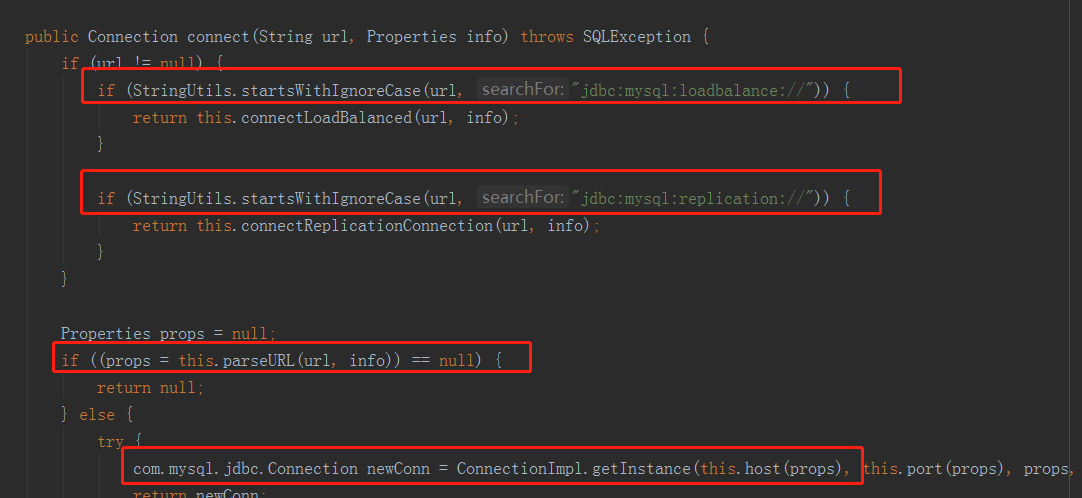
由于篇幅原因,我这里就不分析了,大家有兴趣的可以看看,最后由URL对应的驱动获取到Connection返回,好了我们再来看看下一种DataSource
PooledDataSource
PooledDataSource 内部实现了连接池功能,用于复用数据库连接。因此,从效率上来说,PooledDataSource 要高于 UnpooledDataSource。但是最终获取Connection还是通过UnpooledDataSource,只不过PooledDataSource 提供一个存储Connection的功能。
辅助类介绍
PooledDataSource 需要借助两个辅助类帮其完成功能,这两个辅助类分别是 PoolState 和 PooledConnection。PoolState 用于记录连接池运行时的状态,比如连接获取次数,无效连接数量等。同时 PoolState 内部定义了两个 PooledConnection 集合,用于存储空闲连接和活跃连接。PooledConnection 内部定义了一个 Connection 类型的变量,用于指向真实的数据库连接。以及一个 Connection 的代理类,用于对部分方法调用进行拦截。至于为什么要拦截,随后将进行分析。除此之外,PooledConnection 内部也定义了一些字段,用于记录数据库连接的一些运行时状态。接下来,我们来看一下 PooledConnection 的定义。
PooledConnection
class PooledConnection implements InvocationHandler {

    private static final String CLOSE = "close";

    private static final Class<?>[] IFACES = new Class<?>[]{Connection.class};

    private final int hashCode;

    private final PooledDataSource dataSource;

    // 真实的数据库连接

    private final Connection realConnection;

    // 数据库连接代理

    private final Connection proxyConnection;

    // 从连接池中取出连接时的时间戳

    private long checkoutTimestamp;

    // 数据库连接创建时间

    private long createdTimestamp;

    // 数据库连接最后使用时间

    private long lastUsedTimestamp;

    // connectionTypeCode = (url + username + password).hashCode()

    private int connectionTypeCode;

    // 表示连接是否有效

    private boolean valid;

    public PooledConnection(Connection connection, PooledDataSource dataSource) {

        this.hashCode = connection.hashCode();

        this.realConnection = connection;

        this.dataSource = dataSource;

        this.createdTimestamp = System.currentTimeMillis();

        this.lastUsedTimestamp = System.currentTimeMillis();

        this.valid = true;

        // 创建 Connection 的代理类对象

        this.proxyConnection = (Connection) Proxy.newProxyInstance(Connection.class.getClassLoader(), IFACES, this);

    }

    @Override

    public Object invoke(Object proxy, Method method, Object[] args) throws Throwable {...}

    // 省略部分代码

}
下面再来看看 PoolState 的定义。
PoolState
public class PoolState {

    protected PooledDataSource dataSource;

    // 空闲连接列表

    protected final List<PooledConnection> idleConnections = new ArrayList<PooledConnection>();

    // 活跃连接列表

    protected final List<PooledConnection> activeConnections = new ArrayList<PooledConnection>();

    // 从连接池中获取连接的次数

    protected long requestCount = 0;

    // 请求连接总耗时(单位:毫秒)

    protected long accumulatedRequestTime = 0;

    // 连接执行时间总耗时

    protected long accumulatedCheckoutTime = 0;

    // 执行时间超时的连接数

    protected long claimedOverdueConnectionCount = 0;

    // 超时时间累加值

    protected long accumulatedCheckoutTimeOfOverdueConnections = 0;

    // 等待时间累加值

    protected long accumulatedWaitTime = 0;

    // 等待次数

    protected long hadToWaitCount = 0;

    // 无效连接数

    protected long badConnectionCount = 0;

}
大家记住上面的空闲连接列表和活跃连接列表
获取连接
前面已经说过,PooledDataSource 会将用过的连接进行回收,以便可以复用连接。因此从 PooledDataSource 获取连接时,如果空闲链接列表里有连接时,可直接取用。那如果没有空闲连接怎么办呢?此时有两种解决办法,要么创建新连接,要么等待其他连接完成任务。
PooledDataSource
public class PooledDataSource implements DataSource {

    private static final Log log = LogFactory.getLog(PooledDataSource.class);

    //这里有辅助类PoolState

    private final PoolState state = new PoolState(this);

    //还有一个UnpooledDataSource属性,其实真正获取Connection是由UnpooledDataSource来完成的

    private final UnpooledDataSource dataSource;

    protected int poolMaximumActiveConnections = 10;

    protected int poolMaximumIdleConnections = 5;

    protected int poolMaximumCheckoutTime = 20000;

    protected int poolTimeToWait = 20000;

    protected String poolPingQuery = "NO PING QUERY SET";

    protected boolean poolPingEnabled = false;

    protected int poolPingConnectionsNotUsedFor = 0;

    private int expectedConnectionTypeCode;

    public PooledDataSource() {

        this.dataSource = new UnpooledDataSource();

    }

    public PooledDataSource(String driver, String url, String username, String password) {

        //构造器中创建UnpooledDataSource对象

        this.dataSource = new UnpooledDataSource(driver, url, username, password);

    }

    public Connection getConnection() throws SQLException {

        return this.popConnection(this.dataSource.getUsername(), this.dataSource.getPassword()).getProxyConnection();

    }

    private PooledConnection popConnection(String username, String password) throws SQLException {

        boolean countedWait = false;

        PooledConnection conn = null;

        long t = System.currentTimeMillis();

        int localBadConnectionCount = 0;

        while (conn == null) {

            synchronized (state) {

                // 检测空闲连接集合(idleConnections)是否为空

                if (!state.idleConnections.isEmpty()) {

                    // idleConnections 不为空,表示有空闲连接可以使用,直接从空闲连接集合中取出一个连接

                    conn = state.idleConnections.remove(0);

                } else {

                    /*

                     * 暂无空闲连接可用,但如果活跃连接数还未超出限制

                     *(poolMaximumActiveConnections),则可创建新的连接

                     */

                    if (state.activeConnections.size() < poolMaximumActiveConnections) {

                        // 创建新连接,看到没,还是通过dataSource获取连接,也就是UnpooledDataSource获取连接

                        conn = new PooledConnection(dataSource.getConnection(), this);

                    } else {    // 连接池已满,不能创建新连接

                        // 取出运行时间最长的连接

                        PooledConnection oldestActiveConnection = state.activeConnections.get(0);

                        // 获取运行时长

                        long longestCheckoutTime = oldestActiveConnection.getCheckoutTime();

                        // 检测运行时长是否超出限制,即超时

                        if (longestCheckoutTime > poolMaximumCheckoutTime) {

                            // 累加超时相关的统计字段

                            state.claimedOverdueConnectionCount++;

                            state.accumulatedCheckoutTimeOfOverdueConnections += longestCheckoutTime;

                            state.accumulatedCheckoutTime += longestCheckoutTime;

                            // 从活跃连接集合中移除超时连接

                            state.activeConnections.remove(oldestActiveConnection);

                            // 若连接未设置自动提交,此处进行回滚操作

                            if (!oldestActiveConnection.getRealConnection().getAutoCommit()) {

                                try {

                                    oldestActiveConnection.getRealConnection().rollback();

                                } catch (SQLException e) {...}

                            }

                            /*

                             * 创建一个新的 PooledConnection,注意,

                             * 此处复用 oldestActiveConnection 的 realConnection 变量

                             */

                            conn = new PooledConnection(oldestActiveConnection.getRealConnection(), this);

                            /*

                             * 复用 oldestActiveConnection 的一些信息,注意 PooledConnection 中的

                             * createdTimestamp 用于记录 Connection 的创建时间,而非 PooledConnection

                             * 的创建时间。所以这里要复用原连接的时间信息。

                             */

                            conn.setCreatedTimestamp(oldestActiveConnection.getCreatedTimestamp());

                            conn.setLastUsedTimestamp(oldestActiveConnection.getLastUsedTimestamp());

                            // 设置连接为无效状态

                            oldestActiveConnection.invalidate();

                        } else {// 运行时间最长的连接并未超时

                            try {

                                if (!countedWait) {

                                    state.hadToWaitCount++;

                                    countedWait = true;

                                }

                                long wt = System.currentTimeMillis();

                                // 当前线程进入等待状态

                                state.wait(poolTimeToWait);

                                state.accumulatedWaitTime += System.currentTimeMillis() - wt;

                            } catch (InterruptedException e) {

                                break;

                            }

                        }

                    }

                }

                if (conn != null) {

                    if (conn.isValid()) {

                        if (!conn.getRealConnection().getAutoCommit()) {

                            // 进行回滚操作

                            conn.getRealConnection().rollback();

                        }

                        conn.setConnectionTypeCode(assembleConnectionTypeCode(dataSource.getUrl(), username, password));

                        // 设置统计字段

                        conn.setCheckoutTimestamp(System.currentTimeMillis());

                        conn.setLastUsedTimestamp(System.currentTimeMillis());

                        state.activeConnections.add(conn);

                        state.requestCount++;

                        state.accumulatedRequestTime += System.currentTimeMillis() - t;

                    } else {

                        // 连接无效,此时累加无效连接相关的统计字段

                        state.badConnectionCount++;

                        localBadConnectionCount++;

                        conn = null;

                        if (localBadConnectionCount > (poolMaximumIdleConnections

                            + poolMaximumLocalBadConnectionTolerance)) {

                            throw new SQLException(...);

                        }

                    }

                }

            }

        }

        if (conn == null) {

            throw new SQLException(...);

        }

        return conn;

    }

}
从连接池中获取连接首先会遇到两种情况:
- 连接池中有空闲连接
- 连接池中无空闲连接
对于第一种情况,把连接取出返回即可。对于第二种情况,则要进行细分,会有如下的情况。
- 活跃连接数没有超出最大活跃连接数
- 活跃连接数超出最大活跃连接数
对于上面两种情况,第一种情况比较好处理,直接创建新的连接即可。至于第二种情况,需要再次进行细分。
- 活跃连接的运行时间超出限制,即超时了
- 活跃连接未超时
对于第一种情况,我们直接将超时连接强行中断,并进行回滚,然后复用部分字段重新创建 PooledConnection 即可。对于第二种情况,目前没有更好的处理方式了,只能等待了。
回收连接
相比于获取连接,回收连接的逻辑要简单的多。回收连接成功与否只取决于空闲连接集合的状态,所需处理情况很少,因此比较简单。
我们还是来看看
public Connection getConnection() throws SQLException {

    return this.popConnection(this.dataSource.getUsername(), this.dataSource.getPassword()).getProxyConnection();

}
返回的是PooledConnection的一个代理类,为什么不直接使用PooledConnection的realConnection呢?我们可以看下PooledConnection这个类
class PooledConnection implements InvocationHandler {
很熟悉是吧,标准的代理类用法,看下其invoke方法
PooledConnection
@Override

public Object invoke(Object proxy, Method method, Object[] args) throws Throwable {

    String methodName = method.getName();

    // 重点在这里,如果调用了其close方法,则实际执行的是将连接放回连接池的操作

    if (CLOSE.hashCode() == methodName.hashCode() && CLOSE.equals(methodName)) {

        dataSource.pushConnection(this);

        return null;

    } else {

        try {

            if (!Object.class.equals(method.getDeclaringClass())) {

                // issue #579 toString() should never fail

                // throw an SQLException instead of a Runtime

                checkConnection();

            }

            // 其他的操作都交给realConnection执行

            return method.invoke(realConnection, args);

        } catch (Throwable t) {

            throw ExceptionUtil.unwrapThrowable(t);

        }

    }

}
那我们来看看pushConnection做了什么
protected void pushConnection(PooledConnection conn) throws SQLException {

    synchronized (state) {

        // 从活跃连接池中移除连接

        state.activeConnections.remove(conn);

        if (conn.isValid()) {

            // 空闲连接集合未满

            if (state.idleConnections.size() < poolMaximumIdleConnections

                && conn.getConnectionTypeCode() == expectedConnectionTypeCode) {

                state.accumulatedCheckoutTime += conn.getCheckoutTime();

                // 回滚未提交的事务

                if (!conn.getRealConnection().getAutoCommit()) {

                    conn.getRealConnection().rollback();

                }

                // 创建新的 PooledConnection

                PooledConnection newConn = new PooledConnection(conn.getRealConnection(), this);

                state.idleConnections.add(newConn);

                // 复用时间信息

                newConn.setCreatedTimestamp(conn.getCreatedTimestamp());

                newConn.setLastUsedTimestamp(conn.getLastUsedTimestamp());

                // 将原连接置为无效状态

                conn.invalidate();

                // 通知等待的线程

                state.notifyAll();

            } else {// 空闲连接集合已满

                state.accumulatedCheckoutTime += conn.getCheckoutTime();

                // 回滚未提交的事务

                if (!conn.getRealConnection().getAutoCommit()) {

                    conn.getRealConnection().rollback();

                }

                // 关闭数据库连接

                conn.getRealConnection().close();

                conn.invalidate();

            }

        } else {

            state.badConnectionCount++;

        }

    }

}
先将连接从活跃连接集合中移除,如果空闲集合未满,此时复用原连接的字段信息创建新的连接,并将其放入空闲集合中即可;若空闲集合已满,此时无需回收连接,直接关闭即可。
连接池总觉得很神秘,但仔细分析完其代码之后,也就没那么神秘了,就是将连接使用完之后放到一个集合中,下面再获取连接的时候首先从这个集合中获取。 还有PooledConnection的代理模式的使用,值得我们学习
好了,我们已经获取到了数据库连接,接下来要创建PrepareStatement了,我们上面JDBC的例子是怎么获取的? psmt = conn.prepareStatement(sql);,直接通过Connection来获取,并且把sql传进去了,我们看看Mybaits中是怎么创建PrepareStatement的
创建PreparedStatement
PreparedStatementHandler
stmt = handler.prepare(connection, transaction.getTimeout());

public Statement prepare(Connection connection, Integer transactionTimeout) throws SQLException {

    Statement statement = null;

    try {

        // 创建 Statement

        statement = instantiateStatement(connection);

        // 设置超时和 FetchSize

        setStatementTimeout(statement, transactionTimeout);

        setFetchSize(statement);

        return statement;

    } catch (SQLException e) {

        closeStatement(statement);

        throw e;

    } catch (Exception e) {

        closeStatement(statement);

        throw new ExecutorException("Error preparing statement.  Cause: " + e, e);

    }

}

protected Statement instantiateStatement(Connection connection) throws SQLException {

    //获取sql字符串,比如"select * from user where id= ?"

    String sql = boundSql.getSql();

    // 根据条件调用不同的 prepareStatement 方法创建 PreparedStatement

    if (mappedStatement.getKeyGenerator() instanceof Jdbc3KeyGenerator) {

        String[] keyColumnNames = mappedStatement.getKeyColumns();

        if (keyColumnNames == null) {

            //通过connection获取Statement,将sql语句传进去

            return connection.prepareStatement(sql, PreparedStatement.RETURN_GENERATED_KEYS);

        } else {

            return connection.prepareStatement(sql, keyColumnNames);

        }

    } else if (mappedStatement.getResultSetType() != null) {

        return connection.prepareStatement(sql, mappedStatement.getResultSetType().getValue(), ResultSet.CONCUR_READ_ONLY);

    } else {

        return connection.prepareStatement(sql);

    }

}
看到没和jdbc的形式一模一样,我们具体来看看connection.prepareStatement做了什么
 public PreparedStatement prepareStatement(String sql, int resultSetType, int resultSetConcurrency) throws SQLException {

     boolean canServerPrepare = true;

     String nativeSql = getProcessEscapeCodesForPrepStmts() ? nativeSQL(sql) : sql;

     if (this.useServerPreparedStmts && getEmulateUnsupportedPstmts()) {

         canServerPrepare = canHandleAsServerPreparedStatement(nativeSql);

     }

     if (this.useServerPreparedStmts && getEmulateUnsupportedPstmts()) {

         canServerPrepare = canHandleAsServerPreparedStatement(nativeSql);

     }

     if (this.useServerPreparedStmts && canServerPrepare) {

         if (this.getCachePreparedStatements()) {

             ......

         } else {

             try {

                 //这里使用的是ServerPreparedStatement创建PreparedStatement

                 pStmt = ServerPreparedStatement.getInstance(getMultiHostSafeProxy(), nativeSql, this.database, resultSetType, resultSetConcurrency);


                 pStmt.setResultSetType(resultSetType);

                 pStmt.setResultSetConcurrency(resultSetConcurrency);

             } catch (SQLException sqlEx) {

                 // Punt, if necessary

                 if (getEmulateUnsupportedPstmts()) {

                     pStmt = (PreparedStatement) clientPrepareStatement(nativeSql, resultSetType, resultSetConcurrency, false);

                 } else {

                     throw sqlEx;

                 }

             }

         }

     } else {

         pStmt = (PreparedStatement) clientPrepareStatement(nativeSql, resultSetType, resultSetConcurrency, false);

     }

 }
我们只用看最关键的第21行代码,使用ServerPreparedStatement的getInstance返回一个PreparedStatement,其实本质上ServerPreparedStatement继承了PreparedStatement对象,我们看看其构造方法
protected ServerPreparedStatement(ConnectionImpl conn, String sql, String catalog, int resultSetType, int resultSetConcurrency) throws SQLException {

    //略...

    try {

        this.serverPrepare(sql);

    } catch (SQLException var10) {

        this.realClose(false, true);

        throw var10;

    } catch (Exception var11) {

        this.realClose(false, true);

        SQLException sqlEx = SQLError.createSQLException(var11.toString(), "S1000", this.getExceptionInterceptor());

        sqlEx.initCause(var11);

        throw sqlEx;

    }

    //略...

}
继续调用this.serverPrepare(sql);
public class ServerPreparedStatement extends PreparedStatement {

    //存放运行时参数的数组

    private ServerPreparedStatement.BindValue[] parameterBindings;

    //服务器预编译好的sql语句返回的serverStatementId

    private long serverStatementId;

    private void serverPrepare(String sql) throws SQLException {

        synchronized(this.connection.getMutex()) {

            MysqlIO mysql = this.connection.getIO();

            try {

                //向sql服务器发送了一条PREPARE指令

                Buffer prepareResultPacket = mysql.sendCommand(MysqlDefs.COM_PREPARE, sql, (Buffer)null, false, characterEncoding, 0);

                //记录下了预编译好的sql语句所对应的serverStatementId

                this.serverStatementId = prepareResultPacket.readLong();

                this.fieldCount = prepareResultPacket.readInt();

                //获取参数个数,比喻 select * from user where id= ?and name = ?,其中有两个?,则这里返回的参数个数应该为2

                this.parameterCount = prepareResultPacket.readInt();

                this.parameterBindings = new ServerPreparedStatement.BindValue[this.parameterCount];

                for(int i = 0; i < this.parameterCount; ++i) {

                    //根据参数个数,初始化数组

                    this.parameterBindings[i] = new ServerPreparedStatement.BindValue();

                }


            } catch (SQLException var16) {

                throw sqlEx;

            } finally {

                this.connection.getIO().clearInputStream();

            }

        }

    }

}
ServerPreparedStatement继承PreparedStatement,ServerPreparedStatement初始化的时候就向sql服务器发送了一条PREPARE指令,把SQL语句传到mysql服务器,如select * from user where id= ?and name = ?,mysql服务器会对sql进行编译,并保存在服务器,返回预编译语句对应的id,并保存在
ServerPreparedStatement中,同时创建BindValue[] parameterBindings数组,后面设置参数就直接添加到此数组中。好了,此时我们创建了一个ServerPreparedStatement并返回,下面就是设置运行时参数了
设置运行时参数到 SQL 中
我们已经获取到了PreparedStatement,接下来就是将运行时参数设置到PreparedStatement中,如下代码
handler.parameterize(stmt);
JDBC是怎么设置的呢?我们看看上面的例子,很简单吧
psmt = conn.prepareStatement(sql);

//设置参数

psmt.setString(1, username);

psmt.setString(2, password);
我们来看看parameterize方法
public void parameterize(Statement statement) throws SQLException {

    // 通过参数处理器 ParameterHandler 设置运行时参数到 PreparedStatement 中

    parameterHandler.setParameters((PreparedStatement) statement);

}

public class DefaultParameterHandler implements ParameterHandler {

    private final TypeHandlerRegistry typeHandlerRegistry;

    private final MappedStatement mappedStatement;

    private final Object parameterObject;

    private final BoundSql boundSql;

    private final Configuration configuration;

    public void setParameters(PreparedStatement ps) {

        /*

         * 从 BoundSql 中获取 ParameterMapping 列表,每个 ParameterMapping 与原始 SQL 中的 #{xxx} 占位符一一对应

         */

        List<ParameterMapping> parameterMappings = boundSql.getParameterMappings();

        if (parameterMappings != null) {

            for (int i = 0; i < parameterMappings.size(); i++) {

                ParameterMapping parameterMapping = parameterMappings.get(i);

                if (parameterMapping.getMode() != ParameterMode.OUT) {

                    Object value;

                    // 获取属性名

                    String propertyName = parameterMapping.getProperty();

                    if (boundSql.hasAdditionalParameter(propertyName)) {

                        value = boundSql.getAdditionalParameter(propertyName);

                    } else if (parameterObject == null) {

                        value = null;

                    } else if (typeHandlerRegistry.hasTypeHandler(parameterObject.getClass())) {

                        value = parameterObject;

                    } else {

                        // 为用户传入的参数 parameterObject 创建元信息对象

                        MetaObject metaObject = configuration.newMetaObject(parameterObject);

                        // 从用户传入的参数中获取 propertyName 对应的值

                        value = metaObject.getValue(propertyName);

                    }

                    TypeHandler typeHandler = parameterMapping.getTypeHandler();

                    JdbcType jdbcType = parameterMapping.getJdbcType();

                    if (value == null && jdbcType == null) {

                        jdbcType = configuration.getJdbcTypeForNull();

                    }

                    try {

                        // 由类型处理器 typeHandler 向 ParameterHandler 设置参数

                        typeHandler.setParameter(ps, i + 1, value, jdbcType);

                    } catch (TypeException e) {

                        throw new TypeException(...);

                    } catch (SQLException e) {

                        throw new TypeException(...);

                    }

                }

            }

        }

    }

}
首先从boundSql中获取parameterMappings 集合,这块大家可以看看我前面的文章,然后遍历获取 parameterMapping中的propertyName ,如#{name} 中的name,然后从运行时参数parameterObject中获取name对应的参数值,最后设置到PreparedStatement 中,我们主要来看是如何设置参数的。也就是
typeHandler.setParameter(ps, i + 1, value, jdbcType);,这句代码最终会向我们例子中一样执行,如下
public void setNonNullParameter(PreparedStatement ps, int i, String parameter, JdbcType jdbcType) throws SQLException {

    ps.setString(i, parameter);

}
还记得我们的PreparedStatement是什么吗?是ServerPreparedStatement,那我们就来看看ServerPreparedStatement的setString方法
public void setString(int parameterIndex, String x) throws SQLException {

    this.checkClosed();

    if (x == null) {

        this.setNull(parameterIndex, 1);

    } else {

        //根据参数下标从parameterBindings数组总获取BindValue

        ServerPreparedStatement.BindValue binding = this.getBinding(parameterIndex, false);

        this.setType(binding, this.stringTypeCode);

        //设置参数值

        binding.value = x;

        binding.isNull = false;

        binding.isLongData = false;

    }

}

protected ServerPreparedStatement.BindValue getBinding(int parameterIndex, boolean forLongData) throws SQLException {

    this.checkClosed();

    if (this.parameterBindings.length == 0) {

        throw SQLError.createSQLException(Messages.getString("ServerPreparedStatement.8"), "S1009", this.getExceptionInterceptor());

    } else {

        --parameterIndex;

        if (parameterIndex >= 0 && parameterIndex < this.parameterBindings.length) {

            if (this.parameterBindings[parameterIndex] == null) {

                this.parameterBindings[parameterIndex] = new ServerPreparedStatement.BindValue();

            } else if (this.parameterBindings[parameterIndex].isLongData && !forLongData) {

                this.detectedLongParameterSwitch = true;

            }

            this.parameterBindings[parameterIndex].isSet = true;

            this.parameterBindings[parameterIndex].boundBeforeExecutionNum = (long)this.numberOfExecutions;

            //根据参数下标从parameterBindings数组总获取BindValue

            return this.parameterBindings[parameterIndex];

        } else {

            throw SQLError.createSQLException(Messages.getString("ServerPreparedStatement.9") + (parameterIndex + 1) + Messages.getString("ServerPreparedStatement.10") + this.parameterBindings.length, "S1009", this.getExceptionInterceptor());

        }

    }

}
就是根据参数下标从ServerPreparedStatement的参数数组parameterBindings中获取BindValue对象,然后设置值,好了现在ServerPreparedStatement包含了预编译SQL语句的Id和参数数组,最后一步便是执行SQL了。
执行查询
执行查询操作就是我们文章开头的最后一行代码,如下
return handler.<E>query(stmt, resultHandler);
我们来看看query是怎么做的
public <E> List<E> query(Statement statement, ResultHandler resultHandler) throws SQLException {

    PreparedStatement ps = (PreparedStatement)statement;

    //直接执行ServerPreparedStatement的execute方法

    ps.execute();

    return this.resultSetHandler.handleResultSets(ps);

}

public boolean execute() throws SQLException {

    this.checkClosed();

    ConnectionImpl locallyScopedConn = this.connection;

    if (!this.checkReadOnlySafeStatement()) {

        throw SQLError.createSQLException(Messages.getString("PreparedStatement.20") + Messages.getString("PreparedStatement.21"), "S1009", this.getExceptionInterceptor());

    } else {

        ResultSetInternalMethods rs = null;

        CachedResultSetMetaData cachedMetadata = null;

        synchronized(locallyScopedConn.getMutex()) {

            //略....

            rs = this.executeInternal(rowLimit, sendPacket, doStreaming, this.firstCharOfStmt == 'S', metadataFromCache, false);

            //略....

        }

        return rs != null && rs.reallyResult();

    }

}
省略了很多代码,只看最关键的executeInternal
ServerPreparedStatement
protected ResultSetInternalMethods executeInternal(int maxRowsToRetrieve, Buffer sendPacket, boolean createStreamingResultSet, boolean queryIsSelectOnly, Field[] metadataFromCache, boolean isBatch) throws SQLException {

    try {

        return this.serverExecute(maxRowsToRetrieve, createStreamingResultSet, metadataFromCache);

    } catch (SQLException var11) {

        throw sqlEx;

    }

}

private ResultSetInternalMethods serverExecute(int maxRowsToRetrieve, boolean createStreamingResultSet, Field[] metadataFromCache) throws SQLException {

    synchronized(this.connection.getMutex()) {

        //略....

        MysqlIO mysql = this.connection.getIO();

        Buffer packet = mysql.getSharedSendPacket();

        packet.clear();

        packet.writeByte((byte)MysqlDefs.COM_EXECUTE);

        //将该语句对应的id写入数据包

        packet.writeLong(this.serverStatementId);

        int i;

        //将对应的参数写入数据包

        for(i = 0; i < this.parameterCount; ++i) {

            if (!this.parameterBindings[i].isLongData) {

                if (!this.parameterBindings[i].isNull) {

                    this.storeBinding(packet, this.parameterBindings[i], mysql);

                } else {

                    nullBitsBuffer[i / 8] = (byte)(nullBitsBuffer[i / 8] | 1 << (i & 7));

                }

            }

        }

        //发送数据包,表示执行id对应的预编译sql

        Buffer resultPacket = mysql.sendCommand(MysqlDefs.COM_EXECUTE, (String)null, packet, false, (String)null, 0);

        //略....

        ResultSetImpl rs = mysql.readAllResults(this,  this.resultSetType,  resultPacket, true, (long)this.fieldCount, metadataFromCache);

        //返回结果

        return rs;

    }

}
ServerPreparedStatement在记录下serverStatementId后,对于相同SQL模板的操作,每次只是发送serverStatementId和对应的参数,省去了编译sql的过程。 至此我们的已经从数据库拿到了查询结果,但是结果是ResultSetImpl类型,我们还需要将返回结果转化成我们的java对象呢,留在下一篇来讲吧
Mybaits 源码解析 (七)----- Select 语句的执行过程分析(下篇)(Mapper方法是如何调用到XML中的SQL的?)全网最详细,没有之一的更多相关文章
- Mybaits 源码解析 (六)----- 全网最详细:Select 语句的执行过程分析(上篇)(Mapper方法是如何调用到XML中的SQL的?)
上一篇我们分析了Mapper接口代理类的生成,本篇接着分析是如何调用到XML中的SQL 我们回顾一下MapperMethod 的execute方法 public Object execute(SqlS ...
- Mybaits 源码解析 (四)----- SqlSession的创建过程(看懂框架源码再也不用死记硬背面试题)
SqlSession是mybatis的核心接口之一,是myabtis接口层的主要组成部分,对外提供了mybatis常用的api.myabtis提供了两个SqlSesion接口的实现,常用的实现类是De ...
- [源码解析]Oozie来龙去脉之内部执行
[源码解析]Oozie来龙去脉之内部执行 目录 [源码解析]Oozie来龙去脉之内部执行 0x00 摘要 0x01 Oozie阶段 1.1 ActionStartXCommand 1.2 HiveAc ...
- Mybaits 源码解析 (九)----- 全网最详细,没有之一:一级缓存和二级缓存源码分析
像Mybatis.Hibernate这样的ORM框架,封装了JDBC的大部分操作,极大的简化了我们对数据库的操作. 在实际项目中,我们发现在一个事务中查询同样的语句两次的时候,第二次没有进行数据库查询 ...
- QT源码解析(七)Qt创建窗体的过程,作者“ tingsking18 ”(真正的创建QPushButton是在show()方法中,show()方法又调用了setVisible方法)
前言:分析Qt的代码也有一段时间了,以前在进行QT源码解析的时候总是使用ue,一个函数名在QTDIR/src目录下反复的查找,然后分析函数之间的调用关系,效率实在是太低了,最近总结出一个更简便的方法, ...
- mybatis源码-解析配置文件(四-1)之配置文件Mapper解析(cache)
目录 1. 简介 2. 解析 3 StrictMap 3.1 区别HashMap:键必须为String 3.2 区别HashMap:多了成员变量 name 3.3 区别HashMap:key 的处理多 ...
- Mybaits 源码解析 (三)----- Mapper接口底层原理(为什么Mapper不用写实现类就能访问到数据库?)
上一篇我们讲解到mapperElement方法用来解析mapper,我们这篇文章具体来看看mapper.xml的解析过程 mappers配置方式 mappers 标签下有许多 mapper 标签,每一 ...
- Mybaits 源码解析 (五)----- 面试源码系列:Mapper接口底层原理(为什么Mapper不用写实现类就能访问到数据库?)
刚开始使用Mybaits的同学有没有这样的疑惑,为什么我们没有编写Mapper的实现类,却能调用Mapper的方法呢?本篇文章我带大家一起来解决这个疑问 上一篇文章我们获取到了DefaultSqlSe ...
- Mybaits 源码解析 (八)----- 全网最详细,没有之一:结果集 ResultSet 自动映射成实体类对象(上篇)
上一篇文章我们已经将SQL发送到了数据库,并返回了ResultSet,接下来就是将结果集 ResultSet 自动映射成实体类对象.这样使用者就无需再手动操作结果集,并将数据填充到实体类对象中.这可大 ...
随机推荐
- thymeleaf 日期时间格式处理
一.#dates.format()用来格式化日期时间 ${#dates.format(date, 'dd/MMM/yyyy HH:mm')} ${#dates.arrayFormat(datesArr ...
- Vue.js实战学习笔记(中)
1.递归组件给组件设置name属性,组件就可以在它的模板内调用自己,但必须给一个条件来限制递归数量.<div id="app"> <child-component ...
- Python之——爱心代码参与情人节
一行代码实现输出爱心图,参考https://zhuanlan.zhihu.com/p/23321351 原理: 1.借助数学函数——((x * 0.05) ** 2 + (y * 0.1) ** 2 ...
- Spring IOC(3)----bean实例化
前面一节说到invokeBeanFactoryPostProcessors方法的调用来注册bean定义,这次来看看finishBeanFactoryInitialization这个方法实例化非懒加载的 ...
- 设计时数据源: 在ActiveReports中直接连接PostgreSql 数据库
在之前的博客中,我们学习了如何在运行时绑定PostgreSql 数据库,今天我们学习,如何直连PostgreSQL 数据库. 1. 安装PostgreSQL 的ODBC驱动程序 https://www ...
- Java后台开发方向面试题集合
内容会不断更新. 初衷是每次看面经肯定都会有一些一时反应不过来的问题,希望集中记录一下便于自己查看. 而答案部分谷歌就很好,当然有些问题可能需要多次谷歌. 对于一些记不住的答案,我也会持续写上一些. ...
- 快学Scala 第十六课 (shell调用,正则表达式,正则表达式组,stripMargin妙用)
shell调用:(管道符前加#号,执行shell用!) import sys.process._ "ls -al" #| "grep x" ! 正则表达式:(r ...
- 服务器时间误差导致的google sign-in后台验证错误(远程调试java程序)
https://developers.google.com/identity/sign-in/web/backend-auth import com.google.api.client.googlea ...
- A-05 前向选择法和前向梯度法
目录 前向选择法和前向梯度法 一.前向选择法 1.1 余弦相似度求投影 1.2 举例 1.3 前向选择法优缺点 1.3.1 优点 1.3.2 缺点 二.前向梯度法 2.1 举例 2.2 前向梯度法优缺 ...
- Numpy数组操作
""" Numpy 数组操作 修改数组形状 函数 描述 reshape 不改变数据的条件下修改形状 flat 数组元素迭代器 flatten 返回一份数组拷贝,对拷贝所做 ...