
Java多线程——多线程方法详解
Java多线程系列文章是Java多线程的详解介绍,对多线程还不熟悉的同学可以先去看一下我的这篇博客Java基础系列3:多线程超详细总结,这篇博客从宏观层面介绍了多线程的整体概况,接下来的几篇文章是对多线程的深入剖析。
多线程的常用方法
1、currentThread()方法:
介绍:currentThread()方法可返回该代码正在被哪个线程调用的信息。
示例:
例1:
public class Test01 {

    public static void main(String[] args) {

        System.out.println(Thread.currentThread().getName());

    }

}

结果:

main
结果说明,main方法被名为main的线程调用
例2:
class Mythread extends Thread{

	public Mythread() {

		System.out.println("构造方法的打印:"+Thread.currentThread().getName());

	}

	@Override

	public void run() {

		System.out.println("run方法的打印:"+Thread.currentThread().getName());

	}

}

public class Test01 {

	public static void main(String[] args) {

		Mythread t=new Mythread();

		t.start();//①

	}

}

结果:

构造方法的打印:main

run方法的打印:Thread-0
从结果可知:Mythread的构造方法是被main线程调用的,而run方法是被名称为Thread-0的线程调用的,run方法是线程自动调用的
现在我们将①处的代码改为t.run(),现在的输出结果如下:
构造方法的打印:main

run方法的打印:main
从结果中我们可以看到两次的结果显示都是main线程调用了方法,因为当你使用t.start()方法的时候是线程自动调用的run()方法,所以输出的是Thread-0,当你直接调用run()方法时,和调用普通方法没有什么区别,所以是main线程调用run()
2、isAlive()方法:
介绍:isAlive()方法的功能是判断当前的线程是否处于活动状态
示例:
例1:
class Mythread extends Thread{

	@Override

	public void run() {

		System.out.println("run =="+this.isAlive());

	}

}

public class Test01 {

	public static void main(String[] args) {

		Mythread thread=new Mythread();

		System.out.println("begin =="+thread.isAlive());//①

		thread.start();//②

		System.out.println("end =="+thread.isAlive());//③

	}

}

结果:

begin ==false

end ==true

run ==true
方法isAlive()的作用是测试线程是否处于活动状态。那么什么情况下是活动状态呢?活动状态就是线程已经启动且尚未停止。线程处于正在运行或准备开始运行的状态,就认为线程是存活的
①处代码的结果为false,因为此时线程还未启动;
②处代码调用了run()方法输出结果为run ==true,此时线程处于活动状态;
③处代码的结果为true,有的同学看到这个输出可能会不理解,不是说线程处于活动状态isAlive()方法的结果才是true,现在程序都已经运行结束了为什么还是true?这里的输出结果是不确定的,我们再来看下面一段代码
我们将例1中的代码稍做修改,代码如下:
public class Test01 {

	public static void main(String[] args) throws InterruptedException {

		Mythread thread=new Mythread();

		System.out.println("begin =="+thread.isAlive());//①

		thread.start();//②

		Thread.sleep(1000);//这里加了一行代码,让当前线程沉睡1秒

		System.out.println("end =="+thread.isAlive());//③

	}

}

结果:

begin ==false

run ==true

end ==false
现在我们看到③处的代码结果为end ==false,因为thread对象已经在1秒内执行完毕,而上面代码输出结果为true是因为thread线程未执行完毕。
3、sleep()方法:
介绍:
方法sleep()的作用是在指定的毫秒数内让当前“正在执行的线程”休眠(暂停执行),这个“正在执行的线程”是指this.currentThread()返回的线程。
示例:
class Mythread extends Thread{

	@Override

	public void run() {

		try {

			System.out.println("run threadName="+this.currentThread().getName()+" begin");

			Thread.sleep(2000);

			System.out.println("run threadName="+this.currentThread().getName()+" end");

		} catch (InterruptedException e) {

			// TODO Auto-generated catch block

			e.printStackTrace();

		}

	}

}

public class Test01 {

	public static void main(String[] args) throws InterruptedException {

		Mythread thread=new Mythread();

		System.out.println("begin ="+System.currentTimeMillis());

		thread.run();//①

		System.out.println("end ="+System.currentTimeMillis());

	}

}

结果:

begin =1574660731663

run threadName=main begin

run threadName=main end

end =1574660733665
从结果中可以看出main线程暂停了2秒(因为这里调用的是thread.run())
下面我们将①处的代码改成thread.start(),再来看下运行结果:
begin =1574661491412

end =1574661491412

run threadName=Thread-0 begin

run threadName=Thread-0 end
由于main线程与thread线程是异步执行的,所以首先打印的信息为begin和end,而thread线程是随后运行的,在最后两行打印run begin和run end的信息。
4、getId()方法:
介绍:getId()方法的作用是取得线程的唯一标识
示例:
public class Test01 {

	public static void main(String[] args) throws InterruptedException {

		Thread thread=Thread.currentThread();

		System.out.println(thread.getName()+" "+thread.getId());

	}

}

结果:main 1
从运行结果可以看出,当前执行代码的线程名称是main,线程id值为1
5、停止线程:
介绍:停止线程是在多线程开发时很重要的技术点,掌握此技术可以对线程的停止进行有效的处理。停止线程在Java语言中并不像break语句那样干脆,需要一些技巧性的处理。
在java中有三种方法可以停止线程
- 使用退出标志,让线程正常退出,也就是当run方法执行完之后终止
- 使用stop方法强制终止线程,但是不推荐使用,因为stop和suspend及resume一样,是java废弃的方法
- 使用interrupt方法中断线程(推荐使用)
示例:
例1:
class Mythread extends Thread{

	@Override

	public void run() {

		for(int i=0;i<5000;i++) {

			System.out.println("i="+(i+1));

		}

	}

}

public class Test01 {

	public static void main(String[] args) throws InterruptedException {

		Mythread thread=new Mythread();

		thread.start();

		Thread.sleep(2000);

		thread.interrupt();

	}

}
运行结果:
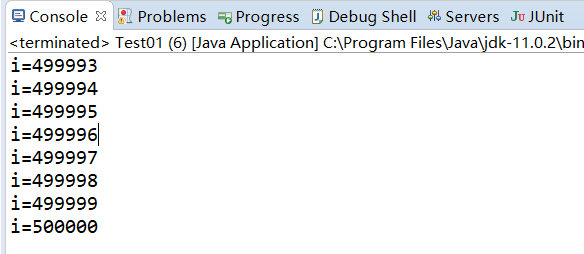
从运行结果我们可以看出最后i=500000,调用interrupt方法没有停止线程,那么该如何停止线程呢?
在介绍如何停止线程时,我们先来介绍一下如何判断线程是否处于停止状态
Thread类中提供了两种方法用来判断线程是否停止:
1、this.interrupted():测试当前线程是否已经中断,执行后具有将状态标志清除为false的功能
public static boolean interrupted() {

        return currentThread().isInterrupted(true);

}
2、this.isInterrupted():测试线程Thread对象是否已经中断,但是不清除状态标志
public boolean isInterrupted() {

        return isInterrupted(false);

}
读者可以仔细观看一下这两个方法的声明有什么不同?
例2:
class Mythread extends Thread{

	@Override

	public void run() {

		for(int i=0;i<5000;i++) {

			System.out.println("i="+(i+1));

		}

	}

}

public class Test01 {

	public static void main(String[] args) throws InterruptedException {

		Mythread thread=new Mythread();

		thread.start();

		Thread.sleep(1000);

		thread.interrupt();

		System.out.println("是否停止1?="+thread.interrupted());

		System.out.println("是否停止2?="+thread.interrupted());

		System.out.println("end!");

	}

}
结果:
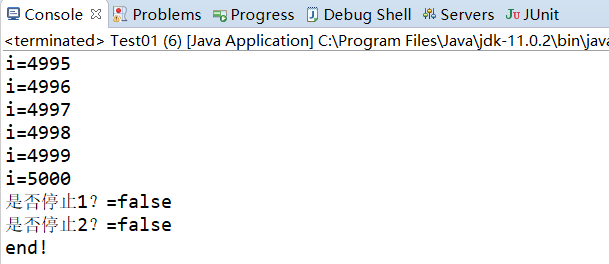
输出结果显示调用了thread.interrupt()方法后线程并未停止,这也就证明了interrupted()方法的解释:测试当前线程是否已经中断。这个当前线程是main,它从未断过,所以打印的结果是两个false。
如果想让main线程结束该怎么做?
将main方法改成如下:
public class Test01 {

	public static void main(String[] args) throws InterruptedException {

		Thread.currentThread().interrupt();

		System.out.println("是否停止1?="+Thread.interrupted());

		System.out.println("是否停止2?="+Thread.interrupted());

		System.out.println("end!");

	}

}

结果:

是否停止1?=true

是否停止2?=false

end!
从输出结果我们可以看出,方法interrupted()的确判断出当前线程是否是停止状态。但为什么第2个值是false?
查看一下官方文档的介绍:
测试当前线程是否已经中断。线程的中断状态由该方法清除。换句话说,如果连续两次调用该方法,则第二次调用将返回false(在第一次调用已清除了其中断状态之后,且第二次调用检验完中断状态前,当前线程再次中断的情况除外)。
文档中说明的非常清楚,interrupted()方法具有清除状态的功能,所以第二次调用interrupted方法返回的值时false。
下面我们来看一下isInterrupted()方法,将main方法改成如下代码:
public static void main(String[] args) throws InterruptedException {

		Mythread thread=new Mythread();

		thread.start();

		thread.interrupt();

		Thread.sleep(1000);

		System.out.println("是否停止1?="+thread.isInterrupted());

		System.out.println("是否停止2?="+thread.isInterrupted());

		System.out.println("end");

}
结果:

是否停止1?=true
是否停止2?=true
end
从结果可以看出,方法isInterrrupted()并未清除状态,所以结果为两个true。
例3:在沉睡中停止
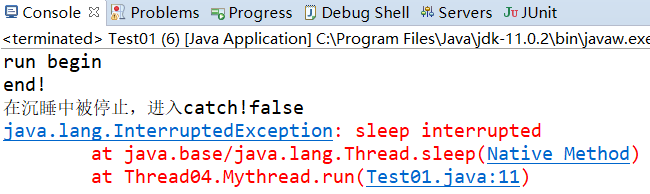
当线程调用sleep()方法后再调用interrupt()方法后会有什么结果:
class Mythread extends Thread{

	@Override

	public void run() {

		try {

			System.out.println("run begin");

			Thread.sleep(200000);

			System.out.println("run end");

		} catch (InterruptedException e) {

			System.out.println("在沉睡中被停止,进入catch!"+this.isInterrupted());

			e.printStackTrace();

		}

	}

}

public class Test01 {

	public static void main(String[] args) throws InterruptedException {

		try {

			Mythread thread=new Mythread();

			thread.start();

			Thread.sleep(200);

			thread.interrupt();

		}catch(Exception e) {

			System.out.println("main catch");

			e.printStackTrace();

		}

		System.out.println("end!");

	}

}
6、暂停线程:
暂停线程意味着此线程还可以恢复运行。在java多线程中,可以使用suspend()方法暂停线程,使用resume()方法恢复线程的执行
例1:
class Mythread extends Thread{

	private long i=0;

	public long getI() {

		return i;

	}

    public void setI(long i) {

		this.i = i;

	}

	@Override

	public void run() {

		while(true) {

			i++;

		}

	}

}

public class Test01 {

	public static void main(String[] args) throws InterruptedException {

		Mythread thread=new Mythread();

		thread.start();

		Thread.sleep(5000);

		//A段

		thread.suspend();

		System.out.println("A= "+System.currentTimeMillis()+" i="+thread.getI());

		Thread.sleep(5000);

		System.out.println("A= "+System.currentTimeMillis()+" i="+thread.getI());

		//B段

		thread.resume();

		Thread.sleep(5000);

		//C段

		thread.suspend();

		System.out.println("B= "+System.currentTimeMillis()+" i="+thread.getI());

		Thread.sleep(5000);

		System.out.println("B= "+System.currentTimeMillis()+" i="+thread.getI());

	}

}
结果:

从控制台打印的时间上来看,线程的确被暂停了,而且还可以恢复成运行状态。
7、yield方法:
介绍:yield()方法的作用是放弃当前的CPU资源,将它让给其他的任务去占用CPU执行时间。但放弃的时间不确定,有可能刚刚放弃,马上又获得CPU时间片
示例:
class Mythread extends Thread{

	@Override

	public void run() {

		long beginTime=System.currentTimeMillis();

		int count=0;

		for(int i=0;i<500000;i++) {
               //Thread.yield();①

			count=count+(i+1);

		}

		long endTime=System.currentTimeMillis();

		System.out.println("用时:"+(endTime-beginTime)+"毫秒!");

	}

}

public class Test01 {

	public static void main(String[] args) throws InterruptedException {

		Mythread thread=new Mythread();

		thread.start();

	}

}

结果:用时:2毫秒!
现在将①处的代码取消注释,我们再来看一下运行结果:
用时:213毫秒!
将CPU让给其他资源导致速度变慢
8、线程优先级:
介绍:
在操作系统中,线程可以划分优先级,优先级较高的线程得到的CPU资源较多,也就是CPU优先执行优先级较高的线程对象中的任务。
设置线程优先级有助于帮“线程规划器”确定在下一次选择哪一个线程来优先执行。
设置线程的优先级使用setPriority()方法,此方法在JDK的源代码如下:
public final void setPriority(int newPriority) {

        ThreadGroup g;

        checkAccess();

        if (newPriority > MAX_PRIORITY || newPriority < MIN_PRIORITY) {

            throw new IllegalArgumentException();

        }

        if((g = getThreadGroup()) != null) {

            if (newPriority > g.getMaxPriority()) {

                newPriority = g.getMaxPriority();

            }

            setPriority0(priority = newPriority);

        }

}
在Java中,线程的优先级为1-10这10个等级,如果小于1或大于10,则JDK抛出异常throw new IllegalArgumentException()。
通常高优先级的线程总是先执行完,但是并不是一定的,高优先级和低优先级的线程会交替进行,高优先级执行的次数多一些
线程优先级的继承特性:
在Java中,线程的优先级具有继承性,比如A线程启动B线程,则B线程的优先级与A是一样的。
class Mythread2 extends Thread{

	@Override

	public void run() {

		System.out.println("Mythread2 run priority="+this.getPriority());

	}

}

class Mythread1 extends Thread{

	@Override

	public void run() {

		System.out.println("Mythread run priority="+this.getPriority());

		Mythread2 thread2=new Mythread2();

		thread2.start();

	}

}

public class Test01 {

	public static void main(String[] args) throws InterruptedException {

		System.out.println("main thread begin priority="+Thread.currentThread().getPriority());

    	        //Thread.currentThread().setPriority(6);①

		System.out.println("main thread end priority="+Thread.currentThread().getPriority());

		Mythread1 thread1=new Mythread1();

		thread1.start();

	}

}

结果:

main thread begin priority=5

main thread end priority=5

Mythread run priority=5

Mythread2 run priority=5
可以看到上面几个线程的优先级都为5
现在将①处的代码注释掉后的结果是:
main thread begin priority=5

main thread end priority=6

Mythread run priority=6

Mythread2 run priority=6
优先级被更改后再继续继承
9、守护线程:
在java中有两种线程,一种是用户线程,另一种是守护线程。
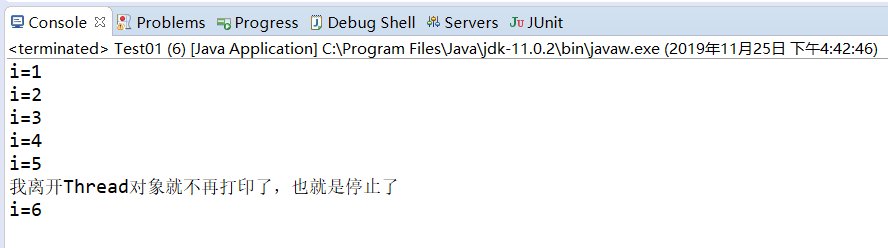
守护线程是一种特殊的线程,它的特性有“陪伴”的含义,当进程中不存在非守护线程了,则守护线程自动销毁。典型的守护线程就是垃圾回收线程,当进程中没有非守护线程了,则垃圾回收线程也就没有存在的必要了,自动销毁。用个比较通俗的比喻来解释一下:“守护线程”:任何一个守护线程都是整个JVM中所有非守护线程的“保姆”,只要当前JVM实例中存在任何一个非守护线程没有结束,守护线程就在工作,只有当最后一个非守护线程结束时,守护线程才随着JVM一同结束工作。Daemon的作用是为其他线程的运行提供便利服务,守护线程最典型的应用就是GC(垃圾回收器),它就是一个很称职的守护者。
class Mythread extends Thread{

	private int i=0;

	@Override

	public void run() {

		try {

			while(true) {

				i++;

				System.out.println("i="+(i));

				Thread.sleep(1000);

			}

		}catch(Exception e) {

			e.printStackTrace();

		}

	}

}

public class Test01 {

	public static void main(String[] args) throws InterruptedException {

		try {

			Mythread thread=new Mythread();

			thread.setDaemon(true);

			thread.start();

			Thread.sleep(5000);

			System.out.println("我离开Thread对象就不再打印了,也就是停止了");

		}catch(Exception e) {

			e.printStackTrace();

		}

	}

}
Java多线程——多线程方法详解的更多相关文章
- java的sleep方法详解
java的sleep方法详解: sleep并不是永久占有CPU,没有那个线程能永久占用CPU.它是指在自己时间片内睡眠,而不是急着交出CPU.yield()就是自己愿意立即交出时间片.因此一个线程sl ...
- Java——多线程之方法详解
Java多线程系列文章是Java多线程的详解介绍,对多线程还不熟悉的同学可以先去看一下我的这篇博客Java基础系列3:多线程超详细总结,这篇博客从宏观层面介绍了多线程的整体概况,接下来的几篇文章是对多 ...
- java native本地方法详解(转)
文章链接出处: 详解native方法的使用 自己实现一个Native方法的调用 JNI 开始本篇的内容之前,首先要讲一下JNI.Java很好,使用的人很多.应用极 广,但是Java不是完美的.Java ...
- selenium+Java,xpath定位方法详解(搬运留存)
用xpath绝对路径比较费事费力,还容易报错,下面几种模糊定位比较灵活好用 driver.findElement(By.xpath("//*[@id='J_login_form']/dl/d ...
- Java基础之方法详解
方法的所属性 在Java的语言中,方法相当于C语言中的函数,但是它与传统的函数也有着明确的不同:在结构化的语言中,函数是一等公民,整个程序是由一个个函数组成的:但是在面向对象的语言里,类是一等公民,整 ...
- java线程基础方法详解
一.线程状态转换 1.新建状态(New):新创建了一个线程对象. 2.就绪状态(Runnable):线程对象创建后,其他线程调用了该对象的start()方法.该状态的线程位于可运行线程池中,变得可运行 ...
- Java中常见方法详解合集(方法的定义及语法结构)
Java的方法定义 1.方法的定义 方法是控制对象的动作行为方式与准则,在Java中方法位于类体下又有另一种含义. 普通的方法在类中称为"实例方法",因为方法的调用需要创建对象,而 ...
- java Clone使用方法详解
java"指针" Java语言的一个优点就是取消了指针的概念,但也导致了许多程序员在编程中常常忽略了对象与引用的区别,本文会试图澄清这一概念.并且由于Java不能 通过 ...
- JAVA面向对象-----main方法详解
JVM看不懂的可以跳过,这里不做过多解释,(^__^) 嘻嘻-- 主函数是静态的 public static void main(String[] args){ } 主函数是什么:主函数是一个特殊的函 ...
- Java ArrayList排序方法详解
由于其功能性和灵活性,ArrayList是 Java 集合框架中使用最为普遍的集合类之一.ArrayList 是一种 List 实现,它的内部用一个动态数组来存储元素,因此 ArrayList 能够在 ...
随机推荐
- amoeba-mysql
配置完成后无法连接 Could not create a validated object, cause: ValidateObject failed 查看logs/下面的 messageHandle ...
- Arduino学习笔记⑤ 模拟IO实验
1.前言 还记得前几个我们都是在讲解数字IO,而其实我们生活中大多数信号都是模拟信号,如声音以及温度变化.在Arduino中,常用0~5v的电压来表示模拟信号. 1.1 模拟输入功能 ...
- WPF中的文本度量
关于WPF中的文本度量,需要了解以下几个问题: WPF中支持一些常用的度量单位:px(device independent pixels).in(inches).cm(centimeters).pt( ...
- DM7的闪回功能及动态新能视图相关SQL总结
DM7的闪回功能默认是关闭的,需要在dm.ini中设置参数: ENABLE_FLASHBACK = 1 UNDO_RETENTION = 900 意思为可以进行900s以内的闪回查询.下面是使用该功能 ...
- springboot pagehelper分页无效
springboot pagehelper分页无效 遇到的问题把所有的数据都查出来了 -然后跟踪代码发现PageHelper.startPage没有生效,生成的sql也没有分页的信息 依赖也引入了 & ...
- Java中Object类hashCode的底层实现
Java中Object类hashCode的底层实现 openjdk\jdk\src\share\native\java\lang\Object.c 42 static JNINativeMethod ...
- ThreadPoolExecutor源码中的适配器模式
什么是适配器模式 网上已有很多的教程,不细讲了.可以参考:五分钟了解设计模式(3)---适配器模式 在适配器模式中,一定要识别清楚,Target Adaptee Adapter分别是哪些类或接口,这样 ...
- unity 之 自定义弹出框
一.弹出框的搭建: 布局如图:Message为整个父物体,并且添加UiMessage代码.panel为遮罩. MessageBox为整个提示框,Panel为标题,ok为确定按钮,cancel为取消按钮 ...
- 在Linux上安装 nessus
Nessus有三种安装方式 1.源文件安装 源文件安装是最复杂的安装方式,用此方式安装可以修改配置参数. 2.rpm安装 rpm安装比起源文件安装更简单一些,它已经把一些底层的东西写好了,用户只要按步 ...
- (大模拟紫题) Luogu P1953 易语言
原题链接:P1953 易语言 (我最近怎么总在做大模拟大搜索题) 分别处理两种情况. 如果只有一个1或0 直接设一个cnt为这个值,每次输入一个新名字之后把数字替换成cnt,最后cnt++即可. 注意 ...