
Win7安装解压版MySQL
1.下载MySQL
访问https://dev.mysql.com/downloads/mysql/5.6.html#downloads,下载操作系统对应的版本(无账号需先注册一个),以mysql-5.6.38-win32为例
2.解压
以解压到D:\soft_dev\mysql-5.6.38-win32为例
3.修改配置文件
解压完mysql-5.6.38-win32目录下有一个配置文件模板my-default.ini,复制一份并命名为my.ini,修改内容如下:
# For advice on how to change settings please see

# http://dev.mysql.com/doc/refman/5.6/en/server-configuration-defaults.html

# *** DO NOT EDIT THIS FILE. It's a template which will be copied to the

# *** default location during install, and will be replaced if you

# *** upgrade to a newer version of MySQL.

[mysqld]

# Remove leading # and set to the amount of RAM for the most important data

# cache in MySQL. Start at 70% of total RAM for dedicated server, else 10%.

# innodb_buffer_pool_size = 128M

# Remove leading # to turn on a very important data integrity option: logging

# changes to the binary log between backups.

# log_bin

# These are commonly set, remove the # and set as required.

 basedir = D:/soft_dev/mysql-5.6.38-win32

 datadir = D:/soft_dev/mysql-5.6.38-win32/data

# port = .....

# server_id = .....

# Remove leading # to set options mainly useful for reporting servers.

# The server defaults are faster for transactions and fast SELECTs.

# Adjust sizes as needed, experiment to find the optimal values.

 join_buffer_size = 128M

 sort_buffer_size = 2M

 read_rnd_buffer_size = 2M

sql_mode=NO_ENGINE_SUBSTITUTION,STRICT_TRANS_TABLES
注意:
(1)配置文件起作用的两种方式:创建my.ini、启动服务时指定defaults-file
(2)basedir、datadir路径中要用/分隔符不能用\,负责启动服务会报配置错误导致的1067错误
(3)MySQL5.6.8之前会将配置文件直接放到安装目录下,之后的版本在服务启动过程中会按照一定的目录优先级搜素my.ini
4.安装MySQL服务
进入D:\soft_dev\mysql-5.6.38-win32\bin目录,执行mysqld.exe -install安装服务(如果360安全卫士有监测,允许本次操作),mysqld.exe -remove移除服务,效果可在windows服务列表中查看

5.启动服务
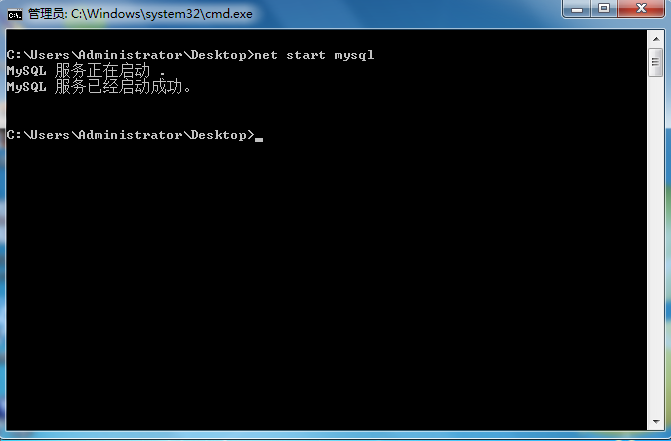
任意位置执行net start mysql
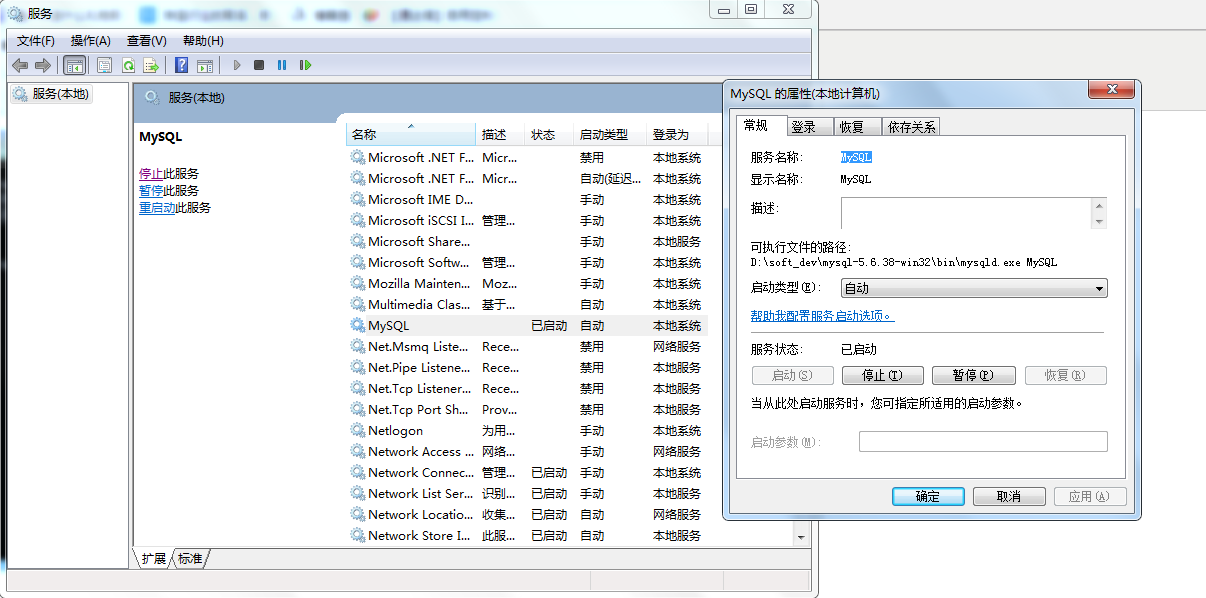
此时再查看Windows服务列表MySQL状态为启动,且启动类型为自动
6.远程登陆用户设置
进入D:\soft_dev\mysql-5.6.38-win32\bin目录,执行mysql -uroot,进入mysql,此时为root免密登录
mysql> use mysql;
mysql> select host,user,password from user;
mysql> update user set password=password('123456') where user='root';
mysql> update user set host='%' where user='root' and host='localhost';
mysql> GRANT ALL PRIVILEGES ON *.* TO 'root'@'%' IDENTIFIED BY '123456' WITH GRANT OPTION;
mysql> flush privileges;
mysql> exit
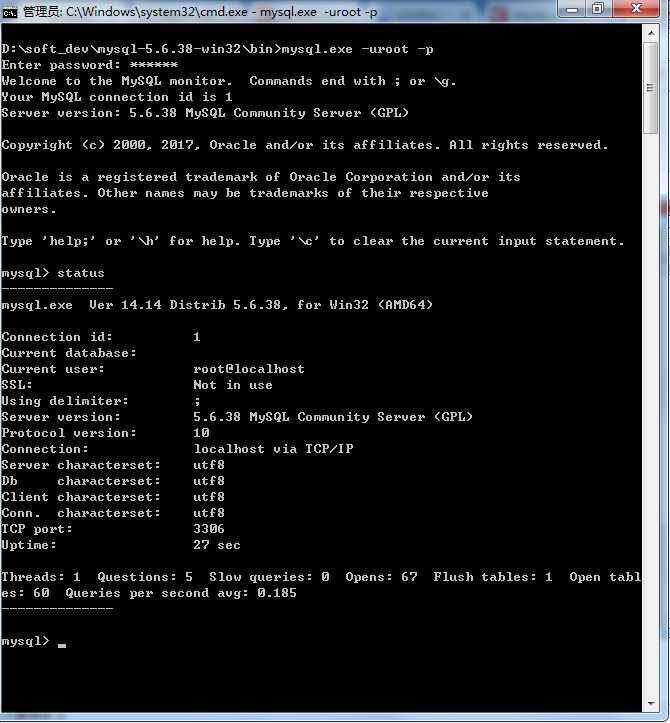
7.修改字符集及其他配置信息
(1) 查看字符集
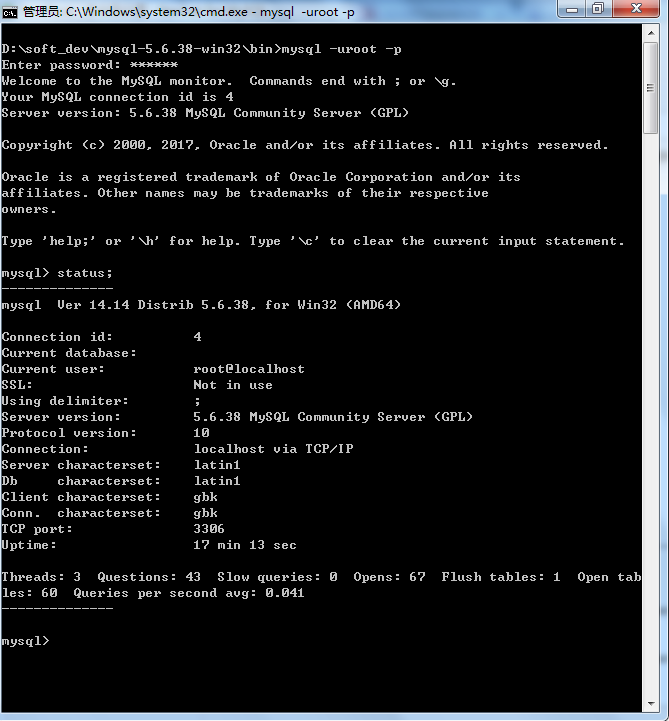
(2) 修改字符集,修改后my.ini文件内容为:
# For advice on how to change settings please see

# http://dev.mysql.com/doc/refman/5.6/en/server-configuration-defaults.html

# *** DO NOT EDIT THIS FILE. It's a template which will be copied to the

# *** default location during install, and will be replaced if you

# *** upgrade to a newer version of MySQL.

[client]

default-character-set=utf8

[mysqld]

# Remove leading # and set to the amount of RAM for the most important data

# cache in MySQL. Start at 70% of total RAM for dedicated server, else 10%.

# innodb_buffer_pool_size = 128M

# Remove leading # to turn on a very important data integrity option: logging

# changes to the binary log between backups.

# log_bin

# These are commonly set, remove the # and set as required.

 basedir = D:/soft_dev/mysql-5.6.38-win32

 datadir = D:/soft_dev/mysql-5.6.38-win32/data

# port = .....

# server_id = .....

character_set_server=utf8

character_set_client=utf8

collation-server=utf8_general_ci

lower_case_table_names=1

max_connections=1000

# Remove leading # to set options mainly useful for reporting servers.

# The server defaults are faster for transactions and fast SELECTs.

# Adjust sizes as needed, experiment to find the optimal values.

 join_buffer_size = 128M

 sort_buffer_size = 2M

 read_rnd_buffer_size = 2M

sql_mode=NO_ENGINE_SUBSTITUTION,STRICT_TRANS_TABLES

[mysql]

default-character-set = utf8
(3) 重启MySQL服务
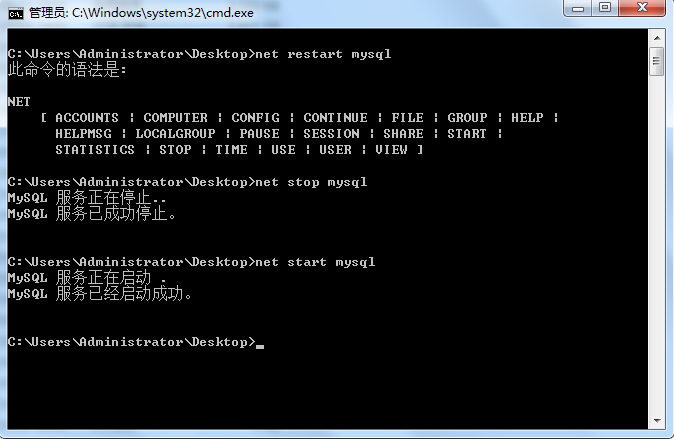
再次查看字符集
Win7安装解压版MySQL的更多相关文章
- Windows 7安装解压版MySQL 5.6(不包含配置文件优化)
到官网下载MySQL5.6 下载地址:http://dev.mysql.com/downloads/mysql/5.6.html, 提供了 .exe版本 和 .zip解压版,因为我的操作系统是64位的 ...
- Windows10下安装解压版MySQL教程
MySQL安装分为安装版和解压版,安装版主要是由一个exe程序式安装,有界面鼠标点击安装即可,小白建议使用安装版安装mysql,相比较与安装版,解压版安装更"纯净",没有多余的东西 ...
- 【DataBase】 在Windows系统环境 下载和安装 解压版MySQL数据库
MySQL官网解压版下载地址:https://dev.mysql.com/downloads/mysql/ 为什么不推荐使用安装版?无脑下一步,很多配置的东西学习不到了 点选第一个就好了,下面的是调试 ...
- 怎样安装解压版MySQL
第一步: 解压包. 第二步:引入MySQL的bin路径. 第三步: 在cmd下敲入 mysqld -install 第四步:启动服务 net start mysql 第五步:空password登录 m ...
- windows安装解压版mysql
记录下用批处理安装mysql5.7.18的过程与踩到的坑 先在安装目录新建文件my.ini [mysql] default-character-set=utf8 basedir=TODO datadi ...
- Windows下安装zip包解压版mysql
Windows下安装zip包解压版mysql 虽然官方提供了非常好的安装文件,但是有的时候不想每次再重装系统之后都要安装一遍MySQL,需要使用zip包版本的MySQL.在安装时需如下三步: 1. 新 ...
- Mysql安装(解压版)
文章首推 刷网课请点击这里 刷二级请点击这里 论文查重请点击这里 WIFI破解详细教程 今日主题:Mysql安装(解压版) 环境 系统:windows10 版本:mysql5.7.29 安装过程 1. ...
- Linux下安装解压版(tar.gz)MySQL5.7
最近尝试在Linux中安装了解压版MySQL,期间查阅了许多博客.很多博客看得我很懵逼,因此记录下自己的安装过程,方便后续查阅. 环境说明:CentOs7.2 一.清理 ...
- 安装解压版的mariadb
今天尝试了安装解压版的mariadb,在官网上https://downloads.mariadb.org/下载了5.5版本的mariadb的zip压缩包, 经过实践发现mariadb解压版安装与mys ...
随机推荐
- python编程基础之二十九
栈和队列: 栈:先进后出,其他没多少特别之处了,一般可以用列表模拟栈,也可以用双端队列,封死一端. 队列:先进先出,也可以用列表模拟,但是一般用库函数,需要导collections 包:主要是为了解决 ...
- Windows系统调用中的系统服务表描述符
Windows内核分析索引目录:https://www.cnblogs.com/onetrainee/p/11675224.html Windows系统调用中的系统服务表描述符 在前面,我们将解过 ...
- Qt5教程: (2) 信号与槽
1. 新建工程 新建一个"Qt Widgets Application"工程 2. 添加按钮 一个Qt工程会有很多个控件, 如果把逻辑代码都写在main函数里, main函数会非常 ...
- Ubuntu php安装xdebug
1.安装xdebug扩展: sudo apt-get install php-xdebug 2.找到扩展的路径: 3.编辑php.ini文件,末尾加入,保存退出: [xdebug] zend_exte ...
- JavaScript正则表达式之语法
Regular Expressions翻译成中文叫正则表达式.也不知道是谁翻译过来的,听起来就很严肃.似乎翻译成通用表达式更能传达其精髓. 为什么叫通用表达式?因为它有一套和编程语言无关的文本匹配规则 ...
- [BZOJ1116] CLO
1116: [POI2008]CLO Time Limit: 10 Sec Memory Limit: 162 MBSubmit: 1311 Solved: 709[Submit][Status] ...
- [BZOJ29957] 楼房重建 - 线段树
2957: 楼房重建 Time Limit: 10 Sec Memory Limit: 256 MBSubmit: 3294 Solved: 1554[Submit][Status][Discus ...
- Redis集群与高可用性技术小结
客户端分片,这种方式需要实现特定的客户端,需要手工配置redis实例并根据算法进行访问,对于redis实例的增减,调整灵活性很差,一般不推荐. 代理分片,常见的有Twemproxy架构(豆瓣创建了co ...
- Python开发【第七篇】列表
问题:当我们要用一系列数字的时候,我们需要将数字进行存储,我们就需要找个容器把数字装起来,我们需要用的时候再拿出来.如何将计算机运算的数据存储在一个地方,同时方便 对数据进行 增.删.改.查 列表 列 ...
- xshell rz commend not found
sudo apt-get install lrzsz 上传rz 下载sz