
使用 jQuery.TypeAhead 让文本框自动完成 (四)(自定义模板)
项目地址:https://github.com/twitter/typeahead.js
直接贴代码了:
@section headSection

{

    <script type="text/javascript">

    $(document).ready(function () {

        var bestPictures = new Bloodhound({

          datumTokenizer: Bloodhound.tokenizers.obj.whitespace('value'),

          queryTokenizer: Bloodhound.tokenizers.whitespace,

          identify: function(obj) { return obj.id; } /* 这个函数是告诉引擎对象的 ID */,

          remote: {

            url: '@Url.Action("Trade_Code_List_Search_By_Trad_Cod")?searchTradCode=%QUERY',

            wildcard: '%QUERY'

          }

        });

        $('#trad_cod_textbox').typeahead(null,{

            name: 'best-pictures',

            source: bestPictures,

            display: 'value',

            limit: 10,

            templates: {

                suggestion: Handlebars.compile('<div><strong>{{id}}</strong> – {{value}}</div>'),

                empty: [

                  '<div class="empty-message">',

                    'unable to find any Best Picture winners that match the current query',

                  '</div>'

                ].join('\n')

            }

        }).bind('typeahead:select', function(ev, suggestion) {

            alert("you select: " + "(id=" + suggestion.id + ", value="+ suggestion.value +")"); //绑定自定义事件

        });

    });

    </script>

}

@Html.Partial("UCjQueryTypeAheadJsScript")

<!-- 这里就是文本框 -->

<input id="trad_cod_textbox" class="text-input" type="text" value="">
UCjQueryTypeAheadJsScript.cshtml(注意:多个一个JS)
<!-- both bloodhound.js and typeahead.jquery.js have a dependency on jQuery 1.9+. -->

<!-- 下面这个 handlebars.js 当需要用 typeahead 的 templates suggestion 时必须要,否则可选  -->

<script src="~/resources/plugins/jQuery-type-ahead.js/handlebars.js"></script>

<script src="~/resources/plugins/jQuery-type-ahead.js/typeahead.bundle.min.js"></script>

<link href="~/resources/plugins/jQuery-type-ahead.js/examples.css" rel="stylesheet" />
Controller.cs
        public ActionResult Trade_Code_List_Search_By_Trad_Cod(string searchTradCode)

        {

            List<Trd_Mas_Simple_Info> simpleTradMasList = new Trd_MasService().GetSimpleListByTradCode(searchTradCode);

            return Json(simpleTradMasList.Select(c => new

            {

                value = c.trd_cod + " - " + c.trd_des,

                id = c.trd_cod

            }), JsonRequestBehavior.AllowGet);

        }
examples.css
.tt-query { -webkit-box-shadow: inset 0 1px 1px rgba(0, 0, 0, 0.075); -moz-box-shadow: inset 0 1px 1px rgba(0, 0, 0, 0.075); box-shadow: inset 0 1px 1px rgba(0, 0, 0, 0.075); }

.tt-hint { color: #999 }

.tt-menu { width: 422px; margin: 12px 0; padding: 8px 0; background-color: #fff; border: 1px solid #ccc; border: 1px solid rgba(0, 0, 0, 0.2); -webkit-border-radius: 8px; -moz-border-radius: 8px; border-radius: 8px; -webkit-box-shadow: 0 5px 10px rgba(0,0,0,.2); -moz-box-shadow: 0 5px 10px rgba(0,0,0,.2); box-shadow: 0 5px 10px rgba(0,0,0,.2); }

.tt-suggestion { padding: 3px 20px; font-size: 18px; line-height: 24px; }

.tt-suggestion:hover { cursor: pointer; color: #fff; background-color: #0097cf; }

.tt-suggestion.tt-cursor { color: #fff; background-color: #0097cf; }

.tt-suggestion p { margin:; }

.gist { font-size: 14px; }
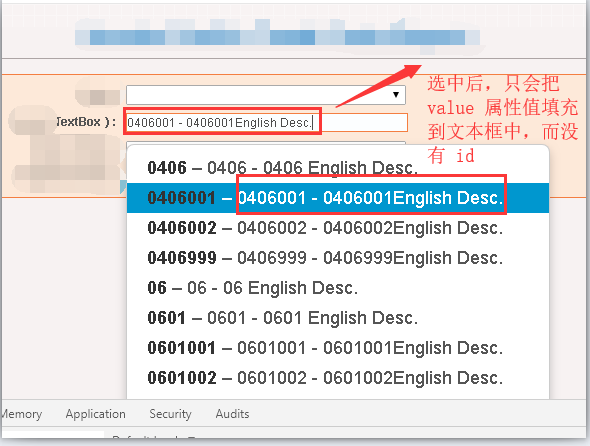
运行效果
谢谢浏览!
使用 jQuery.TypeAhead 让文本框自动完成 (四)(自定义模板)的更多相关文章
- 使用 jQuery.TypeAhead 让文本框自动完成 (三)(服务器返回 JSON 复杂对象数组)
项目地址:https://github.com/twitter/typeahead.js 直接贴代码了: @section headSection { <script type="te ...
- 使用 jQuery.TypeAhead 让文本框自动完成 (二)(访问远程数据)
项目地址:https://github.com/twitter/typeahead.js 直接贴代码了: @section headSection { <script type="te ...
- 使用 jQuery.TypeAhead 让文本框自动完成 (一)(最简单的用法)
项目地址:https://github.com/twitter/typeahead.js 直接贴代码了: @section headSection { <script type="te ...
- 基于JQuery实现的文本框自动填充功能
1. 实现的方法 /* * js实现的文本框的自动完成功能 */ function doAutoComplete(textid,dataid,url){ $("#" + texti ...
- 使用 jQuery.AutoComplete 让文本框自动完成
直接贴代码了. @section headSection { <script type="text/javascript"> $(document).ready(fun ...
- 页面一刷新让文本框自动获取焦点-- 和自定义v-focus指令
<body> <div id="app"> <input type="text" value="" id=&q ...
- Jquery实现 TextArea 文本框根据输入内容自动适应高度
原文 Jquery实现 TextArea 文本框根据输入内容自动适应高度 在玩微博的时候我们可能会注意到一个细节就是不管是新浪微博还是腾讯微博在转发和评论的时候给你的默认文本框的高度都不会很高,这可能 ...
- (三)在js(jquery)中获得文本框焦点和失去焦点的方法
在js(jquery)中获得文本框焦点和失去焦点的方法 文章介绍两个方法和种是利用javascript onFocus onBlur来判断焦点和失去焦点,加一种是利用jquery $(" ...
- Creating Dialogbased Windows Application (4) / 创建基于对话框的Windows应用程序(四)Edit Control、Combo Box的应用、Unicode转ANSI、Open File Dialog、文件读取、可变参数、文本框自动滚动 / VC++, Windows
创建基于对话框的Windows应用程序(四)—— Edit Control.Combo Box的应用.Unicode转ANSI.Open File Dialog.文件读取.可变参数.自动滚动 之前的介 ...
随机推荐
- 安装Goland开发工具
安装Goland开发工具 开发工具: 文本类的编辑器:记事本,notepad,sublime text,atom... 通过命令执行程序 IED:集成开发环境(integrated develop ...
- MySQL Linux环境的安装配置
在Kali中已经内置了MySQL(镜像可以从mysql.com/downloads/ 下载安装) 奇怪的是博主我的kali内置的是mariaDB数据库,所以我也懒得弄MySQL了!直接mariaDB吧 ...
- Python工具库分享
漏洞及渗透练习平台: WebGoat漏洞练习平台: https://github.com/WebGoat/WebGoat webgoat-legacy漏洞练习平台: https://github.co ...
- Material 风格的搜索框MaterialSearchView的使用
大多数App中都有搜索的功能,虽然国内实实在在的遵循Google material design设计语言来设计的App实在不多,但个人感觉MD真的是非常值得研究,这次给大家介绍的是 Material ...
- switch...case...语句分析(大表跟小表何时产生)
一.switch...case...的格式 switch(表达式) { case 常量表达式1: 语句; break; case 常量表达式2: 语句; break; case 常量表达式3: 语句; ...
- USB通信协议深入理解
0. 基本概念 一个[传输](控制.批量.中断.等时):由多个[事务]组成: 一个[事务](IN.OUT.SETUP):由一多个[Packet]组成. USB数据在[主机软件]与[USB设备特定的端点 ...
- Day_05
01.error接口的使用 package main import "fmt" import "errors" func main() { //var err1 ...
- fiddler---Fiddler弱网测试
无论是做web端还是app端的测试,我们都需要对弱网进行测试,对于弱网方法有很多种,如:Fiddler模拟弱网,控制电脑的网速等,今天介绍下Fiddler如何进行测试弱网 什么是弱网 弱网看字面意思就 ...
- 线上可用django和gunicorn的dockerfile内容
一,基础镜像 [xxx.com.cn/3rd_part/python.3.6.8:alpine3.9-mysqlclient1.4.2] FROM python:3.6.8-alpine3.7 MAI ...
- Html学习之五(嵌套之简单购物界面设计)
<!DOCTYPE html> <html> <head> <meta charset="UTF-8"> <title> ...