
Java Virtual Machine (JVM), Difference JDK, JRE & JVM – Core Java
By Chaitanya Singh | Filed Under: Learn Java
Java is a high level programming language. A program written in high level language cannot be run on any machine directly. First, it needs to be translated into that particular machine language. The javac compiler does this thing, it takes java program (.java file containing source code) and translates it into machine code (referred as byte code or .class file).
Java Virtual Machine (JVM) is a virtual machine that resides in the real machine (your computer) and the machine language for JVM is byte code. This makes it easier for compiler as it has to generate byte code for JVM rather than different machine code for each type of machine. JVM executes the byte code generated by compiler and produce output. JVM is the one that makes java platform independent.
So, now we understood that the primary function of JVM is to execute the byte code produced by compiler. Each operating system has different JVM, however the output they produce after execution of byte code is same across all operating systems. Which means that the byte code generated on Windows can be run on Mac OS and vice versa. That is why we call java as platform independent language. The same thing can be seen in the diagram below: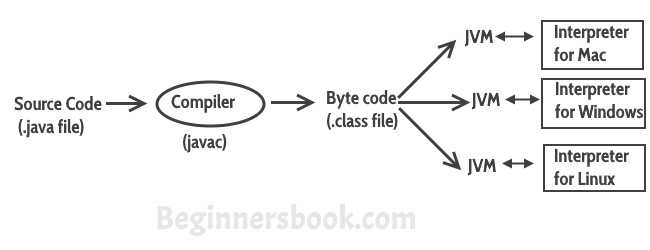
So to summarise everything: The Java Virtual machine (JVM) is the virtual machine that runs on actual machine (your computer) and executes Java byte code. The JVM doesn’t understand Java source code, that’s why we need to have javac compiler that compiles *.java files to obtain *.class files that contain the byte codes understood by the JVM. JVM makes java portable (write once, run anywhere). Each operating system has different JVM, however the output they produce after execution of byte code is same across all operating systems.
JVM Architecture
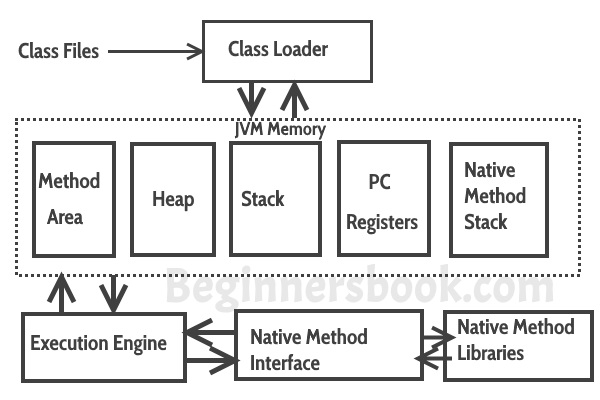 Lets see how JVM works:
Class Loader: The class loader reads the .class file and save the byte code in the method area.
Method Area: There is only one method area in a JVM which is shared among all the classes. This holds the class level information of each .class file.
Heap: Heap is a part of JVM memory where objects are allocated. JVM creates a Class object for each .class file.
Stack: Stack is a also a part of JVM memory but unlike Heap, it is used for storing temporary variables.
PC Registers: This keeps the track of which instruction has been executed and which one is going to be executed. Since instructions are executed by threads, each thread has a separate PC register.
Native Method stack: A native method can access the runtime data areas of the virtual machine.
Native Method interface: It enables java code to call or be called by native applications. Native applications are programs that are specific to the hardware and OS of a system.
Garbage collection: A class instance is explicitly created by the java code and after use it is automatically destroyed by garbage collection for memory management.
JVM Vs JRE Vs JDK
JRE: JRE is the environment within which the java virtual machine runs. JRE contains Java virtual Machine(JVM), class libraries, and other files excluding development tools such as compiler and debugger.
Which means you can run the code in JRE but you can’t develop and compile the code in JRE.
JVM: As we discussed above, JVM runs the program by using class, libraries and files provided by JRE.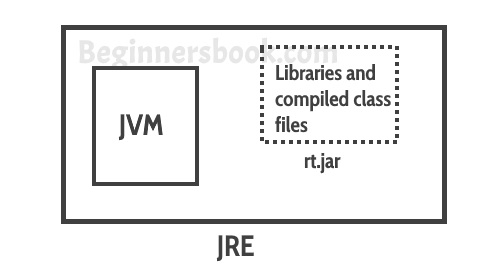 JDK: JDK is a superset of JRE, it contains everything that JRE has along with development tools such as compiler, debugger etc.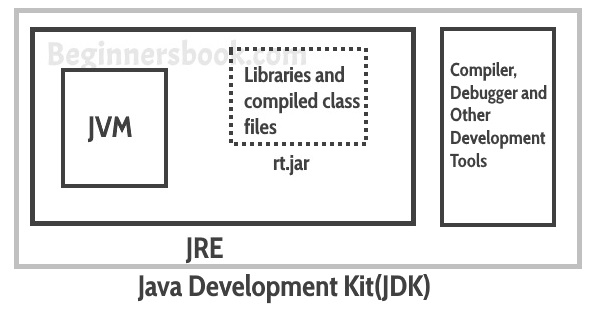
https://beginnersbook.com/2013/05/jvm/
Java Virtual Machine (JVM), Difference JDK, JRE & JVM – Core Java的更多相关文章
- JVM Specification 9th Edition (4) Chapter 3. Compiling for the Java Virtual Machine
Chapter 3. Compiling for the Java Virtual Machine 内容列表 3.1. Format of Examples 3.2. Use of Constants ...
- 60年代进程 80年代线程 IPC How the Java Virtual Machine (JVM) Works
小结: 1. To facilitate communication between processes, most operating systems support Inter Process C ...
- JVM Specification 9th Edition (3) Chapter 2. The Structure of the Java Virtual Machine
Chapter 2. The Structure of the Java Virtual Machine 内容列表 2.1. The class File Format (class文件的格式) 2. ...
- The Structure of the Java Virtual Machine Java虚拟机结构 虚拟机内存模型
小结: 1.实现一台Java虚拟机,只需正确读取class文件中的每一条字节码指令且能正确执行这些指令所蕴含的操作. 2.设计者决定:运行时数据区的内存如何布局,选择哪种垃圾收集算法,是否对虚拟机字节 ...
- What is the difference between JRE,JVM and JDK?
If you are a Java developer, it is very often that you think about understanding the JRE,JVM and JDK ...
- Java初学者不得不知的概念,JDK,JRE,JVM的区别?(转)
JVM(Java Virtual Machine Java虚拟机)可以理解为是一个虚拟出来的计算机,具备着计算机的基本运算方式,它主要负责将java程序生成的字节码文件解释成具体系统平台上的机器指令. ...
- JVM常用命令和性能调优建议 [Could not create the Java virtual machine]
一.查看jvm常用命令jinfo:可以输出并修改运行时的java 进程的opts. jps:与unix上的ps类似,用来显示本地的java进程,可以查看本地运行着几个java程序,并显示他们的进程号. ...
- java的概念了解(jdk,jre,jvm,javase,javaee,javame)
jvm jvm:java virtual machine,俗称:java虚拟机,只认识xxx.class这类文件 jre jre:java runtime environment,俗称java运行环境 ...
- 1、Java语言概述与开发环境——JDK JRE JVM理解
一.理解概念: 1.JDK(Java Development Kit Java开发工具包) JDK是提供给Java开发人员使用的,其中包含Java的开发工具,也包括JRE,所以安装了JDK,就不用单独 ...
随机推荐
- prometheus动态刷新rule
Prometheus的target是支持动态更新的,例如通过file_sd_configs配置将target放置到yaml文件中,当yaml文件中的内容发生变化时,Prometheus会自动更新自身的 ...
- hdu 6318 Swaps and Inversions (线段树求逆序对数)
Swaps and Inversions Time Limit: 2000/1000 MS (Java/Others) Memory Limit: 32768/32768 K (Java/Oth ...
- 解决zabbix监控因php问题导致图形界面中文乱码方法
解决因编译php中添加了-enable-gd-jis-conv选项导致Zabbix监控系统图形界面中文乱码问题 现象: php编译参数: 说明: 如果PHP编译时启用–enable-gd-jis-co ...
- python同步IO编程——StringIO、BytesIO和stream position
主要介绍python两个内存读写IO:StringIO和BytesIO,使得读写文件具有一致的接口 StringIO 内存中读写str.需要导入StringIO >>> from i ...
- Thread.Sleep线程休眠-小白向
try { Thread.sleep(); } catch (InterruptedException e) { } 首先这段代码的作用是使当前进程沉睡2S,展现给用户的结果就是画面维持两秒,有个“正 ...
- Nginx 安装、配置及相关介绍
一.前言 Nginx是一个高性能的HTTP和反向代理服务器,由俄罗斯人开发的,第一个版本发布于2004年10月4日.是一款轻量型的Web服务器,其特点是占有内存少,并发能力强,对负载均衡等提供了非常方 ...
- Glide只播放一次Gif以及监听播放完成的实现方案
需求: 近段时间正好有一个需求,是要实现Gif图只加载播放一次,并且要在Gif播放完毕后回调给系统的需求. 因为Glide 3系列的API与4系列还是有很大差距的,这里我们针对Glide 3.x和Gl ...
- composer入门 一些简单常用的命令介绍
composer是什么 composer是PHP的插件依赖管理工具,我个人感觉和java的Maven.Gradle很类似. Windows OS下安装composer 参考: https://www. ...
- webpack 配置babel-loader babel7
babel 7版本配置 在webpack中 默认只能处理部分 ES6的新语法,一些更高级的ES6或ES7的语法,webpack是处理不了的这个时候就需要借助第三方的loader 来帮助webpack ...
- 《Vue笔记01: 我与唐金州二三事》
最近我在收看唐金州在极客时间发布的<vue从入门到精通>,颇有收获. 唐金州,一点资讯前端技术专家,曾在蚂蚁金服就职,也是开源组件库ant design vue的作者,虽然唐老师写的ant ...